
Some mods target the Mono version of the game, which is available by opting into the Steam beta branch "alternate"

| Date uploaded | 4 months ago |
| Version | 1.0.6 |
| Download link | SirTidez-PackRat-1.0.6.zip |
| Downloads | 974 |
| Dependency string | SirTidez-PackRat-1.0.6 |
This mod requires the following mods to function

LavaGang-MelonLoader
The World's First Universal Mod Loader for Unity Games compatible with both Il2Cpp and Mono
Preferred version: 0.7.0
the_croods-SwapperPlugin
Allows seamless swapping between the il2cpp and mono backends. Can be used to install the mono and Il2Cpp version of a mod seamlessly
Preferred version: 1.2.1README
PackRat
Version 1.0.6 is for the Weather Update beta/alternate beta ONLY
A Schedule One mod that gives every player a persistent, tiered backpack — extra storage that grows alongside your criminal rank.
Screenshots
Backpack Inventory

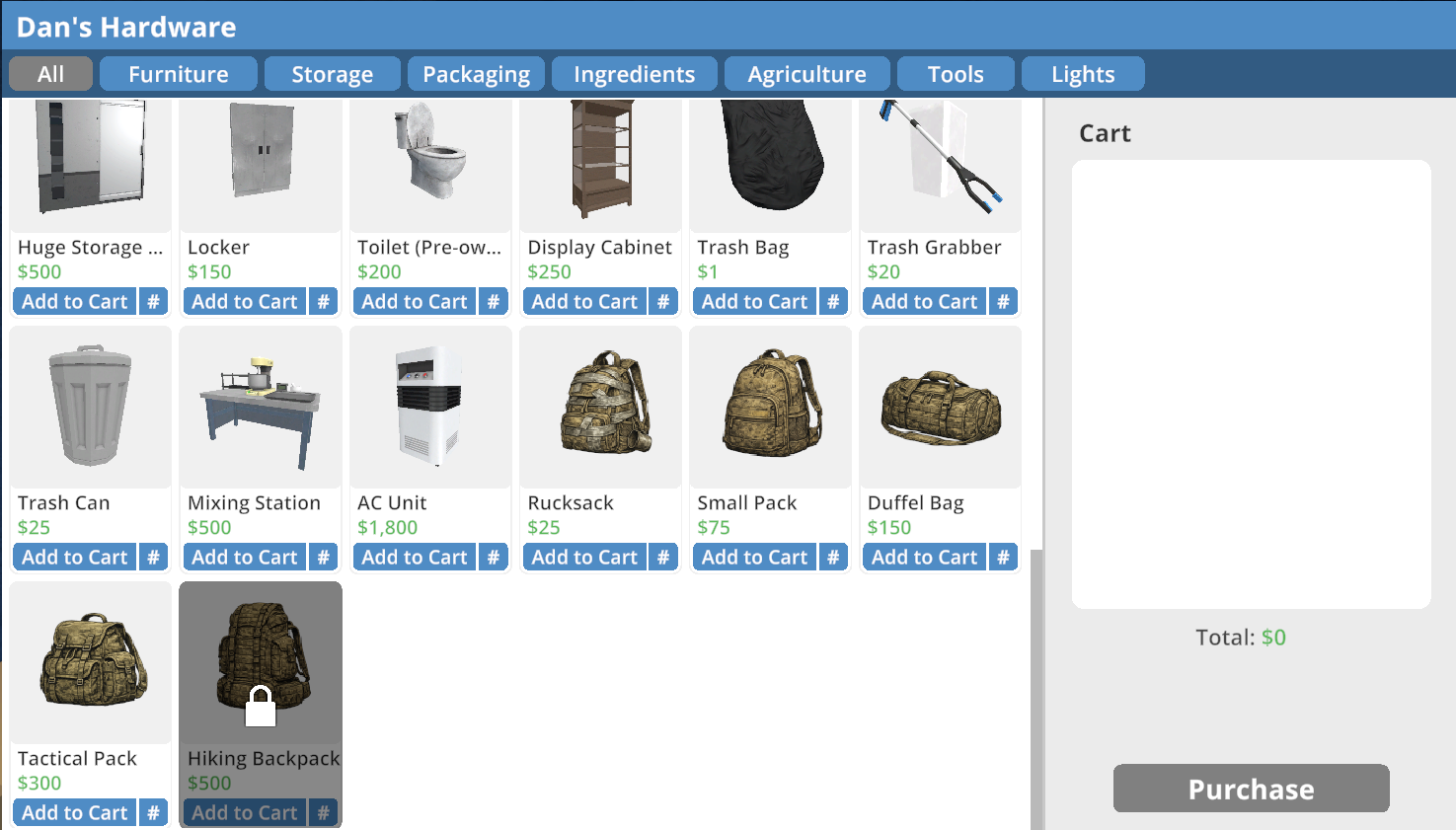
Hardware Store / Shop Integration
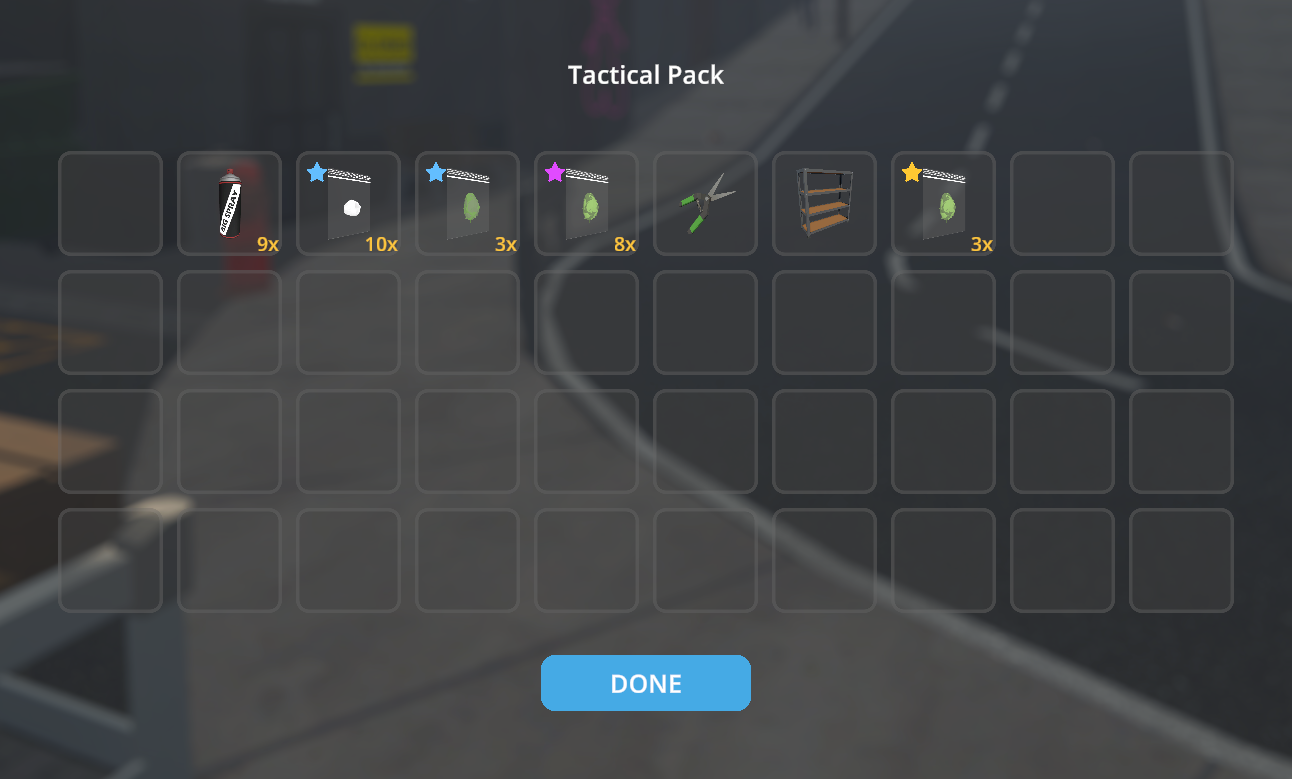
Tactical Pack Tier Example
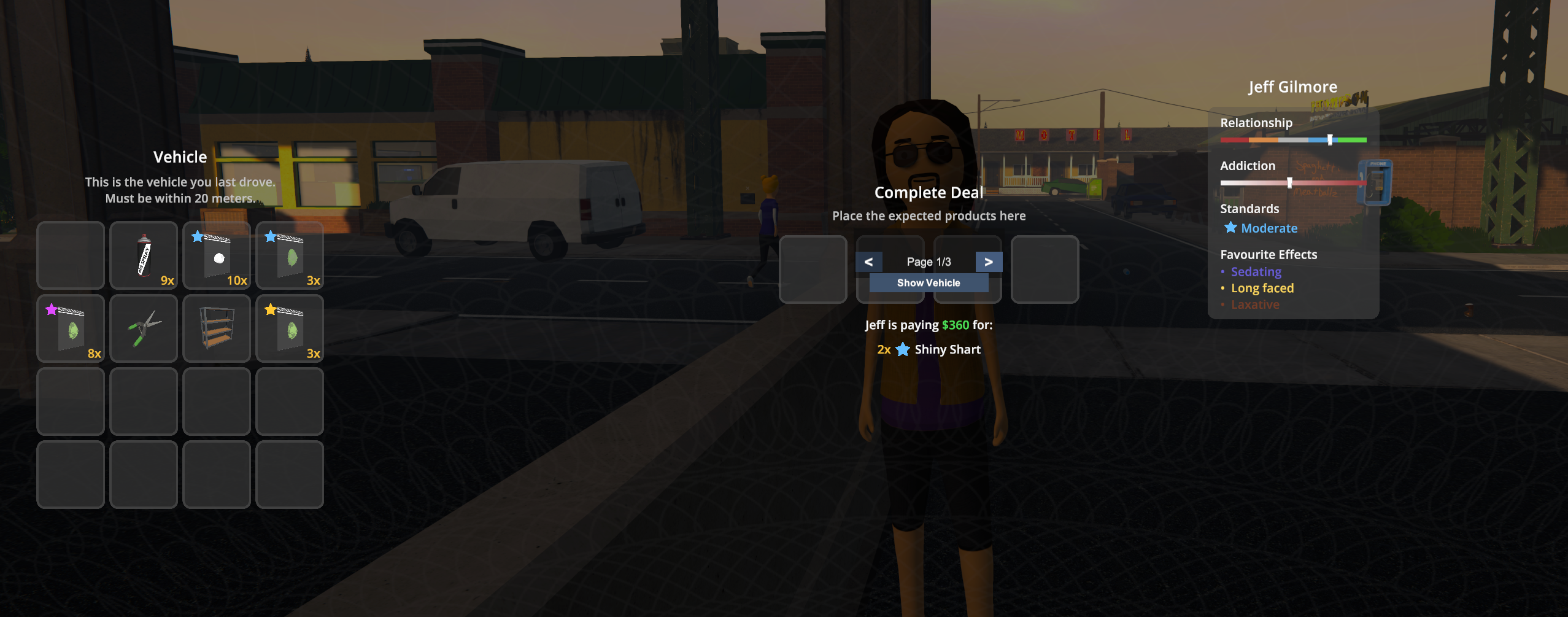
Deal Handover UI (Backpack Integration)
Overview
PackRat adds a backpack to your character that you upgrade by purchasing tiers at the Hardware Store. Once you've reached the required rank for a tier, you buy it with account funds and receive a backpack item in your inventory. Select that item in your hotbar and press B to consume it, apply the tier to your backpack, and open the backpack. Your backpack contents are saved with your game, visible at shops when you're ready to sell, and — for the bigger bags — something the cops will want to check when they stop you.
Tier Progression
Backpack tiers are purchased at the Hardware Store (not automatic). Each tier appears in the store once you've reached its required rank. Buy the tier with account funds, then select the backpack item in your hotbar and press B to apply it and open the backpack.
| Tier | Name | Slots | Can Buy At | Police Search |
|---|---|---|---|---|
| 1 | Rucksack | 8 | Hoodlum I | No |
| 2 | Small Pack | 16 | Peddler I | No |
| 3 | Duffel Bag | 24 | Hustler I | Yes |
| 4 | Tactical Pack | 32 | Enforcer I | Yes |
| 5 | Hiking Backpack | 40 | Block Boss I | Yes |
Features
Extra Storage
Open your backpack at any time with the toggle key (default: B). Your backpack is separate from your hotbar and inventory, giving you dedicated space for stockpiling product, supplies, or anything else you need to haul around.
Hardware Store Tiers
Backpack tiers are bought at the Hardware Store (both locations). Once you've reached the required rank for a tier, it appears in the store; purchase it with account funds (not cash). You receive a backpack item in your inventory. Select that item in your hotbar and press B to consume it, apply the tier to your backpack, and open the backpack. Each tier brings more slots; the game logs the upgrade when you use the item.
Persistent Contents
Everything in your backpack is saved to disk when you save your game. Load back in and it's all still there.
Shop Integration
When visiting a shop to sell, your backpack slots appear alongside your hotbar items. You can sell directly out of the backpack without shuffling things into your inventory first.
Deal Handover Integration
During deal handovers, your backpack storage is injected into the handover UI so you can move required items directly from your bag. Larger tiers are paged, with < and > controls plus a page indicator under the backpack panel. If your last driven vehicle is within 20 meters (the same condition the base game uses for vehicle storage access), a Show Vehicle toggle appears so you can switch between backpack and vehicle storage views. Recent handover updates keep paging and item movement responsive by restricting UI work to the local storage panel instead of broad handover-wide scans.
Cart-Aware Purchasing
When buying from a shop, the purchase warning accounts for your backpack space. If your hotbar is full but the backpack has room, the game will let you know items will spill into it rather than falsely warning you that everything won't fit.
Police Body Searches
Carrying a Duffel Bag or larger makes you a more suspicious target. If police stop and search you while you're rocking a tier 3, 4, or 5 bag, they'll ask to check the backpack too. Anything illegal inside — unpackaged product, contraband — will count against you.
Tip: The Rucksack and Small Pack fly under the radar. If you're moving small amounts and don't want the extra scrutiny, stay at Peddler rank or consider what you're carrying.
Multiplayer Support
In a multiplayer session, the host's configuration is automatically pushed to all clients when they join, and the host now acts as the authoritative source for backpack state. Clients request and apply the host's synced backpack snapshot instead of relying on their own local save state, so unlocked tiers and backpack contents stay aligned across the session. Clients don't need to touch their own config files.
Controls
| Action | Default Key | Notes |
|---|---|---|
| Open / close backpack | B |
When the backpack is already unlocked. |
| Use backpack item (apply tier) | B |
When a backpack tier item is in your hotbar, select it and press B to consume it, apply that tier to your backpack, and open the backpack. |
Handover paging and storage view switching use on-screen UI buttons.
The toggle key is fully configurable. See Configuration below.
Installation
- Install MelonLoader v0.7.0 or newer into Schedule One.
- Drop
PackRat.dllinto yourSchedule One/Mods/folder. - Launch the game. A config file will be created automatically at
UserData/PackRat.cfgon first run.
Configuration
PackRat's config file is located at:
UserData/PackRat.cfg
Edit this file while the game is closed. In a multiplayer session, only the host's config is used — changes made by clients while in-session have no effect.
Full Example Config
[PackRat]

# Key to open and close your backpack
# Accepts any Unity KeyCode name: B, Tab, F1, Backslash, etc.
ToggleKey = B

# Tier 0 — Rucksack
# First backpack; can buy at Hardware Store at Hoodlum I
Tier0_UnlockRank = Hoodlum : 1
Tier0_SlotCount = 8
Tier0_Price = 25

# Tier 1 — Small Pack
# Can buy at Peddler I; still under the radar
Tier1_UnlockRank = Peddler : 1
Tier1_SlotCount = 16
Tier1_Price = 75

# Tier 2 — Duffel Bag
# Can buy at Hustler I. Police will search this and above.
Tier2_UnlockRank = Hustler : 1
Tier2_SlotCount = 24
Tier2_Price = 150

# Tier 3 — Tactical Pack
# Can buy at Enforcer I
Tier3_UnlockRank = Enforcer : 1
Tier3_SlotCount = 32
Tier3_Price = 300

# Tier 4 — Hiking Backpack
# Largest tier; can buy at Block Boss I
Tier4_UnlockRank = Block_Boss : 1
Tier4_SlotCount = 40
Tier4_Price = 500
Config Reference
| Key | Default | Description |
|---|---|---|
ToggleKey |
B |
Key to open/close the backpack and to use a backpack item in the hotbar. Any Unity KeyCode name. |
Tier{n}_UnlockRank |
See table above | Rank required before the tier appears at the Hardware Store. Format: RankName : TierNumber (1–5). |
Tier{n}_SlotCount |
See table above | Number of storage slots for tier n. Clamped between 1 and 40. |
Tier{n}_Price |
25, 75, 150, 300, 500 | Price (account funds) to buy tier n at the Hardware Store. |
Valid rank names:
Street_Rat, Hoodlum, Peddler, Hustler, Bagman,
Enforcer, Shot_Caller, Block_Boss, Underlord, Baron, Kingpin
Note: Which tiers trigger police searches is fixed and cannot be configured. Tiers 3, 4, and 5 (Duffel Bag and above) always include the backpack in police body searches.
Requirements
- Schedule One (Steam)
- MelonLoader v0.7.0 or newer
CHANGELOG
Changelog
1.1
Backpack UI integration
- Added backpack integration for storage containers and station UIs, with paginated 3x3 panels and quick-move support.
Gameplay fixes
- Added backpack ammo support for weapon reloads.
- Fixed duplicate backpack unlockable registration.
- Fixed unintended backpack disabling on player death.
1.0.8
IL2CPP hardware-store stability
- Reworked IL2CPP backpack definition creation so PackRat no longer falls back to cloning arbitrary shop items when the safe template is unavailable.
- Deferred safe backpack template creation until hardware-store integration time, when IL2CPP has a valid shop context to seed from if direct
StorableItemDefinitioninstantiation is still unavailable. - Sanitized fallback template state before reuse and reduced repeated safe-template failure logs to a single actionable warning instead of console spam.
Release metadata
- Bumped the mod version to
1.0.8and restored Thunderstore-compatible semantic versioning in the packaged manifest.
1.0.7
Backpack definition and storage fixes
- Added a safe backpack item template for IL2CPP fallback definition creation so backpack tier purchases no longer clone arbitrary hardware-store items.
- Fixed backpack storage lookup to target PackRat's own
StorageEntityinstead of blindly taking the first storage component on the player. - Hardened legality checks to read legal status by reflection so both Mono and IL2CPP continue working across game API changes.
- Fixed extended-slot growth to avoid registering the same storage slot twice, resolving the regression where the final backpack slots could mirror each other when items were moved.
Save/load and sizing fixes
- Ensured the saved purchased backpack tier is applied before restoring saved contents.
- Fixed slot growth so newly created backpack slots are actually appended to the underlying storage slot list.
- Added equipped-backpack tier persistence so upgrades and downgrades save correctly and restore the active backpack size on the next load.
Compatibility
- Added the new core assembly references required by the latest Schedule One update for both Mono and IL2CPP builds.
- Split Mono and IL2CPP intermediate build output into separate
objfolders so switching runtimes no longer contaminates restore/build state.
Runtime stability and multiplayer
- Fixed host-to-client config sync parsing after the
EnableSearchpayload change so clients correctly receive host backpack settings again. - Added null-safety around shop/cart backpack checks and guarded backpack save-path lookups against missing player-data indices.
- Cleaned up duplicate local
PlayerBackpackcomponents, improved slot clearing to prefer game-native clear methods, and removed the extra IL2CPP handover diagnostics while pruning stale handover panel cache state.
1.0.6
Game update compatibility
- Updated Mono and IL2CPP references for the latest Schedule One game version, including the new
ScheduleOne.Core/Il2CppScheduleOne.Coreassembly split. - Removed hard dependency on game assemblies that are no longer present in newer installs so both runtimes compile cleanly against the current game files.
- Adjusted cross-runtime item/core type handling to match the updated game API surface.
Backpack save/load fixes
- Fixed backpack restore order so the purchased backpack tier and slot count are applied before backpack contents are deserialized.
- Fixed larger backpacks only restoring the first 8 slots by ensuring restored item data loads into the correctly resized storage.
- Applied the same pre-resize restore flow to host-synced multiplayer backpack snapshots.
Arrest and respawn stability
- Removed backpack enable/disable lifecycle hooks tied to player arrest/exit flows to avoid respawn activation issues after arrest.
- Fixed the post-arrest local player lockup where the game could leave the player unable to move after respawn.
1.0.5
Handover UI performance
- Fixed severe handover UI lag when moving items from the backpack panel or player inventory by removing broad hierarchy-wide label scans.
- Reduced repeated header reapply passes and limited backpack label updates to local storage-panel operations so handover paging and item movement remain responsive on both Mono and IL2CPP.
1.0.4
Multiplayer backpack sync
- Added host-driven backpack state sync so clients request and receive the host-authoritative backpack snapshot in multiplayer sessions.
- Added chunked backpack snapshot transfer and host-to-client backpack pull/response handling to keep larger backpack inventories synchronized reliably.
- Non-host clients now skip local backpack persistence and instead load/apply the synchronized host state.
- Added
BackpackSyncDebugLoggingconfiguration to enable verbose multiplayer backpack sync diagnostics when needed.
Runtime and UI robustness
- Improved IL2CPP string assignment handling in reflection utilities so managed strings can be written safely to
Il2CppSystem.Stringmembers. - Added supporting save/load and variable-database hooks required for multiplayer backpack synchronization.
- Hardened backpack/player initialization paths so backpack components and synced state are attached/applied more reliably across runtime variants.
Documentation
- Updated hosted README screenshots and project links for the 1.0.4 release.
1.0.3
Deal handover backpack panel
- Added backpack storage integration to the deal handover UI with paged slot rendering for larger backpack tiers.
- Added pager controls (
<, page indicator,>) and ensured page switching updates slot bindings correctly. - Added a vehicle/backpack view toggle under the pager; backpack view is default and toggle is only shown when vehicle storage is available within 20 meters.
Handover UI behavior and stability
- Fixed item duplication regression introduced during early slot-initialization experiments.
- Hardened handover panel lifecycle checks against stale/destroyed components to prevent open-time exceptions in IL2CPP.
- Improved pager setup robustness for IL2CPP by recreating/repairing missing controls and guarding fragile component access paths.
Handover UI placement and visuals
- Reworked pager layout anchoring so controls are placed beneath the backpack storage area.
- Added a dedicated pager background element and aligned it with the pager controls.
1.0.1
IL2CPP Hardware Store fixes
- Fixed IL2CPP backpack tier listing creation by using IL2CPP-safe
TryCastand a template-clone fallback when creatingStorableItemDefinitioninstances. - Improved Hardware Store integration flow to use game-native listing UI refresh methods and to avoid false "added" success logs.
- Added targeted diagnostics for resource lookup and tier-listing pipeline failures to make IL2CPP troubleshooting actionable.
Backpack tier purchase and use (Hardware Store)
- Backpack tiers are now purchased at the Hardware Store (both locations) with account funds; they no longer unlock automatically by rank.
- After purchase, a backpack tier item appears in your inventory/hotbar (real
StorableItemDefinitionwith tier icon). Select it and press B to consume it, apply that tier to your backpack, and open the backpack. - Added config options
Tier{n}_Price(defaults: 25, 75, 150, 300, 500) for store prices. - Inventory UI is refreshed after consuming a backpack item so the hotbar slot updates immediately.
- Already-purchased tiers no longer show in the Hardware Store: when adding listings we only add tiers the player has not yet purchased; when the player uses a backpack item (press B) we remove that tier and all lower tiers’s from all stores (each tier is an upgrade; buying Tactical Pack means only Hiking Backpack remains).
Removed / simplified
- Removed patches that blocked the backpack item from being added or that cleaned it up in the background; the item is now a normal purchasable that you use with B.
- Removed
PlayerInventoryPatchandInventoryAddBlockPatch; removed OnEnable patch fromShopInterfacePatch. Purchase and payment are handled entirely by the game; our shop patch only adds tier listings and returns without running purchase logic for them.
1.0.0
- Initial port of ScheduleOne-Backpack (v1.8.1) by D-Kay into the PackRat project structure
- Full cross-runtime support: IL2CPP (net6) and Mono (netstandard2.1)
- Backpack storage entity attached to player prefab via PlayerSpawner patch
- Configurable toggle key (default: B), slot count (default: 12), and unlock rank (default: Hoodlum)
- Backpack contents persist across save/load sessions
- Network save data appended to inventory string with
|||delimiter - Host-to-client config sync via Steam lobby metadata
- Optional police body search includes backpack when
EnableSearch = true - Shop cart warning accounts for backpack overflow capacity
- Items can be sold directly from backpack via ShopInterface
- StorageMenu expanded to support up to 128 slots dynamically
- Backpack registered as an unlockable in the levelling system with embedded icon
