

SkulInsight QoL
Online co-op (open beta) with Steam friends or matchmaking; Codex with boss moves and your build; run history, records, achievements; optional daily runs; real damage in descriptions, a combat log for every hit. 11 languages.
| Date uploaded | 3 days ago |
| Version | 0.17.2 |
| Download link | DocRun-SkulInsight_QoL-0.17.2.zip |
| Downloads | 36 |
| Dependency string | DocRun-SkulInsight_QoL-0.17.2 |
This mod requires the following mods to function

BepInEx-BepInExPack_Skul
BepInEx pack for Skul: the Hero Slayer. Includes unstripped core and Unity libraries. Ready to use.
Preferred version: 5.4.2100README
SkulInsight QoL
See the real numbers behind Skul: The Hero Slayer. Damage numbers that tell you where damage came from, item and skull descriptions with your actual damage, a combat log that explains every hit, a Codex with every enemy, boss and piece of gear, a history of all your runs, Skul's achievements for every save slot, and an optional daily run with online leaderboards.
A quality-of-life mod: it shows information the game already uses internally, keeps several save slots side by side if you use them, and only goes online if you turn on the daily run or the online co-op, or send a report. Its only change to the game's balance is the rewards (0.15): optional, on by default, and one switch at the top of the settings turns them off. Every feature can be switched off in the game: pause (Esc) → SkulInsight QoL.
Version 0.17: online co-op (open beta). Play a run together: with a Steam friend (invite from the Co-op window, F3) or with anyone through matchmaking. Off by default: pause (Esc) → SkulInsight QoL → Online co-op (open beta), then restart the game. One run in the host's world: enemies, bosses, room clears and doors (a vote) are shared, gold drops for everyone, room rewards and shops are your own; revive a downed teammate at their ring; the host sets how much more health enemies have (1.5x to 4.5x). It is a beta: Report a bug or idea (Co-op window, settings, Codex) sends your report straight to the developer. Also new: enemy projectiles that can hit you get a thin red outline, also when you play alone. Known issues: CHANGELOG. 0.17.1: co-op fixes from your runs (the adventurer arena camera, a teammate walling you in, enemies chasing the wrong player, the Pope's leftover fanatics), the host's enemy health shown to everyone in the Co-op window, the report form, and co-op run logs sent to the developer after a run if you agree (asked once). 0.17.2: 3-4 players with Steam friends (experimental): the host sets settings → Co-op → Players. Matchmaking still pairs two players.
0.16: restart room, new daily points. Restart room (press F5 twice) takes you back to the moment you entered the room, as when you close the game and continue (in a daily run it ends the run). Daily points: the boss fights instead of the game's double-counted kills, speed counts more, flawless rooms and boss fights count, gold and bones left are worth keeping, and the day's challenges (one of the game's achievements, a skull and a quintessence of the day) give bonus points. Yesterday's daily winners name the adventurers you meet. Fixed: mouse hover selects items, skulls and dark abilities again; no more stutters when a strong build kills a lot. The crash reports now note frames per second and what slows the game down (Show FPS for a line on screen). 0.16.1 and 0.16.2: the changelog in the game (settings → General → Changelog), other players' runs in your language, Restart room keeps your gear, and the daily name box starts with your Steam name. New in 0.15: rewards for every achievement, coins, kill quests and inscription activations (optional: one switch at the top of the settings turns them off), six daily boards a day. New in 0.14: Skul's achievements for every save slot with a small notice, Clear view, Mods in the pause menu (Thunderstore's Skul mods and yours), easier-to-see healing orbs, and the Mac version (guide). The game shows what's new once after the update; every detail is in the changelog. Please report bugs and ideas (see Feedback).
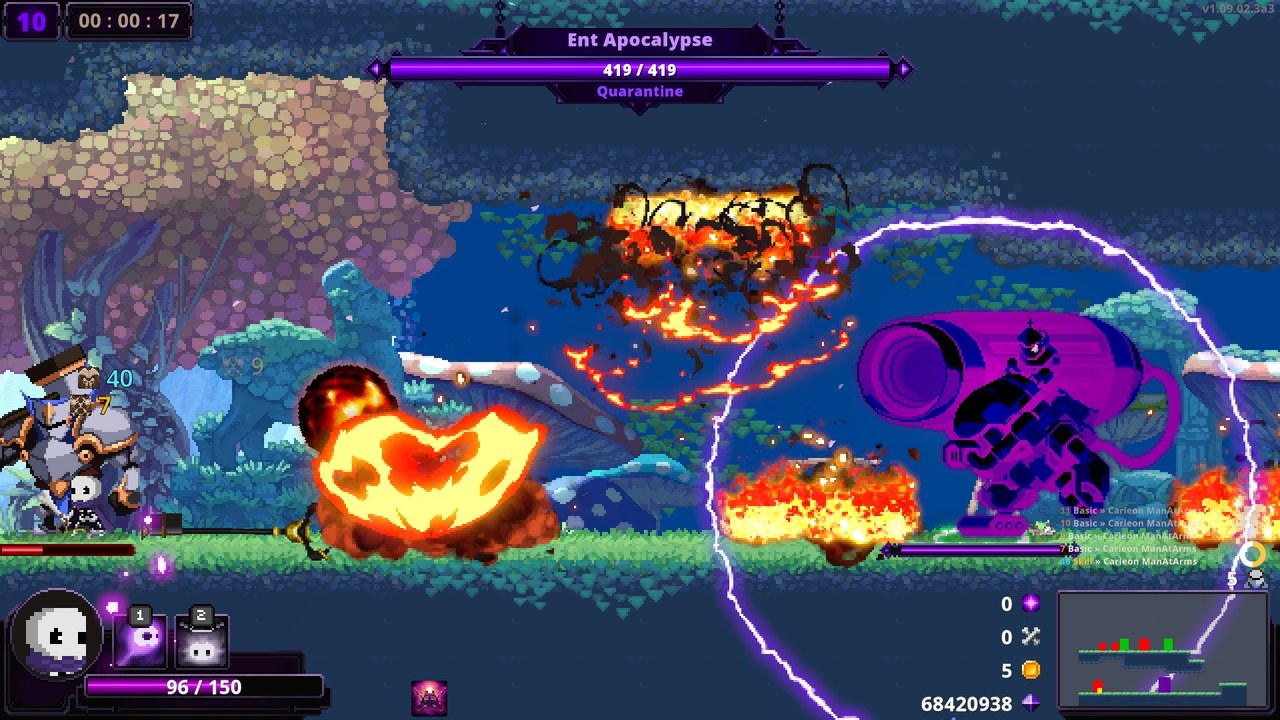
Features
Online co-op (open beta, 0.17)
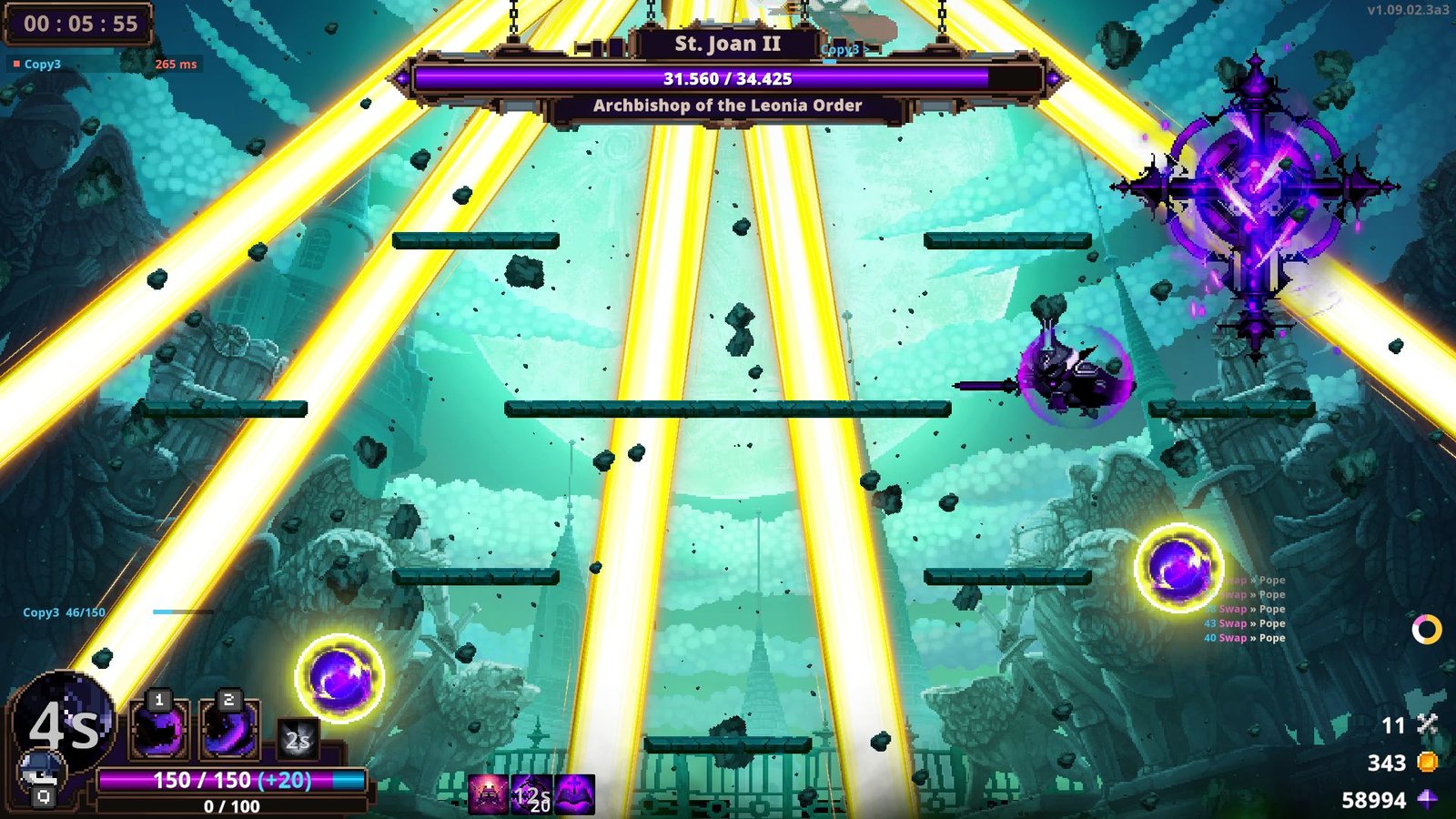
Play a run together: invite a Steam friend from the Co-op window (F3, or the Co-op button in the pause menu), or find a partner through matchmaking. Off by default: pause (Esc) → SkulInsight QoL → Online co-op (open beta), then restart the game. Two players, or 3-4 with Steam friends (experimental, 0.17.2): the host sets settings → Co-op → Players. Matchmaking pairs two players.
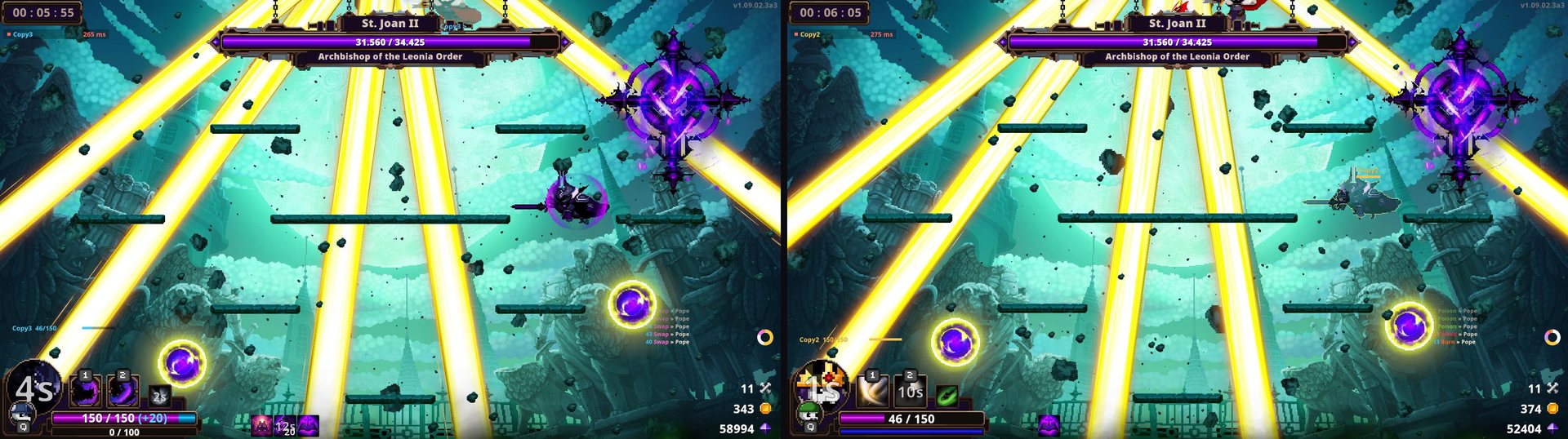
- One run, the host's world: enemies and bosses are shared (the host's game runs them, everyone hits the same ones), room clears and doors (a vote), and gold drops for everyone. Room rewards, shops and gear are your own, and everybody keeps their own save.
- Revive: a downed teammate shows a ring; hold the interact key at it.
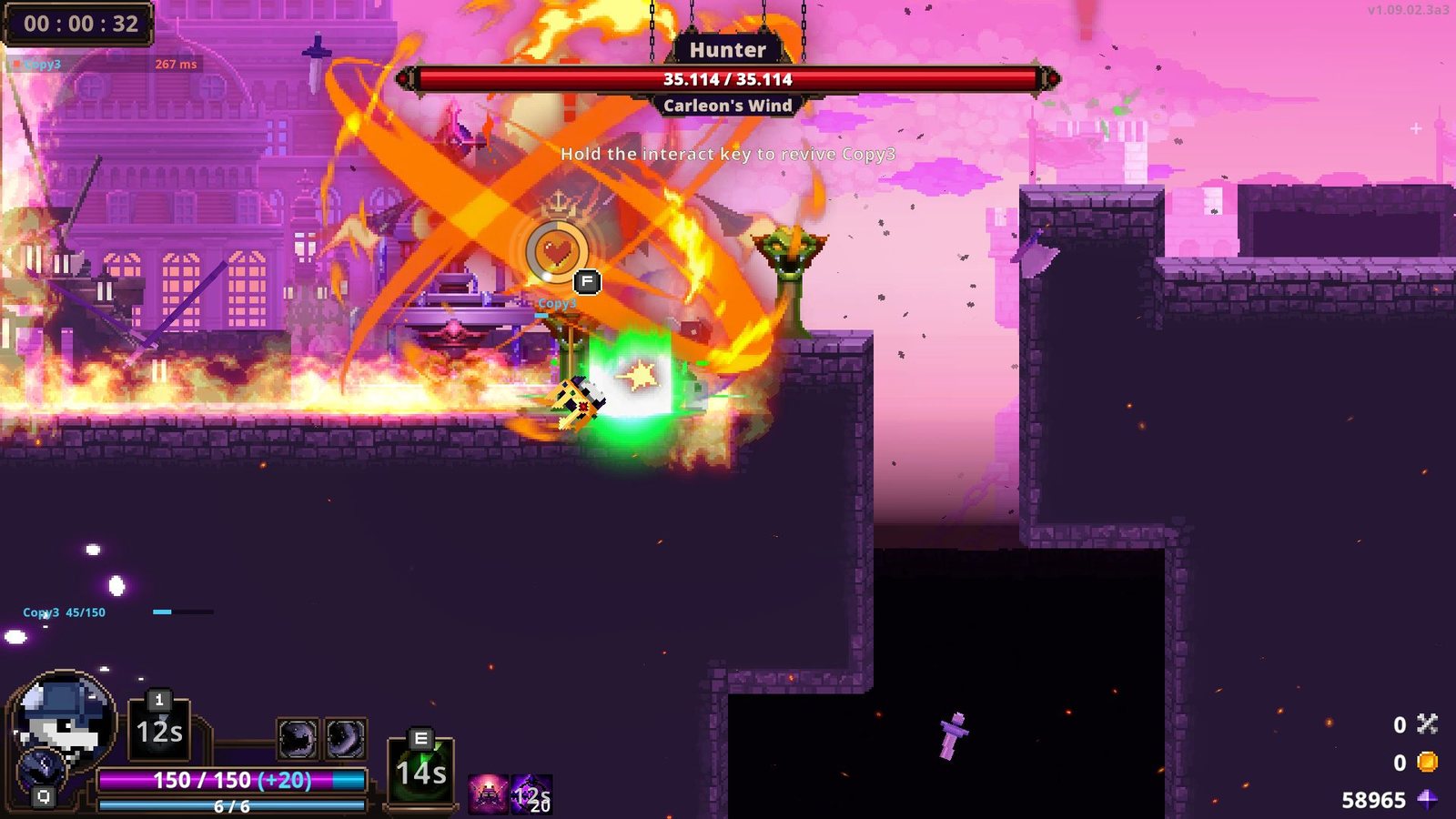
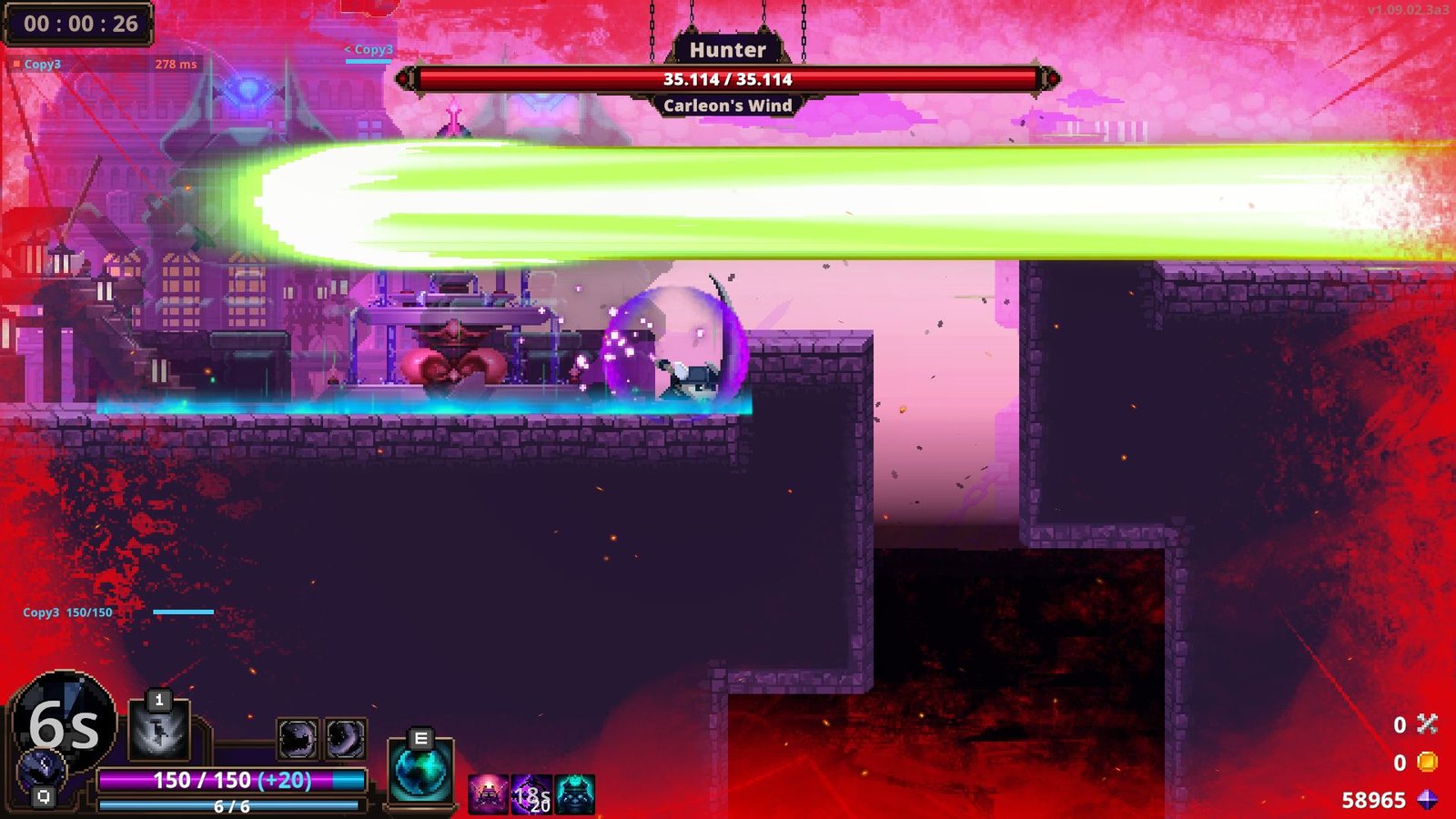
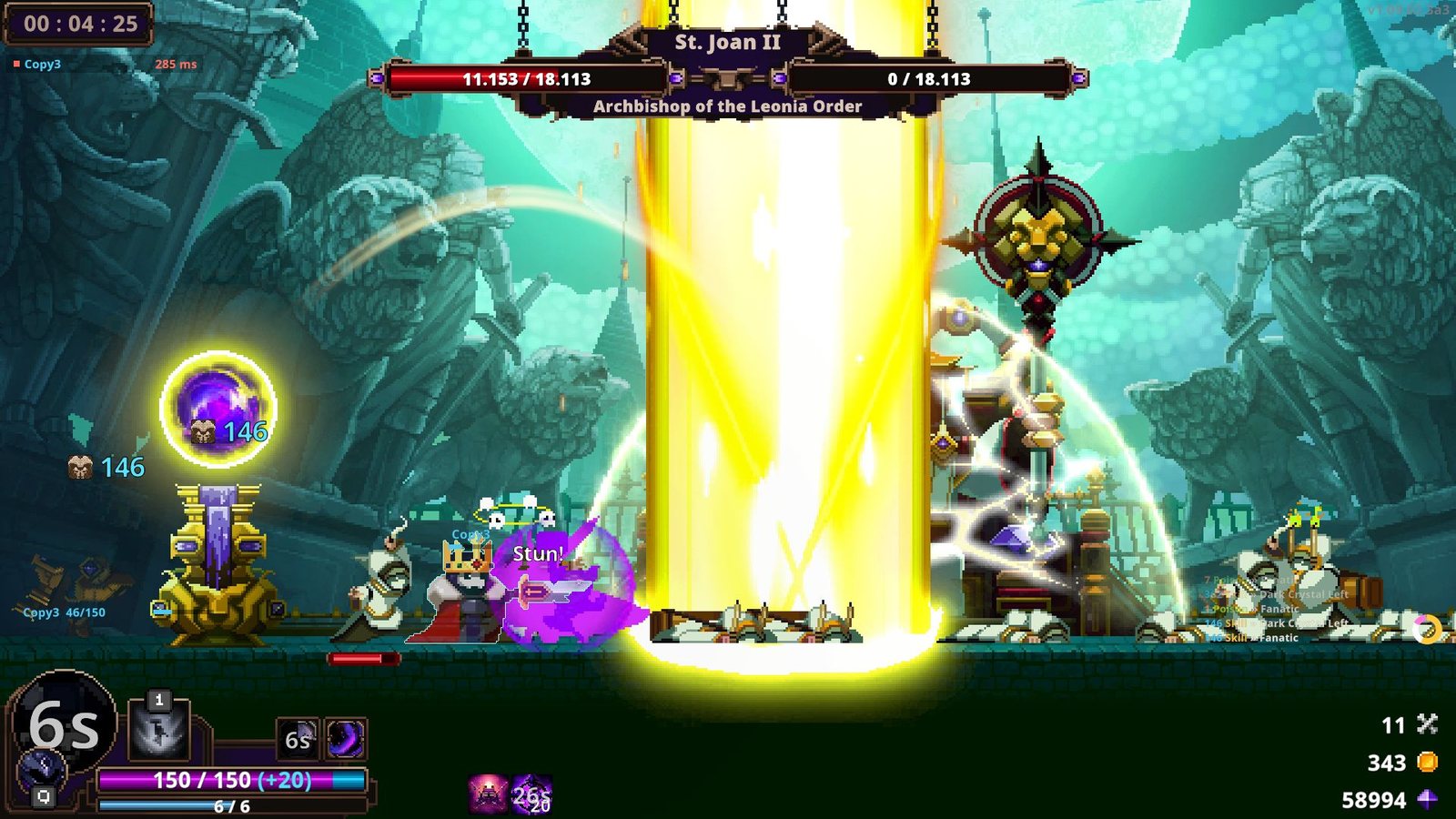
- Seeing each other: name tags, a colour per player and an outline in it; your teammate's moves, projectiles, quintessences and summons show on your game, drawn a little fainter so your own stay readable. Enemy projectiles that can hit you get a thin red outline (also when you play alone).
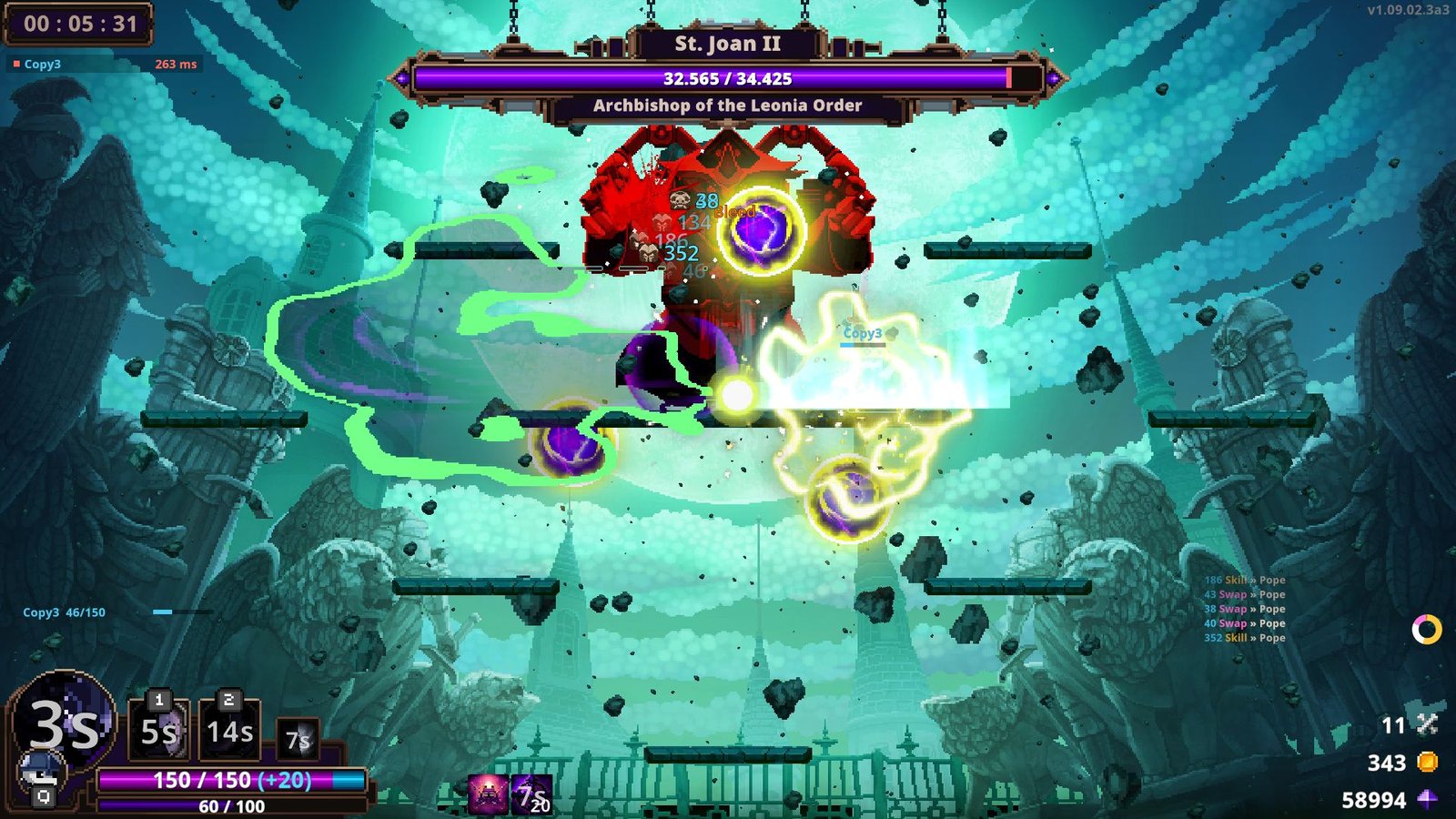
- Enemy health scales with the players (the host sets 1.5x to 3x); boss HP numbers and the damage numbers work as alone, and the combat log has a Players chart.
- Stuck? F6 takes you to your teammate. Found a bug? The Co-op window's Report a bug or idea packs your logs (Steam ids hidden) and opens the report page.
 |
 |
 |
Damage numbers with their source
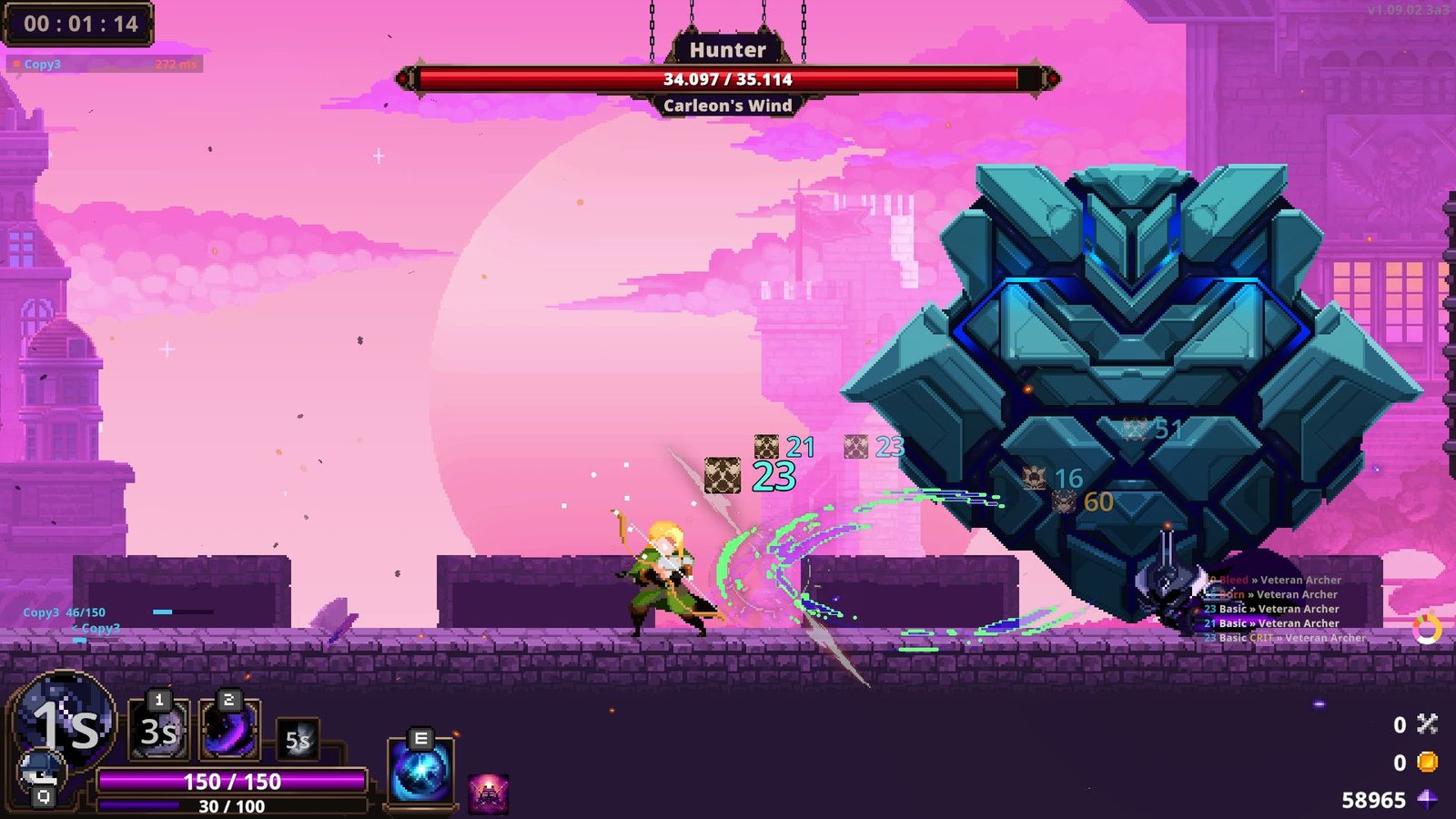
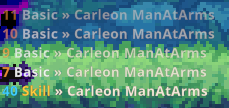
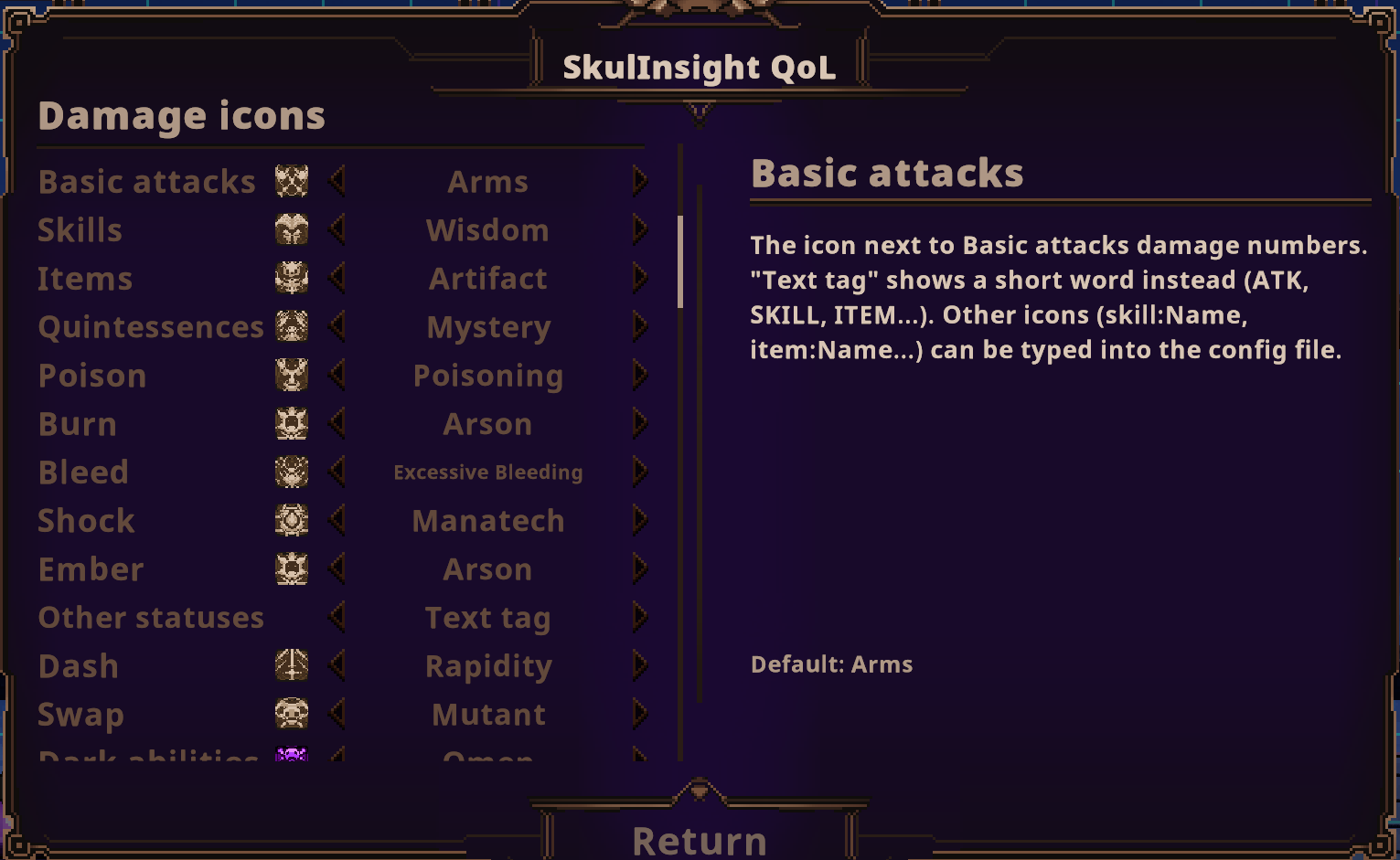
- Every damage number shows where it came from: an icon or a colour-coded tag.
- Basic attack, skill, item, essence, dash, swap, dark ability
- Poison, burn, bleed and other statuses
- Numbers stay on screen a little longer and fade out smoothly (both configurable).

HP numbers on big health bars
Bosses, dark elites, veterans and the adventurer party show current / max HP (and shields) on their health bars.

Real numbers in every description (League-of-Legends style)
Descriptions of skulls, skills, swaps, items, essences and inscriptions show the damage with your current
stats. Hold Shift (or the game's own details key) to see the numbers: the game's boxes stay short and show "Hold Shift for damage numbers"
(setting Descriptions/HoldToShow). On items on the ground, the game's skill and inscription details open beside the
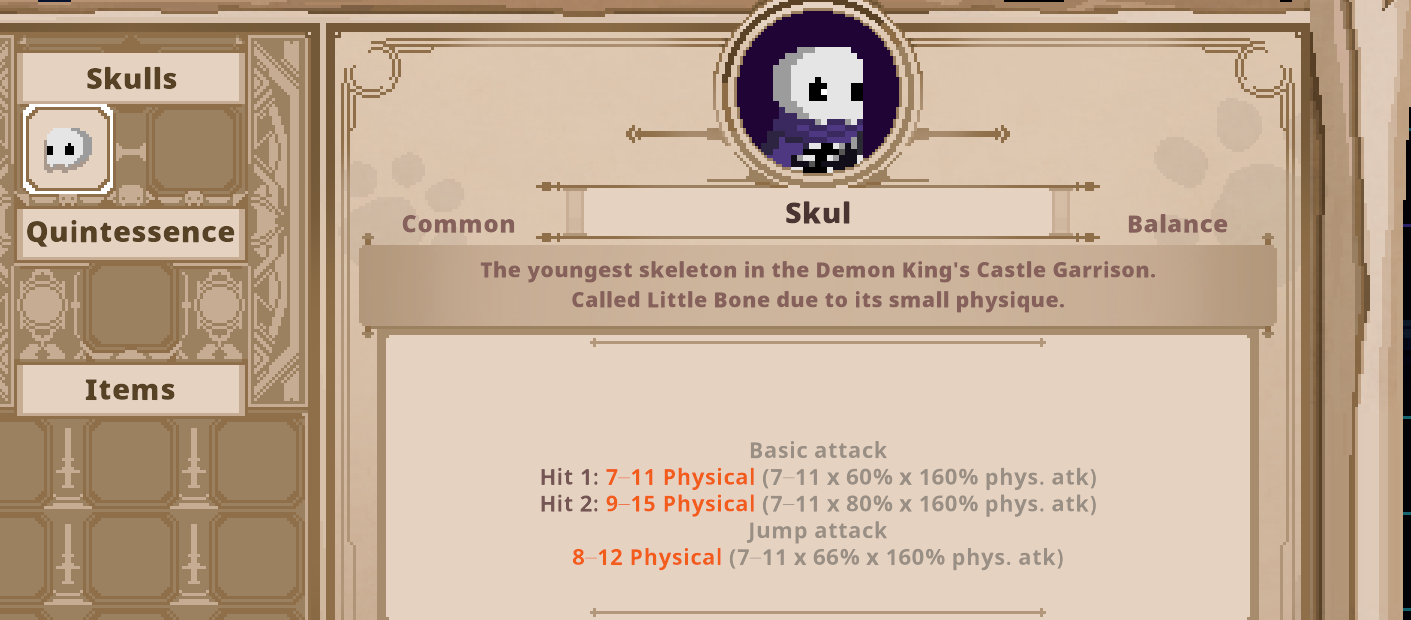
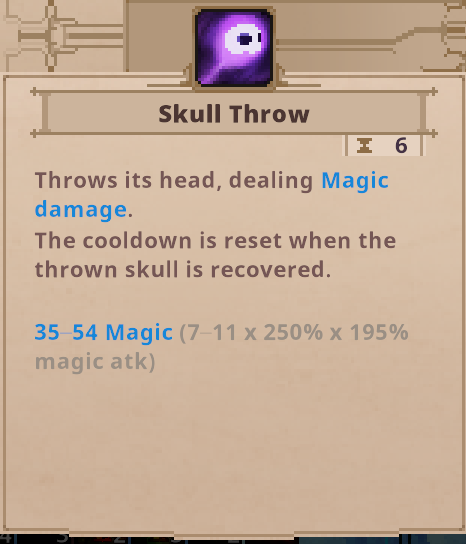
box so they don't cover the numbers. In the boxes each attack is one compact line, e.g. Basic attack: 10–12 · 22–24 · 36–42 Magic, with "All numbers: Codex (K)"; the Codex shows every hit with its calculation, e.g. 60–94 Physical (7–11 skull dmg x 530% x 160% phys. atk) (setting "Compact numbers"; off: the formula in the boxes too). On Arsenal
pages, hold Shift to see what a piece of gear would do with your run's stats.
- Skulls: every hit of the basic combo, jump and dash attacks, charge levels (uncharged / charged / charge N) and passives.
- Items and essences:
- their damage and when it triggers ("On dash, 7 s cooldown")
- summons and spirits
- items that transform into another item
- Inscriptions:
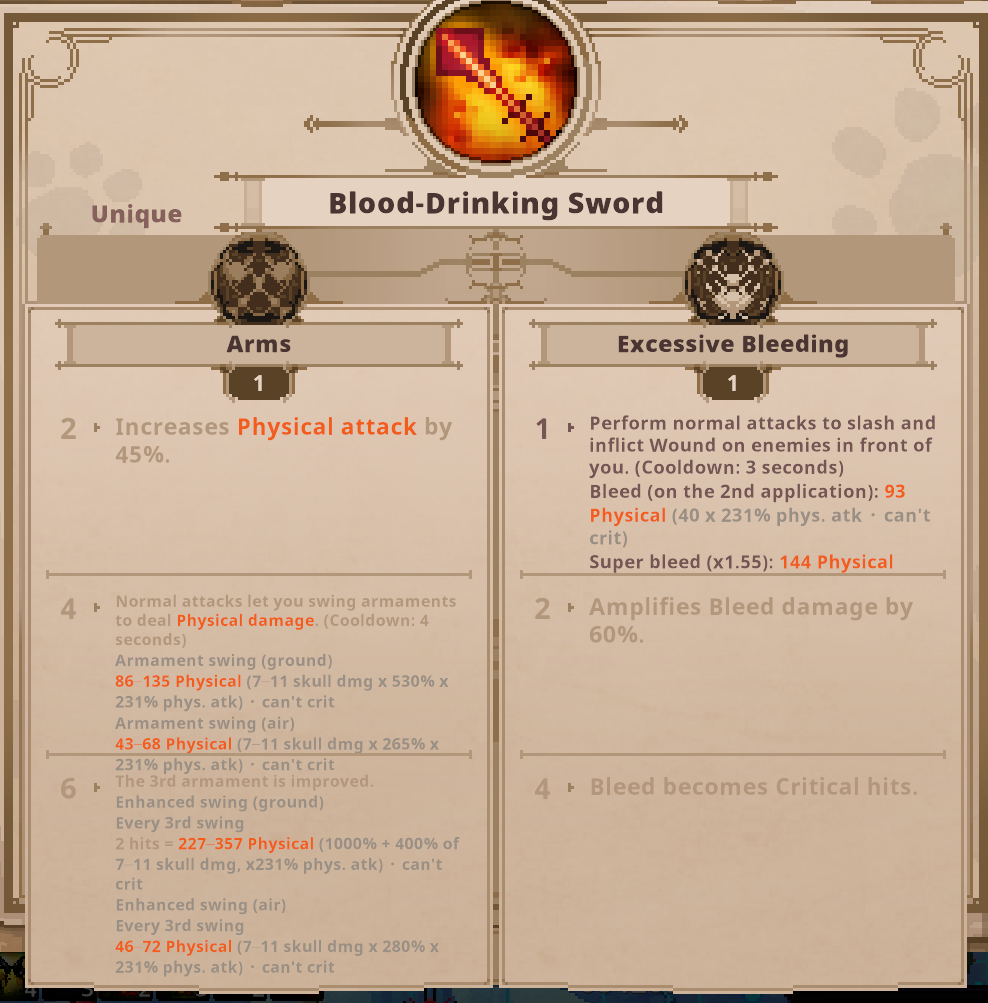
- the damage each step unlocks (Arms armaments, Brawl shockwaves, Artifact meteors, Oberon's attacks, ...)
- status numbers (poison ticks, burn, bleed including severe bleed and crits, freeze and stun durations)
- the tuned (upgraded) versions, including the witch's "Tuned" box
- Explains mechanics the game only hints at, e.g. how Strike's "deadlier strikes" really multiply crit damage.
A skull's basic combo and jump attack, each hit with its real numbers:
Every skill shows its damage:
Even inscription damage is calculated, step by step (here Arms armaments and Excessive Bleeding's bleed):
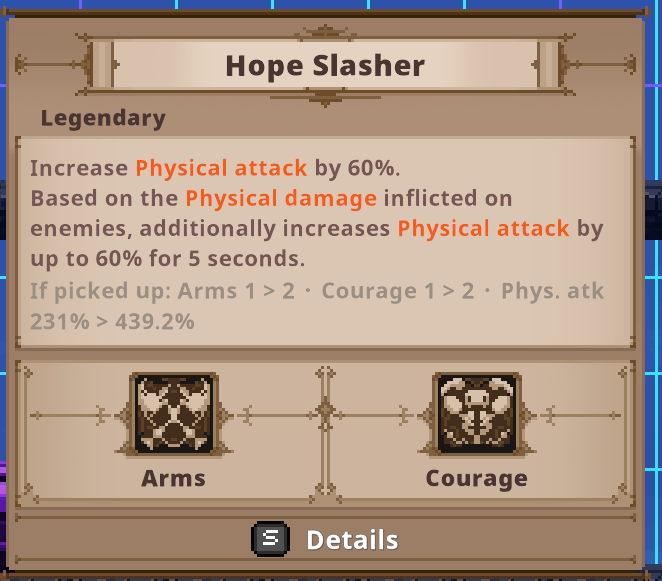
Pickup and swap preview
- Items on the ground and in shops show their numbers as if you had already picked them up. The item's stats and every inscription step it would activate are included.
- The popup says what changes:
If picked up: Arms 1 > 2 · Courage 1 > 2 · Phys. atk 191% > 355.2% - With a full inventory, the swap menu shows the numbers after swapping the selected item.
This makes planning a build much easier: you see what an item would do right at the item, without switching to the stat sheet and back.
Combat log (press L)
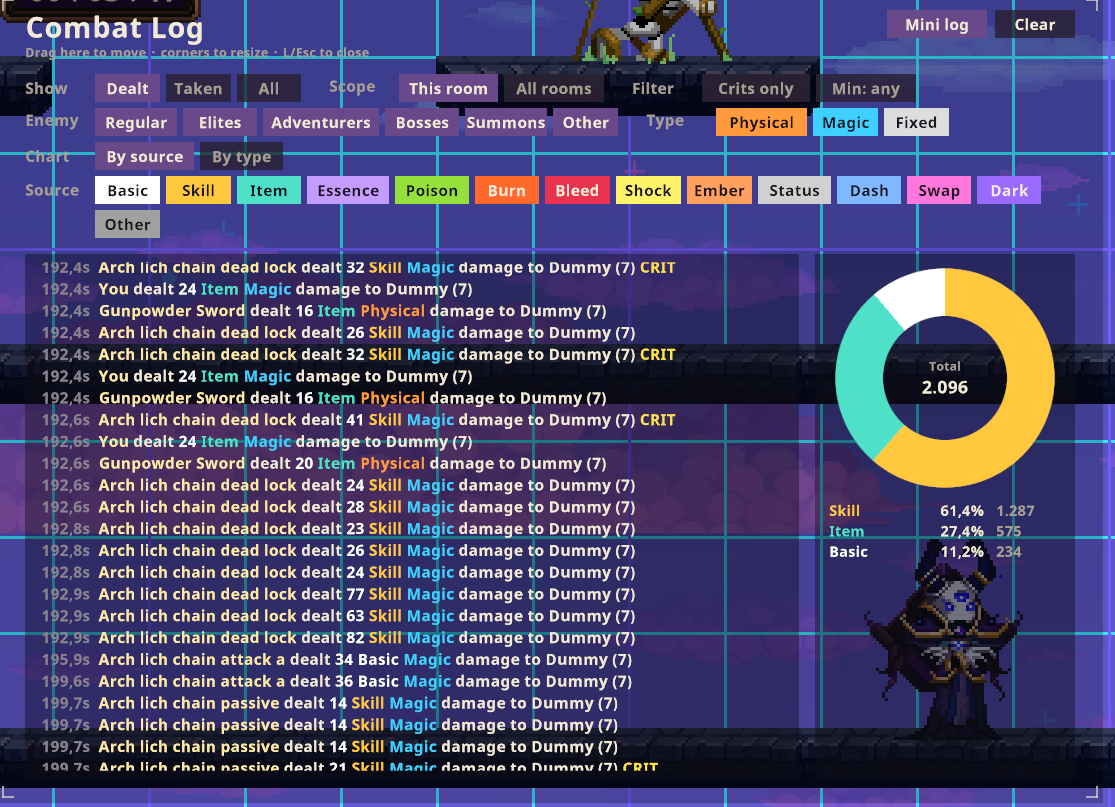
- Every hit, grouped by room, updated live.
- Filters: dealt / taken, room / all rooms, enemy type, damage type, source, crits only, minimum damage.
- Pie chart of your damage by source or damage type.
- Damage table (new in 0.12): View → Damage table: your damage per piece of gear: each skull's basic attack, skills, dash and swap, every item, quintessence, inscription and dark ability, statuses and summons, with share, hits and biggest hit. See which item really carries your build.
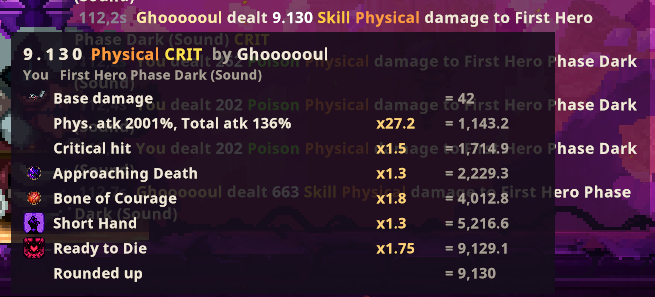
- Hover a line to see its full calculation. Click to pin it. Each step shows its icon, its multiplier and the
running total:
- base damage
- your attack stats
- crit
- every item, inscription and dark ability that changed the number
- effects on the enemy
- the final rounding
- Every hit is named after what dealt it, e.g. "Shadow Spirit Death dealt 14 ...".
- Every session is saved to
BepInEx/DamageInsight/CombatLogs/(JSON lines), so you can look at a run after closing the game. - Optional mini log: a few fading lines above the minimap.
Cooldown ticker
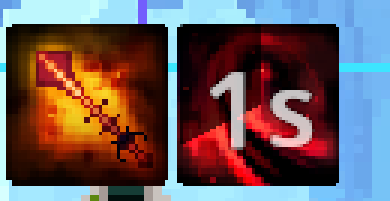
The skill icons of both skulls, the swap icon, the quintessence and the item and ability icons show their remaining
cooldown in real seconds, WoW style: 83s, 2m+, 10m. Your cooldown speed bonuses are included.
Codex (bestiary), new in 0.10
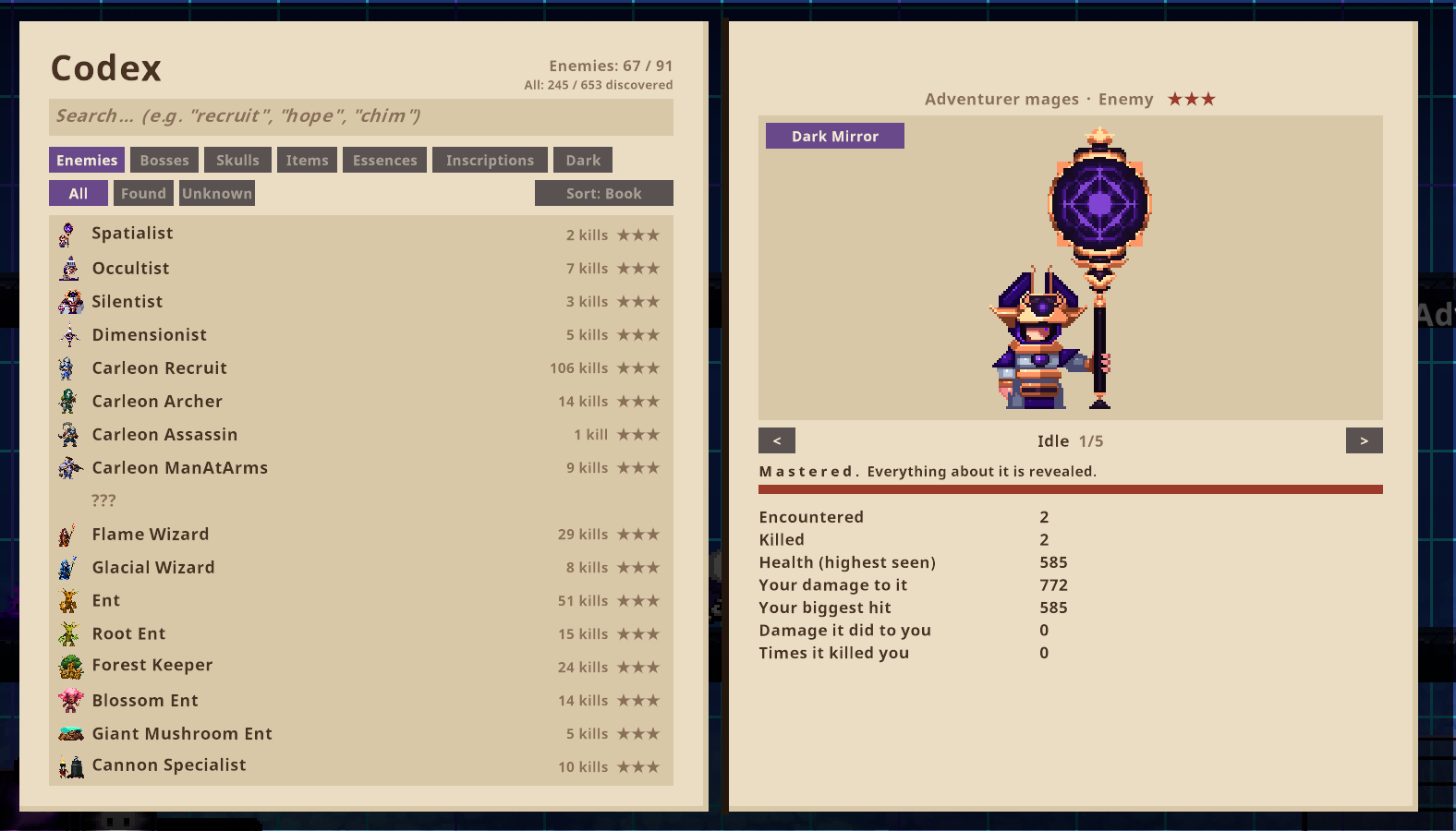
Press K for a book with every enemy, boss, adventurer, skull, item, essence and inscription you have met.
- Unlocked by playing: met = ink outline, then a black silhouette, then colour and animations. Common enemies need more kills than rare ones, so every entry takes about the same number of runs (★★ after about one run's worth of that enemy, ★★★ after about five). Bosses and adventurers: 1 and 3 wins.
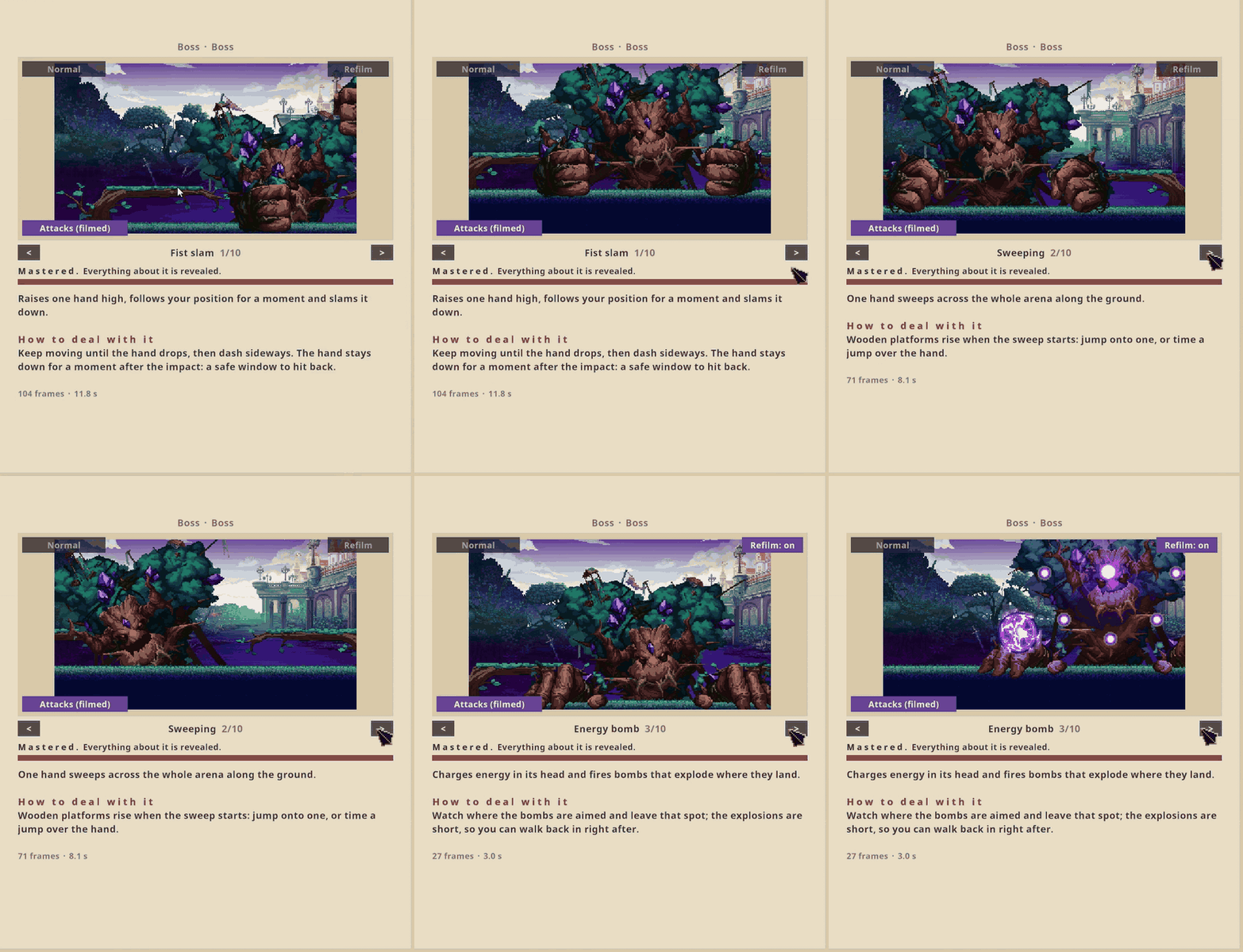
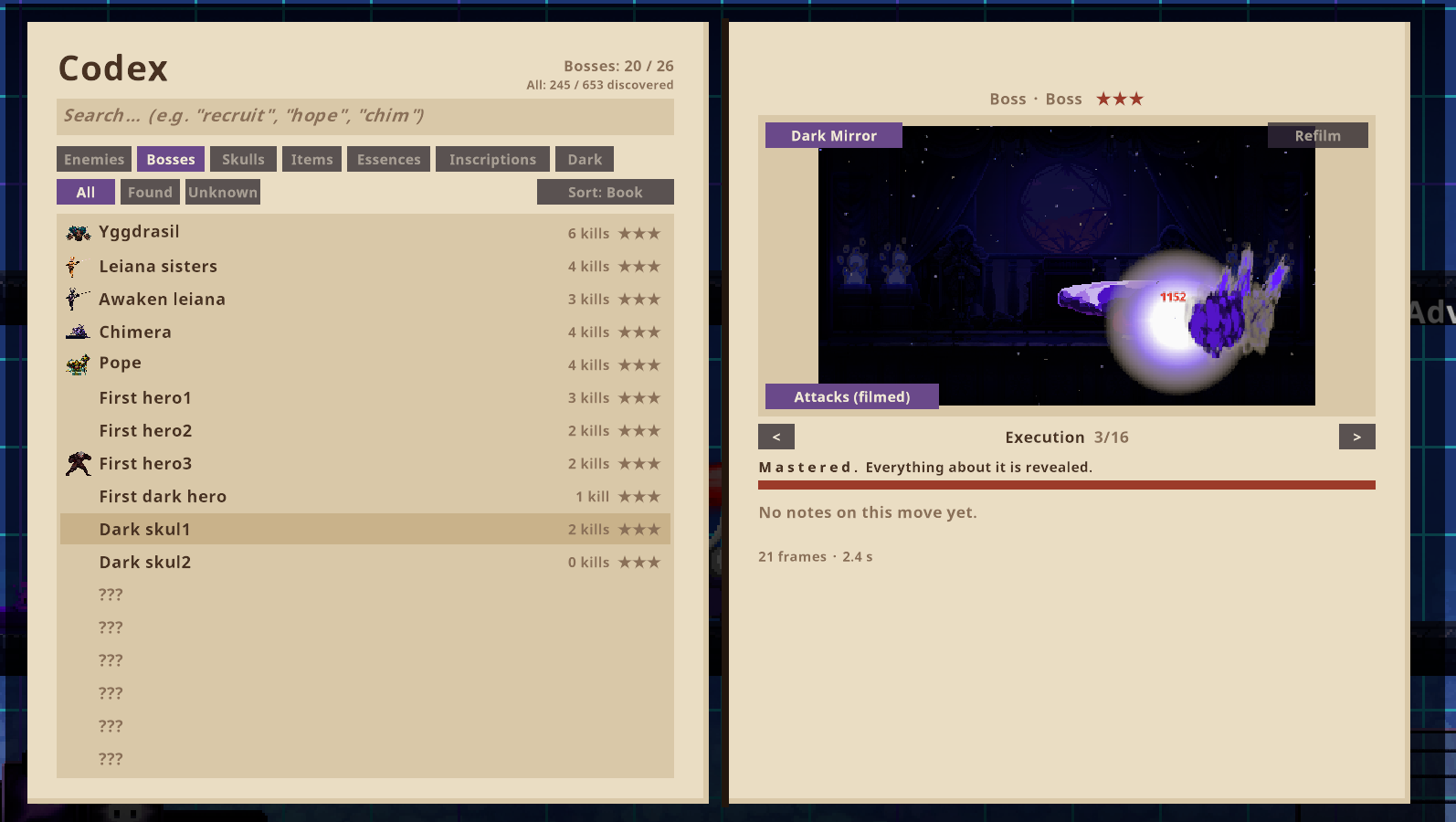
- Boss move lists read from the game's own AI: every boss and adventurer shows its complete list of moves, grouped by fight phase. Moves you haven't seen yet are shown as a black ???, so you know what is still missing.
- Fight films: the first time a boss does a move, the mod films it (small picture, 10 per second). Switch between posed Animations and Attacks (filmed) in the book; "Refilm" replaces a take you don't like.
- Move notes (new in 0.11): every boss move has a short note: what it does and how to deal with it, with numbers from the game (cooldowns, health thresholds, Dark Mirror differences), in all game languages.
- Clean, compact films (new in 0.11): films show only the boss (no damage numbers, none of your own effects, summons or status effects) and take about a quarter of the space. Both can be switched off on the settings page.
- Reset Codex (new in 0.11): start the book over from the settings page; the move notes stay.
- Dark Mirror versions of bosses are kept separately (switch in the book).
- Sections (new in 0.12): You, Bestiary (enemies, bosses, dark enemies) and Arsenal (skulls, items, quintessences, inscriptions, dark abilities). Names in the texts are links; "< Back", Backspace or the mouse's back button go to the page before.
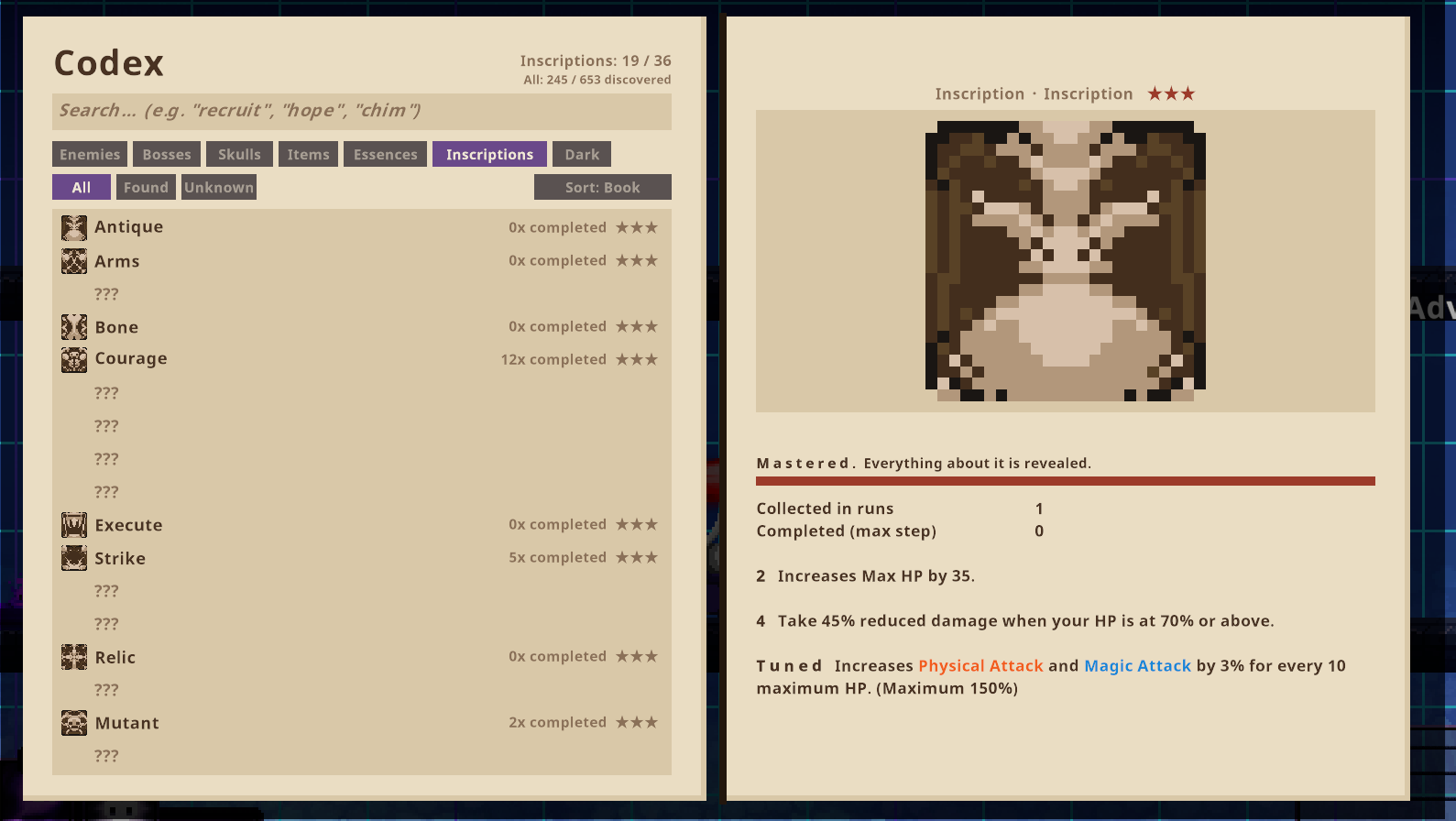
- Arsenal pages (new in 0.12): every skull, item, quintessence, inscription and Dark Mirror ability with its full text and real numbers: a skull's awakening path, attacks and skills, an item's inscriptions and transformation, an inscription's steps and the items that carry it.
- You page (new in 0.12): your run as a Codex inventory: skulls, quintessence, items, dark abilities, inscriptions with what the next step needs, and a stats sheet with the hidden damage stats explained. Click anything to read it in full with your current numbers.
- Dark enemies (new in 0.12): what each of the 15 dark elite abilities does, with its numbers.
- Boxed pages and skill boxes (new in 0.12): every section is a framed box with an icon. Each skull shows its skills as boxes (icon, name, numbers) that stay a ? until you win a run with them: beat a boss of chapter 5 or later while the skill is on one of your skulls.
- Every number with its formula (new in 0.12): base x hit % x attack %. Arsenal pages compare gear at 100 % attack; hold Shift to see the numbers with your run's stats. Dark abilities show their damage per level.
- Everything is created on your own PC while you play; the mod ships no game art.
Save slots
Keep up to 5 games side by side, like profiles: pause (Esc) → SkulInsight QoL → Save slots.
- Each slot is a whole game: story, NPCs, the witch's upgrades, the Dark Mirror, currencies and the run in progress, with its own Codex.
- Play switches to a slot: the game you were playing goes into its slot (a run in progress waits at the room you entered last) and the other game comes in through the title screen. An empty slot starts a new game.
- Copy my game here copies your current game (with its Codex) into a slot; Clear empties one.
- Each slot shows a summary: run, story, NPCs, witch levels, dark quartz, Dark Mirror, deaths, last played.
- Your keys, sound and language stay the same in every slot. The game's save is backed up before every switch.
- Number of slots: 3 to 5 (setting).
Run history and records (new in 0.13)
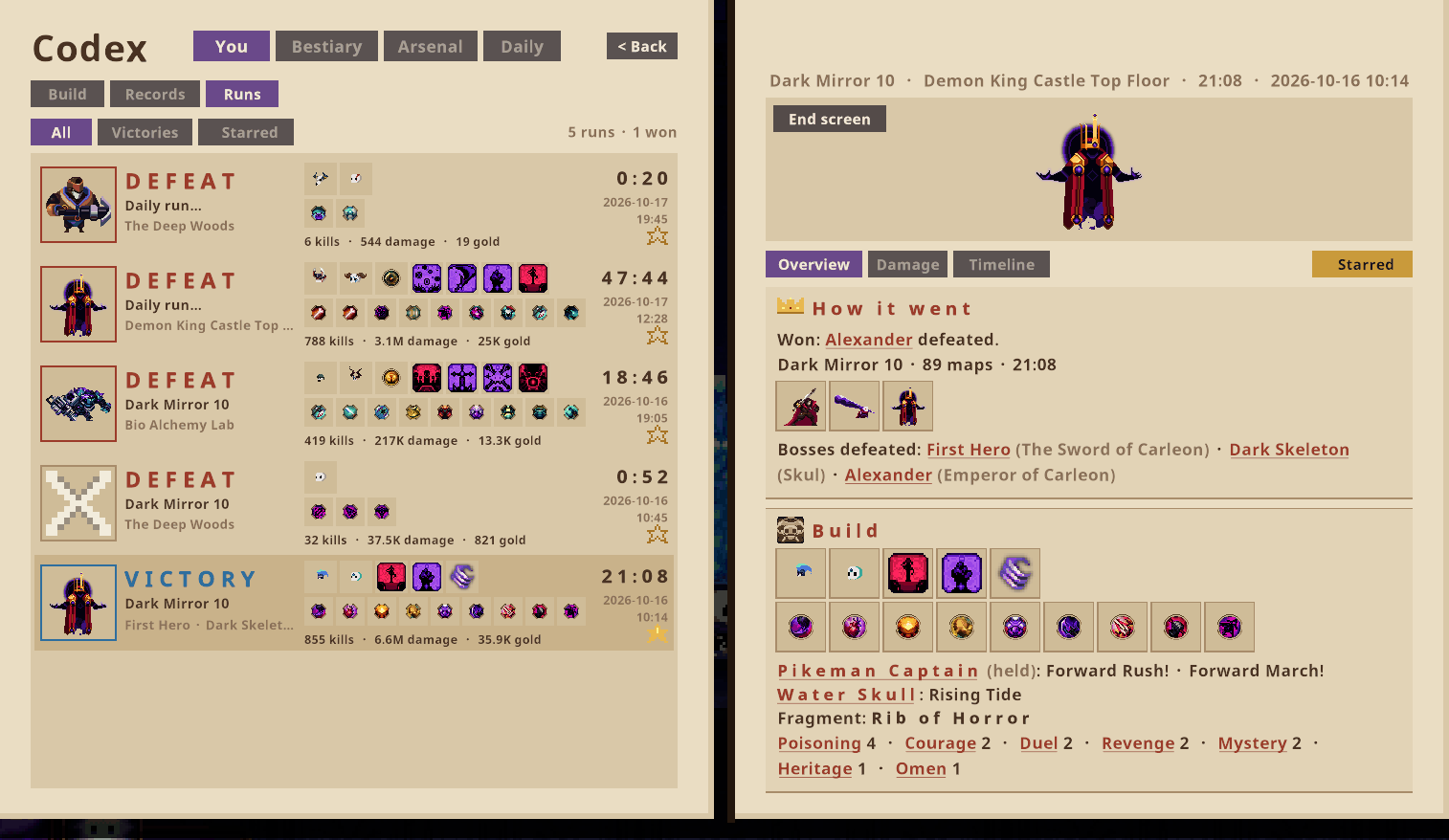
Codex (K) → You → Runs: every run you play, like a match history.
- Each row: how the run ended (the boss or the killer in a frame), Normal / Dark Mirror level / Rookie mode, your skulls and items, kills, damage, gold, time and date.
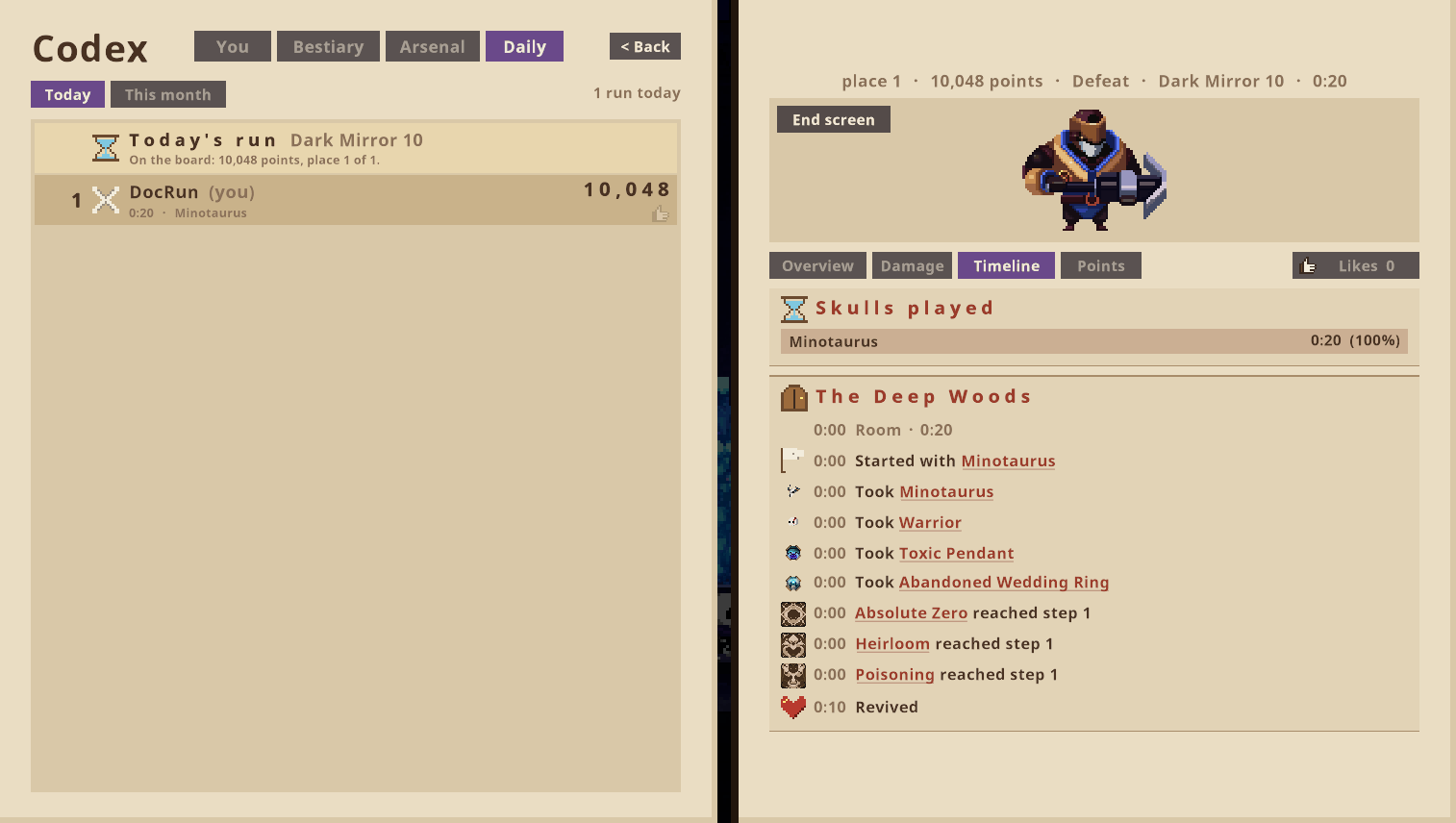
- A run's page: Overview (how it went, the bosses defeated, the build with every inscription, the numbers, your stats at the end), Damage (each piece of gear's share) and Timeline (skulls, items and inscriptions as they came, map by map). Every name links to its Codex page.
- End screen shows the game's own result panel again with the run's numbers.
- Star a run to keep it whole forever; older runs without a star keep only their summary (setting).
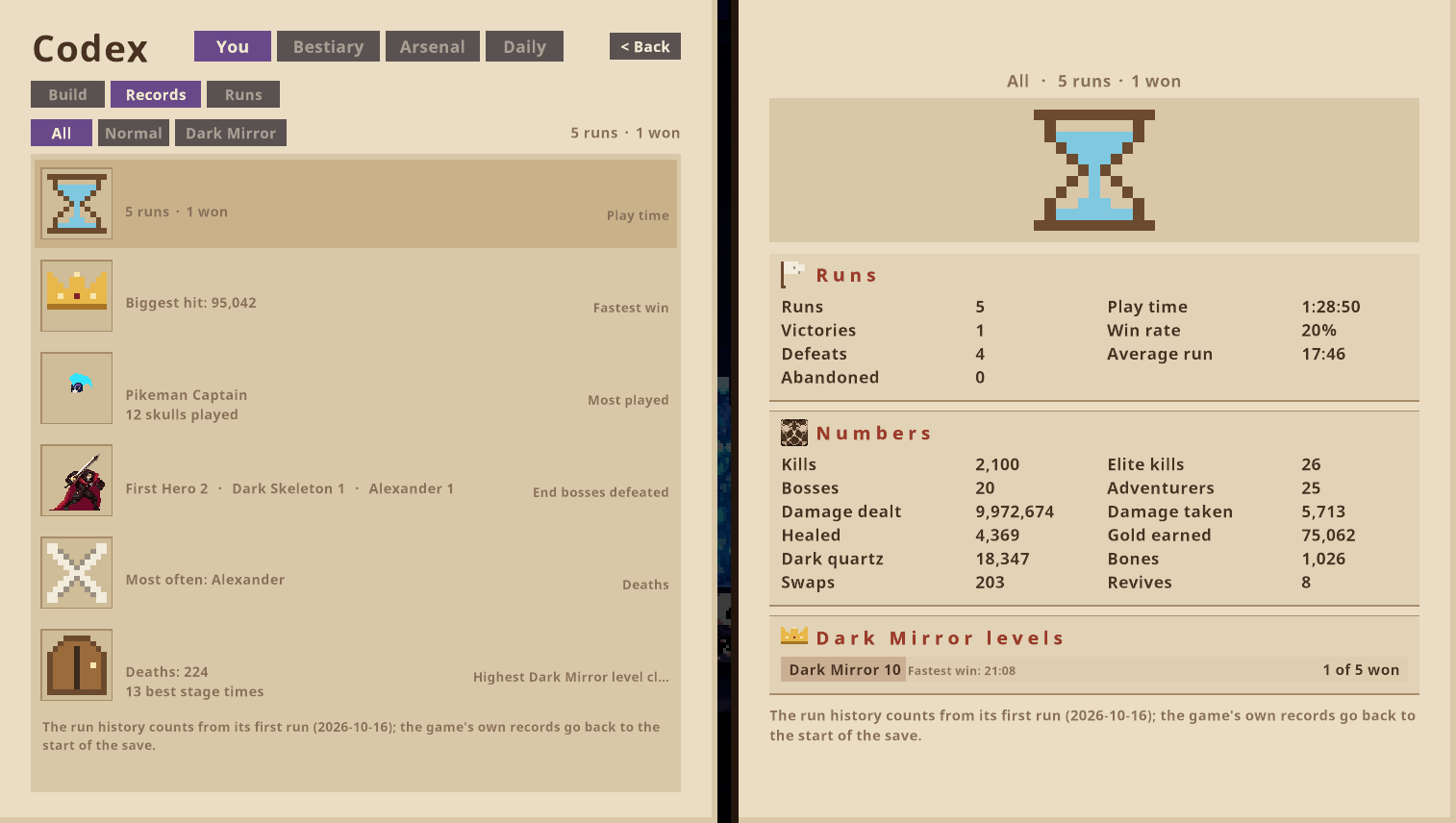
- Records (You → Records): totals, best runs, per skull, against bosses, deaths and the game's own counters.
Achievements (new in 0.14)
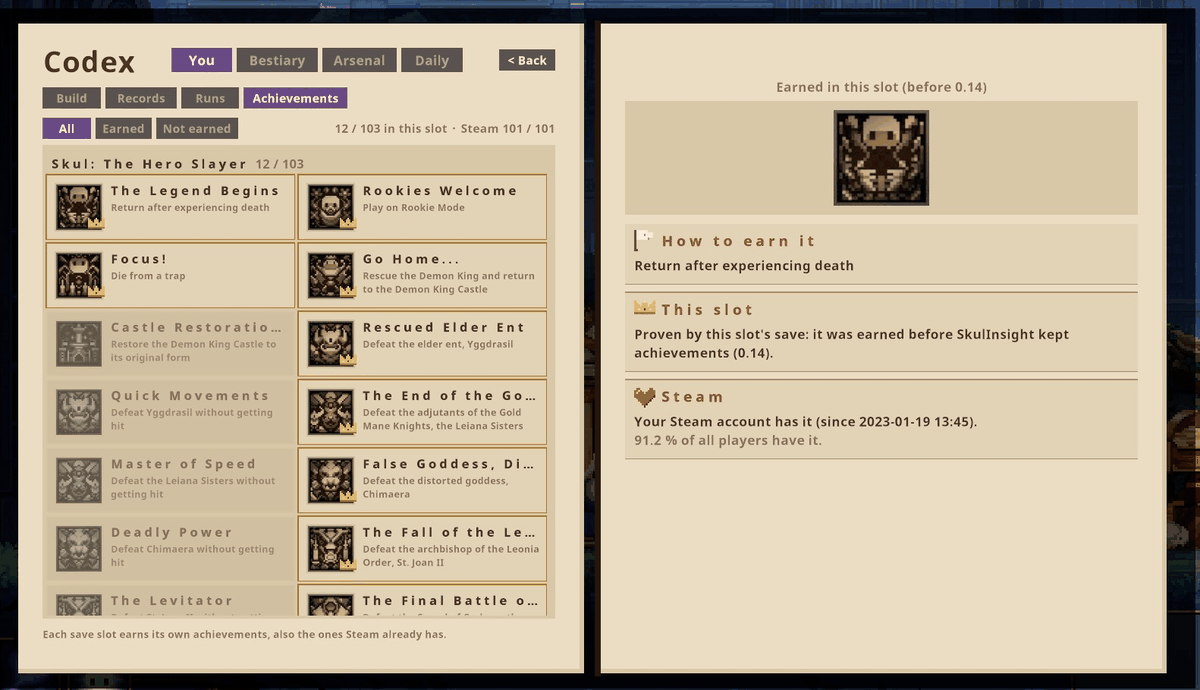
Codex (K) → You → Achievements: all 101 of Skul's Steam achievements, as this save slot has them.
- Steam gives an achievement only once; here every save slot earns its own. A slot from before 0.14 gets what its save proves (bosses beaten, Dark Mirror levels, the endings, legendary skulls, ...); slot 1 (the game you had before save slots) can take over your Steam account's achievements once.
- Earned ones in colour with the date and the run they came in (a link), the rest in grey. Each page: how to earn it, the progress in your save (adventurers, dark quartz hearts, fragments, ...), a tip for the hard ones read from the game's code (what counts as getting hit in a no-hit clear, Little Bone for The Skeleton King, ...), your Steam account's state and the share of all players.
- Achievements that give the story away are veiled until you earn them or meet what they are about; hold the mouse button on one for 4 seconds to look anyway (setting).
- Two that the game counts but Steam doesn't have: Alexander and the Dark Skeleton without getting hit.
- When your slot earns one, a small notice slides down from the top of the screen with a short chime and back up (settings: notice, sound volume).
- Daily runs have SkulInsight's own achievements: thumbs up received (5 to 100) and days in a row (3 to 30).
Rewards (new in 0.15; on by default, one switch turns them off)
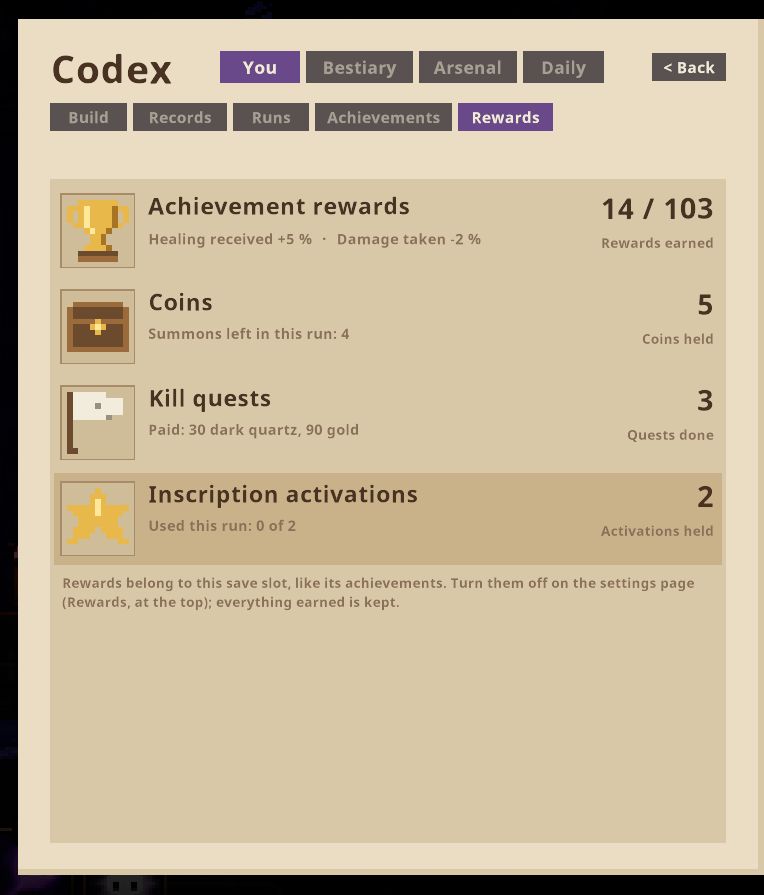
Codex (K) → You → Rewards. The first feature that changes the game's balance, a little: everything belongs to
the save slot, never counts in daily runs, and Rewards at the very top of the settings page turns it all off
(everything earned is kept and comes back).
- Achievement rewards: each of Skul's 103 achievements gives a small lasting bonus that fits it. A boss beaten: +3 % damage to that boss; beaten without getting hit: +10 % more (they multiply: +13.3 %). Each Dark Mirror level: physical and magic attack +1 %. Each legendary skull: +0.5 % by its type (Power: physical attack, Speed: attack speed, Balance: magic attack). Dying and traps: damage taken -1 %; shops: gold +1 %; the castle and the world: movement speed +1 %; dark abilities and inscriptions: cooldown speed +1 %; the hidden boss's trail: critical chance +1 %; and a few special ones (100 adventurers: +5 % damage to adventurers; The Skeleton King: +10 % while holding Little Bone). With every achievement: physical and magic attack +18.5 %, still less than one good item. Each achievement's page and the notice say what it gives; the Rewards tab adds it all up.
- Coins: break a legendary item or skull, or leave it behind on a map, and you get its coin (a skull raised with bones gives its first form's coin). Every 5th win over one adventurer gives that adventurer's coin, for its rare legendary item (The Chosen ...). A run that ends with Omen items gives an Omen coin for each, for an Omen item of your choice (its own page has a Summon too). In a later run, after the map is cleared, Summon drops the gear at your feet: one summon per run for each kind of coin (a skull, an item, an adventurer's item, an Omen item). A summon takes 3 coins of that gear (or 3 Omen coins; setting Coins per summon), an adventurer's coin is enough on its own; the adventurers' items in Dark Mirror runs.
- Kill quests: every normal enemy has an endless quest. About two runs' worth of kills of it (10 to 150) pays 25 dark quartz and 50 gold where it fell; dark enemies count double. A full run finishes about 21 quests (about 535 dark quartz and 1,075 gold). Each enemy's page shows its quest as a square that fills up.
- Inscription activations: complete an inscription in a run (bring it to its last step) and it earns one when the run ends, won or lost. In a later run an activation makes an inscription you have count one more until that run ends, like the Dark Mirror's banners (two per run, each inscription once).
- The run history marks runs played with rewards on, with the quests and coins of that run. All the numbers are settings (section Rewards).
Healing orbs (new in 0.14)
The purple healing orbs enemies drop are easy to miss. They can look like the game's Portable Potion (a bit bigger, with a green glow) or a big green plus; when a map is cleared while you are hurt and orbs are left, a short text above you says so. Your runs count the heals missed (orbs left behind while hurt, and the health they would have restored): on each run's page and on the Records page.

Clear view (new in 0.14)
With a strong build, your own effects can cover the screen until you can't see what hits you. Clear view makes the effects of your skills, items and summons (and your projectiles) fainter: over the run (full in chapter 1, the lowest opacity from chapter 5 on) and whenever many of them are on screen at once. Enemy attacks and their warnings are never faded. Settings section Clear view: on/off, the lowest opacity (40 %), both ways of fading, projectiles.
Mods (new in 0.14)
Pause (Esc) → Mods: a mod browser in the game, on Windows, Linux / Steam Deck and Mac.
- Left: Thunderstore's Skul mods with search, categories and sorting (last updated, downloads, likes, A–Z), each with its icon, author, downloads, likes and age. Click one for its details, the mods it needs and its Thunderstore page.
- Right: your mods with Enabled / Disabled, and the mods folder one click away.
- Installing, updating and turning mods on or off is your mod manager's job (r2modman, Gale): Thunderstore's rules don't allow a mod to update itself or other mods. It only goes online (Thunderstore) when you open it.
Daily runs (new in 0.13, six boards since 0.15; online, off until you turn it on)
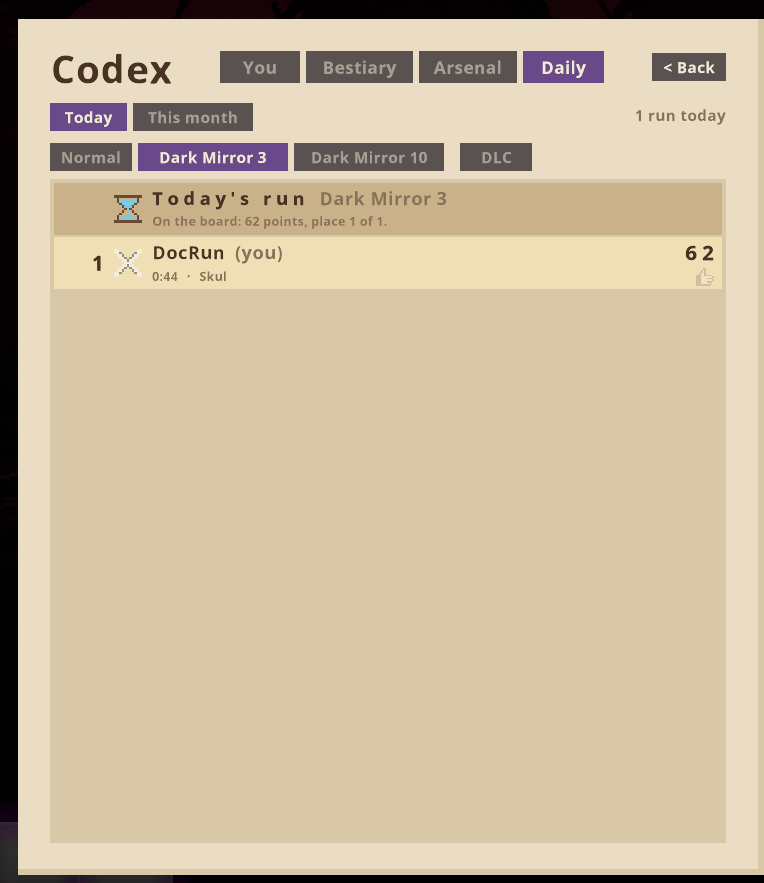
Codex (K) → Daily: every day three runs for everyone, each with and without the DLC, and one try on each.
- Normal, the Dark Mirror at a random level (0-10, the same for everyone that day) and Dark Mirror 10. Each has its own seed and its own boards; your streak counts any of them.
- With DLC boards bring the Mythology Pack's skulls and items and are only playable if you own it (anyone can watch them). Without DLC boards are the same run for everyone, DLC or not.
- The same start for everyone: the same gifts from the castle's Fox and Ogre and the same blessing.
- Played in a separate daily save slot made from your game: every gear unlocked, the Witch at her top, the Dark Mirror (and its machines) up to the day's level, the whole Codex open, 15,000 dark quartz, no rewards. Your own game waits as it is; Back to my game returns.
- After the run: a name (12 characters) for the daily and monthly boards. If typing freezes your game (some input methods such as Pinyin do in full screen), put the name into the mod manager's config (SkulInsight QoL → Daily → Name) and just press Send.
- Points (from 2026-11-01): a win 20,000 and 5 for every second under an hour (a run that didn't win: 1,000 per stage), 1,000 per boss fight won and 3,000 per optional Dark Mirror boss (counted from the run, not the game's double-counted kills), 150 per flawless room and 1,000 per flawless boss fight (no health lost; a shield or a dodge keeps it flawless), -2 per damage taken, 1 per 5 gold and 25 per bone left, times the difficulty. The server sends the current numbers: a run's Points page → How points are counted.
- The day's challenges: shown before the run, so you can plan for them: one of the game's achievements that is a choice in the run (the First Hero as Little Bone 1,500, a minute in the black market 300, 4 dark abilities in the Dark Mirror 500), a skull of the day and a quintessence of the day (win holding it, 1,500 each). The day's board is the run alone; the daily streak (up to 30 days) counts on the month board.
- Yesterday's winners give their names to the adventurers you meet (setting Winners as adventurers).
- Click a run on the board: its build, damage and timeline like your own run history, its points part by part, and a thumbs up.
- Fair play: one try (a daily run can't be continued), runs with other mods loaded don't count, no Steam achievements from the daily slot.
- It talks to the daily run server (skul.umut-aslan.dev) only after you turn it on, and sends a random player id made by the mod, the name you enter and your daily run (numbers, build, damage, timeline). Nothing else.
- Shoutout to Tythos and his community for using and promoting this passion project: leave him some support on Bilibili.
Settings in the game
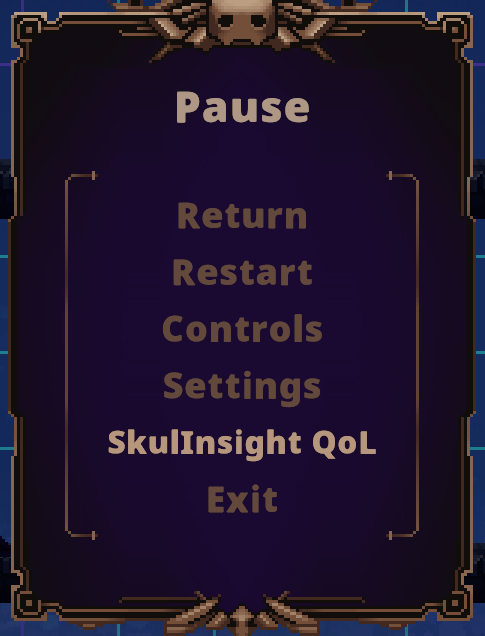
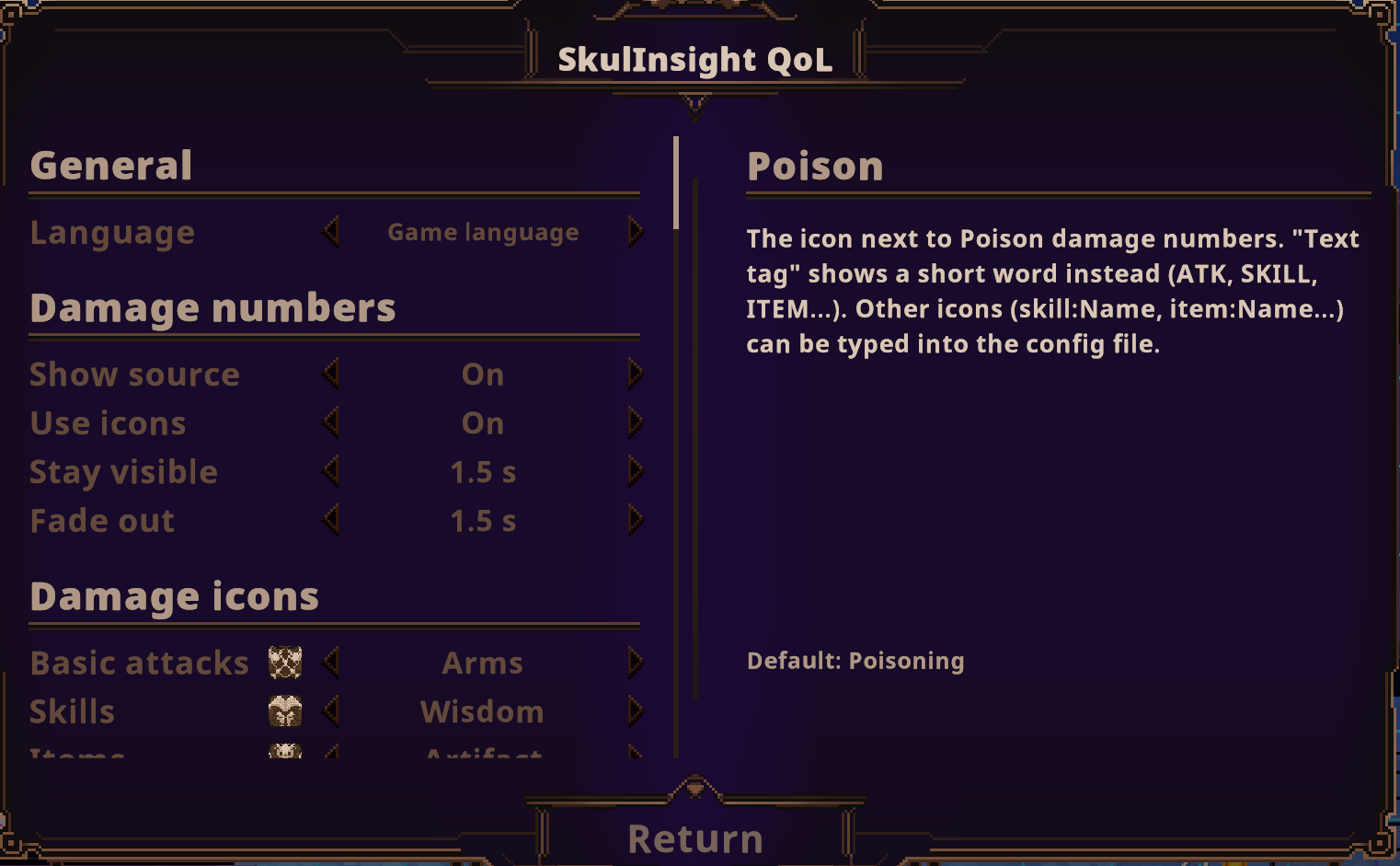
Pause (Esc) → SkulInsight QoL, right under the game's own Settings, styled like the game's options, with keyboard, mouse and controller. Since 0.16 the left side lists the features in groups: Gameplay (changes the game), Insight (what only shows), Helpers, Online and General, each with its switch; hovering or choosing one shows on the right what it does and its settings (Enter goes into them, Esc back). It shows the settings most players change; All settings at the end of the list shows every one, the fine-tuning too. New players choose at the first start between "Only information" and "Information and gameplay". Changes apply at once and are saved right away. What's new opens once after every update; General → Changelog shows every version's highlights in your language.
Restart room (new in 0.16)
Press F5 twice within 3 seconds (Restart Room → Key in the settings): back to the moment you entered the room (health, gear, gold, everything), exactly as when you close the game and continue, but without closing it. Your rewards go back too, and the run history notes each restart. In a daily run it ends the run (only full runs count).
Crash reports
Every game session leaves a report in BepInEx/DamageInsight/CrashReports (the newest 20): what happened (chapters,
maps, your build), every error with whose code it was in (the game's, SkulInsight's, a game method SkulInsight
hooks into, or another mod) and a verdict. A screen that stays black for 20 seconds and a game that closed
unexpectedly are noticed and said on screen. Since 0.16 it also notes how smooth the game runs (frames per second,
stutters, how much of each frame SkulInsight takes) and what was going on if the game stands still; Show FPS puts
a line on screen. Settings page: Crash reports folder → Open. Please attach the newest report to bug reports.
All game languages
The mod's texts follow the game's language (English, 한국어, 日本語, 简体中文, 繁體中文, Deutsch, Español, Português (Brasil), Русский, Polski, Français) and switch live when you change it.
The settings page has a Language row to pick a different one. To fix a translation without waiting for an
update, put a file BepInEx/DamageInsight/Lang/<code>.json with only your changes
({"strings": {"English text": "your text"}}; codes: en, ko, ja, zh-Hans, zh-Hant, de, es, pt-BR, ru, pl, fr), and
please send it in so everyone gets it.
Installation
With a mod manager (recommended)
- Install r2modman or Gale.
- Select Skul: The Hero Slayer, create a profile and install SkulInsight QoL. The required BepInExPack Skul is installed automatically.
- Start the game with Start modded.
Manual installation
- Install BepInExPack Skul into
the Skul folder (the folder containing
Skul.exe). - Start the game once and close it (BepInEx creates its folders).
- Copy
DamageInsight.dllintoSkul/BepInEx/plugins/SkulInsight_QoL/. - Start the game.
Linux and Steam Deck
The mod runs through Proton. Skul's native Linux version can't load it.
- Steam → right-click Skul → Properties → Compatibility: force Proton (for example Proton 9.0).
- Start Skul once from Steam without mods, then quit (this creates Skul's Proton prefix).
- Leave Skul's launch options empty (the Flatpak version of r2modman is the exception).
- Install the mod in r2modman or Gale and press Start modded.
Errors, Steam Deck, manual installation and a check script: Linux and Steam Deck guide.
macOS
The mod runs on Skul's Mac version (Intel and Apple Silicon); one Terminal script sets it up.
- Start Skul once from Steam without mods, then quit.
- Open Terminal, paste this line and press Enter:
curl -fsSL -o ~/Downloads/install-mac.sh https://raw.githubusercontent.com/Umut-Aslan99/SkulInsight_QoL/main/tools/mac/install-mac.sh && sh ~/Downloads/install-mac.sh - The script prints a launch option and puts it in your clipboard: Steam → right-click Skul → Properties → General → Launch options, press Cmd+V. Then start Skul from Steam.
Other Thunderstore mods on a Mac: sh install-mac.sh --add <the mod's Thunderstore link>.
Manual installation, errors and how it works: macOS guide.
Configuration
In the game: pause (Esc) → SkulInsight QoL (right under the game's Settings). Every setting below is there, with an explanation and its default; changes apply at once and are saved right away. Keyboard, mouse and controller work like in the game's own menus.
The same settings are in the settings file (created on the first start):
BepInEx/config/docrun.skulinsight_qol.cfg- in r2modman / Gale: Config editor
| Section | Setting | Default | What it does | | Rewards | Enabled | on | Achievement rewards, coins, kill quests and activations (never in daily runs; off: the game as it is) | | Rewards | AchievementRewards / Coins / Quests / InscriptionActivations | on | Each kind of reward on its own | | Rewards | SummonsPerRun / ActivationsPerRun | 1 / 2 | Summons of each kind, and activations, usable per run (0-3) | | Rewards | CoinsPerSummon | 3 | Coins a summon takes (1-10; an adventurer's coin is enough on its own) | | Rewards | QuestRuns / QuestDarkQuartz / QuestGold | 2 / 25 / 50 | A quest step in runs' worth of kills, and what it pays |
| Rewards | AdventurerKills | 5 | Wins over one adventurer for its coin |
|---|---|---|---|
| Damage Numbers | ShowSourceTag / UseIcons | on / on | Source icon or tag on damage numbers |
| Damage Numbers | HoldSeconds / FadeSeconds | 0.8 / 0.7 | How long numbers stay and fade |
| Damage Icons | (per source) | Which icon each damage source uses | |
| Boss Health Bar | ShowNumbers | on | HP numbers on big health bars |
| Descriptions | ShowDamageNumbers | on | Real numbers in all descriptions |
| Descriptions | PreviewPickup | on | Pickup / swap preview |
| Descriptions | HoldToShow / HoldKey | on / Shift | Numbers in the game's boxes only while the key is held |
| Descriptions | Compact | on | One line per attack in the game's boxes (off: every hit with its formula) |
| General | WhatsNew | on | Show what's new once after an update |
| General | MenuSounds | on | The mod's buttons play the game's menu sounds (hover, click) |
| General | CrashReports | on | A report per game session in BepInEx/DamageInsight/CrashReports (newest 20 kept) |
| General | RunHistory / RunHistoryKeep | on / 100 | Keep every run in the Codex; how many of the newest keep all their details |
| Daily | Enabled | off | The daily run (online): only after you turn it on (Codex → Daily) |
| Combat Log | ToggleKey | L | Opens the combat log |
| Combat Log | RecordCalculations | on | Per-hit calculation (hover a line) |
| Combat Log | SaveToFile | on | Log files in BepInEx/DamageInsight/CombatLogs (newest 30 kept) |
| Combat Log | UseDialogueBackground / BackgroundOpacity | on / 0.85 | Look of the log window |
| Mini Log | Enabled, Lines, HideAfterSeconds, ShowPie, GapAboveMinimap | off, 4, 5, on, 40 | Small log above the minimap |
| Cooldown Ticker | Enabled / Opacity | on / 0.55 | Seconds on HUD icons |
| Clear View | Enabled / LowestOpacity | on / 0.4 | Your own effects get fainter so enemy attacks stay visible |
| Heal Orbs | Look / Reminder | Potion / on | How healing orbs look (Game, Potion, Plus); a text when some are left on a cleared map |
| Mods | Enabled | on | The Mods button in the pause menu (the mod browser) |
| Clear View | OverTheRun / WhenBusy / Projectiles | on / on / on | Fade by chapter, when many effects are on screen, and your projectiles too |
| Codex | Enabled / ToggleKey | on / K | The Codex book |
| Codex | ShowMoveHints | on | Under a beaten boss's moves: when it uses them |
| Codex | FilmBossAttacks | on | Film each boss move once for the Codex |
| Codex | CleanFilms | on | Films show only the boss (no damage numbers, own effects, summons, status effects) |
| Codex | CompactFilms | on | Save films as compact pictures (about a quarter of the size) |
| Codex | ProjectilePictures | on | Add an enemy's projectile to its pictures the first time it fires one |
| Codex | OpenOnYou | on | During a run the book opens on the You page |
| Codex | AchievementNotice / AchievementSound | on / 50 % | A small notice (with a chime) slides down from the top when your save slot earns an achievement |
| Codex | VeilSecretAchievements | on | Story spoilers stay veiled on the Achievements page until earned, met or held |
| Codex balance | (unlock numbers) | Runs / wins / pickups it takes to unlock ★★ and ★★★ in the Codex |
Compatibility
- Made for Skul: The Hero Slayer 1.9.x (Steam: Windows; Linux and Steam Deck through Proton) with BepInExPack Skul (BepInEx 5.4.21+), or the native Mac version with BepInEx 5.4.23.5 for macOS (set up by the Mac installer).
- Changes no content. The only balance change is the optional rewards (one switch turns them off), and Restart room makes going back to a room's start easy. Your save is only touched when you switch save slots (a backup of the game's save is made before every switch); a daily run is played in its own slot. Safe to add or remove at any time.
- Should work next to content mods. Items the mod doesn't understand simply show no extra numbers. Please report anything odd. Daily runs only go on the board without other mods (with them they still work).
- After a game update the mod checks all of its hooks at startup and switches off only what broke. The results
are in
BepInEx/LogOutput.logas[SelfTest]lines.
Known limitations
- A few item effects that aren't direct damage (buffs, heals, chances) show no extra numbers yet.
- The pickup preview covers item stats and plain stat inscriptions. Conditional buffs and bonus-inscription items are not included yet. Skulls and essences on the ground have no preview yet.
- Shock and ember damage from some sources may be labelled with a generic tag.
- Codex:
- King Alexander's hands, First Hero's later forms, the bomb phase and the Dark Mirror helpers (Supporting Thief/Warrior) have no notes yet. King Alexander's heart fights with several attacks at once, so some of its films show two attacks.
- Films made before 0.11 may still show your own effects or end early; "Refilm" or "Reset Codex" takes them again.
- Arsenal pages show what you have met; a skill's numbers appear after you used it once.
- Achievements: their icons come from Steam (the first look may take a moment). No-hit clears and a few others (the black market, the castle) can't be proven from an old save and are earned again.
- Daily run: a crash during a daily run ends that day's try (a daily run can't be continued). Only today's board opens runs; past days and the monthly board don't yet.
- Translations were made with the help of the game's own terms but not checked by native speakers yet; corrections are very welcome (see All game languages). The config file and the developer tools stay English.
Roadmap
- 0.17 (this version): online co-op as an open beta (Steam friends and matchmaking, two players; 3-4 players with Steam friends as an experiment since 0.17.2)
- 0.17.x: co-op fixes from the beta's reports (enemies only one player sees, NPC rewards per player, effects drawn too strong), then 3-4 players through matchmaking too
- 0.16: restart room, new daily points and the day's challenges, the settings page in groups, the changelog in the game, runs in your language
- Next: the Dark Mirror page (levels 0–10 with the game's values, Darktech machines, fragments, the hidden boss)
- Later: skins for skulls from the daily achievements
- Later: knowledge pages: drop chances, run layout, shops and prices, NPCs, game mechanics
- Later: the story in the Codex (story books, dialogue, replayable story scenes)
Feedback / bug reports
Co-op: the Co-op window's Report a bug or idea does the work: it packs your logs into one zip (Steam ids hidden), opens its folder and this repository's issue page with the versions filled in; drag the zip into it. Save logs makes only the zip (for the Skul Discord).
Please open an issue on GitHub: https://github.com/Umut-Aslan99/SkulInsight_QoL/issues. Attach the newest file
from BepInEx/DamageInsight/CrashReports (settings page: Crash reports folder → Open) and BepInEx/LogOutput.log,
and tell us the mod version and what you did. After a crash, start the game once more before you send it: the
report of the crashed session is completed at the next start. Screenshots help a lot. On Linux, please
also attach the report of the check script; on a Mac, the report of
sh install-mac.sh --check.
Credits
- DocRun: idea, design and testing
- Built with BepInEx and Harmony
- Thanks to MrBacanudo's Skul mods (SkulHardModeMods) for showing how Skul modding works, and to the Skul modding community on Thunderstore.
Skul: The Hero Slayer is made by SouthPAW Games and published by NEOWIZ. This is an unofficial fan mod and not affiliated with them.
License
GPL-3.0. You may use, change and share this mod. If you publish a changed version or a mod built on this code, it must also be GPL-3.0 with its source available, and keep the original credits.
CHANGELOG
Changelog
0.17.3 (hotfix from the first players' logs)
Fixes from your co-op runs and reports (thank you: the run logs and the report form found all of these):
- Your own inscriptions in co-op: an inscription sometimes never took effect when you picked up its item (the game refused to load it a second time while your teammate's game data held it), so its bonus was missing for the whole run. Found in 12 of the first 20 co-op logs.
- Another co-op mod installed (ticket #6: "the boss keeps attacking the downed player"): DuelManTeam's OnlineCoopBeta, still in BepInEx/patchers, took over the game parts SkulInsight's co-op needs, so enemies only went for that game's player. SkulInsight now warns at the start and whenever the Co-op window opens, names the mod and how to remove it, and won't host, join or search until it is gone. The same when SkulInsight's own co-op part (BepInEx/patchers/SkulInsight) didn't load.
- Enemy attacks fired from shots (knockbacks and flips on projectiles, some passive stacks) go for the right player instead of the host's.
- A teammate leaving no longer clears your saved "super inscription" state.
- Bug reports and co-op run logs name other co-op mods and the co-op part's state ("Co-op setup").
0.17.2 (3-4 players with Steam friends, experimental)
New:
- 3-4 players with Steam friends (experimental): the host sets how many players the game takes in the settings (Co-op → Players, 2-4). Before, a game was held at two players whatever that setting said. Each player has their own colour (gold, blue, green, pink), the door vote is weighted by votes (a door with 2 of 3 votes wins 2 times in 3), any standing teammate can revive, and enemies get more health with each player: at the default 2x for two players, about 2.75x with three and 3.5x with four (the host's Enemy health setting moves all of them). Matchmaking still pairs two players. Asked for by a co-op group on the Skul Discord, thank you.
- Connection problems: when a co-op connection breaks (and when a game starts or joins), the log now says whether Steam could reach its relay network. This helps with "Steam found no route to the other game".
- The teammates' health rows at the bottom left stack without a gap.
Known issues with 3-4 players:
- Checked with test copies on one PC (three players: joining, the run start, three rooms with door votes, the Co-op window), not yet in a real Steam game with three or four people. Please report what you see (Co-op window → Report a bug or idea).
- Everyone needs 0.17.2. The host's connection carries every player's data: a slow host line shows first as teammates that lag behind.
- "Go to teammate" (F6) takes you to the nearest teammate in the room.
0.17.1 (co-op fixes from your runs, enemy health in the Co-op window)
Fixes from the first players' co-op runs (thank you for the reports):
- Adventurer arenas: your camera locks on the arena again while you fight in it, also when your teammate walked in first, and it no longer stays on the arena when only your teammate is inside.
- A teammate no longer walls you in: a room's own walls, gates and seals react only to your own character (in the Dark Mirror's chapter 4 room before the boss, the other player was shut inside a wall and floated). Both players need 0.17.1 for this. If you do stay stuck inside a wall, you are taken to your teammate by yourself.
- Enemies without a target go for the nearest player, not always the host: a veteran adventurer chased the host outside its arena and never came to the player inside it.
- The Pope's fanatics no longer stay after he dies for the joining player (they kept attacking and couldn't be killed).
- Bosses stop attacking a downed player and go for one who still stands.
- Warning lines in the right place for the joining player: the twin sisters' crossing attack and the dark First Hero's wall attack.
- Your teammate's summons' shots no longer get your green outline.
New:
- Report a bug or idea from the game: a form in the Co-op window, the settings (General) and the Codex sends your report to the developer. Its title and text become a public GitHub issue; your logs (attached to bug reports by default, Steam ids and your account name hidden) only reach the developer. Without a connection, the logs are saved and GitHub's page opens as before.
- Co-op run logs, asked once: after your first co-op run a window asks whether SkulInsight may send each co-op run's logs to the developer (never public), so co-op bugs get found without a report. Change it any time: settings → Co-op → Send co-op run logs.
- Enemy health in the Co-op window: the host's setting (normal enemies, elites, bosses) is shown to everyone. The host changes it with the arrows; the others can ask for more or less and say OK. The slider goes from 1.5x to 4.5x (default 2x). A crown marks the host, and the player with the least Dark Mirror progress is marked.
- Matchmaking tells you why nobody matches (other mods, or another version of SkulInsight QoL), and the Find a partner panel shows who is searching now and the busiest hour on your clock.
- An "Update available" window in the castle when a newer SkulInsight QoL is out (General → Update notice). Co-op and matchmaking only bring players with the same version together.
- A more precise co-op log for bug reports (where everyone stands, the camera, the bosses' targets).
Still known (fixes come in 0.17.x): some enemies exist only on the joining player's game (Chief Maid's servants, the Chimera lab's sleeping subjects, the maze room's cats); some of your teammate's effects are drawn at full strength (Dark Paladin's swings, Rockstar's lightning dash) and Dark Paladin's charged swings show no animation on the other game; NPCs that give something don't yet roll a different reward per player; the Death Knight's shield (iced cola) works only for the host; up to 2 players.
0.17.0 (online co-op, open beta)
- Online co-op (open beta): play a run together. Off by default: pause (Esc) → SkulInsight QoL → Online
co-op (open beta), then restart the game. Two players for now.
- With a Steam friend: open the Co-op window (F3, or the Co-op button in the pause menu), host a game and invite a friend; they join from your invite or from their Steam friends list ("Join game").
- With anyone: matchmaking on the SkulInsight server pairs the nearest players first, for a normal run or the Dark Mirror (you choose), and you can say whether you may host.
- One run, the host's world: the host's castle, Dark Mirror level and unlocks decide what the run looks like; everybody keeps their own save, gear, gold, quests and run history.
- Shared: the enemies and bosses (the host's game runs them, everyone hits the same ones), room clears, doors (a vote; a coin flip when you disagree), gold drops (everyone gets them), dialogues (anyone moves a line on). Your own: room rewards, shops, gear and the Black Market.
- Revive: a downed teammate shows a ring; hold the interact key at it. Once per room or boss fight; everyone who is down gets some health back when the room is cleared.
- Enemy health: enemies have more health in co-op. The host sets how much (Co-op → Enemy health, 1.5x to 3x for two players, default 2x; elites and bosses a little more). A change counts at once for everyone.
- Seeing each other: name tags and a colour per player; your teammate is slightly see-through with an outline in their colour; their moves, projectiles, quintessences and summons (Gravedigger, Oberon, ...) show on your game, drawn fainter so your own stay readable. Their camera shakes, screen flashes and damage numbers stay on their screen (settings bring them back). Your own projectiles get a thin green outline.
- Connection problems: a banner shows when the connection struggles; a dropped player can come back into the same run, or everyone plays on alone. The connection box (ping, quality) sits below the run clock.
- No pause in co-op (the game keeps running for the others). Stuck? F6 takes you to your teammate, makes you visible again if a trap left you hidden, and frees the controls when something holds them (press it twice).
- The combat log has a Players view in co-op: each player's share of the damage, DPS and top sources.
- This is a beta. The Co-op window's Report a bug or idea packs your logs into one zip (Steam ids hidden) and opens the report page on GitHub; Save logs makes only the zip (for Discord). A detailed co-op log is on by default during the beta; it stays on your PC.
- Enemy projectiles that can hit you get a thin red outline that pulses gently, also when you play alone (Outlines → Enemy shot outline).
- Fixed: the game could crash while closing (the Codex's picture work ran on after Unity shut down); with 8 buttons the pause menu's rows got too tall for its frame.
Known issues of the beta (fixes come in 0.17.x, from your reports):
- Some enemies exist only on the joining player's game (Chief Maid's servants, the sleeping subjects of the Chimera's lab, the maze room's cats): they stand around and can't be killed there.
- The twin sisters' (Leiana's) crossing attack shows its lines at the top of the screen for the joining player.
- Some of your teammate's effects are drawn at full strength (Dark Paladin's swings, Rockstar's lightning dash), and Dark Paladin's charged basic swings show no animation on the other game.
- NPCs that give something (the old skeleton, the slime, Arachne's upgrade, ...) are each player's own, but don't yet roll a different reward for each player; the Death Knight's shield (with the iced cola) works only for the host.
- Up to 2 players; 3-4 players and host migration come later.
0.16.2 (your Steam name for the board)
- The name for the daily board starts with your Steam name (the one the title screen shows) when you haven't set one, so runs no longer go on the board as "Skul" by accident (one day's board had three players called "Skul": all three had sent an empty name). You see it in the box before sending and can change it; an empty box still sends "Skul". A name set in the config (Daily, Name) or used before comes first.
0.16.1 (restart room fix, daily points 4, the day's challenges)
- Fixed: Restart room (F5) brought the run back as Little Bone with no gear (closing and reopening the game brought it back). The game loads a run's gear in advance when it starts; the restart now does that again, the way the game itself does when the platform user changes. The same fix applies to switching to a save slot whose run is in progress. If it happened to you with 0.16.0: close the game before entering another room, and the room's save is still there.
- Daily points (on the server, for every version of the mod; feedback from Tythos and his community):
- Formula 3 started a day early, on October 31; the day's runs finished before the switch were counted again.
- Formula 4 from November 1: gold and bones left are worth much more: 1 point per 5 gold (was 10) and 25 per bone (was 2). Keeping them means giving up power, so it is now a real choice. November 1's runs were counted again (only those two parts changed; no place changed).
- The day's achievements from November 2: none that the points count already (no more no-hit bosses or flawless chapters: a flawless boss fight paid twice). Each day and board has one of the game's achievements that is a choice in the run (the First Hero as Little Bone, a minute in the black market, 4 dark abilities), a skull of the day and a quintessence of the day to win holding. All shown before the run, so you can plan for them.
- "How points are counted" on a run's Points page now shows the numbers the server sends, so the next tuning needs no update of the mod. The quintessence of the day has its own line on the Daily page.
- Runs in your language: other players' runs (and your own after changing the language) show their skills, damage table, enemies and stages in your language, also runs sent before this version. The mod finds each name in the game's own texts of every language (Umut: a Chinese player's run was unreadable for him).
- Fixed: the name for the daily board could not be changed once a name had been used: emptying the box brought the old name back at once (also while an input method like Pinyin was composing a new one).
- The changelog in the game (Tythos: many players never open GitHub or the mod manager's changelog): settings → General → Changelog shows every version's highlights in your language, newest first, back to 0.9.0. The What's new window now opens once after every update (small ones too) and is the same list: what is new for you sits in a highlighted box at the top, the earlier versions below (scroll with the mouse wheel or the arrow keys).
0.16.0 (restart room, daily points 3, fixes from the first players)
- Restart room (press F5 twice within 3 seconds): back to the moment you entered the room (health, gear, gold, everything), exactly as when you close the game and continue, without closing it. Your rewards (coins, quests, activations) go back too, so restarting can't farm quests. The run history notes each restart. In a daily run it ends the run, like leaving the game: only full runs without save-scumming count. Settings section Restart Room (on, key F5).
- Daily points, formula 3 (from 2026-11-01, so November's month board uses one formula; feedback from Tythos and his community): the parts that were the same for everyone who finished are gone (stages, kills, damage dealt; the game counts some kills twice when several hits land at once). Now: a win 20,000, speed 5 per second under an hour, a run that didn't win 1,000 per stage, 1,000 per boss fight won (from the run history, not the game's double-counted kills), 3,000 per optional Dark Mirror boss (Dark Skul, King Alexander), 150 per flawless room and 1,000 per flawless boss fight (no health lost; a shield or a dodge keeps it flawless), -2 per damage taken, 1 per 10 gold and 2 per bone left. The day's achievements: each day and board has four, worth 300 to 1,500 each: two of the game's (only the logical ones: no-hit bosses, the First Hero as Little Bone, a minute in the black market, 4 dark abilities), a skull of the day (win holding it, any of its forms) and a flawless chapter. The Daily page lists them and ticks them off; the achievement notice shows. The day's records no longer add points and the daily streak (100 a day, up to 30 days) counts on the month board only, so the day's board is the run alone (what tournaments compare). Runs sent by 0.15 still count (their bosses from the run they sent).
- Settings page, new layout: the features on the left in groups: Gameplay (changes the game) (rewards, restart room), Insight (what only shows), Helpers (Clear view, healing orbs), Online (daily runs), General. Each feature has its switch right there; hovering or choosing one shows on the right what it does and its settings. Enter goes into them, Esc back. It shows the settings most players change (about a third); All settings at the end of the list switches on every setting, the fine-tuning too (timings, opacities, each damage source's icon, the Codex's films and unlock counts, the rewards' numbers).
- A choice at the first start: new players are asked "Only information" or "Information and gameplay"; with the first (and Esc) the rewards and Restart room start off. Players who update keep their settings.
- Yesterday's winners as adventurers: the adventurers you meet carry the names of yesterday's daily winners (each board's first place; in a daily run, that board's). Setting Daily → Winners as adventurers (needs daily runs).
- Name for the board without typing in the game: setting Daily → Name in the mod manager's config editor. Some input methods (Pinyin, IME) freeze full-screen games while typing; the name box starts with this name, so Send works without typing. The Daily page says so after a run.
- Fixed: hovering selects again. The mod's windows could leave their own UI event system running in place of the game's, so the mouse no longer selected items, skulls and dark abilities by hovering (a click bought a dark ability at once). The mod's stand-in now only exists while the game has none.
- Fixed: stutters with strong builds. Since 0.15 every kill rewrote the whole rewards file on disk; kills are now saved a few seconds later.
- Performance in the crash reports: once a minute frames per second, stutters and how much of each frame SkulInsight takes (its most expensive parts); a line per stutter; a performance summary. A freeze watch notes what was going on when the game stands still for 6 seconds (SkulInsight's code or not, a text box, an input method). Settings General → Performance in the reports (on) and Show FPS (a line in the top left corner).
- Run history: flawless rooms per run ("31 of 52 fights without losing health"); a boss counts whatever dealt the last hit (a daily run of 0.15 missed three bosses finished by damage over time).
0.15.0 (rewards, six daily boards)
- Rewards (Codex → You → Rewards), the first feature that changes the game's balance, a little. On by
default; the new settings section Rewards is the first on the settings page and turns it all off (everything
earned is kept). Everything belongs to the save slot and never counts in daily runs.
- Achievement rewards: a lasting bonus for each of the 103 achievements, by theme. Boss beaten: +3 % damage to that boss (all its phases); without getting hit: +10 % more (multiplied: +13.3 %; The Strongest only in the Dark Mirror). Dark Mirror levels 0-10: physical and magic attack +1 % each. Legendary skulls: +0.5 % each by type (Power: physical attack, Speed: attack speed, Balance: magic attack). Danger (dying, traps): damage taken -1 %. Shops: gold gained +1 %. The castle and the world: movement speed +1 %. Dark abilities and inscriptions: cooldown speed +1 %. The hidden boss's trail: critical chance +1 %. Special: 100 adventurers +5 % damage to adventurers, The Skeleton King +10 % while holding Little Bone, Cold-Blooded critical damage +3 %, Rookies Welcome healing received +5 %. Added to your stats like the Witch's (the You page and the descriptions include them); the combat log's calculation names them "Achievement rewards". Achievements taken over from Steam count too.
- Each achievement's page has a Reward section; the achievement notice shows the reward on a second line.
- Coins: a legendary item or skull broken or left behind on a map gives its coin (a skull raised with bones gives its first form's; shop wares and summoned gear don't count). Every 5th win over one adventurer gives its coin, for its rare legendary item (The Chosen Warrior's Armor, Cleric's Bible, Hero's Circlet, Mage's Badge, Hunter's Arrow, Thief's Twin Swords). A run that ends with Omen items gives an Omen coin each, for an Omen item of your choice (one you have met). Summon (Rewards tab, or the gear's page; Omen items' pages for Omen coins) drops the gear at your feet, in a run, once the map is cleared: one summon per run for each kind of coin (legendary skull, legendary item, adventurer, Omen). A summon takes 3 coins of that gear (or 3 Omen coins; setting Coins per summon); an adventurer's coin is enough on its own. The adventurers' items are summoned in Dark Mirror runs (where they belong).
- Kill quests: every normal enemy has an endless quest: about two runs' worth of kills of it (at least 10, at most 150) pays 25 dark quartz and 50 gold where it fell; dark enemies count double; a full run finishes about 21 (about 535 dark quartz and 1,075 gold; the Kill quests page shows the estimate). Enemy pages show the quest as a square that fills up, the reward in its middle (adventurers: their coin's progress).
- Inscription activations: completing an inscription in a run (its last step) earns one, paid when the run ends, won or lost; in a later run "+1 for this run" makes an inscription you have count one more until that run ends, like the Dark Mirror's banners (not Sun and Moon, Masterpiece, Sin or Omen); two per run, each inscription once.
- The run history marks runs played with rewards on, with that run's quests and coins.
- Settings: Rewards, Achievement rewards, Coins, Kill quests, Inscription activations, Summons per run (1 of each kind), Coins per summon (3), Activations per run (2), Quest length (2 runs), Quest dark quartz (25), Quest gold (50), Adventurer wins per coin (5).
- Daily runs: six boards a day. Normal, the Dark Mirror at a random level (0-10, the same for everyone that day) and Dark Mirror 10, each with and without the DLC. Each has its own seed, its own daily and monthly boards and one try; the Daily page picks the board with chips (and a DLC chip). The DLC boards bring the Mythology Pack's skulls and items and are only playable for players who own it (anyone can watch them); the boards without DLC are the same run for owners too (no DLC gear, no DLC map events). A streak counts any board. 0.14 keeps playing the Normal board without DLC.
- Daily runs: the same start for everyone. The castle's Fox and Ogre give everyone the same gifts and the Holy Grail the same blessing (they were rolled before the day's seed was set). A Dark Mirror daily has the Darktech machines up to the day's level only (a Dark Mirror 5 day has no Darktech of levels 6-10), and the daily slot's Codex is fully open. The Dark Mirror's first-time scenes count as seen in the daily slot, like in a save that cleared it: no Dwarf Engineer talks or machine intros, and the skull machine of Dark Mirror 7 and up works at once (it stayed off until its intro ran when your own slot had never been that far).
- The Daily page has a Shoutout to Tythos and his community, who use and promote the mod, with a link to his Bilibili page.
- Fixes: the Daily page said "No connection to the daily run server" after every finished run (the server's answer to a start sent again was taken for a lost connection); a second board played on the same day now reloads the castle for its own seed too; characters the game's fonts don't have (×, →, •) are replaced by ones they have.
- What's new lists 0.15, and one line about 0.14 for players who come straight from 0.13.
0.14.1 (the Thunderstore version follows Thunderstore's rules)
- 0.14.0 was taken off Thunderstore: "plugins updating themselves or other packages is not permitted" there; mod
managers (r2modman, Gale) install and update mods. So in this version:
- SkulInsight doesn't update itself any more (and the setting Update automatically is gone). r2modman and Gale update it as before.
- Mods (pause menu) shows Thunderstore's Skul mods and yours side by side, with search, categories, sorting, each mod's details and a button to its Thunderstore page; it doesn't download, install, update, remove or switch mods (do that in your mod manager).
- Everything else is 0.14.0 as below.
0.14.0 (achievements; macOS)
- Achievements (Codex → You → Achievements): all 101 of Skul's Steam achievements as this save slot has
them. Steam gives each achievement only once; here every save slot earns its own, also the ones your Steam account
already has.
- Earned ones in colour with the date and the run they came in, the others in grey. Each page shows how to earn it, your progress in this save (100 adventurers, 100 dark quartz hearts, 3 fragments, 5 inscriptions modified), a tip for the hard ones read from the game's code (what counts as getting hit in a no-hit clear, holding Little Bone for The Skeleton King, freeing no caged NPC for Cold-Blooded, each Dark Mirror level on its own, ...), links to the boss or the skull, your Steam account's state and the share of all players.
- Slots from before 0.14 get what their save proves: bosses beaten (by the stages reached), the endings, Dark Mirror levels, Alexander and the Dark Skeleton, legendary skulls taken, the counters. Slot 1 (the game you had before save slots) can take over your Steam account's achievements once.
- Achievements that give the story away are veiled until you earn them or meet what they are about; hold the mouse button on one for 4 seconds to look anyway. New setting Veil secret achievements (on).
- Two achievements the game counts but Steam doesn't have: Alexander and the Dark Skeleton without getting hit.
- A run's page lists the achievements earned in it.
- Achievement notice: when your slot earns an achievement, a small box with its icon and name slides down from the top of the screen with a short chime and goes back up after a few seconds. New settings Achievement notice (on) and Achievement sound (50 %; the game's volume applies too).
- Clear view (players' request): with a strong build your own effects cover everything. Now the effects of your skills, items and summons (and your projectiles) get fainter over the run (full in chapter 1, the lowest opacity from chapter 5 on) and whenever many of them are on screen at once. Enemy attacks and their warnings are never faded. New settings section Clear view: Fade your effects (on), Lowest opacity (40 %), Fade over the run (on), Fade when busy (on), Your projectiles too (on).
- Mods (pause menu → Mods), a mod manager in the game, styled after tModLoader and Minecraft's pack screen: Thunderstore's Skul mods on the left (search, categories, sorting by update, downloads, likes or name; each with its icon, author, downloads, likes and age; a click shows its details), your mods on the right (Enabled / Disabled / Restart needed). Install (with the mods it needs), Update, Turn on / off, Remove (into a backup folder), turn all on or off, open the mods folder, and Restart game (the game closes and Steam starts it again; on Windows, Linux / Steam Deck and Mac). Mods go where r2modman and Gale put them (BepInEx/plugins/Owner-Name). It goes online (Thunderstore) only when you open it. In an r2modman profile every change goes into r2modman's mod list too, so r2modman shows what is really installed. New setting Mod manager (on).
- Updates itself: at every start SkulInsight looks on Thunderstore for a newer version of itself and installs it
in the background; it runs from the next start (or right away with Mods → Restart game), and a short message says
so. Only from its own Thunderstore package, and the downloaded file is checked first; the old version is kept in
BepInEx/DamageInsight/Mods/Backup. Also in r2modman and Gale profiles: r2modman's mod list gets the new version, and Restart game starts the game with the same profile again. New setting Update automatically (on). The Mods window's Update on SkulInsight's own row does the same. - Healing orbs (beginners often miss the purple orbs enemies drop): they can look like the game's Portable Potion (a bit bigger, with a green glow) or a big green plus (setting Healing orb look: the game's orb / Portable Potion / green plus). When a map is cleared while you are hurt and orbs are left, a short text above you says so (setting Healing orb reminder). The run history counts Heals missed: Small Healing Orbs left on a map (or on the map you died on) while you weren't at full health, and the health they would have restored, on each run's page and added up on the Records page.
- Daily runs: SkulInsight's own achievements for thumbs up received (5, 10, 25, 50, 100) and days in a row (3, 7, 14, 30; your longest streak counts, also one from before 0.14). The day's record bonuses for most damage, most gold and most kills now only go to runs that defeated at least one boss (a quick death alone on the board got them before).
- macOS: the mod runs on Skul's native Mac version (Intel and Apple Silicon), set up by one Terminal script (guide), which can also add other mods from Thunderstore. On a Mac the Korean, Japanese and Chinese texts use Apple's fonts for missing characters, and Crash reports folder → Open works.
- Run history: the damage taken list shows readable names (bosses' parts under their boss, no more code names like DarkSkeleton_Phase1), also in older runs. The combat log no longer gives every unnamed object (traps, kegs) the name of the first one it met.
- All new texts in every game language.
0.13.1 (package fix)
- The 0.13.0 package on Thunderstore was built wrongly (its DLL wasn't inside the
pluginsfolder) and was taken down. Same mod as 0.13.0, packed correctly; the package description now mentions the optional online daily run. - README: pictures of the run history, the records and the daily run.
0.13.0 (run history, records, daily run)
- Run history (Codex → You → Runs): every run is kept, like a match history. A row shows how the run ended (the boss or the killer in a frame), the kind of run (Normal, Dark Mirror level, Rookie mode), your skulls and items, kills, damage, gold, time and date. A run's page has Overview (how it went, the bosses defeated, the build with every inscription, the numbers and your stats at the end), Damage (each piece of gear's share) and Timeline (skulls, items and inscriptions as they came, map by map). Every name links to its Codex page. End screen shows the game's own result panel again with the run's numbers. Star a run to keep it whole forever; older runs without a star keep only their summary. New settings Run history (on) and Runs kept whole (100).
- Records (Codex → You → Records): your bests over all runs: totals, best runs, per skull, against bosses, deaths and the game's own counters. A record links to its run.
- Daily run (Codex → Daily; online, off until you turn it on): every day one run for everyone with the same
seed and the same difficulty (a weekday schedule from Normal to Dark Mirror 10), and one try.
- You play it in a separate daily save slot made from your game: every gear unlocked, the Witch at her top, every Dark Mirror level open, 15,000 dark quartz, no DLC gear, so everyone starts equal. Your own game waits as it is; Back to my game returns to it.
- After the run you enter a name (12 characters) for the daily and monthly boards. Points for the result, stages, bosses, kills, damage, little damage taken, gold left and a fast win, times the day's difficulty, plus bonuses for the day's records (first win, fastest win, most damage, least damage taken, most gold, most kills) and a daily streak.
- Click a run on the board to see it like your own run history (build, damage, timeline), how its points came about part by part, and give it a thumbs up.
- Fair play: a daily run can't be continued (closing the game or going back to the title screen ends it as it was); runs with other mods loaded or gear the game doesn't know stay off the boards; no Steam achievements from the daily slot.
- Sent to the daily run server (skul.umut-aslan.dev): a random player id made by the mod, the name you enter and your daily run (its numbers, build, damage and timeline). Nothing else, nothing from your own save slots. New setting Daily runs (online) (off).
- All new texts in every game language.
0.12.2 (crash reports; skill details beside the box)
- Crash reports: the mod keeps a report of every game session in
BepInEx/DamageInsight/CrashReports(the newest 20). It lists what happened (chapters, maps, your build per map), every error with where it came from, and says whose code it was in: the game's own, SkulInsight's, a game method SkulInsight hooks into, or another mod. If the screen stays black for 20 seconds (a level that never finishes loading), a message says so and the report notes the game's state and a verdict. If the game closes unexpectedly, the next start says so and adds Unity's log of that session. Please attach the newest report to bug reports (settings page: Crash reports folder, Open). New setting Crash reports (on). - Skill details beside the box: holding the details key on a skull or item on the ground (or in a shop) shows the mod's numbers in its box since 0.12, and the game's skill / inscription boxes opened right on top of them. They now open next to the box (left and right, where the screen has room).
- 11 boss move names met since 0.12 are translated.
0.12.1 (hotfix: the What's new button)
- What's new: the "Got it" button now closes the window with a click (before, only Esc or Enter did), and the mouse cursor stays visible while it is open. Players who already saw the 0.12 window don't get it again.
- Buttons: every button of the mod (Codex, combat log, What's new) lights up under the mouse and plays the game's own menu sounds when you move onto it or click it. New setting Menu sounds (on) turns the sounds off.
0.12.0 (the Codex becomes a full reference; short descriptions, all numbers on Shift; save slots)
Highlights
- The Codex is your reference book: three sections (You, Bestiary, Arsenal) with every skull, item, quintessence, inscription and dark ability, all their numbers, and clickable links between them.
- Short descriptions in the game, every number in the Codex: the game's description boxes stay short and show the mod's numbers while you hold Shift, as one compact line per attack. The Codex keeps every hit with its calculation.
- Save slots: keep up to 5 whole games side by side, each with its own Codex, and switch between them from the settings page.
Codex
- Sections on the title row: You, Bestiary (enemies, bosses, dark enemies) and Arsenal (skulls, items, quintessences, inscriptions, dark abilities), each with its own tabs.
- Links and Back: names in page texts are clickable (an item's inscriptions, an inscription's items, a skull's awakened forms, what an item turns into). "< Back" (top right), Backspace or the mouse's back button returns to the page before.
- Arsenal pages with real numbers (without your items, so pages compare): skulls (type, passive, awakening path, every attack, each skill with cooldown and damage, swap, transformed bodies, summons), items (inscriptions, damage per part, what they turn into), quintessences, inscriptions (every step, the tuned form, every item that carries it) and the Dark Mirror's dark abilities (each level's values, price and, for the damaging ones, their damage per level).
- Boxed pages: every section of a Codex page (Attacks, Skills, Swap, Damage, Inscriptions, Steps, the stats sheet, ...) is a framed box with an icon, so pages read at a glance.
- Skill boxes on skull pages: each skill gets a box with its icon, name, description and numbers. A skill stays a "?" until you win a run with it: beat a boss of chapter 5 or later (normal or Dark Mirror) while the skill is on one of your skulls. The You page always shows the skills you hold.
- Every number with its whole formula: each hit on a Codex page shows base x hit % x attack % (also when a factor is 100 %), so every page reads the same way. Arsenal pages use neutral stats (100 % attack) to compare gear; hold Shift on a page to see the numbers with your run's stats instead: what that item or skull would do in your build.
- You page: your run as a Codex inventory: both skulls, the quintessence, your dark abilities, the 9 items, your inscriptions with what the next step needs ("2 more for step 3") and a stats sheet (the game's stats plus the hidden damage stats, each explained). Click anything to read it in full with your current numbers. During a run the book opens on this page (setting Codex/OpenOnYou).
- Dark enemies (Bestiary): the 15 abilities dark elites can have (Protection, Immortal, Intense Cold, Tornado, ...) with what they do and their numbers; met and killed are tracked like other entries (unlock numbers on the settings page).
Save slots (Esc → SkulInsight QoL → Save slots)
- Up to 5 slots (setting: 3 to 5), each a whole game: story, NPCs, the witch's upgrades, the Dark Mirror, currencies and the run in progress, with its own Codex.
- Play switches: the game you were playing goes into its slot (a run in progress waits at the room you entered last), the other game comes in through the title screen; an empty slot starts a new game. Copy my game here copies your current game (with its Codex) into a slot; Clear empties one.
- Each slot shows a summary (run, story, NPCs, witch levels, dark quartz, Dark Mirror, deaths, last played). Keys, sound and language stay the same in every slot. The game's save is backed up before every switch (the newest 5 backups are kept).
Descriptions in the game
- Hold Shift for the numbers (player request): the inventory, items on the ground and in shops, and the swap menu show the game's own text plus "Hold Shift for damage numbers" (also on skills, swaps and inscriptions in the detail views); hold Shift and the mod's numbers appear. Either Shift key works. Settings: Descriptions/HoldToShow (on) and Descriptions/HoldKey.
- Compact numbers: one line per attack with its hits side by side ("Basic attack: 10–12 · 22–24 · 36–42 Magic"), equal hits merged ("4 x 11–13"), one line per summon, a transformed body's basic, jump and dash attack, and "All numbers: Codex (K)" under skull texts. The longest skull texts went from 79 lines to 10 and now fit their boxes in every language. Setting "Compact numbers" (on; off: every hit with its formula). It replaces the "Short descriptions" setting.
- Summons have real names (Recruit, Archer, Assassin, Man-at-Arms, Hamlet, King Lear, Clone, Crew, Turret...) instead of internal ones like "Recruit 4 Swap BuddyArcher"; a quintessence's summon uses the quintessence's name, and a transformed body's skills use the game's own skill names.
- Inscription texts in the game's boxes are compact too: status numbers (burn, poison, bleed...) and each extra attack on one line without the calculation (a long German burn text ran into the next step); the Codex keeps it.
- Chain attacks are numbered "Part 1, 2, 3" (parts without damage were counted before: "Part 3, 5, 7").
Combat log
- Damage table (View: Damage table, in the combat log's filter bar): your damage per piece of gear instead of only per source: each skull split into basic attack, skills, dash and swap, every item, quintessence, inscription and dark ability on its own row, statuses and summons, each with damage, share, hits and the biggest hit. Follows the log's filters (room, enemies, type). Needs "Record calculations" (on by default) to know which item dealt a hit.
Damage numbers fixed
- The transformed King Arthur (King of Heroes) no longer lists "+ 24-28 Magic + 24-28 Magic" on every hit: gaining mana was counted as his sword wave's damage.
- The Mummies' "Passive" line no longer adds up every gun's hits (the guns are listed as basic attacks).
- Damage numbers for the last skull skills that had none: the Genie's lamp punch, the Golden Gargoyle's statue burst, Davy Jones' special cannonballs (plus the enhanced cannonball of every 3rd reload), Minotaurus' Blunt Strike follow-up hit, the Glacial Skull's swap shards; The Chosen Mage's Badge shows its fireballs and their explosions. Davy Jones' normal attack no longer lists every cannonball type.
What's new window
- The first time 0.12.0 reaches the castle, a small window lists these highlights once (setting "What's new"), so you see what changed even when you update through a mod manager.
Other fixes
- The mini log no longer covers the inventory or other game menus: it hides while one is open.
- Typing in a text field (the Codex search, the game's developer menu) no longer opens the combat log (L) or closes the Codex (K); the letter goes into the text.
- On the settings page, a section heading no longer shows over the page frame below the list.
Languages
- Every new text in all game languages, including enemy projectile and move names met in the Dark Mirror.
- Every description was checked in all 11 languages: in the game (each skull, item and quintessence on the ground and in the inventory) and offline (every text the mod writes).
0.11.0 (cleaner films and animations, move notes)
- Codex films: a take now waits for what the move leaves behind (falling bones, meteors, javelins, a thrown head) instead of stopping when the boss's own motion ends. Short takes filmed by older versions are filmed again once.
- Codex moves: a windup and its hit are one move (Dark Skul's "Special move"), long and short dashes are one "Dash", and the setup at the start of a fight ("Initialize") is no longer listed. Your progress is updated automatically.
- King Alexander's second phase: his heart's attacks are read and filmed (21 moves: its patterns and the machine's lasers, drill missiles, buzz saws, oil and bouncy balls).
- First Dark Hero: the attacks he makes beside his other moves (thorns, dark orb fragments, wall blasts, the big dark orb) are listed as moves of their own.
- Codex pictures: sets that only showed the idle pose ("Jump", "Fall" of enemies that never jump) are hidden; pieces that appear twice (Pope's two dark crystals) are shown once; an enemy's projectile is added to its pictures the first time it fires one.
- Codex move notes: every boss move now has a short note in all languages: what it does and how to deal with it (Yggdrasil, Leiana sisters, Chimera, St. Joan II, First Hero, the adventurers, Dark Skul, First Dark Hero, King Alexander), including numbers from the game (cooldowns, health thresholds, Dark Mirror differences).
- Codex "When:" line: cooldowns written as cool-time blocks are read too (First Hero's Big bang, St. Joan's Super baptism and Divine cross) and "while you are in the air" is shown where a move needs it.
- Clean films (new setting, on): boss films leave out your damage numbers, your skill and item effects, your summons and status effects on the boss (poison, burn, freeze, ...).
- Compact films (new setting, on): new films take about a quarter of the space (JPG instead of PNG).
- Entrances, sleeping and deaths are no longer filmed (the book never showed them); existing ones are removed once.
- Reset Codex (settings page, Codex section): deletes everything the Codex gathered at the next game start, so you can fill it again; the move notes stay.
- Damage numbers: the counter hit of parry skills (Shield Bash, Evading Slash, Ready to Charge), Minotaurus' Stomp and Headbutt, Nature's Grip and more skull skills now show their damage (about 50 more skill parts).
- Transformations: skulls that change into another body (Nightmare's Hell Bike, Devil Berserker, King Arthur, Archmage, Yaksha, Dominator) list that body's attacks with damage numbers in their description.
- Short descriptions (new setting, off): popups show one line per attack part with its total damage instead of the full calculation (player request, GitHub issue #3).
0.10.2 (cooldown seconds everywhere, screenshots)
- Player request: cooldown seconds now also on the skill icons of both skulls, the swap icon and the quintessence icon, with your cooldown speed bonuses included (the number is real seconds, not the base cooldown).
- Cooldown opacity changes without a restart.
- Settings page: the mouse wheel now scrolls the list while the pointer is over a setting too (it stuck there).
- README and guide: screenshots.
0.10.1 (settings in the game, all game languages)
- New: the mod speaks every language the game has (English, 한국어, 日本語, 简体中文, 繁體中文, Deutsch, Español, Português (Brasil), Русский, Polski, Français). It follows the game's
language setting and switches live; the settings page has a Language row to pick another one. Descriptions,
combat log, calculations, damage tags, the Codex (incl. boss move names and hints) and the settings page are
translated, using the game's own terms. Translations can be corrected without an update: put a file with your
changes into
BepInEx/DamageInsight/Lang/<code>.json(see the guide). - New (player request): settings page in the game. Pause (Esc) → SkulInsight QoL, right under the game's own Settings. Every setting of the mod in one list, styled like the game's options, with keyboard, mouse and controller. The right side explains the selected setting and shows its default. Changes apply at once and are saved right away; a key is changed by selecting it and pressing the new key. Also: reset the combat log window position, reset everything.
- The Codex unlock numbers (runs to ★★ / ★★★, boss wins, pickups) can now be changed by everyone (settings page or the config section Codex balance).
- Combat log background and opacity now change without a restart.
- Codex: boss moves show when the boss uses them (HP range, distance, cooldown, chance...), read from its AI, once you have beaten it (can be switched off: Move hints).
- Codex: cleaner move names (designer notes removed, split parts of one move joined, "(enhanced)" versions).
0.10.0 (Codex)
- New: Codex (key K), a bestiary of every enemy, boss, adventurer, skull, item, essence and inscription you have met, with your own stats (kills, damage dealt and taken, deaths) and descriptions.
- Pictures unlock as you play: outline when met, silhouette, then colour and every animation. Thresholds are balanced per enemy from the game's level data (about one run's worth of an enemy for ★★, five for ★★★).
- Bosses and adventurers: the complete move list, read from the game's AI and grouped by fight phase. Unseen moves are shown as "???".
- Fight films: each boss move is filmed the first time it happens; switch between posed animations and films, and mark a take for a refilm.
- Normal and Dark Mirror versions of bosses are kept apart.
- Known gaps (see README): parts of Dark Mirror (Dark Skul phase 2, King Alexander) are not fully analysed yet; some move names are rough.
0.9.3 (important fix)
- Fixed: bosses whose intro opens their health bar during a cutscene (e.g. the chapter 1 boss) could stay invulnerable in phase 2 and show no health bar. The HP-number feature crashed inside the cutscene.
- Every hook of the mod is now guarded: if something in the mod fails, it logs a warning and the game continues normally. An automated test makes sure this stays true.
0.9.2
- Fixed an error that could make an attack fail when the combat log looked up which item dealt it (spirits, summons).
- The combat log calculation and the cooldown ticker can no longer break the game if something unexpected happens; they log a warning instead.
0.9.1
- Fixed broken special characters (dashes, dots) on the Thunderstore page.
0.9.0: first public beta
- Damage numbers with source icons/tags; longer, smoother fade.
- HP numbers on boss, dark elite, veteran and adventurer health bars.
- Real damage numbers in skull, skill, swap, item, essence and inscription descriptions:
- charge levels, summons and spirits, item transformations
- Oberon, statuses, tuned inscriptions and the witch's "Tuned" box
- Pickup and swap preview: items on the ground, in shops and in the swap menu show the numbers you'd have after taking them.
- Combat log (
L): filters, pie chart, per-hit calculation on hover (with icons), hits named after the item/skull that dealt them, log files per session; optional mini log. - Cooldown ticker on the HUD's item and ability icons.
