

HiccupsQOLFixes
Native UI quality-of-life features: crafting search, favorites, chest exclusions, persistent station settings, museum donations and tracking, save backups, and Escape-to-exit dialogue. Required for all multiplayer players.
By hiccup
| Date uploaded | 2 weeks ago |
| Version | 1.2.0 |
| Download link | hiccup-HiccupsQOLFixes-1.2.0.zip |
| Downloads | 27 |
| Dependency string | hiccup-HiccupsQOLFixes-1.2.0 |
This mod requires the following mods to function

BepInEx-BepInExPack
BepInEx pack for Mono Unity games. Preconfigured and ready to use.
Preferred version: 5.4.2305README
HiccupsQOLFixes
Quality-of-life improvements for Sun Haven's crafting, chests, museum, and dialogue, using the game's existing UI and assets.
Multiplayer: every player, including the host, must install the same version. Keep shared features enabled on every player.
Crafting without the scrolling
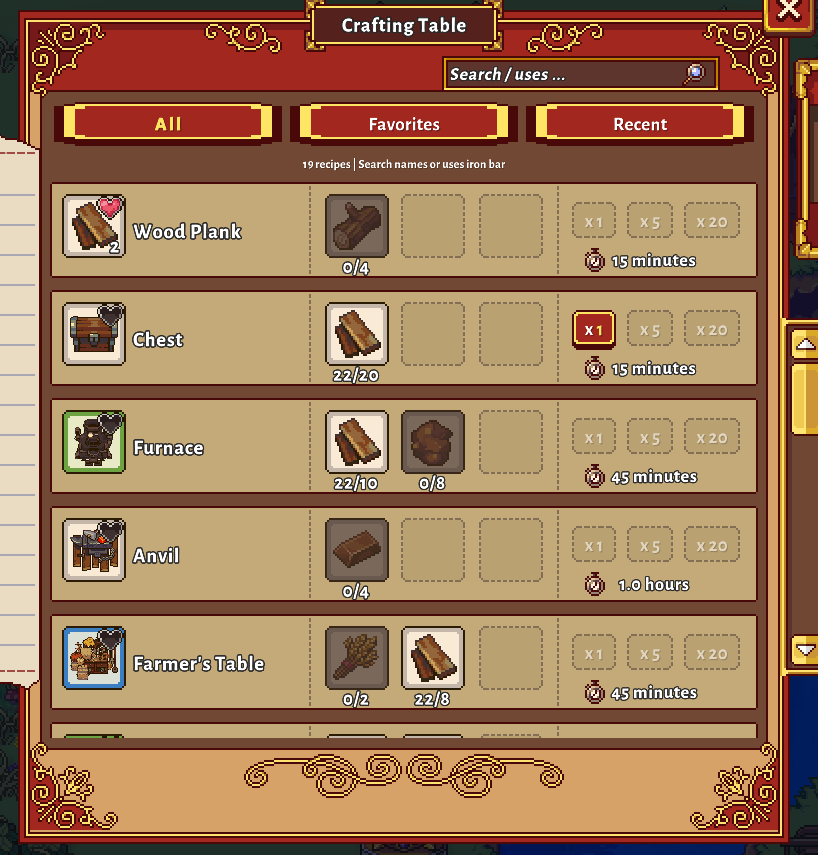
- Fuzzy search: find recipes even with small typing mistakes.
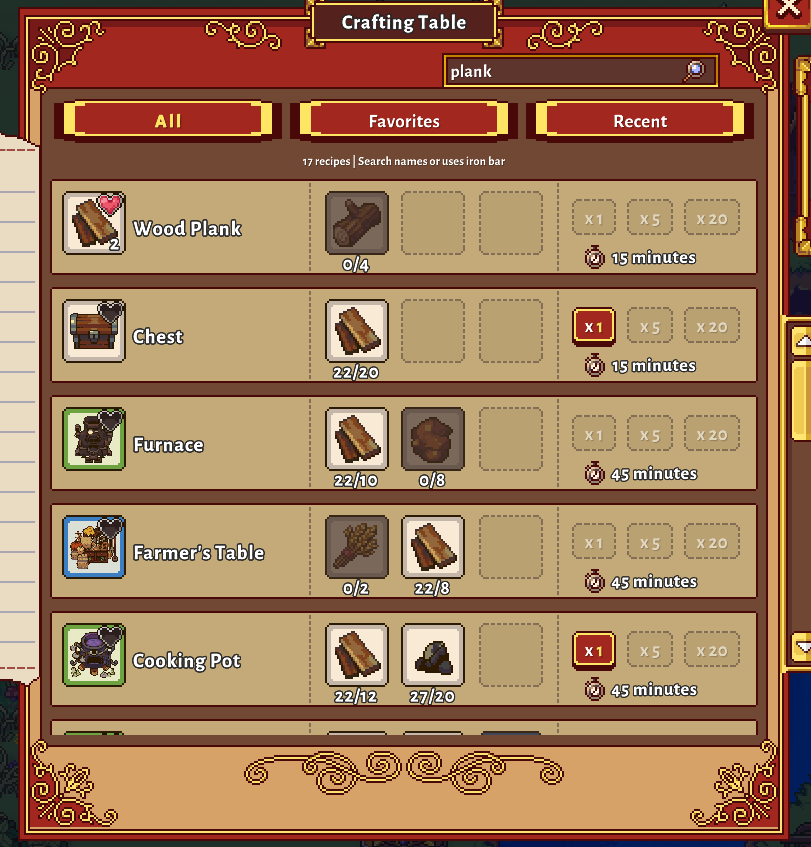
- Search by material: typing
woodorplankmatches recipes that use those materials as well as matching recipe names. Useuses iron barto search only ingredients. - Favorites: click the heart on a recipe's item icon. An uncolored heart means it is not favorited; a colored heart means it is. Use the Favorites tab to find it again.
- Recently crafted: quickly return to the last 30 distinct recipes you crafted.
- Craftable only: filter to recipes you can currently make.
- Crafted at: item tooltips show which crafting stations make that item.
Search, Favorites, Recent, and craftable filtering work together. Recipe unlock requirements still apply. Favorites and crafting history belong to your character. Browser controls appear at stations with a recipe-list UI.
Fruit trees hold up to 99 fruit
Unpicked fruit keeps accumulating at the normal growth rate, up to 99 per tree. Above three fruit, the game's crafting-style item bubble shows the fruit icon and total available. Shake the tree to harvest it all. Counts persist through days, scene changes, and saves using the tree's normal multiplayer updates.
Keep Fruit Tree Storage enabled for every player. Harvest stored fruit before disabling or removing this feature; the unmodded game only supports three fruit spots.
Preview chest names from a distance
Hover over a visible chest to preview its name using the game's normal name-label style, including custom names. No approach is needed. Opening and interacting with chests still requires normal range. Museum donation containers are excluded.
Choose which chests crafting can use
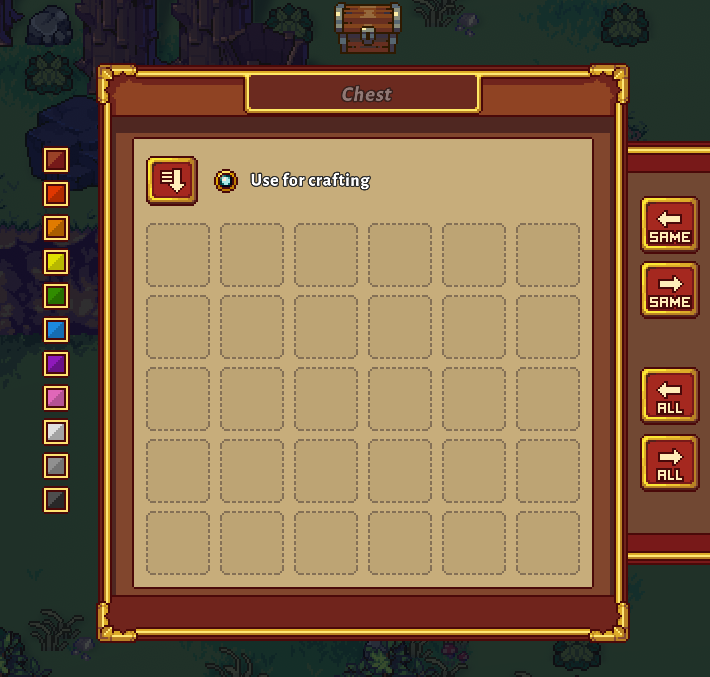
Open a chest and uncheck Use for crafting to prevent crafting stations from pulling its contents.
Chests are included by default. Each chest remembers its own setting through days and saves, and the setting is shared between players.
Crafting stations remember your settings
Each station remembers its nearby-chest, material-filter, and sort choices through days, scene changes, and saves. Those settings are synchronized between players, including players joining later.
One-click museum donations
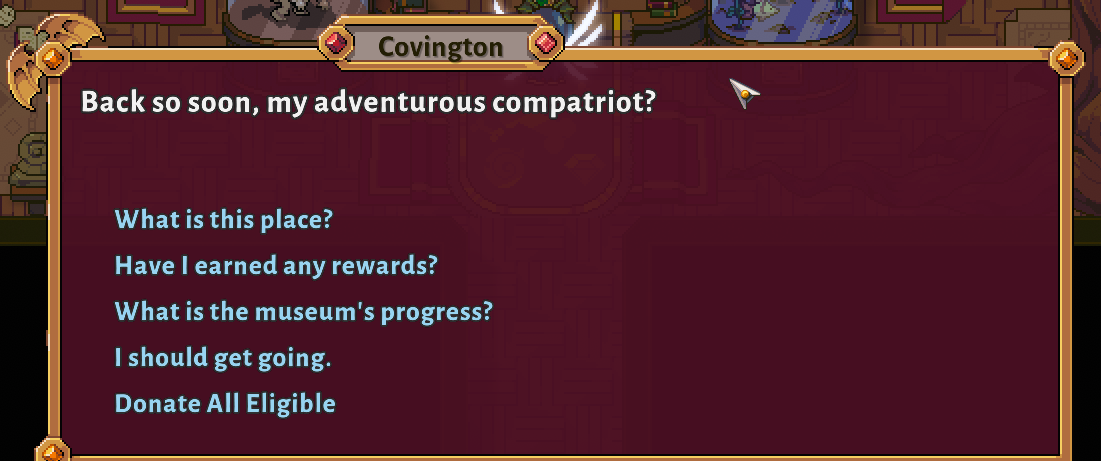
Talk to Covington at the museum front desk and choose Donate All Eligible.
The mod checks the museum's collections and donates the missing quantities from your backpack and hotbar. Already satisfied requirements are skipped. Equipped items, chest contents, gold, tickets, and mana-orb balances are not donated. Collections another player is currently using are skipped.
When you complete a bundle, you receive a message:
Nice! You completed the [name] bundle. Head on up to grab the reward!
Visit the collection's room to claim the reward through the normal game interaction.
If a donation is interrupted, speak to Covington again in the same world to check the transaction and recover any reserved items.
Museum status in item tooltips
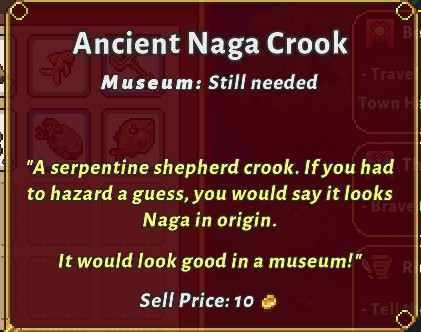
Hover over a museum item to see Museum: Still needed or Museum: Already donated. Partial requirements remain marked as needed. Items used by multiple bundles remain needed until every requirement is satisfied.
Status reflects the current world's museum progress. It appears once the museum definitions have loaded.
Escape to leave dialogue
Press Escape to select an available safe goodbye or cancel response. NPC cleanup runs normally. Required choices, cutscenes, text still scrolling, and dialogue without a recognized safe exit retain the game's usual pause behavior.
Safe sleep at home
At midnight inside a player house or apartment, you start normal sleep without needing to reach a bed. You stay at home, with no pass-out fee or pass-out count increase. Normal overnight saving and multiplayer waiting still apply.
This covers all three tiers of farm houses, the Nel'Vari home, the Withergate apartment, and the Great City apartment. Shared player homes count for guests too. NPC homes, barns, sheds, workshops, and outdoor areas retain normal pass-out behavior. Combat defeat is unaffected.
Automatic save backups
After successful saves, the mod keeps up to five distinct backups per character/save file. Consecutive identical saves do not consume another backup slot.
On Windows, backups are stored in:
%USERPROFILE%\AppData\LocalLow\Pixel Sprout Studios\Sun Haven\HiccupsQOLFixes\SaveBackups
Each save has its own folder. Each player's computer backs up its local saves; a guest does not back up the host's world file.
To restore a backup:
- Close Sun Haven and keep a separate copy of your current save.
- Copy the desired backup into the game's
Savesfolder. - Rename it to its original save filename, shown by the backup folder's name, replacing that save when you intend to roll back.
Backups use the game's normal save format. Sun Haven's built-in backups are unchanged.
Configuration
The configuration file is generated at:
BepInEx/config/com.hiccups.sunhaven.qolfixes.cfg
Each feature has its own Enabled setting. All features are enabled by default. Restart the game after changing settings.
| Configuration section | Feature |
|---|---|
| Crafting Browser | Search, favorites, recent recipes, and craftable filtering |
| Crafting Locations | Crafted-at tooltip text |
| Fruit Tree Storage | Up to 99 fruit per tree, with a native quantity bubble |
| Chest Hover Names | Preview chest names on mouse hover at any distance |
| Chest Crafting Exclusion | Per-chest crafting opt-out |
| Crafting Station Settings | Saved and shared station choices |
| Museum Donation | Covington's Donate All Eligible option |
| Museum Tooltip | Needed/already-donated item status |
| Dialogue Escape | Escape selects safe dialogue exits |
| Safe Sleep at Home | Normal midnight sleep inside player homes |
| Save Backups | Five local save backups |
For multiplayer, use matching versions and keep Fruit Tree Storage, Museum Donation, Chest Crafting Exclusion, and Crafting Station Settings enabled consistently across all players.
Removing the mod
Before uninstalling, re-enable Use for crafting on excluded chests to remove the exclusion marker stored with their names. Existing save backups remain available after uninstalling.
CHANGELOG
Changelog
1.2.1
- Fix harvested fruit returning after overnight growth by immediately updating the world's saved tree record.
- Persist received multiplayer harvests and retain the tree's correct scene ID.
1.2.0
- Let fruit trees accumulate up to 99 fruit, with a native crafting-style bubble showing the fruit icon and total above three.
- Save and synchronize stored fruit with each tree, retaining normal harvest drops and XP.
- Add chest-name previews on mouse hover, independent of interaction distance.
- Fix aquarium fish visuals after bulk museum donations and repair previously donated fish when the aquarium loads or updates.
1.1.0
- Add Safe Sleep at Home: midnight inside a player house or apartment starts normal sleep without reaching a bed or recording a pass-out.
- Support multiplayer guests and shared player homes through the native overnight flow.
- Include the multiplayer museum donation serialization fixes described below.
1.0.1
- Replace museum donation JSON serialization with explicit data contracts for multiplayer requests, offers, and recovery records.
- Reject missing network inventory data instead of reporting no eligible items.
- Log sent inventory counts, host collection checks, and offered donation counts.
- Report unavailable host museum records as a data error.
All multiplayer participants must update to this version.
1.0.0
Initial release.
- Add fuzzy recipe search, ingredient search, favorites, recent recipes, and craftable filtering.
- Show crafting locations in item tooltips.
- Add persistent, synchronized per-chest crafting exclusions and crafting station settings.
- Add Donate All Eligible to Covington's museum dialogue and announce completed bundles.
- Show museum donation status in item tooltips.
- Keep five distinct local save backups per character/save file.
- Use Escape to select available safe dialogue exits, preserving pause behavior otherwise.
- Allow each feature to be enabled independently in configuration.
