

BrigadeDps
Party and per-spell DPS, boss damage shares, spell initials or icons only, and a compact auto-sized meter. Host required.
| Date uploaded | 3 days ago |
| Version | 1.0.2 |
| Download link | Slikfoul-BrigadeDps-1.0.2.zip |
| Downloads | 18 |
| Dependency string | Slikfoul-BrigadeDps-1.0.2 |
This mod requires the following mods to function

BepInEx-BepInExPack_IL2CPP
BepInEx pack for IL2CPP x64 Unity games. Preconfigured and ready to use.
Preferred version: 6.0.788README
Brigade DPS
A party damage meter for The Spell Brigade (Unity IL2CPP, BepInEx 6).
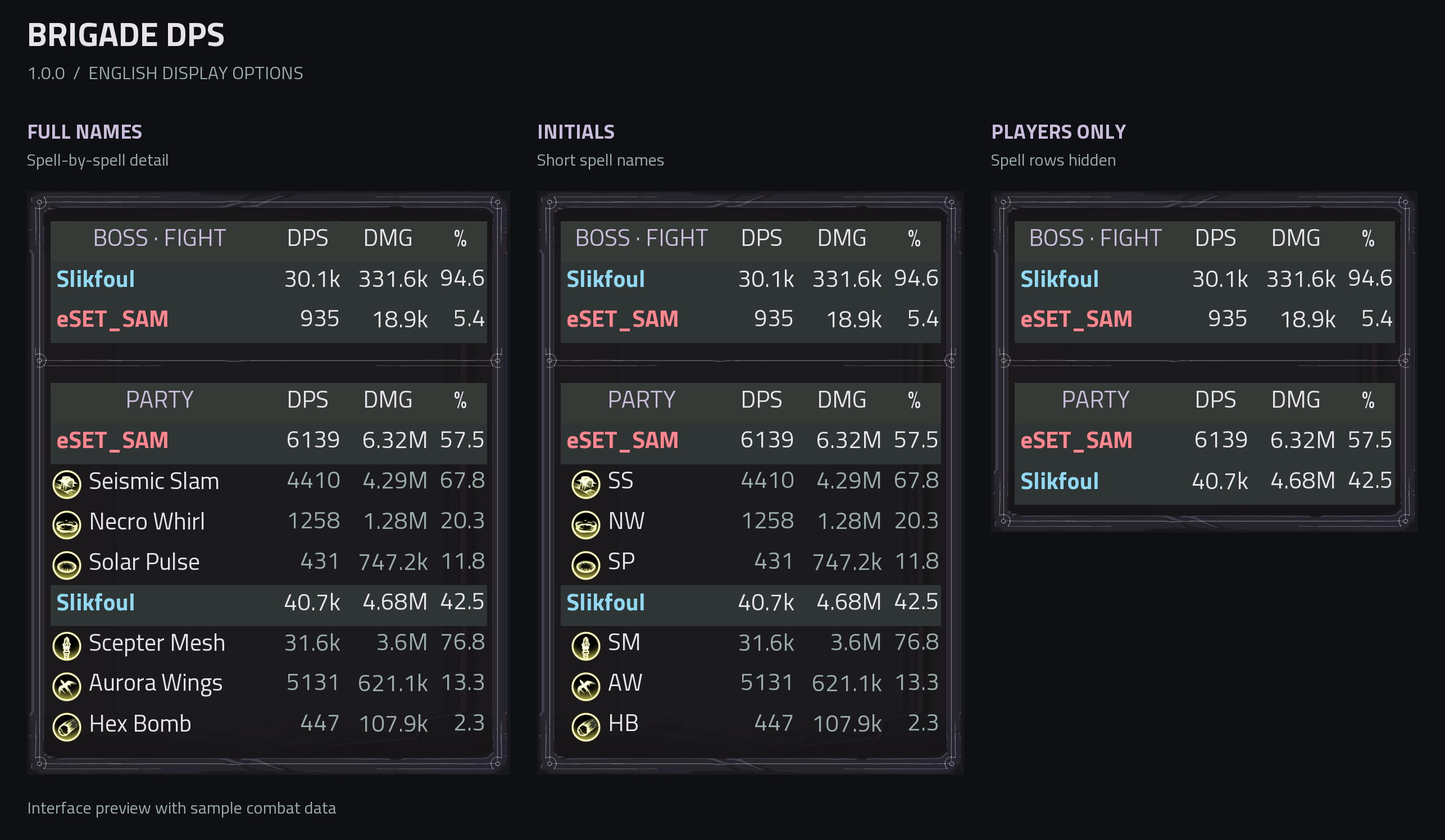
English interface preview with sample combat data: full names, initials, and player totals only.
Features
- Total damage, DPS and damage share for each player and spell, with native spell names and icons.
- DPS and damage values always display one decimal place, including abbreviated thousands and millions.
- Russian or English UI based on the game language, using game fonts. Other languages use English UI text.
- Full spell names, word initials or icons only, configurable in F5 settings.
- A separate boss section showing damage, DPS and each player's share of party damage to the boss. Damage to other enemies is excluded from this section.
- Native dark card artwork with subdued ornamental lines and curls. The top mirrors the bottom, without an emblem. A continuous outer frame and background surrounds both sections, with an ornamental divider between boss and party statistics.
- A compact table that automatically fits the visible text and rows, with small column gaps and centered headings.
- Move the meter by dragging its top row. Choose horizontal growth (right/left) and vertical growth (down/up) in settings. Moving the meter preserves these directions, and the frame stays within screen bounds.
- Move the settings window by dragging its title. Window positions persist between launches.
- Player totals follow the game's total damage statistic; spell totals follow its per-spell statistics. Damage without a spell entry has no separate row.
- In-game settings for visibility, spell icons and names, bosses, results, solo play, position locking, scale, opacity, height limit, spell count, DPS mode and interval, and shortcuts.
- The meter appears during an active run and on the results screen; it stays hidden in the main menu and lobby.
Game artwork is loaded at runtime and is not bundled with the mod. A fallback frame appears until the native assets are available.
Controls
| Action | Default |
|---|---|
| Toggle meter | F3 |
| Toggle spell rows | F4 |
| Open settings | F5 |
| Move meter | Drag the table's top row |
| Move settings | Drag the settings title |
Enable Abbreviate spell names to display initials, for example Wings of Dawn becomes WOD. Disable Show spell names for icons only. If an icon is unavailable, initials keep the spell identifiable.
DPS modes
In F5, Player and spell DPS switches between two modes independently for each viewer:
- Rolling interval (default): damage over the last N seconds divided by N. During the first N seconds of a run, the elapsed run time is used instead. The host sets the interval from 1 to 60 seconds; the default is 10.
- Game value: the game's own DPS for each spell, calculated as total damage since the spell was equipped divided by elapsed game time since equipping it. Each spell has its own averaging period. The player row sums the native DPS of all equipped spells, including those hidden by the row limit.
For example, if a spell dealt 6,000 damage over 60 seconds since it was equipped, including 2,000 damage in the last 10 seconds, its game DPS is 100 and its rolling DPS is 200.
Game values require a host running version 0.1.10 or newer. Unavailable values appear as a dash. Damage totals and percentages use the game's cumulative run statistics in both modes and carry over across loops. This requires the host to run version 1.0.1 or newer. Spell percentages are relative to their player's total damage.
Boss statistics
Boss DPS is total damage dealt to the boss divided by elapsed time since the encounter started, in both display modes. It includes the entire fight, keeps earlier damage through pauses between attacks, and freezes when the encounter ends. This requires a host running version 1.0.2 or newer. Boss percentages show each player's share of the party's damage to the boss.
After a boss dies, its statistics and the divider remain visible for 10 seconds by default. In F5, Boss results after defeat (s) accepts 0–3600 seconds: enter a number and press Enter, or use the +/- buttons. Set it to 0 to hide defeated boss statistics immediately.
This setting is individual for each viewer. The countdown uses real time, including pauses and the results screen; hiding the meter does not restart it.
Multiplayer
The host needs Brigade DPS to collect statistics. Players who want to see the meter should install the same version. Other players can join without the mod.
CHANGELOG
1.0.2
- Boss DPS averages all damage over the full encounter and freezes at defeat, independently of the rolling DPS interval.
1.0.1
- Player and spell damage totals use the game's cumulative run statistics across all loops.
- Rolling DPS continues across loop transitions, with separate per-encounter boss statistics.
- DPS and damage values always display one decimal place, including abbreviated thousands and millions.
1.0.0
- Party and per-spell damage, DPS and damage shares with native spell icons and names.
- Choose rolling DPS or the game's own spell DPS in the in-game settings.
- Separate boss statistics with configurable retention after defeat.
- A compact, automatically sized meter with native ornamental artwork and a continuous frame.
- Movable meter and settings windows, configurable growth directions, and full spell names, initials or icons only.
- Host-synchronized statistics for multiplayer sessions and results-screen display.
