
| Date uploaded | 2 days ago |
| Version | 1.0.1 |
| Download link | ZephyrOff-MenuCleaner-1.0.1.zip |
| Downloads | 41 |
| Dependency string | ZephyrOff-MenuCleaner-1.0.1 |
This mod requires the following mods to function


BepInEx-BepInExPack
BepInEx pack for Mono Unity games. Preconfigured and ready to use.
Preferred version: 5.4.2100
EternalsTeam-PluginConfigurator
Used to configure plugins easily in Ultrakill
Preferred version: 1.10.2README
ZEPHYR'S MENU CLEANER
ABOUT
QoL MOD focused on cleaning up and adding data-driven ways to sort and organize buttons added by other mods. This is currently limited to the Difficulty Selection and Chapter Selection screens, but will later on allow the creation and customization of layers and levels.
FEATURES
CLEANS UP THE MESS LEFT BY OTHER MODS
I've noticed that some mods don't take the time to make their additions to the main menu look pretty and organized, so every added button now gets sorted into a list with a scroll bar!
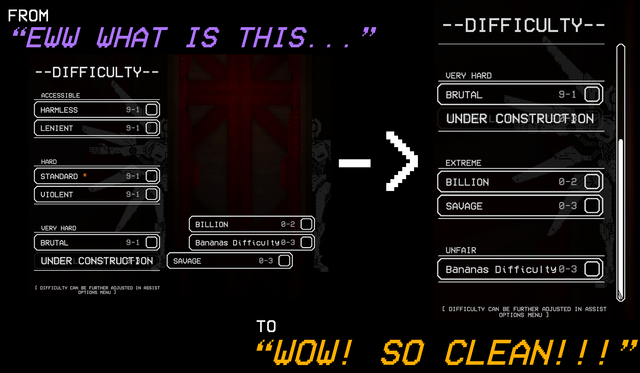
PREVENTS THE ACCUMULATION OF NEW BUTTONS FROM ENDING UP OFF SCREEN
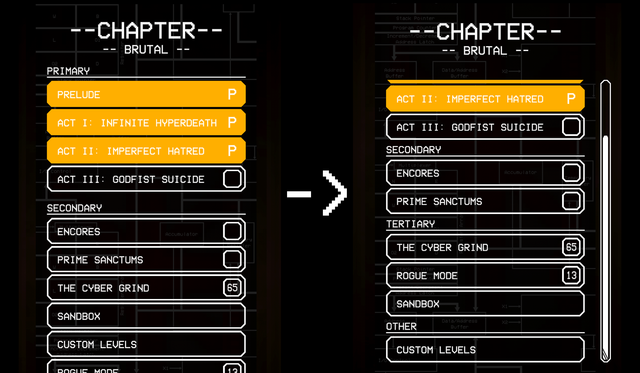
When installing larger modpacks, buttons on the Chapter Select screen may end up past the borders of the game window. This mod adds a scroll bar to fix that issue, while allowing mod creators to sort them however they want!
"HOW TO USE THIS FOR MY OWN MOD?"
(I'll make a wiki page for this eventually)
It's really easy to add your own config files to your mod, as you don't need to add this mod as a dependency.
All you need to do is create a folder named "data" in the same directory as your mod's .dll, and create new json files depending on your needs!
JSON FORMAT
Your file's name needs to follow the format [name].[screen].json.
- [name]: name of your file, can be anything you want
- [screen]: tag used to tell the game which screen is being sorted. Can be either "difficulties" or "chapters"
For example, "example.difficulties.json" would modify the difficulty selection screen, while "example2.chapters.json" would modify the chapter selection screen
From there, the format is always the same:
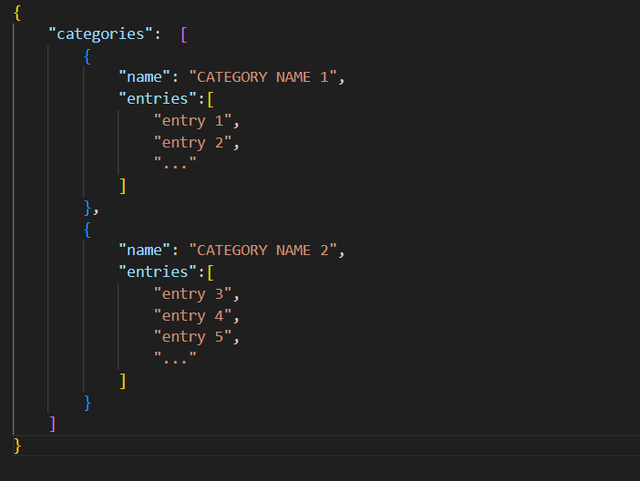
(You can find this template in the mod files)
PRE-SUPPORTED MODS
-
DIFFICULTY SELECTION
-
CHAPTER SELECT
Any mod that isn't listed here will be placed at the bottom of their respective menus unless support is added on their end.
CONTACTS
Any bugs to fix or feature requests? Hit me up on DISCORD!
Username: zephyroff
Server: https://discord.gg/KcsjvKa6jw
CHANGELOG
1.1.2
- Optimized loading times when opening the difficulty selection screen with ranks enabled
1.1.1
- Fixed compatibility issue with Billion Nemesis
1.1.0
- Added an option allowing the game to rank chapters and difficulties while ignoring unreleased content.
- Hopefully fixed that one issue people were having with the spacing on the difficulty screen.
1.0.0
- Initial release
