

CombatMeter
TESTING PHASE - not a stable release. In-game damage and DPS meter with player and enemy rankings, ability breakdowns, and encounter history. Requires server installation.
| Date uploaded | a day ago |
| Version | 0.2.0 |
| Download link | BiribaMods-CombatMeter-0.2.0.zip |
| Downloads | 14 |
| Dependency string | BiribaMods-CombatMeter-0.2.0 |
This mod requires the following mods to function

BepInEx-BepInExPack_V_Rising
BepInEx pack for V Rising. Preconfigured and includes Unity Base DLLs.
Preferred version: 1.733.2README
CombatMeter
Testing phase — not a stable release. CombatMeter is under active development. Damage tracking and encounter detection may be incomplete or inaccurate, and bugs are expected. Test it in a private game or test server before using it on your main server.
An in-game damage and DPS meter for V Rising, inspired by Details! for WoW. Compare players and enemies, inspect damage sources, and review recent encounters in a custom UI styled to match the game.
Features
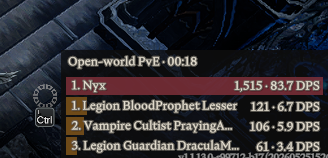
- Live rankings with total damage and DPS shown together.
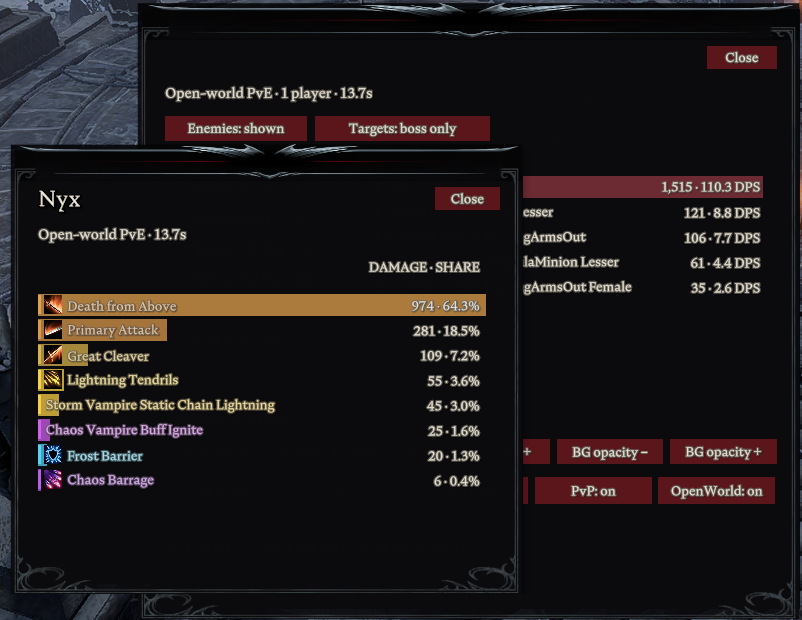
- Damage-source breakdowns for weapon attacks, abilities, debuffs, procs, and summons, with colors and the game's icons where available.
- Hover tooltips and draggable detail windows.
- Current encounter and the latest 20 completed encounters.
- Boss-only and boss-plus-summons filters.
- Movable, scalable HUD with background opacity and position locking.
- Server-side tracking includes players without the client mod.
Screenshots
Live damage and DPS rankings:
Damage-source breakdown and encounter review:
Installation
CombatMeter is required on the server and on each client that wants the HUD. Use matching versions on both sides.
Local private game
- Install CombatMeter and ServerLaunchFix in your mod-manager profile.
- Launch V Rising using Start modded, then open your private game.
BepInEx is installed automatically. The included server plugin runs through ServerLaunchFix.
Dedicated server
Install BepInEx and CombatMeter on the server and on clients that want the HUD. For manual installation, extract the package's BepInEx folder into the game or server directory, keeping the CombatMeter DLLs together.
Restart the game and server after installing or updating. Remove older manual copies to avoid loading the mod twice.
Controls
- F8 opens settings and encounter review; Escape closes the current panel.
- Hover the meter to reveal the cog and padlock. Unlock it, then drag its title strip to move it.
- Hover a player or enemy row for its top damage sources; click for the full breakdown. Click outside the detail window to dismiss it.
- Use the mouse wheel or scrollbars to browse lists.
Configuration
Adjust HUD visibility, scale, background opacity, position locking, enemy rows, and boss filters in settings.
Configuration files are generated on first launch:
| File | Settings |
|---|---|
BepInEx/config/io.combatmeter.server.cfg |
Tracking modes and combat timeout |
BepInEx/config/io.combatmeter.client.cfg |
HUD preferences and shortcut |
Bosses, arenas, duels, and ordinary PvP are enabled by default. Open-world PvE is experimental and disabled by default. Restart the server after changing its tracking settings; client preferences cannot enable a mode disabled by the server.
How damage is counted
Damage reflects health lost after mitigation, excluding overkill. Every participant's DPS uses the same whole-encounter duration. Unidentified damage sources appear as Unknown source. Encounter history lasts for the current server session.
Healing, shielding, and CC statistics are not included.
Compatibility
Built for V Rising 1.1.13.0-r99712-b17 on Windows x64. Game updates may require a mod update. Multiplayer and contest modes are still undergoing broader testing.
If the meter stays on Waiting for server tracking, check that the server has the same CombatMeter version and that its plugin loaded successfully.
Thunderstore · Source and issues
Development
Plugins target BepInEx's .NET 6 runtime. The repository uses a workspace-local .NET SDK and isolated game profiles.
./scripts/bootstrap.ps1
./scripts/setup-profile.ps1
./scripts/build.ps1
Generate matching client/server interop assemblies before building. See the development guide for setup, debugging, and hot reload, and the publishing guide for releases.
Credits
BepInEx, ServerLaunchFix, and Eclipse.
CHANGELOG
0.2.1
- Enable experimental open-world tracking by default for new server configs. Existing saved settings are preserved.
- Clarify mode visibility buttons with shown/hidden, server-off, and waiting states, plus server-policy guidance.
- Show the Targets filter only for boss encounters in encounter review; player source details retain their boss-only filter visibility.
- Allow validated patch releases through the publishing workflow.
- Testing-phase release. Protocol remains 4; update the package and restart the game/server.
0.2.0
- Remove the Emberglass dependency; networking is built into CombatMeter.
- Use directed native game messages with compressed, bounded packet framing. Requests are tied to the connected native user and replies to the current client channel.
- Preserve encounter authorization, request throttling, history, source breakdowns, and server-authoritative damage accounting.
- Resolve source names from native prefab metadata instead of Emberglass's prefab catalog.
- Protocol 4: update client and server together and restart once, including Runtime/Core/Shared.
- Testing-phase release: local-game registration, damage tracking, source replies, and client hot reload verified; broader multiplayer and contest validation continues.
0.1.6
Initial public early-access release.
- Server-authoritative player and enemy damage and DPS rankings.
- Native HUD, settings, encounter review, and session history.
- Colored damage-source tooltips and detail windows, with native icons where available.
- Combined numbered target variants, boss target filters, and comparable player/enemy bars.
- Draggable windows, visible scrollbars, hover controls, red buttons, and larger text with a softened dark contour.
- Protocol 3; matching client and server required.
- 43 automated tests pass. Additional multiplayer and contest validation remains ongoing.
