

Raphael
Unified client UI for V Rising server mods — Bloodcraft, Beelzebub, Uriel, Faust, KindredCommands, KindredLogistics — plus a standalone chat window. Surfaces their commands, stats & reporting as buttons, forms & overlays. (Formerly BloodCraftHub.)
| Date uploaded | 2 weeks ago |
| Version | 0.64.0 |
| Download link | TheShadowRealm-Raphael-0.64.0.zip |
| Downloads | 470 |
| Dependency string | TheShadowRealm-Raphael-0.64.0 |
This mod requires the following mods to function

BepInEx-BepInExPack_V_Rising
BepInEx pack for V Rising. Preconfigured and includes Unity Base DLLs.
Preferred version: 1.733.2README
Raphael, Lord of Wisdom
A client-side V Rising UI that turns the chat commands of popular server-side mods into buttons, forms, and on-screen overlays. Each mod's tabs appear only when that mod is detected on your server — so it works whether your server runs one, several, or none.
Works with: Bloodcraft · Beelzebub · Uriel · Faust · KindredCommands · KindredLogistics — plus a standalone tabbed chat window that works on any server.
🟣 Formerly BloodCraftHub — same mod, renamed. Switching over? See Migrating from BloodCraftHub and don't run both at once.
⚠️ Pre-1.0 beta. It's daily-driven on a live server, but you may hit rough edges. The fastest way to get a fix is the Shadow Realm Discord.
What you get
- One panel for your server's mods — left-rail tab groups for Bloodcraft, Kindred, Beelzebub, Uriel, and Faust; each shows only when detected.
- Commands as forms — player pickers, dropdowns, and number fields instead of typing
.lvl set <Player> <Level>into chat. - Live HUD overlays — XP, familiar, weapon/blood, professions, quests, shift-spell cooldown, and more. Each is draggable, resizable, and individually toggleable.
- Standalone chat window — tabbed per-channel chat (Global / Local / Clan / Whispers / System), whisper anyone online, custom colors. Needs no server mods.
- Admin tooling — surfaced wherever the backing mod provides it: Kindred admin, Beelzebub ability shaping, Faust server analytics, Uriel sharing/spawning.
Full feature list
- Floating Raphael + OV buttons (top-right) — open the panel; OV is a master overlay show/hide (with optional timed auto-reappear and launcher hiding).
- Tab groups (each appears only when its server mod is detected):
- Bloodcraft — Familiars, Boxes, V-Bloods, All Familiars, Class, Weapon Expertise, Blood Legacy, Unarmed + Shift, Prestige, Levels, Daily Quests, Admin.
- Kindred — Logistics (+ admin), Commands, Admin: Players / Server / World.
- Beelzebub — Bestiary, Loadout (universal + per-weapon + per-form ability sets), Hotkeys, Transforms, Settings, admin Config / Players.
- Faust — Castle Info, Open/All Plots, Decay Watch, Castle Resources, Player Info, Clans, Player Positions, Server Stats, Boss Status, Leaderboards, World Map, admin Control / Oversight.
- Settings & Help — Quick Start, Mod Help, Game Guide, Settings, About.
- Secondary overlays (toggle from the footer) — XP, Familiar, Familiar Browser, Daily Quest, Professions, Shift Spell, a Combined info overlay, Quick Actions, a Familiar Quick Spawn overlay, and a Faust Boss Tracker. Each is independently draggable/resizable with its own transparency; visibility persists across sessions.
- Freeze actions while the UI is open (opt-in) — stop moving/attacking/casting and block menu hotkeys while you click around the panel.
- "Last server response" panel — replies to read-data commands (
.wep get,.class l, …) show in-UI, not just in chat. - Live data via Bloodcraft's signed broadcast protocol, with chat-regex fallback for replies it doesn't cover.
- Quality of life — hover tooltips on every control, auto-resizing panel, scrollable tabs + left rail, a two-zone color theme, a 50–400% text-size slider, and opt-in keyboard hotkeys.
Install
Client-side only — install on the player's V Rising client, not the server.
Mod manager (recommended): in Thunderstore Mod Manager or r2modman, open your V Rising profile → search Raphael → Install. Make sure BepInExPack_V_Rising is in the same profile, then launch from the manager.
Manual: install BepInEx for V Rising, drop Raphael.dll into BepInEx/plugins/, launch.
On your first connect to a modded server, a floating Raphael button appears top-right. Hover any control to see what it does (the description shows in the footer). Non-admin commands work for everyone; admin tabs need permissions.
⚠️ Before you install
Running Eclipse? (compatibility needs re-testing)
Historically, Raphael + Eclipse crashed the client on load (the fault is in Eclipse's HUD code, not Raphael). When Raphael detects Eclipse it stands down from its own passive Bloodcraft layer to avoid the crash: Eclipse drives the live HUD, while Raphael keeps its command buttons and chat window. Eclipse has since updated and this hasn't been re-verified — disable Eclipse while running Raphael to be safe.
Raphael looks empty on a Bloodcraft server?
Raphael's live HUD and Bloodcraft tabs are driven by Bloodcraft's broadcast, which only runs when the server enables at least one of: Leveling, Legacy, Expertise, Class, or Familiar systems. A Quests-only / Professions-only server won't engage it — click the Bloodcraft header for an in-panel diagnostic with a one-click Force-enable tabs button (chat commands still work; live overlays stay empty until the server broadcasts).
Controller / gamepad
There are known edge cases when V Rising's controller input meets the Raphael UI (e.g. a face button re-opening the panel after a waypoint teleport). A first-pass fix is in; more testing is ongoing. If something opens/closes/focuses on the wrong button, please report it on Discord with repro steps.
Rolling back a version
- Mod manager: select Raphael → version dropdown → pick an earlier build (quit the game first).
- Crash on load after an update: close the game and delete
BepInEx/interopandBepInEx/cachein your profile — they rebuild on next launch.
Migrating from BloodCraftHub
Raphael replaces BloodCraftHub — don't run both. They have separate plugin IDs, so installing Raphael without removing BloodCraftHub loads both (duplicate buttons, panels, overlays).
- In your mod manager, uninstall or disable BloodCraftHub (
kdpen/BloodCraftHub). - Install Raphael (
kdpen/Raphael). - Fully quit and relaunch V Rising.
Settings don't transfer — Raphael writes a new config, so overlay positions, colors, and hotkeys start at defaults (your old kdpen.BloodCraftHub.cfg is left untouched in case you roll back).
Compatibility (tested versions)
| Mod | Tested | Role |
|---|---|---|
| BepInExPack_V_Rising | 1.733.2 | Loader (hard dependency) |
| Bloodcraft (server) | v1.13.21 | Primary integration |
| KindredCommands (server) | v2.5.8 | Admin/player commands → Kindred |
| KindredLogistics (server) | v1.6.0 | Logistics toggles → Kindred |
| Beelzebub (server, optional) | API 22 | Abilities / transforms → Beelzebub |
| Faust (server, optional) | 0.16.x (API 18) | Server investigation & analytics → Faust |
| Uriel (server, optional) | v0.19.0 | Storage / prisons / stairs / spawning → Uriel |
| Eclipse (client) | v1.3.13 | ⚠ Compatibility needs re-testing — disable while running Raphael |
Newer Bloodcraft builds generally still work — the chat-command grammar is stable. If a tab does nothing on click, the server likely renamed a command.
Known issues
- Eclipse compatibility needs re-testing (see above) — disable it to be safe.
- Controller edge cases under investigation (see above).
- Conservative per-system detection — Raphael may show Bloodcraft tabs for systems the server has disabled (they'll just be empty); per-system hiding is planned.
- Limited autocomplete / pagination — the name cache fills from chat but forms don't yet show a dropdown; only
.clan listhas prev/next widgets so far.
Screenshots
Captured on v0.13.0; the day-to-day look still applies.
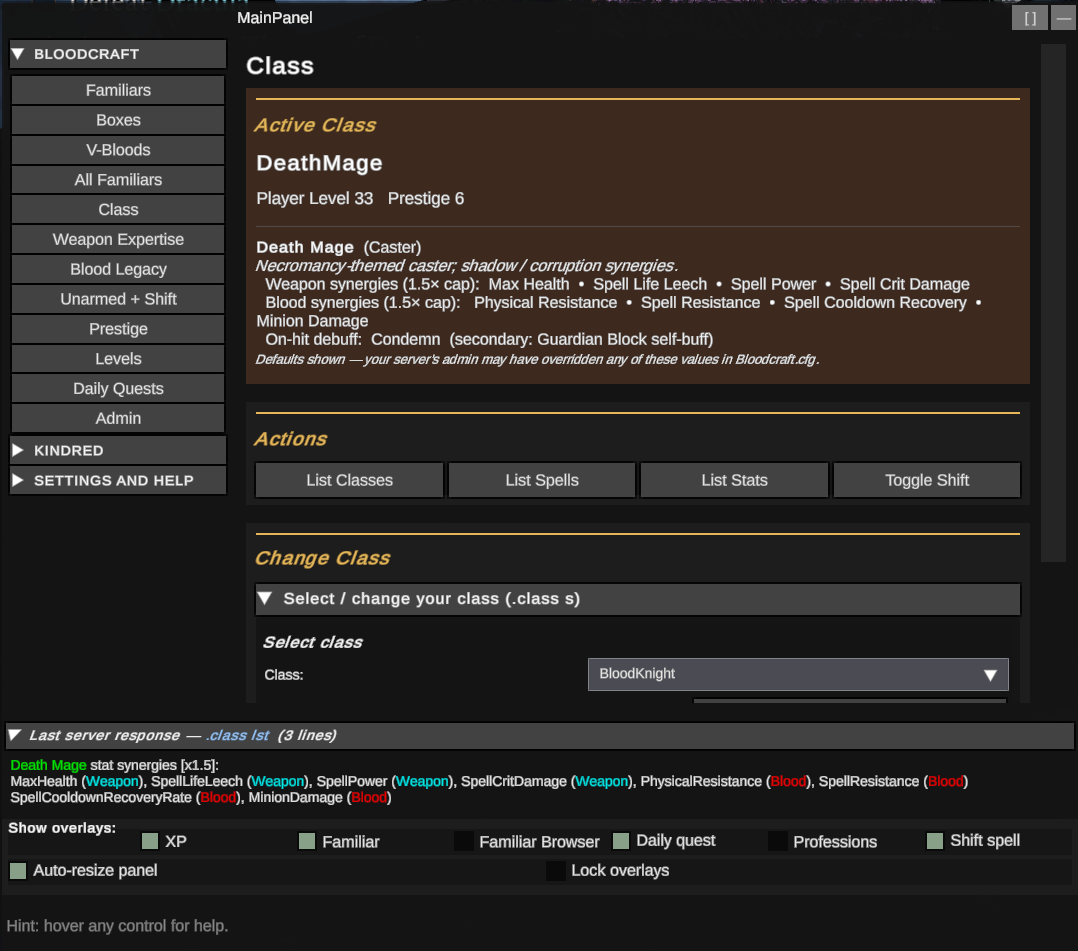 Class tab — active class card with synergies and the live
 .class lst data.
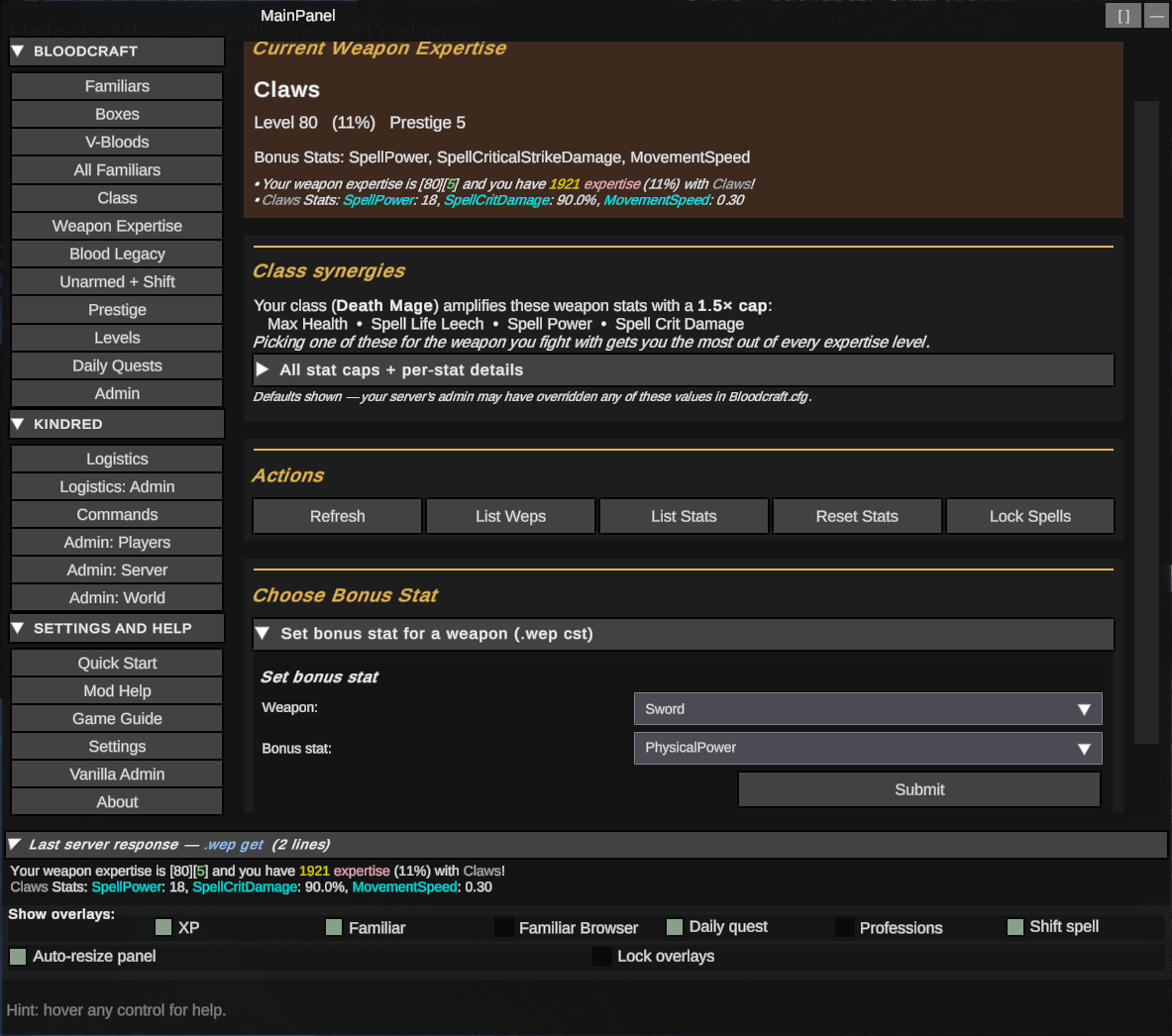 Weapon Expertise — current expertise, class synergies, and the set-bonus-stat form.
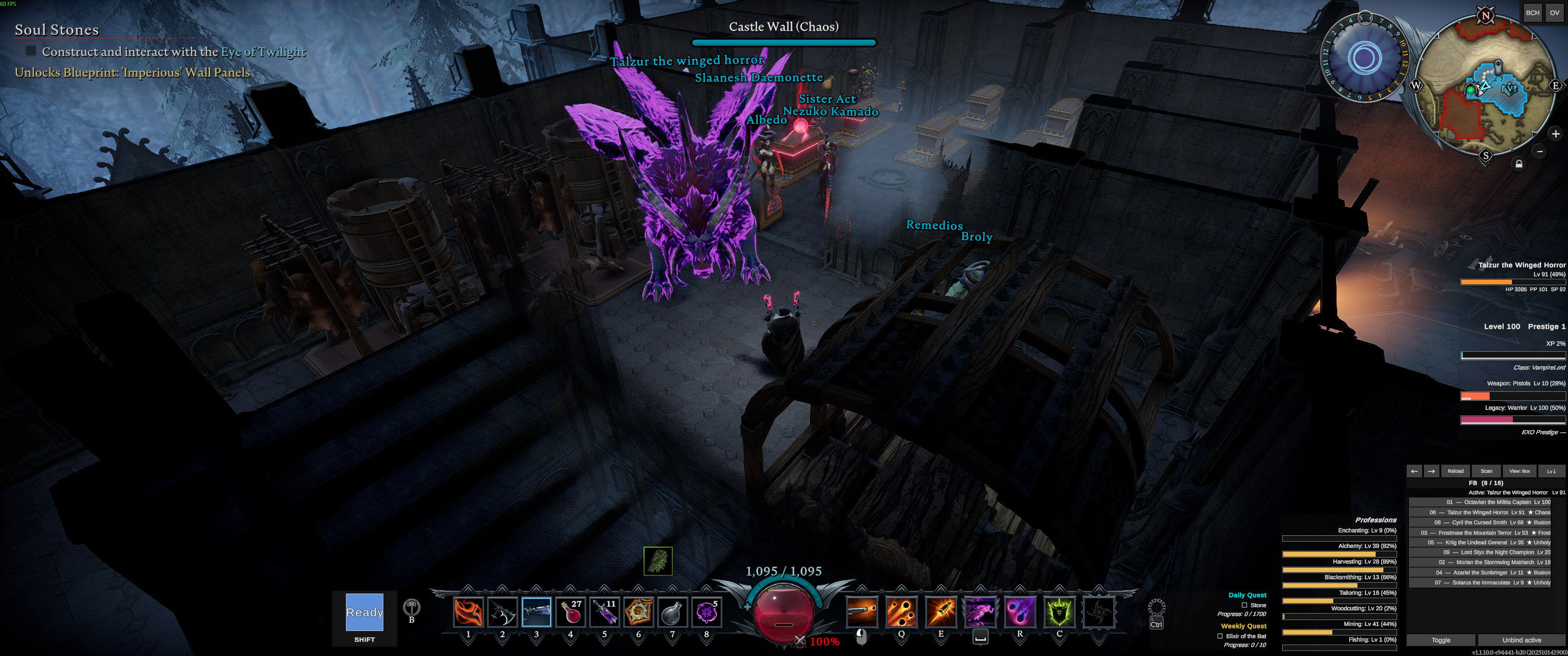 Overlays running alongside the V Rising HUD — XP / weapon / blood / familiar readouts streaming live.
Support & credits
- Bug reports / feature ideas: Shadow Realm Discord (fastest) or GitHub issues. A
BepInEx/LogOutput.logsnippet or clear repro helps a lot. - Upstream mods Raphael wraps — please show them love too: Bloodcraft by zfolmt, KindredCommands / KindredLogistics by odjit. Raphael's UI framework derives from BloodCraftUI (panthernet) and the signed protocol from Eclipse (zfolmt).
- Built on the V Rising server The Shadow Realm (Brutal PvE). Support development: PayPal.
- Special thanks to the testers who shaped Raphael through countless reports: Moonie, Bradley, Xavarie, Exotic Mystique, Shiyrva, Imperivm Draconis.
For developers
Open source (MIT). Build:
cd Raphael
dotnet restore Raphael.sln
dotnet build Raphael.sln -c Release
# Deploy to your local mod-manager profile:
dotnet build Raphael\Raphael.csproj -c Release -p:DeployToClient=true
Fully quit V Rising before redeploying (the running game file-locks the DLL). Key docs: CHANGELOG.md (full history), CONTRIBUTING.md, docs/ARCHITECTURE.md, docs/THUNDERSTORE.md.
License
MIT — includes third-party attribution for ported code from BloodCraftUI (panthernet), Eclipse (zfolmt), and the mods Raphael integrates with.
CHANGELOG
Changelog — Raphael, Lord of Wisdom
Player-facing highlights, newest first. Full per-patch detail lives in CHANGELOG.md. Raphael was formerly BloodCraftHub (v0.1–v0.30).
Current: v0.64.0 (pre-1.0 beta).
0.64.0 — Live “Players now” map + redesigned heat palettes
- Player Positions map gained a View toggle: Heat map ↔ Players now (live) — plots every online player on the calibrated map with their name (and hover detail).
- Redesigned heat palettes with strong cold→hot variation that reads on the map: Magma, Ice→Fire, Viridis (cycle with Colors).
0.63.1 — Dropdown fixes + Faust-tab cleanup
- Online-player / castle dropdowns now populate for admins (the auto-load was wrongly blocked); every picker also got an inline Load button.
- Boss tracker no longer leaves a tracked boss stuck under “Look up one boss”.
- World Map: fixed help text overflowing; tidier filters (advanced GUID filters + map-underlay setup are now collapsible, so the table sits right under the map).
- Player Positions: “Show players on map” moved to the bottom + collapsed; removed the no-op Scale button.
0.63.0 — Pick from dropdowns instead of typing
- Online-player dropdowns anywhere you enter a player (Player Info, heat map, Admin → Player access).
- Boss lookup and castle index are now dropdowns too (castles show
#index · region · (x,z) · owner); the boss tracker overlay now shows live coordinates. - World Map Category / Type are dropdowns and the Category pre-filters the scan server-side (units vs nodes) so it pulls less.
- Heat map activity dots are brighter on the map, plus a Map image opacity slider on Player Positions.
- Boss tracker: removed the redundant management card — track/untrack from the board's ★ buttons.
0.62.0 — Heat map: time windows
- The player-position heat map now has a When toggle (All-time / Today / This week / This month). Needs Faust 0.16.4+; older servers show the all-time map as before.
0.61.0 — Catalog filter, map-friendly heat colors, lighter boss tracker
- World Map filter is now driven by an editable catalog (
config/Raphael/worldscan_categories.txt), so you can pick a Category / Type before scanning, with clean NPC factions + resource types. - Heat map gained Magenta / Cyan / White-hot color schemes that read on top of the world-map image (opacity now scales with intensity so the map shows through).
- Boss tracker auto-refresh now updates only your tracked bosses (per-boss lookups), not the whole board.
0.60.1 — World Map filter fixes + admin tools moved
- Rebuilt the Category / Type filter against real resource-node names, so it now groups cleanly (Plant Fiber, Copper, Pine, Stone, Gloomrot Tech…) and actually narrows the map/table.
- Moved the world-scan admin tools (whitelist, prefab lookup) to Faust → Admin: Control.
- “Truncated” notice now explains the server's result cap and how to raise it (
worldscanmaxresults).
0.60.0 — World Map: search & filter by category / type
- New cascading Category → Type filter on the World Map: after a scan, narrow by category (NPC factions, or resource families like Ore / Stone / Wood / Plants / Gems) and then a specific type (e.g. Ore → Copper). Built automatically from the scan results — no PrefabGUIDs to type — and filters the table + map instantly.
- (Resource nodes only appear if whitelisted on the server — use Seed defaults.)
0.59.2 — Pre-calibrated map defaults
- The World Map / Heat Map underlay now ships pre-aligned to the Vardoran map, so it's close to correct out of the box (fine-tune with the calibration tool). Faust 0.16.3's boss + world-scan fixes are server-side — no Raphael change.
0.59.1 — Faust 0.16.2: bigger world scans
- World Map scans can return far more rows (Faust raised its cap to 10000 / unlimited). Added the
worldscanmaxresultssetting to the config editor + a client safety cap so huge scans stay responsive. - Boss board roaming-boss locations: no Raphael change needed (server-side fix in Faust 0.16.2).
0.59.0 — World map fills the panel + live overlay calibration
- The Faust World Map / Heat Map now fills the panel width, and the map image and coordinate dots are decoupled.
- New calibration tool (World Map → Map underlay): move and stretch the dot overlay over the map until it lines up, then Log calibration to print the values to the console. Adjusts the coordinate overlay only, not the map.
0.58.6 — Readability overhaul
- Rewrote this page and the README to be shorter and easier to scan, with collapsible sections. No code changes.
0.54–0.58 — Faust 0.16: boss board, leaderboards & world map
The Faust 0.16 (API 18) integration, refined across several patches. Needs Faust 0.16+; older Faust degrades gracefully.
- Boss Status — a server-wide V Blood board (live location / region / HP / level, plus defeated), friendly names, single-boss lookup, and a movable Boss Tracker overlay (up to 3 bosses, optional ~5s refresh).
- Leaderboards — top killers and most-defeated V Bloods, over today / this week / all-time.
- World Map — a filterable, server-scanned map of NPC units (with blood type / quality) and resource nodes, shown as a table and an X/Z map you can lay over the actual V Rising world map (capture it from your own game, then calibrate).
- Live config editor — change a feature's cost / cooldown / use-limit / proximity / access / PvP / unlock at runtime, no
.cfgedit or restart. - Plus the matching fixes along the way (boss coordinates, map rendering, config-set command syntax).
0.51–0.53 — Familiar Quick Spawn overlay + compliance
- Quick Spawn overlay — up to 5 one-click familiar summons (by name, regardless of box) with Dismiss / Recall / Unbind; full overlay controls (opacity, text-size, transparency, lock).
- 0.51.0 — a compliance pass aligning Raphael with the V Rising modding guidelines (no feature changes).
0.47–0.50 — Faust analytics, charts & chat scrolling
- Faust through API 17 — a player-position heat map, region fill-% over time, new-vs-returning bars, a session timeline, an active-days grid, and castle world coordinates.
- More readable charts (text that scales with UI size, selectable color themes), a 50–400% text-size slider, settings grouped into titled cards, and clickable chat scroll arrows.
0.31–0.46 — Faust integration (server investigation & analytics)
- New FAUST tab group: Castle Info / Open Plots / All Plots / Decay Watch / Castle Resources, Player Info, Player Positions, Clans, and Server Stats dashboards (playtime, concurrency, DAU/WAU/MAU + retention, population by region). All version-gated to your server's Faust.
0.30.0 — Renamed: BloodCraftHub → Raphael, Lord of Wisdom
- Rebranded to reflect that it serves Bloodcraft, Beelzebub, Uriel, and the Kindred mods (plus a standalone chat window) — and to end the mix-up with the separate Bloodcraft server mod. New package + plugin ID; no feature changes.
Earlier history (v0.1–v0.29, as BloodCraftHub)
- 0.26–0.29 — Uriel integration (storage sharing, public storage, object spawning, prisons & stairs, admin); overlay-visibility controls; a whisper-anyone overhaul; server-switch re-detection fixes.
- 0.18–0.25 — Beelzebub integration (abilities, loadouts, transforms, hotkeys, admin); per-channel chat colors; a secondary view-only chat window.
- 0.15–0.17 — First public release: Bloodcraft / Kindred command UI + live HUD overlays + Eclipse coexistence; the standalone tabbed chat window.
- 0.1–0.14 — Initial build-out: UI stack ported from BloodCraftUI (panthernet) + the signed Eclipse protocol (zfolmt).
