
Please disclose if any significant portion of your mod was created using AI tools by adding the 'AI Generated' category. Failing to do so may result in the mod being removed from Thunderstore.

BetterMinimap
Rotating minimap with smooth zoom, HUD slots, XYZ coordinates, waypoints, edge pings and a brown border. Client-side, English/Russian settings.
| Date uploaded | 4 days ago |
| Version | 1.1.0 |
| Download link | AndrewSha-BetterMinimap-1.1.0.zip |
| Downloads | 47 |
| Dependency string | AndrewSha-BetterMinimap-1.1.0 |
This mod requires the following mods to function

denikson-BepInExPack_Valheim
BepInEx pack for Valheim. Preconfigured with the correct entry point for mods and preferred defaults for the community.
Preferred version: 5.4.2351README
Better Minimap
A configurable client-side minimap for Valheim, by AndrewSha.
Releases · Report a bug · Русский
What's new in 1.1.0
Changes since 1.0.1:
- Replaced separate biome/wind positions with four configurable HUD slots: two above and two below the map. Defaults: Empty / Biome / Wind / Empty. Wind is centered, empty rows collapse, and the HUD block stays within the screen where space permits. Biome text and wind retain their native sizes.
- Added X/Y/Z coordinates as slot content: font size 9, black 3-pixel outline, no separate visibility switch.
- Added Show minimap in General (On by default), without blocking the large M map.
- Added session-only waypoints: Shift+left-click anywhere on the large map to set/move a target; Shift+right-click to clear without deleting pins. Gold markers, an off-screen direction arrow, horizontal distance and a distance-bearing selection confirmation.
- Added blue edge arrows for player pings that do not fit on the minimap. Nearby pings keep their native rings and all pings retain their normal lifetime.
- Added other players' nicknames close below their icons; your own name is hidden. New Players settings: visibility, font size 4–20 (default 8) and optional 2-pixel outline. Only players sharing their position are labeled.
- Added a single thin brown map border, without an extra black outer band, for both map shapes.
- Updated English/Russian settings, presets and migration of old HUD settings; expanded automated checks and replaced the old screenshot gallery with one current reference image.
Features
Two supported UI languages: English and Russian. Russian is selected automatically when the game language is Russian; English is used otherwise.
- Orientation: follow the camera, follow the character, or keep north up. Icons and compass letters remain readable.
- Shape and size: circular or square, 50–150%. Status effects move left when the map is enlarged.
- Zoom: smooth transitions, configurable limits and shortcuts. Custom zoom levels are anchored at ×1, so reaching a limit does not shift the scale.
- Ship zoom: separate land/ship magnifications, shared by worlds and characters in the same profile and saved between game sessions. Works for passengers too.
- Compass: independently toggle letters and lines; choose solid/dashed lines, color and thickness.
- HUD slots: two centered slots above the minimap and two below. Assign biome, wind, coordinates or nothing to each slot. External outlines improve readability.
- Coordinates: compact X/Y/Z coordinates in meters. Select Coordinates in any HUD slot to show them; there is no separate switch.
- Waypoint: Shift+left-click anywhere on the large map to set a target; Shift+right-click to clear. The minimap shows the target and horizontal distance, with an edge arrow when it is off-screen.
- Edge pings: pings that do not fit on the minimap become blue directional arrows at its edge until the native ping expires. Fully visible pings keep their normal ring icons.
- Visibility: General → Show minimap hides the small map and its entire HUD block; the large M map remains available.
- Border: a single thin brown outline follows the circular or square map edge, without a dark outer band.
- Player names: horizontal nicknames close below other players' icons, for players sharing their position. Your own name is hidden. Font size 4–20 (default 8) and an optional outline, independent of coordinates and biome text.
- Lighting: follow time of day, always day, or always night. Only the minimap material is changed.
- Settings: English, or Russian when the game language is Russian. Optional integration with StoreAndCraft's mod settings window.
The large M map keeps its normal controls; Shift+left/right-click and a temporary waypoint marker are added for navigation. World lighting, exploration data, networking and world saves are not modified. Install on the client, not on the server.
Screenshot
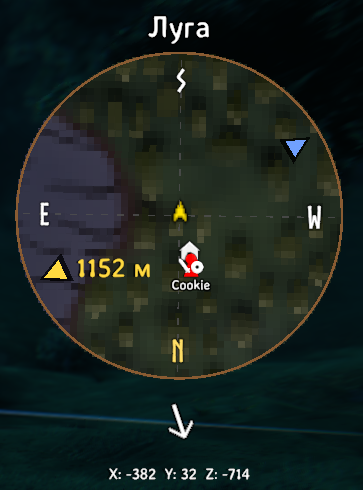
Requirements and installation
- Valheim with BepInEx 5. Built against Valheim 1.0.17 and BepInExPack 5.4.2351.
- StoreAndCraft is optional. Its mod settings window provides the localized in-game UI; Better Minimap does not install or rebind F10.
- Other minimap/HUD overhaul mods may conflict. Compatibility with every HUD mod, resolution and game update is not guaranteed. Windows is the tested build environment.
r2modman / Thunderstore Mod Manager: download the ZIP from GitHub Releases, close the game, then use Settings → Profile → Import local mod. The package is AndrewSha-BetterMinimap.
Manual: install BepInEx 5, then copy plugins/BetterMinimap.dll from the ZIP into BepInEx/plugins/BetterMinimap/.
Do not install the old Shtab Rotating Minimap DLL alongside Better Minimap. The plugin ID and config filename remain unchanged for compatibility.
Settings and defaults
In StoreAndCraft's mod settings window (usually F10), choose Better Minimap. Changes apply after Save; closing or going back without saving discards them. Other configuration managers are not modified by our localization integration.
Sections: 1. General → 2. Map → 3. Zoom → 4. Shortcuts → 5. Compass → 6. HUD → 7. Navigation → 8. Players.
| Setting | Mod default |
|---|---|
| Enable mod | On |
| Show minimap | On |
| Rotation | Camera up |
| Shape / size | Circle / 130% |
| Slots 1 / 2 / 3 / 4 | Empty / biome / wind / empty |
| Coordinates | Not assigned to a slot |
| Target indicator | On; no target selected |
| Player names / font size / outline | On / 8 / on (2 pixels) |
| Lighting | Time of day |
| Min / Max zoom | ×0.1 / ×4 |
| Custom zoom step | ×1.5 |
| Smooth zoom / separate ship zoom | On |
| Zoom shortcuts | Equals/Minus and NumPad +/− |
| Compass letters / lines | On / off |
| Line style / thickness / color | Dashed / 0.8 / #505050BB |
- Enable mod: switches off all mod features without losing settings. The settings window remains available.
- Show minimap (General): hides the small map, slots, compass and overlays without disabling the mod or the large M map. Enabled by default; both reset presets restore it to On. The master mod switch takes precedence and restores the native map when disabled.
- Reset to Vanilla: stages a vanilla-like preset: square, 100%, north up, daytime lighting, Min 0 / Max 1, and custom rotation, zoom keys, smoothing, ship zoom, compass, coordinates and target indicator disabled. It is only a preset, not a locked mode. The default slot layout, outlines and zoom indicator remain while the mod is enabled. Use the master switch for a completely unmodified minimap, including its original biome/wind positions.
- Reset to mod default: stages the defaults in the table. Neither reset changes the master enable switch, including an unsaved manual change to it.
- Both resets apply after Save and reset saved land/ship zoom to ×1, subject to the selected limits. If the mod is disabled, the zoom reset waits until it is manually enabled.
- Min zoom = 0 removes the custom far limit, but not the technical whole-map limit. If Min exceeds Max, the bounds are swapped internally. Only the small map is affected.
- The configurable zoom step applies to this mod's keys; native game keys retain their own step and respect the limits. Shift+Equals and Shift+Minus work with the default bindings.
- The selected zoom is shown below the map for two seconds after a change. On a ship, the label identifies ship zoom.
- Line thickness is 0.1–3.0. Colors use
#RRGGBBor#RRGGBBAA. - The HUD block shifts vertically when needed to keep its slots on-screen. If the entire block is taller than the viewport, reduce the HUD/minimap size.
HUD slots and navigation
Slot 1  (empty)
Slot 2  (biome)
[ minimap ]
Slot 3  (wind)
Slot 4  (empty)
Each slot offers Empty / Biome / Wind / Coordinates. Elements can be repeated. Empty slots take no space; filled slots use compact spacing. The biome font and wind arrow retain their native sizes; the biome row reserves enough height for its actual font metrics. Select Coordinates to immediately show X/Y/Z with a 9-unit font and a 3-pixel outline; select Empty to hide them. Y is the player's world height. There is no separate coordinate toggle. The temporary zoom label appears below the last visible lower slot.
Players: names are enabled by default, with font size 8 (range 4–20) and a 2-pixel outline. Change these independently in 8. Players. Names stay horizontal and close below the visible icon, discounting the sprite's transparent margins, and clip at the minimap boundary. Only the game's existing other public-position players are labeled; your own name is hidden and private player locations are not discovered. The large map is unchanged. The vanilla-like preset disables these labels. Existing saved font sizes are retained within the new bounds; select 8 manually to adopt the new default in an existing profile.
With Target indicator enabled, open M and Shift+left-click any point, including empty map space, to set or move a waypoint. A gold diamond shows the selected point on the large map and minimap; an edge arrow indicates an off-screen minimap target. Distance is measured horizontally in meters. Shift+right-click the large map to clear the waypoint without deleting a pin below the cursor. Ordinary clicks, pin checking, deletion and double-click creation retain their native behavior; the waypoint gestures do not modify pins. Selection is local to this session and clears when the feature/mod is disabled or the minimap is recreated. It is not saved or shared with other players.
Selecting a waypoint displays a confirmation such as Target selected (350 m) with rounded horizontal distance. Player ping rings that would cross the minimap border become blue arrows of the same shape as the gold waypoint arrow, following map rotation and shape. Fully visible pings remain native; edge indicators disappear with the game's ping lifetime and do not create extra network messages.
Configuration and zoom memory
Close the game before manually editing:
BepInEx/config/net.shtab.rotatingminimap.cfg
Stable config keys retain their historical Russian names; localized labels are presentation only. Existing settings are preserved on update and older sections are migrated. Old biome/wind positions migrate into slots; corner wind positions become centered on the same side. Explicitly saved slot settings take precedence. On upgrade from the 1.1.0 test build, coordinate slots that were disabled by its old switch become Empty; enabled coordinate slots are preserved. The obsolete switch is removed.
Separate land/ship magnifications are saved automatically in:
BepInEx/config/net.shtab.rotatingminimap.cfg.zoom
This contains only two zoom values, not game saves. The first time ship zoom is enabled without existing memory, both values start from the current zoom; set your preferred ship zoom aboard. Subsequent sessions restore the appropriate value, subject to Min/Max. A reset after Save resets both values to ×1.
Building and tests
Use .NET SDK 8 and reference DLLs from your own installed game and BepInEx profile. These proprietary/runtime DLLs are not included in this repository.
dotnet build RotatingMinimap.csproj -c Release `
  '-p:ValheimDir=C:\Games\Valheim' `
  '-p:BepInExCore=C:\ModProfile\BepInEx\core'
dotnet run --project tests/GeometryTests.csproj -c Release
powershell -NoProfile -ExecutionPolicy Bypass -File package.ps1
Output: bin/Release/net48/BetterMinimap.dll; installable ZIP: artifacts/.
Packaging uses Windows PowerShell/System.Drawing. A private local.props may supply local reference paths and is ignored by Git.
Automated checks cover geometry, target clamping, slot spacing/migration, viewport fitting, zoom levels and transitions, presets, localization strings and zoom-memory file I/O. They do not launch Unity or replace in-game testing of UI, input, clipping, lighting, resolution changes or compatibility. See the manual test checklist. Report bugs with game/mod versions, reproduction steps and screenshots; remove private data from any attached logs/configs.
License and acknowledgements
MIT, copyright 2026 AndrewSha. See LICENSE.
The implementation and generated compass icon are original. Banderi/ValheimMinimapMod, AlweStats and EvuMinimap were studied for reference; their code and game assets are not bundled.
Русский
Better Minimap — клиентский мод мини-карты Valheim от AndrewSha.
Что изменилось в 1.1.0
По сравнению с 1.0.1:
- Вместо отдельных положений биома и ветра — четыре настраиваемых слота: два над картой и два под ней. По умолчанию: Пусто / Биом / Ветер / Пусто. Ветер по центру, пустые строки не занимают место, блок HUD удерживается в пределах экрана, если хватает места. Размеры биома и стрелки ветра остались штатными.
- Добавлены координаты X/Y/Z как содержимое слота: шрифт 9, чёрная обводка 3 пикселя, без отдельного переключателя показа.
- В «Общее» добавлен переключатель «Показывать мини-карту» (по умолчанию включён). Большая карта M остаётся доступной.
- Добавлена цель на текущий сеанс: Shift+ЛКМ по любой точке большой карты задаёт/переносит цель, Shift+ПКМ снимает её без удаления меток. Золотые маркеры, стрелка направления для далёкой цели, расстояние по горизонтали и подтверждение выбора с расстоянием.
- Пинги игроков, которые не помещаются на мини-карте, показываются синими стрелками у края. Ближние пинги сохраняют штатные кольца; время жизни пингов не меняется.
- Добавлены никнеймы других игроков близко под иконками; своё имя скрыто. В разделе «Игроки» — показ, размер шрифта 4–20 (по умолчанию 8) и отключаемая обводка 2 пикселя. Подписываются только игроки с открытой позицией.
- Добавлена тонкая коричневая рамка для обеих форм карты, без дополнительной чёрной обводки снаружи.
- Обновлены RU/EN-настройки, пресеты и перенос старых настроек HUD; расширены автоматические проверки. Вместо прежней галереи оставлен один актуальный скриншот-референс.
Возможности
Поддерживаются два языка интерфейса: русский и английский. При русском языке игры автоматически выбирается русский, при остальных — английский.
- Вращение по камере, персонажу или север сверху; читаемые значки и буквы компаса.
- Круглая/квадратная форма и размер 50–150%. При увеличении карты бафы сдвигаются влево.
- Плавный зум, свои клавиши и пределы. Ступени привязаны к ×1 и не смещаются после достижения Min/Max.
- Отдельные масштабы суши и корабля с сохранением между запусками игры, в том числе для пассажиров.
- Независимые линии и буквы компаса; цвет, толщина и сплошной/пунктирный тип линий.
- Четыре слота: два над мини-картой и два под ней. В каждом — биом, ветер, координаты или пусто. Ветер только по центру; внешние обводки.
- Координаты X/Y/Z в метрах, уменьшенный шрифт. Появляются при выборе «Координаты» в любом слоте, без отдельного переключателя.
- Shift+ЛКМ по любой точке большой карты — указать цель, Shift+ПКМ — снять. На мини-карте — указатель, расстояние и стрелка у края для далёкой цели.
- Не помещающиеся на мини-карте пинги игроков заменяются синими стрелками у края до истечения штатного времени пинга.
- «Общее → Показывать мини-карту» скрывает мини-карту и весь её блок; большая карта M остаётся доступной.
- Тонкая коричневая рамка по контуру круглой/квадратной карты, без дополнительного тёмного слоя снаружи.
- Никнеймы близко под иконками других игроков с открытой позицией; своё имя скрыто. Размер шрифта 4–20 (по умолчанию 8) и отдельный переключатель обводки.
- Освещение мини-карты: по времени суток, всегда день или всегда ночь.
- Русские настройки при русском языке игры, английские — при остальных.
Обычное управление большой картой M не меняется; добавлены Shift+ЛКМ/ПКМ и временный маркер цели. Освещение мира, исследование, сеть и сохранения мира не изменяются. На сервер мод устанавливать не нужно.
Скриншот
Установка
Нужен BepInEx 5. Сборка выполнена с DLL Valheim 1.0.17 и BepInExPack 5.4.2351.
Скачайте ZIP из GitHub Releases, закройте игру и импортируйте через Settings → Profile → Import local mod в r2modman/Thunderstore Mod Manager.
Вручную: скопируйте plugins/BetterMinimap.dll из архива в BepInEx/plugins/BetterMinimap/.
StoreAndCraft необязателен; его окно модов (обычно F10) предоставляет локализованный интерфейс. Без него остаётся файл конфига. Не держите старую DLL Shtab Rotating Minimap одновременно с новой. Совместимость со всеми HUD-модами и версиями игры не гарантируется.
Настройки
Разделы: 1. Общее → 2. Карта → 3. Зум → 4. Клавиши → 5. Компас → 6. HUD → 7. Навигация → 8. Игроки. В окне StoreAndCraft изменения действуют после Сохранить. Закрытие или возврат назад без сохранения отменяет изменения.
По умолчанию: мод включён, вращение по камере, круглая карта 130%, Slot 1 пустой, биом в Slot 2, ветер в Slot 3, Slot 4 пустой, освещение по времени суток. Указатель цели включён, но цель не выбрана. Зум ×0,1–×4, шаг ×1,5, плавность и отдельный зум корабля включены. Клавиши = / − и NumPad + / −. Буквы компаса включены, линии выключены; линии — пунктир, толщина 0,8, цвет #505050BB.
- Мод включён — общий выключатель всех функций с сохранением настроек и доступа к F10.
- Показывать мини-карту (раздел «Общее») — скрывает мини-карту, слоты, компас и указатели, но не отключает мод и большую карту M. По умолчанию включено; оба пресета возвращают значение «Включено». Общий выключатель мода имеет приоритет: при выключенном моде возвращается штатная карта.
- Сбросить к настройкам игры — обычный пресет: квадрат 100%, север сверху, дневное освещение, Min 0 / Max 1. Вращение, дополнительные клавиши, плавность, отдельный зум корабля, компас, координаты и указатель цели выключены. Стандартная раскладка слотов, обводки и индикатор зума остаются; полностью штатную карту с исходными положениями биома/ветра возвращает общий выключатель.
- Сбросить к настройкам мода — дефолты выше. Ни один пресет не меняет общий выключатель, включая несохранённый ручной выбор.
- Сбросы применяются после Save и возвращают память масштабов к ×1 с учётом пределов. При выключенном моде сброс масштаба ждёт его ручного включения.
- Min = 0 снимает пользовательский предел отдаления, но не техническую границу всей карты. При Min > Max пределы внутренне меняются местами.
- Настроенная кратность действует для клавиш мода; штатные клавиши игры сохраняют свой шаг, но учитывают Min/Max. Работают
Shift+=иShift+−. - Индикатор автоматически появляется на две секунды после изменения масштаба. На корабле подпись указывает корабельный зум.
- Толщина линий — 0,1–3, цвет —
#RRGGBBили#RRGGBBAA. - Блок автоматически сдвигается по вертикали, чтобы слоты не выходили за экран. Если он целиком выше доступного пространства, уменьшите размер HUD/мини-карты.
Слоты: порядок сверху вниз — Slot 1, Slot 2, мини-карта, Slot 3, Slot 4. Для каждого доступно «Пусто / Биом / Ветер / Координаты»; элементы можно повторять. Пустые слоты не занимают место, отступы компактные. Шрифт биома и размер стрелки ветра остаются штатными; высота строки биома учитывает реальные размеры текста. Выбор «Координаты» сразу показывает X/Y/Z шрифтом 9 единиц с обводкой 3 пикселя; Y — высота игрока в мире. Отдельного переключателя нет. Индикатор зума появляется ниже последнего видимого нижнего слота.
Никнеймы: раздел 8. Игроки — «Показывать никнеймы», «Размер шрифта никнеймов» (4–20) и «Обводка никнеймов». По умолчанию включены, размер 8, обводка 2 пикселя включена. Текст находится близко под видимой иконкой, без лишнего отступа от прозрачных полей спрайта, и не вращается вместе с картой; у края карты обрезается по её форме. Подписываются только другие игроки, которые делятся позицией; своё имя скрыто. Большая карта и скрытые позиции игроков не меняются. Пресет настроек игры выключает подписи. Ранее сохранённый размер шрифта сохраняется в новых пределах; чтобы использовать новый дефолт в старом профиле, выберите 8 вручную.
Цель: откройте M, нажмите Shift+ЛКМ по любой точке, в том числе пустому месту. Повторный Shift+ЛКМ переносит цель. На большой и мини-карте точка обозначается золотым ромбом, за пределами мини-карты — стрелкой; рядом расстояние по горизонтали в метрах. Shift+ПКМ снимает цель и не удаляет метки под курсором. Эти жесты не меняют обычные метки. Выбор не сохраняется в мир и не передаётся другим игрокам; сбрасывается при выключении функции/мода или пересоздании мини-карты.
При выборе цели появляется подтверждение вида «Цель выбрана (350 м)» с округлённым расстоянием по горизонтали.
Пинги: если круг пинга не помещается на мини-карте, у края появляется синяя стрелка такой же формы, как у жёлтой цели, с учётом формы карты и вращения. Полностью видимые пинги остаются штатными; стрелка исчезает вместе с пингом, не продлевая его время и не отправляя новых сообщений.
Конфиг: BepInEx/config/net.shtab.rotatingminimap.cfg. Редактировать вручную при закрытой игре. При обновлении выбранные значения сохраняются, старые разделы мигрируют. Старые положения биома/ветра переносятся в слоты; угловой ветер становится центральным на той же стороне. Уже сохранённые настройки слотов имеют приоритет. При обновлении с тестовой 1.1.0 скрытые старым переключателем координаты становятся пустыми слотами, включённые сохраняются. Устаревший переключатель удаляется.
Память масштабов: BepInEx/config/net.shtab.rotatingminimap.cfg.zoom. Записывается автоматически; общая для миров, персонажей и кораблей внутри профиля. При первом включении без памяти оба масштаба берутся из текущего; настройте корабельный масштаб после посадки. При следующих входах восстанавливается подходящее значение с учётом Min/Max.
Для сборки нужны .NET SDK 8 и DLL своего клиента; команды приведены в английском разделе. Автотесты проверяют математику, пресеты, переводы и файл памяти, но не запускают Unity. В багрепорте укажите версии, шаги воспроизведения и скриншоты; удалите личные данные из логов и конфигов.
Лицензия MIT, автор AndrewSha.
CHANGELOG
Changelog
1.2.1 — Documentation refresh / Обновление документации
English
- Moved the screenshot above a single Changelog section, with a separate collapsed block for every version in each language.
- Shortened the English/Russian README, especially settings and HUD/navigation: only essential defaults and controls remain.
- Moved build/test instructions to
docs/building.md; preserved the complete release history in this file. - Documentation-only update since 1.2.0. Mod behavior, defaults and saved settings are unchanged; the version bump delivers the revised README in the Thunderstore package.
Русский
- Скриншот перенесён выше единого раздела Changelog; каждая версия — отдельный свёрнутый блок в обоих языках.
- Сокращён README RU/EN, особенно настройки и HUD/навигация: оставлены основные значения по умолчанию и управление.
- Инструкции сборки/тестирования вынесены в
docs/building.md; полная история релизов сохранена в этом файле. - Только документация относительно 1.2.0. Поведение мода, дефолты и сохранённые настройки не изменены; новый номер нужен для доставки обновлённого README в пакете Thunderstore.
1.2.0 — Six HUD slots, individual sizes, clocks, weight and transparency / Шесть слотов, индивидуальные размеры, часы, вес и прозрачность
English
Changes since 1.1.1; consolidates the unpublished local test builds.
- Added Slot 5 and Slot 6 below Slot 4: two upper and four lower slots, with new slots empty by default. Existing choices are preserved; empty rows collapse and the zoom popup stays below the last filled row.
- Each slot has its own size, 25–400%, default 100%, including biome text and the wind arrow. All text contents share the native biome font size at 100%; coordinates are no longer smaller by default. Wind scales from its native size; outline widths are unchanged. Sizes persist across content changes; both presets reset them to 100%. Row heights follow the text metrics or scaled wind diagonal.
- Compact StoreAndCraft slot rows combine content selection and size on one line with a short label and no per-slot description. Narrow windows use two compact lines. Native Save/Cancel and input widgets are retained; other mods are not changed.
- Added In-game time, Real time and Weight to all six HUD slots. In-game solar time follows the game's day/night cycle and sleep transitions; real time shows the computer's local clock, both in HH:mm. Weight shows current / maximum, rounded up like the native inventory and including the current carry-capacity bonuses. All three use white text with a 2-pixel outline. Existing slot-content defaults remain unchanged; saved
Timeselections remain the in-game clock. - Added Map appearance → Map transparency (%), 0–100, default 0% (opaque). Only the minimap terrain/background fades; icons, border, compass, slot labels and the large map are unchanged. Both presets restore 0%.
- At 1–99% transparency, terrain is rendered separately with the game's shader and composited with UI alpha. At 100%, terrain is hidden without running that pass. At 0%, the original rendering path is retained and the extra resources are released.
- If transparency rendering fails, the background falls back to opaque without disabling the other mod features or changing the saved setting. One warning per failure; no per-frame retries. Save 0%, then the desired value to retry. Partial setup is cleaned up too.
- The seven settings sections now contain 39 entries. Existing saved settings and local-test slot sizes are preserved; new size entries start at 100%. Plugin ID, DLL/config names and client-only installation are unchanged.
- Updated RU/EN documentation and settings, automated clock/weight/opacity, fallback, six-slot layout and size checks, and the in-game checklist. Automated tests do not verify Unity rendering or input.
Русский
Изменения относительно 1.1.1; объединены неопубликованные локальные тестовые сборки.
- Добавлены Slot 5 и Slot 6 ниже Slot 4: два верхних и четыре нижних слота, новые по умолчанию пустые. Прежние значения сохраняются; пустые строки схлопываются, индикатор зума остаётся ниже последней заполненной строки.
- У каждого слота свой размер 25–400%, по умолчанию 100%, включая биом и стрелку ветра. При 100% все тексты имеют штатный размер шрифта биома; координаты больше не уменьшены по умолчанию. Ветер масштабируется от штатного размера; толщина обводок не меняется. Размеры сохраняются при смене содержимого; оба пресета возвращают 100%. Высота строк учитывает метрики текста или диагональ увеличенной стрелки.
- В StoreAndCraft содержимое слота и размер объединены в одну компактную строку: короткая подпись, без описания под каждым слотом. На узком окне — две компактные строки. Штатные элементы управления и Save/Cancel сохранены; другие моды не затронуты.
- Во все шесть слотов добавлены «Игровое время», «Реальное время» и «Вес». Игровые солнечные часы следуют за циклом дня/ночи и переходом ко сну/утру; реальные показывают местное время компьютера, оба варианта — HH:mm. Вес — текущий / максимальный, с округлением вверх как в инвентаре и учётом действующих бонусов к переносимому весу. Белый текст с обводкой 2 пикселя. Содержимое прежних слотов по умолчанию не изменено; сохранённое значение
Timeостаётся игровыми часами. - Добавлено «Вид карты → Прозрачность карты», 0–100%, по умолчанию 0% (непрозрачная). Меняется только фон мини-карты; значки, рамка, компас, подписи слотов и большая карта сохраняют свой вид. Оба пресета возвращают 0%.
- При прозрачности 1–99% фон отрисовывается штатным шейдером в отдельную текстуру, затем накладывается с нужной прозрачностью. При 100% фон скрыт без этого прохода отрисовки. При 0% используется прежняя отрисовка, дополнительные ресурсы освобождаются.
- При ошибке отрисовки прозрачности возвращается непрозрачный фон, остальные функции продолжают работать, сохранённая настройка не меняется. Одно предупреждение при сбое, без повторных попыток каждый кадр. Для повтора сохраните 0%, затем нужное значение. Частично созданные ресурсы также освобождаются.
- В семи разделах теперь 39 настроек. Сохранённые значения и размеры слотов из локальных тестовых сборок сохраняются; новые настройки размера получают 100%. ID плагина, имена DLL/конфига и установка только на клиент не изменены.
- Обновлены RU/EN-документация и настройки, автотесты часов/веса/прозрачности, обработки сбоев, раскладки шести слотов и размеров, а также ручной checklist. Автотесты не проверяют отрисовку и ввод Unity.
1.1.1
Changes since 1.1.0; consolidates the unpublished local test builds.
- Added Transport → Show transport, default On: carts, rafts and ships on both maps, including parked vehicles and modded vehicles using standard Ship/Vagon components. Only nearby client-loaded objects are shown; no saved pins, additional network messages or world-wide tracking. Completely custom vehicle systems require separate support.
- Added Transport icon size, range 5–20, default 12, on both maps. Player icon sizes are unchanged; edge clearance accounts for the selected size. The controlled ship has no duplicate native marker; disabling the mod restores it.
- Player icons now render above all other map icons and labels, with the local arrow highest. Clipping and pointer pass-through are preserved.
- Fixed terrain pixels protruding beyond the circular brown border: a 256-segment geometric stencil shares the frame contour. Border color/thickness are unchanged, with no extra black outer band.
- Fixed missing/stale coordinate outline copies caused by the shipped TextMeshPro numeric text buffer. Coordinates retain font size 9 and a 3-pixel outline, without a background rectangle.
- Regrouped all 30 settings into seven sections: General, Map appearance, Zoom and controls, Around the map, Compass and navigation, Players, Transport. Both reset buttons are under General; slot-order and ping help were added.
- Existing settings migrate automatically; saved values in the new sections take precedence. Renamed the keyboard-zoom toggle to Zoom with extra keys, preserving its historical config key and behavior.
- Updated English/Russian documentation, automated regression checks and the manual testing checklist.
Изменения относительно 1.1.0; объединены неопубликованные локальные тестовые сборки.
- Добавлен «Транспорт → Показывать транспорт», по умолчанию включён: тележки, плоты и корабли на обеих картах, включая припаркованные и модифицированные на компонентах Ship/Vagon. Только загруженные клиентом объекты рядом с игроком, без постоянных меток, дополнительных сетевых сообщений и поиска по всему миру. Полностью нестандартный транспорт требует отдельной поддержки.
- Размер иконок транспорта — 5–20, по умолчанию 12. Иконки игроков не меняются; отступ от края учитывает выбранный размер. Метка управляемого корабля не дублируется и восстанавливается при выключении мода.
- Иконки игроков теперь поверх остальных значков и надписей на обеих картах; своя стрелка выше всех. Обрезка и пропуск кликов сохранены.
- Исправлено выступание пикселей карты за круглую коричневую рамку: маска и рамка используют согласованную геометрию. Цвет и толщина сохранены, чёрный внешний слой не добавлен.
- Исправлена неполная обводка координат из-за числового буфера TextMeshPro. Шрифт 9, обводка 3 пикселя, без прямоугольной подложки.
- 30 настроек сгруппированы в семь разделов: Общее, Вид карты, Масштаб и управление, Элементы вокруг карты, Компас и навигация, Игроки, Транспорт. Кнопки сброса в «Общем»; добавлены схема слотов и подсказка про пинги.
- Сохранённые значения автоматически переносятся; значения в новых разделах имеют приоритет. Переключатель переименован в «Зум через доп. клавиши», старый ключ конфига и поведение сохранены.
- Обновлены RU/EN-документация, автотесты и список ручных проверок.
1.1.0
Changes since 1.0.1; consolidates the unpublished local test builds.
- Four configurable HUD slots replace separate biome/wind positions. Defaults: Empty / Biome / Wind / Empty. Centered wind, compact spacing, collapsed empty rows and vertical viewport fitting. Native biome font and wind size are retained; biome labels no longer disappear due to text truncation or animated transparency.
- X/Y/Z coordinates as slot content, without a separate switch: font size 9 and a black 3-pixel outline.
- General → Show minimap (default On) hides the small HUD while keeping the large M map accessible. Disabling the mod restores native visibility and layout.
- Session-only waypoints: Shift+left-click anywhere on the large map to set/move; Shift+right-click to clear without deleting pins. Gold markers, a minimap edge arrow, horizontal distance and selection confirmation with rounded distance.
- Clipped/distant player ping rings become blue directional edge arrows. Fully visible pings and native ping lifetimes are preserved.
- Other players' nicknames close below their minimap icons; no local-player name. Players settings: visibility, font size 4–20 (default 8), optional 2-pixel outline. Only public-position players are labeled; names clip to the map and do not change large-map labels.
- One thin brown border for circular and square maps, without a dark outer band.
- Updated RU/EN settings, presets and old HUD configuration migration. Expanded automated geometry/UI checks and manual testing checklist.
- Replaced the old screenshot gallery with one current reference image; documented the changes in the English and Russian README sections.
Изменения относительно 1.0.1; объединены неопубликованные локальные тестовые сборки.
- Четыре слота вместо отдельных положений биома/ветра: Пусто / Биом / Ветер / Пусто. Ветер по центру, компактные отступы, пустые строки без зазоров, подгонка блока по высоте экрана. Штатные размеры биома и ветра сохранены; исправлено исчезновение биома.
- Координаты X/Y/Z выбираются в слоте: шрифт 9, чёрная обводка 3 пикселя, без отдельного переключателя.
- «Показывать мини-карту» в разделе «Общее» скрывает малую карту, не блокируя M. По умолчанию включено.
- Цель на текущий сеанс: Shift+ЛКМ задаёт/переносит, Shift+ПКМ снимает без удаления меток. Золотые маркеры, стрелка у края, горизонтальное расстояние и подтверждение выбора с расстоянием.
- Не помещающиеся пинги игроков заменяются синими стрелками у края; ближние кольца и штатное время жизни сохранены.
- Никнеймы других игроков близко под иконками; своё имя скрыто. Показ, размер 4–20 (по умолчанию 8) и обводка 2 пикселя настраиваются в разделе «Игроки».
- Одна тонкая коричневая рамка без чёрного внешнего слоя для обеих форм карты.
- Обновлены RU/EN-настройки, пресеты, миграция старого HUD и проверки. В README добавлен список изменений и оставлен один актуальный скриншот.
1.0.1
- Added circular, square and ship-zoom screenshots to the README.
- Highlighted English and Russian UI support.
- No gameplay changes.
Добавлены скриншоты круглой, квадратной карты и корабельного зума в README. Отдельно отмечена поддержка русского и английского интерфейса. Игровая логика не изменена.
1.0.0
First public release.
- Camera-up, character-up and north-up minimap orientation.
- Circular/square shapes, adjustable size and status-effect spacing.
- Smooth zoom, configurable shortcuts and zoom levels anchored at ×1.
- Separate land/ship zoom saved between game sessions.
- Compass letters and configurable line color, thickness and style.
- Biome/wind positions with external outlines.
- Time-of-day, always-day and always-night minimap lighting.
- English/Russian integration with StoreAndCraft's settings window.
- Master enable switch and two reset presets that preserve its state.
Первый публичный релиз.
- Вращение мини-карты по камере/персонажу или север сверху.
- Круглая/квадратная форма, размер карты и сдвиг бафов.
- Плавный зум, свои клавиши и ступени с опорой на ×1.
- Отдельные масштабы суши/корабля с сохранением между сеансами.
- Компас, цвет/толщина/тип линий, положения биома/ветра и внешние обводки.
- Освещение по времени суток, постоянный день или ночь.
- Настройки RU/EN в окне StoreAndCraft, общий выключатель и два пресета.
