
Please disclose if any significant portion of your mod was created using AI tools by adding the 'AI Generated' category. Failing to do so may result in the mod being removed from Thunderstore.

ForgePlanner
In-game crafting planner. Press F7, build a shopping list, and see the ore, wood, coal and smelting time it takes. Reads recipes, upgrade costs and names from your running game, so the numbers survive patches.
| Date uploaded | 4 days ago |
| Version | 1.0.0 |
| Download link | Biozip-ForgePlanner-1.0.0.zip |
| Downloads | 25 |
| Dependency string | Biozip-ForgePlanner-1.0.0 |
This mod requires the following mods to function

denikson-BepInExPack_Valheim
BepInEx pack for Valheim. Preconfigured with the correct entry point for mods and preferred defaults for the community.
Preferred version: 5.4.2350README
ForgePlanner
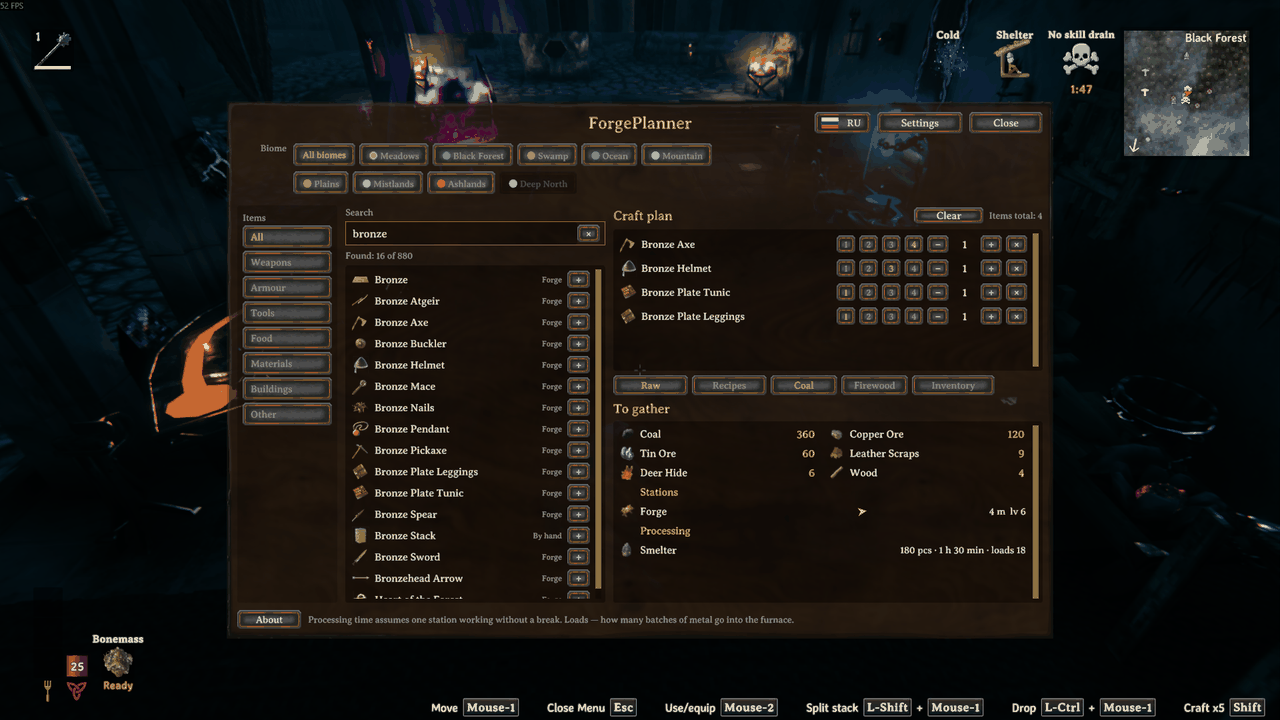
A crafting planner that lives inside Valheim. Press F7, build a shopping list, and see exactly how much ore, wood and hide you need — including the smelting, the coal, and which station you have to stand at.
Everything is read from your running game: recipes, conversions, item names, icons, trader price lists and your language. Nothing is hardcoded, so the numbers keep matching after a game patch instead of going quietly stale.
What it does
- Plan several items at once. Three bronze picks and two maces, not one item at a time. Double-click a row to add it.
- Quality levels 1–4. The upgrade surcharge is taken from the game, not guessed. Valheim doubles it per level (1, 2, 4), which is where most spreadsheets and wikis get it wrong.
- Raw materials or recipe materials. Either break everything down to ore, wood and hide, or stop at what the workbench actually asks for.
- Smelting included. Coal, smelting time and how many loads each station needs.
- Counts what you already have. Your inventory plus nearby chests.
- Tells you which stations you need — and whether one is standing nearby, how far, in which direction, and at what level. If the one you have is too low, it says which level the plan wants. If there is none, one button adds the station itself to the plan.
- Names the trader for anything you cannot find. Some materials drop nowhere; the line says who sells it and for how much.
- Buildings too. Walls, floors, workstations — the hammer menu is in the same catalogue.
- Filter by biome, with the same colours as the website.
- Search and eight tabs: All, plus Weapons, Armour, Tools, Food, Materials, Buildings and Other. Search works in both English and Russian whatever language the game is running in.
Spoiler-free by default
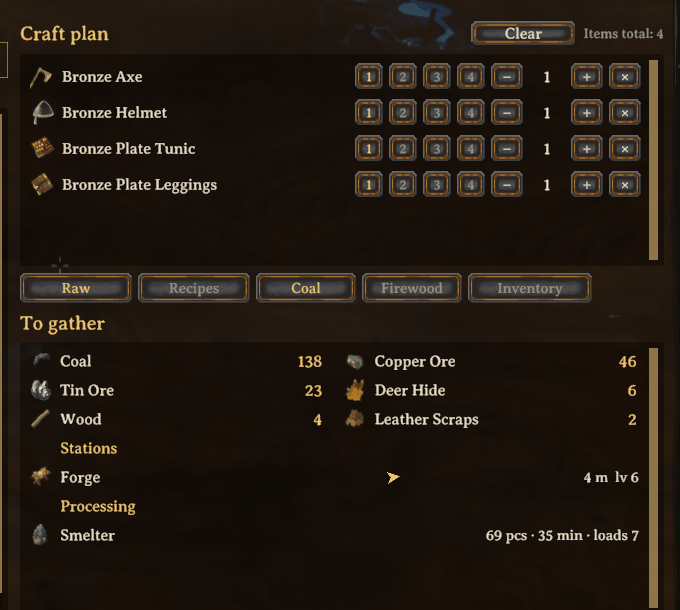
A planner opened in your first hour would otherwise retell the whole game: a thousand entries with flametal weapons at the top. So a biome stays locked until the boss before it falls. Meadows, Black Forest and Ocean are always open — you get there on your own.
Locked biomes dim rather than disappear, and the whole thing is one switch in Settings if you would rather see everything. If you have already beaten the bosses, you lose nothing: it is all open.
The victory keys are read from the boss prefabs themselves, so the mod does not carry a list of boss names that a future update could quietly invalidate.
Usage
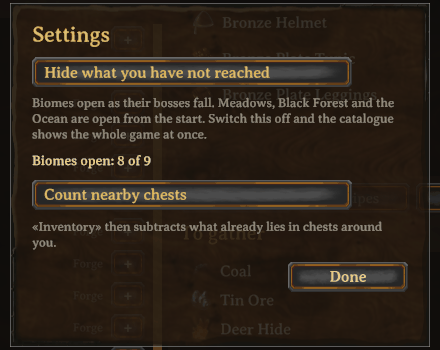
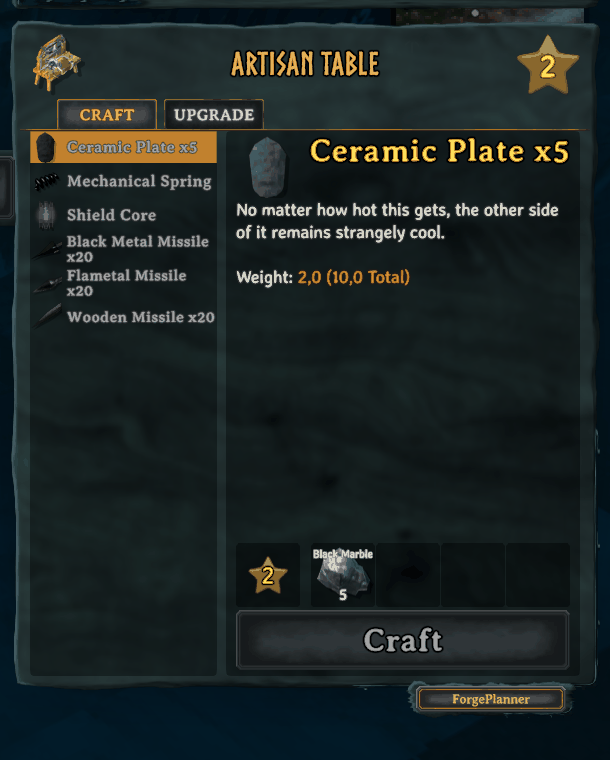
Press F7 in a loaded world, or use the ForgePlanner button on any
crafting station's panel. The cursor is released while the window is open, and
the game behaves exactly as it does when you press E at a workbench: no
swinging, building, walking or hotbar switching by accident. Press F7 or
Esc to close.
Configuration
BepInEx/config/dev.forgeplanner.forgeplan.cfg, written on first run.
| Section | Key | Default | Meaning |
|---|---|---|---|
General |
Open |
F7 |
Hotkey that opens the planner |
General |
Russian |
false |
Window labels in Russian |
General |
HideUnreached |
true |
Lock biomes until their boss is beaten |
Stock |
CountChests |
true |
Count nearby chests, not just your backpack |
Stock |
Radius |
20 |
How far a chest counts as yours, in metres |
Station |
Button |
true |
Show the ForgePlanner button on station panels |
Station |
Corner |
BottomRight |
Which side of the panel the button's shelf sits on |
Station |
OffsetX |
14 |
Shelf offset from the panel edge, in points |
Station |
DropDown |
0 |
How far below the panel edge to drop the shelf |
Debug |
SelfTest |
false |
Dump the parsed catalogue to the log on world load |
The three Station keys are there for repair rather than taste: the crafting
panel belongs to the game, and a future Valheim update may move it. If the
button ends up in the wrong place, it can be put back without a new release of
the mod.
Companion website
forgeplanner.pages.dev runs the same calculation in a browser, for planning before you launch the game.
The two are kept honest about each other: the mod reads the live game, the site reads extracted game data, and a parity harness compares the catalogue, conversions and per-level costs entry by entry. Four real calculation bugs were found that way in a single day — potential idols counted as ingredients, bronze taken from scrap instead of ore, a five-ingot recipe beating the one-ingot one, and a wrong upgrade curve.
Progression is the one thing the site cannot do: it does not know which bosses you have beaten.
Requirements
- Valheim (tested against 1.0.15)
- BepInExPack Valheim 5.4.2350 or newer
Manual installation
Drop Forgeplan.dll into BepInEx/plugins/.
Licence
MIT. See LICENSE. Not affiliated with Iron Gate Studio.
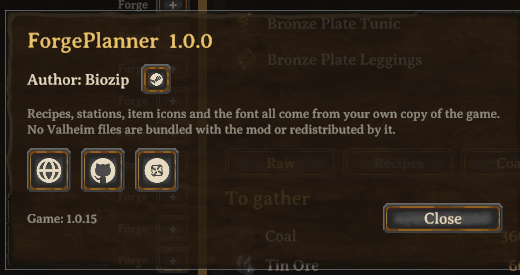
The window borrows the game's own font, panel and button art at runtime, so it
matches your UI scale and your language. It ships no Valheim assets of its own —
the few icons it does carry are its own, and LICENSE says which.
CHANGELOG
Changelog
Русская версия с подробностями — Versions.md в репозитории.
1.0.1
- The package icon is now the project logo - the same anvil used by the website, the Boosty page and the store listings. The mod used to draw its own anvil in code, which made it the one place where the mark differed. In a mod manager the package sits in a list of hundreds; someone arriving from the website should recognise it at a glance.
- No game art is involved, which was the point of drawing the old icon in code: the logo is the author's own and is shared between the two projects.
- The README said the planner has seven tabs and then listed eight. Corrected to eight: All, plus the seven categories.
A separate release rather than a fix to 1.0.0 because Thunderstore ties the icon to the version number and will not take the same one twice.
1.0.0
First public release. MAJOR because the config format changes, and that is deliberate timing.
-
Config keys and comments are now in English. Both the keys and the explanation above each one used to be Russian, so a player who opened
dev.forgeplanner.forgeplan.cfgmet a wall of Cyrillic and could not even change the hotkey.Was Now [Общее] Открыть[General] Open[Общее] Русский язык[General] Russian[Общее] Скрывать недостигнутое[General] HideUnreached[Запасы] Считать сундуки[Stock] CountChests[Запасы] Радиус[Stock] Radius[Станок] Кнопка у станка[Station] Button[Станок] Угол[Station] Corner[Станок] Отступ по горизонтали[Station] OffsetX[Станок] Смещение вниз[Station] DropDown[Отладка] Самопроверка[Debug] SelfTestRenaming keys resets everyone's settings to defaults, which is normally reason enough to leave them alone. But right now nobody's settings exist — the mod has never been published. This is the last moment the fix is free.
Russian stays where it belongs: in the window's own labels, which have a language switch.
-
The GitHub button in the Info panel opens the repository rather than the author's profile.
-
The source is public: https://github.com/Biozip/ForgePlanner
0.23.0
- Materials you buy are labelled with the trader and the price. Some materials drop nowhere — you go to a trader with coins. "Thunder stone — 1" used to read like a task nobody explained; searching the world for it is pointless, it is not there. The line now says "Haldor · 50".
- Price lists are read from the running game, like everything else, so a mod that adds stock to a trader shows up on its own. A star after the price means the item is not on the counter from the start — traders widen their stock as you progress.
- Biomes of purchasable materials sorted out, together with the website: fifteen materials counted as Meadows purely because that was the default. The Frost Foundry is the visible one — it used to show as Swamp, while Frostcore comes from the Deep North.
0.22.0
- The shelf under the crafting panel no longer covers the game's Craft button. It used to tuck under the panel edge to hide the seam — but Craft reaches all the way down, so the shelf was not tucking under the panel, it was sitting on the button.
- The shelf is now the size of the button, with equal margins: a frame, not a stand.
- The config key
Отступ по вертикалиis renamed toСмещение внизand now means "how far below the panel edge to drop the shelf". Old config files still load; the orphaned line goes away on the next save.
0.21.0
- An arrow pointing at the station. "Black Forge, 119 m" answers half the question. The arrow sits next to the distance and turns relative to where you are looking. Beyond 150 m it is not shown: at that range the difference between "that way" and "that way but righter" is a minute of walking wrong.
- The station button dropped clear of the game's Craft button.
- The Nexus link in the Info panel works.
0.20.0
- The crafting station now sets an item's biome. An arbalest is made of swamp iron, but it is forged at the Black Forge, which needs black marble from the Mistlands. The list said Swamp — so a player on the Plains saw it as available and could not make it. 34 items moved.
- New "Stations" section under the totals. Which stations the plan needs, whether one is standing nearby, how far and at what level — and if it is too low, which level is required. If there is none, an "Add to plan" button builds it. Stations are searched with no radius limit, but the game only tracks loaded objects, so past the edge of the loaded world the honest answer is "cannot see".
- The station button moved to its own shelf below the panel.
- The Info panel now shows the game version, and its wording about game assets was rewritten — the old phrasing was genuinely unclear.
0.19.0 – 0.16.0
- An Info panel in the bottom-left corner: name, version, author, and clickable links to the site, GitHub, Nexus and the author's Steam profile. Before opening one, the mod asks and shows the actual address — leading a player out of the game silently is not on, and "go to the site" with no address is exactly what you should not trust. Addresses are compiled in, not configurable: a link that can be swapped through a config file will be.
- A "ForgePlanner" button on every crafting station's panel. A third tab next to Craft and Upgrade is not possible — the game places those tabs by numbers, not layout, and a third one lands differently for everyone because UI scale is adjustable. Its position lives in the config, not for tuning but for repair: the panel belongs to the game and a future patch may move it.
- The mod's first artwork of its own — three icons, embedded in the DLL rather than shipped as loose files, because mods are installed by unzipping and the second file eventually does not get copied. Still nothing from Valheim.
- Settings buttons are sized to their text, and the Info and Settings windows are considerably smaller.
0.17.0
- An empty catalogue explains itself. The counter shows "Found: N of M" and adds "the rest is hidden by filters" at zero. It used to open almost empty and silent, which reads as "the mod is broken".
- Filters no longer survive a change of world. A section and biome set by a previous character made the window open filtered by an invisible condition.
0.15.0
-
Spoiler-free progression. A planner opened in your first hour used to retell the whole game: a thousand entries with flametal weapons at the top. Now a biome opens when the previous boss falls. Meadows, Black Forest and Ocean are always open — you get there on your own. A locked biome dims rather than disappears; a vanishing row of buttons reads as a fault.
The victory keys are not hardcoded. They are read from the boss prefabs themselves at world load. Only one thing is fixed: which victory opens which biome. That is knowledge about the game, not about its files.
-
A Settings button between the language switch and Close: the progression toggle, a count of open biomes, and the chest option — which previously lived in the config file only.
-
Double-click a catalogue row to add it. A single click deliberately does nothing: the row spans the whole list, and a stray click would add things unnoticed.
0.14.0 – 0.13.0
- Item names are translated properly now. Three separate causes, found one
at a time. The last one: there is no convention at all between a prefab's name
and its localisation token — "Seafarer's Bounty" is the prefab
feastoceans_materialand the token$item_feastoceans. The bridge is now extracted from the game bundle itself, 1514 entries. - Food no longer appears twice. Putting a cooked dish on a table is itself a building, and it sat next to the recipe with the same name but "By hand" as its station — as though food could be made without a cauldron.
- Cultivator plantings removed from the catalogue. A sapling costs one seed; that is planting, not crafting.
- Scrolling is three times faster, the title is centred, and the "Clear" button moved next to the plan it clears — in the window header it was being read as "close without saving".
0.12.0 – 0.10.0
- Input is blocked completely while the window is open — exactly as it is
when you press
Eat a workbench, because the mod now answerstrueto the game's ownInventoryGui.IsVisible(). Three earlier attempts were wrong in method: each silenced actions one at a time and each time something else turned up — emotes, crouch, guardian power, the belt, placing buildings. - One of those patches was actively harmful.
Player.UpdateEmotereads no input at all; it plays an animation from network state. Suppressing it froze emotes for every player nearby while our window was open. Removed. - The remaining pointwise patches now check the player is yours. They sit on
Playerinstance methods, and in a multiplayer world there are as many of those as there are people on the server. - Duplicates gone from the catalogue.
Piececomponents hang on plenty of things that are not player buildings — trader campfires, shrine bowls, dungeon rubble. The mod now takes the game's own answer: thePieceTableon the hammer, hoe and cultivator. - Search works in both languages even though the game only knows one.
0.9.0
- Biome filter, ten buttons with coloured dots, matching the website. There is no biome on an item anywhere in the game's data — it is editorial knowledge, so the table is generated from the site's data rather than retyped, and the two now colour biomes identically by construction.
- A language switch, English by default. The window's own labels used to be Russian for good; on an English game it came out bilingual.
- Station icons in the refining block, a search field you can clear, and labels on each block.
0.8.0
- Buildings in the catalogue. New "Постройки" section. They were missing
for a reason: the mod builds its catalogue from
ObjectDB, which holds items only — buildings live on scene prefabs asPiececomponents. Now read from there, with the hammer's own icon, station and material list. - Buildings have no quality levels and no upgrade surcharge;
Piece.Requirementcarries nothing but an item and a count.
0.7.0
- Iron is smelted from scrap, not ore. The game has two smelter rules for iron and whichever came first won — a lottery of prefab order. Iron ore only drops as a fishing bonus from giant herring, so planning iron through it is meaningless. The choice is now explicit, with the same table mirrored in the website's data pipeline.
0.6.1
- Scrollbar handles no longer paint sand-coloured rectangles across the window.
+,−,×and the quality digits are visible again on small buttons.- Wider catalogue column: item names are no longer cut short.
0.6.0
- The window is rebuilt to look like the game. Charcoal, semi-transparent, the game's own panel art — previously it rendered as a white torn sheet, because the sprite search picked the inventory panel's mask.
- Three columns: sections, catalogue, plan.
- Seven catalogue sections instead of one lump of "gear".
- Totals in two columns; scrollbars; mode toggles that stay inside the window.
- Crafting station names are localised. The catalogue used to show
piece_workbenchandblackforge.
0.5.0
- No swinging while the planner is open, but you can still walk. Attacks, building and the hotbar are blocked individually; the general input gate is only used while the cursor sits in the search box.
0.4.0 – 0.3.0
- The window moved from IMGUI to uGUI: the cursor is free without opening the Esc menu, item icons render properly, and the catalogue holds every recipe instead of the first hundred.
0.2.0
Four calculation bugs, all found by comparing the mod against the companion website. All four were shared with the site and fixed on both sides.
- Potential Forge idols counted as crafting ingredients. They are not: you carry them to a separate forge in the Mountains to gamble on quality beyond the normal cap. The workbench never asks for them.
- Bronze was taken from scrap instead of copper and tin. Scrap drops from ruins and cannot be farmed, so the answer was not merely different — it was useless.
- The five-ingot bronze recipe beat the one-ingot recipe. An order for 36 ingots became eight batches of five: 40 ingots and 80 copper instead of 72.
- Upgrade costs used the wrong curve. Valheim doubles the surcharge per level (1, 2, 4); the documentation dumps most tools read from make it linear (1, 2, 3).
0.1.0
Skeleton. Never released.
