
Please disclose if any significant portion of your mod was created using AI tools by adding the 'AI Generated' category. Failing to do so may result in the mod being removed from Thunderstore.

TooManyLags FGN Addon
FiresGhettoNetworking addon aiming for no noticeable latency for every player whenever possible, and the lowest possible latency otherwise. Dynamic object and mob ownership completely removes the impact of other players' lag.
| Date uploaded | 2 days ago |
| Version | 1.0.8 |
| Download link | Botaniclas-TooManyLags_FGN_Addon-1.0.8.zip |
| Downloads | 50 |
| Dependency string | Botaniclas-TooManyLags_FGN_Addon-1.0.8 |
This mod requires the following mods to function

denikson-BepInExPack_Valheim
BepInEx pack for Valheim. Preconfigured with the correct entry point for mods and preferred defaults for the community.
Preferred version: 5.4.2351
VerdantsAscent-FiresGhettoNetworking
Comprehensive networking + server-authority mod with ZDO delta compression, WearNTear server/client CPU skips for invulnerable pieces, AoI-filtered RPC broadcasts, and a built-in per-client config auto-tuner.
Preferred version: 1.5.36README
TooManyLags - FiresGhettoNetworking Addon
A FiresGhettoNetworking extension designed to make nearby interactions feel almost latency-free: locally owned objects are processed directly on your client, without waiting for another player's connection. In shared areas, the server takes over so each player primarily feels their own latency instead of someone else's lag. Includes ownership improvements for Hostile Mobs.
Forced FiresGhettoNetworking settings
TooManyLags applies required FiresGhettoNetworking settings at startup, including enabling Server-Side Simulation on the dedicated server by default. Their saved config values are ignored while TooManyLags is enabled; the config file stays unchanged. Other FiresGhettoNetworking settings and incompatible-mod safety blocks remain active.
Quick start: Install both mods on the dedicated server and every client, then play. FiresGhettoNetworking's default settings and Auto-Tune, combined with TooManyLags' defaults and required overrides, are intended to provide an optimal starting setup for almost all dedicated servers without manual configuration. You can still fine-tune all other FiresGhettoNetworking settings yourself; its config is worth a look.
Server-Side Simulation adds CPU workload to the server. For a weak or already overloaded server CPU, set NoServerSideSimulation=true. Objects and Hostile Mobs then stay player-owned; shared fields prefer the better-connected player. Server-owned buildings, default ownership and permanent station ownership are unavailable. Inventory, refilling and active-use safeguards remain; all clients need the mod for full handoffs. Shared interactions can still depend on the selected player's latency.
| Your setup | Recommended edition and mode |
|---|---|
| Dedicated server, strong CPU | This addon with Server-Side Simulation (default). |
| Dedicated server, weak CPU, with FiresGhettoNetworking | This addon with NoServerSideSimulation=true. |
| Dedicated server, weak CPU, without FiresGhettoNetworking | TooManyLags - Standalone. |
| Locally hosted multiplayer | TooManyLags - Standalone. |
Why it helps
Valheim distributes simulation between object owners. A door or creature owned by another player can feel delayed when that player's connection is slow, even if yours is fast.
TooManyLags assigns nearby interactive objects to you, allowing supported interactions to run locally without a network round trip. Where players' fields overlap, the server becomes the owner. If your connection is poor while you are close to other players, you can still feel that delay when using server-owned objects; other players' interactions no longer depend on your client processing those objects.
Hostile Mobs prefer their current player target as owner. A high-ping target can use the server when another eligible player is nearby. The aim is to keep each player's experience responsive and prevent one slow connection from becoming everyone's lag.
This shares client workload more fairly, especially in large bases. Server ownership can increase server CPU usage. Server overload and protected ownership transitions can still cause delays; this is not a guarantee of zero lag.
Help find problems
Real-world testing is still limited. Please share bugs and ideas through GitHub Issues.
Before reporting a bug, test on a separate copy of your server and world:
- Run only BepInEx and FiresGhettoNetworking, without this mod or other mods. Repeat the steps that caused the problem. If it still happens, please report it to the relevant project rather than here.
- Add this mod to that isolated setup and repeat the same steps. If the problem appears only with this mod, open an issue with a detailed description, steps to reproduce, mod versions, relevant settings and logs.
Thanks for helping improve the mod. Have fun, and enjoy smoother adventures together!
How it works
- A camera-directed grid covers nearby interactive objects and idle tamed animals. One player's fields go to that player; overlapping fields go to the server. Stationary players still count.
- Cell or camera-sector changes request updates. Transfer delays, completed-field caching and unloading cleanup avoid repeated work. Isolated players use vanilla ownership by default.
- Hostile Mobs use AI target ownership with attack protection, consent, retries and safe server fallback. Hostile summons follow the same rules. Friendly magic summons, including skeletons, spirit animals and roots, stay outside both the grid and mob ownership policy. Ordinary tamed animals still use the grid; bosses and active controls retain their safeguards.
- Open inventories, active users and refilling remain protected. Local PUP collision/stability guards remain a separate feature.
Ownership grid in action
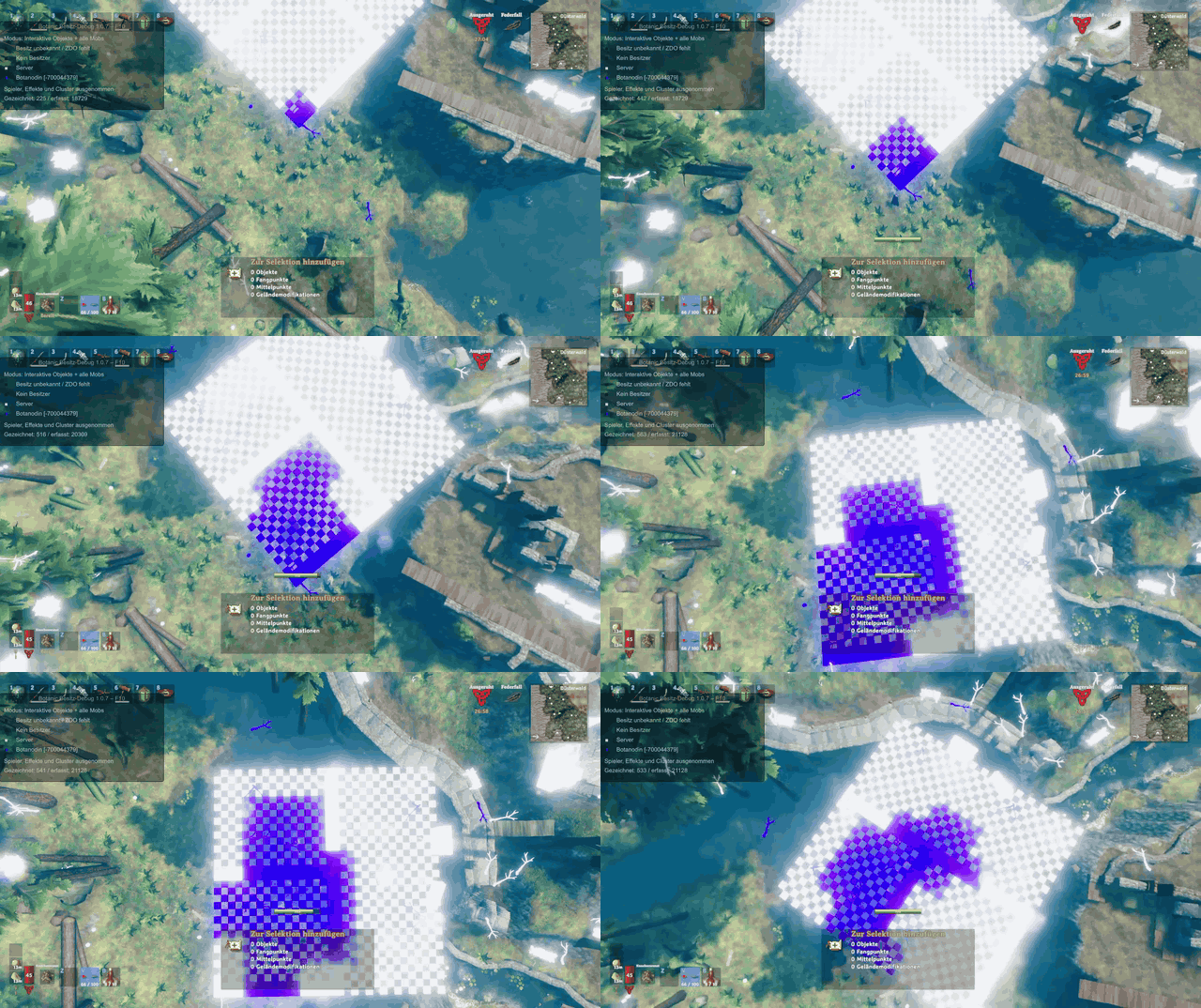
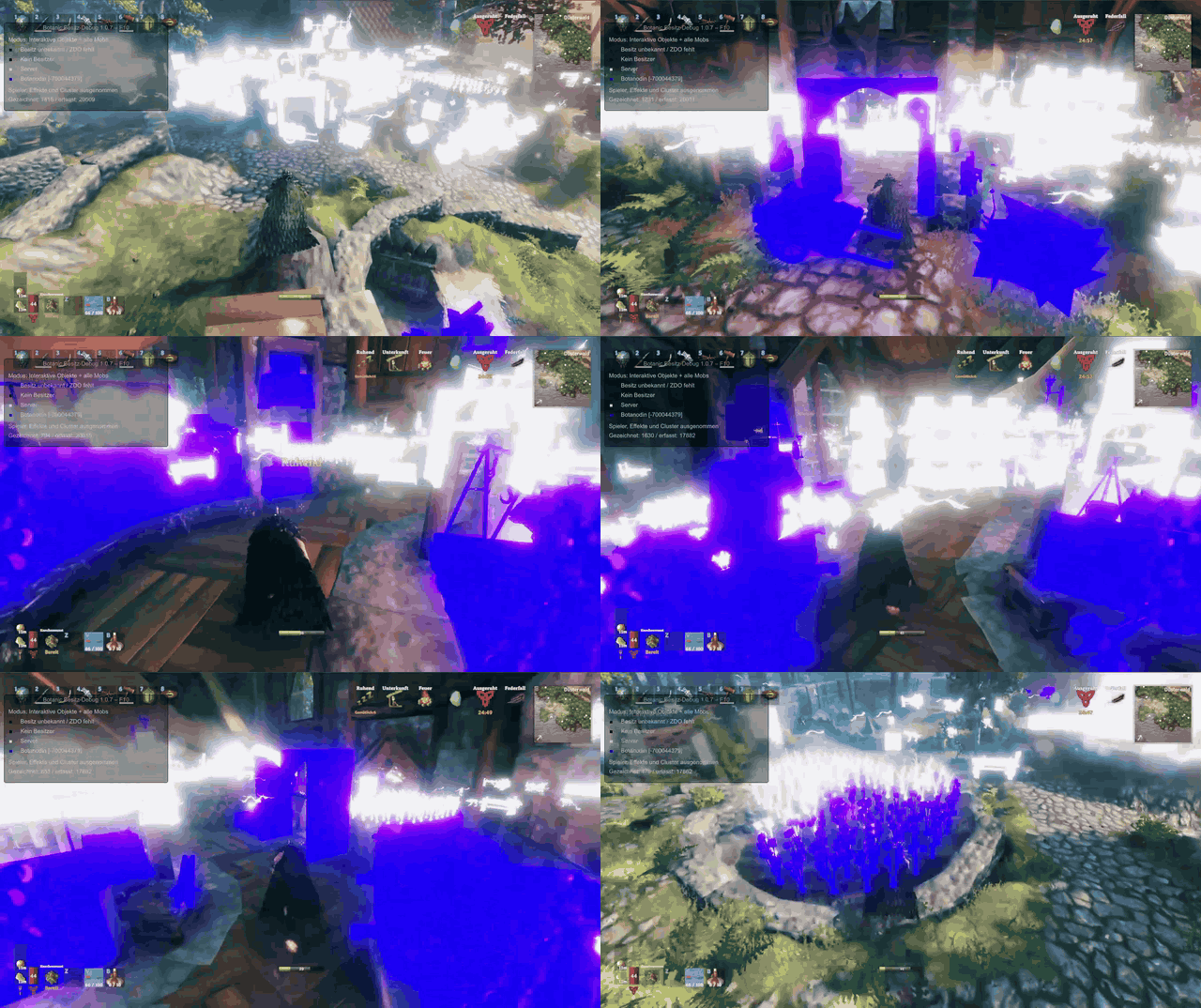
These examples use BotanicOwnerDebug to show ownership: white objects belong to the server; purple objects belong to the player in these recordings. Movement and camera-sector changes update nearby grid cells using their configured delays.
Ownership from above
Ownership while moving
Configuration
Edit BepInEx/config/botanic.toomanylags.fgnaddon.cfg; restart after changes. Sections explain each feature briefly.
Use BotanicOwnerDebug as an optional client-side debugging tool to see object and mob owners, check ownership transfers and tune your configuration.
| Feature | Defaults and options |
|---|---|
| Simulation mode | NoServerSideSimulation=false: full Server-Side Simulation. Set true for weak server CPUs; transfers stay between players. |
| Grid | 4-metre cells, rounded 7x7. Also 8/16 metres and square 3x3/rounded 5x5. 4 metres requires a rounded grid. |
| Direction and delays | Camera direction; inner 0s, forward 0.2s, outer 3s. Full-grid mode uses 2s. Missing camera data uses character heading. |
| Checks | Movement and camera each default to 0.1s. Camera checks support 0.05–5s, allowing up to 20 checks per second. Unchanged sectors create no new field requests or camera writes. Network delivery can add delay. |
| Leaving fields | Keep ownership: on. In directional mode, when only one player remains, red fields transfer automatically; forward/outer fields keep their owner until that player's next cell or heading-sector change. Fully vacated fields retain ownership. Native release still applies. |
| Categories and overrides | 24 object groups; separate static, default-interactive and permanent-refill server ownership. All three overrides default off and are ignored with NoServerSideSimulation=true. |
| Hostile Mobs | AI ownership on; server fallback target ping 200ms, other-player distance 6 metres. Without Server-Side Simulation, fallback uses a lower-latency nearby player. |
Requirements and installation
- Install BepInEx, FiresGhettoNetworking and the same mod version on the dedicated server and every client. Copy
TooManyLags.dllintoBepInEx/plugins/TooManyLags/. - Copy the supplied config into
BepInEx/config/, or let first startup generate it. KeepEnableAIOwnershipconsistent across server and clients. - Restart. TooManyLags automatically applies all required FiresGhettoNetworking settings at startup; no manual FiresGhettoNetworking configuration is needed. These overrides apply to the current session only. Your saved FiresGhettoNetworking config and other FiresGhettoNetworking settings remain unchanged.
PUP FPS is optional.
The imported PUP readiness check supports the verified PUP FPS 1.0.34 build. Other PUP builds block AI server fallback; target-player ownership still works. Without PUP, native loading readiness is checked instead.
CHANGELOG
Changelog
1.0.24
- Fixes the object ownership grid failing to start when newer FiresGhettoNetworking versions already patch Pickable.RPC_Pick. Preserves its existing server-safe effect actor; harvesting, inventory safeguards and grid timing are unchanged.
1.0.23
- Makes Enabled and EnableAIOwnership server-controlled; clients ignore their local values, and only logging remains local. Both switches require a server restart; update server and clients together.
- Restores guarded interactive handoffs after delayed join negotiation or stale owner replication. The extra 1.0.15 handoff protocol is now experimental and opt-in (EnableExperimentalInteractionProtection=false); existing inventory, refill, active-use and overlap safeguards remain enabled, and the player-simulation mode is unchanged.
- Adds 6.4-metre cells and live tuning of camera overlap (0–45°, default 30°) and turn prediction (default 0.1s, 0 disables); predicted cells use the inner/red delay. KeepOwnershipOnCellExit=false includes rear fields with a red 3x3 centre, and outdated positions after teleportation no longer block grid transfers; changing cell size requires a server restart.
1.0.17
- Restores camera-directed grid updates when initial server camera settings are missed; clients retry until synchronization succeeds.
- Fixes ownership handoffs leaving door and harvesting interactions waiting. Verifies source results and recipient readiness, with per-object processing and extra checks limited to actual transfers or delivery failures. Preserves inventory/refill and pending item-stand protection. Update server and clients together.
- Adds ServerOverlapCooldownSeconds (default 1s, 0 disables) to reduce rapid ownership changes when nearby players turn their cameras. Shared fields stay server-owned during the cooldown; a later movement or direction update can request another change. Supports live tuning.
1.0.12
- Adds admin-only in-game tuning of ownership check intervals, transition delays and Hostile Mob fallback thresholds without restarting. Preserves pending handoffs and usage safeguards. Other settings can be saved for the next restart, with pending and active values shown in the console.
- Camera timing is controlled by the server; camera and movement checks default to 0.05s. Directions cover +/-37.5 degrees with 30 degrees of overlap. Changed directions get native send priority and wake the next server pass without another interval wait; duplicate field work is avoided.
- Moves object categories to the final config section, 10 - Object Categories. Use the supplied config and reapply custom category values; saved check intervals are retained.
1.0.9
- Fixes Hostile Mob ownership being disabled by another installed target-ownership feature. Keeps collision protection active and restores the previous target policy if startup fails.
1.0.8
- Adds NoServerSideSimulation for weak dedicated servers: overlapping fields and high-ping Hostile Mobs prefer a better-connected player. Server ownership is disabled in this mode.
1.0.6
- Automatically applies required FiresGhettoNetworking settings, including Server-Side Simulation, without editing the saved config. Server CPU usage may increase.
1.0.4
- With KeepOwnershipOnCellExit enabled in directional mode, only inner/red fields transfer after an overlap ends. Other fields wait for the remaining player's next cell or direction-sector change.
1.0.3
- CameraHeadingCheckIntervalSeconds now accepts 0.05–5 seconds, allowing up to 20 camera-direction checks per second. The default remains 0.1 seconds.
