
Please disclose if any significant portion of your mod was created using AI tools by adding the 'AI Generated' category. Failing to do so may result in the mod being removed from Thunderstore.

CDEV EquipmentSlots
A character sheet beside the inventory: seven equipment slots, six quick slots and a lock on every cell. / Лист персонажа рядом с инвентарём: семь слотов экипировки, шесть быстрых слотов и замок на каждой ячейке.
By CDEVx
| Date uploaded | 2 weeks ago |
| Version | 0.1.5 |
| Download link | CDEVx-CDEV_EquipmentSlots-0.1.5.zip |
| Downloads | 881 |
| Dependency string | CDEVx-CDEV_EquipmentSlots-0.1.5 |
This mod requires the following mods to function

denikson-BepInExPack_Valheim
BepInEx pack for Valheim. Preconfigured with the correct entry point for mods and preferred defaults for the community.
Preferred version: 5.4.2350
ValheimModding-Jotunn
Jötunn (/ˈjɔːtʊn/, 'giant'), the Valheim Library was created with the goal of making the lives of mod developers easier. It enables you to create mods for Valheim using an abstracted API so you can focus on the actual content creation.
Preferred version: 2.30.0README
EquipmentSlots
Armour and six quick slots get places of their own — a character sheet next to the inventory, instead of rows taken out of your backpack. (Русское описание — ниже.)
An item is worn exactly while it sits in its slot: drag a helmet into the helmet cell and it is on your head, drag it out and it is off.
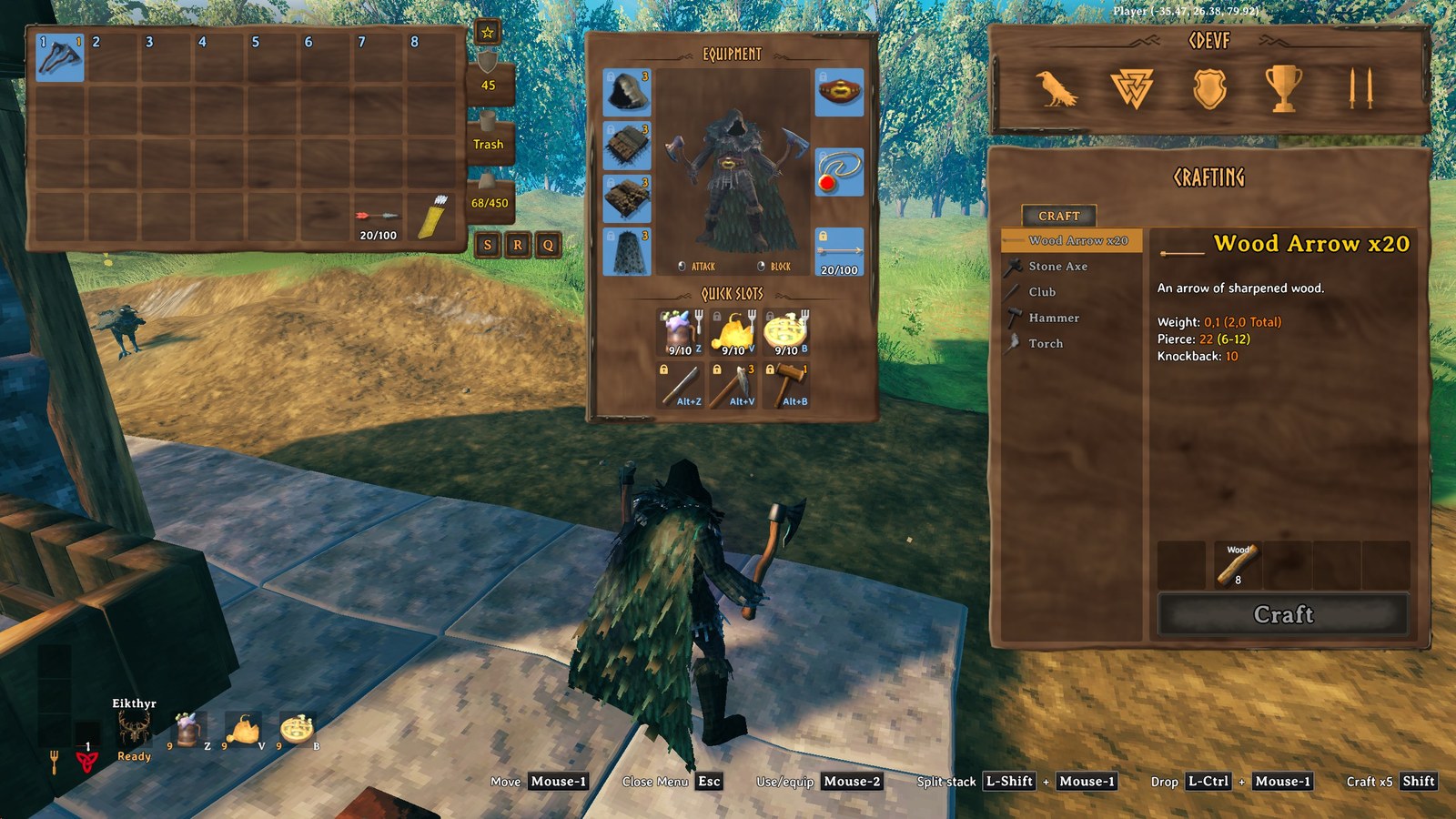
The panel
Between the inventory and the crafting panel, in vanilla's own frame, with your character in the middle
wearing what you put on (Panel.ShowCharacter turns the figure off).
- Equipment — helmet, chest, legs, cape, belt, trinket, and an ammo slot for the arrows or bolts you shoot.
- Quick slots — six cells for anything at all.
- Quiver — Better Archery's three ammo cells, in a small window beside the panel, shown only while its quiver is worn.
- Utility — with Equip Multiple Utility Items, a window with a cell for every extra utility item it lets you wear (up to four), above the quiver window.
A slot takes only what belongs in it; anything else stays on the cursor. Right-click an item in the inventory and it goes to its slot, right-click it in the panel and it comes back.
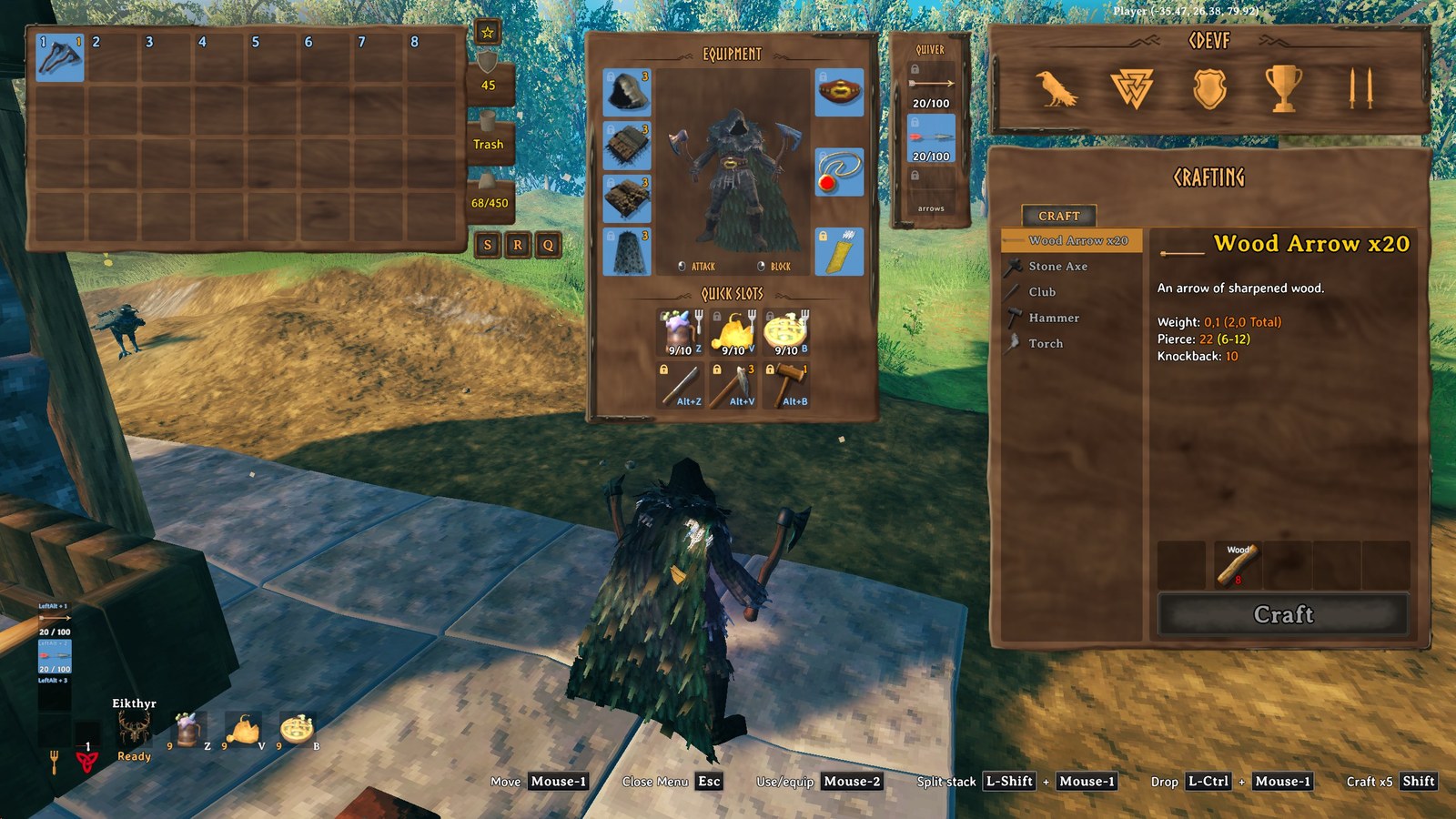
A padlock in the corner of every cell. Click it and nothing that moves many items at once touches that
cell again — neither vanilla's "stack similar" nor QuickStackStore's quick stack, store, sort and restock.
Locks are saved with your character; Inventory.CellLocks hides the padlocks.
Quick slots
Z / V / B use slots 1–3, the same keys with Left Alt use slots 4–6, and slots 4–6 can have keys of
their own instead — all rebindable. A press is exactly a hotbar press: eat, drink, equip, unequip, or use on
what you are looking at. The HUD draws three of them next to the forsaken power and switches to the other
three while Alt is held.
"Stack similar" into a chest leaves every slot alone, and picking things up can top up a stack that is already in a quick slot but never fills an empty one.
Death, graves and bodies
Your worn items fill the top row of the grave, so they are the first thing you see. When you take the grave back, every item returns to its slot or to its old inventory cell and your gear goes back on, even with a full inventory. Upgrading a worn piece at a workbench keeps it in its slot.
Coming from EquipmentAndQuickSlots
Remove EAQS first — next to it this mod switches itself off on purpose. On the first load without it your character is converted: quick slots, armour and Better Archery's quiver keep their items, everything else moves into free inventory cells, nothing is deleted. Do not go back to EAQS with a converted character.
Installation and removal
- BepInExPack Valheim and Jötunn, and remove EquipmentAndQuickSlots.
CDEV.EquipmentSlots.dllintoBepInEx/plugins/CDEV.EquipmentSlots/— a mod manager does it for you.
Empty the slots before you uninstall. They are cells of your own inventory below the grid; without the mod the game drops what is down there at your feet on the next spawn.
Multiplayer
Client mod — nothing new crosses the network, the slots are cells of your own character. A server that has
the mod requires it from every client (Jötunn ClientMustHaveMod); servers without it accept everyone.
Compatibility
- Better Archery 2.0.0 — the quiver is worn in the ammo slot, its arrows live in the window beside the panel, and Better Archery adds no rows of its own.
- QuickStackStore (1.4.15 from Thunderstore) — sort, store, quick stack and trash never touch the slots; restock may refill a quick slot that is not locked.
- MouseTweaks — right-clicks work on the panel too.
- Equip Multiple Utility Items — every utility item it lets you wear gets a cell in the Utility window; the crafting window's repair tab moves to its bottom to make room.
- Adventure Backpacks — the backpack is worn in the cape slot.
- Valheim Plus — works alongside, its extra inventory rows included.
- EquipmentAndQuickSlots — not together; this mod stands down next to it.
- Gamepad — the panel has no gamepad navigation yet.
Settings and languages
BepInEx/config/cdev.equipmentslots.cfg: the six quick-slot keys and the Alt modifier, the HUD (on/off,
offset, spacing), the panel (offset, character, padlocks). Texts in 22 languages, following the game's own
language setting.
Credits
Written by CDEV for a friends' server. Bug reports with a slice of BepInEx/LogOutput.log are welcome.
Licence: MIT (the LICENSE file is in the package).
EquipmentSlots — по-русски
Броня и шесть быстрых слотов получают собственные места: лист персонажа рядом с инвентарём вместо рядов, отнятых у рюкзака.
Предмет надет ровно до тех пор, пока лежит в своей ячейке: перетащил шлем в ячейку шлема — он на голове, вытащил — снят.
Панель
Между инвентарём и окном ремесла, в ванильной деревянной рамке, с персонажем посередине — в том, что на него
надето (Panel.ShowCharacter убирает фигуру).
- Экипировка — шлем, нагрудник, поножи, плащ, пояс, тринкет и ячейка для стрел или болтов, которыми стреляете.
- Быстрые слоты — шесть ячеек под что угодно.
- Колчан — три ячейки Better Archery в отдельном окошке сбоку, видны только когда колчан надет.
- Утилиты — при моде Equip Multiple Utility Items: окошко с ячейкой под каждый дополнительный утилити-предмет, который он разрешает (до четырёх), над окошком колчана.
Ячейка принимает только то, что ей подходит; остальное остаётся на курсоре. ПКМ по вещи в инвентаре — она уходит в свой слот, ПКМ по ней в панели — возвращается обратно.
Замочек в углу каждой ячейки. Нажмите — и запертую ячейку больше не трогает ничто, что перекладывает
вещи пачками: ни ванильная кнопка «сложить похожие» в сундуке, ни быстрая скидка, сортировка и автопополнение
QuickStackStore. Замки сохраняются с персонажем; Inventory.CellLocks убирает значки.
Быстрые слоты
Z / V / B — слоты 1-3, те же клавиши с Left Alt — слоты 4-6, а слотам 4-6 можно назначить собственные
клавиши без модификатора. Все клавиши переназначаются. Нажатие работает как кнопка панели быстрого доступа:
съесть, выпить, надеть, снять, применить к тому, на что смотрите. В HUD три слота рисуются рядом со значком
силы стража и переключаются на вторую тройку, пока зажат Alt.
Кнопка складывания в сундук не трогает ни один слот, а при подборе вещей стак в быстром слоте можно пополнить, но в пустую ячейку ничего не упадёт.
Смерть, могилы и тела
Надетые вещи лежат в верхнем ряду могилы — их видно сразу. Когда вы забираете могилу, каждая вещь возвращается в свой слот или в свою прежнюю ячейку инвентаря, а снаряжение снова надевается — даже при полном инвентаре. Улучшение надетой вещи у верстака оставляет её в слоте.
Переход с EquipmentAndQuickSlots
Сначала удалите EAQS — рядом с ним мод намеренно выключает сам себя. При первой загрузке без него персонаж конвертируется: быстрые слоты, броня и колчан Better Archery сохраняют содержимое, остальное переезжает в свободные ячейки инвентаря, ничего не удаляется. Не возвращайтесь к EAQS с конвертированным персонажем.
Установка и удаление
- BepInExPack Valheim и Jötunn, затем удалите EquipmentAndQuickSlots.
- Положите
CDEV.EquipmentSlots.dllвBepInEx/plugins/CDEV.EquipmentSlots/— менеджер модов сделает это сам.
Перед удалением мода освободите слоты. Это ячейки вашего же инвентаря ниже видимой сетки: без мода игра выбросит всё, что там лежит, вам под ноги при следующем появлении в мире.
Мультиплеер
Клиентский мод — по сети ничего нового не передаётся, слоты живут в инвентаре персонажа. Сервер с модом
требует его от каждого клиента (Jötunn ClientMustHaveMod); серверы без мода пускают всех.
Совместимость
- Better Archery 2.0.0 — колчан надевается в ячейку стрел, его стрелы лежат в окошке сбоку, своих рядов Better Archery не добавляет.
- QuickStackStore (1.4.15 с Thunderstore) — сортировка, складывание и корзина слотов не касаются; автопополнение может пополнить незапертый быстрый слот.
- MouseTweaks — правый клик работает и в панели.
- Equip Multiple Utility Items — каждый утилити-предмет, который он разрешает, получает ячейку в окошке «Утилиты»; вкладка ремонта у окна ремесла переезжает вниз, чтобы освободить место.
- Adventure Backpacks — рюкзак надевается в ячейку плаща.
- Valheim Plus — работают вместе, его дополнительные ряды инвентаря тоже.
- EquipmentAndQuickSlots — вместе не работают, мод уступает ему место.
- Геймпад — навигации по панели пока нет.
Настройки и языки
BepInEx/config/cdev.equipmentslots.cfg: шесть клавиш быстрых слотов и модификатор Alt, HUD (вкл/выкл,
смещение, отступ), панель (смещение, персонаж, замочки). Тексты на 22 языках, язык берётся из настроек игры.
Автор
CDEV, для сервера друзей. Об ошибках пишите, приложив кусок BepInEx/LogOutput.log.
Лицензия: MIT (файл LICENSE лежит в архиве).
CHANGELOG
Changelog
0.1.16
- Appearance: a helmet, chest, legs or cape can now be hidden - pick "Hidden" in its list (second, after "No look"). Nothing is drawn there, whatever is worn; the armour still counts.
0.1.15
- The ammo strip on the hotbar only shows above bows, crossbows and fishing rods. Meads, arrows, bolts and bait on the hotbar no longer get one (it repeated the count the slot already shows).
0.1.14
- Above a bow, crossbow or fishing rod on the hotbar: the arrows (bolts, bait) it shoots next and how many are left
(
[Ammo] ShowOnHotbar). - When the worn arrows run out, the next ones are put on by themselves - the same kind first (
[Ammo] AutoEquip).
0.1.13
- Fixed: a quick slot key the game cannot read (for example the number row of a French keyboard, saved as
Ampersand,Quote...) stopped every quick slot. Such a key is now ignored and named under the hotbar. - Fixed: with Recycle_N_Reclaim the equipment panel stopped updating and the character in its middle was missing.
0.1.12
[QuickSlots] ShowKeyConflictsswitches the key conflict note under the hotbar off.[Panel] ShowOnKey+[Panel] Key(off by default, key U): the equipment panel shows only after pressing the key - in the open inventory it shows or hides the panel, with the inventory closed it opens the inventory with the panel.- With a controller, item descriptions (inventory and chests) are shown on the right again, drawn above the equipment panel.
0.1.11
- Every quick slot has its own key, used exactly as written: a key, a mouse button or a key with modifiers
(e.g.
H,Mouse4,O + LeftAlt). Old configs are converted to the keys they meant. - A quick slot key that is also used by the game, by another quick slot or by another mod is shown under the hotbar.
- A quick slot key that is also a game key (e.g. V, auto-pickup) does both now;
KeysWinOverVanilla = truegives it to the quick slot alone. A key with modifiers (Alt+1) only uses its quick slot. - New option
[Panel] KeepWornInInventory(off by default): worn armour, cape, belt, trinket and arrows stay in the inventory as without this mod, and the panel shows them in their slots too. It is the same item in both places.
0.1.10
- Works with BetterUI (Zenox): its HUD editor no longer pins the quick slots onto the forsaken power, and it can
move and scale the quick slots as one element, apart from the forsaken power.
Hud.Offsetmoves them as well. - The fork on food in the quick slots is coloured by its main stat again (red, yellow, blue), as in the inventory, and the quick slots on the HUD show it too.
0.1.9
- With a controller, the item description is shown below the inventory grid, clear of the equipment panel.
0.1.8
- Fixed: an item dragged from a chest onto a quick slot or a locked cell that already held something was destroyed (since 0.1.7). The two items swap places again.
- Broken gear stays in its slot instead of moving into the inventory, and goes back on by itself once repaired.
- With a mod that rearranges the HUD, the quick slots sat on top of the forsaken power and
Hud.Offsetdid not move them. Fixed. - With a controller, the item description is no longer hidden behind the equipment panel.
0.1.7
- The Appearance tab's tooltip no longer runs across the top of the screen.
Key4-Key6give quick slots 4-6 one more key, used with Alt (Alpha1= Alt+1). A key that uses a quick slot no longer also uses the hotbar, and a press uses its slot only once.- Every key setting is a key binding now, so a config manager shows its "press a key" field for each, and Key1-Key3 may be combinations too. Values already in the config file stay as they are.
- Other mods' "store in nearby chests" buttons (Local Craft From Storage Prime and the like) leave the slots and locked cells alone.
0.1.6
- Appearance tab: choose how your helmet, chest, legs and cape look, from every piece you have ever held. Looks only - no armour, weight or effects - and other players see it too.
- The grave is packed without gaps, so everything fits its rows and nothing hides below a scrollbar.
0.1.5
- Works with QuickStackStore from Thunderstore: with an item in a slot, chests showed nothing and did not close, the crafting list froze and the panel could not be moved. Its sort, store, quick stack and trash now leave the slots alone as well.
- Equip Multiple Utility Items: a Utility window beside the panel with a cell for every extra utility item it allows (up to four); the crafting window's repair tab moves to its bottom to make room.
- Graves: worn items could end up far down a grave and be taken for lost. They now fill the grave's top row, and take-all puts every item back into its slot or its old inventory cell, even with a full inventory.
0.1.4
- Page only: a shorter description in English and Russian, and screenshots of the panel. The mod is the same as 0.1.3.
0.1.3
- A padlock on every cell of the panel: a locked cell is left alone by everything that moves many items at once — vanilla's "stack similar" and QuickStackStore's quick stack, store, sort and restock. Saved with the character.
- Better Archery's quiver is worn in the ammo slot, and its three ammo cells moved into a window of their own beside the panel. Arrows put on while it is worn go into the quiver and never push it out; taking it off empties the window back into the inventory.
- Quick slots 4–6 can have keys of their own (
QuickSlots.Key4–Key6), used without any modifier. - "Stack similar" takes nothing out of the slots, and picking things up never fills an empty slot cell — a full backpack is reported full, as in vanilla.
- The panel is drawn in the vanilla window's own wood with braided titles, is only as tall as it needs to be, and keeps its place whether the quiver window is there or not.
0.1.2
First public release.
- Equipment slots outside the inventory grid — helmet, chest, legs, cape, belt, trinket and an ammo slot. An item is worn exactly while it sits in its slot.
- Six quick slots:
Z/V/Band the same keys withLeft Alt. The HUD shows three of them next to the forsaken power and switches to the other three while Alt is held. - The panel is a character sheet between the inventory and the crafting panel, with your character standing
in it wearing what you put on (
Panel.ShowCharacter). - Better Archery's quiver is hosted by the mod, so it adds no rows of its own.
- Characters coming from EquipmentAndQuickSlots are converted on the first load without it: quick slots, equipment and quiver keep their items, everything else moves into the grid, nothing is deleted. Next to EAQS this mod switches itself off.
- Death, graves and CDEV.SleepingPlayers bodies keep the slot of every item: taking your own gear back puts it into its slot and back on.
- Texts in 22 languages, switched with the game's own language setting.
