
Please disclose if any significant portion of your mod was created using AI tools by adding the 'AI Generated' category. Failing to do so may result in the mod being removed from Thunderstore.

Carturs Map Pins
Drops labelled map pins on ore, dungeons, camps, chests, minibosses and more as you find them. 158 icons, a switch for every kind, and your bed marked as home.
| Date uploaded | a week ago |
| Version | 2.2.0 |
| Download link | Cartur-Carturs_Map_Pins-2.2.0.zip |
| Downloads | 452 |
| Dependency string | Cartur-Carturs_Map_Pins-2.2.0 |
This mod requires the following mods to function

denikson-BepInExPack_Valheim
BepInEx pack for Valheim. Preconfigured with the correct entry point for mods and preferred defaults for the community.
Preferred version: 5.4.2333README
Cartur's Map Pins
Pins things onto your map as you come across them, with a name and an icon, so you can find your way back without writing anything down.
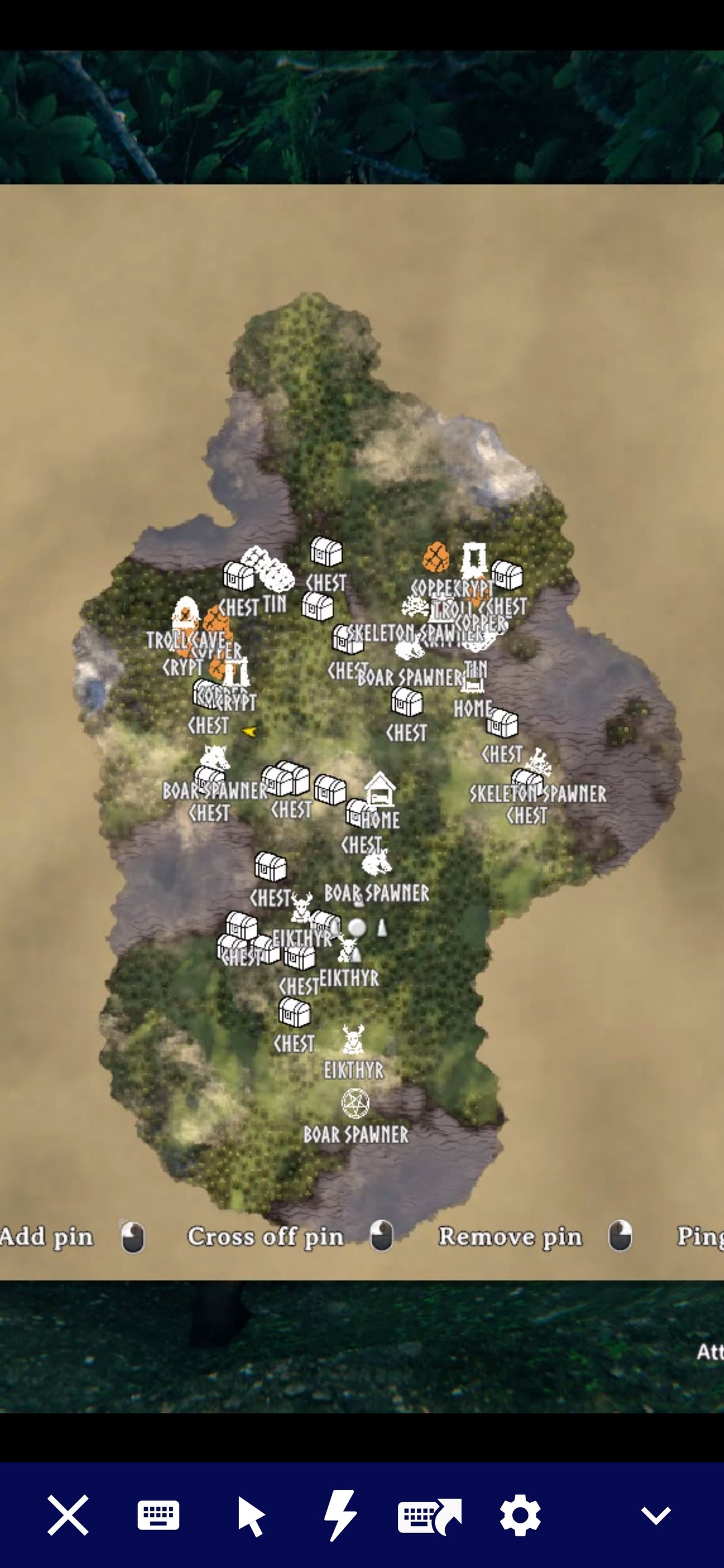
What it does
Walk within DiscoveryRadius (60 metres by default) of an ore deposit, a crypt entrance, a wild beehive or an abandoned chest and it lands on your map with a name on it. The pins are saved with your character like hand-placed ones. They stay after you clear the node, so you can cross them off yourself, with a few exceptions listed below.
The pinned categories are ore deposits, dungeon and cave entrances, camps and villages (Fuling villages, Charred fortresses, abandoned villages and farms, the Deep North village), wild beehives, runestones, abandoned chests, buried chests, named minibosses, leviathans, traders, maypoles, boss altars, high-value pickables and your bed, marked as home. Every category has its own switch. Some are off in a fresh install: landmarks (wells, shipwrecks, stone circles and similar), lore runestones, spawners, wisp spawners, and Greydwarf camps. Within pickables, only the high-value group is on. Berries and mushrooms, crops and herbs, branches, stones and flint, and unrecognised pickables are off, because they would cover the map and bloat your save. Vanilla already marks boss altars with an unnamed icon that is not saved. This mod's pin replaces it rather than sitting on top.
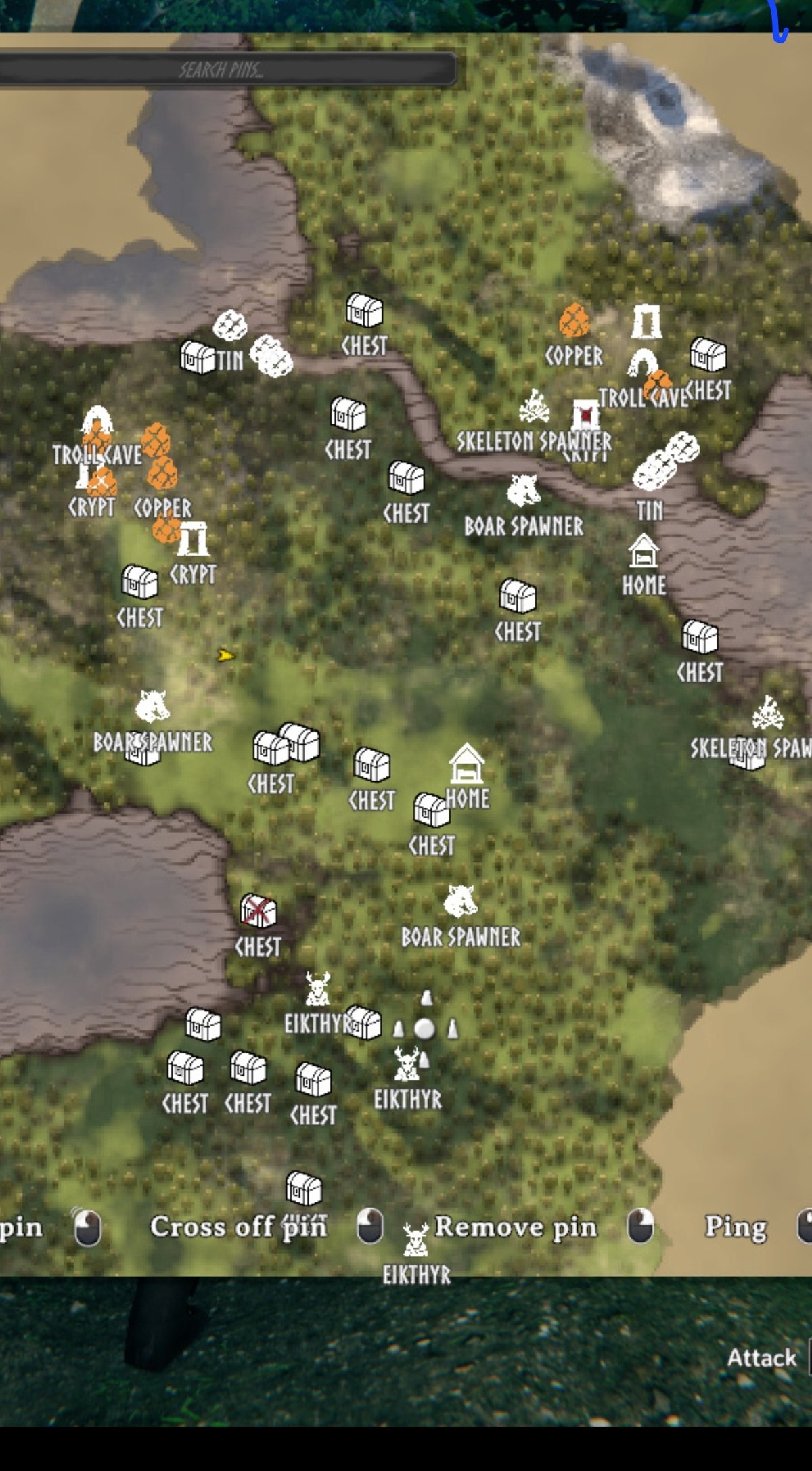
Some pins follow the thing instead of marking a spot. Your boats and carts, tames you have named, anything you can ride, and bears are tracked. When the game does not have the thing loaded, the pin stays where you last saw it. Unnamed livestock is not tracked. These are under Tracking in the config.
A few pins tidy themselves. An ore pin is removed once the deposit is mined out, since deposits never respawn. A looted chest switches to an open-chest icon and fades to half opacity, and goes back if the chest is refilled. A dungeon pin is ticked off once every chest inside is empty and every mud pile is mined. When you loot your grave, its death marker is removed too.
Changing a pin's icon
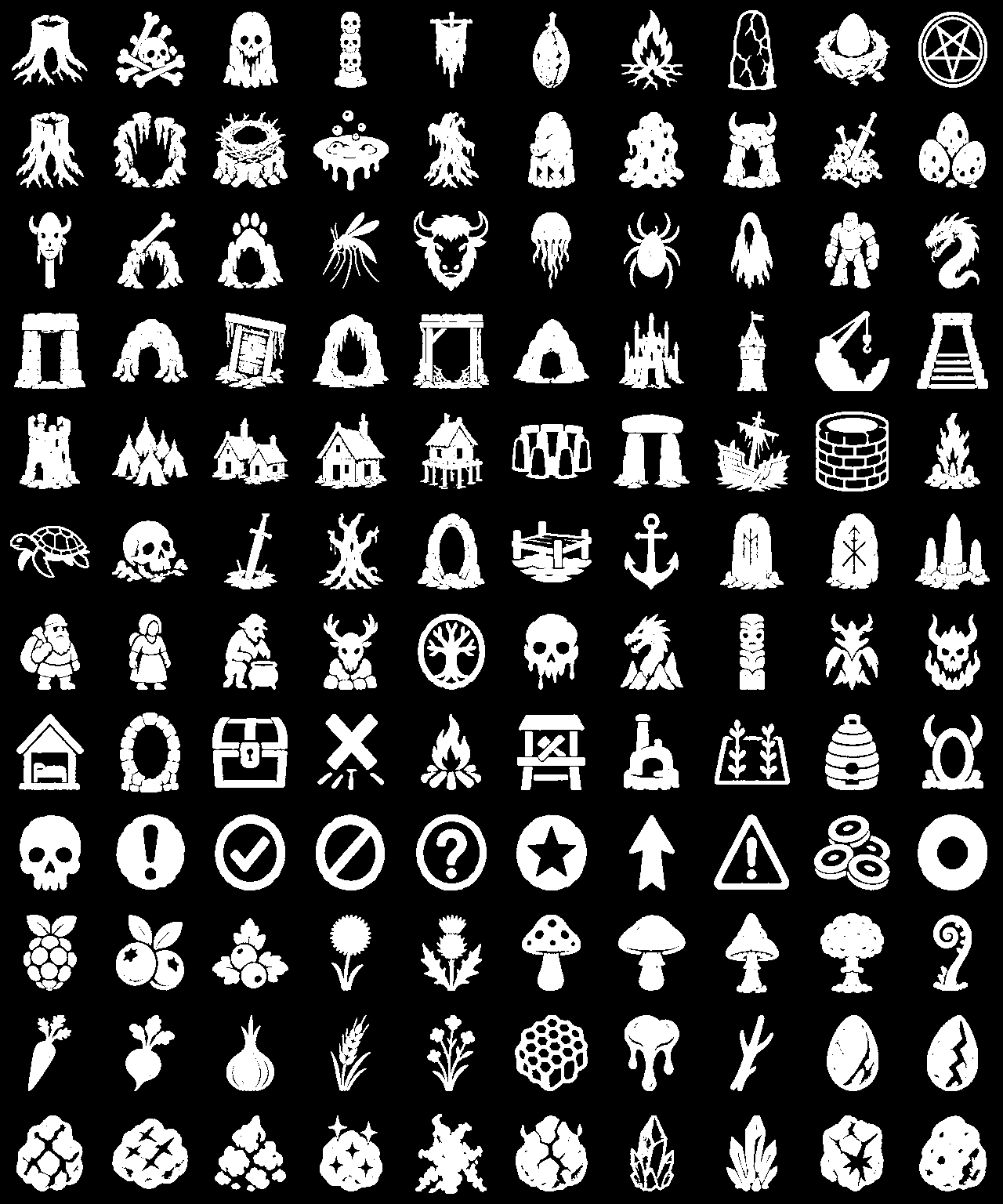
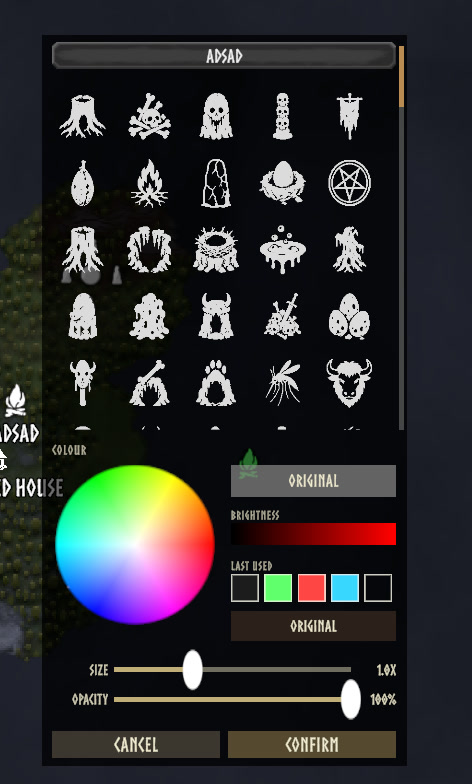
Shift-click any pin on the large map to open an editor beside it. You can rename the pin, pick a different icon, choose a colour, and set its size and opacity. It works on pins this mod placed and on ones you placed by hand. There are 158 icons, and every category and kind of thing takes its own.
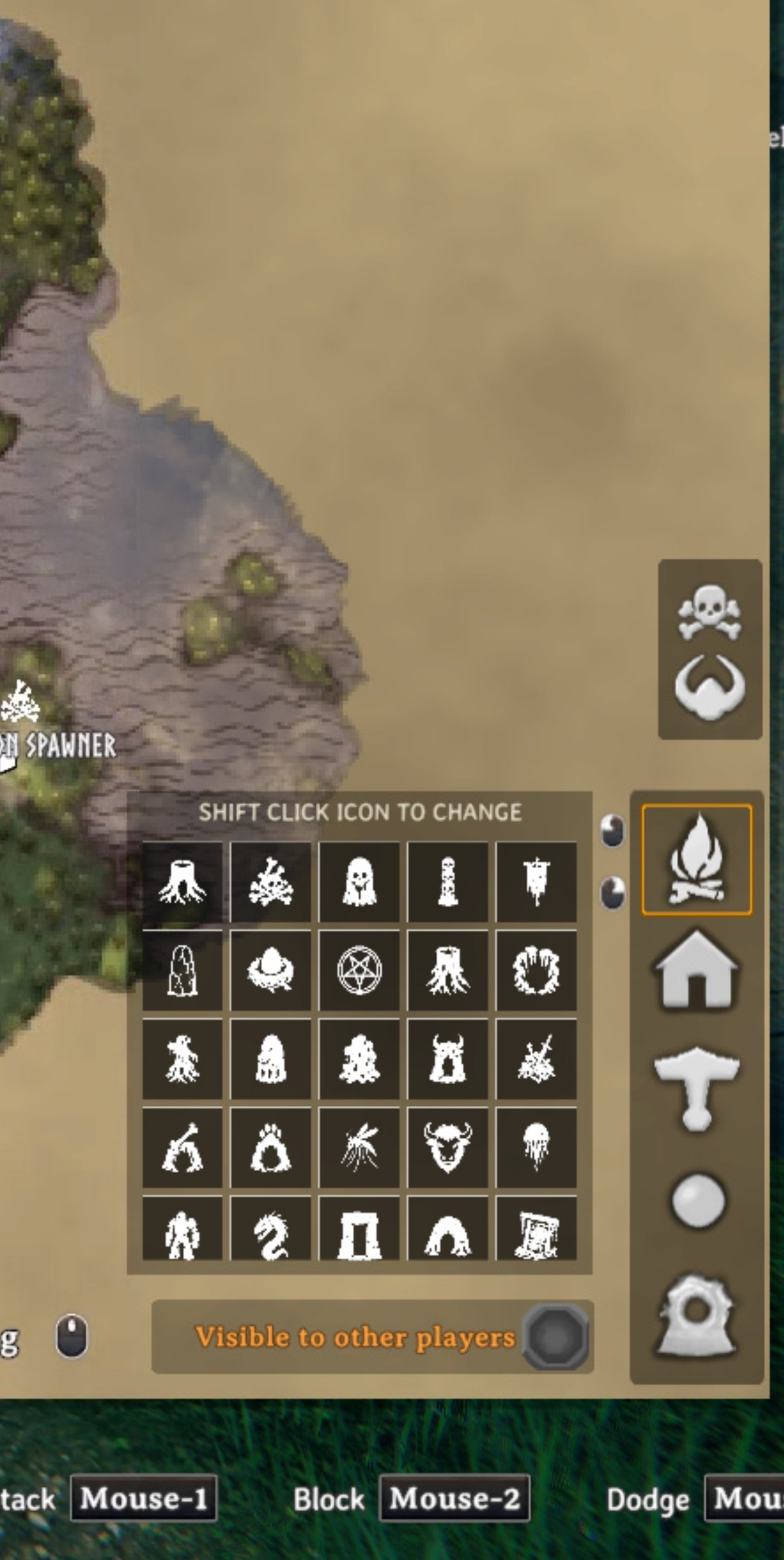
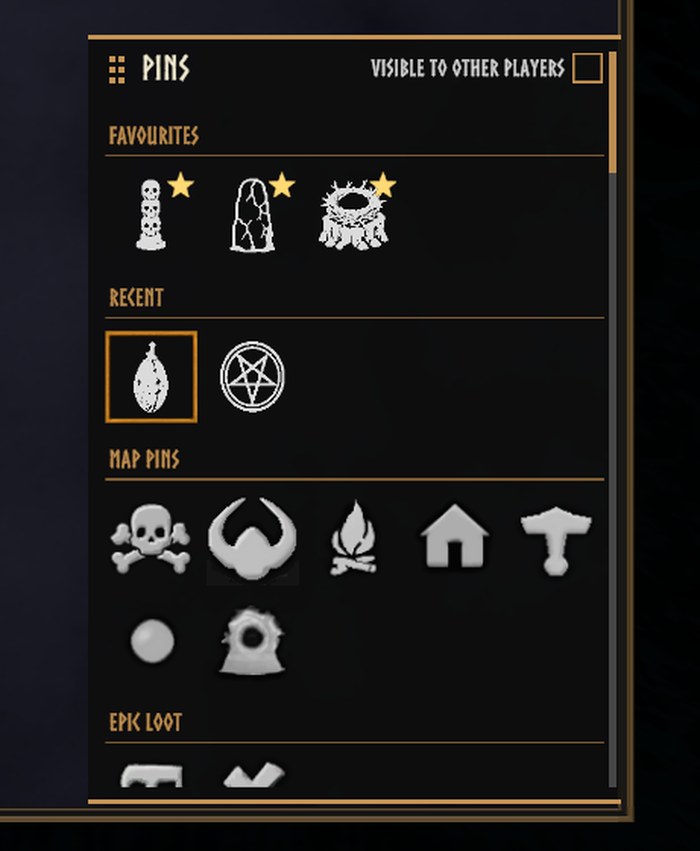
There is also an icon grid on the large map next to vanilla's pin buttons, for choosing what a hand-placed pin will look like. Drag the small gold square in its top left corner to move the panel. It stays where you put it. Only the square drags, so clicking an icon still picks the icon.
Hugin helps you set it up
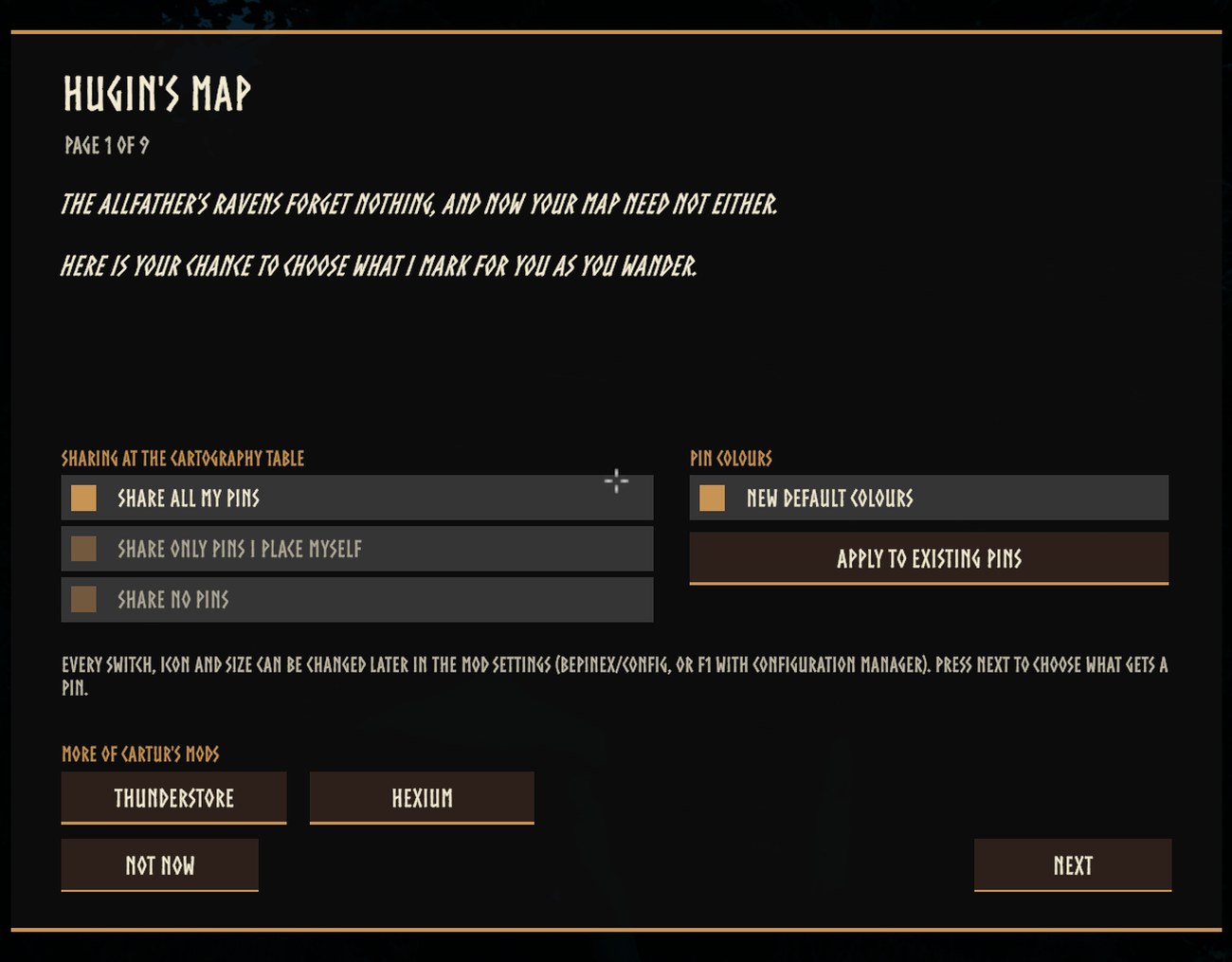
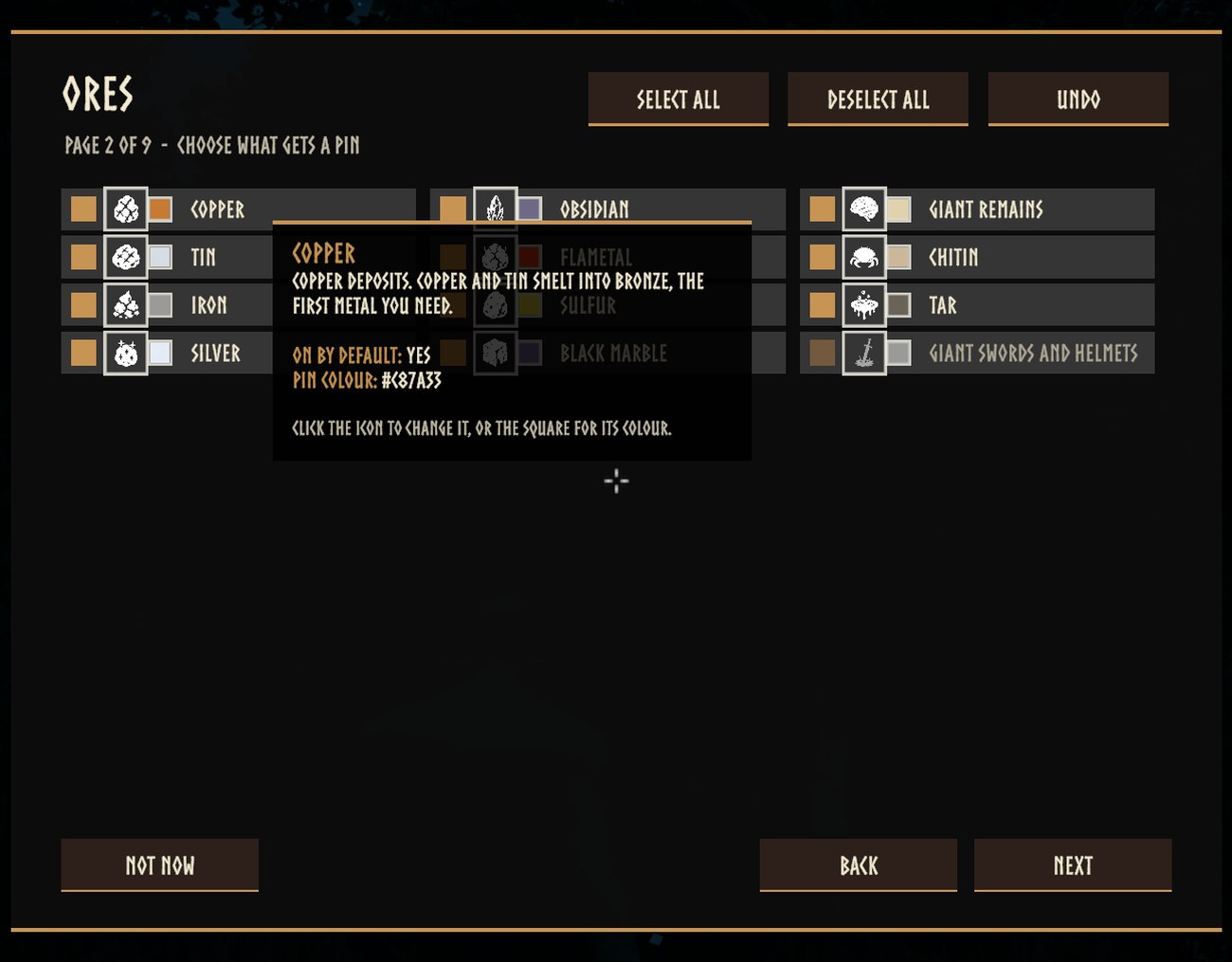
The first time you load a world after installing or updating, Hugin lands and offers to choose what gets pinned. Talk to him and a menu opens: one page for each kind of place (ores, dungeons, camps and villages, bosses, berries and things to pick, landmarks, creature spawners, everything else). Every item has a tick, its icon, its colour and a hover description that says what it is and where it is found. Select all, Deselect all and Undo work on the page you are on. The first page chooses who sees your pins at the cartography table, turns New default colours on or off, and has links to the rest of Cartur's mods.
The menu opens on your own settings, and pressing Done writes only what you changed, so updating never touches a setup you already made. Not now changes nothing. carturpins_setup opens it again at any time. If you play with the game's tutorials switched off, Hugin does not land; use the command.
Colours
Shift-click a pin and the editor has a colour wheel, a brightness bar, your last five colours and an Original button. The same wheel is in Hugin's menu, beside every item.
With New default colours on (General / NewDefaultColours), every new pin takes the colour of the thing it marks: copper brown, tin pale, each berry its own colour, a Fuling village orange, Eikthyr lightning blue, and so on, a colour for every kind. Only pins placed from then on are affected. The Apply to existing pins button in Hugin's menu (or carturpins_applycolours) gives the pins already on your map the same colours, leaving any colour you chose yourself. Every kind's colour is a setting of its own under Kind Colours, as a hex code.
Opacity works the same way. Click the percentage next to a kind's colour in Hugin's menu to step it through 100, 75, 50 and 25; it is saved when you press Done, applies to new pins, and Apply to existing pins applies it to pins you have not faded yourself. Each kind's opacity is a setting under Kind Opacity.
On the map screen
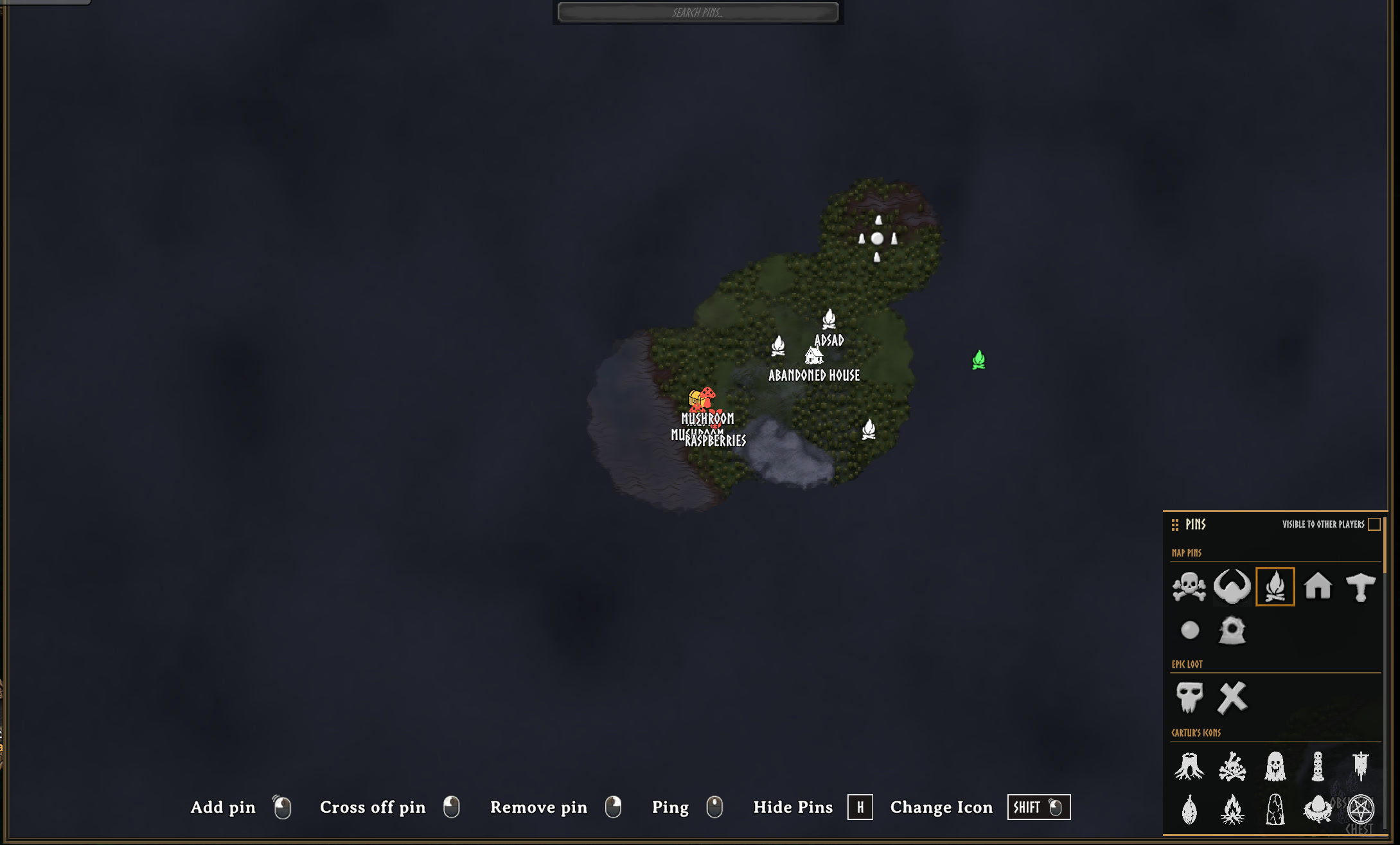
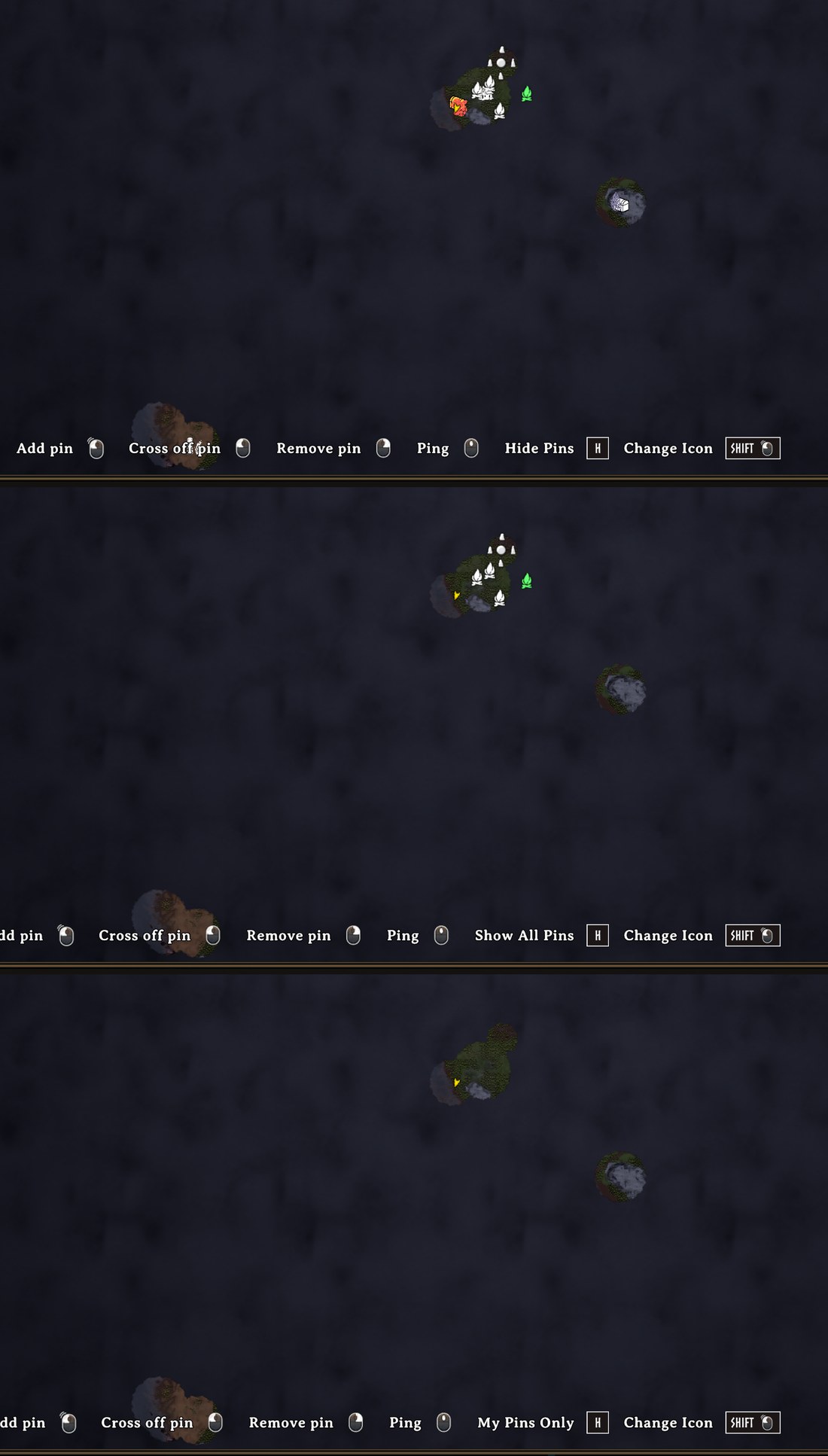
- Hide pins with H. Each press steps through All Pins, Mine Only (the ones you placed), Auto Only (only the ones this mod placed), None, and back to All. Names go with the pins. Nothing is deleted. The key is a setting (
General / HidePinsKey), and the bottom bar always says which state you are in now. - Hide names with Shift+H. Switches every pin's name off and on again and leaves the icons alone. Point at a pin and its name shows. The bottom bar says Labels On or Labels Off. It lasts until you quit the game. The key is a setting (
General / HideLabelsKey). - Setup with P. Opens Hugin's setup menu from the large map, the same as
carturpins_setup, so it works when Hugin is not around. The bar shows it as Setup. The key is a setting (General / SetupKey). - Point at a pin and its name wins. Any other name that would overlap it fades out while the cursor stays on the icon, and comes back when you move off.
- The icon picker has a top bar you can drag anywhere, with Visible to other players in it. The game's own pin buttons and Epic Loot's sit in the picker now instead of in columns down the edge, and a favourite star on each icon puts it in a Favourites row at the top, above a Recent row. The old icon set is folded away until you open it.
- Shift-click works on your spawn point and your last death too, for colour, size and opacity. The hint bar shows it as Shift + click, Change Icon.
- The wheel zooms smoothly, about the pointer. One notch is 6% (the game's own is 10%) eased over about 160 ms, and the spot you point at stays under the pointer. Hold Shift for 2% a notch. The M and Z keys, a controller and touch use the game's own zoom, unchanged.
SmoothMapZoomturns it off; the step, the time, the Shift step and key, and the pointer anchoring are settings (below). - Pins and names fade rather than flicker or jump.
Portals
Every portal is pinned, named with the tag you gave it. Built without a name it starts as "Portal" and takes its name the first time you name it.
Groups and zooming out
Both are off by default.
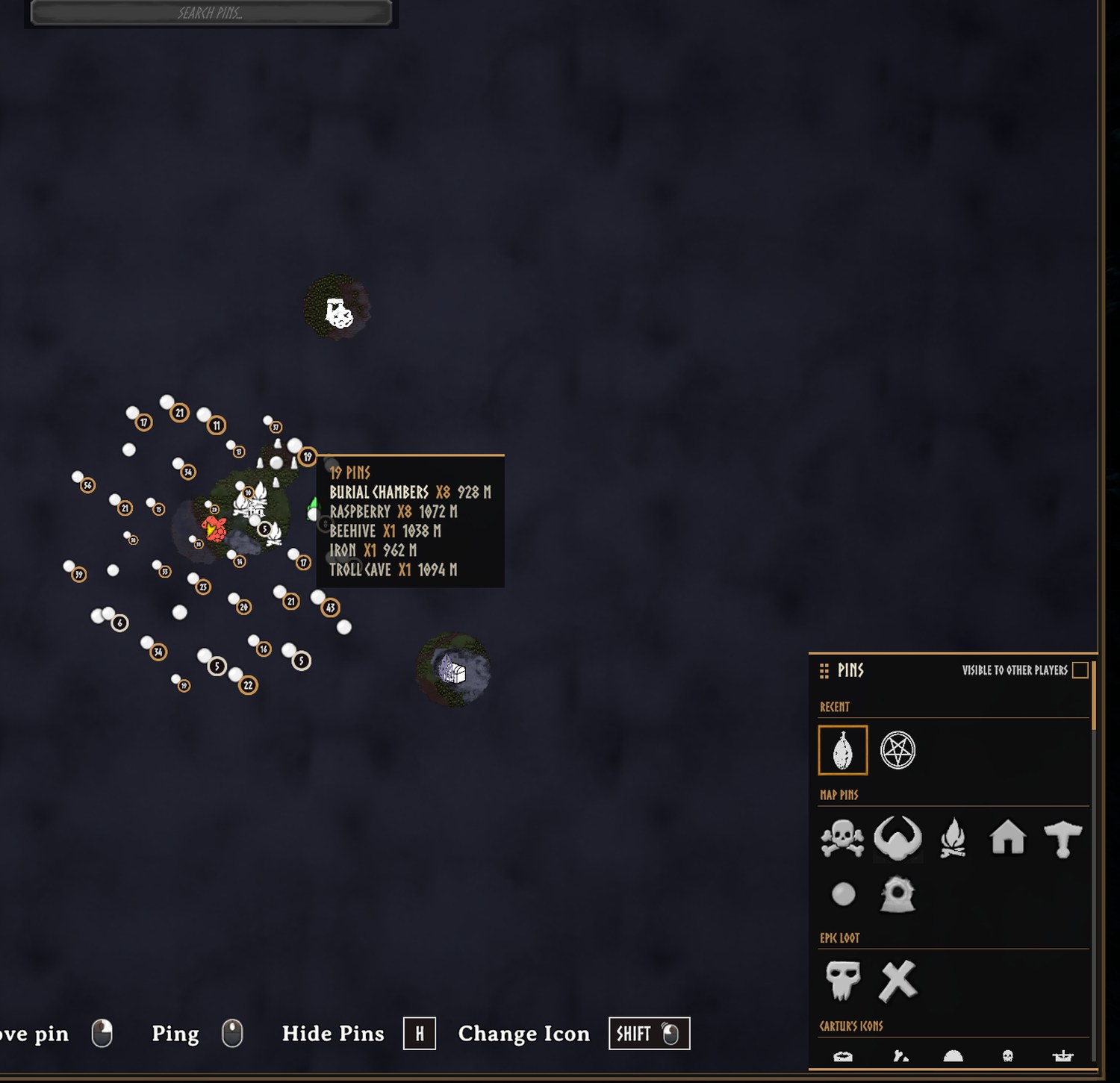
General / ClusterPins: pins this mod placed that crowd together and share an icon become one pin with a count badge (a plain ring for 2 to 9, a heavier one for 10 to 99, gold for 100 or more). The others fade out where they are; nothing moves. Hover the badge for a list of what it stands for and how far away it is. Click it to open a list of the pins in it, nearest first, that you can search and scroll; click one and the map glides to it at a zoom where it stands alone. The list only reads: it does not tick, rename or delete anything. Click outside it to put it away; Escape closes the map as it always does, and the list with it.ClusterClickAction = Zoombrings back the old click, which zooms in. A badge cannot be ticked off or deleted until you are down to a single pin. Your own pins and other players' pins are never grouped.General / MixedCategoryClusters: off by default. Lets crowded pins of different kinds share one badge: ore with chests and stones, landmarks with props and nests, pickables with each other. Bosses, dungeons, camps, traders, home and portals never join a mixed badge, and neither do your own pins. A mixed badge has a teal ring, and its list says how many of each kind are in it.General / EnableClusterSpiderfy: off by default. WithClusterClickActionset to Spiderfy, clicking the badge of a small cluster (up toSpiderfyMaxPins, 12) fans its pins out on a ring round the badge, on thin lines back to where they are; click one to go to it. Any zoom, drag or click elsewhere puts them away. Bigger clusters open the list. Mouse only.General / PriorityZoomOut: when the map is zoomed far out, pickables drop first, then landmarks, nests and hives, then ore, chests and stones. Bosses, dungeons, camps, portals, traders and home always stay.
Keeping the map readable
An ore field is a dozen separate deposits, which used to be a dozen identical pins in one white blob. Pins with the same name on the same patch of the map now draw as one, and separate again as you zoom in. Nothing is deleted. Every pin is still on the map, still saved and still searchable.
Pins are full size until the map is 15% zoomed out and shrink to 60% at the whole-world view. Pin names stop being drawn once the map is zoomed out past HideLabelsFromZoom (63 by default, about where "20% of the way out" was before 2.2); past that, pointing at a pin shows its name. Both points are settings and both can be turned off. Pins that sit on top of each other shrink, never below half size, and where two names overlap the rarer one is kept, so CRYPT beats CHEST. Pointing at a pin always shows its name. Sizes and fades change smoothly rather than popping.
When two names would overlap, the one that loses is tried above its icon, then to the right, then to the left, before it is hidden (SmartLabelPlacement); it goes back under the icon once that place is clear again. Bosses, dungeons, camps, traders, home and portals claim name space before the common kinds do. Names go, and come back, one wheel notch after the zoom limit.
You can draw pins with no names at all, so the map reads as icons. The names stay searchable, they just are not drawn. You can also stop drawing pins further than a set distance from your character. That is off by default. The HiddenPins setting takes a list of names to hide without deleting the pins, and its settings row has a list to pick from your own map.
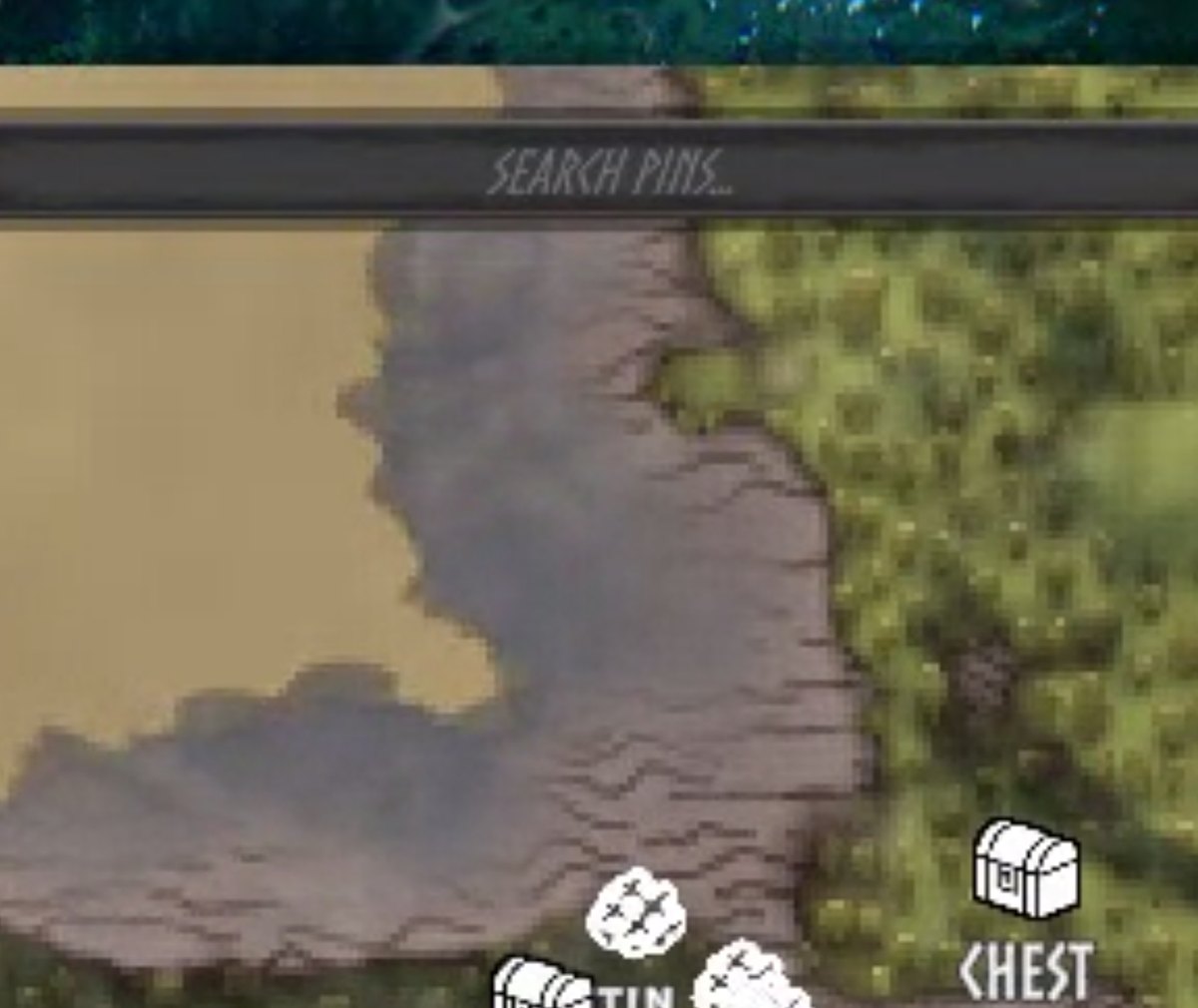
Type in the search box across the top of the map and everything that does not match fades, so you can see where the copper is without losing the shape of the map.
Your own short labels
If you keep a compact naming convention such as R5, B7, SC or FC, write it in BepInEx/config/carturpins_labels.txt, one kind per line:
Pickable:Raspberry=R{qty}
Dungeon:Sunken Crypt=SC
Ore:Copper={qty} {name}
{qty} is how many pins of that kind are merged into the marker at the current zoom, and is left out when there is just one. {name} is the normal name in your language. The file is written for you the first time you start the game, with every line commented out. The key of any pin is the first field of its line in the .pins.txt record in BepInEx/config. Changes apply the next time you load a world.
Only what is drawn changes. The saved name stays, so search, the rename box and the pin list still read "Sunken Crypt". Pins you renamed yourself keep your name, and pointing at a pin shows its full name. The labels are yours alone. Other players only see them if they use the same file.
Names and languages
Names are stored as the game's own localisation tokens, so a crypt reads "Burial Chambers" in your language and is re-worded if you change language. A pin you renamed yourself is left alone. Names the mod makes up itself, such as Sunken Crypt, Frost Cave and Fuling Village, translate through carturpins_names_<language>.txt. carturpins_names_english_template.txt is written to BepInEx/config the first time you start the game. Copy it to carturpins_names_french.txt (or german, spanish, and so on: the game's own language name), translate the text after each = and restart the game. The same file translates the names and descriptions in Hugin's setup menu (carturpins_desc_* and carturpins_row_*; page titles, buttons and the welcome text are not translated) and the name shown when you point at an icon in the icon pickers (every icon name has a key, in the template; icons the game already has a word for, such as Resin or Workbench, follow the game's language when you have no file). An older template gets the new keys appended the next time the game starts. carturpins_labels.txt is for short labels, not translation.
What counts as ore, a beehive or a pickable is worked out at runtime from components rather than from a list of prefab names, which is why it should survive game updates and pick up modded content. Player-built beehives and containers are never pinned.
Settings
Config file: BepInEx/config/com.jekkle.valheim.carturmappins.cfg.
In the config manager (F1) the settings are in numbered sections, and the first one, 01. Start Here, has a button, Open Hugin's setup. The setup menu is where what gets a pin, its icon, its colour and its opacity are chosen, plus who sees your pins at the cartography table and New default colours, so none of those are listed in F1. They are still in the .cfg file under the same names and values, and editing them there works as before. The button needs a world to be loaded, and closes the config manager so the menu is not hidden behind it. P on the large map and carturpins_setup open the same menu.
| Setting | Default | What it does |
|---|---|---|
DiscoveryRadius |
60 | Metres. How close you must get before something pins. |
AutoPinning |
true | Place pins automatically. Off pauses it without touching any category switch. |
AutoPinningKey |
F8 | Key that toggles AutoPinning in game. |
ShowPinLabels |
true | Draw the name under each pin this mod places. Your own pins keep their names. |
HideCollidingLabels |
true | Stop names being drawn on top of each other. |
HideGroupedLabels |
true | No name on a pin that stands for several (cluster badge, merged repeat) once the map is zoomed out past half of HideLabelsFromZoom; point at it and the name shows. A pin that is only crowded keeps its name unless it overlaps another. |
LabelScale |
0.7 | How big names are drawn, 0.3 to 2. 1 is the game's own size. Applies at once. |
HideLabelsFromZoom |
63 | The zoom past which names stop being drawn. 0 is fully zoomed in, 100 is the whole world and never hides. The scale is logarithmic: every point is the same step of zoom, one wheel notch is about 1.4 points, and a value from before 2.2 is converted for you the first time the map opens (2 becomes 20, 20 becomes 63). |
SmartLabelPlacement |
true | A name that would overlap another is tried above, right and left of its icon before it is hidden. |
SmoothMapZoom |
true | Ease the large map's wheel zoom and zoom about the pointer. Off gives the game's own zoom back. |
MapZoomStepPercent |
6 | One wheel notch, in percent (the game's own is 10), 1 to 25. |
PrecisionZoomPercent |
2 | One notch while the precision key is held, 1 to 10. |
PrecisionZoomKey |
LeftShift | Hold for the finer step. Right Shift also counts when this is Left Shift. |
MapZoomDurationMs |
160 | Time to cover 98% of a zoom, 0 to 600. 0 zooms at once. |
CursorCenteredZoom |
true | Zoom about the pointer instead of the middle of the map. |
ShrinkPinsFromZoom |
15 | Percent zoomed out before pins start shrinking. |
MergeRepeatedPins |
true | Draw one icon where several same-named pins sit together. |
ShrinkCrowdedPins |
true | Shrink pins stacked on one spot. |
ZoomedOutPinScale |
0.6 | How small pins get at full zoom-out. 1 turns it off. |
HidePinsBeyond |
0 | Metres. Hide pins further than this from you. 0 draws all. |
HidePinsKey |
H | On the large map: step through All pins, Mine only, Auto only, None. |
HideLabelsKey |
Shift+H | On the large map: hide every pin's name, or show them again. Icons stay. |
SetupKey |
P | On the large map: open Hugin's setup menu. |
ClusterPins |
false | Crowded pins with the same icon become one pin with a count badge. |
ClusterClickAction |
Inspector | Click on a badge: Inspector opens the list, Zoom zooms in (the old click), Spiderfy fans out a small cluster (needs EnableClusterSpiderfy). |
MixedCategoryClusters |
false | Badges may hold pins of different kinds. Bosses, dungeons, camps, traders, home and portals never join. |
EnableClusterSpiderfy |
false | Allow the fan-out click for small clusters. |
SpiderfyMaxPins |
12 | The most pins a cluster can hold and still fan out, 3 to 24. |
PriorityZoomOut |
false | Far out, cheap-to-find pins drop first. Bosses, dungeons, camps and portals stay. |
ConfirmDelete |
Off | Ask for a second click before right-click deletes a pin: Off, AutoPinsOnly or All. Ctrl+Z on the large map undoes a delete either way. |
Ore / TintByType |
true | Colour ore pins by what the ore is. |
Pickables / TintBerriesByType |
true | Colour berry bush pins by their berry. |
Ore / ForgetMined |
true | Remove an ore pin once its deposit is mined out. |
Chest / LootedIcon |
Chest open | Icon an emptied chest switches to. |
Chest / LootedDisplay |
Faded | Faded keeps an emptied chest's pin at half strength; Hidden does not draw it until the chest is filled again. |
Dungeon / TickWhenLooted |
true | Tick a dungeon off once it is cleared. |
Home / ReplaceBedMarker |
true | Give vanilla's spawn marker the same house icon. |
CustomIcons / MapPicker |
true | Show the icon grid on the large map. |
Tracking / Boats, Carts, Tames, Wild |
true | Pins that follow boats, carts, named tames and rideables, and bears. |
General / ApplyPreset |
None | Sets every switch at once, see below. |
General / ResetPins |
No | Starts a world's pins over, see below. |
Each category also has a MinimumSpacing (under Advanced), which is how far apart two of the same thing must be to earn separate pins. Its Enabled and Icon, and a switch, icon, colour and opacity for every kind of thing the mod knows about, are the setup menu's.
ApplyPreset sets every switch at once. Minimal keeps ore, dungeons, chests, boss altars, minibosses and home. Everything turns it all on. Defaults restores a fresh install. It is a button rather than a state, and returns to None once applied. It changes what gets pinned from then on, and pins already on the map stay.
Starting a world's pins over
General / ResetPins removes every pin this mod placed and forgets them, so each is pinned again as you rediscover it. Pins you placed by hand are untouched, and so is any colour or size you set through the editor. Locations come back within seconds. Ore, chests and beehives reappear when their part of the world next loads.
It is a spelled-out dropdown rather than a tick box on purpose, because a stray click here would throw away a map somebody spent a long time filling in.
Commands
carturpins_clear |
Removes every pin this mod placed. |
carturpins_reicon |
Resets this mod's pins to their category's current icon. Hand-placed pins are left alone. |
carturpins_setup |
Opens Hugin's setup menu. |
carturpins_applycolours |
Gives pins you have not coloured or faded the default colour and opacity of their kind. |
carturpins_count |
How many are on record. |
carturpins_forget_missing |
Forgets records whose pin is gone, so those places can be pinned again. |
carturpins_dedupe |
Removes leftover duplicate pins no record points at. Counts only, unless you pass yes. |
carturpins_zoom |
Prints the zoom and sizing numbers behind what is drawn. |
Compatibility and known issues
Maps with thousands of pins are slow to zoom and pan, and 2.2 does not change that. The game builds the marker of every pin that enters the view and removes the one of every pin that leaves it each time the view changes. In our test, with 5,000 pins on the map, zooming ran at about 10 frames a second; with 1,000 it ran at 58. Eased zoom adds little to that (58 against 65 frames a second at 1,000 pins, no difference at 5,000). 2.2 made the mod's own part of that pass much cheaper (a pass at 5,000 pins zoomed out went from 64 to 7 milliseconds in our test), but the game's part is still there.
Not tested: a controller, multiplayer, a high-resolution wheel or a trackpad, resolutions other than 1920x1080, and other mods that change the map zoom. The smooth zoom steps aside when it sees something else change the zoom. A real mouse-wheel event and a real Escape key could not be injected into the game in testing: zoom was driven through the same wheel function the game reads, and the map was closed through the call Escape makes.
Client-side. The server does not need it and neither do the people you play with. With PinSharing left on Everything, a cartography table publishes the pins this mod placed along with your own.
Pairs with Cartur's Compass and Clock, which puts these pins on a compass bar.
Badger's Valheim Skies opens its menu on a hotkey without checking whether you are typing, so a letter typed into the search box fires it. The Nexus page for this mod has an optional download that fixes that. Install it only if you use that mod.
Install
Use a mod manager (r2modman, Thunderstore or Gale) and it pulls in BepInEx for you. To install by hand, drop CarturMapPins.dll into BepInEx/plugins.
Free, and always will be. If it improved your game you can tip me on Patreon.
Discord: bug reports, install help, and mod requests. Bug reports get their own thread so nothing is lost in a chat scroll, and requests are voted on.
More from Cartur: HD Blood · Compass and Clock · Safe Stamina · Follow Command · Flooring · UI HUD · Waste Management · Feeding Trough · Combat Text
CHANGELOG
Changelog
2.5.0
Almost all of this comes from totya's tests of 2.4.0.
A badge is drawn at the middle of its group. It used to sit on the leftmost pin of the group, which read as the wrong place. The pins themselves, and everything saved about them, stay where they are; only the badge's marker moves. Clicking, hovering and the fan-out follow where the badge is drawn, and a click on the spot the badge used to be on is looked up where things are now drawn, not where the leader pin is. That mismatch is the most likely reason a pin got an X after a badge was clicked and kept it after the map was reopened; it was found by reading the code, not reproduced. A click on a badge that has just dissolved (the groups are rebuilt as the map zooms) is now ignored for a third of a second instead of ticking the pin under it.
Hovering a badge shows rows. The list is now one shaded row per name with the count and the nearest distance in their own columns, drawn above the pin names that used to print across it. The click list sits above them too.
Click actions. EnableClusterSpiderfy is gone. ClusterClickAction set to Spiderfy now fans a small cluster out and lists a bigger one (over SpiderfyMaxPins). A file that had Spiderfy chosen with the switch off was getting the list, so it becomes Inspector once.
Pin size follows the zoom you use. ShrinkPinsFromZoom is on a log scale like HideLabelsFromZoom, so the shrinking is spread over normal zooms and not the last stretch before the whole world shows. The default is 25. An older value is converted once, keeping the same zoom; the old default of 15 takes the new one. ZoomedInPinScale is 0.5 to 1 with a default of 1 (a saved 0.75 moves to 1 once, a saved value below 0.5 becomes 0.5), ZoomedOutPinScale is a 0.2 to 1 slider.
Names hide in one notch at small steps. A notch that would stop within one step below HideLabelsFromZoom when zooming out now lands just past it, the same as the zoom-in snap.
Settings menu. The sections are listed in their numbered order (02a was after 04), the three pin size settings have a page of their own (02d. Pin Size), and ClusterPins is first on its page. Settings that need another switch (the cluster options, the zoom options, SmartLabelPlacement) grey out while it is off in Shudnal's Configuration Manager; the others read that when the menu opens. Every setting has a one-sentence explanation first when you hover it, and the same sentence leads its comment in the .cfg. Page titles and the choices of a setting (for example Zoom, Inspector, Spiderfy) can be translated with cat.<page>= and val.<Key>.<Value>= lines in the translation file; what is saved stays the English value. HiddenPins says that capital letters do not matter. The Explorer zoom preset is 50% over 120 ms.
Smaller. The hint bar stops at the pin picker only when the picker is on the bar's band of the screen, so a picker moved up takes nothing from it. Hugin's buttons grow around their middle on hover, so none of them drifts.
Tested in the game (Valheim 1.0.20, 1280x720; the centre and the popup on a Debug build, the rest also on the Release build, which loads with its settings pages in numbered order and no setting without a hover sentence): the badge sits at the mean of its members' markers (off by 0 px in a group of 4 and a group of 6); a click on a badge with the list, the fan-out and the zoom action ticked nothing and the zoom action halved the zoom; a click on the badge leader's old spot ticked nothing; the settings pages come out in numbered order; at a 2% step one wheel notch took the zoom from 0.0159 past the 0.0163 name limit (to 0.0166), where it used to take two; pins are smaller at zoom 0.5 than at 0.1; the hover rows and the fan-out draw. Not tested: Hugin's hover change, a picker moved up off the hint bar, other resolutions, a crowded spot with map labels beside the list, Configuration Managers other than Shudnal's, controller, multiplayer, the translated page titles and choices, and whether the X on a pin is gone for the player who reported it.
2.4.0
All of this comes from totya's tests of 2.2.0 and 2.3.0.
The map hint bar is spaced properly at every size. At 1280x720, 1920x1080 and 2560x1440 the game gives the bar only 1225 units, and the eight entries need more, so they were squeezed unevenly and ran into each other (worst in Hungarian). The bar now stretches across the free room, from the map frame to the icon picker, every word stays beside its own key, and the same gap goes between entries. If even the smallest gap does not fit, the words shrink to at most 70% instead of overlapping. Seen in the game at 1920x1080 in Hungarian and English and 1280x720 in Hungarian; measured at 2560x1080, where the bar fits with equal margins. Not checked: other shapes of screen, such as 16:10.
Faster map zoom by default. One wheel notch is now 25% (was 6%) over 60 ms (was 160 ms). If your config still holds the old 6 and 160 they move to the new values once; a value you chose yourself is never touched. MapZoomStepPercent goes up to 50 now. New ZoomPreset (in the new Map Zoom section): Smooth is the old 6% over 160 ms, Fast is 25% over 60 ms, Explorer is 50% over 60 ms. Choosing one sets the two values and the setting goes back to None; each value stays free to change.
Settings are in smaller sections. The Map Display page is split into Map Display, Map Zoom, Pin Clusters and Pin Names. No setting was renamed, and an existing config carries its values across. Checked with an old-format config file: your own values were kept, and a stale line from before the numbered sections no longer beats the newer one.
Settings can be translated. The descriptions in the .cfg file and the Configuration Manager names read cfg.<Key>.desc= and cfg.<Key>.name= lines from the same translation file as the pin names (carturpins_names_<language>.txt); the English template has every line to copy. A description translated that way is written into the .cfg, which is what r2modman shows. The .cfg part was checked in the game with a test file. Not checked: the Configuration Manager (F1) names.
Zooming out far no longer slides the world out of the view. Zooming about the pointer moves the view centre away from where you started. With the pointer in a corner and a 25% step, the old code ended up with the centre 15 to 21 km from where it began, outside the world. Now once the view is more than half the world's radius tall, the centre is held closer to the middle of the world, and with the whole world showing it is centred. Zooming in aims at the world's edge if the pointer is over the black beyond it. The point where this starts is a judgement of what feels natural, not a measured value. Zoom in is unchanged.
Names come back in one notch at the hide limit. At a 10% step a notch could land a hair above HideLabelsFromZoom and leave the names hidden until a second notch (measured: 0.0902 to 0.0820 against a limit of 0.0805). A notch zooming in that would stop within one step above the limit now stops just inside it. Names also settle 0.05 s after the zoom stops (was 0.3 s) when the smooth zoom is on.
"Auto pin" no longer shows for a pin you placed. The tag, and the right-click delete confirmation, matched an auto pin by its position rounded to a metre, so a pin you placed on the same spot read "Auto pin" too. They now also require the pin to still carry the name the mod wrote. This does not remove a pin and does not stop the mod placing one. The cause of the second Fire Geyser pin in his report is not found; a pin you placed or one from an old version are the likeliest, and the tag will now show which. Checked in the game with a hand-placed pin on a recorded spot.
Small: the Hugin menu's Not now button lines up with Apply to existing pins.
2.3.0
Pins are smaller up close, and you can set how much. New ZoomedInPinScale (0.75 by default) sets the pin size when the map is zoomed in; pins keep it until the map is zoomed out past ShrinkPinsFromZoom, then shrink towards ZoomedOutPinScale of that size (0.7 by default, so about 0.53 of the game's size at the whole-world view). At full zoom a chest icon was a third of a 32 m floor quarter and felt large against the terrain. 1 gives the game's size back. Names are separate (LabelScale).
Nothing changes for anyone who already tuned their pin sizes. If your config has a ZoomedOutPinScale other than 0.6 or a ShrinkPinsFromZoom other than 15, ZoomedInPinScale starts at 1 and your values are untouched. A config still on the old 0.6 moves to 0.7 once, the first time this version runs. Checked in the game with a fresh config, an old-default config and one with 0.4 saved. Zoom sweep with 715 test pins: no icon or label flicker, no alpha pops or scale jumps, no overlapping names, same 44 cluster badges.
Not checked: the minimap with the new sizes. The cluster grid is still sized from the game's full icon, so a badge can group pins a little sooner than their smaller icons suggest.
2.2.0
Wheel zoom on the large map is eased and zooms about the pointer. One notch is 6% (the game's own is 10%), over about 160 ms, and the spot you point at stays where it is on the screen. Hold Shift for 2% a notch. The M and Z keys, a controller and touch are left to the game. SmoothMapZoom turns it all off. New settings: MapZoomStepPercent, PrecisionZoomPercent, PrecisionZoomKey, MapZoomDurationMs, CursorCenteredZoom. In the game, over 3 cycles of 4 notches in and out with the pointer at the same pixel, the point under it did not move; zoom stops at the game's limits and does not drift at them; closing the map mid-zoom stops the zoom where it was.
A click on a cluster badge opens a list of the pins in it, nearest first, with a search box. Click a pin in the list and the map glides to it at a zoom where it stands alone. The list only reads. ClusterClickAction = Zoom brings back the old click. Clusters still need ClusterPins, which is off by default.
New, off by default: MixedCategoryClusters (badges may hold ore with chests and stones, landmarks with props, pickables with each other; bosses, dungeons, camps, traders, home and portals never join; the list shows how many of each kind) and EnableClusterSpiderfy (a small cluster fans out on a ring on lines back to where its pins are; set ClusterClickAction to Spiderfy). The badge ring of a mixed cluster is a plain teal one for now.
Clusters no longer reuse old groups when a pin changed but the count did not. The cache looked only at how many pins there were; a pin renamed, given another icon, ticked or hidden while the count stayed the same left the old groups in place. A group also keeps its lead pin when a pin is added beside it, and the pins that led a group at one zoom level lead first at the next, so pins switch between "in a badge" and "alone" less as you zoom: in a test sweep from fully in to fully out and back, 38 of 1,000 pins switched three or more times, against 88 in 2.1.3 (at 5,000 pins zoomed out, 32 against 243).
Map names: a name that would overlap another is tried above its icon, then right, then left, before it is hidden (SmartLabelPlacement, on by default). In a 200-group test map 22 to 39% more names stayed visible at three zoom levels. Bosses, dungeons, camps, traders, home and portals claim name space before the common kinds.
HideLabelsFromZoom: names hide and come back one wheel notch after the limit (totya, on 2.1.3). The band round the limit is 1% of the zoom itself, not a quarter of a point of the 0 to 100 scale. Checked in the game at a limit of 2 with 6% notches: hidden on the notch past the limit, back on the notch before it.
HideLabelsFromZoom is on a finer scale (totya, on 2.1.3: the values that matter sat in its first two or three points). It is logarithmic now: every point is the same step of zoom and one wheel notch is about 1.4 points. The first time the map opens, an older value is converted so the limit stays at the same zoom: 2 becomes 20 and the old default 20 becomes 63, which is the new default. Checked in the game: with the old value 2 the file now reads 20, names show at zoom 0.0337 and hide at 0.0357; at 63 they show at 0.200 and hide at 0.225. If you go back to 2.1.3 afterwards, the number in your file is on the new scale (63 is the old 20, 20 is the old 2); change it back by hand.
Hugin's menu: Not now sits left of Next, half a button's width apart, with Back on the far left (totya). The Hexium button opens the list of Cartur's mods (valheim.hexium.gg/?q=Cartur, 12 mods when checked) instead of the team's profile page.
Hint bar: more room between entries when the bar has it. The room after each entry grows from 18 px towards 56 px with the width to spare between the map frame and the icon picker; the label next to its own key stays as close as before; it never goes below 18. At 1920x1080 that is about 14 px more; I did not measure a wider screen.
Faster on maps with many pins. The game switched every name on at each map pass and the mod switched the hidden ones back off; hidden names are now just faded out. With 5,000 test pins zoomed out, the mod's part of a map pass went from 64 to 7 milliseconds, and with 5,000 pins and names showing, from 88 to 25. Shown names are checked for overlap against stored rectangles instead of being measured again for each name (89 to 33 milliseconds at 5,000 pins). The same names show either way (205 and 414 on the same test map before and after). A zoom sweep from fully in to fully out on 755 test pins ran at 8 to 9 frames a second before this and 29 to 30 after (2.1.3 ran it at 9 to 14).
Still slow: maps with thousands of pins. The game builds and removes the marker of every pin that enters or leaves the view whenever the view changes, and that part is not the mod's. With 5,000 pins zooming runs at about 10 frames a second, with or without eased zoom.
Not tested: a controller, multiplayer, a high-resolution wheel or trackpad, resolutions other than 1920x1080, other mods that change the map zoom. A real mouse-wheel event and a real Escape key could not be injected into the game in testing. Zoom was driven through the same wheel function the game reads, and the map was closed through the call Escape makes.
2.1.3
From totya's second report, on 2.1.2.
Map names: pointing between two icons no longer draws two names on top of each other. With the pointer near two pins but on neither, the nearest pin's name was forced on with no overlap check and could be drawn over its neighbour ("Kis faház" over "Láda"). The nearest pin's name now wins and hides the names that overlap it, as it already did when the pointer was on an icon. Checked with the pilot at three pointer positions between Chest, Crypt and Buried Chest at 1920x1080: no overlapping pair. I could not reproduce the original overlap, so this is checked as "does not overlap now", not as "was broken before".
HideLabelsFromZoom: names come back sooner when you zoom out again. The hysteresis band was at least one point of the 0 to 100 scale, which at a limit of 3 took about six wheel steps to cross. It is now at least a quarter of a point. Not measured in game.
Hint bar at the bottom of the large map is centred from the live window, between the map frame and the icon picker, instead of a fixed shift. At 1920x1080 and 2560x1080 it sits where it did in 2.1.2, so most players will see no change.
Hugin's menu: Not now, Back and Next sit 12 px lower, so Not now no longer reads as part of the "More of Cartur's Mods" buttons. Checked in a screenshot at 1920x1080.
Still open from the same report: the cramped Change Icon entry, duplicate Fire Geyser pins after a language change (needs totya's pin file), and what to do with the zoom scale of HideLabelsFromZoom.
2.1.2
From totya's report on 2.1.1.
Hint bar at the bottom of the large map: each key sits next to its own words. The gap between a key and the words before it was the same as the gap to the next entry, so H looked like it belonged to "Labels Off" and Shift+H to "Setup". Every entry on the bar now has its own space after it, the game's Add pin, Cross off pin, Remove pin and Ping included, and the bar is centred between the map's left edge and the icon panel instead of running off the left. Checked in the game at 1920x1080 with a screenshot; not checked at other resolutions.
Settings menu (F1): the sections are back. 2.1.1 put every setting into one list. That list replaced the section headings in sighsorry's ConfigurationManager, so the settings came out flat. The numbered sections are back, the settings Hugin's menu owns are still left out, and "Open Hugin's setup" is now first, in "01. Start Here". Nothing changes in the .cfg except that one line moving from 02. Map Display to 01. Start Here. Checked in the game from the tags ConfigurationManager reads (474 hidden, 200 listed, none in a shared tab); the manager itself was not opened.
Hugin's menu: Infested Tree, Serpent and Stone Golem now toggle. The game's own HoverName text sat on top of the menu and took the clicks over the left part of the rows in the middle of the screen, the checkbox square included, so a click on the name worked and one on the box did not. The menu now draws above every other overlay canvas. Measured with the pointer on each row: over the checkbox the top hit was HoverName before, and in 238 points across the left and right sides of every row on every page nothing but the menu is on top now. A click on the checkbox squares was tried by hand on the test machine (1920x1080); it has not been tried on totya's.
Map names: a crowded pin keeps its name. A pin that was only shrunk because others stood close lost its name even when the text had room ("Chest" beside "Log Cabin"). Now only a pin that stands for several (a cluster badge or a merged repeat) draws no name, and only when the map is zoomed out past half of HideLabelsFromZoom (10% at the default); closer in, the overlap rule decides alone. Measured on 247 names hidden by the old rule: 40% would not have overlapped a name that was showing. Same pins, same game, old rule against new: 47, 11 and 9 names at the three zooms tested became 83, 23 and 15; overlapping pairs went from 2, 1 and 0 to 4, 5 and 4, all slivers of 1 to 4 px on one side (the old rule has one of 2x11 px); pins whose name switched on and off more than twice in a 12 s zoom sweep went from 4 to 0 (pointer parked away from the pins). HideGroupedLabels keeps its name and now means this.
Zoomed out past the name limit, only the pin under the pointer shows its name. Until now every pin within 60 px of the pointer did, and past the limit a whole crowded patch sits inside 60 px, so pointing at a cluster brought back all of its names stacked on each other (83 at once with the pointer on a test cluster, 0 with it parked). Now it is the pin under the pointer only, the way Shift+H already works: 1 name with the pointer on a pin, 0 beside it, at zoom 0.25, 0.3 and 0.5.
2.1.1
Labels: the name you point at wins. Pointing at an icon now hides every other name that overlaps its name, with the usual 0.2 s fade, and brings them back when you move off. In 2.1.0 the pointed-at name was only forced on, so it was drawn over whichever name already sat there. Measured on two pins 4 px and 21 px apart on one row (zoom 0.1): the overlap between the pointed-at name and the names around it went from 35x5 px and 38x16 px to 0, with the pointer on either pin, and the names crossfade in about 0.25 s. The automatic collision handling is unchanged.
New: Shift+H hides the names, not the pins. The hint bar has a new Labels On / Labels Off entry beside H. H still steps All, Mine only, Auto only, None, and does not fire on Shift+H. While names are off, pointing at a pin shows only that pin's name. Not saved between sessions, like H. Rebind with General / HideLabelsKey.
New: P opens the setup menu from the large map, shown as Setup in the hint bar. It is the same call as carturpins_setup, so it does not need Hugin. Rebind with General / SetupKey. S is not used because it is the game's Backward key and you can still walk with the map open.
Icon names are translatable, all of them. Only names that were also pin names had a translation key, so "Skeleton Bones" and "Seeker Egg" stayed English beside a translated "Tar Pit". Every icon name now has a key (93 new ones, appended to your carturpins_names_english_template.txt at the next start), and 29 of them follow the game's own word when you have no file (Resin, Workbench, Karve, Hen, ...). A word in your file wins over the game's.
Hugin's menu: the hover box no longer takes clicks. The report was that Stone Golem and Serpent would not toggle. I could not reproduce that: 119 real clicks over every row of every page toggled all 119. What I did find is that the hover box sat on top of the right part of the rows below the one you point at, and a click there hit the box instead of the row (measured: pointer on Wraith, the top hit at Stone Golem and Serpent was the box). That is fixed, and it may or may not be the cause of what was reported. If those two still do not toggle, please send BepInEx/LogOutput.log and your screen resolution.
Settings menu (F1): one tab, and a button for the setup menu. Everything Hugin's menu chooses (what gets a pin, icons, colours, opacity, who sees your pins at the cartography table, New default colours) is no longer listed in F1, and the settings that are left are in one tab, Settings, with a new first entry, Open Hugin's setup. Nothing was removed or renamed in the .cfg: same sections, keys and values. The button closes the config manager so the menu does not open behind it.
Tested in the game on the Debug build (same code as Release) with ConfigurationManager (shudnal's) and the carturtest character: all 474 settings Hugin's menu owns are hidden in F1, so are the 30 Kind Colours and Kind Opacity ones it has no row for (one per berry and mushroom, Buried Chest, Maypole, Stone Tower and Stone Tower Ruin), and the other 200 are in the one tab, the button is the first entry, a click on it opened the setup menu and closed F1 (no errors in the log), and Done wrote its change to the .cfg (Spawners / Enabled, put back afterwards). Before and after, the .cfg differs only by the new OpenSetup = false line and the reworded NewDefaultColours comment. Not tested: the button with no world loaded, the original (Bepis) ConfigurationManager, a gamepad.
Tested in the game (the Debug build, which is the same code as Release; the carturtest character, Dev profile): label overlap with the pointer on each of two close pins, 120 groups of pins for frame rate, Shift+H and H and P through BepInEx's own key layer (so its modifier check ran for real, not the keyboard), the hint bar at 2560x1600 and 1920x1080, icon names with an English translation file and with the game set to German, the setup menu's rows by click. Frame rate with 715 pins on the large map at 2560x1600 was 23 fps on average and 10 fps for the worst 5%, with no 2.1.0 run to compare against. Not tested: the Release build launched in the game (only the Debug build was), a physical keyboard, a gamepad, multiplayer or a dedicated server, other mods that might use Shift+H or P, the original (Bepis) ConfigurationManager, the settings button with no world loaded, a Hungarian translation file (a made-up file for English was used), Stone Golem and Serpent on the machine of the player who reported them, frame rate against 2.1.0.
2.1.0
Overlapping map names, fixed properly.
- Name collision now uses the size of the text. It used the 32 px icon box, so names that did not overlap hid each other and names that did were left on top of each other.
- Pointing at a pin reveals only the pin nearest the cursor, and names are decided again when the map is at rest.
- Measured on a portal 14-22 m from a dungeon: text overlap went from 26-65 px to 0 at the zoom levels tested (one pair kept 7 px at the widest zoom).
- Names are 30% smaller by default. New setting
General / LabelScale(default 0.7, range 0.3-2.0, applies at once). Because it is a new setting, existing players get 0.7 too; set it to 1 for the game's size. - Pins that stand for a group draw without a name (cluster badges, merged repeats, crowded patches); point at one and its name shows.
General / HideGroupedLabels, on by default. - Smoother name fades. A fade now takes 0.2 s with an ease instead of about 0.07 s, names settle 0.3 s after you stop zooming, and the names of grouped pins stay up while you zoom in. The biggest per-frame jump in a name's opacity went from 0.37 to about 0.19-0.25.
H shows where you are, not where you are going. The bar now says the current state (All Pins, Mine Only, Auto Only, None) instead of what the next press does.
New H mode: Auto only. The cycle is All, Mine only, Auto only, None. Auto only shows just the pins this mod placed.
Icon names on hover. Pointing at an icon in the map's icon picker and in Hugin's picker shows its name, in your language when your translation file has the key.
Hugin's setup menu:
- It waits until Hugin has finished talking before it opens; it used to open over his speech.
- Pin names and descriptions follow your translation file. New keys
carturpins_desc_*andcarturpins_row_*are incarturpins_names_english_template.txt; an older template gets them appended the next time the game starts. Page titles, buttons and the welcome text are not translated.
Hide emptied chests. New setting Chest / LootedDisplay: Faded (the default, as before) or Hidden. Hidden does not draw the pin of an opened, emptied chest, and brings it back if the chest is filled again. Config only, no menu entry.
Not yet tested: multiplayer or a dedicated server, Epic Loot, gamepad, LabelScale at 0.3 and 2.0, and how the fades look on screen (only their numbers were measured).
2.0.1
Fix: the icon picker was almost invisible with a UI reskin mod such as AugaLite. The picker copied the colours of the inventory slot's button, and AugaLite makes those a faint grey, so our white icons (and the "Visible to other players" label) were tinted to near nothing. The picker now uses its own fixed colours, so it looks the same with or without a UI mod. Checked with Auga 1.0.5 installed: icons draw at the same grey as without it.
New: default opacity per kind. Next to a kind's colour in Hugin's menu is a percentage; click it to step 100, 75, 50, 25. It is saved when you press Done, applies to new pins, and Apply to existing pins (or carturpins_applycolours) applies it to the pins already on your map that you have not faded yourself. One setting per kind under Kind Opacity. Pin opacity in the shift-click editor works as before.
2.0.0
Hugin sets it up with you. The first time you load a world after installing or updating, Hugin lands and offers to choose what gets pinned. Talk to him and a menu opens: one page per kind of place (ores, dungeons, camps, bosses, berries, landmarks, spawners, the rest), with a tick, an icon and a colour for every item, Select all / Deselect all / Undo on each page, and a hover description with where it is found. It opens on your own settings and writes back only what you change, so an update does not touch yours. Choose who sees your pins at the cartography table, and turn on New default colours. carturpins_setup opens it any time.
Pin colours.
- A colour wheel with your last five colours, in the shift-click editor and in Hugin's menu.
- New default colours: each new pin takes the colour of the thing it marks (copper brown, a Fuling village orange, each berry its own). Only new pins; a button in Hugin's menu (and
carturpins_applycolours) gives the pins already on your map the same. A colour you set by hand always wins. One setting per kind under Kind Colours.
A better picker on the map screen.
- A top bar you can drag by anywhere, with Visible to other players in it.
- The game's pin buttons and Epic Loot's moved into the picker (the old columns are gone).
- Icons without boxes, the same pop on hover as the inventory, smoother scrolling.
- Favourites and recent icons on top: star any icon.
- The old icon set folds away until you open it.
- Hint bar: [H] Hide Pins and [Shift]+click Change Icon.
Hide pins with H. First press hides every pin, second shows only your own, third shows all again. Names go with the pins. Nothing is deleted.
Shift-click works on your spawn point and death marker too (colour, size and opacity).
Smooth zoom. Pins and names no longer flicker, jump or pop as you zoom; they fade. (Measured on 715 test pins: flickering pins 590 to 0, sudden size jumps 2,051 to 0.)
Portals are pinned with the tag you gave them. New category Portal.
Clusters (off by default, General / ClusterPins). Crowded pins with the same icon collapse into one pin with a count badge; hover it for the list, click it to zoom in. Nothing moves.
Priority zoom-out (off by default, General / PriorityZoomOut). Far out, pickables then landmarks then ore drop first; bosses, dungeons, camps, portals, traders and home stay.
From 1.8.9:
- Right-click deletes the pin that is lit up, Ctrl+Z brings back what you deleted, optional confirm (
ConfirmDelete), and pointing at a pin says Auto pin / Your pin / Shared pin. ShowPinLabelsoff hides only this mod's names. Pin names no longer flash when zooming out.- Berry bushes in their berry's colour; tamed hatchlings tracked; the giant sword and helmet icon; icons come back after a reinstall.
1.8.9
- Right-click deletes the pin that is lit up. The game deleted whichever pin was nearest the cursor, which with pins close together was often a different one. Ctrl+Z on the large map brings back the pins you just deleted. New setting
General / ConfirmDelete(off by default) asks for a second click first, for every pin or only for auto pins. Asked on Nexus. - Pointing at a pin says whose it is: Auto pin, Your pin or Shared pin, shown beside the cursor.
- Pin names no longer flash on for a moment when you zoom out.
ShowPinLabelsoff now hides only this mod's names. Pins you placed yourself and the game's own keep theirs. Reported on Discord.- Icons come back after a reinstall. Custom icons could turn into the plain vanilla pin when the mod was removed and installed again; they are recovered the next time you load the world. GitHub #1.
- Berry bushes are coloured by their berry: raspberry red, blueberry blue, cloudberry yellow, lingonberry pink, vineberry purple. New setting
Pickables / TintBerriesByType, on by default. Berries themselves are still off by default (Pickables / BerriesAndMushrooms). GitHub #4. - Tamed hatchlings are tracked: a tamed Asksvin is pinned before it grows up. GitHub #9.
- Giant swords and helmets have their own icon setting and draw the giant sword icon instead of the plain ore one. They are still off by default (
Ore Types / Giant Armor). Reported on Discord.
1.8.8
- Giant swords and helmets in the Mistlands can be pinned. New switch
Ore Types / Giant Armor, off by default. They are mined with a pickaxe for iron and copper scrap. Asked on Discord. - No more errors under Mod Organizer. Saving the pin files left a short-lived Windows temporary file (
~RF....TMP) that Mod Organizer reported as an error, and the files were saved up to three times a second, which filled its log. They are now saved at most every 10 seconds, without that temporary file, and once more when you log out or quit. Reported on Nexus.
1.8.7
- New icon in the Cartur's Mods style. The mod itself is unchanged from 1.8.6 (BepInEx still reports 1.8.6).
1.8.6
- Lingonberries in the Deep North pin again. In patches of Deep North ground the game's own data reads like hoed soil, so Map Pins took those spots for your farm and skipped every wild bush on them. Farms are still left alone. Reported on Discord and Nexus; tested on wild Deep North bushes, 9 of 9 pinned.
1.8.5
- Berry bushes that were already picked when you arrived now get a pin. They were skipped, and nothing pinned them after they regrew. Reported on Nexus (lingonberries). Please report it if a berry bush still won't pin.
- The two config files are written on first launch.
carturpins_names_english_template.txt(for translating names) andcarturpins_labels.txt(short labels) are now inBepInEx/configbefore you load a world. The README says where they are and which one is for translation. Asked on Nexus. - The
BerriesAndMushroomssetting now lists every berry it covers, lingonberry and vineberry included. It is off by default.
1.8.4
- The pin under the cursor on the large map grows a little and draws on top of its neighbours, so you can see which one you are about to click.
- PinSharing set to Nothing no longer takes other players' pins off the cartography table. Only your own pins are held back now.
- A pin you named with a dollar sign in it ("Stash $5") keeps its name. It used to become "Stash [5]".
- Changing only the colour or icon of a vanilla pin in the editor no longer rewrites its name.
- The raid circle keeps its real size when the map is zoomed out.
- Labels you hid stay hidden. The game used to switch them back on a second after the map opened.
- Pins shared by friends are no longer treated as yours, so your own pin is still placed next to theirs.
- Dungeon sweeps only untick pins the mod ticked, never ones you ticked yourself.
- Death markers are only cleared for the player who died.
- Two unnamed pins with different icons in the same spot are both drawn.
- The pin editor closes with the map.
- Tracked boats and carts are saved in a way that survives a crash and reads the same in every language.
- Smaller fixes: one broken patch no longer switches off the rest of the mod, the mod no longer loads on dedicated servers, and a few per-frame allocations are gone.
- The README is rewritten and checked against the code.
1.8.3
- Bears get a pin. Bears roam rather than living somewhere fixed, so there is no spot to pin ahead of time. Now a bear is pinned once you come within DiscoveryRadius of one, the pin follows it while it is nearby, and stays where you last saw it once it is out of range - so you can find it again for the trophy. Killed or gone when you get back, the pin goes too. Switch: Tracking / Wild. Icon under Wild Icons. Requested on Nexus.
1.8.2
- Your own short labels. Write
Pickable:Raspberry=R{qty}orDungeon:Sunken Crypt=SCincarturpins_labels.txtand the map draws R5 and SC instead of the full names.{qty}is how many pins are merged into the marker,{name}the normal name. Display only: the saved name, search and hand-renamed pins are untouched, and pointing at a pin shows its full name. The file is written for you, commented out, the first time you load a world. Requested by a player. - Dungeon, camp and landmark names now translate. They were saved as plain English, so no translation file could reach them; pins already on your map are re-worded the next time the game language changes.
- Pointing at a pin shows its name again. The cursor was measured from the wrong corner of the map, so the reveal never fired.
- Renamed spawner pins keep their name on maps from older versions. The 1.7.1 fix missed pins recorded by older versions of the mod, so those still gained "Spawner" on every load.
- Intact Dvergr guard towers get a pin under Landmarks (the Landmark category is off by default, so switch it on to see them). Only the ruined ones were pinned before, through the chest inside them.
1.8.1
- Changing a category's icon moves every pin of that kind, not just new ones.
- Looted buried chests switch to the open-chest icon, and unlooted ones keep the dig-here X.
- Pins you placed by hand are never taken over by auto-pinning.
- Migrations and styles are kept per world.
- The hide list works whatever language the game is in.
- Hidden pins no longer catch clicks on the map.
- Only your own boats and carts are pinned.
- A tracked pin is only redrawn when it actually moves.
- Pins are saved atomically, so a crash mid-save can no longer corrupt the file.
- Number settings have sensible ranges in the config manager.
1.8.0
- F8 pauses auto-pinning. Press it in game to stop and resume placing new pins (shown top
left) without touching any category switch. Pins already on the map stay, and looted chests and
mined ore are still tidied up. The key is
General / AutoPinningKey; the switch itself isGeneral / AutoPinning. - Buried chests are their own kind, with their own dig-here X icon. Switch them off under
Chest Site Kinds / Buried Chest, or right-click their icon in the grid to hide just those. Buried chests already on your map move to the new icon the next time you walk past. - Turning off
CustomIcons / MapPickerhides the icon grid straight away, and the search bar with it. It used to need a restart. - The icon grid fits its window at the source. The grid's scroll area was 100 pixels wider than the window, which is what laid out 7 columns where 5 fit. 1.7.1 worked around it; this removes the cause.
1.7.1
- Wild beehives get pinned again. The mod recognised hives by a part only player-built hives carry, and built hives are skipped on purpose, so the wild ones in abandoned houses never pinned.
- A pin group you hid stays hidden. The game switches a hidden pin type back on whenever a pin of that type is added. Right for pins you place by hand, wrong for the ones this mod places - a newly found mushroom re-showed every mushroom pin. The mod now puts your filter back.
- Every icon in the picker is reachable. On some screens (2560x1440) the grid laid out 7 columns in a 5-column window and 44 icons were cut off. It is now a fixed 5 columns.
- ApplyPreset set in the config file works. A preset set while the game was closed was read but never applied. It is now applied at load. Presets change what gets pinned from then on; pins already on the map stay.
- A looted chest fades straight away, instead of waiting for the map to move.
- Renamed pins keep their name. Spawner pins were relabelled at the start of every session without checking for a rename, so " Spawner" got added to pins you had named - portals included. Pins it already renamed need renaming once more.
1.7.0
- Turning a group off now stops pins that were already queued. A pickable is not pinned when it loads - it waits in a queue until you walk within discovery range, which can be minutes. The group switch was only read when it joined the queue, so turning Crops off left everything already queued to pin anyway. Five dandelions went onto the map after the switch was set to false, which is how this was found.
- A copper deposit keeps its pin while you are still mining it. A Black Forest copper deposit destroys itself the moment it breaks and leaves a fractured pile behind - and that pile is what you actually mine the ore out of. The mod only knew about the original, so nine seconds after the first hit it decided the deposit was gone and removed the pin. The debris now counts as the deposit still standing.
- A hide list, with the names picked from your own map. Type or tick the pins you do not want to see. They stay on the map and in your save - they are simply not drawn - so taking a name back out brings them all straight back. This is the only control here that reaches pins that are already placed: turning a category off has only ever stopped new ones. Matching is on what a pin is, not what it says, so "copper" and "copper ore" both find copper and none of it breaks when you change the game's language.
- Changing an icon now carries the pins already on the map. They used to keep the old
artwork until you found out that
carturpins_reiconexists and typed it into a console that needs a launch argument to open. Pins still on the previous icon follow the change silently; if any carry an icon you picked by hand, you are asked about those and only those. - Your own farm is not pinned. Every sapling in the game grows into something this mod pins - carrot, turnip, onion, oat, kale, poteitr, magecap, jotun puffs, both vineberries, barley and flax - so a real farm with Crops turned on pinned your own base, once every five metres. Anything standing on cultivated ground is now left alone. Cultivation is something you do with a hoe, so no wild patch is ever mistaken for a field.
- Wild barley and flax are High Value; the ones you planted are Crops. A patch out in the Plains is worth walking back to. The field behind your house is not.
- Picked things that never come back lose their pin. A surtling core stand, a Dyrnwyn fragment, a coin pile, amber, pearls - once taken, the pin marked an empty patch of ground forever. Berries, mushrooms and crops keep their pins, because those regrow. The game itself says which is which and the mod now asks it.
- Half the game's pickables were filed as "Unrecognised", and the gemstones as junk. Groups were decided by matching letters in a prefab name, and at scale it was wrong more often than right: 44 of the 89 pickables fell through to a group that is off by default and means "could not classify this", and the junk rule matched the letters stone, so Bloodstone and all seven Mork Halla gemstones sat with the sticks and rocks. Groups now come from the same table that holds the names and icons. High Value went from 7 entries to 28.
- The settings are in a findable order. Forty-two sections sorted alphabetically meant the first thing you saw was Beehive, the master switches sat fourteenth, and Tracking's boat icons were thirty-five sections from Tracking itself. Sections are now numbered and grouped, and the mod binds them in that order so it reads correctly whether or not Configuration Manager is set to sort by name. Every existing setting is carried over - nothing is reset.
1.6.0
- Boats, carts and tames get pins that follow them. A pin that moves rather than marks a spot: your boats, your carts, and any tame you have named or can ride. When something is too far away for the game to have it loaded its pin stays where you last saw it, so the map still says where you left the boat. Raft, Karve and Longship each get their own icon and every tame is drawn as itself, all of them settings under Boat Icons and Tame Icons.
- Right-clicking one of this mod's icons now hides that kind of pin. Every cell in the icon grid is a copy of one vanilla pin button, and the copy kept vanilla's own right-click wiring - so right-clicking any custom icon hid one fixed vanilla pin type instead, and the new icons could not be filtered at all.
- Mushrooms pin when you turn mushrooms on. The BerriesAndMushrooms switch says it covers both and never did: mushrooms fell through to the Unrecognised switch, which is off by default and means "the mod could not classify this". Reported as "Common Mushroom No Auto Pin".
- The five pickable switches are on the plain settings page. They were all marked advanced, so the one switch that turns mushroom pins on was invisible unless you had already found the Advanced checkbox.
- Pin names can be translated. The names this mod writes itself - Sunken Crypt, Frost Cave, Copper - are now translatable, and a template file appears beside the config to translate from. Anything read off the game's own components was always in your language already.
- A cartography table no longer has to publish this mod's pins. New PinSharing setting: share everything as before, share only the pins you placed by hand, or share no pins at all. Reading other people's pins is unaffected, and your own map is never changed.
1.5.2
- A pin you placed by hand is no longer at risk. The repair pass that moves a record back onto its pin matched on saved-flag and distance alone, with no check of the pin's type - every other matcher in the mod has one. A drifted record could therefore adopt your own pin, and the mined-out-ore sweep would then remove it. The type is checked now.
- Traders and boss altars stop churning. The mod removed vanilla's dictionary entry as well as its pin, so vanilla re-added the marker every five seconds for the rest of the session, each time forcing a full map rebuild and writing a log line.
- That same check stops running every frame. The game's five-second throttle sits inside the method, so a postfix on it fired on every frame regardless.
- A new world no longer opens with the search filter still applied. The box was cleared; the filter behind it was not, so pins stayed dimmed under an apparently empty box.
1.5.1
- Mining one deposit no longer takes a neighbouring deposit's pin with it. Reported on Nexus as the ore marker disappearing "as soon as even a single piece is mined", and it was real. The sweep that forgets a mined-out deposit worked in the Ore category's dedupe radius, 15 metres, but dedupe itself only ever merges a pin with its own kind - so a copper deposit and a tin deposit ten metres apart are two separate pins sitting inside each other's radius. The sweep could not tell them apart: it took the first ore record in range, which on a mined copper node was sometimes the untouched tin one. The same blindness ran the other way, where a live tin node vouched for mined-out copper and kept a dead pin on the map forever. Registered nodes now carry which ore they are, and both halves of the sweep ask about one ore rather than about ore in general. Records written before subtypes were recorded still behave as they did.
1.5.0
-
The readability settings 1.4.0's page described now actually exist. The listing documented
ShowPinLabels,MergeRepeatedPins,ZoomedOutPinScaleandHidePinsBeyond; the DLL had none of them, and the zoom cutoff was namedHideLabelsBeyondZoomon the page and did not exist either. All six are real settings now - the four above plusHideLabelsFromZoomandShrinkPinsFromZoom- and the table in the README matches what the config file writes. -
Crowding is measured in world metres, over every pin. The first version measured it between icons where they had landed on screen, which seemed obviously right and was not: a cell boundary is fixed to the screen, so panning one pixel slid every pin towards a different cell, and pins lose their icons the moment they scroll off, so the set being measured changed every time the view moved. No two looks at the same map agreed. A patch of ground does not move when you drag the map, so the answers hold still now.
-
A death marker goes when its grave is emptied. Vanilla adds one in
Player.OnDeathand never removes it - the onlyRemovePinfor a death pin is form_deathPin, a different pin that is switched off by aconst false- so a long save collects markers for graves that are long gone. Hooked onTombStone.GiveBoost, whichUpdateDespawncalls only once the grave is both unused and empty, immediately before destroying it. Nearest pin only, and only within the radius the grave can occupy, so several deaths on one spot stay several markers. -
Player-built beehives and chests are not pinned any more. A piece you place reached the spawn hook with a blank creator:
Player.PlacePieceinstantiates the prefab - which runsZNetView.Awake, and this mod's hook with it - and only callsPiece.SetCreatorafterwards. So a hive you had just built looked wild. The creator is read again when the pin is actually placed, a tick later, by which time the ZDO carries it. -
Pin names follow a language change. Each record keeps the label before Localize ran on it, so switching the game's language re-words this mod's pins into the new one. A pin you renamed by hand is left alone: the record also keeps the exact text the mod last wrote, and a pin that no longer reads that way was renamed by you.
-
Custom icon types fall back to a vanilla glyph instead of a white box. Reserving the custom type range leaves those types valid but unknown to
Minimap.GetSprite, which returns a null Sprite, and a Unity Image with a null sprite draws a solid white square. Every custom type without a sprite now points at a vanilla one, so a player with custom icons switched off sees what they saw before, and the pin keeps the type that says which icon it wants back. -
New command
carturpins_dedupe. Removes a leftover second copy of one of this mod's pins that no record points at, which nothing else can clean up. Counts by default; passyesto actually remove them.
1.4.0
-
The map stays readable when it fills up. An ore field is a dozen separate deposits and so was a dozen identical pins, which at map scale is one white blob you can neither count nor click. Pins with the same name standing on the same patch of ground now draw as one. Zoom in and they separate again - nothing is deleted, and every pin is still saved and still searchable.
-
Pins shrink as you zoom out, and names step aside. Full size until the map is 15% zoomed out, then down to 60% at the whole-world view; names stop being drawn past 20%. Both are settings. The game has a setting of its own for hiding names and it has never worked - it is set to a zoom further out than the map can reach - so this is the first time they go away at all.
-
No more flickering when you drag the map. Crowding used to be measured between icons where they landed on screen, so panning a single pixel slid every pin towards a different cell and the whole map re-decided what to draw. It is measured in world metres now. Drag as much as you like: the only thing that changes what you see is the zoom.
-
Pins fade instead of popping. Sizes glide and pins fade in and out rather than appearing and vanishing between frames.
-
Icons without names. A switch to draw pins with no label under them, for people who want the map to read as icons. The names are still there and still searchable - they are simply not drawn, so turning it back on brings all of them back.
-
Hide pins beyond a distance. Off by default. Set it to a few thousand metres to keep the map to the part of the world you are actually in.
-
Emptied chests fade. A looted chest pin now draws at half opacity, so a chest you have been through reads as dealt with without losing its place on the map.
-
Death pins clear themselves. The game drops a marker where you died and never removes it, so a long save collects markers for graves that are long gone. Loot the grave and its marker goes with it.
-
Pin names follow the language you play in. They always came out in your language when they were placed, but the text was then written into the save, so switching language left every existing pin in the old one. They are re-worded when you change it. A pin you have renamed yourself is never touched.
-
Fixed: a second character saw an empty map and nothing was ever pinned again. The record of "we already pinned this" was one file for every world and every character. A second character walking into a world the first had explored was told everything in it was already pinned, on a map that was empty. Records are kept per world per character now, and the old shared file is handed to the first character that loads rather than being thrown away.
-
Fixed: turning custom icons off could destroy which icon a pin had. With them off, or if the icon sheet failed to load, the game rewrote every custom-icon pin to a plain marker - and then saved it that way, so turning them back on could not recover it. Off now means "do not draw them", never "destroy them".
-
Fixed: two icons on your bed, and on traders. The game draws its own unnamed marker on both, underneath ours. It is removed where ours stands, so one place reads as one pin instead of two overlapping ones that both shrank for being crowded.
-
A failed patch no longer takes the rest of your mods down. If a game update moves something this mod hooks, it now says so in the log and steps aside instead of stopping the whole mod loader.
1.3.6
- No more duplicate pins. The mod kept its "already pinned here" list in a file beside the config, while the pins themselves live in your character save. Reinstalling the mod, or anything else that clears the config folder, emptied that list while every pin it described was still on your map - so the next time you walked past a deposit it pinned it a second time. It now asks the map itself before placing, and takes any pin it finds back into the list, so a lost list repairs itself instead of doubling everything up.
1.3.5
- The icon picker can be moved. There is a small gold square in its top left corner, next to the "shift click icon to change" line. Drag it and the panel goes wherever you put it, and stays there next time you play. Only that square drags, so clicking an icon still picks the icon. It cannot be lost off the edge of the screen: let go past an edge and it comes back far enough to grab again, and the same happens if you later play at a smaller resolution than the one you positioned it at.
1.3.4
- Page only - the plugin is unchanged from 1.3.3, so there is nothing new to see in game. The description now covers the things 1.3.3 added but never wrote down: resetting a world's pins, why the settings list got shorter, and that icon choices from 1.2.2 come back by themselves. Also adds a link to Cartur's Flooring.
1.3.3
- Your icon settings from 1.2.2 come back. 1.3.0 replaced the icon sheet, and the names in your config file - MineFace, CobwebArch, Shrine, Bee - stopped existing, so the game logged a warning and quietly used the default instead. If you had picked an icon by hand, that choice was lost. It is read back now: most become the same icon redrawn, and the handful the new sheet has no answer for keep their original artwork, which is still included. Nothing to do; it happens on the next launch.
- Start a world's pins over.
General / ResetPinsremoves every pin this mod placed and forgets them, so each one is pinned again as you rediscover it. Pins you placed by hand are untouched, and so are any colours or sizes you set. - The settings screen is shorter. It listed about 360 rows; roughly 290 of those were a switch or an icon for one single kind of thing. Those now sit behind the Advanced tick box, leaving the seventeen categories and their icons in view. Nothing has been removed or renamed, and no setting you have changed is affected.
1.3.2
- Fixes a broken pin UI on some installs. The icon picker and the pin editor build their own text labels, and those labels were created without naming a font, on the understanding that the game would supply a default one. On some installs it does not - Valheim keeps its fonts in an asset bundle rather than where the text system looks for them - and a label with no font throws every frame, which takes the rest of that panel down with it. Every label this mod makes now takes its font from the map's own pin-name box, which is always there. Nothing to change; if your map looked fine before, it still will.
1.3.1
- Renaming a pin now shows the new name straight away. The map writes a label's text
once, when it builds the label, and never reads the name again - so a rename from the
pin editor left the old name on screen until the pin scrolled off and back, and a pin
that had no name yet never got one at all. The editor now rebuilds the label the way
vanilla's own naming does.
$,<and>are stripped from names, as vanilla does. - Enter in the search box or the editor's name field no longer reaches vanilla's pin-naming handler. Both boxes are clones of the map's own name field, which carried its handler along; pressing Enter in one could close a pin you were naming and leave it blank.
- Bosses revealed by a vegvisir or a guardian stone get the mod's own altar pin - Eikthyr, The Elder, Bonemass, Moder and the rest - instead of vanilla's generic boss marker. Recorded like any other pin, so walking up to the altar later does not add a second one. Off when the Boss Altar category or that boss's switch is off; vanilla's marker is left alone then.
1.3.0
A new icon set, and the old one kept. 153 icons, redrawn. Pins this mod placed move onto the new art by themselves the first time you load. Pins you placed by hand keep the exact picture you gave them — 1.2.2's sheet is still loaded underneath, and its icons are still in the picker, listed after the new ones. Nothing picks them for you.
Camps pin properly. A Fuling village used to be invisible: the mod looked for a dungeon generator, and villages stopped having one. Now Fuling villages, abandoned villages and farms, Charred fortresses and the Deep North village are all pinned by name. Greydwarf camps are off by default — they are the most common location in the Black Forest, 450 attempts a world against 405 for Fuling villages.
Named minibosses get their own pins. Lord Reto, Brenna, Geirrhafa, Zil & Thungr and the Fallen Valkyrie. They used to pin as generic Charred, Skeleton and Fuling spawners, if at all. On by default, and they do not need the Spawner category on — one you fight once is not the same as a greydwarf nest.
Your bed is marked as home. Set your spawn and the bed gets a house pin that stays there. Vanilla moves a single marker to whichever bed you slept in last, so the outpost you used a week ago left nothing behind. Vanilla's marker gets the same house icon so there is one house, not two markers stacked.
Mined-out deposits stop lying to you. Ore never respawns, so a pin on a worked-out node is a walk across the map to an empty hole. Those pins are removed once the deposit is gone — only pins this mod placed, and only while the game has that area loaded, so a node you simply walked away from is never mistaken for a mined one.
Dungeons tick off when you have emptied them. Every chest inside empty and every mud pile mined, and the pin greys out the way one you ticked by hand does. The game tracks nothing of the sort itself: dungeon spawners respawn on a timer, so what you took is the only lasting record of having been through. Unticks if a chest refills. Per kind, so Sunken Crypts can tick and Frost Caves need not.
The Deep North reads properly. Winding Tunnels, Gates of Morkhalla, the Aesir Passage and Kall Fimbulbringer's altar, the Deep North village, the Ancient Altar. Mork Halla and Bear Cave were pinning as a generic staircase.
Every pin can be coloured, resized and faded. Shift-click a pin: eight colours, a size slider and an opacity slider, alongside the icon grid and the name. Nothing applies until you confirm, and Cancel throws it away. Works on pins you placed by hand as well as ones the mod placed.
Ore pins are coloured by what the ore is. Copper warm brown, tin pale, iron dull grey, flametal orange, sulphur yellow. Obsidian, tar and black marble are lifted towards grey rather than drawn true - the map is dark, and a black pin on it is a hole rather than a marker. A colour you set yourself always wins.
Crowded pins shrink, and piled-up names get out of each other's way. Pins sitting on top of each other scale down, never below half. Where two labels overlap the rarer name is kept, because CHEST appears forty times and says less than CRYPT - and a pin under your cursor always shows its name, so nothing is unreadable for long. Icons are never moved: a pin stays where the thing is.
A switch for every kind. Not just per category: every dungeon, camp, boss, trader, spawner, miniboss, landmark, plant and ore type has its own on/off switch, generated from the same tables that do the matching — so the menu can never fall behind what the mod recognises.
Maypoles are pinned, and nothing you built ever is.
Shift-click a pin to rename it or change its icon. It always worked; nothing said so. The map now says so, above the icon grid.
The icon picker is rebuilt. It sits beside vanilla's own pin buttons instead of across the map from them, every cell has a border that turns gold when selected and lifts under the cursor, and the grid scrolls more than twice as fast. Old pin names that still read as "$piece_chestwood" are resolved on load.
Fixes: the seven guardian stones at the spawn temple put seven pins on top of each other and are now left to vanilla's own marker · a vegvisir standing inside a location no longer outranks the location, so a Morgen Hole is a dungeon rather than a runestone · pin labels are translated instead of reading "$enemy_eikthyr" · spawner pins from older versions repair their own icons when you walk past · the icon grid scrolls half again as fast · carturpins_reicon resets every pin the mod placed to its category's current icon, for anyone who changes their icon settings.
1.2.2
- Moved the links to my other mods to the top of the page.
1.2.1
- Added links to my other mods.
1.2.0
Names. Spawners said "Skeleton" where they meant "Skeleton Spawner", and the eleven skeleton variants each said something different - "Skeleton Night Noarcher", "Skeleton Meadows Night Noarcher". Every spawner now asks what it actually spawns and says so: "Boar Spawner", "Greydwarf Elite Spawner", and the minibosses by name - "Brenna Spawner", "Lord Reto Spawner". 99 of 103 spawner labels changed.
The boss stones read "BossStone_Eikthyr" and now read "Eikthyr Guardian stone". Wisps, the Bog Witch, boss altars and random-loot pickables were showing internal names or the literal word "None"; all of them now say what they are.
Ore. 33 things counted as ore and 16 of them were not - a rusty crypt gate, a cauldron, a barrel, a weapon rack, a pickaxe hung on a wall, the giants' swords and helmets. All of them drop scrap when broken, which is not the same as being a deposit. Now 17, and every one is something you mine.
Lore runestones, the eleven story stones, can be pinned. Off by default.
Settings. Roughly 100 entries down to about 40. Icons are a dropdown showing the icons instead of a slider you dragged from -1 to 82. Per-category spacing and the timing knobs moved to Advanced. Nothing was lost, it is just not all on screen.
Icon settings are stored by name now (Icon = Pickaxe), so your previous icon
choices reset to the defaults once.
Fixes. Hildir crypts were labelled "Crypt"; every charred ruin claimed to be the Charred Fortress. Eleven dungeon and camp names that never matched anything were removed.
1.1.1
Rebuilt for Valheim 1.0.7, and the diagnostics no longer ship.
Console commands work again. Valheim 1.0.7 added a parameter to
Terminal.ConsoleCommand's constructor. C# resolves optional arguments at compile
time and writes the exact parameter count into the DLL, so the 1.1.0 build referenced
a constructor that no longer exists and threw MissingMethodException while
registering commands. That aborted Awake before the "loaded" line and took
carturpins_clear and carturpins_count with it. Pin placement was unaffected,
since the Harmony patches are applied earlier. The source never named those
parameters, so a recompile is the whole fix.
The log is quiet now. The probe tooling was being built into release. On a normal
session this mod produced 3,569 of 4,857 log lines - 73% of the file - almost all of
it one Drain: counter printed on every queue tick, plus an AddInstance diag:
report every 15 seconds and a one-shot node dump that was on by default. None of
it was useful to a player, and volume is exactly what makes a log useless to read
when something has gone wrong.
Release builds now contain none of it: no carturpins_probe, carturpins_locations
or carturpins_catalog commands, no Diagnostics/AutoProbeOnSpawn option, and no
per-tick logging. What remains is the load line, the catalog summary, pin events, and
warnings.
carturpins_clear and carturpins_count are unaffected - those are features, not
diagnostics.
1.1.0
First public release.
- Automatic labelled pins for ore, dungeons, caves, camps, beehives, runestones, chests, spawners, leviathans, traders, wisp fountains and high-value pickables.
- Emptied chests switch to a looted icon and switch back if refilled.
- 83 selectable icons, one per category, on top of the vanilla pin types.
carturpins_clearandcarturpins_countconsole commands.
