
Please disclose if any significant portion of your mod was created using AI tools by adding the 'AI Generated' category. Failing to do so may result in the mod being removed from Thunderstore.

Carturs UI HUD
A hand-drawn wood-and-bronze Valheim UI: bronze HUD bars and food diamonds, inventory with equipment and quick slots, crafting, chests, trader, build menu and more. Every piece movable. Remove EAQS and Shield Me Bruh first.
| Date uploaded | a month ago |
| Version | 1.1.2 |
| Download link | Cartur-Carturs_UI_HUD-1.1.2.zip |
| Downloads | 92 |
| Dependency string | Cartur-Carturs_UI_HUD-1.1.2 |
This mod requires the following mods to function

denikson-BepInExPack_Valheim
BepInEx pack for Valheim. Preconfigured with the correct entry point for mods and preferred defaults for the community.
Preferred version: 5.4.2333README
Cartur's UI — HUD
Just want the HUD from before? Set Panels / newPanels to false in the config and
restart. That keeps the bars, food diamonds, guardian power and edit mode, plus the
inventory, hotbar and equipment panel (they hold the new equipment, quick and shield slots),
and puts every other screen back to vanilla. The slots stay on either way: turning them off
would drop whatever is in them on the ground.
Read before installing:
- Remove Equipment and Quick Slots and Shield Me Bruh first. Their slots are built in now. If either is still installed, BepInEx skips this mod and starts the game without it.
- Uninstalling drops what is in the equipment, quick and shield slots on the ground where you log in (the same as removing Equipment and Quick Slots). Take your gear off first, or pick it back up.
- Made for GUI scale 100 %. Above about 130 % the crafting and equipment panels overlap.
- Not every screen is reskinned yet — see the list below.
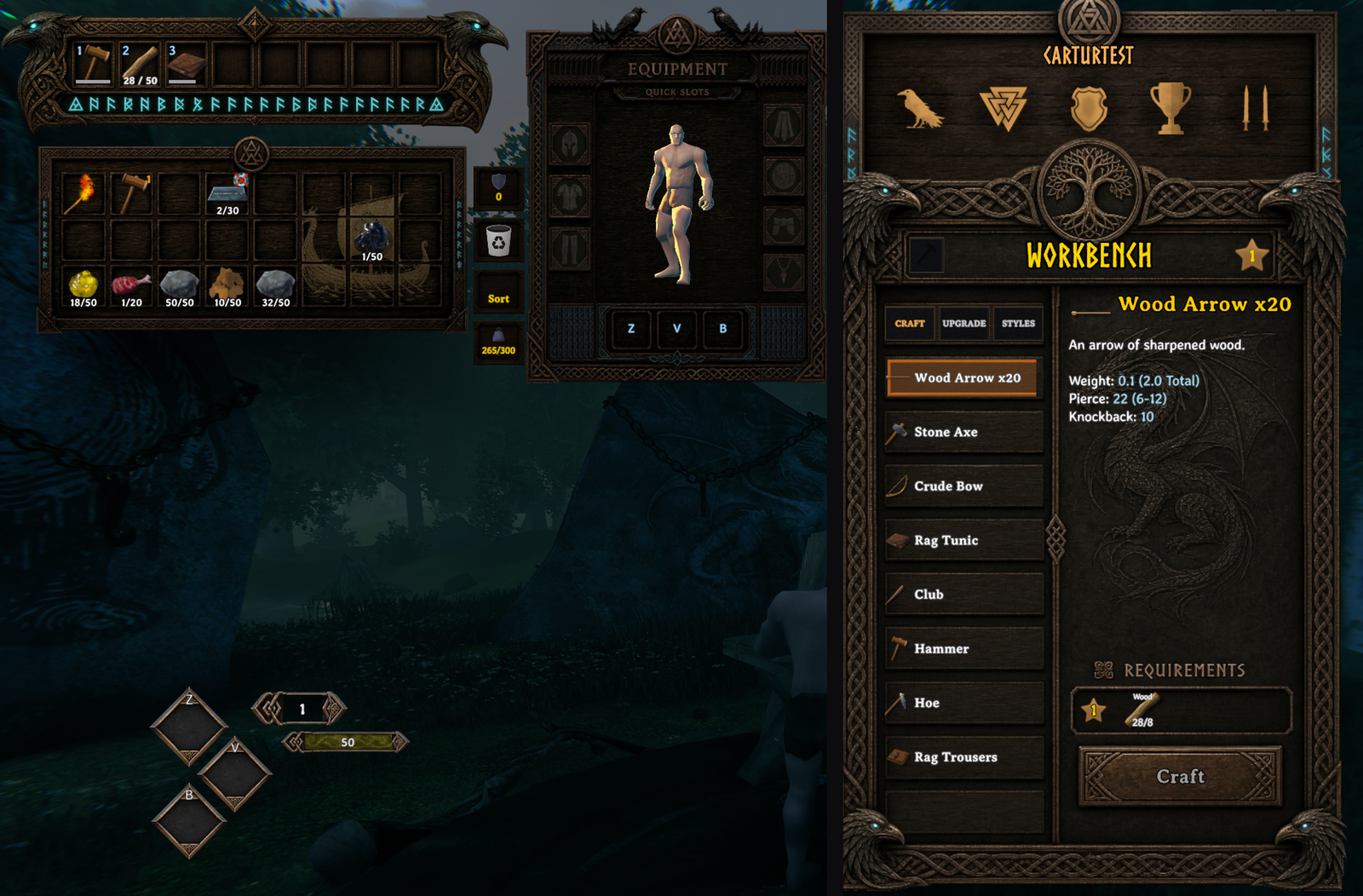
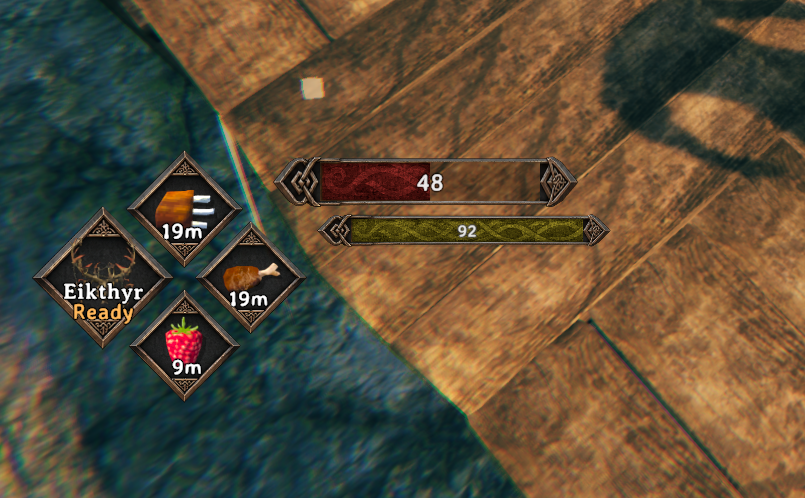
What it does
A hand-drawn wood-and-bronze interface: Norse knotwork boards behind the windows, bronze frames on the bars and food, and every piece placed and sized by you.
- HUD — health, stamina, eitr and adrenaline bars in bronze frames that grow with your maximum; three food diamonds with countdowns; the guardian power with Ready or cooldown.
- Inventory — bag, hotbar and an equipment panel with your character live in it, plus equipment, quick (Z / V / B) and shield slots. The quick slots are the food diamonds.
- Crafting, chests, the trader — on painted boards, controls seated on their plates.
- Build menu, skills, compendium, popups, pause and settings menus, loading and sleep screens — on the same boards.
- Epic Loot's enchanting table and trader windows, when Epic Loot is installed — one board per enchanting tab.
- Loading HD Valheim Textures without freezing. With HD Valheim Textures installed, its textures load during the logo screen with a progress bar, instead of the game hanging for half a minute or more on the main menu.
- A hover effect on every button, and a bronze highlight on the selected row.
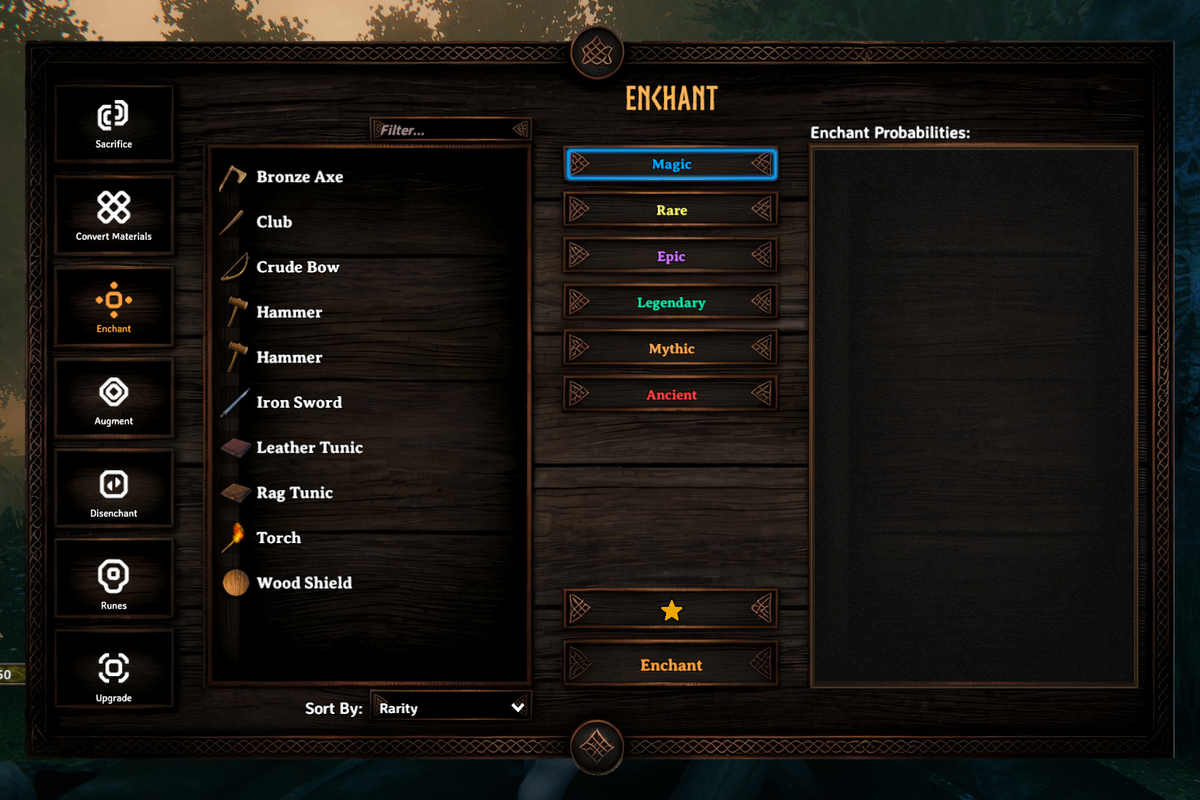
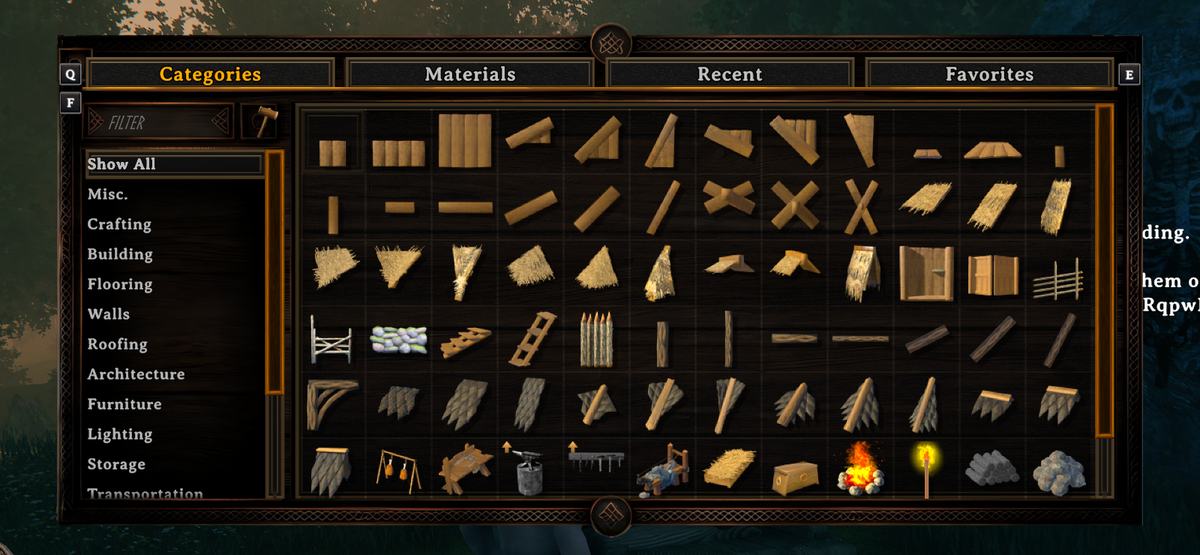
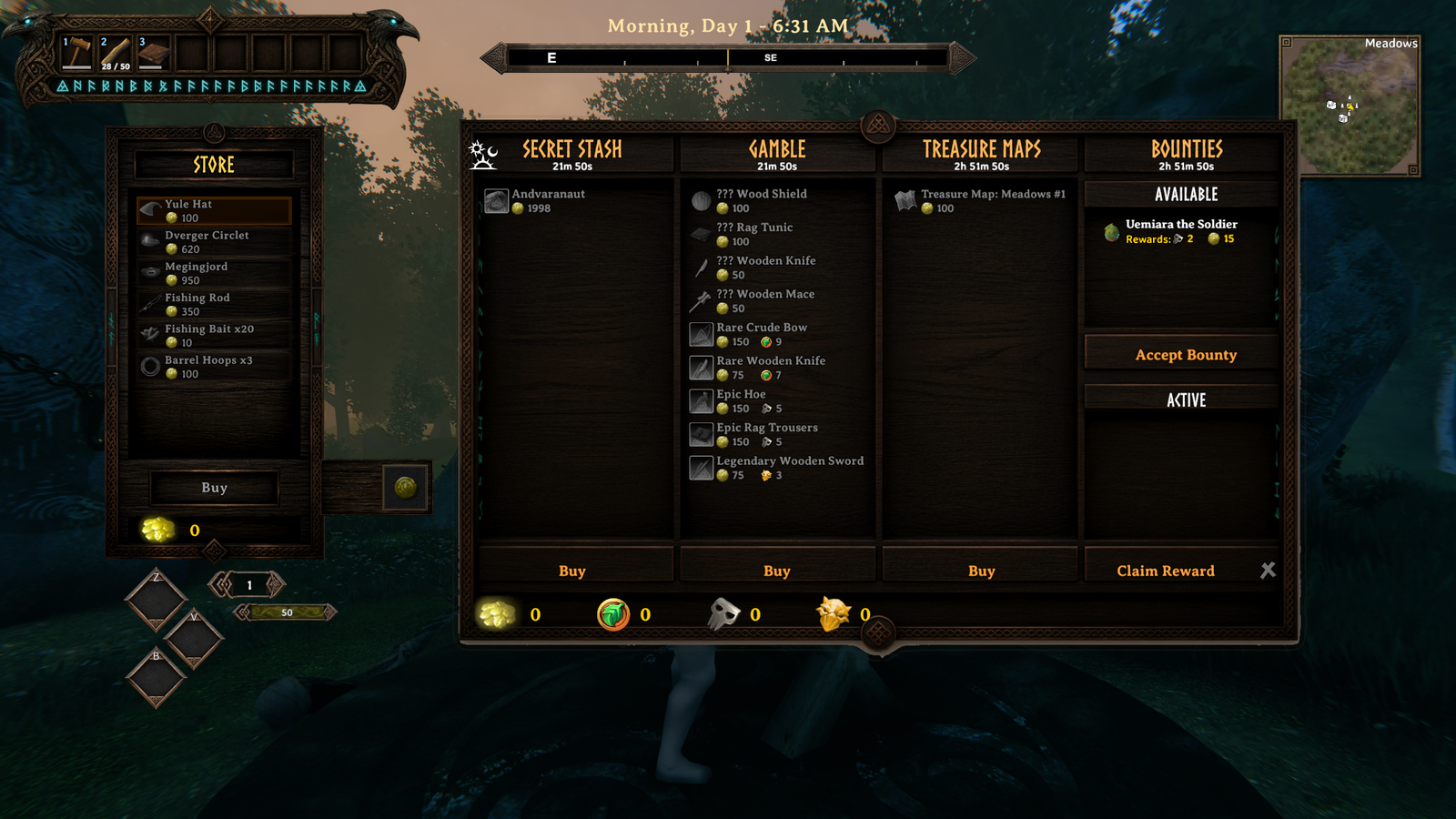
Still on vanilla art: the large map and minimap frames, the connecting screen, and some small dialogs. Controllers work, but the mod is made and tested with mouse and keyboard.
Arranging it
Turn on editMode in the config — a tick box in game with
ConfigurationManager,
or edit the file directly. It applies immediately, no restart.
| drag | move a piece |
| wheel | size it |
| shift + wheel | a bar's length |
| ctrl + wheel | how far the frame's ornaments stand off the fill |
| ctrl + drag | nudge the frame against the fill |
Your input is held while edit mode is on, so a drag doesn't swing your axe. Turn it off when
you're done; the layout saves either way. resetLayout puts every piece back.
Your own art
Put a PNG in BepInEx/config/CarturUI/ with the same name as one of the mod's own files in
plugins/CarturUIHud/assets/, and it is used instead. Restart the game to see it. The
BepInEx log says custom art: <name> for each file it picked up.
Make it the same size as the file it replaces: the bar frames and boards are cut at fixed
pixel positions. food_frame.png, bar_fill.png and bar_fill_enemy.png can be any size.
A file that doesn't fit is skipped with a warning in the log, and the original is used.
Delete your file to go back.
Settings
BepInEx/config/com.jekkle.valheim.carturuihud.cfg.
| Setting | Default | What it does |
|---|---|---|
Panels / newPanels |
true | Off: HUD, slots, inventory, hotbar and equipment panel only. Restart. |
Layout / editMode |
false | Arrange the pieces — see above. |
Layout / resetLayout |
false | Tick to put every piece back. |
Art / darkMode |
false | Keep vanilla's dimmed panel material. |
Compatibility
Declared incompatible, so BepInEx skips this mod if one of these is in the profile: Auga, AugaLite, Equipment and Quick Slots, Shield Me Bruh.
Works alongside Epic Loot, Jotunn, BetterArchery (its quiver sits in three ammo cells of the equipment panel), HD Valheim Textures and Cartur's Waste Management (its trash can and sort button sit in the inventory's side column). Any other mod that redraws the same windows will fight it.
Install
Use a mod manager (r2modman / Thunderstore / Gale) and it pulls in BepInEx for you. Client-side; no server install needed, works in multiplayer.
Free, and always will be. If it improved your game you can tip me on Patreon.
Discord — bug reports, install help, and mod requests. Bug reports get their own thread so nothing is lost in a chat scroll, and requests are voted on.
More from Cartur: HD Blood · Map Pins · Compass and Clock · Safe Stamina · Follow Command · Flooring · Waste Management · Feeding Trough · Build Camera · Combat Text
CHANGELOG
Changelog
1.1.13
-
Key pouch. A Keys button on the equipment panel, on the empty wood under the Legs box, opens a strip of what you hold in it: door keys, Hildir's three keys, and utility items such as belts and the wishbone. They sit in the same hidden cells Rune UI's key pouch uses. A key in it opens its door, a belt in it is worn and shown on your character while the Utility slot is free (a belt in the Utility slot replaces it, and the pouch one stays in the pouch), and the wishbone works from the pouch without taking the Utility slot. Anything that is not a key or a utility item is moved out to the bag, as in every other slot. Closing the bag closes the strip. With a controller, down off the quick slots opens it and moves along it.
-
Adrenaline bar in edit mode. It shows as an empty "0" bar with or without a trinket, so it can always be placed. The Eitr bar's placeholder in edit mode no longer shows the prefab's stray "45", which looked like a copy of the adrenaline bar left behind.
-
Tested in the game (Valheim 1.0.20, 1280x720, Release build): a key put in the pouch stayed there and a Wood put on a pouch cell was moved to the bag; the button opened and closed the strip and closing the bag closed it; Blood Gold, Crypt and Dvergr keys in the pouch opened the Morkborg gate, the sunken crypt gate and the queen's door (Crypt and Dvergr again after quitting and relaunching); a belt in the pouch was worn, a second utility item in the Utility slot replaced it and taking that off wore the pouch belt again; the wishbone's effect was on the player and pinged near a beacon, also after a relaunch; the controller movement rules, driven directly, went from the quick slots down into the pouch, along it and back to the bag; the adrenaline bar was moved with no trinket. Not tested: a real controller, moving items on pouch cells with the A button, Hildir's keys (no door uses them), other resolutions, multiplayer, a screenshot of the belt on the character.
-
Controller: the yellow frames sit where they should. With a controller in use, the game draws a yellow frame round the inventory and round the armour and weight boxes. Those frames are sized for the game's own layout, so with Cartur's UI they hung under the inventory and beside the side column. They now follow Cartur's inventory board and the armour and weight boxes.
-
Tested in the game (Valheim 1.0.20, 1280x720, Release build): with the game made to report a controller (no real controller), the frame round the inventory went from 297x169 px, hanging below the board, to 313x143, matching the board, and the other two frames moved onto the side column; the same with a chest open. Not tested: a real controller, the chest's own frame while the chest has focus, other resolutions.
1.1.12
- Path of Valheiman: with both installed, Path of Valheiman's own equipment sheet and its category crafting window no longer draw over Cartur's UI. They overlapped the Equipment panel, replaced the recipe list, moved the Requirements box and put a second "< 1 >" amount control on the Craft button. Cartur's UI turns both off through Path of Valheiman's own settings, set again on every launch. Cartur's UI does not write that setting to Path of Valheiman's config file, but Path of Valheiman may save it the next time one of its own settings is changed (its "Crafting list by category" setting then shows as off).
- Tested in the game (Valheim 1.0.20, 1280x720, Path of Valheiman 5.1.2, the Release build): with both installed the log says Path of Valheiman's equipment system and crafting window were turned off by Cartur's UI. The inventory screen shows only Cartur's Equipment panel, the plain recipe list, the Requirements box with its icon inside it and the "- Craft +" button, and the pilot's four checks passed (they ran out of time on Path of Valheiman's craft rows before). Without Path of Valheiman the mod loads with no error about it (checked on an earlier build of the same change). Not tested: Path of Valheiman's food, tool and arrow hotkeys and its tool bar with its equipment off, other resolutions, multiplayer.
1.1.11
- New option, Panels > uiScale (1 to 1.25, default 1). Scales the whole interface - windows, icons and text - not just the text. Applies straight away. It stacks on the game's own GUI scale, so the panels sit closer together as it grows; arrange them in edit mode if they touch. Asked for on Hexium.
- Tested: uiScale 1.25 at 1920x1080 in game, on a Debug build. The canvas scale went from 1.0 to 1.25, no panel went off screen or overlapped, and 12 of 12 bag-cell hit tests passed. Not tested: the Release build in game, other resolutions, uiScale together with the game's own GUI scale above 100%, gamepad, multiplayer.
1.1.10
- The map and minimap borders have no corner knots and fit their map. The border is now the plain frame rule with mitred corners, and it follows each map's own size, so it hugs the large map and the minimap at any resolution and UI scale.
- The character preview shows your weapon, helmet, chest and legs styles. Styles from Cartur's Weapon Styles and Epic Loot no longer draw as the vanilla item in the preview.
- Layout values typed into Configuration Manager apply at once, without a restart.
- Resizing a HUD piece no longer jumps between tiny and huge while you drag.
- New option, Layout > vanillaFoodTimers (off by default). On, the food diamonds show the food timers the way the base game lists them, in the order the foods were eaten, whatever they were eaten from. Takes effect on the next launch.
1.1.9
- MyLittleUI's crafting filter has its own place. Its Filter box sat on top of the recipe list on the crafting board. It now goes in the crafting title bar where the search box is, and Cartur's UI's own search steps aside so there is one box (MyLittleUI's also searches descriptions and materials). Without MyLittleUI, or with its filter off, nothing changes. Reported on Discord.
1.1.8
- New icon in the Cartur's Mods style. The mod itself is unchanged from 1.1.7 (BepInEx still reports 1.1.7).
1.1.7
- New character-select screen. Your five most recently played characters round the menu campfire (four on two logs, the newest standing) with the game's cauldron cooking over the fire, and every character in one menu on the right: name, save type and last played on one line, Start / New / Remove / Manage saves / Back under the list. Hover a character to make it stand and emote; double-click to play. Also released on its own as Cartur's Character Select; with both installed only one copy runs. Part of the new panels (
newPanels). - Minimap border sits round the map instead of on it, so it no longer covers the map's corners, the wind arrow or pins near the edge.
HD textures / maxTextureSize(default 0, off): caps the size HD Valheim Textures' textures load at, for less video memory.
1.1.6
- Crafting search, category and craft several. The crafting board gets a search box, a category button (All, Weapons, Armor, Tools, Consumables, Materials, Misc) and - / + on the Craft plate to craft up to 50 at once through the game's own multicraft.
Panels / craftingToolsturns it off. Requested on Nexus. Inventory / extraSlots. Off removes the equipment panel, quick slots and shield slot, so another inventory mod can own the inventory. Anything still in those slots moves into your bag; nothing is dropped. Requested on Discord.- VNEI: its window now fits inside the crafting board, and its tab stays in the tab row. Reported on Discord.
- Lineajes Races: the character in the equipment panel shows your race. Reported on Nexus.
- Adventure Backpacks: its Chest and Backpack tabs above a chest are left alone instead of being pulled into the chest header. Reported on Nexus. Please report it if the tabs still misbehave.
1.1.5
- Nine new loading screens, original paintings, one per biome. They rotate with the nine official Valheim artworks already in the mod, which are now credited to Iron Gate in the README.
- The README is rewritten: a fuller description of what the mod does, every setting and default checked against the code, and image captions that match the pictures. No code changes. Thunderstore also gets 1.1.4's fixes with this version, since 1.1.4 went out while the Thunderstore listing was down.
1.1.4
- The recipe list scrolls wherever the mouse is on it. It used to stop every few lines until you moved the mouse onto a recipe: the gaps between rows did not catch the wheel. Reported on Nexus.
- World Modifiers descriptions are readable. The window covered them when creating a world; they now sit beside it. Reported on Nexus.
- Any number of crafting tabs. Tabs other mods add to the crafting panel share the tab row with Craft, Upgrade and Styles, and are drawn in this UI's style.
Panels / newPanelsoff now really leaves the crafting, chest and info windows vanilla. Only the bag kept the new art. Reported on Discord.- No more yellow "Could not find type" warnings in the log when Better Archery is not installed.
1.1.3
- Works with Quick Stack Store. Its trash can no longer throws an error every time the inventory opens - it gets a box in the side column instead. And quick stacking, store all and sort now leave your equipment and quick slots alone, where before P emptied the quick slots into chests. Food in a quick slot and arrows in the quiver can still be restocked. Reported on Nexus.
Panels / textScale- make the text in the inventory, crafting, chest and trader windows bigger (up to 1.6) or smaller, for big monitors. Applies straight away. Requested on Nexus.
1.1.2
- The server password box says when it's locked. On the world screen it only takes typing once Start Server is ticked (that's the game), but it looked ready, so typing did nothing. Now it reads "Tick Start Server to set a password" and is shaded until you do. The game's own "[Empty]" hint, which the 1.1.0 layout clipped out of sight, shows again. Reported on Discord.
1.1.1
- Your own art. A PNG in
BepInEx/config/CarturUI/named like one of the mod's files replaces it - bar frames, fills, food frames, boards. Same size as the original, except the food frame and bar fills, which can be any size. Requested on Nexus.
1.1.0
The rest of the interface. Until now this mod was the HUD; now it reskins most of the game.
- Read first: Equipment and Quick Slots and Shield Me Bruh are now incompatible — their equipment, quick and shield slots are built in. Remove them before updating. Uninstalling this mod drops what is in those slots on the ground, the same as removing Equipment and Quick Slots.
Panels / newPanels(on by default). Off keeps the HUD from 1.0.5 plus the inventory, hotbar and equipment panel that hold the slots, and puts every other screen back to vanilla. Restart to apply.- Inventory, hotbar and an equipment panel with your character live in it, plus equipment, quick (Z / V / B) and shield slots. The food diamonds show the quick slots.
- Painted boards for crafting, chests, the trader, the build menu, skills, compendium, popups, the pause and settings menus, and the loading and sleep screens.
- Epic Loot's enchanting table (one board per tab) and trader windows, when it is installed.
- With HD Valheim Textures installed, its textures load during the logo screen with a progress bar, instead of freezing the main menu for half a minute or more.
- A hover effect on every button, toggle and dropdown; a bronze highlight on the selected row.
- New default layout. Bars keep the positions they had; anything you moved stays where you put it.
- Bars stay on screen at very high health, and their numbers are only rebuilt when they change (from 1.0.5).
1.0.5
- Bar text is only rebuilt when the value changes, not every frame.
- Extended Action Quick Slots: its bar is found even when it appears late, and the mod no longer adds another listener every time the HUD rebuilds.
- The bars stay on screen at very high health and stamina.
- If the mod fails to start, it now removes all of its changes so the game shows its normal bars.
- The adrenaline bar hides at zero adrenaline, like vanilla, instead of showing an empty frame for anyone wearing a trinket.
1.0.4
- Edit mode works on machines where it did not. The overlay appeared, the cursor came back, and nothing could be dragged. The mod was reading the mouse itself and working out what the cursor was over by hand; it hands both jobs to Unity now, the way the compass mod's edit mode already does. Drag, ctrl+drag and the wheel all behave as before.
1.0.3
- The eitr bar now shows. It shared a row with adrenaline, and adrenaline won that row whenever you had any adrenaline pool at all - which every vanilla trinket grants, bronze upwards. So anyone wearing a trinket never saw their mana, however much of it they had.
- Eitr and adrenaline get a row each now, and each one appears on its own pool without consulting the other, the way the game's own HUD does it.
- A config written by an earlier version has both bars saved at the same spot. It is moved to the new rows on load; any size or length you set by hand is kept.
1.0.2
- Listing only. New icon: a shot of the HUD in game, so the Thunderstore tile and the Nexus page show the same picture. No code change.
1.0.1
- Listing only. Links the rest of the Cartur mods, Flooring included, in the same place the others carry theirs. No code change.
1.0.0
First release.
- Health, stamina, eitr and adrenaline bars in a 9-sliced bronze frame, with a knotwork fill that is uncovered rather than stretched as the bar drains.
- Bars take their length from your maximum, so they grow when you eat and shrink when the food runs out. Every bar reaches the same length at its own ceiling.
- Three food diamonds with countdowns, driven by Equipment and Quick Slots when it is present and by the vanilla eaten-food list otherwise.
- Guardian power box with the name and Ready/cooldown drawn over the icon.
- Eitr and adrenaline share a row; neither is drawn until you have that pool.
- Edit mode: drag to move, wheel to size, shift+wheel for bar length, ctrl for the frame. Saved to the config and applied live, with no hotkey to hit by accident.
