
Please disclose if any significant portion of your mod was created using AI tools by adding the 'AI Generated' category. Failing to do so may result in the mod being removed from Thunderstore.

RunicPrecisionBuildTool
Precise six-axis building with snapping, fine control, world movement, and optional 3D orientation guides.
| Date uploaded | 2 weeks ago |
| Version | 1.0.1 |
| Download link | Chazman-RunicPrecisionBuildTool-1.0.1.zip |
| Downloads | 23 |
| Dependency string | Chazman-RunicPrecisionBuildTool-1.0.1 |
This mod requires the following mods to function

denikson-BepInExPack_Valheim
BepInEx pack for Valheim. Preconfigured with the correct entry point for mods and preferred defaults for the community.
Preferred version: 5.4.2333README
Runic Precision Build Tool
Build beyond the grid without abandoning Valheim's building system.
Runic Precision Build Tool adds precise three-axis rotation and world-axis positioning to the vanilla hammer workflow. Rotate beams into ornamental patterns, form complex roof lines, recess lights into stone, or make tiny alignment corrections—all while retaining Valheim's familiar placement preview and snapping behavior.
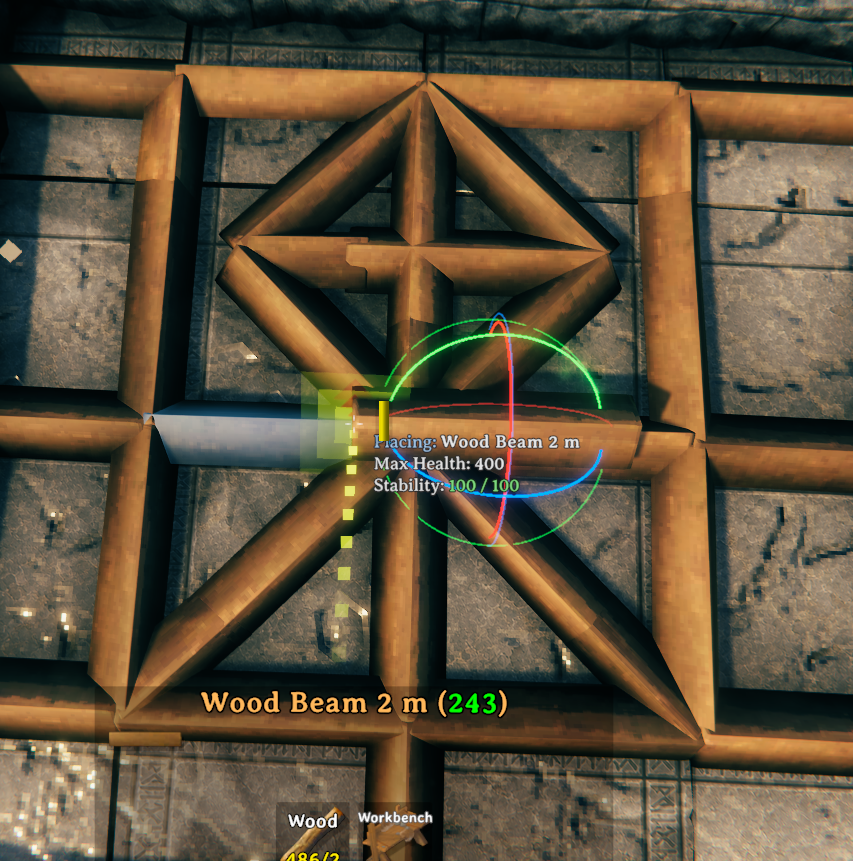
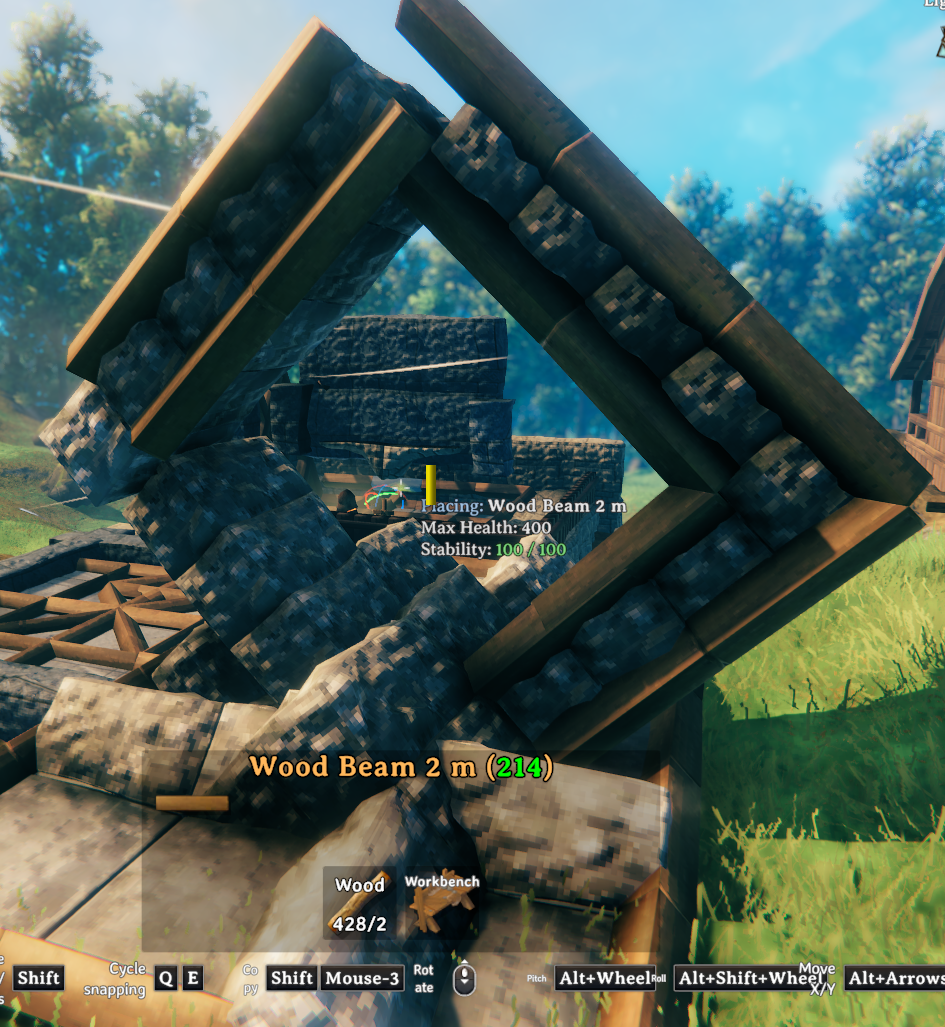
Features
- Pitch and roll any rotatable build piece in addition to vanilla yaw.
- Move the placement ghost along fixed world X, Y, and Z axes.
- Normal and fine adjustment steps for both rotation and movement.
- Preserve transformed snap points while rotating pieces.
- Deliberately inset pieces into other geometry for detailed construction.
- Toggleable RGB orientation rings show the piece's local axes and the fixed world planes.
- Optional controls appear inside Valheim's native bottom build-hint strip.
- Reset the current placement state without reopening the hammer menu.
- Client-side operation with no custom data added to placed pieces or world saves.
- No Jotunn dependency.
Controls
| Control | Action |
|---|---|
| Mouse wheel | Vanilla yaw rotation |
Left Alt + Wheel |
Pitch around the piece's current local axis |
Left Alt + Left Shift + Wheel |
Roll/twist around the piece's current local axis |
Left Alt + Left/Right Arrow |
Move along world X |
Left Alt + Up/Down Arrow |
Move along world Y |
Left Alt + Page Up/Page Down |
Move along world Z |
Hold V while adjusting |
Use the fine step |
Left Alt + R |
Reset rotation, yaw, movement offset, and snap selection |
G |
Toggle the 3D guides and expanded native control hints |
Bright red, green, and blue rings represent the object's current local X, Y, and Z axes. The larger translucent rings remain aligned to the world, making the object's orientation easy to read.
Installation
Mod manager
Install through Thunderstore Mod Manager or r2modman. The required BepInEx pack will be resolved automatically.
Manual
- Install BepInExPack Valheim.
- Place
RunicPrecisionBuildTool.dllinBepInEx/plugins/RunicPrecisionBuildTool/. - Start Valheim.
Configuration
After the first launch, configuration is written to:
BepInEx/config/chazman.RunicPrecisionBuildTool.cfg
The normal and fine rotation steps, normal and fine movement distances, control modifiers, and
general enable state can be changed there. The default fine modifier is V; this mod deliberately
does not use Ctrl so it can coexist with build-camera controls.
Multiplayer and compatibility
Runic Precision Build Tool is client-side. A dedicated server and other players do not normally need the mod because Valheim already synchronizes the final position and quaternion of a placed piece.
The mod does not add custom components or metadata to placed pieces and does not change the world save format. Removing it leaves already placed pieces intact. Servers with restrictive mod policies or server-side placement validation may still prohibit or reject unusual placements.
The tool avoids globally consuming inputs and leaves ordinary building unchanged unless its modifier keys are held. If another mod uses the same shortcuts, change that mod's bindings or the available Runic Precision configuration entries.
Support and community
Questions, bug reports, screenshots, compatibility reports, and feature discussion are welcome in the Chazman Mods Discord:
When reporting a problem, please include:
- Your Valheim version.
- The Runic Precision Build Tool version.
- Your BepInEx log.
- The affected build piece and exact control sequence.
- Other building or camera mods installed.
Credits
Created by Chazman for the Valheim building community.
Runic Precision Build Tool is an independent mod and is not affiliated with Iron Gate Studio.
CHANGELOG
Changelog
2.0.2 - 2026-09-05
- Reworked the Thunderstore description and README opening to lead with the player problem, the mod's core benefit, major features, in-game feel, and then safety and compatibility details.
- Description-only package update. The plugin DLL and gameplay behavior are byte-for-byte unchanged from 2.0.1.
2.0.1 - 2026-08-29
- Made the plugin independently installable with BepInEx as its only runtime dependency.
- Removed Core registry/capability registration, Persistence networking, Transactions composites, remote mutation protocols, world journals, recovery, reconciliation, custody, and quarantine.
- Moved F11 undo and F12 area repair to Valheim's native loaded local-owner path for solo, listen host, and dedicated-client play without ownership claiming or mutation RPCs.
- Kept conservative fresh creator, ward, range, no-build, pose, health, structural, tool, and native policy checks; undo clears its one in-memory receipt before native removal starts.
- Kept fixed-capacity deterministic repair discovery and one hammer durability charge per successful repair, with no inventory-wide lock or gameplay journal.
- Changed precision yaw, pitch, and roll increments to the pending piece's current local axes, so pitch follows a yawed beam's own X axis and the visual guides rotate with the piece. The resulting quaternion remains locked against later candidate-surface drift.
- Restricted P to the exact equipped Hammer build mode, so ordinary gameplay and cultivator or other tool placement modes cannot activate Precision.
- Made F6 cycle every currently unlocked build piece when the catalog search query is empty instead of displaying the missing-query error.
- Kept the explicit P precision mode, same-frame rotation input, six-axis movement/reset controls, transform and snap-side matching, two-placement repeat history, bounded search/favorites/recents, readout, and axis guides.
- Kept optional Harmony ordering with Build Camera, Crafting, and Agriculture plus PerfectPlacement conflict detection and exact Valheim 0.221.12 seam verification.
- Replaced obsolete durable/dedicated protocol tests with focused native-ownership and standalone architecture assertions.
2.0.0
- Rebuilt the tool as a compact six-degree-of-freedom extension of Valheim's ordinary hammer placement workflow.
- Added configurable quaternion rotation, local/world translation, matching, native snap composition, readout, and fail-closed adapter verification.
