
Please disclose if any significant portion of your mod was created using AI tools by adding the 'AI Generated' category. Failing to do so may result in the mod being removed from Thunderstore.
RunicPrecisionBuildTool
Client-side 6DOF hammer placement with vanilla snapping, precision movement, exact rotation matching, and native angle readouts.
| Date uploaded | 2 weeks ago |
| Version | 2.0.0 |
| Download link | Chazman-RunicPrecisionBuildTool-2.0.0.zip |
| Downloads | 119 |
| Dependency string | Chazman-RunicPrecisionBuildTool-2.0.0 |
This mod requires the following mods to function

denikson-BepInExPack_Valheim
BepInEx pack for Valheim. Preconfigured with the correct entry point for mods and preferred defaults for the community.
Preferred version: 5.4.2333README
Runic Precision Build Tool
Six-degree-of-freedom precision inside Valheim's ordinary hammer workflow.
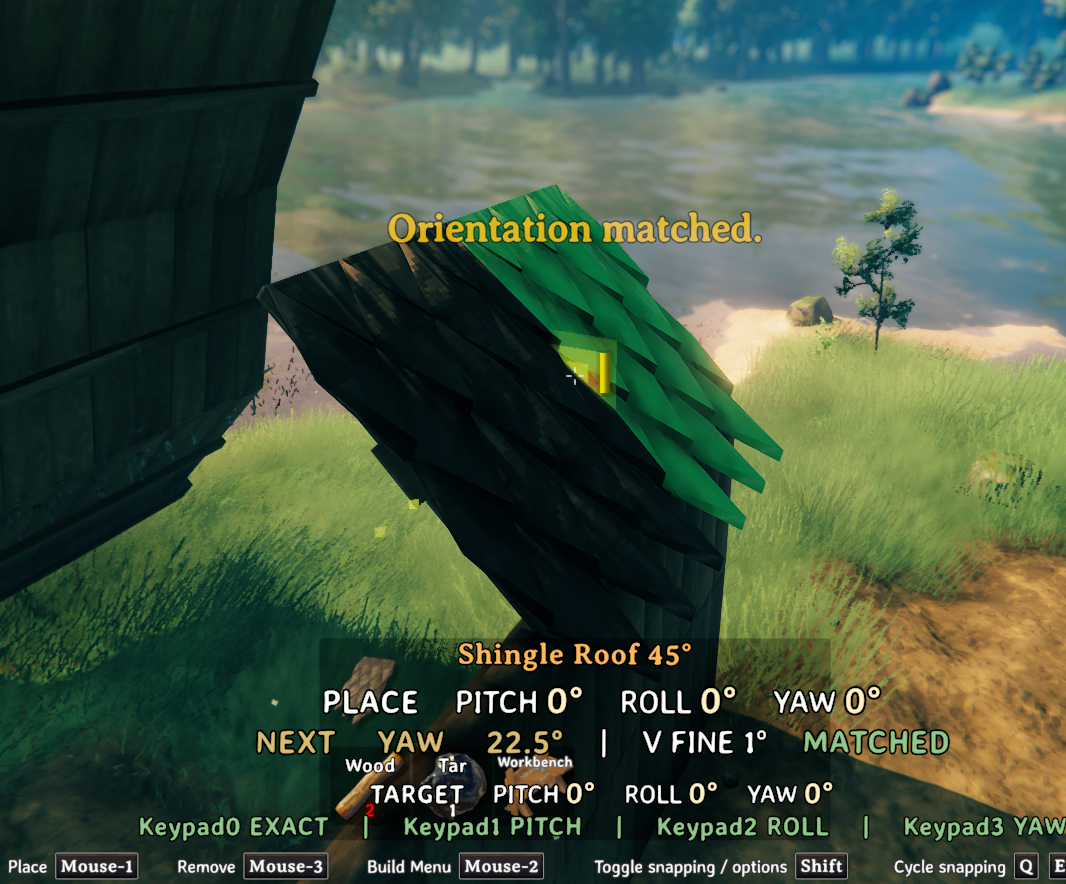
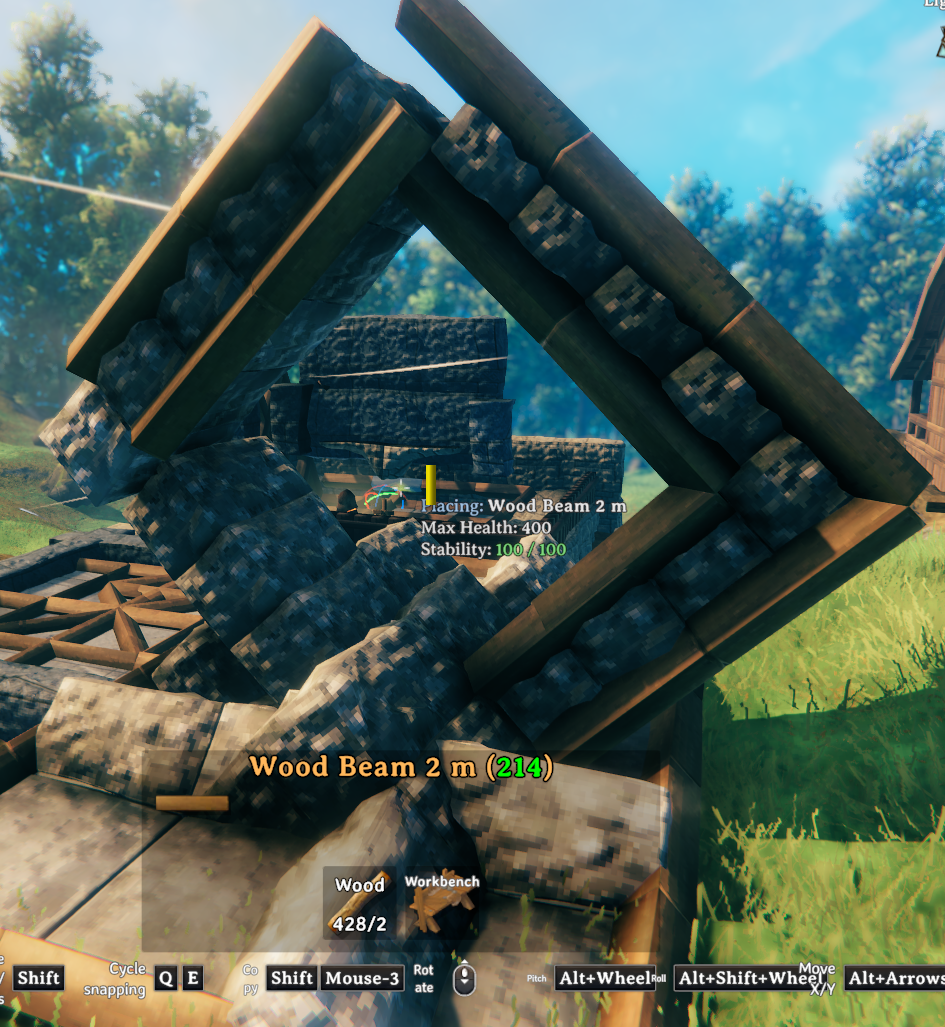
Runic Precision Build Tool gives Valheim's existing placement preview three fixed-world rotation degrees of freedom and three fixed-world movement degrees of freedom. Rotation and position stay independent: turning a piece never moves its pivot, and moving it never changes its orientation. The final preview still travels through Valheim's normal snapping, placement validation, resource checks, and placement path.
Quick start
- Equip a hammer and choose a piece from Valheim's ordinary build menu. Runic has no separate
build mode and does not require
B. - Rotate the placement ghost with the wheel: wheel alone is yaw,
Left Alt + Wheelis pitch, andLeft Alt + Left Control + Wheelis roll. AddVto any of those chords for fine rotation. - Move the ghost with
Left Alt + Arrow keysfor up/down/left/right andLeft Alt + Page UporPage Downfor forward/back. AddVfor the fine movement versions. - Aim directly at an existing build piece and press
Keypad0to copy its exact orientation, or useKeypad1,Keypad2, andKeypad3to copy only pitch, roll, or yaw. Component matches can be applied one after another. - Hold
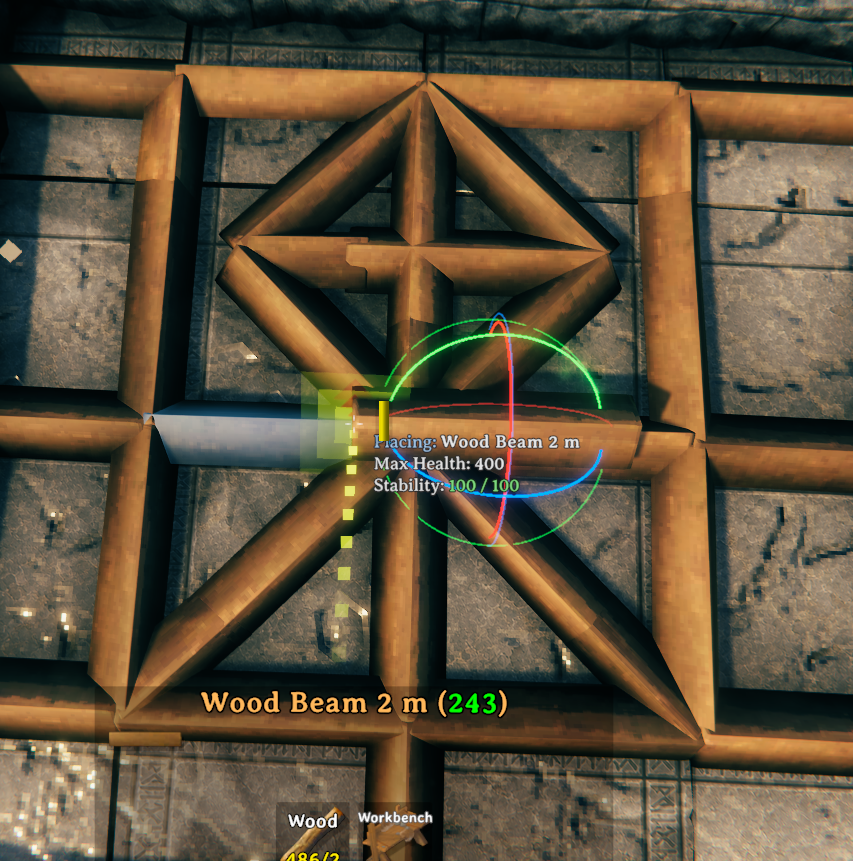
Gwhen you need the labeled fixed-world pitch, roll, and yaw guides. Release it to hide them. - Press
F10to reset Runic rotation and movement. Hold Valheim'sLeft Shiftwhile positioning when you want to suppress snapping, then place the piece normally.
Runic does not use F or R with its default controls, so Forsaken Power and hammer-mode exit stay
vanilla. The package also includes INSTRUCTIONS.md as a compact offline reference.
Features
- Rotate the selected build piece around fixed yaw, pitch, and roll centerlines through its unchanged pivot.
- Move the placement ghost left/right, up/down, and forward/back on fixed world directions that do not turn with the piece.
- Configure six complete wheel chords, twelve complete movement chords, four matching actions, a hold-only axis guide, and Reset independently.
- Set rotation precision as equal divisions of a circle and set normal/fine movement distance for each direction pair independently.
- Match the exact quaternion of the rotatable piece under the crosshair, or copy only its pitch, roll, or yaw. Successive component matches compose without replacing the other two components. The active snap host remains a fallback when no piece is directly aimed at.
- Preserve Valheim's ordinary automatic/manual snap selection without retaining or forcing a pair.
- Keep precision state across repeated placements of the same selected prefab.
- Show the final preview orientation in a native-style
Placehint, with a conditionalTargetline for direct comparison. - Hold a non-consuming control to show three fixed-world axis lines through the placement pivot.
- Reset all Runic adjustments and vanilla yaw with one key.
- Sample held keys and same-frame key-down edges consistently so quick
Vfine chords are not dropped by Valheim's input update timing. - Remain client-side: no custom components, metadata, or world-save format changes.
- Use the bare wheel for configured normal yaw by default.
- Require only BepInEx; no Jotunn dependency.
Controls
Each exact wheel chord or movement key press applies one increment. Holding a movement key does
not repeat it. The default normal rotation setting divides a circle into 16 increments
(360 / 16 = 22.5 degrees); the fine setting uses 360 increments (1 degree).
Every row below has its own configuration entry. These are complete chords, not pieces of a shared hidden modifier system.
| Control | Action | Default step |
|---|---|---|
| Mouse wheel | Yaw around the fixed vertical centerline | 22.5 degrees |
Left Alt + Wheel |
Pitch around the fixed left/right centerline | 22.5 degrees |
Left Alt + Left Control + Wheel |
Roll around the fixed front/back centerline | 22.5 degrees |
V + Wheel |
Fine yaw around the fixed vertical centerline | 1 degree |
V + Left Alt + Wheel |
Fine pitch around the fixed left/right centerline | 1 degree |
V + Left Alt + Left Control + Wheel |
Fine roll around the fixed front/back centerline | 1 degree |
The twelve movement actions are also independent configuration entries:
| Direction | Normal chord | Fine chord | Normal / fine distance |
|---|---|---|---|
| Up | Left Alt + Up Arrow |
V + Left Alt + Up Arrow |
0.25 / 0.05 m |
| Down | Left Alt + Down Arrow |
V + Left Alt + Down Arrow |
0.25 / 0.05 m |
| Left | Left Alt + Left Arrow |
V + Left Alt + Left Arrow |
0.25 / 0.05 m |
| Right | Left Alt + Right Arrow |
V + Left Alt + Right Arrow |
0.25 / 0.05 m |
| Forward | Left Alt + Page Up |
V + Left Alt + Page Up |
0.25 / 0.05 m |
| Backward | Left Alt + Page Down |
V + Left Alt + Page Down |
0.25 / 0.05 m |
Other actions:
| Control | Action |
|---|---|
Keypad0 |
Match the target piece's exact rotation |
Keypad1 |
Match only the target piece's pitch |
Keypad2 |
Match only the target piece's roll |
Keypad3 |
Match only the target piece's yaw |
Hold G |
Show the fixed-world axis guides until released |
F10 |
Reset Runic rotation and translation plus the current yaw index |
Hold Left Shift while snapping |
Valheim snap suppression (unchanged) |
Runic does not use or consume F or R by default. Valheim's F Forsaken Power action and R
hammer-mode exit remain untouched everywhere. All four matching actions remain independently
configurable.
Use Keypad0 when the selected and target pieces share the same authored visual basis, such as two
copies of the same roof tile: copying the complete rotation is the cleanest match. Different piece
types can be modeled with different visual and snap-point bases, so copying all three components
may not produce the useful edge alignment. In that case, use Keypad1, Keypad2, or Keypad3
for pitch, roll, or yaw. The actions compose in sequence: for example, press Keypad1 and then
Keypad3 to copy the target's pitch and yaw while preserving the placement piece's existing roll.
The G guide is a hold-only overlay, not a toggle or an action selector. It does not consume wheel
input or another Runic action, so it can remain held while rotating, moving, or using any of the
four matching actions. Valheim's overlapping radial action is suppressed only while an
eligible placement is actively using the configured G guide; it remains vanilla everywhere
else. Three labeled lines cross the current placement pivot and remain fixed in world space
regardless of the piece's orientation:
- PITCH X — orange (
#FFB000), fixed world left/right. - YAW Y — cyan (
#56D4FF), fixed world vertical. - ROLL Z — magenta (
#E878C4), fixed world front/back.
Releasing the configured guide chord hides both the lines and their native-hint legend immediately. They also hide immediately whenever placement input is gated, such as when focus is lost, a relevant menu opens, the placement ghost is unavailable, or the selected piece cannot rotate.
The large two-line Place readout reports the effective pitch, roll, and yaw of the current
placement ghost, with the numbers emphasized. When a valid rotatable piece is available, a
matching Target readout appears below it. A successful match briefly displays MATCHED and also
uses Valheim's native message system.
Scope and limitations
The tool intentionally has no separate build mode, custom panel, persistent gizmo, or placed-piece editor. Its only spatial overlay is the transient fixed-world guide shown while its configured hold chord is down. It controls the ordinary hammer placement preview only. Keyboard and mouse are supported; controller bindings are not provided.
All six degrees of freedom use fixed world directions. Pitch turns around the fixed left/right centerline, yaw around the fixed vertical centerline, and roll around the fixed front/back centerline. Left/right, up/down, and forward/back movement use those same fixed world directions. Neither the rotation axes nor the movement directions turn with the piece. Rotating after moving cannot orbit the ghost, and moving after rotating cannot change its orientation.
Rotation matching copies orientation only: it does not change the selected prefab, snap point,
placement position, or fixed-world translation offset. Keypad0 replaces all three orientation
components; Keypad1, Keypad2, and Keypad3 replace only their named component and preserve the
other two.
A match accepted during placement is handed to Valheim's snap search in that same placement
update. This lets a compatible pair of snap points become eligible immediately after Keypad0,
Keypad1, Keypad2, or Keypad3. Orientation alone cannot guarantee a snap: the two prefabs must
still have compatible snap points within Valheim's search range. Runic does not select, force,
retain, or lock a pair.
Runic does not retain, force, or reapply a snap pair. Valheim selects and validates snapping from
the current candidate every frame. Because vanilla snapping runs after Runic applies the candidate
transform, Valheim may move the ghost onto a valid snap point. Hold Left Shift to suppress
snapping when the exact freely moved position must be preserved. For the Target line and all four
matching actions, the piece directly under the crosshair takes priority. Runic uses a successfully
completed vanilla snap host only when the crosshair does not hit an eligible piece, avoiding
ambiguous targets at crowded joints.
Runic controls are ignored while typing or while relevant menus are open. If the adapter cannot verify the expected Valheim placement code, Runic functionality and its hints disable for that session while vanilla building remains available.
Installation
Mod manager
Install through Thunderstore Mod Manager or r2modman. The required BepInEx pack will be resolved automatically.
Manual
- Install BepInExPack Valheim.
- Place
RunicPrecisionBuildTool.dllinBepInEx/plugins/RunicPrecisionBuildTool/. - Start Valheim.
Configuration
After the first launch, configuration is written to:
BepInEx/config/chazman.RunicPrecisionBuildTool.cfg
The package also includes RunicPrecisionBuildTool.cfg.example, a fully commented clean 2.0.0
configuration that can be copied to that path while Valheim is closed.
| Section | Key | Default | Allowed range / purpose |
|---|---|---|---|
| General | Enabled | true |
Enable Runic functionality |
| Controls - Rotation Wheel | YawWheelChord | None |
Wheel alone; None has this special meaning only for normal yaw |
| Controls - Rotation Wheel | PitchWheelChord | LeftAlt |
Complete normal-pitch wheel chord |
| Controls - Rotation Wheel | RollWheelChord | LeftAlt + LeftControl |
Complete normal-roll wheel chord |
| Controls - Rotation Wheel | FineYawWheelChord | V |
Complete fine-yaw wheel chord; None disables |
| Controls - Rotation Wheel | FinePitchWheelChord | V + LeftAlt |
Complete fine-pitch wheel chord; None disables |
| Controls - Rotation Wheel | FineRollWheelChord | V + LeftAlt + LeftControl |
Complete fine-roll wheel chord; None disables |
| Controls - Actions | MatchRotation | Keypad0 |
Match the aimed piece's exact rotation |
| Controls - Actions | MatchPitch | Keypad1 |
Match only the aimed piece's pitch |
| Controls - Actions | MatchRoll | Keypad2 |
Match only the aimed piece's roll |
| Controls - Actions | MatchYaw | Keypad3 |
Match only the aimed piece's yaw |
| Controls - Actions | AxisGuides | G |
Hold-only, non-consuming fixed-world axis guide; None disables |
| Controls - Actions | Reset | F10 |
Reset Runic rotation and translation |
| Controls - Movement | MoveUp / MoveDown | LeftAlt + UpArrow / LeftAlt + DownArrow |
Two independent normal action chords |
| Controls - Movement | MoveLeft / MoveRight | LeftAlt + LeftArrow / LeftAlt + RightArrow |
Two independent normal action chords |
| Controls - Movement | MoveForward / MoveBackward | LeftAlt + PageUp / LeftAlt + PageDown |
Two independent normal action chords |
| Controls - Movement Fine | FineMoveUp / FineMoveDown | V + LeftAlt + UpArrow / V + LeftAlt + DownArrow |
Two independent fine action chords |
| Controls - Movement Fine | FineMoveLeft / FineMoveRight | V + LeftAlt + LeftArrow / V + LeftAlt + RightArrow |
Two independent fine action chords |
| Controls - Movement Fine | FineMoveForward / FineMoveBackward | V + LeftAlt + PageUp / V + LeftAlt + PageDown |
Two independent fine action chords |
| Rotation | IncrementsPerCircle | 16 |
1–36000; 8 = 45°, 16 = 22.5°, 32 = 11.25° |
| Rotation | FineIncrementsPerCircle | 360 |
1–36000; default is 1 degree per wheel notch |
| Movement | SideStepMeters | 0.25 |
0.001–10 m per normal left/right press |
| Movement | UpDownStepMeters | 0.25 |
0.001–10 m per normal up/down press |
| Movement | ForwardBackStepMeters | 0.25 |
0.001–10 m per normal forward/back press |
| Movement | FineSideStepMeters | 0.05 |
0.001–10 m per fine left/right press |
| Movement | FineUpDownStepMeters | 0.05 |
0.001–10 m per fine up/down press |
| Movement | FineForwardBackStepMeters | 0.05 |
0.001–10 m per fine forward/back press |
| UI | ShowPlacementAngles | true |
Show the native-style Place line |
| UI | ShowTargetAngles | true |
Show the conditional Target line |
| UI | ReadoutFontSize | 36 |
Maximum native readout size, 22–54 points |
| Diagnostics | VerboseLogging | false |
Enable additional diagnostic logging |
Keyboard shortcut values describe the complete key combination for that one action. None
disables any non-yaw wheel chord, discrete action, or the guide; only YawWheelChord=None means
wheel alone. AxisGuides is deliberately a non-consuming held overlay, so its keys may coexist
with a wheel, movement, matching, or reset chord. The 2.0.0 configuration is independent and does
not load or migrate 1.x settings. Exact duplicate selector chords are reported so they can be
corrected in the configuration file; they are never guessed or automatically remapped.
Multiplayer and compatibility
Runic Precision Build Tool is client-side. A dedicated server and other players do not normally need the mod because Valheim synchronizes the final position and quaternion of a placed piece. Removing the mod leaves previously placed pieces intact.
The tool does not weaken Valheim's clipping, private-area, no-build-zone, resource, or other placement checks. Servers with restrictive mod policies or additional server-side validation may still reject unusual placements.
If PerfectPlacement's Enable Free Placement Rotation option is enabled, Runic functionality disables for the session and logs one warning to avoid competing rotation systems. Other building, camera, or input mods may use the same shortcuts or alter the placement pipeline; check the BepInEx log and test the combination before relying on it.
Support and community
Questions, bug reports, screenshots, compatibility reports, and feature discussion are welcome in the Chazman Mods Discord:
When reporting a problem, please include:
- Your Valheim version.
- The Runic Precision Build Tool version.
- Your BepInEx log.
- The affected build piece and exact control sequence.
- Other building, camera, and input mods installed.
Credits
Created by Chazman for the Valheim building community.
Runic Precision Build Tool is an independent mod and is not affiliated with Iron Gate Studio.
CHANGELOG
Changelog
2.0.2 - 2026-09-05
- Reworked the Thunderstore description and README opening to lead with the player problem, the mod's core benefit, major features, in-game feel, and then safety and compatibility details.
- Description-only package update. The plugin DLL and gameplay behavior are byte-for-byte unchanged from 2.0.1.
2.0.1 - 2026-08-29
- Made the plugin independently installable with BepInEx as its only runtime dependency.
- Removed Core registry/capability registration, Persistence networking, Transactions composites, remote mutation protocols, world journals, recovery, reconciliation, custody, and quarantine.
- Moved F11 undo and F12 area repair to Valheim's native loaded local-owner path for solo, listen host, and dedicated-client play without ownership claiming or mutation RPCs.
- Kept conservative fresh creator, ward, range, no-build, pose, health, structural, tool, and native policy checks; undo clears its one in-memory receipt before native removal starts.
- Kept fixed-capacity deterministic repair discovery and one hammer durability charge per successful repair, with no inventory-wide lock or gameplay journal.
- Changed precision yaw, pitch, and roll increments to the pending piece's current local axes, so pitch follows a yawed beam's own X axis and the visual guides rotate with the piece. The resulting quaternion remains locked against later candidate-surface drift.
- Restricted P to the exact equipped Hammer build mode, so ordinary gameplay and cultivator or other tool placement modes cannot activate Precision.
- Made F6 cycle every currently unlocked build piece when the catalog search query is empty instead of displaying the missing-query error.
- Kept the explicit P precision mode, same-frame rotation input, six-axis movement/reset controls, transform and snap-side matching, two-placement repeat history, bounded search/favorites/recents, readout, and axis guides.
- Kept optional Harmony ordering with Build Camera, Crafting, and Agriculture plus PerfectPlacement conflict detection and exact Valheim 0.221.12 seam verification.
- Replaced obsolete durable/dedicated protocol tests with focused native-ownership and standalone architecture assertions.
2.0.0
- Rebuilt the tool as a compact six-degree-of-freedom extension of Valheim's ordinary hammer placement workflow.
- Added configurable quaternion rotation, local/world translation, matching, native snap composition, readout, and fail-closed adapter verification.
