
Please disclose if any significant portion of your mod was created using AI tools by adding the 'AI Generated' category. Failing to do so may result in the mod being removed from Thunderstore.

ItemFinder
在背包面板上添加“查找”按钮:模糊搜索、拼音首字母搜索附近箱子的物品,穿墙标记 + 箭头 + 愿望骨音效指引,附带 P 键两点测距。
| Date uploaded | 2 weeks ago |
| Version | 1.3.2 |
| Download link | ChineseCanFly-ItemFinder-1.3.2.zip |
| Downloads | 47 |
| Dependency string | ChineseCanFly-ItemFinder-1.3.2 |
README
Item Finder 物品查找
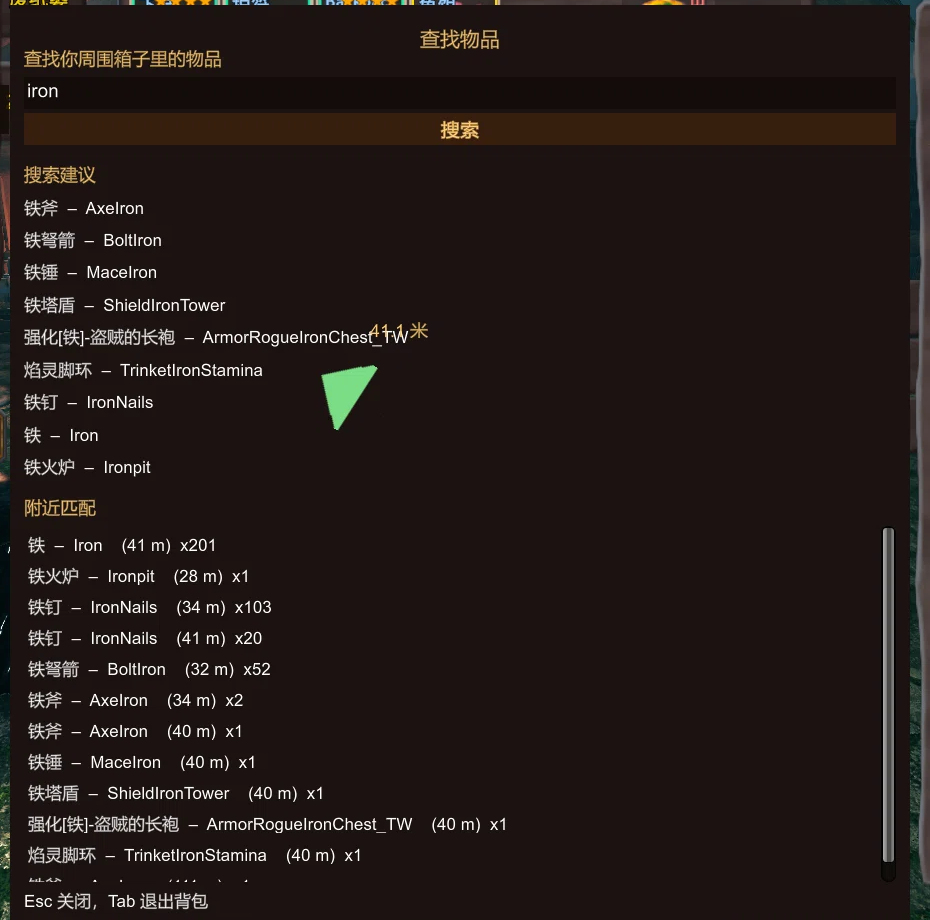
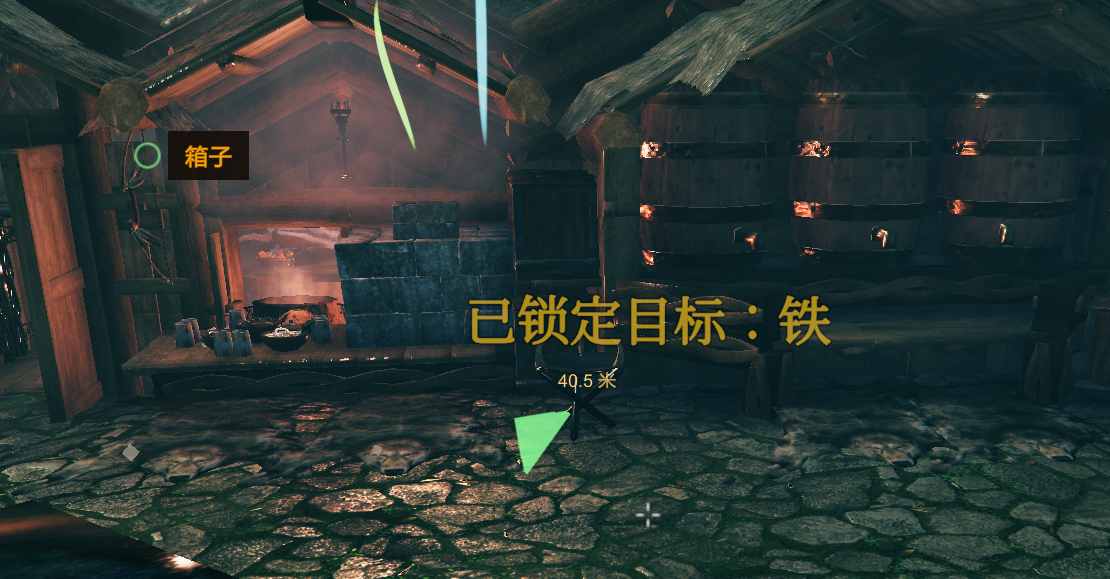
给背包面板加一个「查找」按钮:输入名字(中文 / 英文 / 拼音首字母),立刻列出附近箱子里有这个物品的容器,选中后用穿墙标记 + 中心箭头 + 愿望骨音效把你带到跟前。
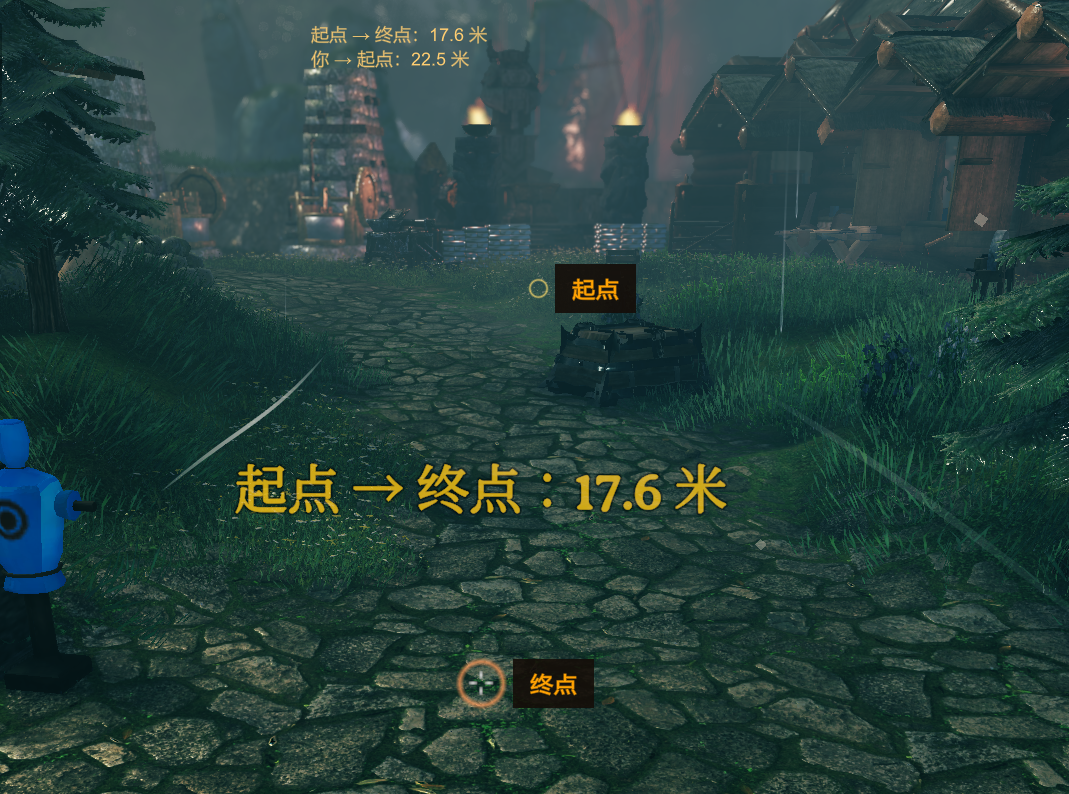
顺手带了个按 P 的两点测距。
功能
- 背包右下角一个「查找」按钮,打开即时搜索窗口,不用记快捷键
- 模糊搜索:
铁、iron、IronNails都能命中;支持拼音首字母(td→ 铁锭、tfp→ 铁斧) - 搜索建议:输入时实时给出候选名称(中文名 + 英文名),点一下或回车选第一个
- 结果列表:物品名 / 英文名 / 距离 / 数量,按匹配度与距离排序,只列附近容器里的
- 穿墙标记:屏幕上给目标箱子画圆环 + 中心方向箭头 + 距离,靠近自动提示到达
- 愿望骨音效:选中目标后按距离播放脉冲音效,越近越快,可以关
- 两点测距:
P键第一次记起点、第二次记终点、第三次清除;准星放置,实时显示到起点的距离
安装
- 先装好 BepInEx 5.4.x(Valheim 1.0.x 用 5.4.2360 即可)
- 把压缩包里的
ChineseCanFly.ItemFinder.dll和两个ItemFinder.*.yml放进BepInEx/plugins/ChineseCanFly-ItemFinder/ - 启动游戏,打开背包就能看到「查找」按钮
配置文件在 BepInEx/config/ChineseCanFly.ItemFinder.cfg,也可以装 Configuration Manager 在游戏里改。
使用
| 操作 | 说明 |
|---|---|
| 点背包面板右下角「查找」 | 打开搜索窗口 |
| 直接打字 | 输入即搜,中文 / 英文 / 拼音首字母都行 |
| 回车 | 选中第一个结果 |
| Esc / Tab | 关闭搜索窗口(Tab 同时收起背包) |
P |
两点测距:起点 → 终点 → 清除 |
选中结果后会关闭搜索窗口并收起背包,标记和音效持续到你走到目标或手动重新搜索。
配置
[UI]
| 键 | 默认 | 说明 |
|---|---|---|
| Show Inventory Button | true | 是否显示背包上的「查找」按钮 |
| Anchor To Inventory | true | 吸附背包面板(面板变高会跟随);自定义背包布局位置不对时关掉,改为吸附物品网格 |
| Button X Percent | 100 | 横向位置,占面板宽度百分比:100 = 贴右边缘,0 = 贴左边缘 |
| Button Y Pixels | -6 | 相对面板底边的像素:负值往下挂到面板外,正值往上进面板内 |
[Search]
| 键 | 默认 | 说明 |
|---|---|---|
| Search Radius | 0 | 只列出这个范围内的箱子(米),0 = 所有已加载容器 |
| Pinyin Search | true | 允许拼音首字母搜索 |
| Max Results | 24 | 最多显示多少条结果(5–60) |
| Include Ships And Carts | true | 是否包含船和推车上的箱子 |
[Guide]
| 键 | 默认 | 说明 |
|---|---|---|
| Use Sound | true | 是否播放愿望骨脉冲音效 |
| Sound Interval | 1.5 | 距离远时两次脉冲的间隔(0.4–5 秒),越近越快 |
| Marker Scale | 1 | 屏幕标记和箭头的尺寸倍数(0.5–3) |
[Measure]
| 键 | 默认 | 说明 |
|---|---|---|
| Measure Hotkey | P | 测距热键 |
| Show Player Distance | true | 是否同时显示你到起点的实时距离 |
| Place Range | 60 | 准星放置测量点的最大距离(5–200 米) |
说明与限制
- 只适合单人 / 自己开房:客户端读不到未加载区域的容器,多人服务器上别人家里的箱子搜不到,这是游戏机制,不是 bug。
- 和 ExtraSlots / ExtraSlotsCustomSlots / QuickStackStore 等改背包布局的模组可以共存:如果按钮位置被挤歪,用
Button X Percent/Button Y Pixels调一下即可。 - 搜索时按
E不会关背包(这是 1.3.2 修的),可以正常往搜索框里打字母。 - 有问题或建议:https://github.com/tutu8420/ItemFinder/issues
English
Adds a Search button to your inventory panel. Type a name (Chinese, English or pinyin initials), and Item Finder lists nearby containers holding that item, then guides you there with an on-screen marker, a center arrow and the wishbone ping.
- Fuzzy search + pinyin initials (
td→ 铁锭), suggestions while typing - Results show name, English name, distance and count
- On-screen ring / arrow / distance, wishbone-style sound that speeds up as you get closer
Pfor two-point distance measuring- Bilingual (Chinese / English) via yml, follows the game language
Requires BepInEx 5.4.x. Drop the DLL and both yml files into BepInEx/plugins/ChineseCanFly-ItemFinder/.
Works best in singleplayer / hosted worlds: containers outside loaded areas are not visible to the client, which is a game limitation.
CHANGELOG
版本记录
1.3.2
- 修复:搜索窗口打开时按 E 会关闭背包(现在拦截
InventoryGui.Hide(),E 可以正常输入到搜索框) - 修复:查找按钮改锚到原版背包面板背景
Player/Bkg的右下角,解锁额外行数后面板变高也会跟随 - 新增:
[UI]三项位置配置,自定义背包布局(ExtraSlots / CustomSlots)可自行微调Anchor To Inventory:吸附背包面板,关掉则吸附物品网格Button X Percent:横向位置(100 = 贴右边缘)Button Y Pixels:相对面板底边的像素(负值往下挂到面板外)
- 优化:世界标记标签按文字实际尺寸撑开背景框,字号改为 22,不再出现字大框小
- 优化:启动时在日志里打印
ZInput.GetButtonDown/InventoryGui.Hide的 Harmony 补丁状态,便于排查冲突
1.3.1
- 首个公开版本
- 背包面板“查找”按钮,输入即搜,模糊匹配 + 拼音首字母(如
td→ 铁锭) - 列出附近容器里的匹配物品:名称、英文名、距离、数量,回车选第一个结果
- 选中后:屏幕标记圆环 + 中心箭头 + 愿望骨距离音效,靠近自动提示到达
P键两点测距:第一次起点、第二次终点、第三次清除,实时显示你到起点的距离- 中英双语 yml,按游戏语言自动加载
