
Please disclose if any significant portion of your mod was created using AI tools by adding the 'AI Generated' category. Failing to do so may result in the mod being removed from Thunderstore.
EasySpawner
Easy spawner provides a simple and easy to use UI for spawning any Valheim prefab inside the game. Use this mod to spawn in items or enemies (of any level!) or just experiment spawning any gameobject possible (includes fx, vfx, and sfx)
| Date uploaded | 5 years ago |
| Version | 1.0.1 |
| Download link | Cooleyy-EasySpawner-1.0.1.zip |
| Downloads | 339 |
| Dependency string | Cooleyy-EasySpawner-1.0.1 |
This mod requires the following mods to function

denikson-BepInExPack_Valheim
BepInEx pack for Valheim. Preconfigured and includes unstripped Unity DLLs.
Preferred version: 5.4.701README
EasySpawner
Mod for Valheim using BepInEx
Easy to use Item/NPC/Prefab spawner
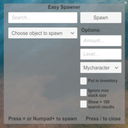
Easy spawner provides a simple and easy to use UI for spawning any Valheim prefab inside the game. Use this mod to spawn in items or enemies (of any level!) or just experiment spawning any gameobject possible (includes fx, vfx, and sfx) While in game press "/" or "Numpad /" to show/hide the menu.
The main feature of the provided menu is a search field that when typed into updates a dropdown of prefabs that contain the search term (non case-sensitive). The prefabs will contain all manner of gameobjects from items, enemies, world objects, fx, vfx, sfx and anything else in the game. Anything that can be provided a level such as equipable items and enemies can be spawned at any level up to 999,999,999. The mod is fully client-side and not required by anyone but the person who wants to use it, this can be used on any server.
Note: The prefab names may differ from the in game name. E.g. The 5th boss Yagluth's prefab is called GoblinKing
Warning: This mod can massively affect your character and world. Do not use this on a server where you are not given permission by others on it!
Menu UI
<html> </html>
Example. Entering "copper" will provide all prefabs with "copper" contained in the name, here it provide Copper bar, Copper ore, Copper knife and three variants of a copper vein.
<html> </html>
Clicking the spawn button, pressing "=" or "Numpad +" will create the selected prefab at the chosen player.
Features
-
The menu UI can be dragged within the screen with the mouse.
-
The search field auto updates the prefab dropdown with every character entered
-
You can choose the player to spawn the prefab at. Note: you cannot place items into others inventory
-
You can choose the amount and level of the item/object you want to spawn using the amount and level field
-
You can create Items/Npcs much higher level than the game normally permits. E.g. a level 999999999 Silver sword
 </html>
-
You can tick the "Put in inventory" toggle to immediately place the item in your inventory. Note: this only works for item drops and only works on yourself, if you tick this and try on other players it will just spawn in front of them as normal
-
You can go over the normal stack size limit by ticking the "Ignore stack size" toggle. E.g. a 999 stack of arrows
 </html>
- By default the dropdown only fills with up to 100 search results as large dropdowns can cause a bit of lag when opened, check the "Show > 100 search results" toggle to fill the dropdown with every result found. (Dropdown with every single prefab can lag the game for a few seconds)
Installation
-
If you have the zip, extract within your BepInEx plugins folder. Otherwise place the .dll and Assetbundle file in a folder called "EasySpawner" in your BepInEx plugins folder.
Note: The Folder name and Assetbundle file name must be Exactly "EasySpawner" and "EasySpawnerAssetBundle" !
