
Please disclose if any significant portion of your mod was created using AI tools by adding the 'AI Generated' category. Failing to do so may result in the mod being removed from Thunderstore.

PortalCompass
Search, pin and pick XPortal destinations: an A-Z list with a letter rail, recent portals, and a map of your explored world. Client-side. GPL-3.0.
| Date uploaded | 2 days ago |
| Version | 1.0.0 |
| Download link | DJ_Lifecoach-PortalCompass-1.0.0.zip |
| Downloads | 21 |
| Dependency string | DJ_Lifecoach-PortalCompass-1.0.0 |
This mod requires the following mods to function

denikson-BepInExPack_Valheim
BepInEx pack for Valheim. Preconfigured with the correct entry point for mods and preferred defaults for the community.
Preferred version: 5.4.2351
SpikeHimself-XPortal
Select portal destination from a list of existing portals. No more tag pairing, and no more portal hubs! XPortal is a complete rewrite of the popular mod AnyPortal.
Preferred version: 1.2.26README
Portal Compass
Portal Compass replaces the destination list of XPortal. You can search for a portal, pin portals, see your recent portals, and choose a portal on the map.
XPortal does the linking, the saving and the server sync. Portal Compass changes only how you choose the destination. Your portal links do not change. When you remove Portal Compass, the XPortal list comes back.
Requirements
- XPortal 1.2.26
- BepInEx
Portal Compass is a client mod. The server does not need it. Players without Portal Compass use the XPortal list.
How to use
Go to a portal and open it (E). The Portal Compass panel opens.
Search. Type the name of a portal. The search field is ready when the panel opens. Names that start with your text come first. Push Enter to link to the top result.
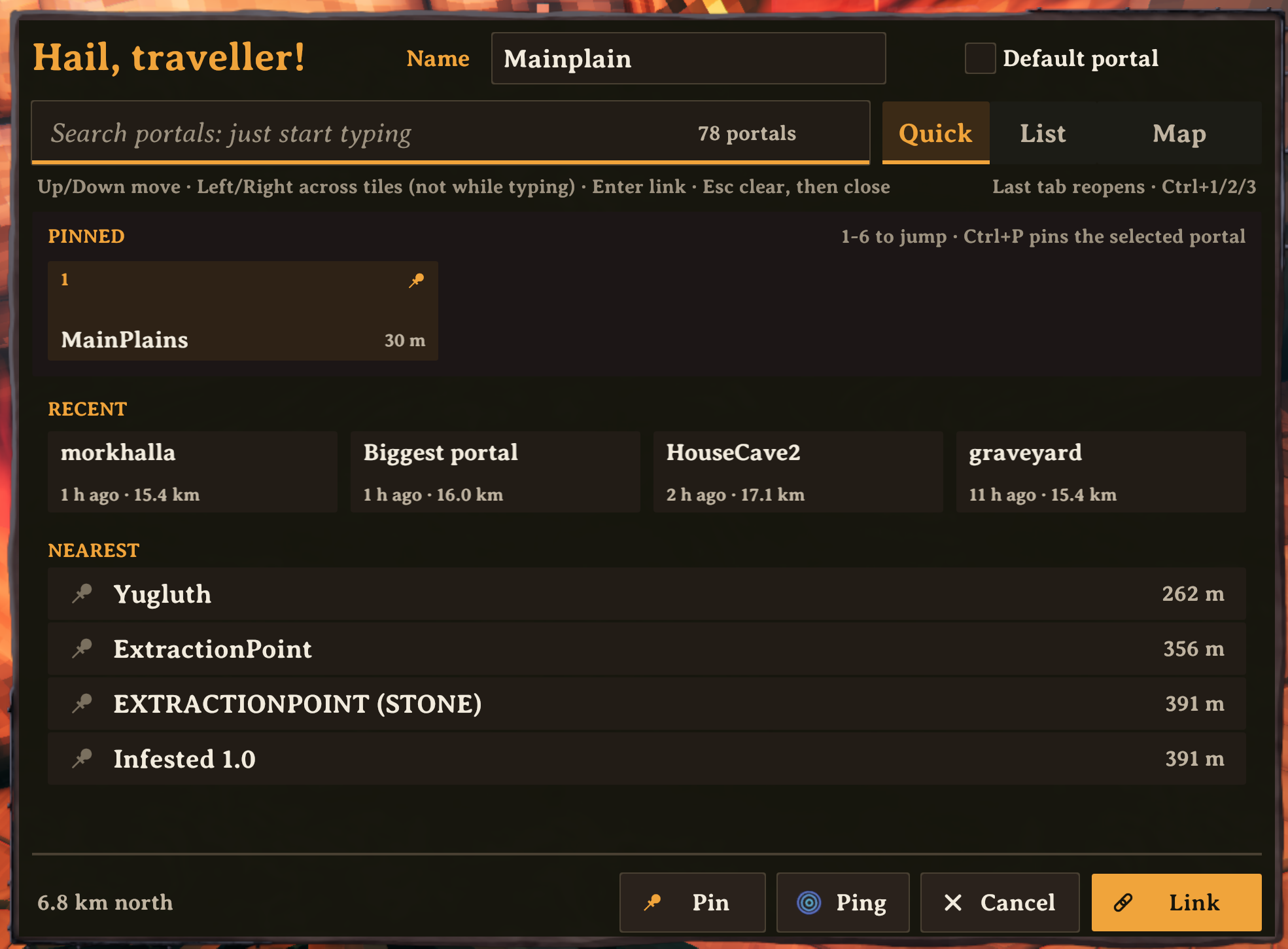
Quick. This tab shows your pinned portals, your recent portals and the nearest portals. Push 1 to 6 to select a pinned portal.
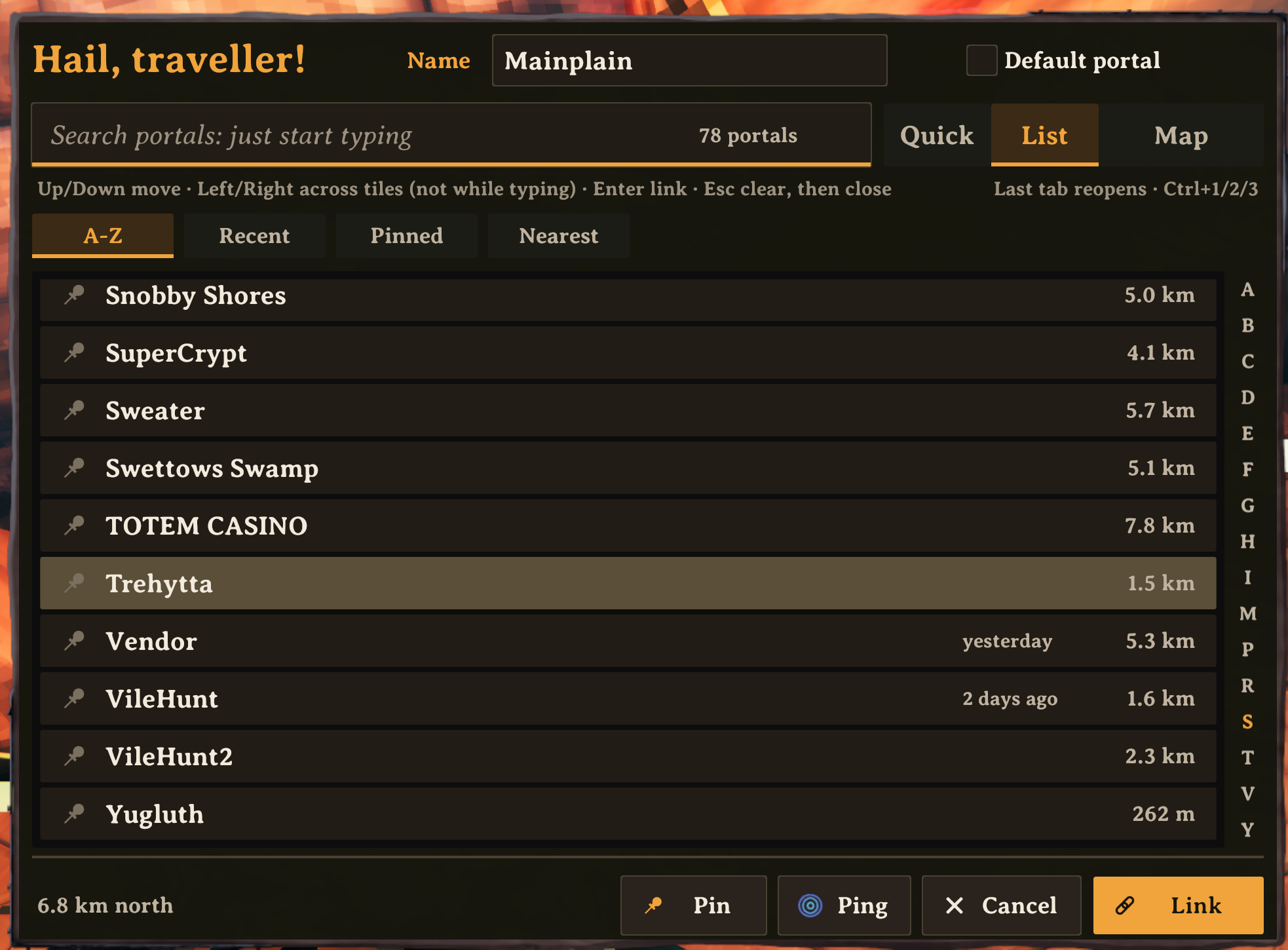
List. This tab shows all portals. Sort them by name, recent, pinned or distance. Use the letters on the right side to go to a letter.
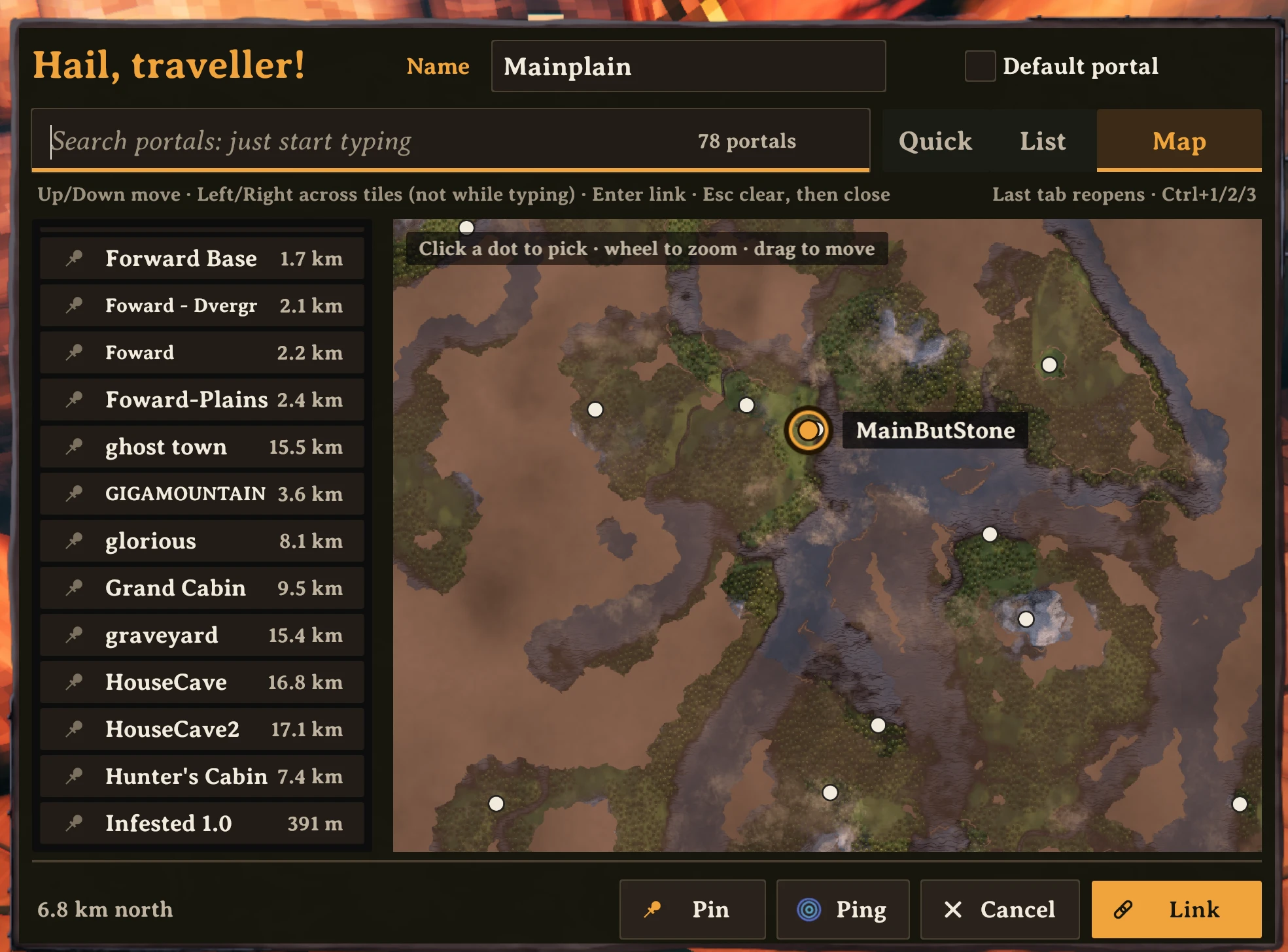
Map. This tab shows your explored map with a dot for each portal. The map does not show areas that you did not explore. It does not show portals in those areas, but it always shows the selected portal. Zoom in to see the portal names. It also shows players who share their position on the map.
- Click a dot to select the portal.
- Turn the mouse wheel to zoom.
- Drag to move the map.
Link. Select a portal and push Link. Or double-click the portal. The panel closes. Then go through the portal.
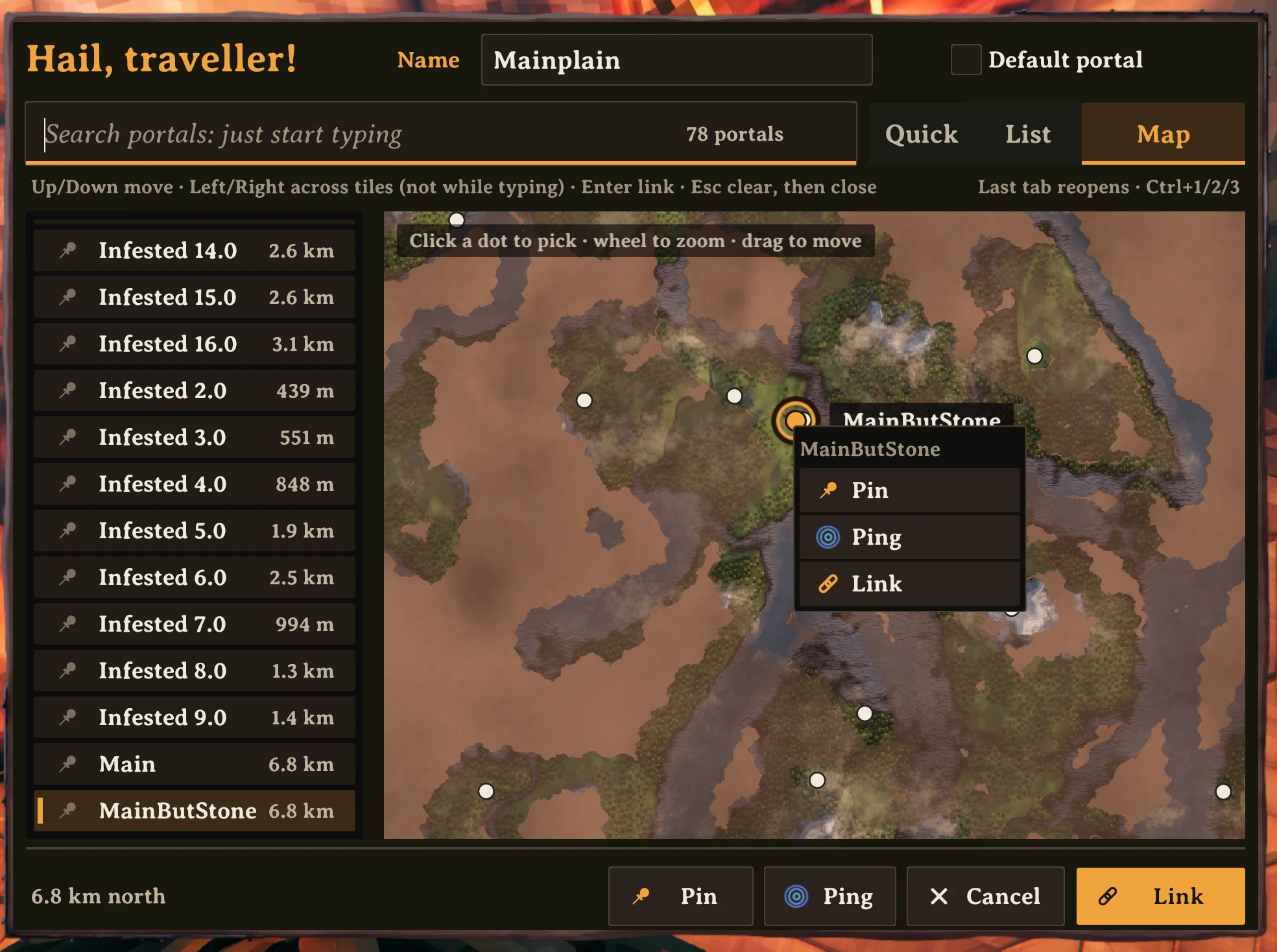
Right-click a portal to pin it, unpin it, ping it on the map, or link to it.
Keys
| Key | Action |
|---|---|
| Type | Search |
| Up / Down | Move the selection |
| Left / Right | Move across tiles (when the search field is empty) |
| Enter | Link to the selected portal |
| Esc | Clear the search. Push again to close. |
| 1 to 6 | Select a pinned portal (Quick tab, empty search) |
| Ctrl+1 / 2 / 3 | Go to Quick / List / Map |
| Ctrl+P | Pin or unpin the selected portal |
Gamepad: D-pad moves. A links. B cancels. Y pings. X pins. LB and RB change the tab.
Settings
Push F1 to open the settings (Configuration Manager).
- Size. The size of the panel. At 1, the panel has the same size as the menus of Valheim, on all screen resolutions.
- Rows per scroll step. The number of rows that one step of the mouse wheel scrolls.
Portal Compass keeps your pins and recent portals for each character and world, in BepInEx/config/com.joostliebregts.portalpicker.json.
Credits
Portal Compass uses XPortal by SpikeHimself. Thank you, SpikeHimself.
Licence: GPL-3.0, the same as XPortal. Source: github.com/joostliebregts/valheim-portal-compass.
CHANGELOG
Changelog
1.0.1 (2026-10-23)
- README: the map screenshot comes first. No change in the mod.
1.0.0 (2026-10-23)
- First release on Thunderstore. Search, pins, recent portals, an A-Z list with a letter rail, and a map of your explored world with portal names and friends who share their position. Right-click a portal to pin, ping or link; double-click to link at once.
0.4.1 (2026-10-22)
- Map: the selected portal's name label and the hint box no longer catch clicks, so a portal dot under them can be picked (Joost).
0.4.0 (2026-10-22)
- New name: Portal Compass (was Portal Picker; that name and "Portal Atlas" are already taken on Thunderstore). Same plugin id, so your pins and settings carry over. If you had Portal Picker installed, remove it: the two are the same mod.
0.3.13 (2026-10-22)
- Double-click a portal (a row, a tile or a dot on the map) to link to it at once; the panel closes, like Link (Joost).
- The map opens on the portal this one links to, at your last zoom; without a destination it opens on where you stand (Joost).
0.3.12 (2026-10-22)
- Map (Joost): the selected portal always gets its dot and the map moves to it, also when it lies in a part of the world you haven't explored (before, a far destination such as one linked by a friend stayed invisible). Other portals in the fog stay hidden, and so does the terrain.
0.3.11 (2026-10-20)
- Icons on every action (Joost: "nice icons for ping and link too, throughout the UI"): Pin a push pin, Ping Valheim's own ping icon from the map, Link a chain link, Cancel a cross; on the bottom bar's buttons and in the right-click menu. Drawn by the mod itself, so they don't depend on the font.
0.3.10 (2026-10-20)
- A push-pin icon on Pin in the right-click menu and on the Pin button in the bottom bar (Joost): ember for Pin, dimmed for Unpin.
0.3.9 (2026-10-20)
- Map: "You" and other players get their label spot first; portal names give way around them, so the middle of the map no longer stacks three names on top of each other. Softer hover in the right-click menu, so its text stays readable.
0.3.8 (2026-10-20)
- Right-click any portal (Joost: "right click a recent portal, or any portal, and get a menu to pin it"): rows on the Quick and List tabs, the pinned and recent tiles, and the dots on the map. The menu has Pin or Unpin, Ping (when the server allows it) and Link, and works without selecting the portal first. Esc or a click outside closes it.
0.3.7 (2026-10-20)
- Map (Joost): friendly players on the map, with Valheim's player icon and their name in blue, updated every second. Only players who share their position (the "visible on map" box on Valheim's big map) are shown, exactly like Valheim's own map does. Your own arrow is bigger and has a small "You" under it.
0.3.6 (2026-10-20)
- Map (Joost): portal names show two zoom notches further out (fully from about 1.5 km top to bottom). Where names would overlap, the pinned portals and the ones nearest the middle keep theirs and the rest give way, so clusters stay readable.
- 0.3.5: waits for XPortal before hooking in and no longer links to XPortal's DLL directly, so it can load at game start (live modding).
0.3.4 (2026-10-20)
- Map (Joost): a ring around the dot under the mouse; your position is Valheim's own player arrow from the big map, turned the way you face (was a black and white ring); zoomed in (from about 1 km across), every portal gets a small name under its dot on a dark, mostly see-through label, fading in as you zoom and gone when you zoom out.
- Hover is a light yellow glow on tabs, chips, buttons and rows, instead of Unity's default tint, which read as "turns dark".
0.3.3 (2026-10-20)
- Pins, last used and the map zoom are really saved now (Joost: "it resets every time I install"). Unity's JSON writer silently left the list of pins out of BepInEx/config/com.joostliebregts.portalpicker.json, so since 0.2.0 they only lived until the game closed. Now written with Newtonsoft.Json (shipped with Valheim), through a temporary file so a crash can't break it. Pins made before this version are gone, sorry; pin them once more and they stay.
- Clearing the search: an x button at the right end of the field (while there is text), right-click the field to clear it, double-click to select all. Esc still clears too.
0.3.2 (2026-10-20)
- Denser (Joost): the big name of the selected portal at the bottom is gone (it is already highlighted in the list and on the map); the bottom bar is lower and that height goes to the lists. One small line beside the buttons still says how far and which way. Map list rows are lower (32 px), so about a third more portals fit.
0.3.1 (2026-10-20)
- Map (Joost): opens centred on where you stand, at the zoom you used last (remembered across opens and sessions; the first time about 3 km top to bottom). The list beside it is narrower and A-Z (while typing: best match first, so Enter takes the top one); long names shrink to fit. The "you are here" ring is drawn on top of the dots around it.
0.3.0 (2026-10-20)
- Map tab (board D): the portals nearest first on the left; on the right Valheim's own explored map, fog of war included, so nothing you haven't explored is revealed. A dot per portal (pinned portals as pins), a ring where you stand, and the selected portal in ember with its name. Click a dot to pick it, wheel to zoom at the cursor, drag to move. The map opens with every portal in view and follows your selection. Ctrl+3 or LB/RB to get there. It is off when the server has no map (nomap) or hides portal distances. Portals in parts of the world you haven't explored (yourself or through shared map data) get no dot, so the map doesn't give their spot away; they stay in the list. (None) is in the map's list too. After an independent review: the map no longer jumps away from your portal when it opens; zoom stops at Valheim's own closest zoom; you can't pan off the world; the selected portal gets an ember ring, apart from pinned ones.
- Letter rail on the List tab works like a rolodex: click a letter or hold and slide along the rail to scroll the list there (it browses; your destination stays). The letter of the section at the top is ember, the one under the mouse lights up.
- Sharp on 4K (Joost: "a little hazy"): the picker now draws on its own canvas whose scale factor matches your screen, so text and edges render at full resolution instead of being stretched. XPortal's wood frame is copied, so it looks the same.
0.2.1 (2026-10-20)
- Legible (Joost: "very low legibility", "no white", "bad contrast"): a dark "ember on soot" design. A warm near-black ground inside XPortal's wood frame, three levels of text and one ember accent for state and action, no white surfaces. Body text is 11-14:1 contrast, the rest at least 5.4:1; the old selection was 3.2:1. Rounded 6 px shapes, 1 px borders on fields and buttons. The selected row or tile gets an ember bar; the selected tab or chip gets ember text with an ember underline.
- The same size on every screen: XPortal's canvas doesn't scale, so on a 4K screen the panel was half size. It now scales like Valheim's own menus (1080p reference times your in-game GUI scale), never past the screen. F1: Panel > Size (0.6-1.6). Text is about 15% bigger.
- The mouse wheel scrolls whole rows: 4 per notch (F1: Rows per scroll step).
- A push-pin icon instead of the square, with a large click area: the whole left end of the row.
- Hover over Default portal for a short explanation (Simplified Technical English).
- Quick tab: when there is room, the nearest portals are listed under Pinned and Recent, so the tab is useful before you pin anything.
0.2.0 (2026-10-20)
- Rebuilt as wireframe board D ("All in one, with tabs"; Joost: 0.1.0 was nowhere near it). One panel: XPortal's own widgets are hidden and the picker fills XPortal's wood panel, scaled to fit the screen. Header with Name and Default portal; a big search field with a match count; tabs Quick / List / Map (Map comes later), opening on the tab you used last.
- Quick: while typing the top 4 matches; pinned portals as tiles (3 wide, keys 1-6); Recent as 4 tiles with when you last went there.
- List: chips A-Z / Recent / Pinned / Nearest, rows with pin mark, last used and distance, a letter rail to jump, and (None) to unlink.
- Bottom bar for the selected portal: name, distance and direction, last used; Pin, Ping, Cancel, Link. Link = XPortal's OK (set the destination and close; you walk through yourself).
- Search ranks names that start with what you typed first, then word starts, then anywhere; nearer first.
- "Last used" now comes from actually travelling through a portal, not from pressing OK. Pins and last used are keyed by the portal's position (portal IDs change between sessions); pins from 0.1.0 are dropped for that reason.
- Keys: Up/Down, Left/Right (when not typing), PageUp/PageDown, Enter links, Esc clears then closes, Ctrl+1/2 tabs, Ctrl+P pin, 1-6 pins. Gamepad: D-pad, A link, B cancel, Y ping, X pin, LB/RB tabs (0.1.0 blocked the D-pad).
- After an independent review (a fresh Opus pass against XPortal's source and board D): follows the server's Hide portal distance setting (no distances, directions or Nearest then); Up/Down move to the nearest tile in the row above/below; Enter does nothing when nothing matches (a typo can't link the wrong portal); 6 pins at most; Esc puts back the destination you had; clicking no longer makes the next key replace your search; Ctrl shortcuts don't type; D-pad read through XPortal's own button names; a broken settings file is kept as .bak.
0.1.0 (2026-10-20)
- First rough prototype, plain Unity UI (the Hearthwoven look comes later). A picker under XPortal's portal panel: search field focused on open (case-insensitive, part of the name), all portals A-Z with distance, Pinned on top (Pin/Unpin per portal), Recent (last 4 chosen with OK, pinned ones not repeated); stored per player and world in BepInEx/config/com.joostliebregts.portalpicker.json.
- Keys: Up/Down move, Left/Right too while the search is empty, PageUp/PageDown jump 10, Enter chooses (one match left: Enter chooses it; Enter on the destination already chosen = OK), Esc clears the search, then cancels. Mouse wheel scrolls fast.
- Choosing sets XPortal's own dropdown value, so XPortal sets the target and Ping and OK work as before. Untested in game.
