
Please disclose if any significant portion of your mod was created using AI tools by adding the 'AI Generated' category. Failing to do so may result in the mod being removed from Thunderstore.

HP Barheim
Enemy and boss HP bars with stars, weakness icons, damage numbers, stagger bar, saveable layouts, and Creature Level & Loot Control and Path of Valheiman support.
By DarthVladi
| Date uploaded | 4 days ago |
| Version | 1.3.0 |
| Download link | DarthVladi-HP_Barheim-1.3.0.zip |
| Downloads | 196 |
| Dependency string | DarthVladi-HP_Barheim-1.3.0 |
This mod requires the following mods to function

denikson-BepInExPack_Valheim
BepInEx pack for Valheim. Preconfigured and includes unstripped Unity DLLs.
Preferred version: 5.4.2202README
HP Barheim
Health bars for enemies and bosses, with the extras you want while fighting: stars, weakness icons, floating damage numbers, a stagger bar and ailment bars. Everything can be turned on or off and restyled, and 1.3 makes that much easier: settings are sorted by what they change, and you can save your own looks and share them.
New in 1.3
Creature Level & Loot Control support
HP Barheim now works with Creature Level & Loot Control, and it is optional. If you have it, the extras it adds to creatures show up on HP Barheim's bars:
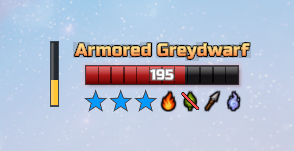
- Creature effects (Aggressive, Quick, Regenerating, Curious, Splitting, Armored) as a star color, as a word in the name, or both. Each effect has its own color, and by default HP Barheim follows what CLLC's own settings say.
- Elemental infusions in the name (for example "Fire-Infused Greydwarf") and, if you like, in the weakness icons: a Fire-Infused creature shows as weak to frost, a Poison-Infused one as immune to poison, and so on.
- Boss affixes (Reflective, Shielded, Twin...) in the boss name.
- Twin bosses share one boss bar, like in CLLC.
- If you hide Valheim's own enemy bars, CLLC no longer fills your log with errors.
An enemy with a CLLC effect: blue stars for Armored, plus weakness icons
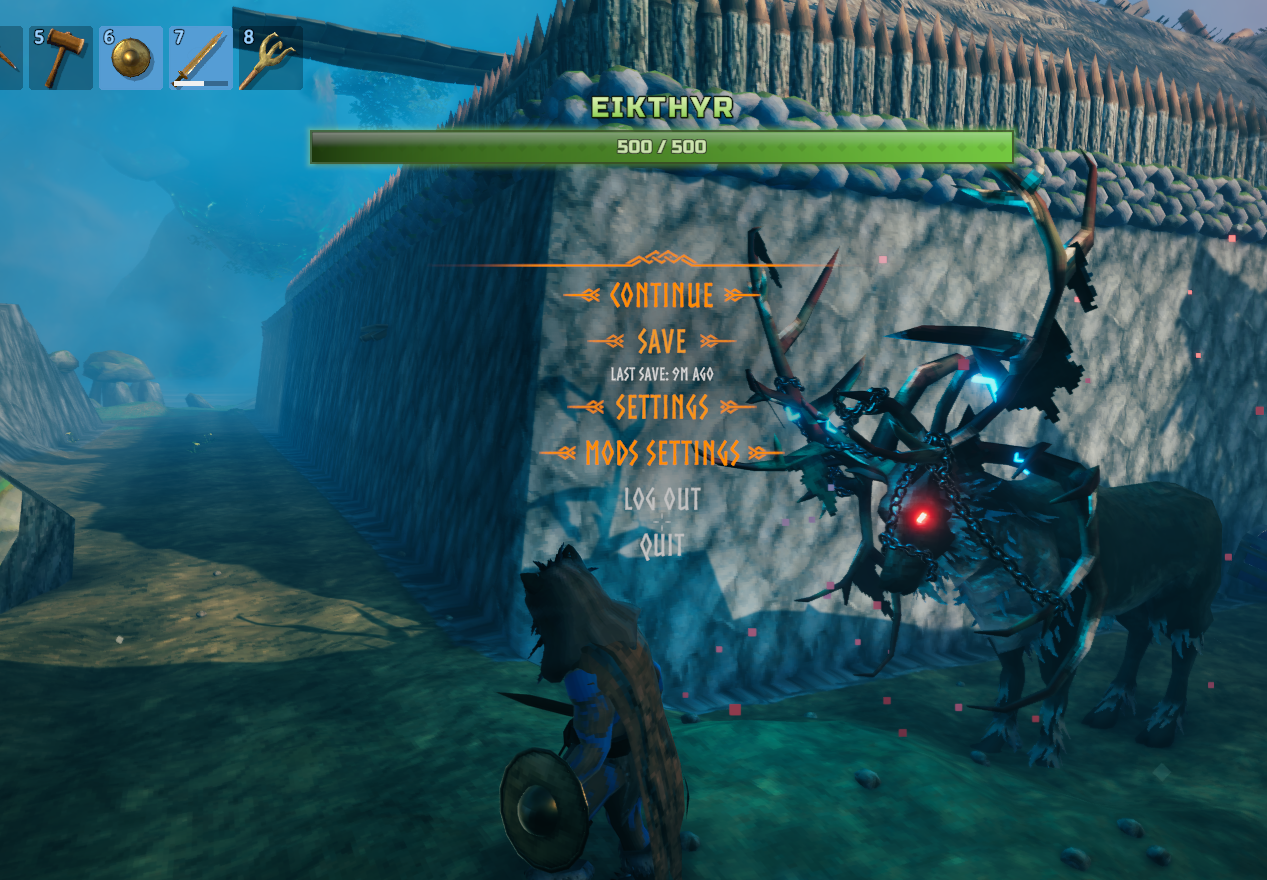
A boss with its stars under the bar
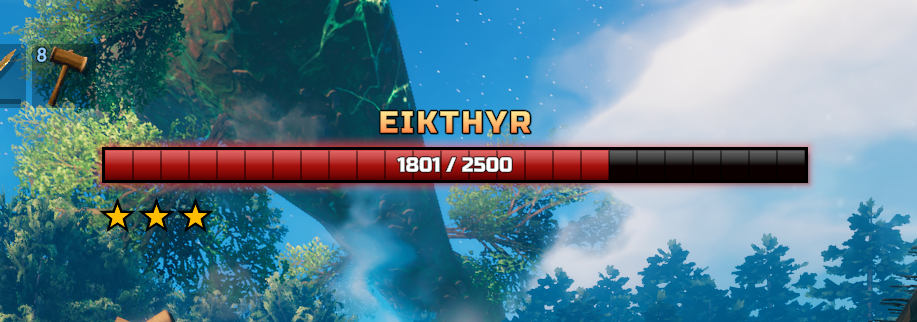
Stars on bosses
Bosses can now show their stars, with the same options as the enemy stars: size, color, position, edge, and a "x5" count when there are too many to draw. They only appear when a boss has a level above 1, which Valheim does not do by itself (CLLC does).
Layouts instead of presets
Presets are now layouts, and you can make your own.
- Open the Configuration Manager (F1) and look at 00. Layouts. Click a layout to load it.
- Save, Save as, Revert and Delete work on your own layouts. The ready-made ones can never be overwritten, so you can always go back to them.
- Your layouts are
.jsonfiles inBepInEx/config/HPBarheim/layouts(one folder for enemies, one for bosses). To share one, send the file; to use a friend's, drop it in the folder. There is an Open layouts folder button. - The enemy HUD and the boss bar have separate layouts, so you can mix and match.
- New ready-made looks: Ember, Valkyrie, Iron, Tidal, Minimalist, Royal, Tactical, Brutal, Arcane and Small Bar, plus a new Default. For bosses: Default, Obsidian, Wraith, Glacial and Verdant.
- Ghost, Line, Mono, Pulse and Full were retired.
- Things that are about behavior and not looks (damage numbers on or off, boss bar on or off, distances...) are never changed by a layout. Their description says so.
Settings that are easier to find and use
The whole settings file was reorganized:
- Settings are grouped into numbered sections by what they change: the health bar, the name, the health text, the level, the stars, the weakness icons, and so on, with the boss bar in its own sections.
- Every part is set up the same way. You pick which side of the bar it sits on (above, below, inside, left or right), where along that side, how far from it, and then fine-tune it. Texts have the same options everywhere (font, size, style, color, gradient, outline, shadow, glow), and so do icons and bars.
- Effects have a switch, and their options only show while the switch is on.
- Numbers use sliders with sensible limits.
- Names and descriptions were rewritten to say what each setting does.
- Your old settings come with you. The first time you start 1.3, your existing config is converted automatically so your bars should look the way they did, and a copy of the old file is kept next to it as
DarthVladi.HPBarheim.cfg.before-1.3.bak.
Try it without an enemy
00. Preview shows a sample enemy HUD, a sample boss bar and every kind of damage number on your screen, drawn by the same code as the real ones. Change any setting and see it right away. You can even set the sample's name, stars, health, weaknesses and modifier icons, and try the CLLC effects on it.
New weakness icons
The weakness and resistance icons are now hand-drawn, with a cleaner look at small sizes. Their edge can be any color you like.
Also
- Fixed: a faint dark box could appear behind letters of bold texts with a thick outline (for example the star count or the damage numbers).
- The enemy view angle now defaults to 20 degrees on a fresh install.
- Icons are prepared when the game starts, so nothing hitches the first time one appears in a fight.
Features
- Enemy health bars with name, level, stars and health text. Long names wrap onto two lines.
- Boss bar at the top of the screen with its own name, health text, stars and style.
- Weakness icons that show what an enemy is weak or resistant to.
- Floating damage numbers, colored by damage type.
- Stagger bar that shows how close an enemy is to being staggered.
- Alerted (!) and aware (?) indicators next to or above the name. They hide while the health bar is visible (can be changed).
- Ailment bars for Path of Valheiman (fire, poison, frost, lightning, bleeding), for enemies and, separately, for bosses. They only appear if that mod is installed.
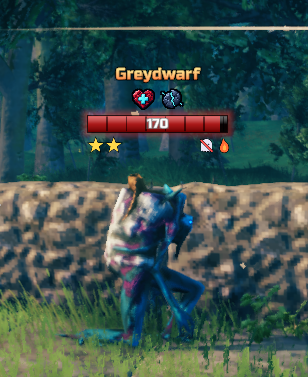
- Path of Valheiman modifier icons (Swift, Armored, Warded...) between the name and the health bar, with a "+N" when an enemy has more than the limit. Works even with the vanilla enemy bar hidden. They only appear if that mod is installed.
- Creature Level & Loot Control effects, infusions and boss affixes. They only appear if that mod is installed.
- Look settings for the health, stagger and ailment bars: glow, gradient, textures and shine.
- Layouts to start from a ready-made look, save your own and share them.
- Preview to try every setting without an enemy around.
Screenshots
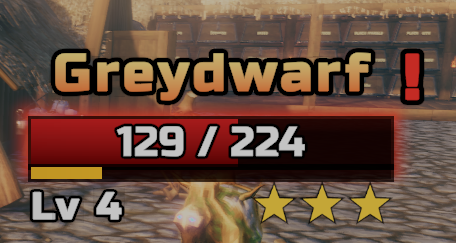
Enemy bar with health text, stagger bar, level and stars
Path of Valheiman modifier icons
A minimalist style and a diagonal bar texture
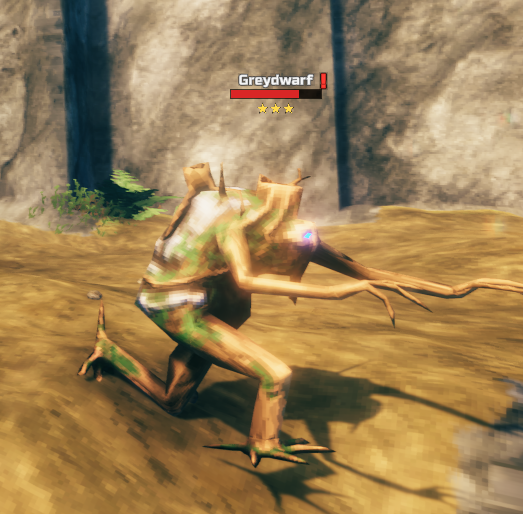
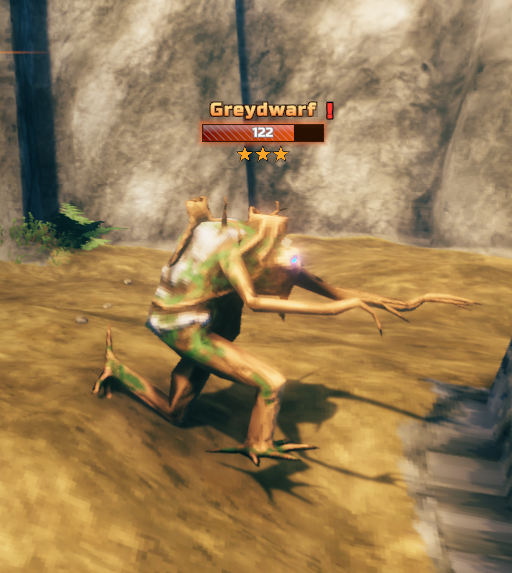
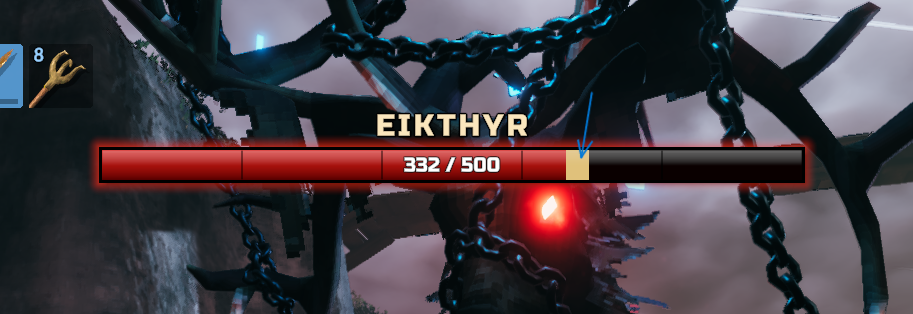
Boss bar: damage trail (phantom) and the green Verdant style
Settings
Every option has a description. Edit them in game with Configuration Manager (F1), or in BepInEx/config/DarthVladi.HPBarheim.cfg with the game closed. The sections are:
- 00 Layouts and Preview, 01 General
- 02-13 the enemy HUD: Health Bar, Name, Health Text, Level, Stars, Weakness Icons, Modifier Icons, Stagger Bar, Ailment Bars, Alerted Indicator, Aware Indicator, Damage Numbers
- 14-18 the boss bar: Boss Bar, Name, Health Text, Ailment Bars, Stars
- 19 Creature Level & Loot Control
- 98 Compatibility, 99 Advanced
Compatibility
- Client side only. It does nothing on a dedicated server, but every player who wants the bars needs it installed.
- Path of Valheiman and Creature Level & Loot Control are both optional. Without them HP Barheim works as always and the parts that depend on them stay off.
- If you use Zen Targeting or SeneaL UI, HP Barheim tells you once which of their options to turn off so information does not show twice. It never changes their settings.
Install
Use a mod manager (r2modman or Thunderstore Mod Manager), or put HPBarheim.dll in BepInEx/plugins. Requires BepInExPack Valheim.
CHANGELOG
Changelog
1.5.0
✨ Added
- 🩸 Impale and Corrosion bars (Path of Valheiman): two new ailment bars under the enemy and boss health bars, next to fire, poison, frost, lightning and bleeding. Impale fills with the stacks put on by pierce hits; Corrosion shows how much of the enemy's armor is gone. Like the others, they only show while they hold something. The Preview now shows all 7.
- 🎨 HP Barheim's own icons for Path of Valheiman modifiers: 26 hand-painted icons, one for each modifier, in the same style as the weakness and Star Level System icons, with no round plate behind them. Pick them or Path of Valheiman's own with
PathOfValheimanModifierIconsin 98. Compatibility (HP Barheim's own is the default). A modifier HP Barheim has no picture for always uses Path of Valheiman's. - 🔎 Bigger HUD on enemies with stars:
EnableStarScaleandStarScale1toStarScale6in 01. General. Defaults: 1 star ×1.0, 2-3 stars ×1.05, 4-5 stars ×1.1, 6 or more ×1.2. It combines withHudScale,LargeEnemyScaleand the distance scaling. The boss bar is not affected. - 🧭 Modifier icons around the name: with
ModifierIconAnchor = Name, the newModifierIconNameSideputs them Below (as before), Above, Left or Right of the name. - 👀 Pick the Path of Valheiman modifiers in the Preview:
PreviewPovModifiersfor the sample enemy andPreviewPovBossModifiersfor the sample boss. Write them separated by commas (for exampleArmored, Swift) and try any of the 26. - 👑 The sample boss now shows Path of Valheiman modifier icons in the Preview, under the boss bar.
🔧 Changed
- 🧼 Settings of mods you do not have are hidden: sections 10 and 17 (ailment bars), 20 (Creature Level & Loot Control) and the settings of Path of Valheiman, Creature Level & Loot Control, Star Level System, Zen Targeting and SeneaL UI in 98 only show while that mod is installed. Install or remove a mod and the list follows.
- 🧪 The Preview's ailment bars only show with Path of Valheiman installed and its ailment bars on.
- 🎨 New Default layouts for the enemy HUD and the boss bar. The enemy Default now puts the modifier icons above the name, a bit bigger, with a plainer health bar. Existing configs keep what they have; load a layout in 00. Layouts to switch.
- The Preview's
PreviewModifierIconsandPreviewBossModifierIcons(a number of sample icons) are replaced by the lists of modifiers above. The old values are dropped from your config file.
🐛 Fixed
- 🔤 A long name no longer covers the modifier icons. With the icons anchored to the health bar, they now step away from the name when the two would overlap. With the icons anchored to the name, the other parts that sit above it (the alerted and aware symbols) are lifted to make room.
1.4.1
🐛 Fixed
- 🖥️ Bars and damage numbers not showing at all with Windows display scaling above 100% (for example 125% on a 1080p laptop). In that case Valheim draws the 3D view at a lower resolution and stretches it over the screen as a layer of its own, and that layer covered HP Barheim's bars, boss bars and damage numbers. They are now drawn above the 3D view and still under Valheim's own HUD, inventory, map and menus. This most likely also fixes the same problem with render scaling or upscalers such as DLSS.
- 🎯 In that same case, bars and numbers now sit exactly over the enemy instead of drifting toward the lower-left corner.
✨ Added
- 🧩
CanvasSortingOrderin 99. Advanced (shown with "Advanced settings" ticked in the Configuration Manager): the drawing order of HP Barheim's layers. The default (10) works for everyone; only change it if another mod's UI hides the bars or the bars cover something they should not. - 📝 With
DebugLoggingon, the log now gets a short screen and UI report every 10 seconds, to help with display problems in bug reports.
1.4.0
✨ Added
- ⭐ Star Level System support (optional):
- Its resistances and weaknesses show in the weakness icons, combined with the creature's own.
- Its creature modifiers show as icons: 30 new hand-painted icons, in the same row as the Path of Valheiman icons.
- Choose how modifiers show with
StarLevelSystemModifiersin 98. Compatibility: Icons (default, the name stays clean), Name (words in the name, like SLS does), Both or None. - Bosses show their modifiers too, under the boss bar, in the new section 19. Boss Modifier Icons.
- ↕️ Modifier icons in a column:
ModifierIconOrientationin 08. Modifier Icons (Horizontal or Vertical), great on the left or right side of the bar. - 👀 Star Level System samples in the Preview: give the sample enemy and the sample boss any modifiers (
PreviewSlsModifiers,PreviewSlsBossModifiers).
🔧 Changed
- 🎨 New Default layouts for the enemy HUD and the boss bar. Every ready-made layout now includes the modifier icons. Existing configs keep what they have.
- 👀 00. Preview only lists what you use: each sample's options show while that sample is on, and each mod's options only if that mod is installed.
- 📦 Creature Level & Loot Control moved to section 20 (was 19). Your settings move with it automatically.
- 🔄 Names and levels update while the bar is on screen, so mods that rename a creature or raise its level after it appears are shown right away.
- 🛡️ Thinner "immune" mark on weakness icons, and sharper drawn icons at small sizes.
- 💬 The Zen Targeting and SeneaL UI notes no longer show when HP Barheim's bars are turned off (
Enabled = false), so playing with other bars and only HP Barheim's damage numbers is now clean.
1.3.0
Added
- Creature Level & Loot Control support (optional). Its creature effects (Aggressive, Quick, Regenerating, Curious, Splitting, Armored) show as a star color, a word in the name, or both; elemental infusions show in the name and can change the weakness icons; boss affixes show in the boss name; Twin bosses share one bar. By default HP Barheim follows CLLC's own display settings. New section 19. Creature Level & Loot Control and a
CreatureLevelControlSupportswitch in 98. Compatibility. - Stars on bosses, with their own section (18. Boss Stars): size, color, position, edge and a "x5" count. They show when a boss has a level above 1.
- Layouts (section 00. Layouts): load, save, save as, revert and delete your own looks, kept as
.jsonfiles inBepInEx/config/HPBarheim/layouts, and share them by sending the file. The enemy HUD and the boss bar have separate layouts. - Ready-made layouts: Default, Ember, Valkyrie, Iron, Tidal, Minimalist, Royal, Tactical, Brutal, Arcane and Small Bar for enemies; Default, Obsidian, Wraith, Glacial and Verdant for bosses.
- Preview (section 00. Preview): a sample enemy HUD, boss bar and damage numbers on screen, to try any setting without an enemy.
- New hand-drawn weakness icons.
Changed
- The settings were reorganized. New numbered sections by what each setting changes, new names and descriptions, the same set of options for every text, icon and bar, positions set against the bar (side, alignment, distance, offsets), effects with a switch, and sliders for numbers.
- Your old config is converted automatically on the first start, and a copy is kept as
DarthVladi.HPBarheim.cfg.before-1.3.bak. - Presets became layouts. Ghost, Line, Mono, Pulse and Full were retired. If your config named one of them, the layout name is left empty and your look is kept.
- New Default looks for the enemy HUD and the boss bar. They apply on a fresh install; existing configs keep what they have.
ViewAngleDegreesnow defaults to 20 (was 15) on a fresh install.- The weakness icons' edge is now a solid edge in any color you choose.
- Icons are prepared when the game starts, so nothing hitches the first time one appears in a fight.
Fixed
- A faint dark box could appear behind bold letters with a thick outline (the star count, "+N", damage numbers, "!" and "?").
- With Creature Level & Loot Control installed and Valheim's enemy bars hidden, CLLC no longer fills the log with errors.
1.2.0
Added
- Path of Valheiman modifier icons. If you have Path of Valheiman installed, each enemy's modifiers (Swift, Armored, Warded...) now show as icons between the name and the health bar, even with the vanilla enemy bar hidden.
- An enemy with no modifiers looks exactly as before.
- With more modifiers than the limit, the first ones are shown followed by a "+N".
- New config section 17. Modifier Icons (size, spacing, max icons, "+N" text, offsets, edge) and a switch,
PathOfValheimanModifiers, in 98. Compatibility.
Changed
- The
!and?symbols are no longer shown while the health bar is visible. You can bring them back withAlertedHideWithHealthBarandAwareHideWithHealthBar(sections 09/10). - Small performance improvement when drawing Path of Valheiman ailment bars.
- Slightly adjusted defaults:
WeaknessIconOffsetX5 andEnemyNameGlowColoropaque white. Existing config files keep their values.
1.1.1
- Fixed: the stagger bar was missing in 1.1.0. If you downloaded 1.1.0, please update.
1.1.0
- Ailment bars for Path of Valheiman, with their own look settings (position, direction, size, outline, glow, gradient, texture, shine).
- Separate ailment bar settings for bosses, lying in a row under the boss bar by default.
- Stagger bar: can be placed on any side of the health bar and has the same look settings (glow, gradient, texture, shine).
- Gradients can run horizontally or vertically.
- Alerted and aware indicators can sit above the name.
- Long enemy names wrap onto two lines instead of running past the bar.
1.0.0
- First release.
