
Please disclose if any significant portion of your mod was created using AI tools by adding the 'AI Generated' category. Failing to do so may result in the mod being removed from Thunderstore.

HP Barheim
Enemy and boss HP bars with stars, weakness and modifier icons, damage numbers, stagger bar and saveable layouts. Supports Star Level System, Creature Level & Loot Control, Path of Valheiman and TalentTree.
By DarthVladi
| Date uploaded | 3 weeks ago |
| Version | 1.6.0 |
| Download link | DarthVladi-HP_Barheim-1.6.0.zip |
| Downloads | 991 |
| Dependency string | DarthVladi-HP_Barheim-1.6.0 |
This mod requires the following mods to function

denikson-BepInExPack_Valheim
BepInEx pack for Valheim. Preconfigured and includes unstripped Unity DLLs.
Preferred version: 5.4.2202README
HP Barheim
Health bars for enemies and bosses, with the extras you want while fighting: stars, weakness icons, modifier icons, floating damage numbers, a stagger bar and ailment bars. Everything can be turned on or off and restyled, you can save your own looks and share them, and a live preview lets you try every setting without an enemy around.
✨ New in 1.6.0
New icons for Creature Level & Loot Control, Path of Valheiman and Star Level System::

 |
Creature Level & Loot Control Creature effects, elemental infusions and boss affixes Click here to read the full list |
 |
Star Level System Boss, major and minor modifiers Click here to read the full list |
 |
Path of Valheiman All 26 creature modifiers, with PoV's own texts Click here to read the full list |
 |
TalentTree Talent status effects on enemies and on your character Click here to read the full list |
🎯 Health bars only on the enemy you aim at
The new default: only the creature under your crosshair shows its health bar, at any distance up to MaxDistance. Walls, doors, rocks and buildings block it, so nothing is seen through them, and a crowd of enemies no longer fills your screen with bars.
TargetedLingerSecondskeeps the bar a moment after you look away (60 = like Valheim's own bars).TargetedKeepHitSecondsalso keeps the bars of the enemies that were hit in the last few seconds (off by default).- Prefer the old way? Set
ShowHealthBarForin 01. General to Damaged (every damaged enemy in range) or Always (every enemy in range).
🌳 TalentTree Support
If you use TalentTree, HP Barheim can display:
- ✨ Status Effects: Show TalentTree effects on enemies and bosses as icons. Effects about to expire blink. Enemy icons appear above the name, even when it wraps to two lines.
- 🛡️ Creature Armor: An armor bar below the health bar shows the creature's armor, how much remains after your debuffs, and how much remains after your armor penetration. A full bar represents TalentTree's maximum armor (45%).
- 🔰 Armor Indicator: An optional shield icon with customizable color and glow, plus an optional number showing the damage reduction that applies to your hits (e.g., 35% armor means 35% less damage).
Configure everything in 21. Talent Status Effects, with separate settings for enemies and bosses.
🧱 Tidy stacking under the health bar
The armor bar goes right under the health bar, the stagger bar under it, and the stars and weakness icons under both. A bar that is not showing takes no room: with no armor and no stagger built up, the stars and icons sit right under the health bar, and they move down when the other bars appear (StackBelowHealthBar in 02. Health Bar).
Normal Default bar:

Dynamic added elements (displayed only when they have to)

💔 And more
- Choose how many weakness icons are shown (
WeaknessIconMax, up to 10). - New default layouts, Barheim-Enemies and Barheim-boss.
Features
- ❤️ Enemy Health Bars: Show enemy names, levels, stars, and health.
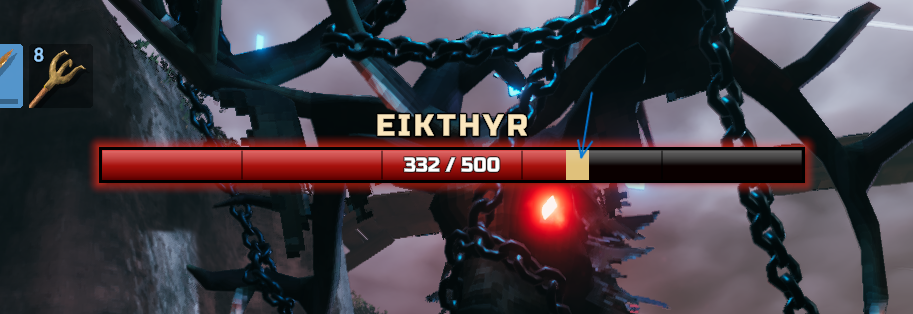
- 👑 Boss Bar: A customizable boss health bar at the top of the screen.
- 🛡️ Weakness Icons: See enemy weaknesses and immunities.
- ⚔️ Damage Numbers: Customize floating damage numbers, colors, and fonts.
- 💫 Stagger Bar: Track enemy stagger progress, with an optional stun icon.
- ❗ Awareness Indicators: See when enemies are alerted or aware of you.
- ⭐ Modifier Icons: Display enemy modifiers from supported mods.
- 🔥 Ailment Bars: Show Fire, Poison, Frost, Lightning, Bleeding, Impale, and Corrosion effects from Path of Valheiman.
- 🔰 TalentTree Support: Display enemy status effects and armor.
- 🐉 Creature Level & Loot Control: Display creature effects, infusions, and boss affixes.
- 🎨 Visual Customization: Customize bar colors, gradients, frames, glow, textures, and more.
- 📐 Layouts: Use presets or save and share your own.
- 👁️ Preview Mode: Test your settings without needing an enemy nearby.
🔌 Optional Mod Support: Everything that depends on another mod only appears if that mod is installed.
Layouts
- Open the Configuration Manager (F1) and look at 00. Layouts. Click a layout to load it.
- Save, Save as, Revert and Delete work on your own layouts. The ready-made ones can never be overwritten, so you can always go back to them.
- Your layouts are
.jsonfiles inBepInEx/config/HPBarheim/layouts(one folder for enemies, one for bosses). To share one, send the file; to use a friend's, drop it in the folder. There is an Open layouts folder button. - The enemy HUD and the boss bar have separate layouts, so you can mix and match.
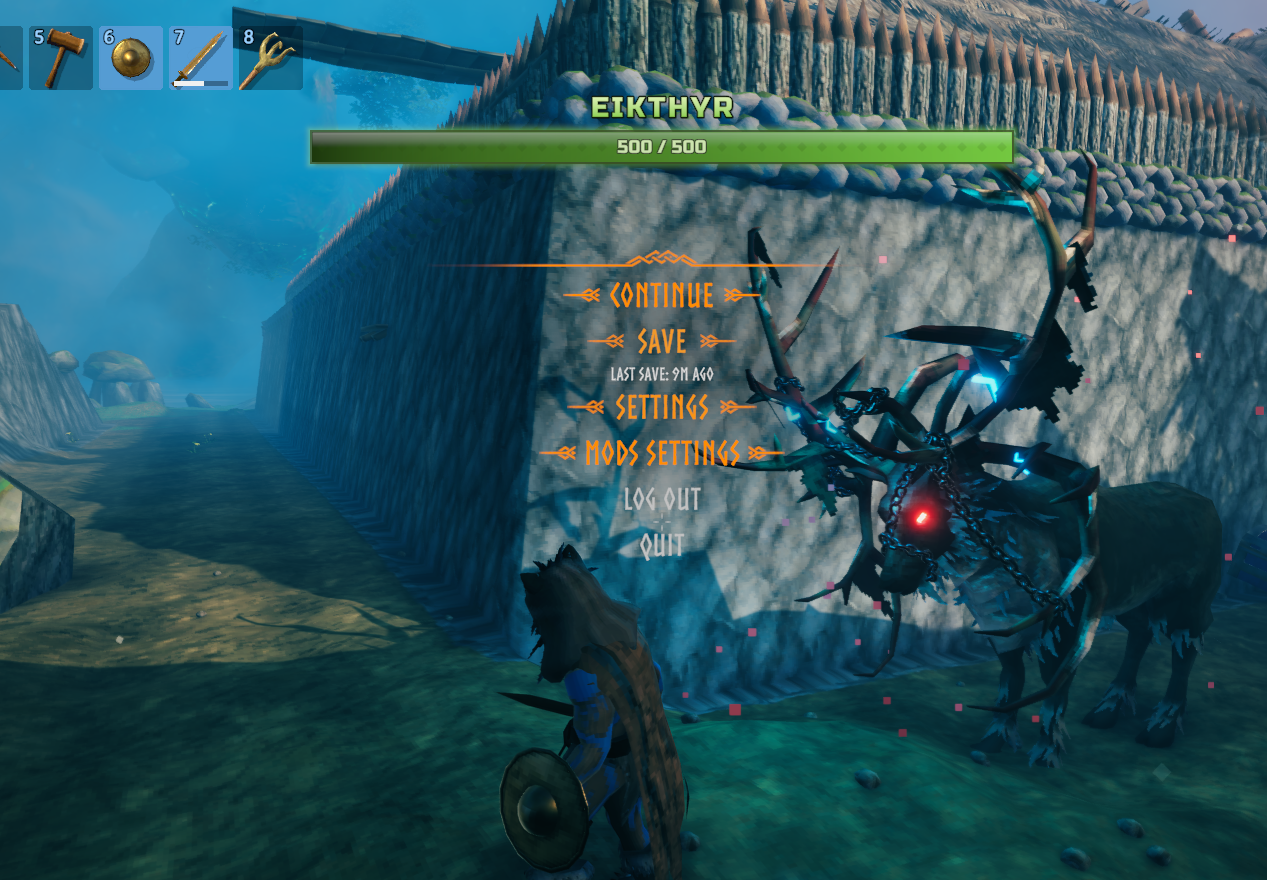
- Ready-made looks for enemies: Barheim-Enemies (the default), Ember, Valkyrie, Iron, Tidal, Minimalist, Royal, Tactical, Brutal, Arcane and Small Bar. For bosses: Barheim-boss (the default), Obsidian, Wraith, Glacial and Verdant.
- Things that are about behavior and not looks (damage numbers on or off, boss bar on or off, distances...) are never changed by a layout. Their description says so.
Mods Supported:
- 🔥 Path of Valheiman: Ailment bars for enemies and bosses (fire, poison, frost, lightning, bleeding, impale, and corrosion), modifier icons with HP Barheim’s hand-painted art, and damage numbers in Path of Valheiman’s colors.
- 🌳 TalentTree: Display talent status effects on enemies and bosses, plus a creature armor bar with a shield icon and the armor value that applies to your hits.
- 🐉 Creature Level & Loot Control: Show creature effects through star colors or in names, elemental infusions, boss affixes, a shared health bar for Twin bosses, and stars on bosses.
- ⭐ Star Level System:: Display modifiers as icons or in names, and show resistances through weakness icons.
- 🎯 Zen Targeting & SeneaL UI:: HP Barheim tells you which options to disable to avoid duplicate elements. It never changes their settings.
Screenshots
Boss bar: damage trail (phantom) and the green Verdant style
Settings
Every option has a description. Edit them in game with Configuration Manager (F1), or in BepInEx/config/DarthVladi.HPBarheim.cfg with the game closed. The sections are:
- 00 Layouts and Preview, 01 General
- 02-13 the enemy HUD: Health Bar, Name, Health Text, Level, Stars, Weakness Icons, Modifier Icons, Stagger Bar, Ailment Bars, Alerted Indicator, Aware Indicator, Damage Numbers
- 14-19 the boss bar: Boss Bar, Name, Health Text, Ailment Bars, Stars, Modifier Icons
- 20 Creature Level & Loot Control, 21 Talent Status Effects (TalentTree). Each one only appears when that mod is installed
- 98 Compatibility (Path of Valheiman, Creature Level & Loot Control, Star Level System, TalentTree), 99 Advanced
Updating from 1.2 or older? Your old config is converted automatically the first time you start the game, and a copy of the old file is kept as DarthVladi.HPBarheim.cfg.before-1.3.bak.
Compatibility
- Client side only. It does nothing on a dedicated server, but every player who wants the bars needs it installed.
- Star Level System, Path of Valheiman, Creature Level & Loot Control and TalentTree are all optional. Without them HP Barheim works as always and the parts that depend on them stay off.
- If you use Zen Targeting or SeneaL UI, HP Barheim tells you once which of their options to turn off so information does not show twice. It never changes their settings.
- Works with Windows display scaling above 100%, render scaling and upscalers (fixed in 1.4.1). If another mod's UI ever hides the bars, raise
CanvasSortingOrderin 99. Advanced.
Install
Use a mod manager (r2modman, Gale or Thunderstore Mod Manager), or put the HPBarheim folder in BepInEx/plugins. Requires BepInExPack Valheim.
CHANGELOG
Changelog
1.6.0
- 🎨 Added 61 new icons for Path of Valheiman, Star Level System and Creature Level & Loot Control.
- 🔥 Added own icons for the Fire, Frost, Lightning, Poison and Spirit infusions.
- 🛡️ Simpler armor bar: a single fill from white to sky blue.
- 🩸 Added icons to the ailment bars.
1.5.1
✨ Added
- 🎯 Health bars only on the enemy you aim at (new default):
ShowHealthBarForin 01. General.- Targeted (default): only the creature under your crosshair shows its bar, at any distance up to
MaxDistance. Walls, doors, rocks and buildings block it, so nothing is seen through them, and a crowd no longer fills the screen with bars. TargetedLingerSecondskeeps the bar a moment after you look away (default 0.5 s; 60 = like Valheim's own bars).TargetedKeepHitSecondsalso keeps the bars of enemies that were hit in the last few seconds (off by default).- Damaged = the previous behavior (every damaged enemy in range). Always = every enemy in range.
- Targeted (default): only the creature under your crosshair shows its bar, at any distance up to
- 🌳 TalentTree support (optional), in the new section 21. Talent Status Effects, with separate settings for enemies and bosses:
- Status effects that TalentTree's talents put on enemies and bosses now show as a row of icons, with TalentTree's own pictures. An effect about to end blinks. On enemies the row sits right above the name, even when the name takes two lines.
- Creature armor bar under the health bar: the armor the creature has, what is left after your debuffs, and what is left against your own armor penetration. A full bar is TalentTree's highest armor (45%), and the background shows that full scale.
- A shield icon next to the armor bar, with its own position, size, edge, color and an optional glow.
- An optional number with the armor that really applies to your hits (35% = 35% less damage), with its own position and text look.
- The armor bar has the same look settings as the stagger bar (frame, gradient, shadow, glow, shine, texture) and its own background opacity.
- The Preview shows sample effects and armor (
PreviewTalentStatusEffects,PreviewTalentArmor).
- 🧱 Tidy stacking under the health bar (
StackBelowHealthBarin 02. Health Bar, on by default): the armor bar goes right under the health bar, the stagger bar under it, and the stars and weakness icons under both. A bar that is not showing takes no room, so with no armor and no stagger built up the stars and icons sit right under the health bar, and they move down when the other bars appear. It applies to what is placed below the health bar (and to horizontal bars). - 💔 Stun icon next to the stagger bar (
EnableStunIconin 09. Stagger Bar), with its own position, size and edge. It is off in the default layout. - 🔢 Choose how many weakness icons are shown (
WeaknessIconMaxin 07. Weakness Icons, 1 to 10; default 4). Weaknesses are shown before immunities. - ✨ Shine inset: the shine of any bar can start a few pixels below its top edge (
...ShineInset).
🔧 Changed
- 🎨 New default layouts: Barheim-Enemies and Barheim-boss replace both "Default" layouts. If you were on "Default", you are moved to the new one automatically and your values are kept. The other ready-made layouts got small touch-ups.
- 💾 Layouts now also keep the Creature Level & Loot Control and TalentTree settings, so a shared layout looks the same everywhere.
- 🔤 One font for everything: pick it once with
Fontin 01. General. The separate font settings of each text are gone; size, color and the rest stay per text. - 🎯
AlwaysShowHealthBaris replaced byShowHealthBarFor. Everyone starts on Targeted: pick Damaged or Always to get the previous behavior back.
🐛 Fixed
- 🖼️ Turning on a bar's frame no longer makes a see-through background look solid.
1.5.0
✨ Added
- 🩸 Impale and Corrosion bars (Path of Valheiman): two new ailment bars under the enemy and boss health bars, next to fire, poison, frost, lightning and bleeding. Impale fills with the stacks put on by pierce hits; Corrosion shows how much of the enemy's armor is gone. Like the others, they only show while they hold something. The Preview now shows all 7.
- 🎨 HP Barheim's own icons for Path of Valheiman modifiers: 26 hand-painted icons, one for each modifier, in the same style as the weakness and Star Level System icons, with no round plate behind them. Pick them or Path of Valheiman's own with
PathOfValheimanModifierIconsin 98. Compatibility (HP Barheim's own is the default). A modifier HP Barheim has no picture for always uses Path of Valheiman's. - 🔎 Bigger HUD on enemies with stars:
EnableStarScaleandStarScale1toStarScale6in 01. General. Defaults: 1 star ×1.0, 2-3 stars ×1.05, 4-5 stars ×1.1, 6 or more ×1.2. It combines withHudScale,LargeEnemyScaleand the distance scaling. The boss bar is not affected. - 🧭 Modifier icons around the name: with
ModifierIconAnchor = Name, the newModifierIconNameSideputs them Below (as before), Above, Left or Right of the name. - 👀 Pick the Path of Valheiman modifiers in the Preview:
PreviewPovModifiersfor the sample enemy andPreviewPovBossModifiersfor the sample boss. Write them separated by commas (for exampleArmored, Swift) and try any of the 26. - 👑 The sample boss now shows Path of Valheiman modifier icons in the Preview, under the boss bar.
🔧 Changed
- 🧼 Settings of mods you do not have are hidden: sections 10 and 17 (ailment bars), 20 (Creature Level & Loot Control) and the settings of Path of Valheiman, Creature Level & Loot Control, Star Level System, Zen Targeting and SeneaL UI in 98 only show while that mod is installed. Install or remove a mod and the list follows.
- 🧪 The Preview's ailment bars only show with Path of Valheiman installed and its ailment bars on.
- 🎨 New Default layouts for the enemy HUD and the boss bar. The enemy Default now puts the modifier icons above the name, a bit bigger, with a plainer health bar. Existing configs keep what they have; load a layout in 00. Layouts to switch.
- The Preview's
PreviewModifierIconsandPreviewBossModifierIcons(a number of sample icons) are replaced by the lists of modifiers above. The old values are dropped from your config file.
🐛 Fixed
- 🔔 No more false "conflict with SeneaL UI" note when you have hidden SeneaL UI's boss panel (
BossBarsHiddenin its[Elements]section). The note now only appears when that panel is really showing next to HP Barheim's boss bar. - 🔤 A long name no longer covers the modifier icons. With the icons anchored to the health bar, they now step away from the name when the two would overlap. With the icons anchored to the name, the other parts that sit above it (the alerted and aware symbols) are lifted to make room.
1.4.1
🐛 Fixed
- 🖥️ Bars and damage numbers not showing at all with Windows display scaling above 100% (for example 125% on a 1080p laptop). In that case Valheim draws the 3D view at a lower resolution and stretches it over the screen as a layer of its own, and that layer covered HP Barheim's bars, boss bars and damage numbers. They are now drawn above the 3D view and still under Valheim's own HUD, inventory, map and menus. This most likely also fixes the same problem with render scaling or upscalers such as DLSS.
- 🎯 In that same case, bars and numbers now sit exactly over the enemy instead of drifting toward the lower-left corner.
✨ Added
- 🧩
CanvasSortingOrderin 99. Advanced (shown with "Advanced settings" ticked in the Configuration Manager): the drawing order of HP Barheim's layers. The default (10) works for everyone; only change it if another mod's UI hides the bars or the bars cover something they should not. - 📝 With
DebugLoggingon, the log now gets a short screen and UI report every 10 seconds, to help with display problems in bug reports.
1.4.0
✨ Added
- ⭐ Star Level System support (optional):
- Its resistances and weaknesses show in the weakness icons, combined with the creature's own.
- Its creature modifiers show as icons: 30 new hand-painted icons, in the same row as the Path of Valheiman icons.
- Choose how modifiers show with
StarLevelSystemModifiersin 98. Compatibility: Icons (default, the name stays clean), Name (words in the name, like SLS does), Both or None. - Bosses show their modifiers too, under the boss bar, in the new section 19. Boss Modifier Icons.
- ↕️ Modifier icons in a column:
ModifierIconOrientationin 08. Modifier Icons (Horizontal or Vertical), great on the left or right side of the bar. - 👀 Star Level System samples in the Preview: give the sample enemy and the sample boss any modifiers (
PreviewSlsModifiers,PreviewSlsBossModifiers).
🔧 Changed
- 🎨 New Default layouts for the enemy HUD and the boss bar. Every ready-made layout now includes the modifier icons. Existing configs keep what they have.
- 👀 00. Preview only lists what you use: each sample's options show while that sample is on, and each mod's options only if that mod is installed.
- 📦 Creature Level & Loot Control moved to section 20 (was 19). Your settings move with it automatically.
- 🔄 Names and levels update while the bar is on screen, so mods that rename a creature or raise its level after it appears are shown right away.
- 🛡️ Thinner "immune" mark on weakness icons, and sharper drawn icons at small sizes.
- 💬 The Zen Targeting and SeneaL UI notes no longer show when HP Barheim's bars are turned off (
Enabled = false), so playing with other bars and only HP Barheim's damage numbers is now clean.
1.3.0
Added
- Creature Level & Loot Control support (optional). Its creature effects (Aggressive, Quick, Regenerating, Curious, Splitting, Armored) show as a star color, a word in the name, or both; elemental infusions show in the name and can change the weakness icons; boss affixes show in the boss name; Twin bosses share one bar. By default HP Barheim follows CLLC's own display settings. New section 19. Creature Level & Loot Control and a
CreatureLevelControlSupportswitch in 98. Compatibility. - Stars on bosses, with their own section (18. Boss Stars): size, color, position, edge and a "x5" count. They show when a boss has a level above 1.
- Layouts (section 00. Layouts): load, save, save as, revert and delete your own looks, kept as
.jsonfiles inBepInEx/config/HPBarheim/layouts, and share them by sending the file. The enemy HUD and the boss bar have separate layouts. - Ready-made layouts: Default, Ember, Valkyrie, Iron, Tidal, Minimalist, Royal, Tactical, Brutal, Arcane and Small Bar for enemies; Default, Obsidian, Wraith, Glacial and Verdant for bosses.
- Preview (section 00. Preview): a sample enemy HUD, boss bar and damage numbers on screen, to try any setting without an enemy.
- New hand-drawn weakness icons.
Changed
- The settings were reorganized. New numbered sections by what each setting changes, new names and descriptions, the same set of options for every text, icon and bar, positions set against the bar (side, alignment, distance, offsets), effects with a switch, and sliders for numbers.
- Your old config is converted automatically on the first start, and a copy is kept as
DarthVladi.HPBarheim.cfg.before-1.3.bak. - Presets became layouts. Ghost, Line, Mono, Pulse and Full were retired. If your config named one of them, the layout name is left empty and your look is kept.
- New Default looks for the enemy HUD and the boss bar. They apply on a fresh install; existing configs keep what they have.
ViewAngleDegreesnow defaults to 20 (was 15) on a fresh install.- The weakness icons' edge is now a solid edge in any color you choose.
- Icons are prepared when the game starts, so nothing hitches the first time one appears in a fight.
Fixed
- A faint dark box could appear behind bold letters with a thick outline (the star count, "+N", damage numbers, "!" and "?").
- With Creature Level & Loot Control installed and Valheim's enemy bars hidden, CLLC no longer fills the log with errors.
1.2.0
Added
- Path of Valheiman modifier icons. If you have Path of Valheiman installed, each enemy's modifiers (Swift, Armored, Warded...) now show as icons between the name and the health bar, even with the vanilla enemy bar hidden.
- An enemy with no modifiers looks exactly as before.
- With more modifiers than the limit, the first ones are shown followed by a "+N".
- New config section 17. Modifier Icons (size, spacing, max icons, "+N" text, offsets, edge) and a switch,
PathOfValheimanModifiers, in 98. Compatibility.
Changed
- The
!and?symbols are no longer shown while the health bar is visible. You can bring them back withAlertedHideWithHealthBarandAwareHideWithHealthBar(sections 09/10). - Small performance improvement when drawing Path of Valheiman ailment bars.
- Slightly adjusted defaults:
WeaknessIconOffsetX5 andEnemyNameGlowColoropaque white. Existing config files keep their values.
1.1.1
- Fixed: the stagger bar was missing in 1.1.0. If you downloaded 1.1.0, please update.
1.1.0
- Ailment bars for Path of Valheiman, with their own look settings (position, direction, size, outline, glow, gradient, texture, shine).
- Separate ailment bar settings for bosses, lying in a row under the boss bar by default.
- Stagger bar: can be placed on any side of the health bar and has the same look settings (glow, gradient, texture, shine).
- Gradients can run horizontally or vertically.
- Alerted and aware indicators can sit above the name.
- Long enemy names wrap onto two lines instead of running past the bar.
1.0.0
- First release.
