
Please disclose if any significant portion of your mod was created using AI tools by adding the 'AI Generated' category. Failing to do so may result in the mod being removed from Thunderstore.
RuneheimUI
Reskin Valheim's whole interface in three looks: Runeheim, Elden Ring or Path of Valheiman (with Path of Valheiman installed, only its theme; none of its art is included). Movable HUD, live character preview, full controller support.
| Date uploaded | a day ago |
| Version | 0.116.7 |
| Download link | Daytreee-RuneheimUI-0.116.7.zip |
| Downloads | 68 |
| Dependency string | Daytreee-RuneheimUI-0.116.7 |
This mod requires the following mods to function

ValheimModding-Jotunn
Jötunn (/ˈjɔːtʊn/, 'giant'), the Valheim Library was created with the goal of making the lives of mod developers easier. It enables you to create mods for Valheim using an abstracted API so you can focus on the actual content creation.
Preferred version: 2.30.2
denikson-BepInExPack_Valheim
BepInEx pack for Valheim. Preconfigured with the correct entry point for mods and preferred defaults for the community.
Preferred version: 5.4.2351
Daytreee-RuneheimCore
Shared library for the Runeheim mods. Does nothing on its own.
Preferred version: 1.7.1README
Runeheim UI
A calm Norse reskin of Valheim's whole interface. New menus, inventory, crafting and HUD in three themes, and every piece can be moved or switched off.



Mods from Dreanegade, our favorite Valheim mod author. Give them a try:
 Magic Supremacy Experience magic like never before: deeper, greater and more diverse. |
 Hunter Legacy Master the art of ranged combat: hunt your enemies with deadly precision. |
 Artisan Mastery Discover the artisan's way: master the crafts that shape life beyond battle. |
 Warrior Glory Follow the warrior's path: discover a new arsenal and claim glory in battle. |
PATH OF VALHEIMAN SUPPORT ADDED
Path of Valheiman keeps its own layout and is drawn with its own art in the Path of Valheiman theme.
$\color{#e0874a}{\textbf{Only one theme works with Path of Valheiman: the Path of Valheiman theme.}}$ While Path of Valheiman is installed, the interface always uses it; the Runeheim and Elden Ring themes are only available without Path of Valheiman.
No art from Path of Valheiman is included in this mod. The Path of Valheiman theme takes its art style from your own Path of Valheiman install while the game runs and carries it across the interface; its icons are our own, made to match.

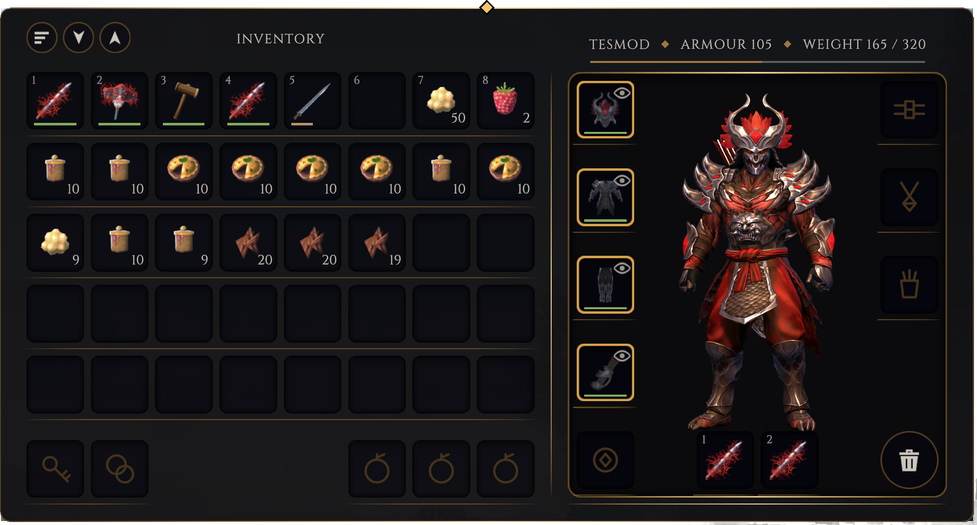 Inventory · Runeheim |
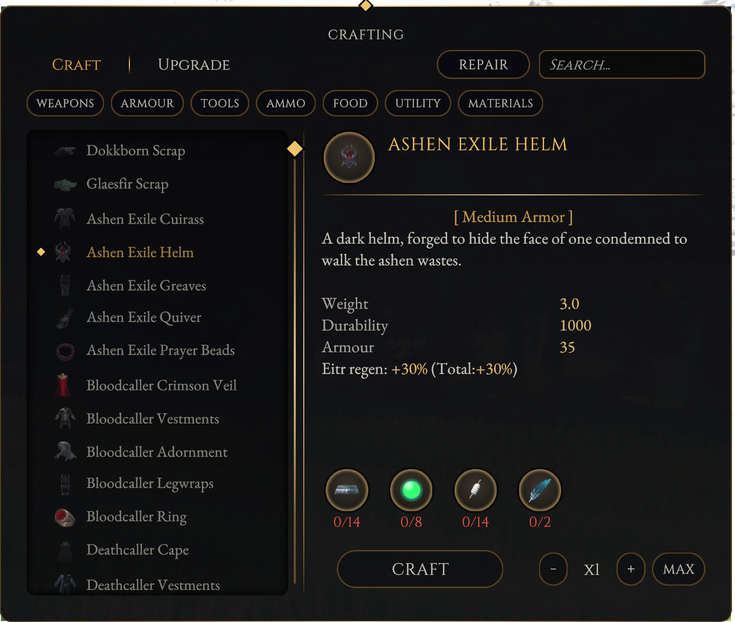 Crafting · Runeheim |
 Icon hotbar · Runeheim |
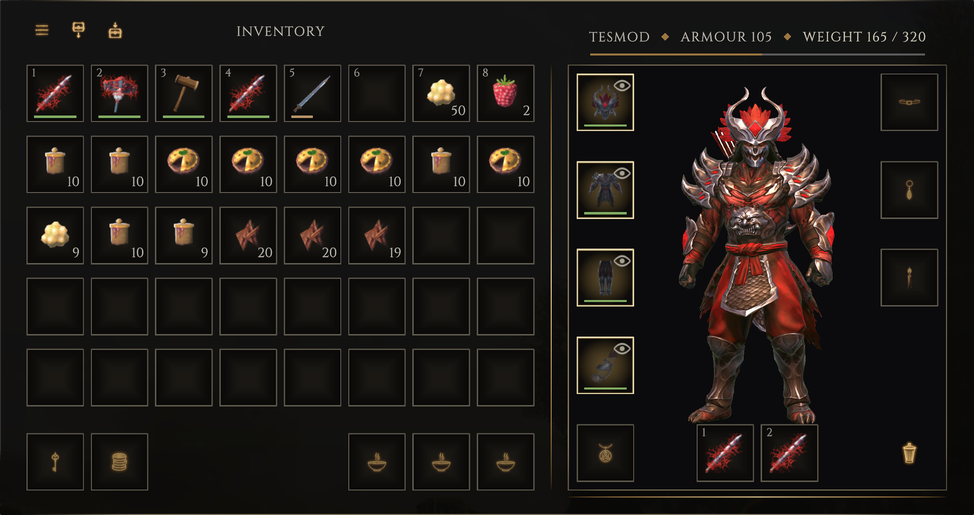 Inventory · Elden Ring |
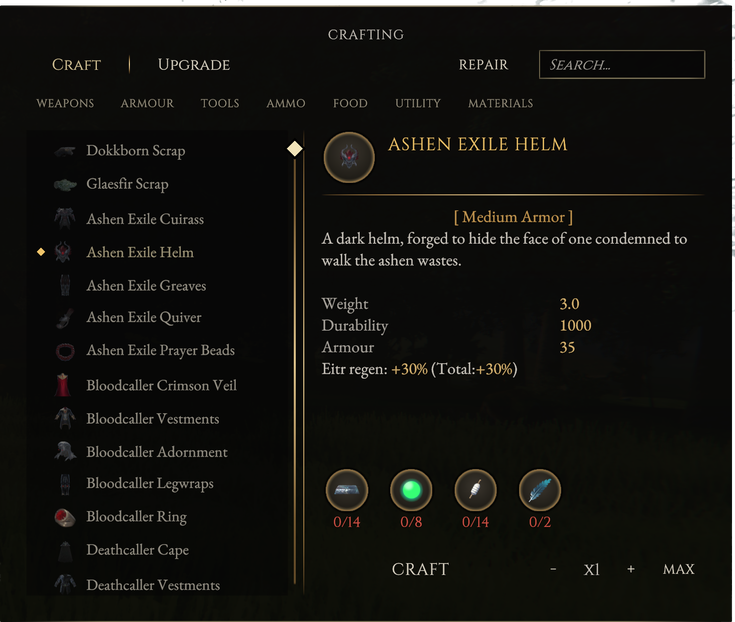 Crafting · Elden Ring |
 Icon hotbar · Elden Ring |
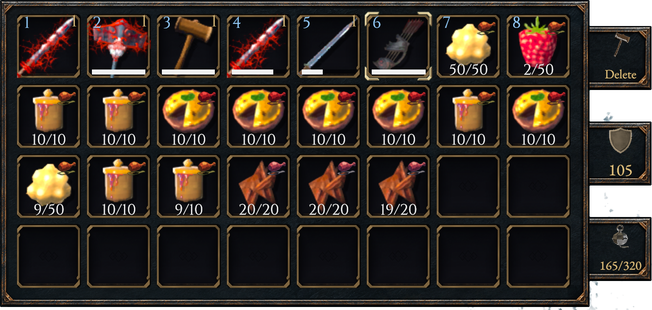 Inventory · Path of Valheiman |
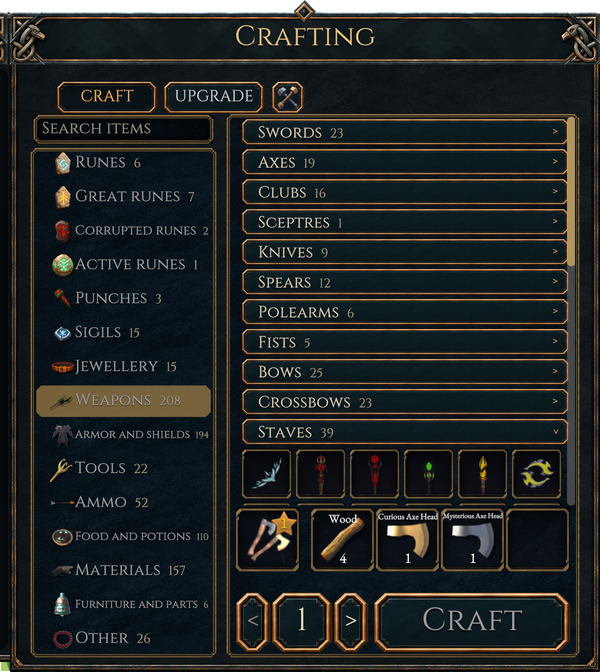 Crafting · Path of Valheiman |
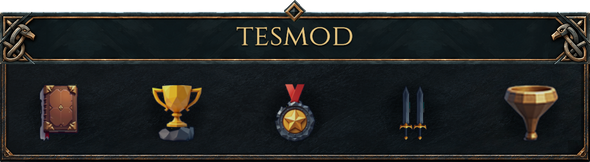 Icon hotbar · Path of Valheiman |
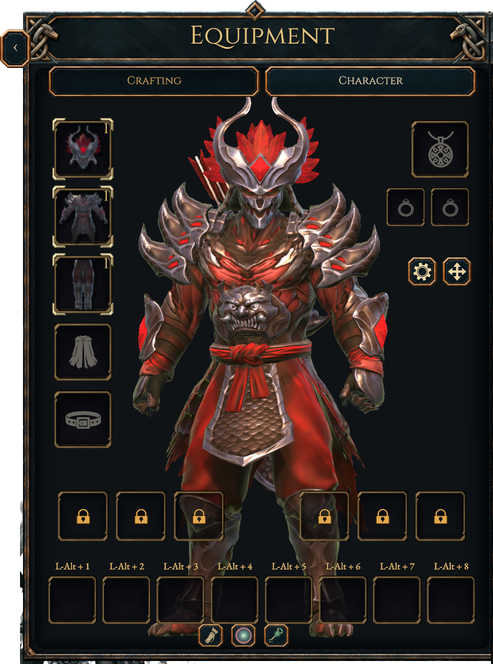
Equipment · Path of Valheiman

 Three complete looks: Runeheim, Elden Ring or Path of Valheiman, across every screen of the game. With Path of Valheiman installed, only its own theme is used.
 Every screen rebuilt: main and pause menus, character and world select, inventory, crafting, settings and pop-ups.
 Make it yours: pick the theme, colors, animations and effects for each part of the interface (F8 > Appearance), and save your looks as presets.
 A cleaner HUD: health and stamina bars, minimap, compass, status effects and enemy bars, all movable and resizable.
 Inventory and crafting: a live character preview, extra gear slots, and Sort, Pull and Store buttons (with Runeheim QOL).
 Path of Valheiman compatible: its own layout in the Path of Valheiman theme (the only theme while it is installed); its tooltips, bags and windows all work.
 Full controller support: every window in every theme, as one menu with tabs along the top: RB / LB switch tabs, Y opens an item's options, B closes.
 Map and world: tidier markers and a peek inside chests and machines.
 Other mods match: Runeheim Souls and other popular mods get the same look, and other mods' windows follow your theme automatically.
 Hotkeys your way: every mod's hotkeys in one list with clashes in red; Runeheim keys can fire on press, release, tap, double tap or hold.
 Your choice: every feature can be switched off in F8. Works client-side; server admins can set the gameplay features for everyone.

- Cinzel, Almendra and EB Garamond fonts (SIL Open Font License)
- treextr, for Path of Valheiman and its art style (the Path of Valheiman theme reads its art from your own install; none of it ships with Runeheim UI)
- License: Runeheim UI is © 2026 Daytreee, all rights reserved. Free to play and to list as a modpack dependency; don't reupload it or reuse its code, art or music without permission. Full terms in LICENSE.txt.
- Made with AI: AI was used on this project, as it is on all Runeheim projects.

- Runeheim Souls: Elden Ring-style progression and combat: runes, levels, stats, talismans and Elden Ring's own moves.
- Runeheim Performance: Smoother frames and longer views: FSR and DLSS with frame generation, far view to 1,200 m, no freezes near new places, faster big bases and smoother multiplayer.
- Runeheim Music: A new dark orchestral soundtrack with Nordic folk for every Valheim music slot.
- Runeheim QOL: Craft from chests, sort, pull and store, self-running machines, freecam building and discovery markers.
- Runeheim Core: The shared library every Runeheim mod runs on.
CHANGELOG
Changelog
0.116.7
- Updated for Runeheim Core 1.7.1.
0.116.6
- Vitals numbers (Path of Valheiman theme): numbers shown left of the icons now always keep a clear gap from the food plates and their timers, however long the numbers get: the bars step right just as far as needed and the food plates stay put, clear of the Shift+Q quick slot. The food and potion quick slots beside the bars also stay clear of numbers shown after the longest bar.
- Item tooltips, including those on equipped items, are no longer hidden behind the food plates, vitals and other HUD pieces.
0.116.5
- Formats moved to Appearance (Path of Valheiman theme): the HUD format options (vitals numbers, timers, big numbers, clock, day, number placement, rune shield and longest bar) are now in the Appearance window under Global > Formats, instead of the HUD settings page. Your choices carry over, and presets you save now include them.
0.116.4
- Rune shield over health (Path of Valheiman theme): when your rune shield is bigger than your health, its glass now shows its full length past the health bar instead of being cut to the health bar's size. All bars still fit within your Longest bar setting.
- Vitals bars (Path of Valheiman theme): stamina and eitr bars, along with health and the rune shield, now always stay within your Longest bar setting, and lowering that setting shortens them right away.
- Rune shield as its own bar: its icon and number now line up with the health, stamina and eitr rows, and its icon has the same soft glow as theirs instead of a round blue halo.
0.116.3
- Anti-cheat kicks fixed: with Path of Valheiman installed, servers running AzuAntiCheat no longer kick players for "Unknown assembly loaded mid-session: RuneheimUI.Pov". That part of the mod now loads when the game starts instead of after joining.
0.116.2
- Weapon effects in the character preview: with Runeheim Souls, your weapon's elemental aura or grease coat now shows on the inventory's character preview too.
0.116.1
- Smoother frames: no more occasional short stutter while the interface looks for other mods' windows, and less memory churn every frame (fewer small stutters from memory cleanup).
0.116.0
- Path of Valheiman theme customization: Appearance now works in the Path of Valheiman theme too. Frame color recolors its gold rims, studs and lines; the new Stone color recolors its stone and slate; Panel fill makes its plates darker, lighter, see-through or solid; Accent and Text color its highlights and text; Animations, Entrance, Glow and Ripples work there as in the other themes. Trader windows and other mods' windows in this theme follow your colors. The character view behind your character follows the stone color and panel fill. Item, status and theme icons never change color.
- Ready-made Path of Valheiman looks: the Appearance preset list offers Valheiman Gold (the theme as it comes), Frostforged, Bloodmoon, Mistlands and Ashlands while the Path of Valheiman theme is on. Each pairs a colored trim with its own stone and highlight colors (frost, blood, amethyst and ember trims on dark stone); your own saved presets stay below them.
- Vitals numbers placement (Path of Valheiman layout): choose where the health, stamina and eitr numbers sit: left of the icons, inside the bar at its left, after the longest bar, inside the bar centered, or above each bar.
- Rune shield: as glass over health it is never longer than your health bar, so it no longer covers the numbers. You can also show it as its own bar above health; then it counts toward the shared bar length, so a big shield never runs off the screen.
- Longest bar (Path of Valheiman layout): set how long the vitals bars may grow before they all shorten together.
- Formats (Path of Valheiman theme, HUD settings): vitals numbers as 312, 312 / 400, 78% or hidden; status and food timers as 1:58, 2m, 118s or no text (only the draining ring or line); big numbers as 3450, 3,450 or 3.4k; the minimap clock in 24-hour or 12-hour time or hidden; the day count shown or hidden.
0.115.1
- Season above the minimap: Seasonality's season now shows in its own small plate over the minimap instead of in the status effect list.
- Compact status effects (new setting, HUD): all effects share one plate with just their icons and timers (hover for the name); a new row is added when a row fills.
- ImmersiveTrader windows: shop rows, reward slots, cargo rows and dungeon difficulty buttons keep their icons and text inside the frames; long quest stories scroll again; a hunted creature's name shows above its portrait; "Hunting Tasks" stays on one line.
- ImmersiveTrader's trader window in the Path of Valheiman theme: the shop sits inside the trader window at its own size again (it was pushed up and off the screen), the page tabs, the selected quest, dungeon, contract or cargo row and the picked dungeon difficulty use the theme's buttons and gold rims instead of flat orange and green blocks, and the trader's name stays on one line.
- Bought inventory rows stay: with Path of Valheiman's layout, rows bought from Haldor (Wider Pockets, Deeper Pockets) no longer disappear when you load your character, and rows that went missing come back. In Runeheim's own layout they add bonus storage slots.
- Fonts in any folder: Runeheim's fonts now load when your mod profile's folder name has letters like ä or ö (Valheim's fonts were shown instead).
- Wind on a ship: while you're on a ship the wind arrow shows the wind that ship gets, and turns gold when it's behind you. Path of Valheiman's tailwind now shows on it.
- Sort button on chests (with Runeheim QOL 1.0.6): between Take all and Stack, in every layout.
- Map filters with Path of Valheiman: turning off "Places" hides only the game's traders and start stones; Path of Valheiman's own markers (ores, chests, dungeons) keep showing, and its Portal Web gates follow the Portals filter.
- Seasonality's seasons without a timer: the season row stays, without its long countdown or a draining line, and counts as an effect that never runs out. A new setting, Effects that never run out, lets you mark other effects the same way; effects showing a countdown of their own otherwise count as timed.
- Ship HUD under the minimap: while you steer a ship, the game's sail and wind dial sits just under the wind panel, the rudder icon beside it on its left, and the status rows below them, so nothing overlaps.
- Station lists after visiting another station: the Rune Carver's Disenchant list (and other station lists) keep the Path of Valheiman look instead of showing the game's orange highlight when ImmersiveTrader is installed.
- Pull and Store with Path of Valheiman: the buttons stay usable until you've unlocked Path of Valheiman's quick stack on its skill tree.
0.115.0
- Keepsakes (Runeheim Souls 0.50): the Site of Grace's new Keepsakes tab has the same look as the talisman page: drag keepsakes into eight slots, filter by craft skill and sort by rarity, name or level. Keepsakes you haven't unlocked yet show dimmed with the level they need.
- The Equipment page in your inventory now shows your talismans, the eight keepsakes you wear and your spirit side by side. Hover one to read it.
- Talismans, Keepsakes and Spirits tabs at the Site of Grace keep their own names (they used to sit under one Equipment tab).
- A fourth food (Runeheim Souls' Valkyrie Platter Keepsake) shows in the food row.
- Runeheim theme buttons: the Site of Grace's tabs, its - / + and Confirm / Close, the pause menu, the game's Settings tabs and our settings window's buttons are now Runeheim's rounded chips (the open tab in gold) instead of plain words. The Elden Ring theme keeps its plain words, and their "|" dividers now sit between the words instead of on a long label like Keyboard & Mouse.
- Runeheim theme HUD: runes and craft runes are two rounded chips (the name on hover, gains float above), food sits on rounded plates with the icon in a socket and a gold line that drains, status effects are round sockets with their timer or state under them and a gold ring that drains, and the wind and the day are two chips under the minimap. The Elden Ring theme keeps its banners.
- Path of Valheiman theme food and status rows are full Path of Valheiman buttons again (no faded sides). Food rows drop the food names for shorter rows, and each snack (Path of Valheiman's Snacking) shows in a round gold-rimmed socket on a food row's right end with a ring that drains and its time; hover it for what it gives.
- ImmersiveTrader's quest tracker sits under the hotbar in the Runeheim and Elden Ring themes too, below the pickup messages, in our font and colors (gold title, green finished steps).
0.114.2
- Path of Valheiman's XP penalty line shows again: the "Combat XP penalty" line now sits right under the biome name below the minimap, and the status effects move down to make room.
- Your arrow stays on the map while you steer a ship (small and large map).
- Path of Valheiman's announcements keep their own font: the big center messages (like "Runestone read") look the way Path of Valheiman draws them again.
- Wind and day plate: it sits under the XP penalty line, above the status effects, with a new gust icon and a matching wind arrow, both kept clear of the plate's border and the day line.
- Softer gold on buttons (Path of Valheiman theme): the gold rim of the button art is a little quieter everywhere it is used.
- Elden Ring combat window on the main menu in the Path of Valheiman theme: the build status and its Build button now show there too, in Path of Valheiman's window style.
- Food and status effect rows (Path of Valheiman theme): a slimmer band of the button art, only its top and bottom borders, solid behind the icon, name and timer and fading out just past them on the left and right.
- Slimmer durability bars (Path of Valheiman layout): inventory slots show a thin rounded durability bar inside the slot frame, gold when healthy, amber when worn, red when nearly broken.
- Clearer timers on food and status effects (Path of Valheiman theme): the time left is its own thin line under the name, gold, then amber, then red as it runs out. Status effects without a time limit no longer show a time line.
- Crafting group headers keep one font (Path of Valheiman layout): "Tools", "Torches" and the other group rows no longer switch from capitals to normal text when you click in the crafting panel.
- Path of Valheiman's minimap lines show again: the "Next: Light rain" weather line now sits above the minimap, the area level shows at the top of the round minimap, the XP penalty line shows its details on hover, and with "Hide minimap" on, the penalty and weather lines show in the top-right corner.
- New enemy level stars: a slim rune spark in place of the game's star. With Path of Valheiman installed, its stars and modifiers show in one row above the health bar (with the spark), by its "Creature level stars" and "Modifier display" settings, in its rarity colors.
- Faster scrolling in Immersive Trader windows: its quest and trader lists scroll three times as far per wheel notch.
- Requires Runeheim Core 1.6.4.
0.114.1
- Pause menu: a fix for the pause menu behind the scenes; nothing changes in how it looks or works.
- Requires Runeheim Core 1.6.4.
0.114.0
- Path of Valheiman theme for the connection windows: the server password window and the Disconnected / connection failed window get Path of Valheiman's header band and slate panel, with a sunken password box and themed buttons. The main menu steps aside while the Disconnected window is up, so its OK button shows.
- Smoother screens: text and pictures are styled before they first draw, so panels no longer flash their old look when they open.
- Stronger rarity colors (Path of Valheiman theme): Path of Valheiman's own rarity frames stay, with richer colors and glow, on the hotbar too. Locked transmog looks stay grayed out as Path of Valheiman shows them.
- Item tier on hotbar slots (Path of Valheiman theme).
- Quest tracker under the hotbar (Path of Valheiman theme): it sits top-left under the item hotbar and the pickup messages. Switch it off in F8 > Mods > Path of Valheiman.
- Quest log on narrow screens: the traders stack on top of the quests.
- Immersive Trader windows (trader, quests, training dummy) in the Path of Valheiman theme.
- Fixes: the icon strip stays centered with Immersive Trader (no more glow flicker), the gem board's links scale with the board, recipe rows keep one name size, and the Mods page fold arrows point the right way.
- Requires Runeheim Core 1.6.4.
0.113.2
- Quieter main menu: a few window checks no longer throw a hidden error every frame before you're in a world.
- Requires Runeheim Core 1.6.4.
0.113.1
- Rarity frames from Path of Valheiman's rarity kit (Path of Valheiman theme): common, magic, rare and legendary items get their own hand-made cell frames, and their rarity colour and glow stand out more. Unique items keep Path of Valheiman's look; sockets, influence and the rest stay as Path of Valheiman draws them. The art comes from your own Path of Valheiman install.
- Darker item cells: inventory, chest, hotbar and equipment cells have dark iron frames instead of gold, so rarities stand out.
- Hover is back on item cells: the cell under the mouse or the controller lights up with corner brackets.
- Requires Runeheim Core 1.6.4.
0.113.0
- Opacity settings for every part of the interface: a new Opacity tab in Appearance (F8). Each category (inventory, crafting, hotbar, map, bars, tooltips and more) has 0-100% sliders for its window background, frames, slots, item icons, buttons, selected and hover highlights, glow, text and bar backgrounds, with Global as the default for all of them. Works in every theme and is saved with your presets.
- Softer selected highlight in every theme: the open tab and the chosen category, recipe or slot no longer glare (Opacity, Selected highlight).
- Path of Valheiman uses its own theme only: while Path of Valheiman is installed the interface always uses the Path of Valheiman theme; Runeheim and Elden Ring are available without it.
- Path of Valheiman slots match their window: slots take the window's own slate color, a little darker, instead of near-black.
- Steady window titles: the Inventory, Crafting and Equipment titles no longer drop out of their bands now and then.
- Even crafting tabs: every tab name in the crafting window is in capitals at the same size (Disenchant at a Rune Carver was smaller).
- Repair button stays put next to the crafting tabs when you switch tabs.
- Smoother menus with Path of Valheiman: opening the inventory, a chest or a crafting station no longer hitches; the theme does far less work per frame and never searches the whole game for pictures or texts while you play.
- No flash of the old look: a window's icons are themed in the same frame it opens.
- The Inventory title stays in its frame with a chest open and without Runeheim QOL.
- Beyond in the Path of Valheiman theme: Beyond's menu and its Prophecy window get the theme's window plate, slate boxes and gold edges, its buttons the theme's buttons, and its text our fonts.
- Skill gems on the bars: eitr reserved by skill gems and health they hold show on the health and eitr bars.
- F8 with Beyond: when Beyond also uses F8, F8 opens Beyond and Runeheim's settings stay in Settings, Runeheim tab.
- Sturdier with Path of Valheiman updates: if a Path of Valheiman update changes something this mod reads, only that part switches off (with one line in the log) instead of erroring.
- Requires Runeheim Core 1.6.4.
0.112.1
- Fixed the white player preview after dying (with Path of Valheiman): the equipment window's character view keeps its picture through deaths and respawns.
- Warning popups match your theme: the Confirm / Cancel popup for high-end settings now has the current theme's look in every theme, also over the settings window.
- Clearer logs: problems that used to fail silently now leave a short line in LogOutput.log, which makes bug reports easier to fix.
- Requires Runeheim Core 1.6.4.
0.112.0
- VNEI support: VNEI's tab sits in the crafting tab row next to the others in every theme (with the Path of Valheiman layout it was half hidden and couldn't be clicked), and its item browser opens inside the crafting window, dressed in the current theme.
- Build menu categories work again: clicking anywhere on a category (not just its name) picks it, in every theme.
- Dropdowns dressed in every theme: the game's Settings dropdowns get the theme's button look with a small gold arrow, and their open list a framed dark plate (Path of Valheiman: its bronze-edged slate instead of a pale stone). The chosen option's mark sits clear of its text.
- No freeze half a minute into a world with Path of Valheiman: its skill tree window is now built behind the loading screen instead of by itself after you start playing (a 1 s freeze, then a few seconds of rough frames).
- Windows open cleanly with frame generation: while frame generation runs, windows and pop-ups appear at once instead of scaling or fading in, so the made frames can't bend them.
- No "Entering Valheim" screen: starting a world fades straight into the game's own loading screen, sooner.
0.111.4
- Vanilla skills button: F8 > Inventory > Character. The game's own Skills button in the inventory's icon row next to Character, in every theme, with its own themed icon; it opens the game's skills window (on a controller, B closes just that window). Automatic (default): shown when Path of Valheiman has skills switched on; On or Off to choose yourself.
- Skills window: level numbers no longer run into the text beside them (Path of Valheiman's "no effect").
- Dropdowns in the game's Settings screen open on top: the list showed behind the other dropdowns (the movesets page).
0.111.3
- Runeheim theme icons closer to vanilla: 15 map markers and interface icons redrawn to follow the game's own shapes (death skull, trader sack, Hildir's shirt, bog witch cauldron, stealth eyes, the build hammer and more), in the same gold style.
- The red damage screen effect and the event area circle on the map are never replaced by a theme.
- Settings tooltips are readable again: the game's Settings tooltips (and every Runeheim setting in the Graphics tab) show in the dark Runeheim tooltip beside the cursor instead of bare text over the menu.
0.111.2
- Hotkey triggers: on the Hotkeys page, every Runeheim hotkey has a pulldown for when it counts: on press (as before), on release, single tap (a quick press), double tap or hold (half a second). Other mods' and the game's own keys keep working as they do.
- The inventory opens without a stall with the Path of Valheiman layout: each open used to freeze for 0.1-0.2 seconds while the theme checked every piece of the window again; now it remembers what it already checked.
0.111.1
- With a controller in the main menu, the open settings no longer fight the menu for focus every frame.
0.111.0
- The menu's tab bar (Inventory, Crafting, Character...) shows only when you play with a controller. With mouse and keyboard you click the windows themselves.
- No first-open stutter: the interface's art, item icons and windows are prepared behind the loading screen when the game starts and when you enter a world, so menus open without a hitch and nothing flickers in.
- The compass stays hidden while the menu is open.
- Requires Runeheim Core 1.5.0.
0.110.0
- Controller overhaul: the inventory screen is one menu with tabs along the top: Inventory, Crafting, Skill tree (Path of Valheiman), Character, Compendium and Trophies. RB / LB switch tabs, LT / RT switch the sections inside one (crafting categories, Trophies / Achievements, Inventory / Talismans), and B closes the whole menu. Works in both layouts; Path of Valheiman's own screens keep their layout.
- Menu tabs: the tab bar has its own art in every theme, and its own Menu tabs category in Appearance.
- Controller: Y on an item opens its options: Use or Equip, Split stack, Move to chest or bag, Drop, and Delete with Path of Valheiman.
- Controller: L3 sorts the inventory.
- Controller: Path of Valheiman's skill tree: move with the left stick, zoom with the right, LT / RT switch between the skill and craft trees.
- Controller: the on-screen keyboard opens by itself for the game's text boxes (naming a chest, signs) and sits under them; Done accepts, B cancels.
- Controller: Settings pages switch with LT / RT, the language no longer changes while the Runeheim page is open, and the RB badge sits on the Runeheim tab.
- Controller: B closes the pause menu; the Appearance window's tabs switch with LT / RT; RT / LT step through the build menu's categories.
- While the menu is open, the minimap, crosshair and Path of Valheiman's skill-point diamonds step aside, so nothing peeks out from under the windows.
- Windows can no longer be moved: their layout is built in.
- Requires Runeheim Core 1.4.0.
0.109.9
- Tool picker: each tool sits in the theme's own item slot (it looked stretched), and with Path of Valheiman it shows PoV's own tool bar.
0.109.8
- Controller: the selection glow takes the shape of what it lights: hexagon slots, pill chips and toggles, each theme's slot and button corners, and a lit line under text-only menu entries.
- Controller: a tool picker (hold D-pad Up with Runeheim Souls): the tools on your hotbar in a small window, A takes one out.
- Controller: the on-screen keyboard is the right size in the world too.
- Controller: the game's own focus no longer lights a second button in the inventory.
0.109.7
- Controller: what you've chosen glows softly in the theme's own light (gold in Runeheim, amber in Elden Ring, ember in Path of Valheiman), beside its own hover look.
- The game's Settings > Controller tab shows Runeheim's controller pages (controller type, button hints, the Elden Ring controller layout) in place of the game's own.
- Build menu: the categories use the crafting menu's category chips in every theme.
- Themed buttons in other mods' windows (Worldhalla...) light up clearly on hover.
- Controller: the build menu works with the controller: move across categories and pieces with their mouse hover look, A picks, B closes.
- Controller: our slots and buttons light up only for the controller's choice, not also where the mouse rests.
- Controller, Path of Valheiman layout: the game's own controller frame no longer shows on a second inventory slot (or the hotbar) beside your selection.
- Controller: the Runeheim tab in the game's Settings is on LB / RB with the other tabs (after the last one).
0.109.6
- Controller keyboard: Caps lock, and each command key shows its controller button picture (Xbox, PlayStation or Switch): Shift, Caps, Space, Delete, Done.
- Controller keyboard: B closes it reliably (it could open again by itself).
- Controller keyboard: while it is open, buttons no longer reach the windows behind it (Worldhalla's window closed on B / Circle).
- Worldhalla: Done no longer stays grayed out once the name is long enough, at any screen size.
0.109.5
- Controller: a clearer selection marker on everything you choose, in each theme's own style (gold corner brackets in Runeheim, a pale-gold hairline in Elden Ring, accent brackets in Path of Valheiman).
- The game's Yes / No pop-ups show in front of the settings window and work with a controller (B answers No).
- Worldhalla, Path of Valheiman theme: the "Click to reveal" plate over the map is dark again (it showed pale blue).
0.109.4
- Controller: character creation works with a controller; B cancels.
- Controller: an on-screen keyboard opens for every text box (search bars, names...): Shift, Space, Delete, Done; Y deletes, Start closes.
- Worldhalla: its new world window works with a controller, and its Done button no longer looks grayed out once the name is long enough.
0.109.3
- Controller: on character select LB / RB switch characters and B goes back; the button strip shows them.
0.109.2
- Fixed (controller): moving between the buttons on character select also switched your character.
0.109.1
- Fixed (controller): the start menu, character select, world select and their dialogs couldn't be used with a controller.
0.109.0
- Controller support: the settings, Appearance and pulldown menus work with a controller (LB / RB switch pages and tabs). Press Y in the pause menu or main menu to open the Runeheim settings. The Runeheim inventory works with a controller in every theme, and so does Path of Valheiman's layout: the D-pad or left stick moves across the inventory, chest, crafting and side panels, A picks up, puts down or presses, X uses or equips, B closes. A carried item sits on the chosen slot, and a strip at the bottom shows the buttons.
- The Compendium's Keybinds page has a Controller section listing every button.
- Fixed: pulldown menus in the settings didn't open.
- Pulldown menus are bigger and easier to read, and their open list is as wide as the button (it was drawn at half size on big screens).
- Fixed: the Runeheim mouse cursor looked enlarged and blurry.
- Fixed (controller): the pause menu couldn't be moved through, and after closing it holding Start didn't open it again.
- With a controller: button and slot tooltips show beside the chosen control (not where the mouse was left), the chosen control lights up as it does on mouse hover, and B on a side page (Compendium, Trophies, loot filter...) closes the page before the inventory.
- With a controller the icon strip above the crafting panel (Compendium, Character, Trophies, Achievements) is reachable, and the HUD layout editor's buttons work (B closes it).
- With a controller, Path of Valheiman's item tooltips show beside the chosen slot and in front of its windows.
- Build menu with a controller: the piece you're on gets a gold edge (nothing showed where you were).
- The Compendium's Controller page names the buttons for your controller (Cross, Circle, L1 ... on PlayStation).
- Runeheim Souls' new equipment slots (bottom left) take your theme's look and have their own Equipment slots category in Appearance (look, colors, fill, animation).
- A Pouch slot under the Quiver on the character view (a placeholder: pouches that unlock consumable cells are coming).
- American spelling throughout (color, armor, center, gray).
- Path of Valheiman bag size fix: bags no longer grow to the maximum number of rows. Each time a character loads with the Path of Valheiman layout, a bag that grew too big goes back to the normal size plus your skill tree's bag upgrades; items in removed rows move into free bag slots, nothing is dropped.
- Without Runeheim QOL, the Sort, Pull and Store buttons in Path of Valheiman's inventory are hidden.
- Fixed: after opening Appearance from the settings, closing them could leave the game ignoring keys (the inventory wouldn't close).
- Settings with more than four choices open as a pulldown menu.
- Text boxes from other Runeheim mods' settings show in F8.
- Runeheim Souls' terms: "two-handing" is one weapon in both hands, "power stance" is a weapon in each hand (Secondary slot tooltip and Compendium).
- New mod icon and banner.
- Requires Runeheim Core 1.3.4.
- Mod page: text formatting shows properly, and the other Runeheim mods' icons are the new ones.
0.107.0
- Appearance (F8 > General > Appearance): customize every part of the interface on its own: Global, Inventory, Crafting, Icon hotbar, Hotbar, Status effects, Map, Health/Stamina/Eitr, Enemy bars, Tooltips, Menus and windows, and Runeheim Souls. Each part has Theme, Colors, Animation and Effects tabs with pulldown menus; "Same as global" follows your Global choices. Save and load your own presets. Nothing changes until you change it.
- Quality of life features moved to Runeheim QOL: Sort, Pull and Store, crafting and building from nearby chests, machine automation (Shift + E), away catch-up, chest renaming, freecam building, close placement, smoke through open structures, discovery markers, boss-unlocked portal ores and loot from player kills only. Install Runeheim QOL to keep them; your settings, machine setups, chest names and discovered places carry over. Without it, the Sort / Pull / Store buttons are hidden.
- The Compendium's keybinds page lists Runeheim QOL's keys under their own heading when it's installed.
- Requires Runeheim Core 1.3.3.
0.106.5
- Other mods' windows follow your theme: windows other mods build from the game's own parts (wooden panel, buttons, fields, checkboxes) are dressed in your current theme as they open, and again when you switch theme. Windows with their own art keep their look. Switch it off with "Theme other mods' windows" (F8 > Interface > Pieces).
- Path of Valheiman layout:
- The repair button stays put beside the crafting tabs at stations.
- Item tooltips next to the Equipment portrait no longer hop as they appear.
- Path of Valheiman's tool bar and minion panel aren't hidden with the hotbar while the inventory is open.
- With the Path of Valheiman layout off (our inventory holding its slots), its item tooltips show above the inventory again, so Hold Shift to compare and Hold Alt for details work; a pinned tooltip stays on its item while you move across other slots.
- Characters whose bag grew while Runeheim UI held Path of Valheiman's slots (layout off) go back to the normal bag size the next time they load with the Path of Valheiman layout on, every time, not only once.
- Requires Runeheim Core 1.3.2.
0.106.4
- Path of Valheiman layout:
- The inventory has its own title band ("Inventory") like the other panels, with Sort, Pull and Store buttons under it.
- The loot filter (the funnel icon) opens as a page in the crafting panel's place, like the Compendium, Trophies and Achievements.
- Crafting categories: the chosen one is a darker band with thin gold lines and a gold name, easier to read; icons line up in one column near the frame, and the names are larger.
- The craft amount buttons and Craft are one even row of the same height.
- Delete, armor and weight tabs: picture and number grouped and centered in their frame.
- Hotbar numbers sit in each slot's top-left corner, clear of the frame.
- The HUD hotbar hides while the inventory is open (the bag shows the same row).
0.106.3
- Path of Valheiman layout: the inventory's Compendium, Trophies and Achievements icons now open their pages in the crafting panel's place, in the Runeheim style, sized exactly to it (also at workstations). Close or the same icon brings the crafting panel back.
- Page lists fade in row by row without first flashing in full.
- Long window titles shrink to fit their title bar instead of running into its ends or the Close button.
- Tooltips follow the game's own pointer position.
0.106.2
- Path of Valheiman layout fixes:
- Craft, upgrade and salvage lists: names sit beside their icons instead of under them, on one line at one size for every row, and the item's level sits small in the icon's corner.
- The upgrade list's first item is no longer cut off at the top.
- Picking a crafting category no longer makes the category names flicker.
- Upgrade levels in inventory and chest slots stay in the top-right corner, inside the slot's frame.
- Item tooltips no longer jump or resize as they appear.
- The round minimap no longer turns square for a moment when you open your inventory.
0.106.1
- New mod page: a cleaner layout with a gallery and one combined feature list.
- License: all rights reserved (LICENSE.txt in the download).
0.106.0
- Path of Valheiman layout (on by default with Path of Valheiman installed): Path of Valheiman's own inventory, Equipment and Character window, stats, slots around the player preview, crafting, chests, hotbar and HUD keep exactly their layout, dressed in the chosen theme: with the Path of Valheiman theme, its own slate window plates, slot frames, buttons and rails (read from Path of Valheiman); with the Runeheim theme, our gold on blue-black.
- In the Runeheim theme its own windows (loot filter, Settings, Builds, PoV Wiki) get our look too; in the Path of Valheiman theme they keep their own art. The skill trees are left as they are.
- Its Equipment window shows the Runeheim live player preview at the same size and framing: hovering a slot still glides to that part of the body. It stands on a sunken background, and Path of Valheiman's live surroundings behind the character are switched off while it shows (put back if you turn the preview off).
- Slots look pressed into the panel; the stone texture on small panels is one smooth piece instead of a visible repeat.
- Texts shrink to fit their boxes and button labels keep a margin, so nothing runs over a border; the food marker stays inside its slot.
- No flicker: Path of Valheiman's own pictures are hidden and the Runeheim art drawn over them, instead of repainting pictures it keeps resetting.
- HUD: the health, stamina and eitr bars keep the Runeheim bars' look, size and place. Each is led by the same icon in its own color (red, gold, blue) that beats, faster when low, with a soft glow; the rune shield lies over the health bar as blue glass, its points shown next to your health.
- The Equipment window's Settings and HUD-edit buttons sit under the ring slots and hide while the window is folded.
- Enemy health bars no longer grow bigger each time the interface is switched off and on again.
- Path of Valheiman's arrow and food quick cells step aside with the rest of the HUD while the big map is open.
- Dragging worn gear from an Equipment slot onto the bag now takes it off and leaves it in that cell.
- The repair button sits in the crafting panel after its tabs at stations that repair, instead of on the Equipment window's title.
- Crafting: the chosen recipe's item shows in the box left of its materials (a needed station level is a small badge on it); a station's header shows its picture beside the title and "Level N" after it; recipe rows keep their picture, durability and level clear of the list frame; Salvage shows what you get back in the material slots; PoV's equipment Settings panel opens on top, under the gear button.
- The chosen recipe in the crafting list is marked with a gold fill; the loot filter button in the top strip works again; the upgrade level sits in the top right of equipment slots; the PvP swords cross at mid-blade; status effects step aside while the inventory is open.
- Switch it off under Path of Valheiman settings to go back to Runeheim's own inventory screens holding Path of Valheiman's slots (takes effect the next time a character loads).
0.105.0
- Talisman page: talismans go on and come off by drag and drop only. A click shows the talisman's details and keeps them up (click again to let go).
- Talismans that buff certain attacks (jump attacks, roll attacks, guard counters, charged heavies...) list every weapon with that attack, with its picture and name. Other talismans explain exactly how they work. Needs Runeheim Souls 0.46.0.
- Fixed: installing through a mod manager lost the art, fonts and icons (they ended up in one folder). The mod's files now keep their folders.
0.104.2
- Mod page: Runeheim Music added to the other Runeheim mods, and a note that AI was used on this project, as on all Runeheim projects.
0.104.1
- Elden Ring build progress bar on the main menu: rounded, fills with the real progress, with a moving shine.
0.104.0
- Russian: the whole interface follows the game's language. Outside English, the Runeheim fonts switch to the game's own font, which has every letter, and long words shrink to fit.
- Fixed: items (the Calling Bell and others) drew past their inventory slots; they sit inside them again.
- The grace's Talismans page has a Biome filter under the sort buttons: click to step through the biomes with talismans (right-click steps back).
0.103.1
- Elden Ring theme: new Pull and Store button icons (a chest with an arrow out or in), and Primary and Secondary weapon slot icons in its own line style (a longsword and a short sword).
- The Primary and Secondary weapon slots are numbered 1 and 2 in the corner, in every theme, and now take each theme's own look (they had kept the Runeheim one).
- A slot without a code-drawn icon (Secondary) shows its theme's picture where there is one, its name only otherwise.
- Elden Ring theme: the icon hotbar under your name (Compendium, Character, Trophies, Achievements) draws its icons 20% bigger; the PvP swords and the dark glow behind each icon stay their size.
- The icon hotbar's icons are centered on their own dark glows in every theme.
- The grace's Equipment pages draw the screen's heading and help lines small and tight, so the talisman and spirit area is about 100 px taller.
- Spirits page at the Site of Grace (Runeheim Souls summons), in every theme: Equipment now has Talismans and Spirits tabs across the top of the well; the spirit you wear sits in a large socket with its details, your unlocked spirits beside it as emblems: click one to wear it (Confirm applies it), right-click the socket to take it off.
- The inventory's Talismans tab is now Equipment: the talismans you wear and, under them, the spirit your Calling Bell calls (Runeheim Souls summons).
0.103.0
- Elden Ring theme: new icons for the head, chest, legs, cape, belt, trinket, quiver, charm and utility slots (several didn't look like what they stood for).
- Animations throughout (F8 > Interface > HUD > Animations, with a Fast option): windows and pages fade and rise in and fade out, the strip pages and the inventory tabs crossfade, settings pages fade in, lists (Character, Compendium, Trophies, Achievements) appear row by row, pop-ups scale in, tooltips fade in, buttons ease their glow and dip when pressed, slots lift under the cursor and pop when an item lands, new status effects and freshly eaten food pop in, the equipped diamond on the hotbar pops in, and the talisman page's sockets and emblems pop in one after another.
- Fixed: some item icons from other mods (Ashen Exile greaves) came out faded or cut away; icons that the clean-up would change too much now show untouched.
- Inventory tabs above the window: Inventory, and Talismans (with Runeheim Souls), a look at the talismans you wear, in every theme. They can't be changed there (that stays at a Site of Grace); the rest of the page is kept for what comes next.
- Character page in two columns, so you scroll much less. Talismans moved off it to their own tab.
- Hotbar icons are bigger; the slots stay the same size.
- Talisman page redone in every theme (Runeheim, Path of Valheiman, Elden Ring): bigger cells, a frame in each talisman's rarity color drawn in the theme's own style, Legendaries glowing, rarity groups from Common to Legendary, sort by rarity, A to Z or newest learned, a large emblem in the detail panel with an "Elden Ring combat" tag, your learned count per rarity, and a detail text that scrolls instead of being cut off.
- The talisman pop-up's backing follows the theme (Elden Ring and Path of Valheiman window plates).
- Bar animations, each with its own switch (F8 > Interface > HUD): health, stamina and eitr glide to new values, a bright sliver shows healing, health flashes when hit, low bars pulse, stamina and eitr shake when you lack them, and bars ease to a new length when your max changes. Enemy bars get a damage trail that holds then drains, damage numbers that add up a run of hits, and a flash when the stance breaks.
- Status buildup bars are round at both ends at every fill.
- With Path of Valheiman installed, its own item tooltips and item compare take over from ours.
- Settings: the page list scrolls, so a long Mods group no longer runs past the window.
- Elden Ring theme: the glow behind equipped and selected slots is much softer and no longer covers the item.
- "Power stance" now means one weapon in both hands and "dual wielding" two weapons, in tooltips and text.
- Mod page: new screenshots (in a fold-out), every feature listed, links to the other Runeheim mods.
0.102.0
- Quality of life master switch now covers craft and build from chests, machine automation, away catch-up, freecam building, close placement, smoke through structures, boss-unlocked portal items, loot from player kills only and discovery markers, in single player and multiplayer alike. Inventory pull/store has its own switch.
- Talisman pop-up from Runeheim Souls uses Runeheim UI's heading font.
- With Runeheim Souls in Souls Combat Only, the runes and flask counter, talisman slots and Souls rows on the Character page are hidden.
0.101.0
- Away catch-up for automated machines: when you come back, machines whose outputs go to chests work through the time you were away (refill, produce, store), up to a server-set maximum (24 h by default).
- Boss-unlocked portal items (server setting, off by default): once a biome's boss is defeated, that biome's ores and metals (and dragon eggs with Moder) may go through portals. Other mods' items can be added per boss under "Extra portal unlocks".
- XPortal support in every theme: its portal window gets our window, fields, destination list, checkbox and buttons.
- Stars for level 4 and up: enemies above 2 stars now show one star per level (the game showed none).
- Wind, day and time under the minimap on their own small plate, with a simple line arrow.
- Build menu slots have a plain dark border.
- Single player: the Server settings page is hashed out; every server setting is also on its own page.
0.100.0
- Elden Ring theme: a new look you can switch to (F8 > Interface > Theme). Every Runeheim UI window, slot, bar, button, tooltip and map piece has its own Elden Ring style, all drawn in code. It only restyles: no new screens or inventory tabs.
- New icon sets for the Runeheim and Elden Ring themes, each keeping the shape of the Valheim icon it replaces. Each theme's icons stay with that theme. Icon sets load only when first used, so startup is quicker.
- Map: the space around the large map is filled in every theme; the filter row and pin picker get their own themed windows; the Elden Ring theme tints the map slightly; pings pulse again and never show through windows; new bed, campfire, spawn, ping and check icons.
- Wind under the minimap in every theme: a wind icon and an arrow turning with the wind. The status effects row sits below it.
- Compare tooltip simplified: better values in green, worse in red (costs like stamina the other way round), the same look as the item tooltip, and solid at 100% panel opacity.
- Elden Ring combat status on the main menu (with Runeheim Souls, every theme except Path of Valheiman): ready / not built / needs updating, with the Build button, a progress bar and a hover tooltip. It fades in with the menu.
- Worldhalla's New World screen skinned in every theme: fields, buttons, the generator dropdown, the reveal pop-up and panels behind the texts over the revealed map.
- The game's Yes / No pop-ups on the main menu get a themed window; open dropdown lists get a solid panel and no longer show switches.
- Building freecam moves 20% faster by default.
0.99.3
- Mod icon re-centered: the frame is now even on all sides.
0.99.2
- Talisman page rebuilt (Runeheim Souls' grace screen): your talisman pouch as round sockets across the top, the talismans you own on the left, and the hovered one's full details on the right. Drag a talisman onto a slot to wear it, between slots to swap, or off the pouch to take it off; one in a slot leaves the list until it comes off. Clicks and right-click still work.
- Primary and Secondary slots: click a weapon to pick it up and move it. Only dual-wield weapons go in the Secondary slot.
- Building freecam is 20% faster by default.
- Fixed: without Path of Valheiman, other mods' type scans logged "Could not load PathOfValheiman" over and over. Everything built on Path of Valheiman now lives in RuneheimUI.Pov.dll, loaded only when it's installed.
- Compendium: the Runeheim Souls guide follows the Elden Ring mode changes (respawn, travel, dual wielding).
0.99.1
- Primary and Secondary slots: dropping a weapon on Secondary wields it right away (with Runeheim Souls 0.37.1). Right-click or Ctrl+click either slot to take that weapon off and empty the slot.
- Fixed: "SECONDARY" (and any long slot name) ran past its slot; names now shrink to fit.
- Compendium: the Runeheim Souls guide follows the new Secondary slot behavior.
0.99.0
- The inventory strip's pages all open in the crafting window's place, like Player data did: Compendium, Trophies and Achievements are now our own pages there, one at a time. Player data is renamed Character.
- Primary and Secondary weapon slots under the character view (with Runeheim Souls).
- Runeheim Souls' built-in Elden Ring combat: its settings page (F8 > Mods > Elden Ring combat) and its keys on the Hotkeys page.
- Compendium: the Runeheim Souls guide is rewritten for this update and follows your settings; the Keybinds page shows the new Y and R keys.
- Fixed: the title line on the talisman picker (and similar windows) could show its parts on top of each other.
- Runeheim Souls' grave numbers use our heading font.
0.98.1
- Item tooltips for weapons, shields and armor are short now: damage, stamina, block, armor, resistances, durability and weight, plus Runeheim Souls' scaling and requirements. Hold Left Shift for the full details, Left Alt to compare with what you have on
- Character view: both feet stand level again (it copied the foot placement from the real, uneven ground)
0.98.0
- Other mods' UI is left alone: buttons, panels and windows that other mods add keep their own look (F8 > Interface > Pieces, "Leave other mods' UI alone"). Supported mods and the game's own UI are still restyled
- Fixed: the crafting queue could restart its first item forever. It now checks your inventory when an item finishes, and if nothing was made (inventory full, materials gone) it stops with a message instead of looping
- Character view: follows Eldenheim's poses (one- and two-handed grip, power stance) by copying your real pose, and keeps the visual effects on your weapons and armor
- Ctrl+click (no chest open): with the trash bin open, the item goes into the bin (worn gear too). With the bin closed, unequipped armor, capes, belts, trinkets and quivers go on, worn gear comes off into your bag, and anything else does what the game normally does. The bin never opens by itself. Right-click in the bin gives an item back
- New Compendium entries: "Keybinds" (every Runeheim, Runeheim Souls and Eldenheim key, showing your current bindings) and "Runeheim Souls: getting started"
- Banner at the top of the mod page, and the mod icon shows its name
- "Never restyle": type a mod's name or a window's name and Runeheim UI never touches it
0.97.0
- Every mod's hotkeys can be rebound straight from the Hotkeys page: click a key, then press the new one
0.96.0
- Eldenheim's settings in F8 > Mods > Eldenheim, so it no longer needs ConfigurationManager
- Eldenheim's keyboard and mouse bindings: click and press to set them on its page, and they show on the Hotkeys page with conflict checks (keys it shares with the game on purpose aren't flagged)
- Shows Runeheim Souls' per-weapon Eldenheim movesets page (Mods > Eldenheim movesets)
0.95.0
- Optional biome backgrounds behind your character in the inventory: they advance with each boss you defeat, or pick your own
- A frame around the character view
- With Path of Valheiman, item tooltips follow its layout: type and weight, stats, affixes, then the description
- Key hints sit at the bottom of tooltips ("Hold Left Alt to compare", "Hold Left Alt for more details")
- The Compendium's Mods list shows only installed mods, each with its description and mod page link
- Path of Valheiman theme: rounded health, stamina, eitr and enemy bars with matching frames, and a themed minimap border
- Path of Valheiman's Hugin's Flight takes over freecam building (switchable)
- Appearance tab: Show locked looks
- The map's marker picker is back, and Path of Valheiman's map settings sit top left
- Right-click takes off items worn in Path of Valheiman's extra slots (Tome, Utility, Earring, rings, trinkets), e.g. a Magic Supremacy tome
- Pause menu buttons and the hotbar follow the transparency setting
- Fixes: new world screen with Worldhalla, Settings tab labels, window title bars
0.94.0
- Path of Valheiman theme, on automatically when that mod is installed
- Edit layout now uses category boxes with a drag icon
- Size sliders for the vitals bars, food and status effects
- Item comparison includes Path of Valheiman stats
- Loot filter changes wait for Confirm
- Other mods' main menu popups are hidden by default
- Headings now use Cinzel
- Various fixes
0.90.18
First public release.
- Full reskin of menus, HUD, inventory, crafting, chests, map icons and enemy bars.
- Compass bar with map markers inside a range you set.
- Move and resize everything in Edit layout; switch any piece off.
- Optional crafting and building from nearby chests, machine automation, chest renaming, freecam building and smoke that passes through open structures, with server controls.
- Discoveries mark themselves on your map; the skills screen is part of the Player data page; the quiver slot holds arrows (up to 300) and a quiver together.
- Path of Valheiman support: equipment and bonus rows in our inventory, Character page with skill board, stats wheel and transmog try-on, loot filter page, workstation screens inside our windows, and a settings page for which mod handles shared features.
