
Please disclose if any significant portion of your mod was created using AI tools by adding the 'AI Generated' category. Failing to do so may result in the mod being removed from Thunderstore.

AdvancedAdminPanel
Server-secured F7 admin panel: spawn items/creatures/bosses, teleport, moderate. No Jotunn needed.
| Date uploaded | 2 days ago |
| Version | 2.5.5 |
| Download link | HephaestusLabs-AdvancedAdminPanel-2.5.5.zip |
| Downloads | 1258 |
| Dependency string | HephaestusLabs-AdvancedAdminPanel-2.5.5 |
This mod requires the following mods to function

denikson-BepInExPack_Valheim
BepInEx pack for Valheim. Preconfigured and includes unstripped Unity DLLs.
Preferred version: 5.4.2202README

The all-in-one, server-secured admin toolkit for Valheim. Press F7 and run your realm from one window: spawn anything, teleport anywhere, moderate anyone, and tune the panel to your taste. No Jötunn, no wrappers. Just BepInEx and two DLLs.

Hephaestus Labs Discord · support, bug reports, release announcements · Source & changelog
At a glance
- Nine tabs covering items, creatures, bosses, your character, the world, other players, server status, settings, and a Tools tab with 32 optional server modules in five categories.
- Admins only. The panel checks your
adminlist.txtstatus on every server you join. If you are not an admin there, or the server has no companion, the window shows a notice instead of the tabs. Server actions are validated again server-side by the companion. - Single-player and dedicated servers. In single-player you are the host and automatically an admin.
- Mod-aware. Items and creatures from other installed mods show up automatically.
- Nine languages, in-game hotkey rebinding, persistent settings.
Quick start
Requirements: BepInEx for Valheim (denikson BepInExPack_Valheim). With r2modman or Thunderstore Mod Manager, just install this package.
| Where | What to do |
|---|---|
| Your client (single-player or joining a server) | Copy AdminPanel.dll and AdminPanelCompanion.dll into BepInEx/plugins/. Launch the game and press F7. |
| Dedicated server | Copy AdminPanelCompanion.dll into the server's BepInEx/plugins/. Add each admin's SteamID64 to the server's adminlist.txt (Steam_<id>, V_<id> and the bare number all work). Restart the server. |
Both DLLs must be the same version on the client and the server. The Server tab tells you if they are not.
Once the server is running, its BepInEx/LogOutput.log must contain Loading [AdminPanelCompanion <version>] followed by a Bind probe: ... 0 failed line. If it does not, the companion is not installed where BepInEx looks (BepInEx/plugins/ of the instance players join), the zip was uploaded without being extracted, or the server was not fully stopped and started after the upload.
The tabs
| Tab | What you get |
|---|---|
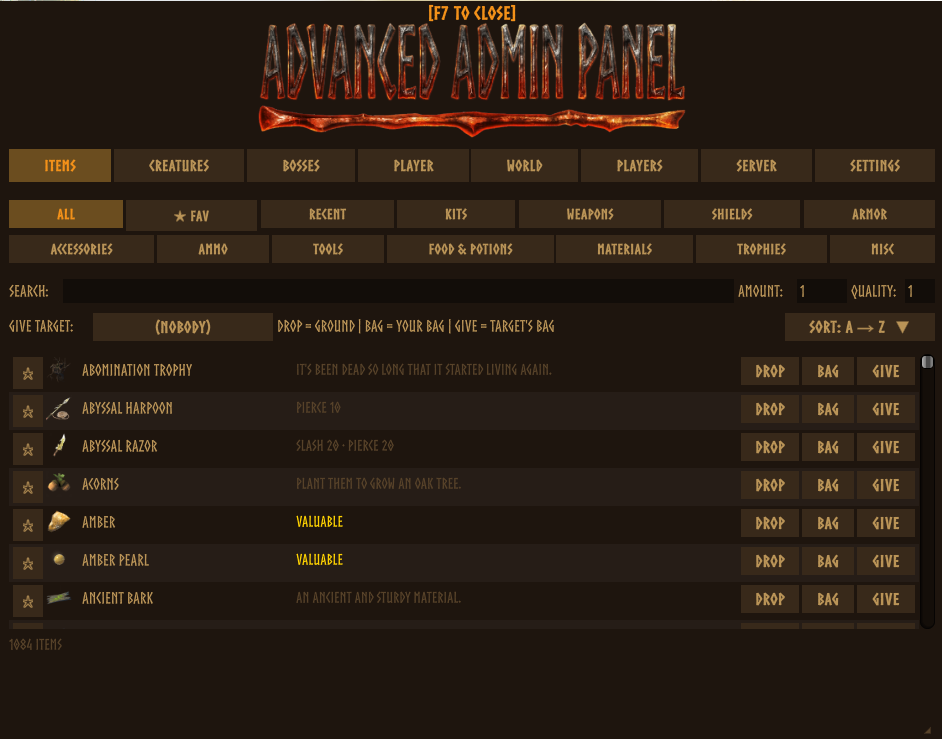
| 🎁 Items | Every item with icons, live search and real stats (damage, armor, food values). Categories, favorites, recents. One-click gear kits from Bronze to Ashlands, bulk packs, and give straight into any player's inventory. |
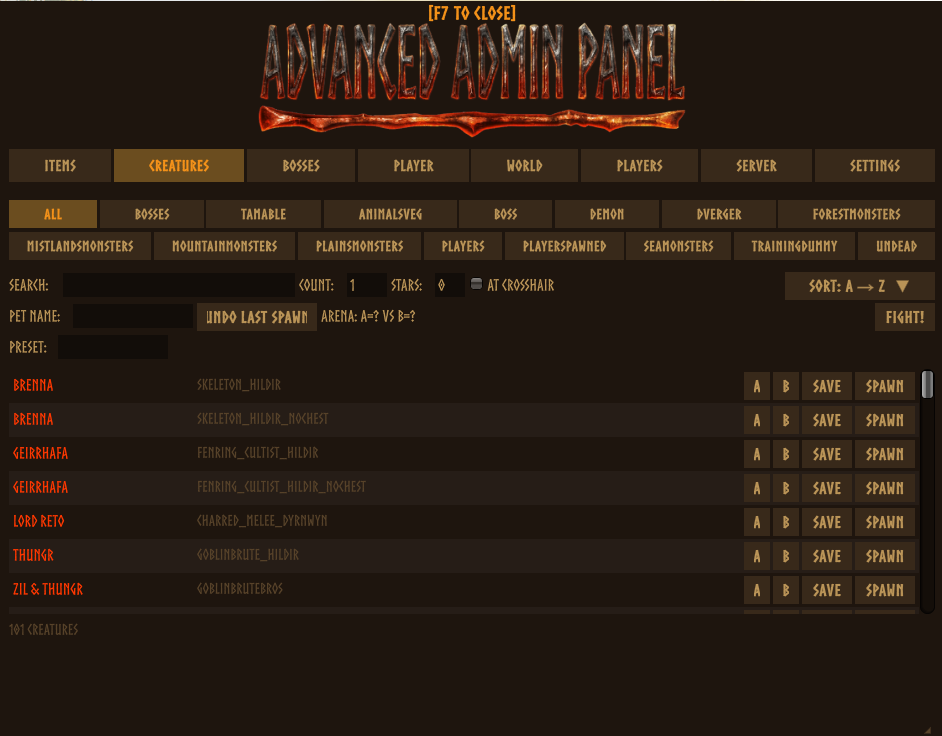
| 🐗 Creatures | Spawn by faction with count and star level, at your crosshair, optionally pre-tamed with a pet name. Saved presets, undo last spawn, arena mode (A vs B). |
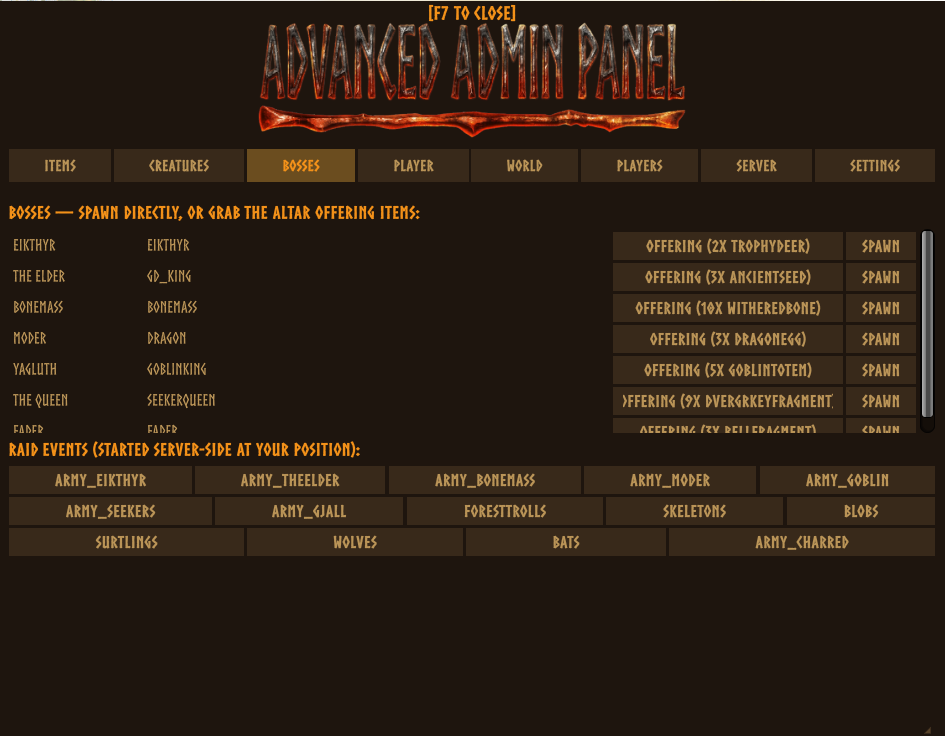
| ⚔ Bosses | One-click summons from Eikthyr to Fader, instant altar offerings, real raid events at your position. |
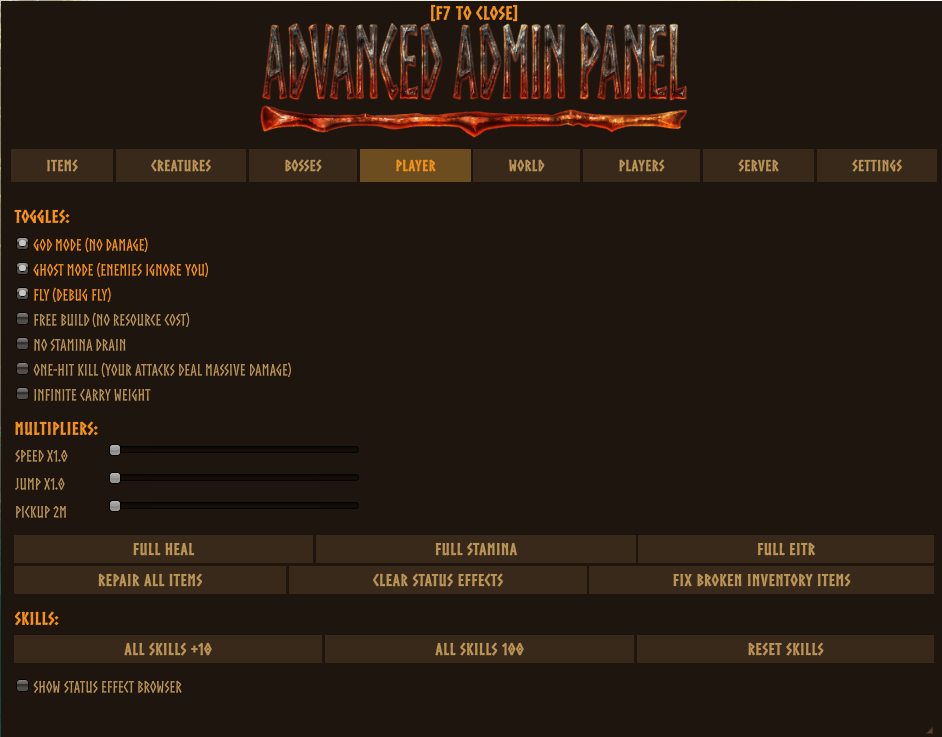
| 🏃 Player | God mode, ghost, fly, free build, no stamina, one-hit kill. Speed, jump and pickup sliders, skill +10 / max / reset, a categorized status-effect browser. Buffs persist through death. |
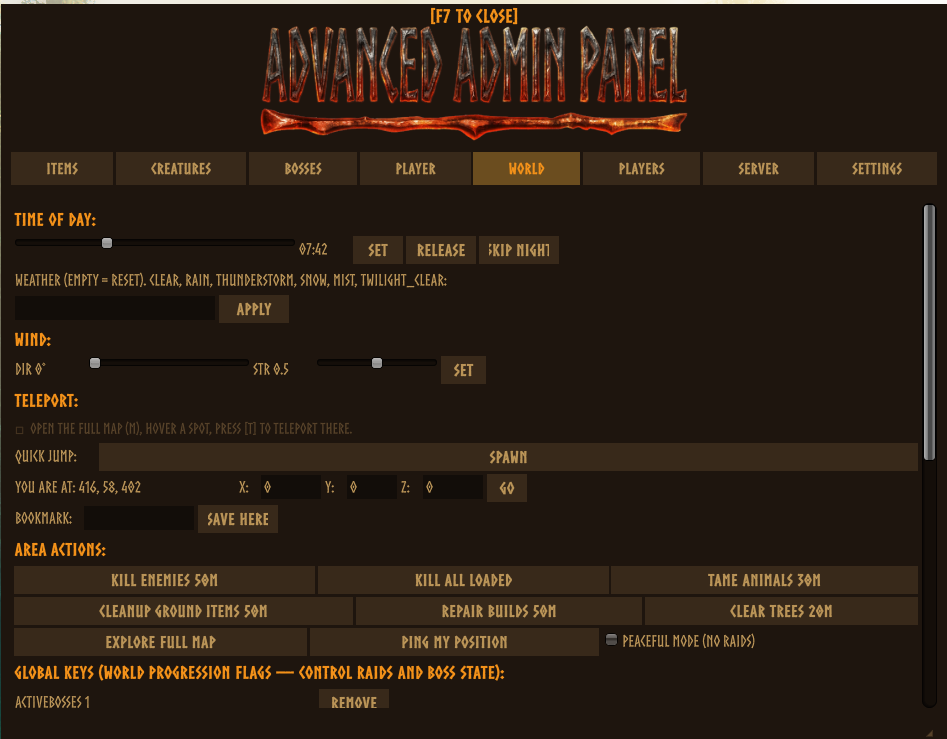
| 🌍 World | Time and weather control, wind for sailing, teleport bookmarks, quick-jump to boss altars, teleport to any map point (open the map, hover, press T). |
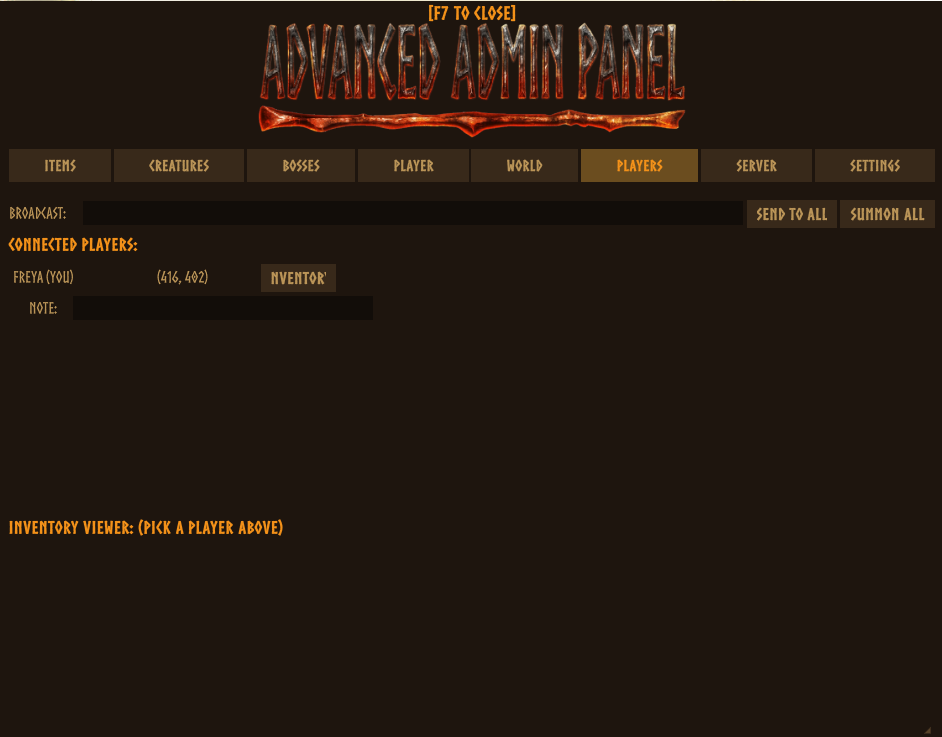
| 👥 Players | Live roster: teleport to, summon, spectate, heal, ping, lightning strike, live inventory viewer, kick / ban, per-player admin notes. |
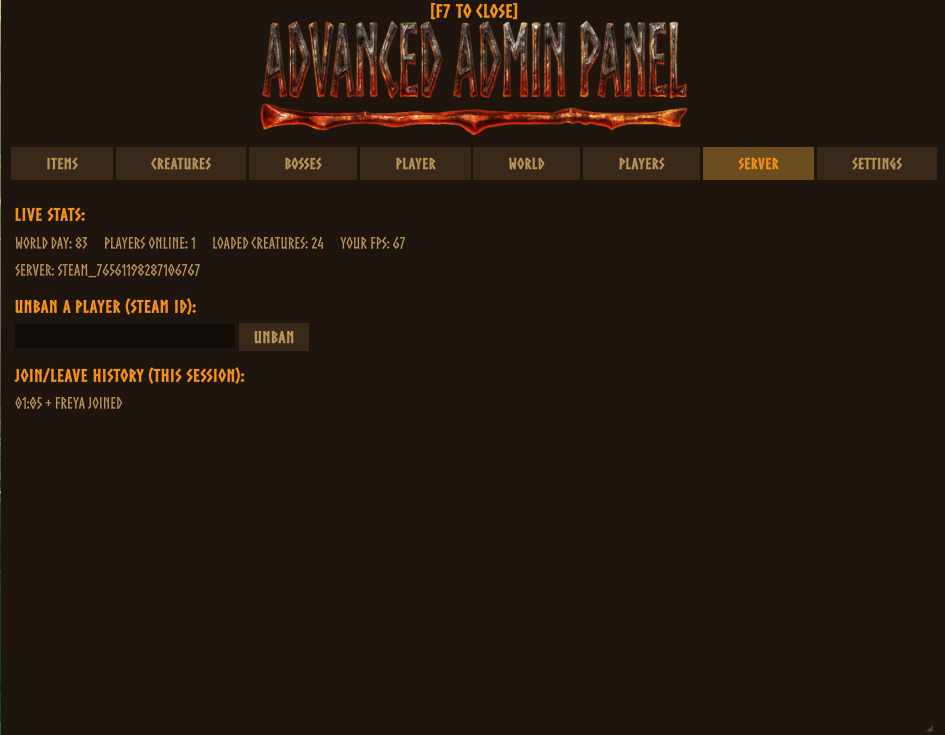
| 📊 Server | Stats read from the server itself: ZDO count, per-peer ping, last-save and next-autosave clocks, the server's plugin roster, admin and ban lists, join / leave log, force save, offline ban / unban by ID. |
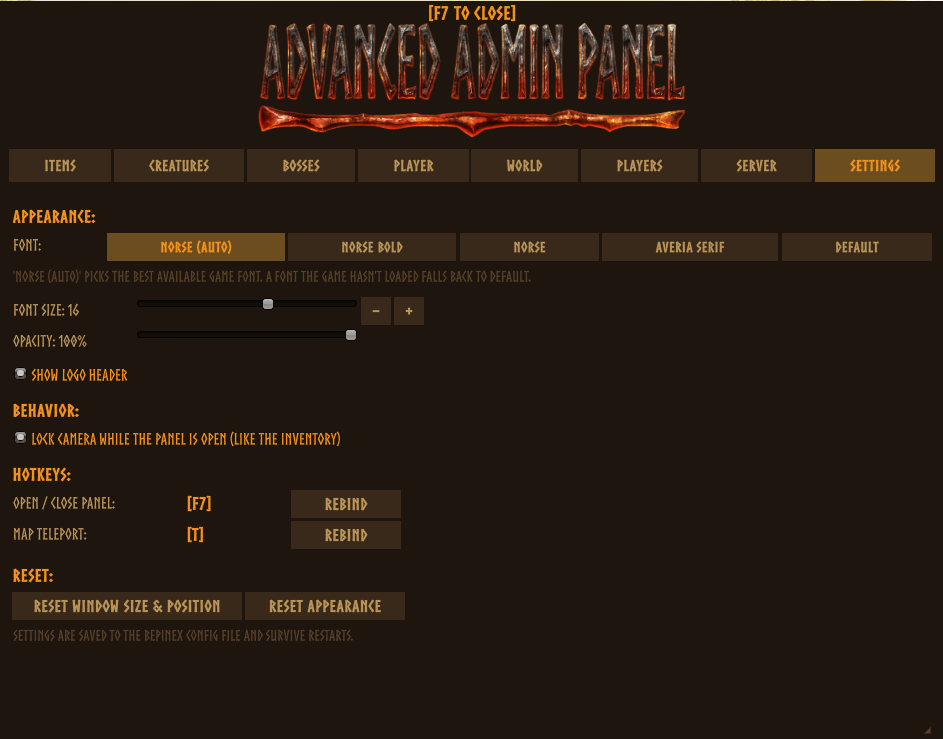
| ⚙ Settings | Language, font and size, panel opacity, logo header, camera lock, hotkey rebinding. All in-game, all persistent. |
| 🧰 Tools | 32 optional modules for dedicated-server admins, grouped into Moderation, Server, Players, World and Shortcuts. See below. |
Tools: 32 server modules
Every module is a chip in the Tools tab: pick a category, then a section. Everything that changes server behaviour is off by default and needs the companion on the server. Every section can be hidden in the config file (section Features).
| Category | Sections |
|---|---|
| Moderation | Moderation (warn, mute, freeze, jail, watchlist, temp-ban, lockdown), Rap Sheet, Roles (tiered admin roles), Audit (audit trail), Guard (anti-cheat rules: fly, speed, health, noclip, damage cap; client-mod reports; dry-run mode), Staff Chat, Direct Message |
| Server | Server Tools (MOTD, scheduled restarts, backups and staged restore), Diagnostics (performance, log tail, self-test), Discord (webhooks), Client Performance (census), Extensions (SDK) |
| Players | Player Data (vault, offline queue, death log, rescue, reset), Economy (shops, ledger), Bounties, Death Rules, Skill Rules, Map Reveal, Trader Stock, Blacklist, Item Forge |
| World | Area Tools (protection zones, ownership transfer, mass remove), Build Tools (piece editor, blueprints, terrain reset, free camera), Locations (finder), Spawners, Containers (chest inspector), Tames (roster), Creature Editor, Map Pins, Raid Composer |
| Shortcuts | Macros (command palette and macros), Workflow (batch actions, quick-action bar) |
How the security works
Two layers, and it helps to know what each one does.
- The panel's admin gate (client side, since 2.5.5). When you join a server the panel asks the companion whether your ID is in that server's
adminlist.txt(the game itself also hands every client a copy of that list, which the panel uses until the companion answers). If you are not an admin there, or the server has no companion, the whole window is replaced by a notice with a Re-check button; no tab, tool or self-only cheat is reachable. The companion writes one line to the server log per connection when a non-admin opens the panel. This gate is honesty for normal players. A modified client can remove it, which is why the second layer exists. - The companion (server side). Every request that goes through the server (spawn, give, teleport, kick, ban, heal, inventory, broadcasts, world events, skills, and the Tools modules) is validated server-side against
adminlist.txtwith the game's own admin rules, and the companion re-stamps the true sender ID so forged requests are dropped and written to the audit log. Without the companion on the server, nothing is enforced and every server action is silently dropped. The companion also drops the game's own inbound "AdminList" / "PlayerList" RPCs on the server, which a modified client could otherwise use to rewrite the server's in-memory admin list (a vanilla gap, present with or without this mod). - What only the gate covers. Self-only toggles (god mode, fly, no stamina, one-hit) and the tools that edit objects the game lets any client edit (World-tab kill / tame / clear tools, global keys, the Build Tools piece editor and terrain reset, the Creature Editor, the Item Forge) run on the admin's own client. Valheim trusts clients for those, as it does for every client mod. They sit behind the admin gate, not behind the companion. Pair with a server-side anticheat if you need to stop a modified client from doing what the game already allows it to do.
Languages
Ships with English, Deutsch, Español, Français, Italiano, Nederlands, Polski, Português (BR) and Svenska, following Valheim's language setting by default (override it under Settings → Language). Item and creature names always follow the game.
Want another language? Drop a <code>.txt into BepInEx/plugins/AdminPanel_Localization/. No rebuild needed, and untranslated lines fall back to English. Pull requests are welcome.
Compatibility
- Custom weapons, armor and creatures from other installed mods appear automatically. To spawn modded content on a dedicated server, that mod must also be installed server-side.
- Works alongside ValheimPlus and other BepInEx mods.
- Built against the current Valheim release. Both DLLs run a self-check at startup and report on the Server tab if a game update broke anything.
FAQ
The panel shows a version-mismatch banner. The client and server companion differ. Update AdminPanelCompanion.dll on the server (and both DLLs on the client) to the same release and restart.
I am in adminlist.txt but server actions say I am not an admin. Update to 2.5.3 or later. Older companions only matched the bare SteamID64 and rejected the Steam_ and V_ forms that hosting panels write.
The panel says "You are not an admin on this server". Your ID is not in that server's adminlist.txt in any form the game accepts. Ask the owner to add it (one ID per line) and press Re-check; a companion restart is not needed. If you are the owner and you are sure the ID is there, check the server log for Loading [AdminPanelCompanion and for the line the companion writes when a non-admin opens the panel.
The panel says "This server does not run AdminPanelCompanion.dll". No companion answered within 15 seconds. Install both files on the server, in BepInEx/plugins/ of the instance players join, then do a full stop and start.
Everyone who installs the mod gets the panel on my server. They get the window, not the powers. Since 2.5.5 non-admins see only the notice; before 2.5.5 they saw the tabs while every server action was denied. Either way, install the companion on the server, that is what enforces adminlist.txt.
Do I need the companion in single-player? Yes, both DLLs. You are the host there, so no adminlist entry is needed.
A Tools section shows "no reply from the companion". The server has no companion, an older one, or you are not an admin there. The Server tab shows which.
Screenshots
Support
- Discord: Hephaestus Labs for help and bug reports. The panel also has a one-click bug report on the Server tab.
- GitHub for source, releases and the full changelog.
Advanced Admin Panel is an unofficial, fan-made mod and is not affiliated with or endorsed by Iron Gate AB or Coffee Stain Publishing. Valheim™ and its visual style are the property of Iron Gate AB. The logo is fan art inspired by Valheim's official logo design.
CHANGELOG
Changelog
2.5.5
BOTH DLLs are 2.5.5 — server owners: update AdminPanelCompanion.dll on the server and restart. Built for Valheim 1.0.14.
- The panel now knows whether you are an admin on the server you are on. Until now the window opened with every
tab for anyone who installed the client DLL; on a server with the companion their server actions were denied
silently, and on a server without it nothing was denied at all, so "everyone has admin" is what owners saw. Now the
companion answers the version handshake with your
adminlist.txtverdict (same rules as every server action), and the panel uses the adminlist copy the game hands every client until that answer arrives. Not an admin, or no companion within 15 s: the whole window body is a notice with a Re-check button. Nothing else is reachable, the self-only cheats included (god, fly, ghost, free build, no stamina, one-hit, weight, speed, jump, pickup), the command palette and its hotkey, macros and the free camera. Admins see no change; a listen host is always an admin. - Server log line per non-admin. The companion logs
peer <id> (<name> / <steamid>) opened the Admin Panel but is not in adminlist.txtonce per connection, and no longer writes aDENIED admin actionline for the handshake itself. - Reply spoofing closed. On a remote client the version and health replies are accepted only from the connected server peer, like every other server-truth reply; a host accepts only its own in-process companion.
- The server's adminlist can no longer be rewritten over the network. The game registers its "AdminList",
"PlayerList" and "HistoricalPlayerList" RPCs on every connection, server side included, and on the server the
admin list it fills is the live
adminlist.txtcopy. A modified client could invoke "AdminList" with its own id and be an admin for the game and for this companion until the file changed on disk. The companion now drops all three on the server and logs the sender once. (Vanilla behaviour, present without this mod.) - One Tools tab, five categories. The Extras and Tools tabs (16 chips each, wrapping into three rows) are one
Tools tab: a category row (Moderation, Server, Players, World, Shortcuts), then the sections of that category, then
the section body. The body is one scroll view with the same bottom edge for every section, so sections without a
list of their own (Direct Message, Creature Editor, Map Reveal, Skill Rules, Item Forge, Raid Composer) no longer
run off the window and lists inside a section can never be taller than the body. The last chip is remembered per
category. Config keys are unchanged (
EnableExtrasTab,Show*Section). - Guard rule 'damage' (on by default when EnableAntiCheat is on). The companion relays every hit sent to a character
someone else owns; a hit whose damage total exceeds
AcDamageCap(default 10000) is now dropped before it reaches the target and the sender is flagged. This is the one rule that prevents rather than reports: one-hit-kill cheats never land on other players, their tames, or creatures simulated near someone else. Hits on creatures the cheater's own client simulates never pass through the server (vanilla design) and stay invisible to it. - Handshake at spawn. The companion version / admin handshake now goes out as soon as the player is in-world, not on the first F7, so the command palette and map-teleport hotkeys work for admins who never open the window, and a missing companion is known by the time the panel is first opened. Pressing F7 on the loading screen no longer starts the 15 s no-reply clock early.
- README rewritten around what each layer protects. The old text said every world or player action was validated server-side. That is true of everything that goes through the companion, and not of the client-side tools (World-tab kill / tame / clear, global keys, piece editor, terrain reset, Creature Editor, Item Forge), which the game lets any client do and which now sit behind the admin gate. The FAQ covers the two new notices and the "everyone gets the panel" question, and the quick start tells server owners which log lines prove the companion is loaded.
- Reported from an AMP-hosted server whose log showed the companion was never loaded (the zip was in place, the plugin was not). Thanks for the log; it is what made both halves of this visible.
2.5.4
BOTH DLLs are 2.5.4 — server owners: update AdminPanelCompanion.dll on the server and restart.
- The companion self-update module is gone. Thunderstore's Global Rules require packages to rely on mod
managers for updates rather than be capable of updating themselves, and this module (check GitHub, download and
stage
AdminPanelCompanion.dll, swap it in at the next restart) was exactly that. Nothing in either DLL downloads or replaces files any more. Update through your mod manager or from the GitHub releases page; the in-game notice that a newer version exists stays, and only opens that page in your browser. The Extras tab now lists 32 modules. A leftoverAdminPanelCompanion.dll.stagedfile next to an older companion is no longer applied; delete it by hand.
2.5.3
BOTH DLLs are 2.5.3 — server owners: update AdminPanelCompanion.dll on the server and restart.
- Admins were denied on servers whose adminlist.txt holds a prefixed id. A Steam-socket server reports a
player's bare SteamID64, while
adminlist.txtmay store the same id asSteam_<id>or as the display formV_<id>that hosting panels write when you add yourself. The game accepts all three; the companion only matched the bare form, so every server action was refused (DENIED-NOT-ADMINinaudit.log, no replies to the Extras tab, while client-only toggles like time of day or fly kept working). Adminlist membership now goes through the game's ownZNet.IsAdmin, with the old list scan kept as a fallback. Reported from a GPortal server.
2.5.2
BOTH DLLs are 2.5.2 — server owners: update AdminPanelCompanion.dll on the server and restart.
A full review of the 2.5.1 hotfix (15 findings) is fixed here. The four that mattered:
- Terrain reset could flatten a zone for everyone.
TerrainComp.Savegained a parameter in 1.0.12; the reset zeroed the terrain data in place, then the save call threw, leaving the zone flat on the admin's client until the next vanilla save persisted it. It now validates every engine handle before touching anything, keeps a snapshot, restores it if the engine refuses the save, and counts only zones that were really written. - Backups understand chunked worlds. 1.0.12 saves a world as a folder (
_main.N.db2/.fwl2/.chunks/.okplus chunk files), not a.db/.fwlpair. Backup sets now copy the complete current generation and verify it, listing, retention and free-space checks work on sets, the staged restore swaps the whole directory (the previous folder is kept, never deleted) and reports "applied" only after re-verifying, and the self-test / save-health views report the real files. Legacy worlds keep the old pair behaviour. - Portals are counted again. Portals live outside the sector array in 1.0.12; every world scan (census, hotspots, tames, chests) now walks them too, and the portal list is deduplicated (a portal moved across a zone edge sat in two buckets; a removed one could linger as a phantom).
- Bug reports show the real game version (
Version.GetVersionString(bool)was looked up with the wrong shape).
Hardening so this class of failure is visible next time:
- Startup self-check in both DLLs: every method is JIT-compiled at startup; anything that no longer binds to the running game is logged once, shown on the Server tab, and (for the server companion) sent to the panel as a warning — instead of a silent "did nothing". A game version newer than the one the build targets logs a warning.
- The build fails when Valheim updates: both projects now compile against the live install, refuse the frozen fallback copy, and stop with an error when the installed Steam build differs from the verified one.
- Shared, silent, cached engine lookups (world identity, save layout, sector containers) replace duplicated per-call reflection; dead pre-1.0.12 fallbacks and stale engine comments are gone; the "needs companion X" hint is generated from the panel version and distinguishes "no reply yet" from "companion is older".
- Object scans reject centres beyond the world edge, so a far-off coordinate can no longer return every stray ZDO.
2.5.1
Hotfix for Valheim 1.0.12 (the 11 September game update). BOTH DLLs are 2.5.1 — server owners: update
AdminPanelCompanion.dll on the server and restart, or the panel shows a ⚠ version-mismatch banner.
2.5.0 was compiled against a copy of the game assemblies that had not been updated since July. On the current game the runtime silently refused every call whose signature had changed (the failures were caught and logged as "did nothing"). All of it was found by reading the server's own log and rebuilding against the live game; the projects now compile against the live install, so a future game update fails the build instead of failing on your server.
- The companion's data store never resolved its folder -
World.m_fileNameno longer exists (the on-disk name isWorld.m_worldNamenow), so nothing server-side persisted (roles, warnings, temp-bans, ledgers, audit trail) and the lookup spammed a HarmonyX warning ~30x per second (a 213 MBLogOutput.login one day). The store now resolves the world name silently and caches the lookup, with a fallback to the game's own DB path if the field is renamed again. - Rule broadcasts and the death-rules tick failed with
Field not found: ZRoutedRpc.Everybody- the game turned that field into a constant. - Every sector walk was dead: tombstone search, area counts and cleanup, object block collection, the
world scan's zone hotspots, the location finder and the "highest nearby object" helper all used the old
FindSectorObjects(zone, area, ...)shape; the game now takes aSimulationDistanceand zone coordinates areVector2s. One shim (ZoneCompat) reproduces the old square walk on the new API. - Portal list and portal rescue read
GetPortals()as a flat list; it is now grouped per sector index. - Self-update version compare picked up the game's own global
Versionclass instead ofSystem.Version. - Terrain reset (Build Tools) called
Heightmap.Poke(bool); the signature changed. - The Discord "world name" and backup path helpers used the removed
m_fileNamefield and now share the fixed resolver; the world scan no longer warns about the removedm_objectsByOutsideSectorbucket.
Also in this release: the in-panel What's New window now shows the 2.5.x notes (2.5.0 still showed the 2.3.0 text), and the Server tab's "waiting for server data" hint names the right companion version.
2.5.0
BOTH DLLs changed — AdminPanel.dll AND AdminPanelCompanion.dll are 2.5.0. Server owners: update
the companion on the server and restart, or the panel will show a ⚠ version-mismatch banner and the new
server features will stay silent (unregistered RPCs are dropped without a log line).
This is the biggest release so far: the 2.4.0 "server-truth" Server tab that never shipped, plus a new
Extras tab with 33 optional modules for dedicated-server admins. Every module that changes
behaviour on the server defaults OFF; passive views and logging default on. The whole tab can be
hidden with [Features] EnableExtrasTab = false.
The Extras modules are new and have had far less field time than the eight base tabs. Single player is a smoke test; dedicated servers are the real proving ground. If something misbehaves, the in-panel Bug Report (side window) or the Discord is the fastest way to get it fixed.
New — Server tab is now the "server truth" center (the 2.4.0 work)
Data is read authoritatively from the server instead of guessed by the client: uptime, real ZDO count, per-peer ping, last-save clock and next autosave, the server's BepInEx plugin roster (spot a stale companion at a glance), admin/banned/permitted lists, a server-side join/leave log that survives your relogs, force save, and offline ban / unban by ID (crossplay IDs stored as entered). Reply parsers reject anything that did not come from the server peer, so "server truth" cannot be spoofed. Listen-server hosts get the same actions through a local bridge.
New — the Extras tab (9th tab, one chip per module)
Moderation & accountability: Moderation (warn / mute / freeze / jail / watchlist) · Audit Trail (every admin RPC, old and new, logged at one chokepoint — off the main thread) · Admin Roles (tiered grants, custom roles) · Player Rap Sheet (notes, history, recent chat) · Direct Message · Guard (anti-cheat probes; "no answer" is its own status, never "clean").
Server operations: Server Tools (MOTD, announcements, scheduled restarts, backups) · Diagnostics (self-test, RPC round-trip, log tail) · Discord (one-way webhooks for joins, deaths, bans, boots) · Player Data (playtime, tombstones, last position, queued offline actions) · Economy (currency, shops, reserved slots) · Extensions (a small SDK other plugins can register sections into) · Macros and Workflow (command palette, favourites, help pages).
World & build: Area Tools (protection zones, bulk cleanup with an undo list) · Build Tools (piece palette, snap/rotate helpers, mass repair) · Server-wide Map Pins · Map Reveal / Reset for any player · Location finder (nearest dungeons, altars, spawners) · Spawner and nest manager · Containers (chest inspector / editor, container search) · Tames (roster, rename, cull) · Creature stat editor.
Rules & events: Recipe and build-piece Blacklist · Skill Gain Rules (rate and cap, server-enforced) · Trader stock and prices · Death rules (keep-inventory, tombstone handling) · Raid Composer (custom multi-wave raids) · Bounty board · Staff Chat (admin-only channel) · Item Forge (give with attributes) · Client performance census · Companion self-update (staged for the next restart).
Actions that need the target player to run the mod (inventory, skills, status effects, map, trader, blacklist enforcement) say so in the UI and are ignored, not broken, when they don't.
Fixed
- Crossplay bans through the roster Ban button and offline ban now keep the full platform ID (they were prefix-stripped and silently did nothing). Unban matches the same way.
- Force save no longer blocks the main thread; guarded against overlapping saves.
- Last-save timestamp now works on headless dedicated servers (it relied on a client-only HUD event).
- Server tab state resets on disconnect, so server A's ban list is never shown as current on server B.
- Kill nearby has an include tamed toggle instead of always sparing tames.
- Extras chip row navigates in both directions; empty sections explain why they are empty (press Scan / nothing yet / multiplayer-only) instead of looking broken.
- Economy: a purchase could be settled with a sale confirmation (items kept AND money paid).
- Unban regression introduced by the crossplay ban fix — caught in review before release.
Localization
All nine languages ship the complete 2065-key table (validator green). Community overrides in
BepInEx/plugins/AdminPanel_Localization/ still work and fall back to English per line.
2.3.0
BOTH DLLs changed — AdminPanel.dll AND AdminPanelCompanion.dll are 2.3.0. Server owners: update
the companion on the server and restart, or the panel will show a ⚠ version-mismatch banner.
New — the panel speaks your language
Eight translations ship in the DLL: Deutsch, Français, Español, Italiano, Português (BR), Polski, Nederlands, Svenska. By default the panel follows Valheim's own language setting; override it under Settings → Language. Item, creature and status-effect names always follow the game, as before.
Translators: drop a <code>.txt file into BepInEx/plugins/AdminPanel_Localization/ to override or add a
language without rebuilding the mod. A missing line falls back to English on its own, so partial
translations are perfectly usable.
New — relevance-ranked search
Searching Items or Creatures now ranks results: exact match, then prefix, then word-start, then anything
else. Typing iron puts Iron first instead of burying it in an alphabetical list — previously "Banded
shield" (prefab ShieldIronSquare) came first. Typing sledge now finds "Iron sledge", which plain prefix
matching missed entirely. Your chosen sort still orders results within each relevance band.
Typing is also much cheaper: the list no longer re-filters and re-sorts the entire item database on every single keystroke.
New — multi-step undo, per admin
Undo spawn now steps back through your last 20 spawns instead of only the most recent one, and the history is per admin — your undo can no longer delete a spawn another admin made. The server reports how many steps are left after each undo.
New — destructive actions ask first
Kill ALL loaded, Ground items 50m, Clear trees 20m and per-player Ban now arm on the first click and only fire on a second click within 3 seconds.
New — status effects for any player
The status-effect browser (Player → Status effects) now has the same Me / any online player target picker as the skill browser. Effects are validated on the server and applied on the target's own client — the target needs companion 2.3.0 on their side.
Fixed — Undo actually removes objects on dedicated servers
Undo looked fine in the server log but the creature kept standing. Root cause: dedicated servers don't
instantiate creatures (the nearest client simulates them), and on that path Valheim's ZDOMan.DestroyZDO
is a silent no-op unless the caller owns the ZDO. The server now claims ownership of the raw ZDO first,
so the destroy actually broadcasts. Found by reading the server's own log against the client's.
Fixed — scrolling panel lists no longer zooms the vanilla camera
2.2.9's fix restored the zoom distance after the camera had already been positioned from it, so every
scroll tick still visibly zoomed. The wheel reads are now muted at the IL level inside
GameCamera.UpdateCamera/UpdateFreeFly while the panel is open (verified at startup — grep the log for
patch-verify), and no longer tied to the camera-lock toggle.
Known limitation: ValheimPlus's FirstPerson feature implements a second, independent scroll-zoom. This release includes a best-effort mute for it, but if your server force-syncs a V+ config with FirstPerson enabled you may still see some camera zoom while scrolling the panel. Vanilla and non-V+ setups are fully covered.
Fixed — layout at large font sizes
At font size 14+ labels tuned for the default size wrapped mid-word ("Broadcas / t:") and buttons stretched to fill leftover row space ("Send to all" as a half-window slab). Form labels now grow with their text, list columns clip instead of wrapping, and buttons size to their content.
New — support the developer
An optional Buy the developer a coffee button in Settings opens PayPal in your browser. The mod is free and always will be.
Improved — Server tab
Added ZDOs loaded, zones loaded and session uptime alongside the existing stats.
Improved — performance and rendering
- Live stats, player rosters, global keys, bookmarks and spawn presets are now built once per frame instead of on every IMGUI pass (which runs at least twice per frame).
- Fixed a latent crash: deleting a bookmark or saving a preset rewrote the config mid-frame, which could desync IMGUI's control count.
- If the game's Norse font cannot draw the active language, the panel now switches to a readable font automatically instead of rendering blank boxes.
2.2.9
BOTH DLLs changed — AdminPanel.dll AND AdminPanelCompanion.dll are now 2.2.9. From this release
on the two files always share one version number, and the panel warns in-game when the server's companion
doesn't match ("⚠ Version mismatch"). Server owners: update the companion on the server and restart.
New — manage player inventories
The Players-tab inventory viewer now has Remove 1 / Remove all per item. Removal runs on the target player's own client (admin-validated through the server), unequips equipped items first, and pushes the refreshed inventory back to your viewer automatically.
New — skill browser with targets and private notes
Player → Skills → Show skill browser: every skill with its level and −10 / −1 / +1 / +10 / +100 / ±custom buttons. Apply to yourself or any online player — with an optional private note that pops center-screen only for that player, together with the skill's new value. Empty note = silent change.
Fixed — Skip night actually skips night
The old button flipped a local debug flag and did nothing (world time is server-owned). It now runs the game's own sleep-skip on the server — same effect as everyone going to bed.
Fixed — camera zoom while scrolling the panel (for real)
2.2.8's input patch was silently bypassed by JIT inlining. The camera's zoom distance is now pinned directly while the panel is open — there is no path around it.
More
- Teleport to any online player (World → Teleport), and Teleport / Area actions reorganized into labeled rows (To player / Bosses / Position / Bookmark · Combat / Cleanup / World).
- Mod version on the title screen, under the game's version line.
- ✕ close button on the panel (and the side panel's What's New ↔ Bug Report switch works both ways).
- Hotkeys can bind middle/side mouse buttons.
- Buttons grow to fit their text — no more clipped labels; the panel can no longer get stuck on the wrong font after visiting the main menu.
- Bug-report screenshots include the panel (that's usually the thing being reported).
2.2.8
Only AdminPanel.dll changed (→ 2.2.8). The companion stays at 2.1.2.
Fixed — panel styles broke after logging out and back in
Logging out to the main menu made the game unload the textures and font behind the panel's skin, so after relogging every button, tab and chip rendered as flat text with no background. The skin now survives the unload sweep and self-heals if anything still gets destroyed, and all per-world caches (item icons, creatures, player roster) reset cleanly on logout instead of pointing at destroyed objects.
New — What's New & in-panel bug reports
A side panel docked to the main window, with two tabs:
- What's New — opens once after each update (toggle in Settings → Panel).
- Bug Report — describe a bug and send it straight from the game, with an optional screenshot (the panel hides itself for the capture). A Join our Discord button is right there too.
New — TP to last death
Your death position is recorded automatically; Player → Quick actions → TP to last death takes you back to your corpse. Survives a relog.
New — update notice
When a newer version is released, the panel shows a banner at the top with a Get update button (one quiet GitHub check per game launch; fully silent when offline).
Fixed — scrolling a panel list no longer zooms the camera
The mouse wheel was reaching the game camera while the panel was open. Blocked the same way as mouse-look (honors the Settings → Behavior camera-lock toggle).
Changed — cleaner tabs
Every tab is reorganized with section dividers (Settings, Player, World, Players, Server, Bosses), so long tabs read as titled sections instead of one wall of controls.
2.2.7
Both DLLs changed. AdminPanel.dll → 2.2.7, AdminPanelCompanion.dll → 2.1.2. Update both.
Fixed — admin actions did nothing in single-player
If you hosted the game yourself (single-player, or a listen-server for friends), every server-executed action silently did nothing: spawning items/creatures/bosses, Bag/Give, kits, undo, summon, heal, kick, ban, broadcast, events and peaceful mode. The panel said "Requested ..." and nothing happened.
The companion identified the caller by looking them up in the server's peer list, but a host is never in that
list — it only ever contains remote connections. So the host failed the admin check before adminlist.txt
was even read, which is also why adding your own Steam ID to the list didn't help. The host is now recognised
as an admin directly, the way the game itself does it.
Client-side features (buffs, teleport, fly, the map-point T teleport) were never affected, which is why
those kept working while spawning didn't.
Dedicated servers were never affected — admins connect as remote clients and were always resolved correctly. Server owners can update at their convenience; there is no behaviour change for them.
New — logo header
The Advanced Admin Panel logo now sits above the tabs. Toggle it in Settings → Show logo header.
Notes
- In single-player you no longer need an
adminlist.txtentry (it never actually worked there anyway). - Denied admin actions are now logged instead of failing silently, so this can't hide again.
2.2.6
New — Settings tab
The panel has a Settings tab so admins can customize it in-game (no config-file editing):
- Font — Norse (auto), Norse Bold, Norse, Averia Serif, or Default; missing fonts fall back gracefully.
- Font size — 10–20 slider; the whole panel scales from it while headers/tabs keep their hierarchy.
- Panel opacity — 55–100% background transparency.
- Camera lock toggle — turn the inventory-style camera lock off if you prefer a live camera while the panel is open.
- Hotkey rebinding — rebind the panel key (F7) and map-teleport key (T) from the UI; Esc cancels.
- Reset buttons — reset window size/position or all appearance settings.
Everything persists in the BepInEx config and defaults render exactly like v2.2.5. Sliders preview live and only write to disk when you release the mouse.
Changed
- Minimum panel width raised 560 → 660 px so all 8 tabs always stay clickable in one row.
