
Please disclose if any significant portion of your mod was created using AI tools by adding the 'AI Generated' category. Failing to do so may result in the mod being removed from Thunderstore.
HexDevTools
Adds an in-game dev tools UI for running common Valheim dev commands.
| Date uploaded | 2 weeks ago |
| Version | 1.3.0 |
| Download link | Hex_Viking-HexDevTools-1.3.0.zip |
| Downloads | 118 |
| Dependency string | Hex_Viking-HexDevTools-1.3.0 |
This mod requires the following mods to function

denikson-BepInExPack_Valheim
BepInEx pack for Valheim. Preconfigured with the correct entry point for mods and preferred defaults for the community.
Preferred version: 5.4.2333
ValheimModding-Jotunn
Jötunn (/ˈjɔːtʊn/, 'giant'), the Valheim Library was created with the goal of making the lives of mod developers easier. It enables you to create mods for Valheim using an abstracted API so you can focus on the actual content creation.
Preferred version: 2.29.0README
HexDevTools
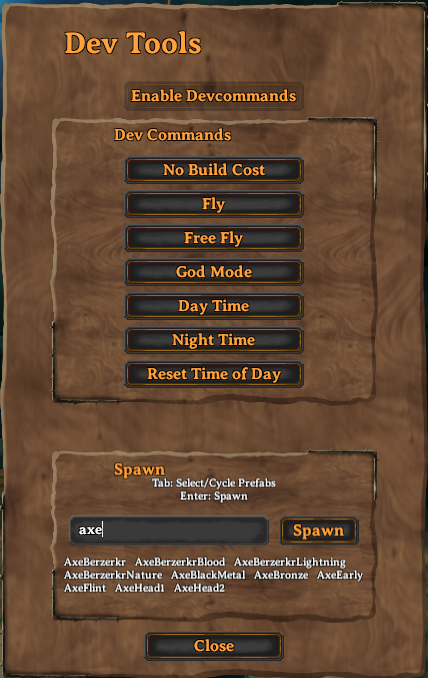
HexDevTools adds an in-game developer tools panel to Valheim, providing quick access to common developer commands through a simple UI.
Features
- Toggle the DevTools panel with a configurable hotkey (default:
F8) - Enable
devcommandsanddebugmode - Quick access to common developer commands:
- No Build Cost
- Fly
- Free Fly
- God Mode
- Day Time
- Night Time
- Reset Time of Day
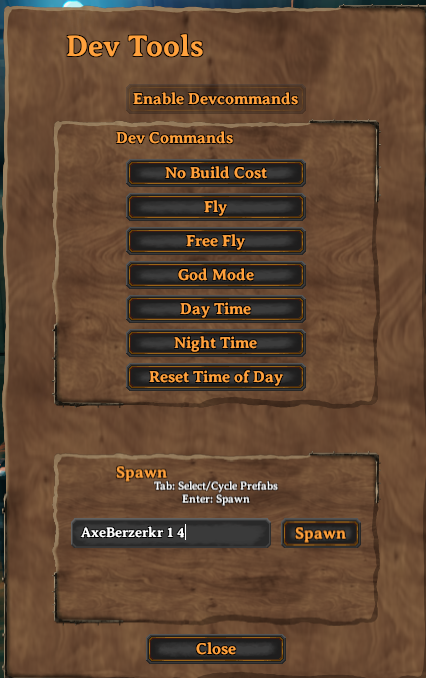
- Spawn prefabs with autocomplete
- Close the panel with the Close button,
F8,Esc, or by clicking outside the panel - Uses Valheim-style UI through Jötunn
Dedicated Servers
Valheim restricts many developer commands on dedicated servers.
To use HexDevTools on a dedicated server, install Server Devcommands by JereKuusela on both the server and client, and ensure your Steam ID / PlayFab ID is listed in the server's adminlist.txt file.
https://thunderstore.io/c/valheim/p/JereKuusela/Server_devcommands/
HexDevTools provides a UI for developer commands but does not bypass Valheim's built-in server restrictions.
Default Hotkey
F8
The hotkey can be changed in the configuration file.
Configuration
Configuration file:
BepInEx/config/hex.devtools.cfg
Example:
[General]

## Toggle Dev Tools UI
# Setting type: KeyboardShortcut
# Default value: F8
ToggleKey = F8
Modifier keys are also supported:
ToggleKey = LeftControl + F8
Usage
- Press
F8to open the DevTools panel. - Click Enable Dev Commands.
- Use the available developer command buttons.
- Enter a prefab name (and optional arguments) in the spawn box.
Example:
LoxPie 10
Runs:
spawn LoxPie 10
Installation
Install with a mod manager or copy the DLL into:
BepInEx/plugins/
Dependencies
- BepInExPack Valheim
- Jötunn
Feedback & Support
Report bugs, request features, or provide feedback on Discord:
Source Code
CHANGELOG
Changelog
v1.3.0
Added
- Dedicated-server support for DevTools commands
- Compatibility with the Server Devcommands mod
- Automatic detection of existing
devcommandsanddebugmodestates
Dedicated-server use requires the Server Devcommands mod and a correctly configured
adminlist.txtfile.
v1.2.0
Added
- Spawn prefab autocomplete
- Ability to close the DevTools window with the Esc key or by clicking outside the panel
- Discord support link
v1.1.0
Added
- UI button to reset the time of day to its default value
v1.0.0
- Initial release
