
Please disclose if any significant portion of your mod was created using AI tools by adding the 'AI Generated' category. Failing to do so may result in the mod being removed from Thunderstore.
VChat
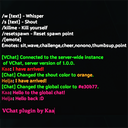
Adds a global chat channel, configurable colours per channel, chat history, removes auto character casing, and various other changes to improve the usage of the chat.
| Date uploaded | 5 years ago |
| Version | 1.0.0 |
| Download link | ItsKaa-VChat-1.0.0.zip |
| Downloads | 424 |
| Dependency string | ItsKaa-VChat-1.0.0 |
This mod requires the following mods to function

denikson-BepInExPack_Valheim
BepInEx pack for Valheim. Preconfigured and includes unstripped Unity DLLs.
Preferred version: 5.4.1600README
VChat
A simple chat improvement mod for Valheim, a single dll that works for both servers and clients.
Features
- Adds a global chat channel, currently only accessible if the dedicated server is hosting it and only visible for users that have the plugin installed.
- Colours! colours for every chat channel (whisper, local, shout, global) and also colours the input field, even when typing channel commands like
/shout [text]. - Sent message history that can be called using arrow up and down when the chat is focused.
- Easily configurable using ingame commands that can be also be adjusted in the configuration file.
- Removes the annoying auto caps and lowercases for the shout and whisper channels.
- Various other settings to improve the ingame chat.
Commands:
/s /l /say /local
/y /sh /yell /shout
/w /whisper
/g /global [text]
Switches to the provided chat channel, and if text is entered, also send a message to that channel.
- Examples:
- "/g Hello VChat" will send a message to the global chat channel and set it as the active channel for your next message.
- "/sh" will switch the currently active chat channel to shout.
/setlocalcolor /setshoutcolor /setwhispercolor /setglobalcolor [color]
Changes the chat colour for the chat channel visible in the command name, this accepts either a html string like #ff0000 or a name, like 'red'.
/showchat
Toggles the chat to always show or hide.
/showchatonmessage
Toggles the chat to show when a message is sent, this has no effect if /showchat is enabled.
/chatclickthrough
Toggles if the chat should be click-through, for example when the map is in front of the chat window.
/maxplayerchathistory
Sets the amount of messages that should be recorded so that the history can be called up with the up and down arrow. This is disabled if it's set to 0. Note that these are not saved to a file, restarting valeim will clear this list.
Installation (manual)
- Download BepInEx Package and follow it's installation procedure.
- Download the latest version of VChat from here.
- Navigate to the Valheim installation folder.
- For Windows:
- Open Steam and right-click on Valheim - Manage - Browse local files. This will open the directory where Valheim is installed.
- For Windows:
- Extract the contents (or just VChat.dll) of the VChat.zip archive into Valheim/BepInEx/plugins/
- Launch valheim and VChat should load. You can modify the configuration file located in Valheim/BepInEx/config/org.itskaa.vchat.cfg or use the ingame commands.
- Note that for the global chat to work, this mod has to be installed on the server as well, if you are the owner, please repeat this process for the server.
Or you can use the mod manager r2modman.
Changelog
1.0.0
- Initial release
