
Please disclose if any significant portion of your mod was created using AI tools by adding the 'AI Generated' category. Failing to do so may result in the mod being removed from Thunderstore.

AdminHammer
Admin tool in SeneaL UI style: spawn creatures like the hammer places pieces, drop items like a broken chest, and change world modifiers live on your server.
| Date uploaded | a week ago |
| Version | 1.0.2 |
| Download link | Jatify-AdminHammer-1.0.2.zip |
| Downloads | 89 |
| Dependency string | Jatify-AdminHammer-1.0.2 |
This mod requires the following mods to function

denikson-BepInExPack_Valheim
BepInEx pack for Valheim. Preconfigured and includes unstripped Unity DLLs.
Preferred version: 5.4.2202
ValheimModding-Jotunn
Jötunn (/ˈjɔːtʊn/, 'giant'), the Valheim Library was created with the goal of making the lives of mod developers easier. It enables you to create mods for Valheim using an abstracted API so you can focus on the actual content creation.
Preferred version: 2.30.2README
AdminHammer
An admin tool for server owners and game masters, built from SeneaL UI's own interface kit so it looks like the rest of your SeneaL game.
Thunderstore · GitHub · jatify.com
What it does
- Admin hammer. A gold hammer for admins. Right click opens the admin panel, like the hammer opens the build menu.
- Spawn creatures like building. Pick a creature, set its stars (0-2) and a count, and a ghost of it follows your aim. Left click places it, the mouse wheel turns it, right click goes back to the menu. You can also spawn a creature next to any online player.
- Drop items. Pick an item and an amount (1, 10, 50 or a full stack) and it spills out in front of you, or a chosen player, like a broken chest.
- World modifiers, live. The same sliders and switches as Valheim's world-modifier screen (combat, death penalty, resources, raids, portals, no build cost, passive mobs, ...), applied on the server at once. Only the menu's own settings are used, so the world is never flagged as cheated.
- Every creature by biome, with a rendered portrait of each (cached after the first time), Deep North and Ashlands included. Hover anything for details.
- Add-on tabs. Other mods can add their own tab to the panel (
AdminHammerApi.AddTab).
Add-ons
- BuffMeDaddy: a Buffs tab to give yourself or other players any status effect, and switch off its time limit. Optional; AdminHammer works without it.
Screenshots
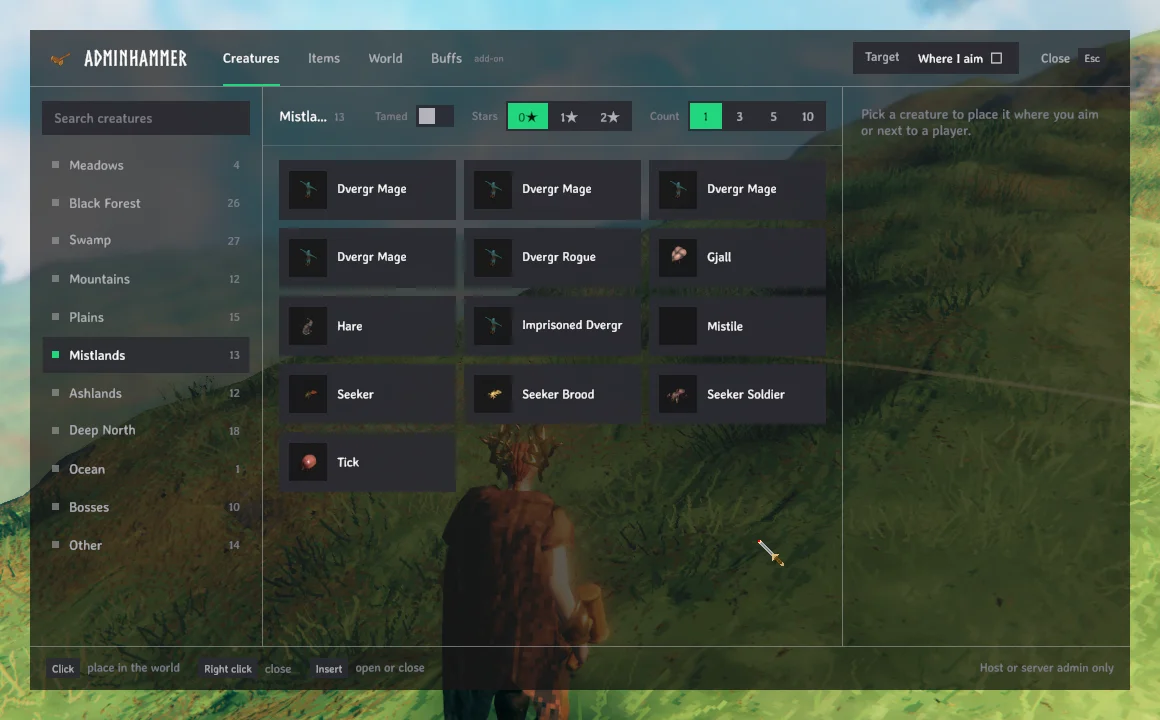

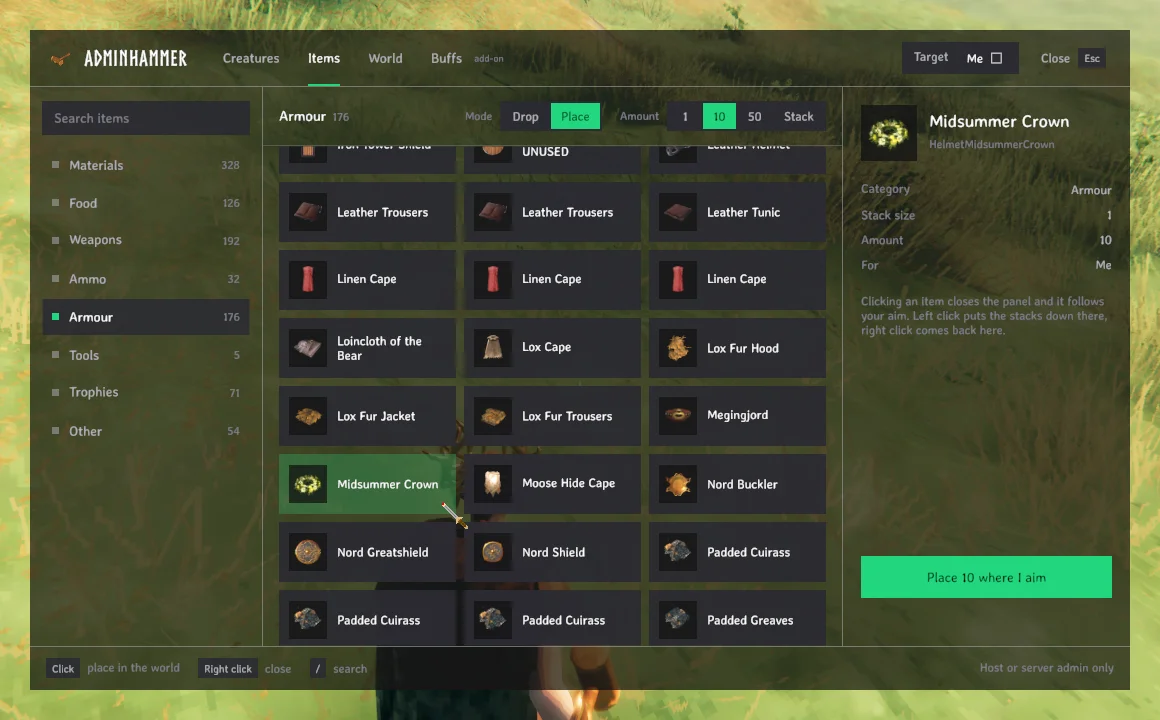

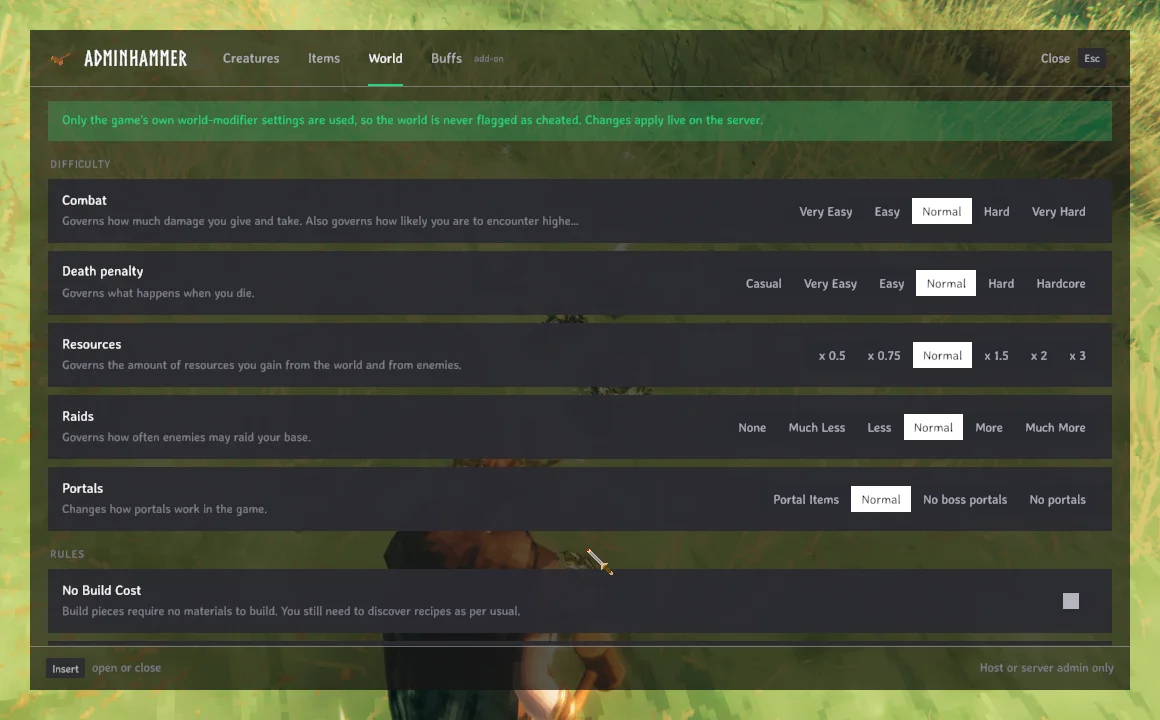
The Buffs tab in the screenshots comes from the BuffMeDaddy add-on and is not part of AdminHammer.
Requirements
- BepInExPack Valheim 5.4.2202 or newer
- Jotunn 2.30.2 or newer
- SeneaL UI 1.2.5 or newer
A mod manager (r2modman, Gale, Thunderstore App) installs them for you.
Getting the hammer
- Type
/adminhammerin chat (oradminhammerin the F5 console), or - craft it at a workbench: 1 wood, 1 stone.
Insert also opens the panel (configurable in jatify.adminhammer.cfg).
Who can use it
The host of a local world, or an admin of a dedicated server. Put your Steam ID in the server's adminlist.txt in both forms, one per line:
76561198000000000
Steam_76561198000000000
The server accepts the bare ID for admin commands, but the game's own client check only matches the Steam_ form.
Only you need the mod: nothing is required on the server or on other players' clients. Players without it see your hand empty while you hold the hammer.
Good to know
- Things you spawn are not marked as cheated (Valheim's own
spawncommand would mark them). - Placing creatures needs the Admin hammer in hand; switching to anything else clears the selection.
- If you remove the mod, the Admin hammer disappears from your inventory the next time you load.
Credits
- Interface: drawn at runtime with SeneaL UI's components, theme and icons, by seneaL. None of SeneaL UI's files are included in this package; it must be installed separately.
- Icons: SeneaL UI's adaptation of Phosphor Icons (MIT License, © 2023 Phosphor Icons).
- Item and command registration: Jotunn, by the Valheim Modding team.
- Mod loader: BepInEx.
- Creature biomes: Valheim's own spawn tables, plus the creature list of the Valheim Wiki.
AdminHammer is an unofficial, fan-made mod. It is not made, endorsed or supported by seneaL or Iron Gate AB. Please report AdminHammer bugs here, not to SeneaL UI. Valheim is a trademark of Iron Gate AB.
Source: https://github.com/imdizmo/AdminHammer (MIT; the MIT licence covers AdminHammer's own code only)
CHANGELOG
Changelog
1.1.0
- The panel in the Jatify design: tabs and a Target picker in the header, categories and search on the left, tiles, and an inspector with the main action (Place where I aim, Spawn next to a player, Drop). The World tab lists every setting in one column.
- No longer needs SeneaL UI. With Jatify UI installed it has Jatify UI's look; without it, the same design in Valheim's font.
- Double click a tile to place or drop straight away; / jumps to the search.
- Like the hammer's build menu: clicking a creature goes straight to placing it; right click closes the panel, and Esc closes it without opening the pause menu.
- Items: Drop or Place. Place puts the stacks down where you aim, the way you place a creature.
- A Tamed switch: tameable creatures spawn already tamed.
- Game keys are off while you type in the panel (M no longer opens the map), and the panel's name is in Valheim's Norse lettering.
- For add-on authors: AdminHammerUi (the panel's parts), AdminHammerApi.Target, Status and a tab footer. Tabs are text now; Tab.Icon and Tab.Title are ignored.
1.0.2
- README: the BuffMeDaddy add-on. No code changes.
1.0.1
- README: screenshots, and links to GitHub and jatify.com. No code changes.
1.0.0
- First release: Admin hammer, creature placement, item drops, live world modifiers, SeneaL UI styling.
- Add-on tabs: other mods can add a tab to the panel (AdminHammerApi.AddTab).
- Requires SeneaL UI 1.2.5 or newer.
