
Please disclose if any significant portion of your mod was created using AI tools by adding the 'AI Generated' category. Failing to do so may result in the mod being removed from Thunderstore.

StatusGroups
Tidy status effects: smaller icons, sorted into groups like buffs, cooldowns, negatives and rites. Pick a layout: Icons, Stacked or Vanilla.
| Date uploaded | 3 days ago |
| Version | 1.0.2 |
| Download link | JoksterCube-StatusGroups-1.0.2.zip |
| Downloads | 17 |
| Dependency string | JoksterCube-StatusGroups-1.0.2 |
This mod requires the following mods to function

denikson-BepInExPack_Valheim
BepInEx pack for Valheim. Preconfigured with the correct entry point for mods and preferred defaults for the community.
Preferred version: 5.4.2351README
StatusGroups
A tidy status bar, however many buffs you stack!
Three meads, rested, shelter, a guardian power, set bonuses, a few rites... and the top right of your screen turns into a wall of big icons and names.
StatusGroups shrinks the icons and sorts them into groups: buffs, cooldowns, negatives and passive effects. Pick the layout you like: small icons in a row per group, or one icon per group.
📸 Screenshots
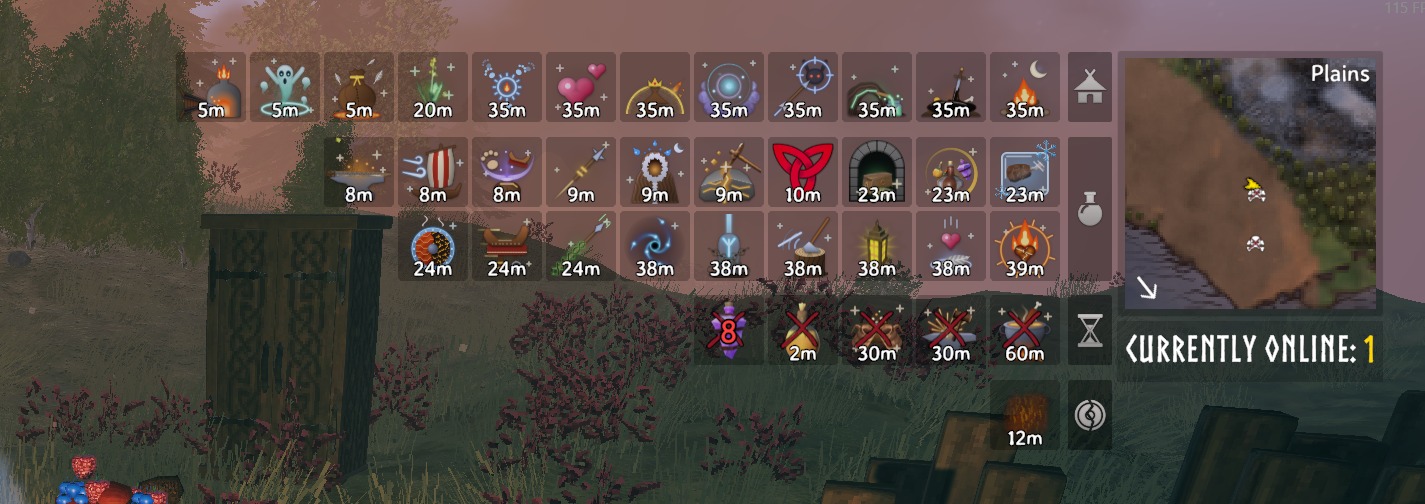
40 statuses at once, still easy to read. Buffs, cooldowns and TempestRite's rites each get their own rows, marked by the icon on the right.
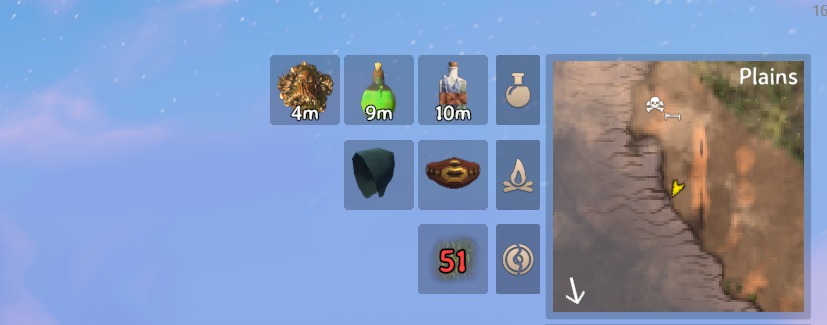
A normal day in the Plains: a few meads and your worn gear, one small row each.
🧭 Features
- 🔹 Three layouts: Icons (small icons, a row per group), Stacked (one icon per group, with how many it holds and the time of the one ending first) or Vanilla (the game's own list).
- 🗂️ Four groups: Buffs, Cooldowns, Negatives and Passive, for the game's statuses and any mod's.
- 🏷️ Group icons: a mead bottle, an hourglass, a cracked shield and a campfire mark each group's row. Or pick any status's icon for it.
- 🎛️ Per group: show each group expanded, stacked or hidden, rename it and put the groups in any order. Longer groups go on top, and a group too long for one row is split evenly (6 and 5, not 10 and 1).
- 📏 Your size and text: icon size, statuses per row, names on or off, and the color and size of every text. Times show whole minutes, and grow big and red in the last minute.
- 🖱️ Put it anywhere: press Esc and drag the icons where you want them. Right-click to put them back. Stacked groups open up while the menu is open, so you can see what they hold.
- ✍️ Your own rules: move any status, from the game or any mod, into any group, or make new groups.
- 🌩️ Other JoksterCube mods: TempestRite's blessings join Buffs and kinship waits Cooldowns, and its Domain & Reckoning rites and World Rites get a group each. PingMark's Perception goes to Buffs, ProtectSpawnerFarms' statuses to Passive.
🗂️ Groups
| Group | What goes there |
|---|---|
| Buffs | Rested, the forsaken power, meads and anything else drunk or eaten that isn't food, and other effects that run out (Corpse run, No skill drain...). |
| Cooldowns | Waits shown with a crossed-out icon, like the healing and stamina meads' wait. |
| Negatives | Wet, Cold, Freezing, Burning, Frost, Shock, Poison, Smoked, Encumbered, Tarred and the like. |
| Passive | Resting, Shelter, Campfire, Cozy, Warm, worn gear and set bonuses (Demister, Wishbone...), and other effects that last while something holds. |
With TempestRite:
| Group | What goes there |
|---|---|
| Domain & Reckoning | The rites worked at an obliterator, and the fights and rites that end others. |
| World Rites | Atmospheric, Celestial and Biome Mastery rites. |
| Buffs / Cooldowns | Blessings join Buffs, kinship waits join Cooldowns. |
Custom Rules come first. A comma separated list of status=group, where the status is its name in game or its internal name, and * matches anything:
Wishbone=Buffs, SE_MyMod_*=My Mod, Shelter=At Home
A group named in a rule appears in the Groups settings, so you can stack, hide or move it like any other. Turn on Log Statuses (an advanced setting) to see every status's internal name and group in the BepInEx log.
⚙️ Installation
Install with a mod manager (r2modman, Thunderstore App), or manually:
- Install BepInExPack Valheim.
- Extract StatusGroups into
BepInEx/plugins. - Launch the game. Settings are in
BepInEx/config/JoksterCube.StatusGroups.cfg, or in game with Configuration Manager (F1). Changes show at once.
🧩 Multiplayer & Compatibility
- ✅ Client only. It only changes what your own HUD shows, so it works in single-player and on any server, with or without the mod.
- 🌩️ Made to go with TempestRite: its many blessings, rites and waits are sorted into groups of their own, named in your language.
- ✅ Other players don't need it, and nobody needs the same version.
- ⚠️ Other mods that also redraw the status list may clash with it. Pick Vanilla to hand the list back to the game.
🔧 Configuration
The settings most people change:
| Setting | Default | What it does |
|---|---|---|
| Layout | Icons | Icons, Stacked or Vanilla. |
| Split By Group | On | A block for each group. Off: every status in one block. |
| Icon Size | 0.75 | Icon size compared to the game's (0.3–1.5). |
| Statuses Per Line | 18 | Statuses in a row before the next row starts. |
| Show Names | Off | Each status's name, under its time. |
| Show Group Names | Off | The group's name above its block. |
| Show Group Icons | On | The group's icon beside its block. |
| Status Boxes | On | Each status in a small square, its time on the icon. Off: times under the icons. |
| Text Color | White | Color of every text. Times under a minute show in red. |
| Group Display / Name / Icon / Order | Each group: Default, Expanded, Stacked or Hidden, your own name, the status whose icon marks it, and its place. |
|
| Custom Rules | empty | Your own status=group rules. |
Font sizes, name width, seconds, sorting and more are in the config file and Configuration Manager, each setting explained there.
🛠️ For mod authors
Give your mod's statuses their own groups, with no reference to StatusGroups: call JoksterCube.StatusGroups.StatusGroupsApi by reflection, so your mod still works without it.
[BepInDependency("JoksterCube.StatusGroups", BepInDependency.DependencyFlags.SoftDependency)]

// In Awake:
if (Chainloader.PluginInfos.TryGetValue("JoksterCube.StatusGroups", out PluginInfo info) && info.Instance)
{
    Type api = info.Instance.GetType().Assembly.GetType("JoksterCube.StatusGroups.StatusGroupsApi");
    api.GetMethod("AddGroup", [typeof(string), typeof(Func<string>), typeof(int)])
        .Invoke(null, ["MyMod Buffs", (Func<string>)(() => "Buffs"), 2000]);
    api.GetMethod("Assign", [typeof(string), typeof(string)]).Invoke(null, ["SE_MyMod_Haste", "MyMod Buffs"]);
    // Or every status starting with a prefix:
    api.GetMethod("AssignPrefix", [typeof(string), typeof(string)]).Invoke(null, ["SE_MyMod_", "MyMod Buffs"]);
    // Optional: the group's icon (pale: a pale silhouette, tinted like the built-in groups' icons).
    api.GetMethod("SetGroupIcon", [typeof(string), typeof(Func<Sprite>), typeof(bool)])
        .Invoke(null, ["MyMod Buffs", (Func<Sprite>)(() => myIcon), false]);
}
- id (
"MyMod Buffs"): also the name of the group's settings and what players write in Custom Rules. Start it with your mod's name. - name: shown above the group's row and on its stacked icon. Asked for each time, so it can follow the game's language (a
$tokenworks too). - order: the group's place, lower first. Pick a free one:
| Order | Mod | Group |
|---|---|---|
| 100–1000 | StatusGroups | Buffs (100), Passive (400), Cooldowns (800), Negatives (1000) |
| 200, 500 | TempestRite | Domain & Reckoning, World Rites (set by StatusGroups, whatever TempestRite asks) |
| 5000 | StatusGroups | Groups named only in Custom Rules |
A mod can also put its statuses into the four built-in groups by their ids: Buffs, Cooldowns, Negatives, Passive.
💬 Feedback & Support
Report bugs or suggest improvements on GitHub.
Author: JoksterCube
Version: 1.0.2
License: GNU GPL v3 or later
CHANGELOG
| Version | Update Notes |
|---|---|
| 1.0.5 | Fixes: • Status Boxes: texts on a square (like "Comfort: 1") and the Magic Barrier's damage left (like 650/650) now stay inside its frame. |
| 1.0.4 | New: • Magic Barrier shows how much damage it can still absorb, like 178/210, in red on top of its icon. |
| 1.0.3 | Fixes: • Icons no longer get stuck smaller after a status comes and goes quickly (like a campfire's warmth). • No more "Font Asset was not found" warnings in the game's log. |
| 1.0.2 | Changes: • Statuses without a time from worn gear now sort after those from where you are (fire, shelter). Fixes: • New statuses no longer pop up at full size before shrinking to Icon Size. • Status Boxes: icons fit their square evenly at every Icon Size. • Status Boxes: long status texts (like "Comfort: 1") shrink to fit the square instead of widening it. • Icons that aren't square keep their shape instead of being stretched. |
| 1.0.1 | • The Passive group is now shown by default. Already played with 1.0.0? Set Passive Display to Default in the config to show it. |
| 1.0.0 | First release. • Shrinks your status effects and sorts them into groups: Buffs, Cooldowns, Negatives and Passive (hidden by default). • Three layouts: Icons (small icons, a row per group), Stacked (one icon per group) and Vanilla (the game's own list). • Show, stack, hide, rename, reorder or re-icon each group, and use Custom Rules to put any status into any group. • Press Esc and drag the icons anywhere on screen. • TempestRite's rites get groups of their own, and other mods can add theirs. Client only: other players and the server don't need it. |
