
Please disclose if any significant portion of your mod was created using AI tools by adding the 'AI Generated' category. Failing to do so may result in the mod being removed from Thunderstore.

RecipePinner
Pin any recipe or build piece to your HUD and track the materials you still need in real time. Group pins into named projects, manage them from the My Pins panel, and optionally count nearby chests.
| Date uploaded | 2 weeks ago |
| Version | 1.5.3 |
| Download link | KadrioS-RecipePinner-1.5.3.zip |
| Downloads | 735 |
| Dependency string | KadrioS-RecipePinner-1.5.3 |
This mod requires the following mods to function

denikson-BepInExPack_Valheim
BepInEx pack for Valheim. Preconfigured with the correct entry point for mods and preferred defaults for the community.
Preferred version: 5.4.2351README
Recipe Pinner
Your crafting companion for Valheim

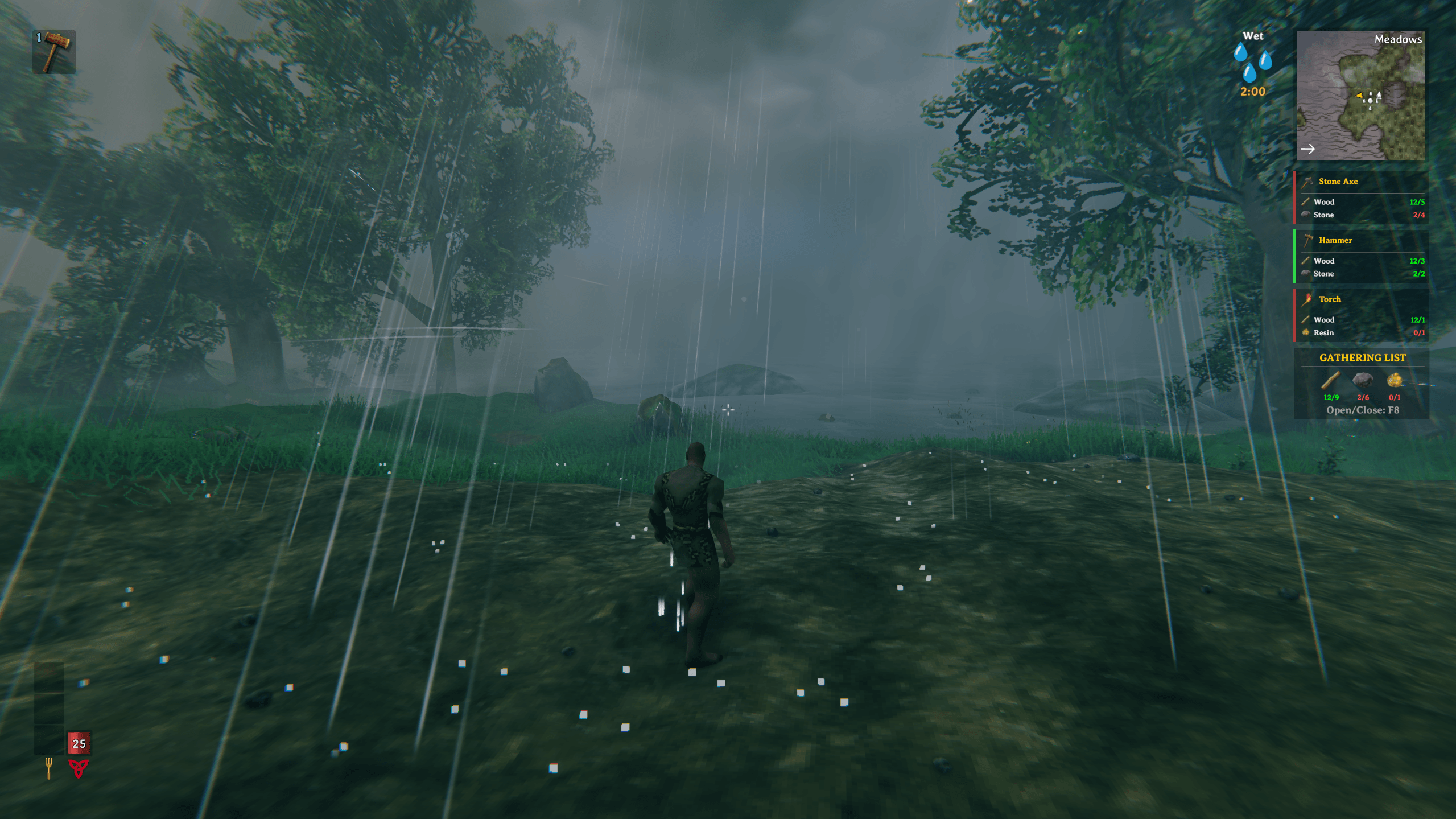
Shown with a larger HUD and a solid background, both of which are settings. By default the pins are smaller and half-transparent.
Valheim only tells you what you are missing while you are standing at the bench. Recipe Pinner tells you in the forest.
Pin any recipe or build piece to your HUD and what it still needs stays in front of you — counting down as you gather, turning green the moment you can craft it. Group a whole project into a single pin, and let it count the chests around you too.
Built for Valheim 1.0. This build cannot run on 0.221.x. If you are still on an older game version, stay on Recipe Pinner 1.3.2.
⭐ What It Does
📍 Pin it, then watch it fill up
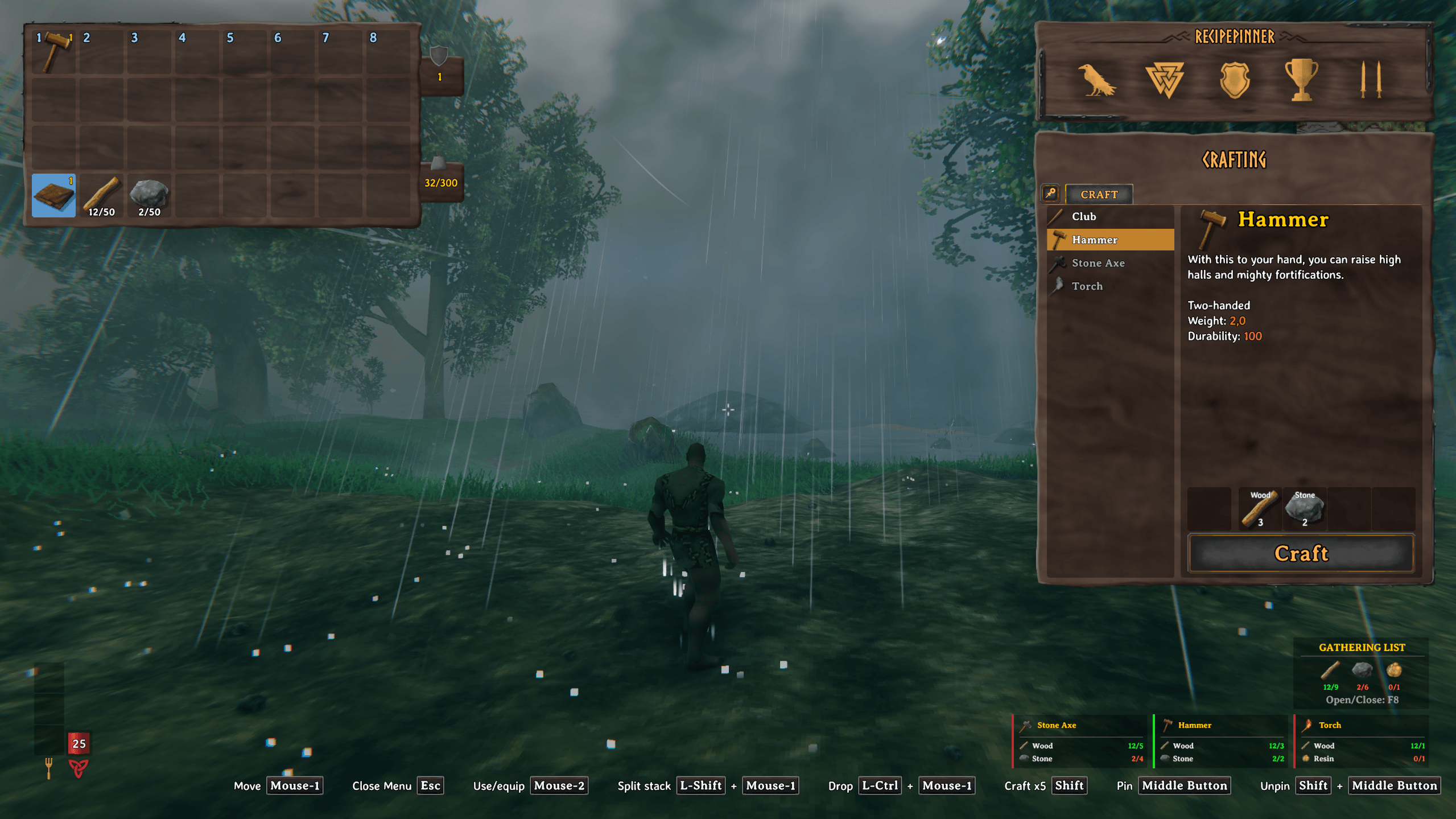
Hover a crafting recipe or a Hammer build piece, press the Pin key, and it lands on your HUD with everything it needs. From then on the numbers follow you: they climb as you pick things up, and the row turns green the moment that material is covered. Nothing to open, nothing to check.
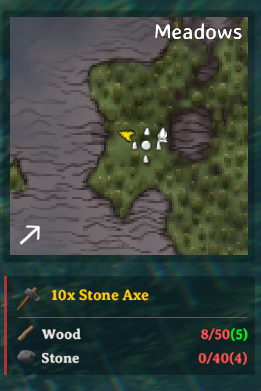
Press the key again on the same recipe to pin a second copy, a third, a tenth — every total scales with it.
Pin something more than once and each row also shows what one of them costs, in brackets. Ten stone axes need fifty wood, so with eight in your bag the row reads:
8/50(5)— 8 you have · 50 for all ten · (5) for one
The total stays red because fifty is far off, while (5) turns green the moment you can afford a single axe. That is the difference between "I can't do this yet" and "I can make one right now", and you get it without doing arithmetic.
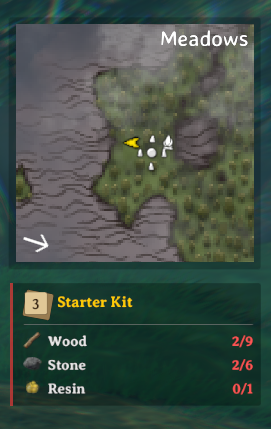
Your Pin and Unpin keys appear in Valheim's own button-hint bar, next to Move and Use, and follow your keys if you rebind them — so the control is discoverable without opening a config file. The Unpin hint stays hidden until there is actually something it can remove.
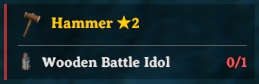
Upgrades can be pinned the same way, and the pin shows what that next level actually costs. Pin one at the Forge of Potential and it asks for the Idol the Forge charges instead of the ordinary materials — including the levels past an item's usual cap that only the Forge can reach.
🧩 Turn a whole project into one pin
An armour set is not one recipe. Pin each piece separately and your HUD fills up while the thing you actually want to know — what the whole project costs — is written nowhere.
Select them in the My Pins panel and combine them into a named group. The group becomes a single HUD pin with one merged material list — the running total for the entire project, in one place.
Expand the group in the My Pins panel and every member shows its own materials underneath its name, which answers the question a merged list never can: which one of these can I make right now?
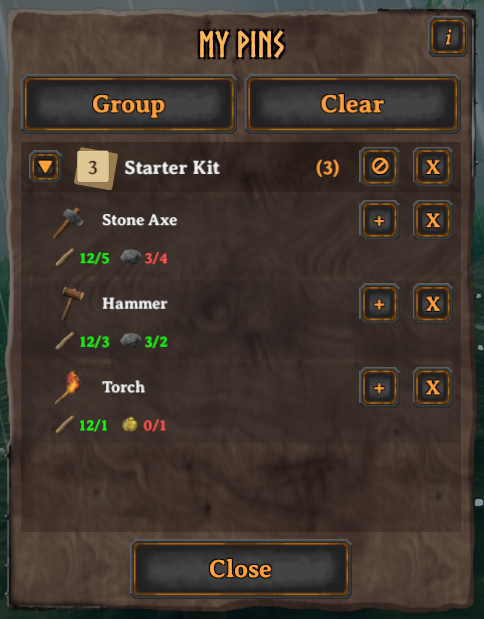
From the panel you can also:
- Change how many copies of a recipe you want, or remove it.
- Adjust an individual member's count inside a group.
- Disband a group back into separate pins, keeping every recipe.
- Put the same recipe in more than one project — duplicate pins can be split between groups.
Groups earn their keep on armour sets, station upgrades, building projects and food prep. A big one switches to a compact grid so it does not swallow the HUD, and whatever still does not fit is folded into a single +N cell — N more materials than the pin has room to show. When a group is your only pin, it skips that limit and shows everything, which quietly turns it into a permanent shopping list.
📋 Count the chests, not just your pockets
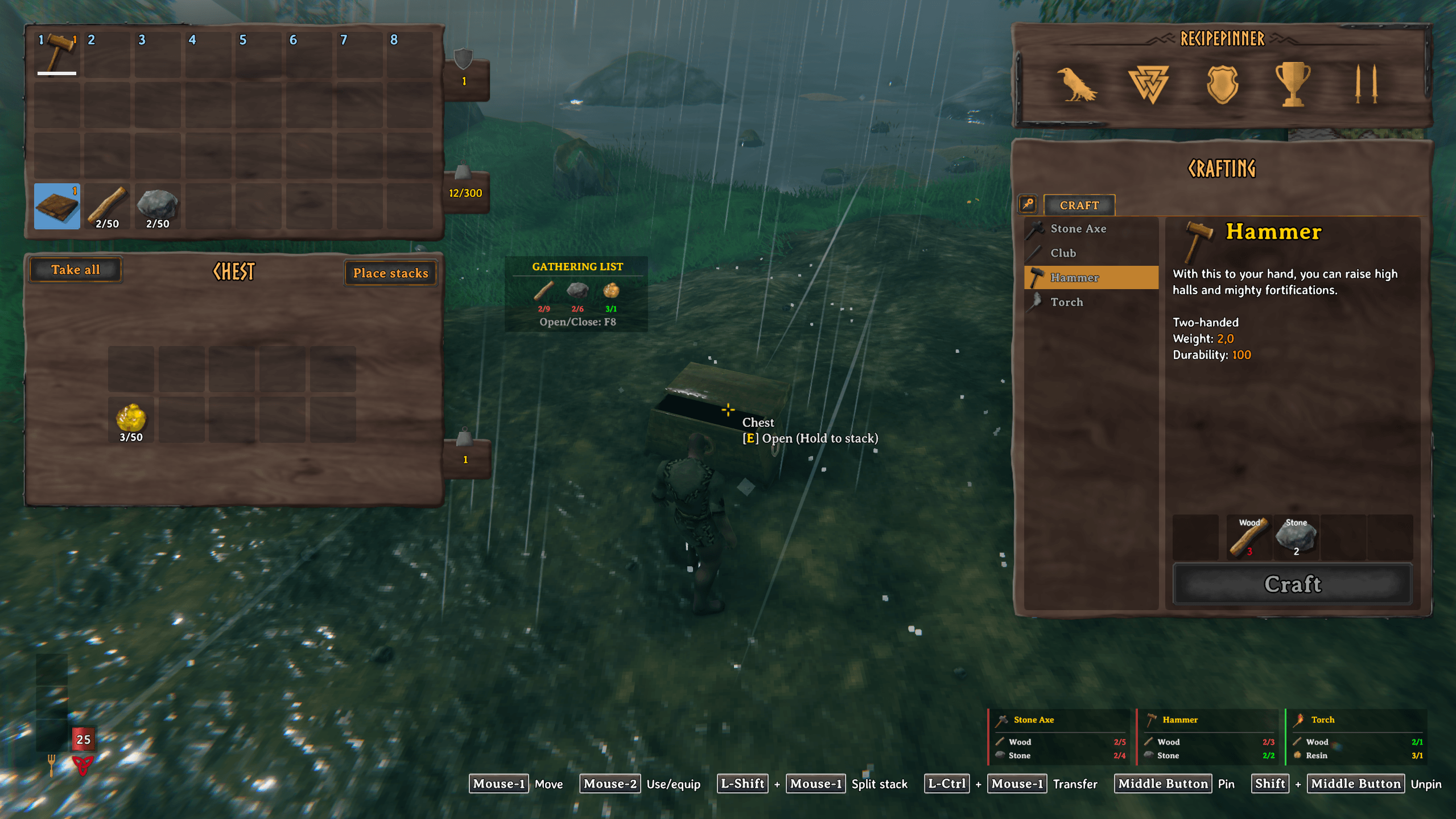
The Gathering List adds up everything your pins need and shows one combined total — what to bring back from the trip, rather than what each recipe wants separately. It snaps alongside an open chest, so you can see what you still need while you are moving things around.
Turn on the Chest Scanner in the config (EnableChestScanning) and the nearby chests count too. Then the colours on your pins tell you three different things:
- 🟢 Green — you have it on you.
- 🟡 Yellow — you have it, but it is in a chest nearby.
- 🔴 Red — you do not have it.
Yellow is the useful one: it is the difference between "go mine more copper" and "walk ten steps".
It is off by default, and it only ever reads — it never moves, takes or touches anything in a chest.
🖥️ Gets out of the way
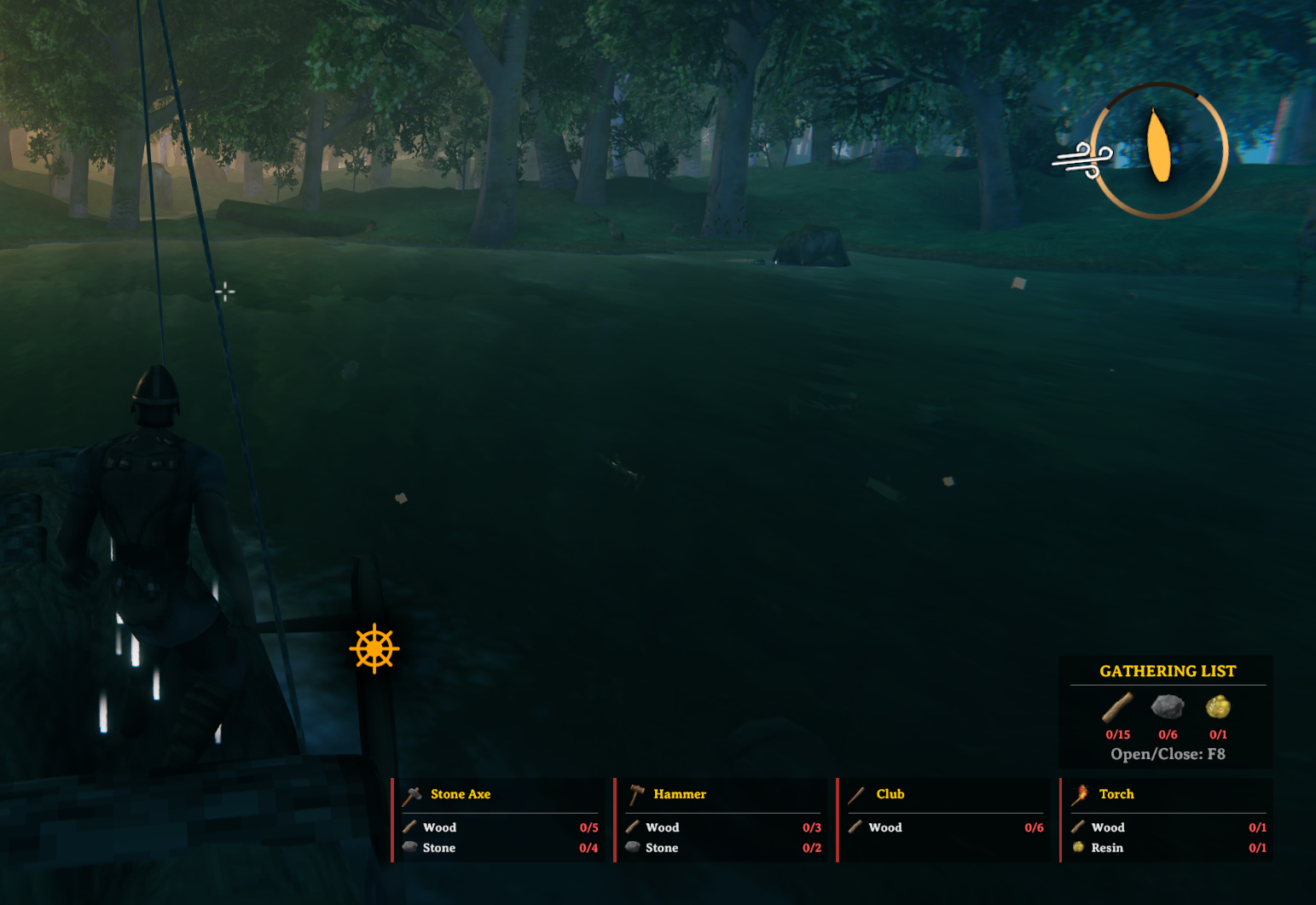
Pins move themselves depending on what you are doing: a normal spot while you are exploring, the bottom right when your inventory or a chest is open, moved aside while you are sailing, and clear of Valheim's button-hint bar when that is on. Pin more than fits on one screen and the list pages instead of growing.
If you use MyLittleUI, the layout goes horizontal on its own to stay out of its way. If you prefer a different spot entirely, every layout's position is a setting.
Each pin can also carry a coloured bar along its edge — ready or not ready — so the answer is available from the corner of your eye, without reading a single number.
Almost none of this is fixed. The settings cover the hotkeys, the layouts and where they sit, HUD scale, fonts, colours, icon sizes, how many pins fit on a page, when a group goes compact, and whether a recipe unpins itself once you have crafted it — and nearly every one applies the moment you change it. Open the config with the HUD on screen and you can watch a slider move the pins.
🌍 Every language Valheim speaks
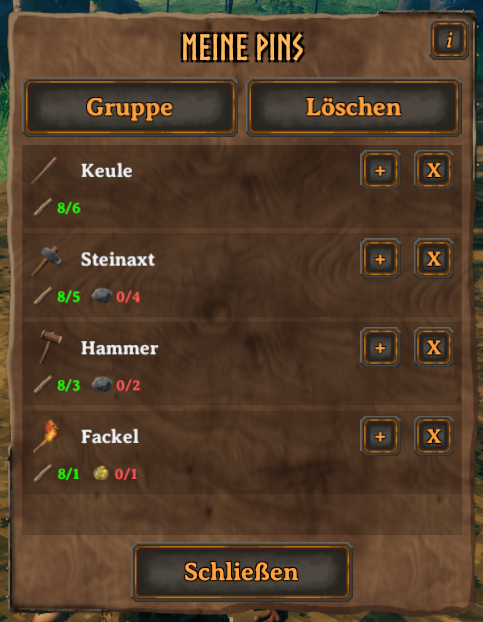
Recipe Pinner follows the language you play in. There is nothing to set and nothing to download — pick your language in Valheim, and the pins, the panel, the dialogs and the hints all follow.
Some of those translations were AI-assisted, so one may read awkwardly in your language. Please report it if it does — or fix it yourself and keep the fix. The language files sit in a plain folder next to the mod, one line per piece of text, and a text editor is the only tool you need.
✅ Requirements And Compatibility
| Game version | Valheim 1.0 or newer — see the note at the top if you are on an older one. |
| Needs | BepInExPack Valheim 5.4.2351 or newer, and nothing else. |
| Install on | Your own game only. Recipe Pinner draws a HUD and reads your own inventory — it sends nothing over the network, so it works in multiplayer whether or not anyone else has it, and a dedicated server does not need it. |
| Optional | Configuration Manager, to change every setting in-game. |
| Other UI mods | The horizontal HUD layout exists for MyLittleUI users, and the My Pins button can be moved out of another mod's way. If something fights with it, please report it and name the other mod. |
🔧 Installation
With a mod manager — Thunderstore Mod Manager, r2modman or Gale (recommended). Easiest, and it handles the dependency for you.
By hand — install BepInExPack Valheim first, then put RecipePinner.dll and the RecipePinner_languages folder together in Valheim/BepInEx/plugins/RecipePinner/:
BepInEx/
└── plugins/
    └── RecipePinner/
        ├── RecipePinner.dll
        └── RecipePinner_languages/
            ├── English.json
            ├── Turkish.json
            └── ...
RecipePinner_languages has to stay next to the DLL.
Updating — install the new version over the old one. Your pins, groups and their order load unchanged. Anything worth knowing for the version you are coming from is in the Changelog tab, or CHANGELOG.md on GitHub.
🕹️ Getting Started
Pin something. Open a crafting station or the Hammer's build menu, hover a recipe or a piece, and press Mouse Wheel Click. It lands on your HUD with its materials. Press the same key again on the same recipe to pin a second copy; hold Left Shift and press it to take one back off.
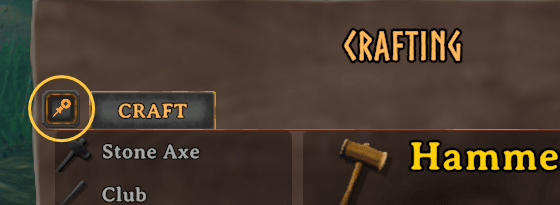
Open the panel. With your inventory open, click the pin icon just left of the crafting panel's CRAFT tab — hover it and it reads MY PINS. That is everything you have pinned, each row with its own materials, and the controls to change a count or remove a pin.
Group them into a project. In My Pins, click Group, select at least two pins, confirm, and give the group a name. They collapse into a single HUD pin with one merged material list. Expand the group again and each member shows its own materials; Disband turns them back into separate pins whenever you want.
That is all you need to start. Everything below is controls, settings and the finer details.
🎮 Controls
| Action | Default |
|---|---|
| Pin recipe / add count | Mouse Wheel Click |
| Decrease / remove pin | Left Shift + Mouse Wheel Click |
| Toggle HUD overlay | F7 |
| Toggle Gathering List | F8 |
| Cycle HUD pages | Left Alt |
| Clear all pins | P (press twice) |
| Open My Pins panel | Pin icon beside the CRAFT tab, inventory open |
Every one of these can be rebound in the config. They are keyboard and mouse only for now — gamepad support is on the ideas list, so a controller player will not be able to pin anything yet.
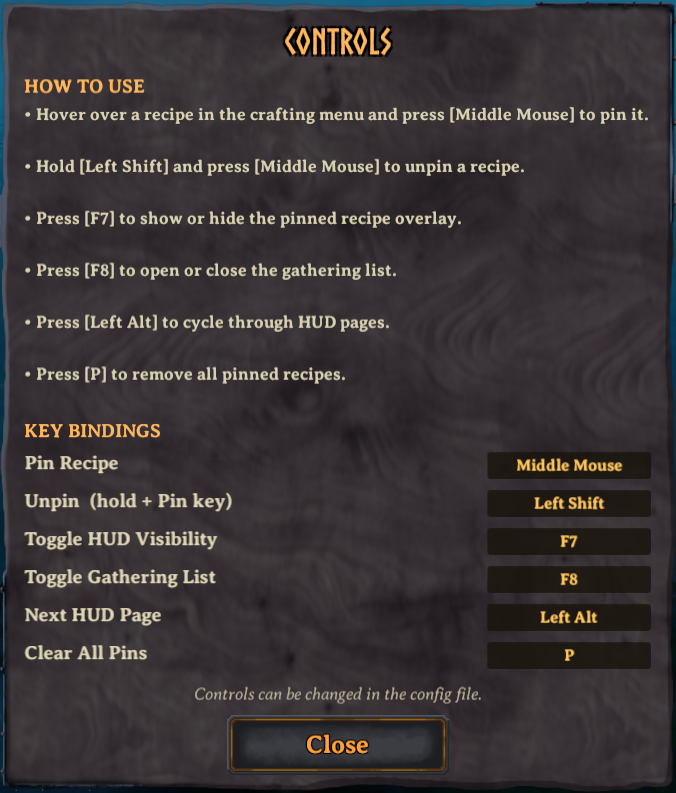
Clearing all pins asks before it does anything: press the key once to arm it, then again within two seconds. The My Pins panel also has an info button that shows your current keys in-game, so you never have to come back here for them.
🖼️ More Screenshots
The screenshots above show the core loop. These cover the rest — layouts, group shapes, a build piece, a Forge upgrade and panels.
Click to expand
Layouts
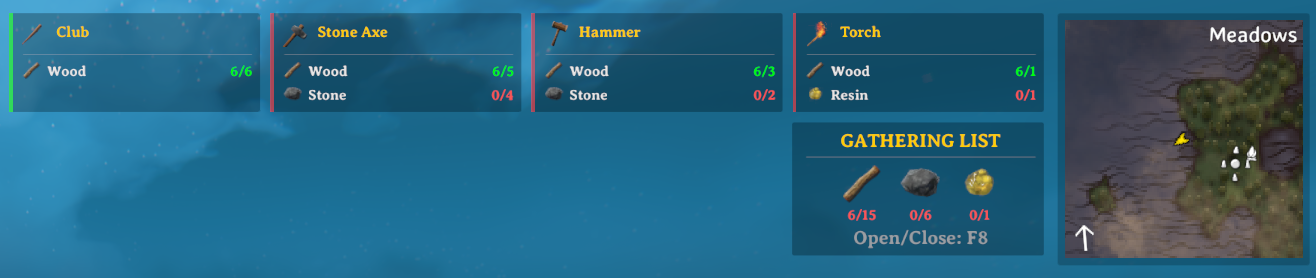
Horizontal, near the map side. Auto-Detect picks this when MyLittleUI is installed.
Alongside MyLittleUI, with the layout adjusted around it.
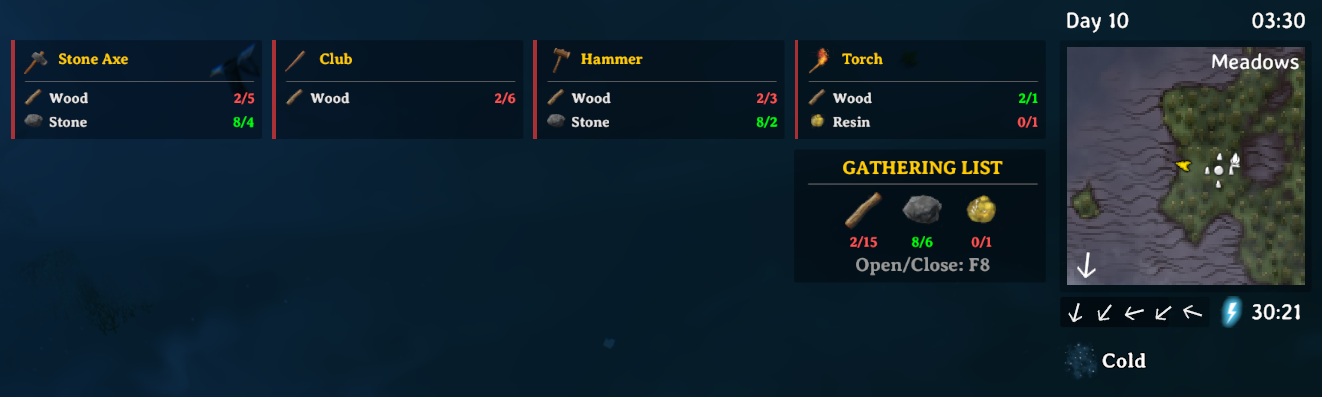
Out at sea, moved clear of the sailing HUD.
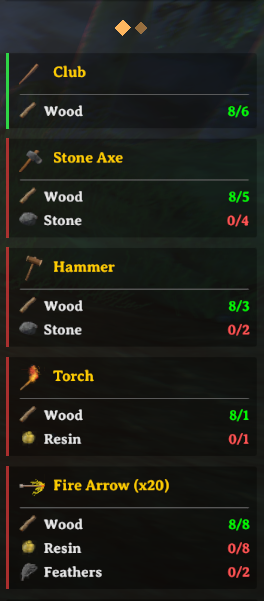
Pin more than fits and the list pages instead of growing. The dots on top show which page you are on.
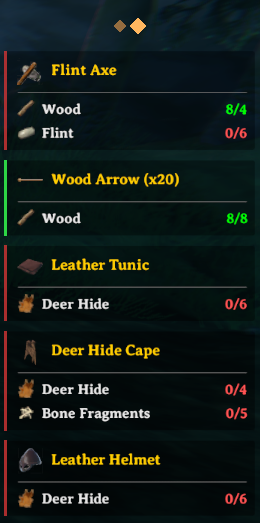
Groups
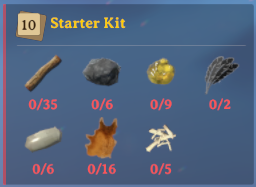
A group needing many different materials switches to a compact grid.
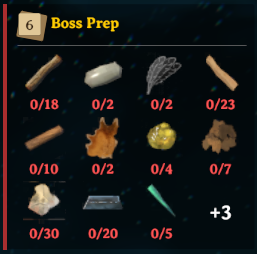
Still too long, and the remainder collapses into a single +N cell.
Building
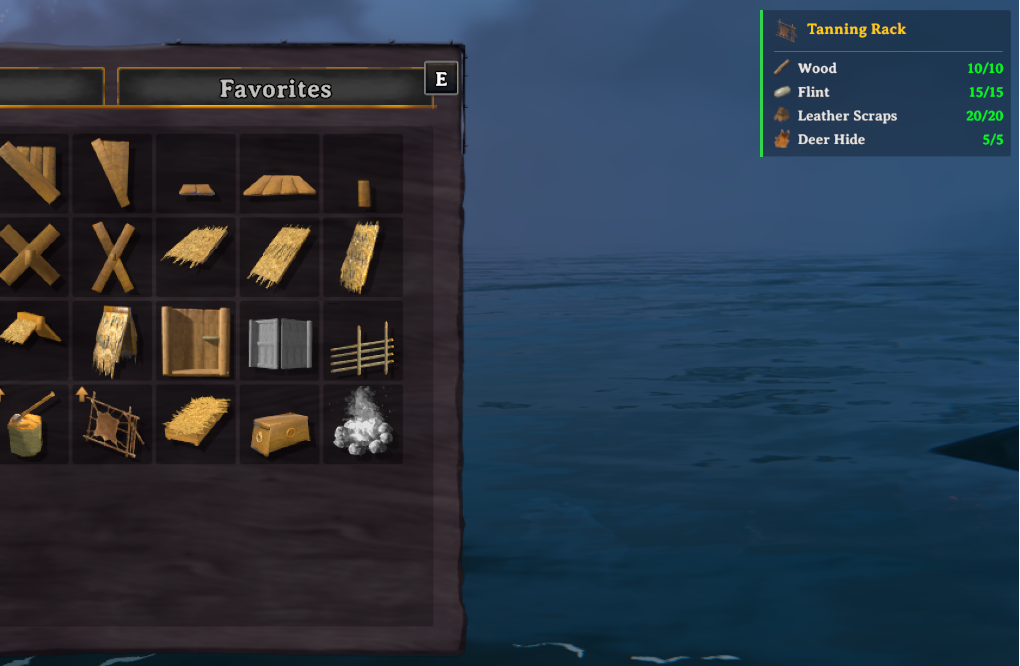
Hammer build pieces pin exactly like recipes, straight from the build menu.
Upgrades
An upgrade pinned at the Forge of Potential asks for the Idol instead of the ordinary materials.
Panels and lists
The info button in the My Pins panel, showing your current keys without leaving the game.
The Gathering List on its own, totalling every pin at once.

⚙️ Configuration
Install Official BepInEx ConfigurationManager and press F1 in-game to reach everything with the HUD still on screen. Editing BepInEx/config/com.Kadrio.RecipePinner.cfg by hand works too, and deleting that file restores every default on the next launch.
Every category, and what it covers
| Section | What it covers |
|---|---|
| General | Enable the mod, language override, layout mode, pin limit, pins per page, auto-unpin after crafting or building |
| Controls | Every hotkey: pin, unpin, toggle visibility, Gathering List, page switch, clear all |
| Chest Scanner | Whether nearby chests count toward your materials, plus scan range and interval |
| HUD Appearance | UI scale, background opacity, font sizes, recipe/material/group icon sizes, the craft-readiness bar, the single-unit bracket |
| Colors | The three material states, the recipe name, and both readiness-bar colors |
| Pagination | Page dot size, spacing, color and inactive opacity |
| Gathering List | Turn it on, open it automatically, column count, font sizes, and where it sits beside an open chest |
| Groups | When a group switches to the compact grid, how many rows it may use, and the group icon's font size |
| My Pins Panel | Panel width, height and position, the button's position, size and icon color, and the size of the materials shown on each row |
| Layout (Vertical) | List width, pin spacing, position |
| Layout (Horizontal - Map Side) | Column width, pin spacing, position |
| Layout (Horizontal - Bottom Right) | Column width, pin spacing, position, and whether the list lifts clear of Valheim's button-hint bar |
| Debug | Verbose logging. Off by default; turn it on before reporting a bug |
❓ FAQ
Will this mod disable my achievements?
Valheim switches achievements off while any mod is installed. That is the game's own check and every mod trips it, Recipe Pinner included — but it is not permanent, and it is not something the mod does to you. The modded flag only exists in the running game, so removing your mods turns achievements back on.
What is permanent is the game's own cheat marking: console cheats are recorded on your character, spawned items stay marked as cheated for as long as you keep them, and world modifiers are recorded on the world. Recipe Pinner does none of these — it reads your inventory and draws a HUD. It runs no console commands, spawns nothing and changes no world setting.
Since Valheim 1.0.12 you can also opt back in while still modded. With the console enabled, run:
yesiuseddevcommandsbutiwantmyachievementsanyway
The setting is saved on your character, so once is enough.
Do I need this on a server, or do my friends need it?
No to both. Recipe Pinner draws a HUD and reads your own inventory, and it sends nothing over the network. Install it on your own game only: it works in multiplayer whether or not anyone else has it, and a dedicated server does not need it.
Does it work with modded recipes?
Yes. Anything that shows up in a crafting station's list or the Hammer's build menu can be pinned, including recipes and pieces other mods add — Recipe Pinner reads what the game shows you, not a list of vanilla items. If a modded recipe pins wrongly, please report it and name the mod.
The Pins button overlaps something. Can I move it?
Yes. MyPinsButtonPosition sets where it sits and MyPinsButtonSize how big it is, and both apply the moment you change them — open the config while the inventory is on screen and you can watch the button move. X grows to the left and Y grows upward.
If another mod rearranges the crafting panel, this is the setting that gets the button out of its way.
More questions
Does it craft from chests, like the craft-from-container mods? No. The Chest Scanner only counts what is in nearby chests, so your numbers tell the whole story. Crafting still takes from your inventory exactly as it normally does.
Will it slow my game down? It is light. The counting only reruns when your inventory changes, and the Chest Scanner — the only part that looks at the world around you — is off by default and checks on an interval rather than every frame.
Is it safe to remove? Yes. Your pins are kept in their own files under BepInEx/config/RecipePinner_Data/, and the mod adds nothing to your world or your character, so uninstalling it leaves both untouched.
Does the Chest Scanner touch what is in my chests? No. It only reads — it never moves, takes or rearranges anything — and it stays off until you turn it on. Its range and interval are both settings.
Are pins shared between my characters? No. Each character has its own pins, saved separately. Switching characters loads that character's own list.
Does it work with MyLittleUI? Yes. Auto-Detect switches to the horizontal layout when MyLittleUI is installed, reading MyLittleUI's own settings to decide.
Why does my group pin show +N instead of all its materials? A group with many different materials switches to a compact grid, and that grid is capped so one large group cannot stretch the pins beside it. Raise the cap with GroupCompactMaxRows, or change when compact mode starts with GroupCompactThreshold. When a group is your only pin, it never shows +N.
Can I force a particular language? Yes, with the LanguageOverride setting. Left alone, the mod follows Valheim's language.
How do I fix a bad translation myself? Open the matching .json in BepInEx/plugins/RecipePinner/RecipePinner_languages/, edit the text on the right of each line, and save. Leave placeholders like {0} alone — they are replaced with numbers and key names at runtime.
Why did some config settings reset after updating? Version 1.3.0 reorganized the config categories, so a setting that moved may not have kept its old value. If you are coming from 1.2.x, launch once and glance over the layout, hotkey, Chest Scanner and Gathering List sections. Nothing is broken if you skip it — you may just be running a default you did not choose.
🐞 Known Issues
With Quick Stack Store installed, its container buttons land on the Gathering List. QSS places its buttons to the right of the container window, which is exactly where the list snaps when you open a chest, so the two end up on top of each other. Until it is fixed properly, raising the X value of ContainerGatheringListPosition moves the list clear of them.
Anything else, please report it — see Support And Feedback below.
🧭 Future Ideas
Things I may build next. No promises on any of them, and the one at the bottom shows how this list is meant to work.
- Group readiness bar: split a group's accent bar into one segment per member, so a single glance tells you which recipes in the project are already craftable.
- Chest Scanner in the readiness bar: turn the bar yellow when a recipe is craftable only with nearby chest contents, matching how the material counts already behave.
- Hold-to-pin quantity: hold the Pin key to choose how many copies to pin, instead of pressing it once per copy.
- Station requirement on the pin: show which crafting station a recipe needs and at what level, so a pin can tell you the materials are ready but the station is not.
- Ready-made pin sets: pin a whole kit at once — an iron set, a bronze set — instead of picking the recipes one by one.
- Share a group to chat: send a group's material list into the chat window so a co-op party knows what to collect.
- Pinned recipe highlight: mark pinned recipes inside the crafting panel. This one may not be feasible.
- Gamepad support, material-gathered notifications, auto-sorting craftable pins to the top, chest highlighting, VNEI, and more compatibility work with other UI and crafting mods.
- ✅
Pin keybind hint: show the Pin control in the game's own hint bar, next to Move and Use.Shipped in 1.5.0.
🤖 AI-Assisted Development
Recipe Pinner is marked AI-Generated on Thunderstore, from 1.3.0 onward. That label is there by choice: AI assistance is a real part of how this mod is built, most heavily from 1.3.0, when My Pins and Pin Groups grew past what I could finish on my own.
What it is not is unattended. Every release is reviewed, tested in game and judged by me before it goes out, and anything that breaks is mine to answer for.
☕ Support My Work
If Recipe Pinner makes your Valheim life easier, you can support development here:


💬 Support And Feedback
Found a bug, a bad translation, or a mod this one fights with? Tell me and name the other mod — that is usually the whole diagnosis.
Discord: kadrio · GitHub Issues
🔗 Mirrors
Same mod, same version — every site is updated at the same time.


Pin it. Group it. Gather it. Build it.
See you in Valheim.
CHANGELOG
1.5.4
Fixed
- With Quick Stack Store installed, the Gathering List beside an open chest no longer hides behind its buttons. The list now moves past them on its own, and stays where it was when they are hidden or not installed.
- Fixed three ways your pins could be lost or overwritten: pressing Clear All's key twice at the main menu and then entering the same character again, a save file that could not be read for a moment (it was then saved empty), and changing Maximum Pins while the mod was turned off, which could write one character's pins into another character's save. Recipe Pinner now only saves pins it has actually read for the character you are playing.
- Maximum Pins now holds when you add another copy of a recipe that is in a group, or disband a group. If the result would not fit, you get "List Full!" and nothing changes - the disband confirmation does not even open. Before, the extra pins went through and the next start removed your newest ones.
- Lowering Maximum Pins now removes the pins at the end of the list as you see it. A recipe's extra copy shown after its group could be kept while the group itself was removed.
- A pin is no longer removed when the craft does not happen - for example when a material leaves your inventory while the craft bar is filling.
1.5.3
Fixed
- Typing a map pin name or a build menu search no longer triggers Recipe Pinner's hotkeys. A name with two P's in it - "copper", say - could clear every pin you had.
- Fixed Recipe Pinner stopping until a restart - no hotkeys, no Gathering List updates - after you returned to the main menu and entered a world again with more pins than fit on one page. No pins were lost.
- The pins now stay behind the map when you open it, like the rest of the HUD, instead of covering it.
- Typing a group name no longer triggers other mods' hotkeys - Quick Stack Store's restock on L, for example. Mods that respect Valheim's own text boxes now see the group name field as one.
- With My Little UI installed, changing its status effect list setting now moves the pins straight away, instead of after a restart. On a server that syncs that setting, the pins now follow the server's value too.
1.5.1
Fixed
- The Unpin hint no longer appears when there is nothing to unpin. It shows once you have a pin the shortcut can remove, and stays hidden while every pin you have is inside a group - a group member can only be taken out from the My Pins panel.
- Fixed the Gathering List's Open/Close line being blank after you return to the main menu and enter a world again. It used to come back only when you opened your inventory.
1.5.0
Added
- Upgrades can now be pinned for the Forge of Potential. Pin an upgrade while standing at that station and the pin asks for the single Idol it charges, instead of the ordinary materials it does not use. Pin the same upgrade anywhere else and you get the ordinary materials, as before. You can keep both pins at once, and crafting the upgrade clears both.
- Upgrade levels past an item's usual quality cap can be pinned. Only the Forge of Potential can reach them, and pins used to refuse those levels outright.
- Every row in My Pins shows its own materials, with the same have/required numbers and colours the HUD uses. A group's own row shows none - open it, and each member shows its own, so you can tell which one you are able to craft right now.
- The Pin and Unpin keys now appear in Valheim's button-hint bar, next to the game's own, while the inventory, a container or the build menu is open. Rebind a key and the hint follows it.
- New settings for the materials row - icon size, text size and height - and for how far the pins move out of the button-hint bar's way.
Fixed
- A pinned upgrade no longer disappears when an attempt at the Forge of Potential goes wrong. That station can fail and drop the item a level, or destroy it, and the pin was being removed as though the upgrade had worked. It now clears only when the item really did reach the level you pinned.
- Pins are no longer hidden behind Valheim's button-hint bar. That bar is on by default and sits exactly where the pin list does while your inventory is open or you are sailing; the list now moves out of its way and settles back when the bar is gone. Turn off
AvoidKeyHintBarif you would rather it did not, or changeKeyHintBarOffsetfor a different gap. - My Pins now shows which upgrade level a pin is for. A ★2 and a ★3 pin of the same item used to draw as two identical rows.
1.4.1
Fixed
- Fixed pressing Caps Lock while typing a group name starting your character auto-running. Typing in the mod's name box now stops the character, the same way typing in chat or the console does — and Caps Lock still types capitals.
- Fixed not being able to walk while a confirmation dialog was open. Delete, disband and clear now leave you free to move, like Valheim's own Compendium and Skills panels. Only the group-name box stops the character.
1.4.0 — Valheim 1.0.7 compatibility
This version requires Valheim 1.0 or newer. It cannot run on older game versions — if you are still on 0.221.x, stay on 1.3.2. It also needs BepInEx pack 5.4.2350 or newer.
Valheim 1.0 changed enough that the mod stopped working entirely, and testing the rebuild turned up three more things the update had broken. All four are fixed below.
Fixed
- Fixed the mod doing nothing on Valheim 1.0. A game method the mod calls changed shape in 1.0, so the mod failed on every frame before it could draw anything — it loaded, and then nothing appeared. Rebuilt against 1.0.
- Fixed pinned upgrades asking for too little from level 4 up. Valheim 1.0 changed how upgrade costs scale and the pin was still using the old maths — a stone axe level 4 pin asked for 6 stone where the game wanted 8. Levels 2 and 3 were always right.
- Fixed the new Idols showing as a required material on every pin. They are used only at the Forge of Potential, and only as an alternative to the ordinary upgrade materials, so pins no longer list them.
- Fixed pinning a build piece not working on the first press, so you had to move off the piece and back on before it would pin. Valheim 1.0's rebuilt build menu only registers a piece as hovered when the cursor actually moves onto it, which never happened when the menu opened under your cursor or after the piece list refreshed. Pinning now works on the first press, wherever the cursor already is.
OLD VERSIONS
1.3.2
Added
- Pin a recipe more than once and each material row now also shows what a single one costs, in brackets. Ten stone axes need fifty wood, so the row reads
8/50(5)— the total stays red while(5)turns green as soon as you can afford one axe. Turn it off withShowSingleUnitRequirement. - Hovering the My Pins button now shows its name above it, the way Valheim's own Compendium, Skills and Trophies buttons do.
Changed
-
The My Pins button has moved. It used to sit in the crafting panel's header, on top of the crafting station's own picture; it now sits to the left of the tab row, and its default size is 30 rather than 40.
- Note: if you never changed
MyPinsButtonPositionorMyPinsButtonSize, the new placement is applied for you once, on your first launch after updating. If you had set either one yourself, nothing moves. Either setting puts the button wherever you want it, including back where it was.
- Note: if you never changed
Fixed
- Fixed the delete button on a pinned recipe removing a group instead, when a group had been given exactly the same name as that recipe. Both buttons now always act on the row they belong to, and group names stay unrestricted.
- Fixed a language file the mod cannot read failing silently. When fewer than half the expected lines are read, it now warns with the file name and the count, so a broken translation no longer looks exactly like a working one.
- Fixed every launch reloading the translations, the recipe cache and the UI once at the main menu, because startup registered a language change that had not happened.
1.3.1
Added
- Added a
group_name_emptylocalization key for the empty-group-name message, translated in all 36 shipped language files.
Changed
-
ContainerGatheringListPositionnow sets the gap between the chest window's top-right corner and the Gathering List's top-left corner, instead of an offset from the screen centre. The default is(90, 2).- Note: Values saved under the old meaning have a negative X. Those are recognised and replaced by the new default, so the panel does not move for anyone updating. Set a positive X to choose your own spacing.
-
Reduced the work done every frame while the Gathering List is open. The material list, its colours and text, its layout rebuilds, its placement setup and the inventory tally behind every pin's material counts are now recalculated only when something actually changes.
Fixed
-
Fixed recipes that share an internal name pinning as a single entry whose counter simply climbed instead of pinning separately. Jewelcrafting gems are the clearest case: a gem's separate recipes now pin as separate entries, each with its own materials and its own auto-unpin.
- Note: gem pins saved before this update need to be unpinned and pinned again once to separate them. Every other pin is unaffected and loads unchanged.
-
Fixed the Gathering List sitting in the wrong place beside an open chest at any game UI scale other than 80 — drifting away from the chest window at smaller scales, and ending up behind the inventory panel at larger ones. It is now placed from the chest window itself and follows it at every scale and resolution.
-
Fixed opening or closing the inventory sending the pinned-recipe HUD back to page 1. The same cause was also tearing the HUD down twice every time it was rebuilt.
-
Fixed the Confirm button doing nothing at all when the group name field was left empty. It now says the name cannot be empty and keeps the dialog open with what you typed.
-
Fixed an upgrade recipe with no item data throwing an error out of the crafting hook. Such a recipe is now refused, both when pinning and when auto-unpinning, instead of producing a pin with an empty name.
-
Fixed the layout width and spacing settings accepting zero or negative values, which left the HUD unusable with no explanation. Widths now accept 50-1000 and spacings 0-200.
-
Fixed the Controls ("i") button playing its click sound twice.
-
Fixed a "Cannot create canvas" warning that could repeat every frame while the game HUD was unavailable.
1.3.0
Added
-
Added Pin Groups: select multiple pins and combine them into a named group with a merged resource list and a stacked-cards group icon.
-
Added a new My Pins management panel, accessible from the inventory screen, for viewing, selecting, grouping, disbanding, and removing pins.
-
Added expandable sub-item views in the My Pins panel for managing individual group members.
-
Added per-group member claim counts, allowing recipes to belong to multiple groups or remain partially available as individual pins.
-
Added persistent group/order support: Pin Groups, group member counts, and pin/group ordering are now saved and loaded alongside existing pinned recipe data.
-
Added Compact Group Layout (
GroupCompactThreshold): groups with many unique materials automatically switch to a compact grid layout to save HUD space. The threshold applies immediately without restarting, and the grid's column count is derived from your configured pin width. -
Added
GroupCompactMaxRows: controls how many grid rows a compact group pin shows before the remaining materials collapse into a+Ncell. Changes apply immediately without restarting. -
Added a full-list mode for lone groups: a group pinned on its own drops the
+Ncell and shows every material, turning it into a permanent gathering list. -
Added confirmation and group-naming dialogs with input locking so game controls do not interfere while typing.
-
Added a Controls Info panel, accessible via the info button in the My Pins panel, showing keybindings and usage instructions.
-
Added configurable Unpin modifier (
HotkeyUnpin): hold it while pressing the Pin hotkey over a recipe or build piece to decrease/remove that pin. -
Added a dedicated building auto-unpin setting (
AutoUnpinAfterBuilding), separate from crafting auto-unpin behavior. -
Added configurable column count for the Gathering List grid, with automatic panel resizing in horizontal layouts.
-
Added new HUD icon size settings for recipe, material, and group icons.
-
Added new My Pins panel/button configuration options.
-
Added missing language files to the
RecipePinner_languagesfolder so every Valheim-supported language now has a translation file.- Note: Some translations may be imperfect because they were AI-assisted. Please report any incorrect translations.
Changed
-
Building-piece auto-unpin is now controlled by its own
AutoUnpinAfterBuildingsetting instead of sharing the crafting auto-unpin setting. -
Improved building auto-unpin handling for placed building pieces.
-
Improved recipe/build hotkey handling so invalid contexts no longer trigger unintended pin/unpin behavior.
-
Improved save/load reliability for pinned recipes and pin order.
-
The clear-all hotkey now asks for confirmation instead of wiping every pin on a single press: press it once to arm, then again within two seconds.
-
Improved Gathering List positioning and layout behavior in horizontal HUD layouts.
-
Improved HUD/Gathering List behavior when pins are hidden or when the Gathering List is shown by itself.
-
Improved MyLittleUI AutoDetect compatibility, including better vertical placement when MyLittleUI status lists are disabled.
-
Improved MyLittleUI config parsing so only exact
Enable = true/falsevalues in the relevant sections are read. -
Improved localization parsing, including support for common escaped characters and different line endings.
-
Reorganized config categories for clearer ordering and grouping.
- Note: Because config category names changed, some users may need to review or reapply existing config values.
Fixed
- Fixed recipes with multiple output variants (for example Bronze 1x and Bronze 5x) always pinning the first variant. The hovered row is now matched exactly instead of by display name, so the 5x recipe pins its own 5x material cost. This also affects mods that add 1x/5x crafting options.
- Fixed the mod overwriting your pin save file with empty data while it was disabled. With
EnableMod = false, two consecutive saves could permanently erase every pinned recipe. - Fixed cleared pins not being saved immediately after using the clear-all hotkey.
- Fixed auto-unpin results being lost when the game closed without a clean exit.
- Fixed pins loading without validation after switching characters within the same session.
- Fixed pin saves to use an atomic temp-file replace with a
.bakbackup instead of writing directly to the final save file. - Fixed duplicate save entries producing duplicate pin order and UI entries.
- Fixed impossible edited-save upgrade pins such as
★999being accepted. - Fixed
MaximumPinsreductions not trimming, rebuilding, and paginating pins consistently. - Fixed pagination/page-size behavior when
MaximumPins < PinsPerPage. - Fixed Recipe Pinner hotkeys firing behind non-crafting inventory panels such as Skills, Trophies, and Compendium.
- Fixed the unpin combination acting or logging outside valid recipe and build contexts.
- Fixed possible crashes, null-reference edge cases, or missing display data when recipes, build pieces, modded resources, Gathering List slots, pin slots, or resource slot UI components contain incomplete data.
- Fixed
RefreshRecipeCacheforcing the HUD visible for a frame even when the overlay was hidden. - Fixed HUD visibility becoming inconsistent after clearing all pins while the overlay was hidden.
- Fixed player death/null-player UI handling so pinned HUD overlays hide together with the rest of the game HUD.
- Fixed shutdown save-path warnings when the mod is destroyed after the player name has already been cleared.
- Fixed Gathering List positioning when HUD pins are hidden: pagination spacing no longer leaves an empty offset, so the Gathering List can move into the first pin position correctly.
- Fixed an issue in horizontal layout mode where the Gathering List retained an incorrect offset and gap because anchors were not reset correctly in gathering-list-only mode.
- Fixed Gathering List placement in MyLittleUI vertical AutoDetect mode when its status lists are disabled.
- Fixed Chest Scan runtime toggling so enabling or disabling it through a mod manager takes effect without restarting the game.
- Fixed stale container references not being cleared when Chest Scan is disabled.
- Fixed container cleanup so destroyed containers are removed from tracking more reliably.
- Fixed Chest Scan re-enable behavior so active containers are scanned again after toggling the feature back on.
- Fixed inventory item count recalculation occurring every frame during Chest Scan; it is now only evaluated when a container scan trigger condition is met.
- Fixed the
LanguageOverrideconfig value flowing into a file path without sanitizing.
1.2.4
- Fixed Gathering List positioning issues across all layout modes when pins are hidden via toggle (F7).
- Fixed Gathering List not repositioning to chest location when pins are hidden and a chest is opened.
- Fixed Gathering List visibility being reset when changing config settings while only the Gathering List is visible.
- Fixed an issue where the Gathering List wouldn't update inventory amounts while pins were hidden (F7 mode).
- Fixed a potential bug where clearing all pins while a chest is open could cause the Gathering List panel to remain orphaned on the screen.
- Fixed reflection initialization log reporting inaccurate success/fail counts.
- Fixed inconsistent logging in MyLittleUI config reader.
- Added value range (8-40) to font size config entries to prevent invalid values.
- Removed dead code and cleaned up leftover code artifacts.
- Refactored UIManager into partial classes for better code organization.
1.2.3
⚠️ IMPORTANT NOTE FOR EXISTING USERS: Due to layout improvements, the default position for the Gathering List while a chest is open has changed. Please delete your old .cfg file or manually update the InventoryGatheringListPosition setting to x: -400, y: 320 in the config file properly align it.
Developer Note: When I released version 1.2.0, I didn’t have the chance to thoroughly test the mod, and while trying to fix some issues, I ended up breaking other things. If you encounter any bugs, please don’t hesitate to report them via Discord (kadrio) or GitHub. Thank you for your patience!
- Fixed Gathering List incorrectly multiplying material amounts when the same recipe was pinned multiple times.
- Fixed Gathering List opening empty on the first pin instead of waiting for 2+ pins.
- Fixed Gathering List not clearing its data when all pins were removed.
- Fixed an issue where the Gathering List's position while a chest is open.
- Please report bugs.
1.2.2
- Optimized memory usage and eliminated unnecessary log outputs by ensuring the game's containers are no longer tracked in the background when the Chest Scanner feature is disabled.
- A new “Work in Progress” section and new features for “Future Plans” have been added to the README file.
- No need to delete config file.
1.2.1
- README file fixed only. No need to delete config file.
1.2.0
- ⚠️ IMPORTANT: The configuration structure has been heavily overhauled. Please delete your old com.Kadrio.RecipePinner.cfg file before launching the game!
- 🌍 LOCALIZATION UPDATE: Added new translation keys for the Gathering List (
gathering_title,gathering_opened,gathering_closed,gathering_empty,gathering_hint). The 13 default languages are already updated, but if you use a custom language file, please update it! - Added a new 'Gathering List' panel (Toggle: F8) that aggregates total required materials across all pinned recipes.
- Added automatic visibility logic for the Gathering List (auto-opens when 2+ recipes are pinned, auto-closes when below 2).
- Added a 'Craft Readiness Indicator' to pins, displaying a colored accent bar (green = ready to craft, red = missing materials).
- Added Auto-Unpin functionality that automatically removes recipes from the screen after crafting or building them.
- Inventory/Chest Awareness: When opening your inventory or a chest, the pins will now automatically temporarily switch to the existing 'Bottom Right Horizontal' layout so they don't block the screen.
- The Gathering List will also reposition itself next to the chest panel for easy comparison.
- Implemented real-time live-updating for the Gathering List while interacting with chest contents.
- Improved UI aesthetics by dynamically aligning all pin heights on each page to match the longest panel, preventing jagged layouts and ensuring a clean, uniform look.
- Optimized overall performance by significantly reducing unnecessary UI rebuilds and per-frame calls.
- Improved general codebase stability through extensive cleanup.
1.1.4
- In the 1.1.3 update, I put in an old DLL lol (sorry).
1.1.3
- Fixed upgrade recipes (★3, ★4) showing incorrect material amounts — now correctly calculates costs based on upgrade level.
- Optimized container scanning with a movement cooldown to prevent excessive scans.
- Reduced memory allocations by reusing container snapshot buffers instead of creating new lists each scan.
- Improved dictionary access efficiency across TogglePin, AutoUnpinHook, and AutoUnpinBuildHook using TryGetValue pattern.
- Removed unused legacy PinnedRecipe.cs file.
1.1.2
- Added full support for tracking Item Upgrades (pinning directly from the Upgrade tab).
- Added smart auto-unpin logic to correctly distinguish between crafting new items and upgrading existing ones.
- Added new localization keys (max_level, no_upgrade_cost) for upgrade notifications.
- Optimized internal logic with reflection caching to improve performance and reduce overhead.
- Note: Users with custom language files must update them to include new keys to avoid missing text.
1.1.1
- Updated installation instructions in README. No code changes.
1.1.0
- Added pagination system to handle large numbers of pins (configurable 'PinsPerPage').
- Added visual pagination indicators (diamond dots) with configurable size, spacing, and opacity.
- Added 'Cycle Page' hotkey (Default: LeftAlt) to switch between pages.
- Fixed critical issue where auto-unpinning did not work for construction/hammer placement (added Player.PlacePiece hook).
- Fixed 'Save path invalid' and 'ObjectDB null' warnings in logs during startup/shutdown.
- Optimized UI rendering with dirty-check mechanism to improve performance.
- Updated configuration handling.
1.0.2
- Fixed an issue where using the Middle Mouse Button to remove/deconstruct build pieces would accidentally pin the recipe. Pinning is now restricted to hovering over HUD icons only.
1.0.1
- Fixed README images
1.0.0
- Initial Release
