
Please disclose if any significant portion of your mod was created using AI tools by adding the 'AI Generated' category. Failing to do so may result in the mod being removed from Thunderstore.

WeightDisplay
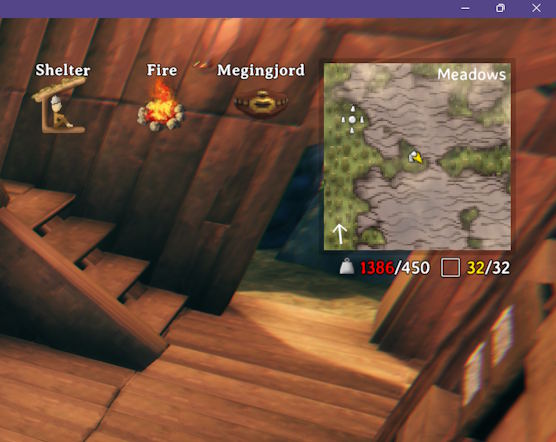
Shows your current and maximum carry weight, followed by how many inventory slots are in use, just below the minimap.
| Date uploaded | a week ago |
| Version | 1.3.0 |
| Download link | Kriona-WeightDisplay-1.3.0.zip |
| Downloads | 61 |
| Dependency string | Kriona-WeightDisplay-1.3.0 |
This mod requires the following mods to function

denikson-BepInExPack_Valheim
BepInEx pack for Valheim. Preconfigured with the correct entry point for mods and preferred defaults for the community.
Preferred version: 5.4.2360README
Shows your current and maximum carry weight, followed by how many inventory slots are in use, on the HUD just below the minimap.
- Weight turns yellow at 80% of your maximum and red when you're overburdened
- Slot count turns yellow when every slot is in use. Optional: it can warn you when you're close to full
- All of the colors and warning thresholds can be changed, and either the weight or the slot count can be turned off
- Moves to the top-right corner when the minimap is hidden
- Hides along with the rest of the HUD
Configuration
BepInEx\config\kriona.WeightDisplay.cfg is created on first run, and changes take effect as soon as the file is saved. You do not need to restart Valheim or rejoin the world.
| Setting | Default | Description |
|---|---|---|
| ShowWeight | true | Show your current and maximum carry weight |
| ShowSlots | true | Show how many inventory slots are in use |
| FontSize | 18 | Size of the weight text |
| Margin | 6 | Gap between the minimap (or the screen corner) and the text |
| WeightWarningPercent | 80 | Percentage of your maximum carry weight at which the weight takes WeightWarningColor (1-100) |
| WeightWarningColor | yellow | Color of the weight at or above WeightWarningPercent |
| OverburdenedColor | red | Color of the weight when you're overburdened |
| SlotWarningOpenSlots | 3 | Number of open inventory slots at or below which the slot count takes SlotWarningColor (1-100) |
| SlotWarningColor | (empty) | Color of the slot count when SlotWarningOpenSlots or fewer slots are open |
| FullSlotsColor | yellow | Color of the slot count when every slot is in use |
Colors can be a name (black, blue, green, orange, purple, red, white, yellow) or a #RRGGBB value. Leave one empty to keep the number uncolored at that point.
Installation
With a mod manager such as r2modman or the Thunderstore Mod Manager, install Weight Display - it installs BepInExPack for Valheim too.
By hand:
- Install BepInExPack for Valheim from Thunderstore or Nexus Mods
- Extract the zip into your Valheim folder, or copy
WeightDisplay.dllintoBepInEx\plugins
Client-side only - other players and the server don't need it.
Other Mods By Me
See all my mods on Thunderstore.
Source
The source code is on GitHub.
CHANGELOG
Changelog
1.3.1
- The slot count only includes items in the inventory grid, so items in another mod's equipment slots (such as CDEV Equipment Slots) aren't counted
1.3.0
- Shows how many inventory slots are in use after the weight (suggested by digibluez)
- The inventory screen's weight icon replaces the word "Weight" (suggested by digibluez)
- Add settings to toggle weight / slots
- Add warning thresholds / colors (suggested by digibluez)
- Saving the config file no longer triggers the mod to write it back, so an editor with it open doesn't report it as changed
- Shows a message when the config file is reloaded
1.2.0
- Config changes take effect as soon as the file is saved; you don't need to restart Valheim or rejoin the world
1.1.0
- Config changes are read each time you join a world; you don't need to restart Valheim
1.0.0
- Initial release
