
Please disclose if any significant portion of your mod was created using AI tools by adding the 'AI Generated' category. Failing to do so may result in the mod being removed from Thunderstore.

NearbyStorage
See and use items in nearby containers without opening them one by one and craft, build, refuel, and feed machines from nearby chests.
| Date uploaded | 5 days ago |
| Version | 1.0.3 |
| Download link | Landoria-NearbyStorage-1.0.3.zip |
| Downloads | 332 |
| Dependency string | Landoria-NearbyStorage-1.0.3 |
This mod requires the following mods to function

denikson-BepInExPack_Valheim
BepInEx pack for Valheim. Preconfigured with the correct entry point for mods and preferred defaults for the community.
Preferred version: 5.4.2351README
Nearby Storage
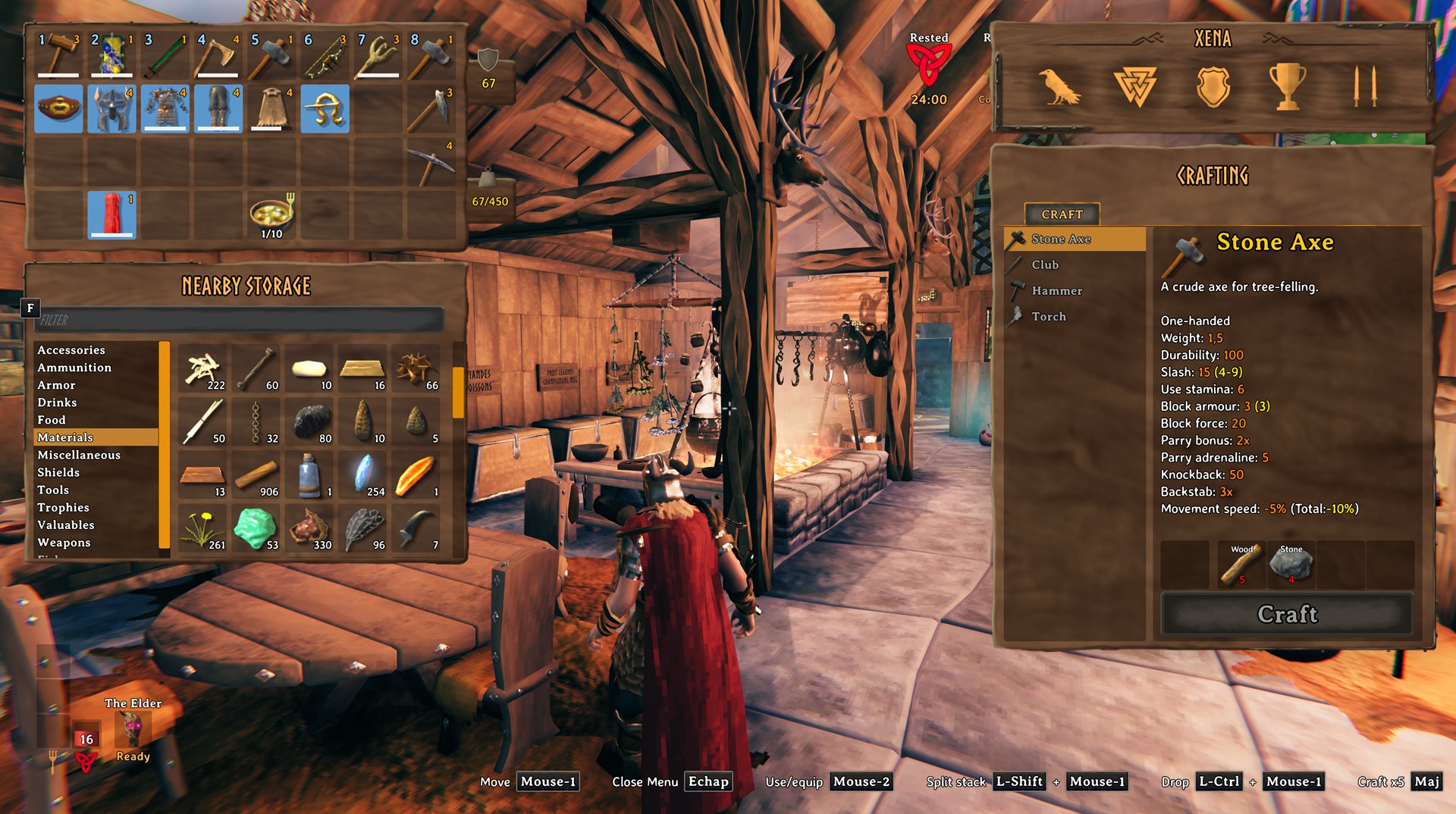
See and use items in nearby containers without opening them one by one. Nearby Storage also lets you name chests and craft, build, refuel, and feed machines using nearby supplies.
Nearby Storage panel
- Press Tab to open your inventory. Nearby Storage appears below it when accessible nearby containers contain items.
- Ctrl-click an inventory stack to store it when exactly one nearby container already holds the same item and quality and has room for the whole stack. Otherwise, an error appears.
- Drop an item onto an occupied Nearby Storage slot to move it into the same container.
- Choose a category or use the search field to find items.
Craft from Nearby Storage
- Hold Left Alt while crafting, building, refueling, or feeding a machine to use supplies from your inventory, nearby containers, and, where applicable, ground drops.
- Hold Alt and Shift together to use nearby supplies when crafting multiple items at once.
Renaming containers
- Press Shift + E while looking at a wooden, reinforced, or personal chest or a barrel to give it a name if you can open it.
Including or excluding containers
- Press Alt + E while looking at a wooden, reinforced, or personal chest or a barrel to include or exclude it from Nearby Storage for your character.
- Excluded containers are also ignored when crafting, building, refueling, and feeding machines. Containers are included by default.
Ping a container
- Alt + click a Nearby Storage item to ping its container.
Settings
Settings are stored in Landoria.NearbyStorage.cfg and reload while the game is running.
| Setting | Default | Description |
|---|---|---|
SearchRadius |
60 |
Search radius around the player for nearby storage and ground items, from 10 to 100 metres. |
NearbyStorageShortcut |
Left Alt |
Hold to use nearby supplies while crafting, building, refueling, or feeding. |
Screenshot
Contact
Report bugs through GitHub Issues.
CHANGELOG
Changelog
1.0.6
- Added a category picker to the chest rename dialog.
- Localized the interface in 35 languages.
1.0.5
- Updated readme
1.0.4
- Add the
AutomaticItemDistributionsetting.
1.0.3
- Allow to exclude containers from the Nearby Storage
1.0.2
- Added chest renaming.
1.0.0
- Initial Version
