
Please disclose if any significant portion of your mod was created using AI tools by adding the 'AI Generated' category. Failing to do so may result in the mod being removed from Thunderstore.
BowTrajectory
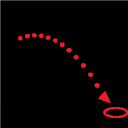
Shows the predicted arrow/bolt flight path with an impact marker while drawing a bow or crossbow.
By ModdedWolf
| Date uploaded | 2 weeks ago |
| Version | 1.0.3 |
| Download link | ModdedWolf-BowTrajectory-1.0.3.zip |
| Downloads | 232 |
| Dependency string | ModdedWolf-BowTrajectory-1.0.3 |
This mod requires the following mods to function

denikson-BepInExPack_Valheim
BepInEx pack for Valheim. Preconfigured and includes unstripped Unity DLLs.
Preferred version: 5.4.2202README
Bow Trajectory
A lightweight, client-side Valheim mod that draws the predicted flight path of your arrow/bolt in real time while you draw a bow (or aim a crossbow), ending in a marker where it's predicted to land.
It reads the real launch values from the game each frame (draw strength, projectile speed, gravity, drag) and simulates the exact same physics the projectile uses, so the line matches where the arrow will actually go.
- Purely visual / client-side. It does not change any gameplay values, so it's safe in single-player and on servers that don't have the mod installed.
- Works with bows and crossbows, and adapts to your current ammo (different arrows have different speeds/gravity).
Requirements
- Valheim (PC)
- r2modman (or Thunderstore Mod Manager) with a Valheim profile that has BepInExPack Valheim installed
- For building from source: the .NET SDK (8.0+)
Install with r2modman
- Install r2modman, choose Valheim, and create (or select) a profile.
- In that profile, install BepInExPack Valheim (r2modman pulls it in as a dependency for most mods; if it isn't there, install it from the Online tab).
- Launch the game once through r2modman (
Start Default) so the profile'sBepInExfolders are generated. - Drop
BowTrajectory.dllinto the profile's plugins folder:%APPDATA%\r2modmanPlus-local\Valheim\profiles\<ProfileName>\BepInEx\plugins\(or import it via r2modman's Import local mod). - Launch Default and equip a bow.
If you build from source (below), the build copies the DLL into your profile automatically.
Show it in the r2modman mod list (Import local mod)
r2modman only lists mods that were installed through it. To have it appear and be managed (recommended), import the packaged zip:
- Build the package:
dotnet build -c Release -t:Package(producesdist\BowTrajectory-<version>.zip). - In r2modman, select your profile, then Settings -> Import local mod and choose that zip.
Start Default.
Do not also drop the loose DLL into BepInEx\plugins\ when using the imported version, or BepInEx will see the plugin twice (duplicate GUID) and skip loading it.
Usage
- Equip a bow or crossbow and select arrows/bolts.
- Hold to draw the bow — the trajectory line appears and updates as your draw strength increases. For crossbows it appears while aiming.
- Release to fire; the arrow follows the predicted path.
- Press B in-game to toggle the preview on/off (configurable).
Configuration
Settings live in the BepInEx config file and can also be edited live with a config manager mod. File location:
%APPDATA%\r2modmanPlus-local\Valheim\profiles\<ProfileName>\BepInEx\config\ModdedWolf.BowTrajectory.cfg
For manual BepInEx installs, the file is at:
Valheim\BepInEx\config\ModdedWolf.BowTrajectory.cfg
Updating from v1.0.2 or earlier: config moved from dev.modded.bowtrajectory.cfg to ModdedWolf.BowTrajectory.cfg. Your settings are copied over automatically the first time you run v1.0.3+. You can delete the old file once everything looks right.
| Section | Key | Default | Description |
|---|---|---|---|
| General | Enabled |
true |
Master on/off. |
| General | ToggleKey |
B |
Hotkey to toggle the preview in-game. |
| General | MinDrawPercent |
0.05 |
Only show the bow path once the draw passes this fraction (0-1). |
| General | ShowForCrossbows |
true |
Also show the path while aiming a crossbow. |
| General | StopAtCharacters |
true |
If true, the path and impact marker stop on creatures/animals/players too, not just terrain/structures. Set false to let the line pass through characters. |
| Appearance | StartColor |
white | Line color near the bow. |
| Appearance | EndColor |
red | Line color near the impact point. |
| Appearance | LineWidth |
0.06 |
Line width (meters). |
| Appearance | ShowImpactMarker |
true |
Show a ring where the arrow is predicted to land. |
| Appearance | ImpactColor |
red | Impact ring color. |
| Appearance | ImpactMarkerSize |
0.5 |
Impact ring radius (meters). |
| Advanced | MaxPoints |
400 |
Max simulated points along the path. The simulation always uses the game's live physics timestep so the arc matches the real arrow. |
How it works
Each frame, while a bow/crossbow is drawn, the mod:
- Reads the launch point and aim direction the game would use (
Attack.GetProjectileSpawnPoint). - Computes the launch speed from the bow's
m_projectileVel/m_projectileVelMinand the current draw percentage via the bow'sm_drawVelocityCurve(plus any bonus from the selected ammo). - Reads
m_gravity/m_dragfrom the arrow's projectile prefab. - Steps the projectile forward using the same integration as
Projectile.FixedUpdate(vel += down * gravity * dt, quadratic drag,pos += vel * dt) at the game's liveTime.fixedDeltaTime, raycasting each segment against terrain/structures until it hits something. - Feeds the points into a
LineRendererand places the impact ring at the first hit.
Notes
- Accuracy spread is intentionally ignored so the line shows the true center aim, not the random cone.
- Built against your installed Valheim version's assemblies. After a major Valheim update, rebuild from source if member names changed.
Questions or bugs? Discord
CHANGELOG
Changelog
1.0.6
- Moved in-game settings onto a dedicated Settings → Bow Trajectory tab (vanilla Accessibility layout is unchanged).
- Tab includes toggles for show trajectory, show impact marker, and show for crossbows.
- Tab includes trajectory color and impact marker color dropdowns (Custom hex still uses Configuration Manager / the cfg file).
- Added Line width and Impact marker size sliders on the tab (same ranges as Configuration Manager).
- Color dropdowns stay at the narrower ~180px width for a cleaner layout.
- Added a Default button (centered at the bottom of the settings content) that resets all tab settings to Bind defaults and saves.
- Fixed duplicate white floating label on the Bow Trajectory settings tab button (leftover TMP from cloning Accessibility).
- Fixed Bow Trajectory tab caption staying orange when unselected (restored vanilla Selected on/off caption colors).
1.0.5
- Color settings (
StartColor,EndColor,ImpactColor) are now named presets (dropdown in Configuration Manager) instead of raw Unity colors. - Preset dropdown shows friendly labels (e.g.
RGB Cycle Fast,Custom) instead of raw enum names likeRgbCycleFast. - Added matching
*ColorHexsettings (#RRGGBBor#RRGGBBAA) used when the preset isCustom. - Animated RGB Cycle Slow / Medium / Fast presets cycle through rainbow hues (~7s / ~3.5s / ~1.25s per full rotation).
- Config scrub: bare hex (e.g.
FFFFFFD9) and legacy Unity Color values left in preset keys are converted toCustom+ hex before Bind, so BepInEx no longer warns that values likeFFFFFFD9were not found.
1.0.4
- Fixed config migration re-applying on every startup: after a successful migration, legacy
dev.modded.bowtrajectory.cfgis renamed todev.modded.bowtrajectory.cfg.migratedso migration only runs once and no longer overwrites user edits toModdedWolf.BowTrajectory.cfg.
1.0.3
- Renamed plugin GUID to
ModdedWolf.BowTrajectory(config path is nowModdedWolf.BowTrajectory.cfg) - Migrates settings from legacy
dev.modded.bowtrajectory.cfgon first launch
1.0.0
- Initial release
