
Please disclose if any significant portion of your mod was created using AI tools by adding the 'AI Generated' category. Failing to do so may result in the mod being removed from Thunderstore.
Chest List
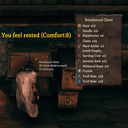
Shows a clean overlay of chest contents when looking at player-placed chests (optional for world loot chests).
| Date uploaded | 2 days ago |
| Version | 1.0.0 |
| Download link | ModdedWolf-Chest_List-1.0.0.zip |
| Downloads | 67 |
| Dependency string | ModdedWolf-Chest_List-1.0.0 |
This mod requires the following mods to function

denikson-BepInExPack_Valheim
BepInEx pack for Valheim. Preconfigured and includes unstripped Unity DLLs.
Preferred version: 5.4.2202README
Chest_List
Look at a chest and see what's inside — without opening it.
When you hover a player-placed chest, Chest_List shows a clean overlay listing item names and stack counts. The panel reuses Valheim inventory background art when available, and respects your configured position and transparency.
- Player-built chests: always on
- World / dungeon loot chests: optional (off by default)
- Optional item icons (on by default; image left, text right)
- Optional combined stacks (one row per unique item with total count)
- Client-side only — no server install required
Install with r2modman (recommended)
- Install r2modman.
- Select Valheim and open your profile.
- Make sure BepInExPack Valheim is installed.
- Download this mod and click Install with Mod Manager,
or go to Settings → Import local mod and select the downloaded zip. - Click Start modded.
Manual install (BepInEx)
-
Install BepInExPack Valheim if you do not already have it.
-
Extract the zip.
-
Copy files into:
Valheim\BepInEx\plugins\ModdedWolf-Chest_List\The folder should contain
Chest_List.dll,manifest.json,icon.png, andREADME.md.Prefer the Thunderstore / r2modman package folder name (
ModdedWolf-Chest_List) so enable/disable in the mod manager controls the install. A bareplugins\Chest_List\folder is invisible to r2modman and will always load. -
Launch Valheim.
Configuration
After first launch, settings are saved here:
BepInEx\config\ModdedWolf.Chest_List.cfg
| Section | Key | Default | Description |
|---|---|---|---|
| General | EnableWorldGeneratedChests | false | Also preview world/dungeon loot chests |
| General | CombineStacks | false | Merge identical items into one row with total count |
| UI | PositionX | 0.72 | Horizontal position (0–1) |
| UI | PositionY | 0.55 | Vertical position (0–1) |
| UI | Alpha | 0.92 | Overlay opacity (0–1) |
| UI | ShowItemImages | true | Show icons left of names |
| UI | MinPanelWidth | 300 | Minimum panel width (grows with longest row) |
| UI | MaxPanelWidth | 470 | Maximum panel width before names clip |
Compatible with BepInEx ConfigurationManager.
Notes
Player-placed vs world chests uses Valheim's Piece.IsPlacedByPlayer() (creator id). Containers without a player creator are treated as world-generated. The overlay hides while inventory, menus, console, chat input, or similar UI are open.
CHANGELOG
Changelog
1.0.1
- Panel grows to fit every item (no scroll, no max-height clip); avoids mouse-wheel camera zoom conflicts.
- Title uses a Valheim TMP font (fixes missing LiberationSans SDF warning).
CombineStacksdefaults to true (new installs / missing keys only; existing cfg keeps its value).
1.0.0
- Initial release: hover overlay listing chest contents (names + stacks).
- Player-placed chests always shown; world-generated chests optional (off by default).
- Configurable UI position, transparency, and item icons (icons on by default).
- Optional
CombineStacksto merge identical items into one row with a total count. - Container name shown as a fixed header above the full item list.
- Panel height grows to fit every item (no scrolling, no max-height cap).
