
Please disclose if any significant portion of your mod was created using AI tools by adding the 'AI Generated' category. Failing to do so may result in the mod being removed from Thunderstore.
AdvancedTerrainModifiersCompatible
Maintained AdvancedTerrainModifiers compatibility fork for current Valheim, Jotunn and EpicLoot.
| Date uploaded | 4 days ago |
| Version | 1.4.8 |
| Download link | Ostrix-AdvancedTerrainModifiersCompatible-1.4.8.zip |
| Downloads | 4451 |
| Dependency string | Ostrix-AdvancedTerrainModifiersCompatible-1.4.8 |
This mod requires the following mods to function

denikson-BepInExPack_Valheim
BepInEx pack for Valheim. Preconfigured with the correct entry point for mods and preferred defaults for the community.
Preferred version: 5.4.2350
ValheimModding-Jotunn
Jötunn (/ˈjɔːtʊn/, 'giant'), the Valheim Library was created with the goal of making the lives of mod developers easier. It enables you to create mods for Valheim using an abstracted API so you can focus on the actual content creation.
Preferred version: 2.30.0README
AdvancedTerrainModifiers Compatible
Quality of life building mod that improves how terrain manipulation with the hoe and cultivator works and adds new terrain manipulation tools.
Install this package instead of
Searica-AdvancedTerrainModifiers. Do not load both packages: this compatibility build intentionally keeps the original BepInEx plugin GUID so existing configuration and multiplayer checks continue to work.
This GPLv3 compatibility fork is based on Searica's AdvancedTerrainModifiers 1.4.1 (e773c62). Ostrix maintains the compatibility release. It avoids the EpicLoot 0.13.x Player.Update Harmony conflict and restores custom terrain-operation synchronization when the installed Jotunn build lacks custom TerrainOp registration. Credit for the original mod and gameplay features belongs to Searica. Do not report fork-specific issues to the original author.
Version 1.4.8 targets Valheim 1.0, BepInEx 5.4.2350 and Jotunn 2.30.0. English and Russian gameplay text can be edited in Translations/TerrainTools/<Language>/translations.json; external keys override the embedded defaults. If you edited the old path, move those files manually. Runtime compatibility must still be smoke-tested after each Valheim release.
Version 1.4.8
- Refreshes projected terrain previews only after Valheim finishes positioning the placement ghost, removing the one-frame race that could make the gizmo jitter or jump after opening the inventory.
- Restricts custom terrain RPC data and ownership claims to operations managed by this mod; malformed radii, powers and deltas are rejected instead of being applied.
- Runs terrain reset only for the dedicated reset tool and skips player structures, non-player legacy modifiers and protected areas.
- Makes the camera-scroll transpiler fail safely if a future Valheim update changes its target IL.
- Loads editable translations from a TerrainTools-owned path, avoiding collisions in flattened mod-manager installs while retaining embedded English and Russian defaults.
Version 1.4.7
- Reverts the terrain-restoration radius preview change that polluted shared overlay state and broke every tool preview after switching the build menu with Tab.
- Restores the isolated square frame and cross preview for terrain restoration while retaining the embedded Gale-compatible translations from 1.4.6.
Version 1.4.6
- Embeds and explicitly registers English and Russian translations so localization still works when a mod manager flattens the package folders.
- Makes the terrain-restoration preview circle and center marker follow the selected radius immediately.
Version 1.4.5
- Uses one shared paint-mask bounds calculation for both square terrain painting and its preview.
- Aligns the preview to Valheim's rendered 65x65 paint-mask texels instead of the mismatched one-metre vertex-grid inverse.
- Shows a bright core frame plus a wider translucent frame for the texture-filtering feather; mip filtering can still soften the edge at distance.
- Uses the proven paint-mask preview for level and raise tools so their frames match the visible square.
- Shows matching base and target footprints for precise raising, centered on the height vertex actually modified by Valheim; square vegetation restoration also uses the shared paint preview.
- Prevents precision paint, raise and smooth operations from reporting a zero effective radius after their sentinel is applied.
Version 1.4.4
- Preserves precision height, radius, hardness, smoothing and paint settings through Valheim 1.0 terrain-operation RPC serialization.
- Restores custom
TerrainOpregistration after world reloads and provides an idempotent fallback when the installed Jotunn build does not register custom terrain operations. - Fixes terrain restoration across Heightmap boundaries and removes legacy
TerrainModifierobjects inside the selected area. - Adds adjustable restoration radius with
Alt + mouse wheel; the frame and center marker now scale together. - Prevents camera zoom while changing radius or hardness and increases the default hardness scroll speed.
- Fixes overlay state, precision-height scrolling, square-tool hover information, shovel initialization and its single-action build menu.
- Adds editable English and Russian gameplay localization.
- Updates the package for BepInEx 5.4.2350 and Jotunn 2.30.0.
Server-Side Info: This mod does work as a client-side only mod and only needs to be installed on the server if you wish to enforce configuration settings.
Security note: Ward checks are applied to the full local brush footprint, but this does not turn Valheim's client-owned terrain RPCs into server-authoritative validation. Treat untrusted or modified clients as outside the supported security model.
Terrain paint note: Valheim stores terrain paint on a coarse interpolated mask. The visible edge can therefore extend slightly beyond a square preview. The same behavior was reproduced with PlanBuild's terrain-paint tool and is treated as a current engine limitation rather than a different operation area in this mod.
Features
Multiplayer Support
- All terrain operations, including resetting terrain modifications, work in multiplayer and are synced to other players.
Quality of Life
- Adds descriptions of how each terrain tool works for all Vanilla terrain tools.
- All new features can be enabled/disabled from the configuration file.
Modifiable Tool Radius
- Lets you change the radius of terrain tools using the scroll wheel.
- Configurable hotkey to enable changing radius.
- Configurable maximum tool radius.
- Camera zoom is blocked while modifying tool radius.
Modifiable Tool Hardness
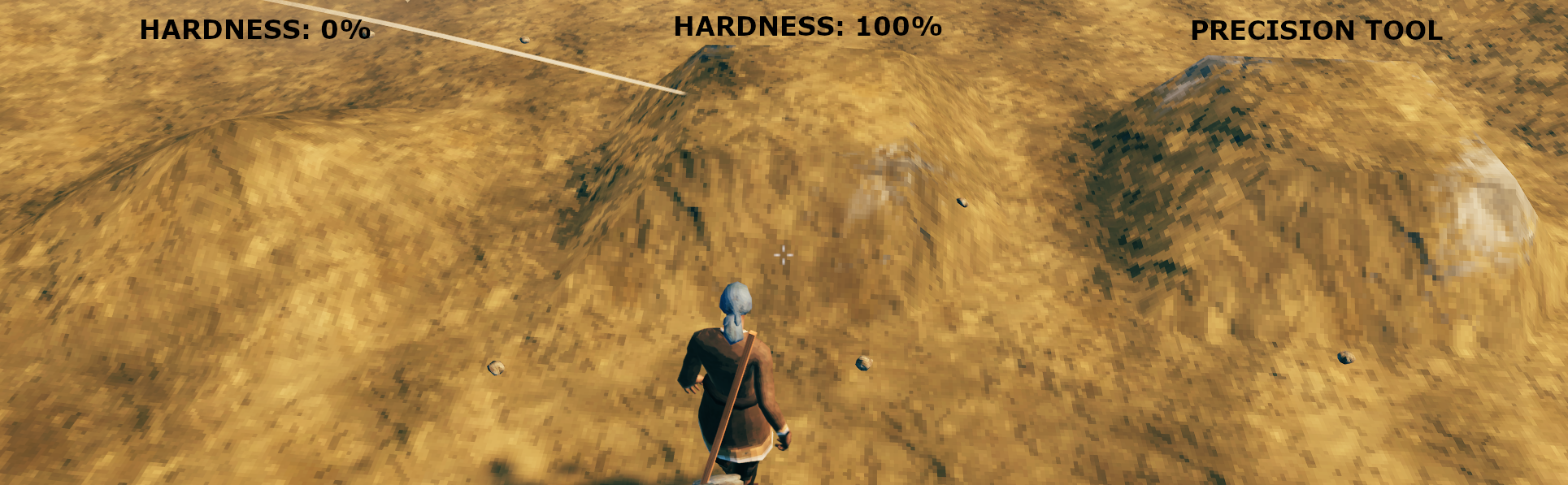
- Lets you change the "hardness" of terrain tools using the scroll wheel. "Hardness" refers to how uniformly the effect is applied over the radius of the tool, so increasing the hardness will apply the effect more uniformly (see image for example of changing hardness for the Raise Ground tool).
- Configurable hotkey to enable changing hardness.
- Camera zoom is blocked while modifying tool hardness.
New Terrain Tool
- Adds a craftable shovel that lets you lower terrain.
New Hoe Tools
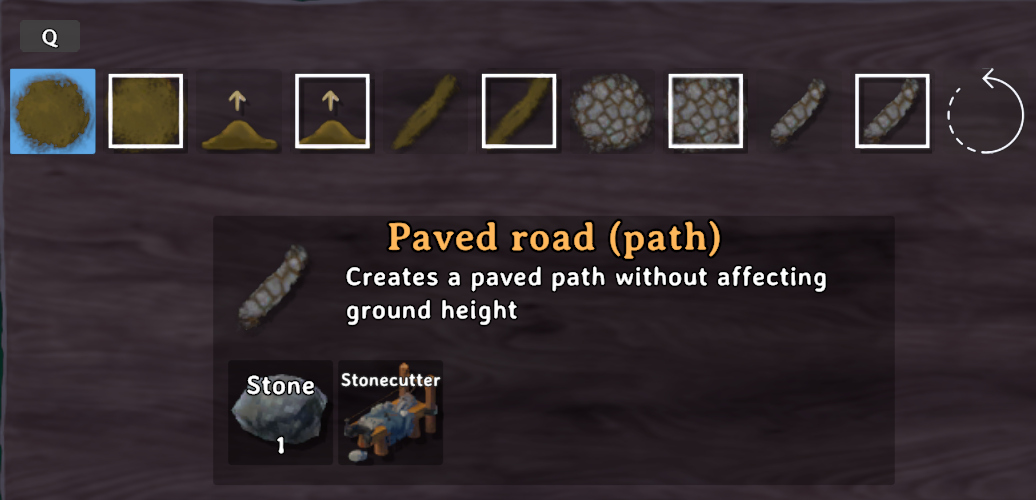
- Adds a version of each terrain tool that doesn't affect the terrain height when used.
- Adds square versions of all terrain tools that modify terrain according to the world grid (so you can enjoy clean edges).
- Adds a precision raise ground tool that lets you set the exact height you want to raise the terrain by using the scroll wheel on your mouse.
- Adds a remove terrain modifications tool that lets you reset terrain.
New Cultivator Tools
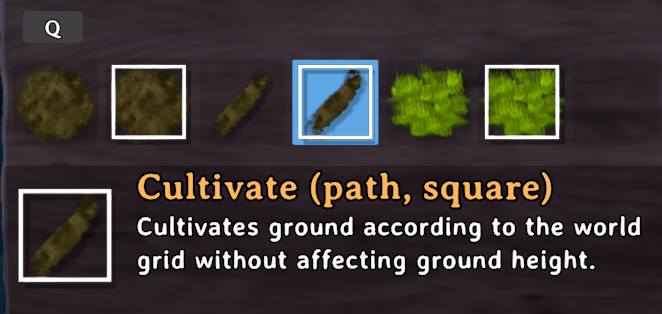
- Adds a version of the cultivate tool that doesn't affect the terrain height when used.
- Adds square versions of each tools tool in the cultivator that modifies terrain according to the world grid (so you can enjoy clean edges).
Instructions
If you are using a mod manager for Thunderstore simply install the mod from there. If you are not using a mod manager then, you need a modded instance of Valheim (BepInEx) and the Jotunn plugin installed.
Configuration
Changes made to the configuration settings will be reflected in-game immediately (no restart required) and they will also sync to clients if the mod is on the server. The mod also has a built in file watcher so you can edit settings via an in-game configuration manager (changes applied upon closing the in-game configuration manager) or by changing values in the file via a text editor or mod manager.
Global Section
These settings control the global settings and how verbose the output to the log is.| Setting | Server Sync | Description |
|---|---|---|
| Verbosity | No |
Low will log basic information about the mod. Medium will log information that is useful for troubleshooting. High will log a lot of information, do not set it to this without good reason as it will slow down your game.
|
| HoverInfo | Yes |
Set to true/enabled to show terrain height when using square terrain tools.
|
Radius Section
These settings control features related to modifying the radius of terrain tools.| Setting | Server Sync | Description |
|---|---|---|
| RadiusModifier | Yes |
Set to true/enabled to allow modifying the radius of terrain tools using the scroll wheel. Note: Radius cannot be changed on square tools except terrain restoration.
|
| RadiusModKey | No |
Modifier key that must be held down when using scroll wheel to change the radius of terrain tools.
|
| RadiusScrollScale | No |
Scroll wheel change scale, larger magnitude means the radius will change faster and negative sign will reverse the direction you need to scroll to increase the radius.
|
| MaxRadius | Yes |
Maximum radius of terrain tools.
|
Hardness Section
These settings control features related to modifying the hardness of terrain tools.| Setting | Server Sync | Description |
|---|---|---|
| HardnessModifier | Yes |
Set to true/enabled to allow modifying the hardness of terrain tools using the scroll wheel. Note: Hardness cannot be changed on square terraforming tools and tools that do not alter ground height do not have a hardness.
|
| HardnessModKey | No |
Modifier key that must be held down when using scroll wheel to change the hardness of terrain tools.
|
| HardnessScrollScale | No |
Scroll wheel change scale, larger magnitude means the hardness will change faster and negative sign will reverse the direction you need to scroll to increase the hardness.
|
Shovel Section
These settings control features related to the new Shovel tool.| Setting | Server Sync | Description |
|---|---|---|
| Shovel | Yes |
Set to true/enabled to allow crafting the shovel. Setting to false/disabled will prevent crafting new shovels but will not affect existing shovels in the world.
|
| ShovelToolName | Yes |
Set to true/enabled to add this terrain tool to the shovel. Set to false/disabled to remove it.
|
Hoe Section
These settings control features related to the Hoe.| Setting | Server Sync | Description |
|---|---|---|
| HoeToolName | Yes |
Set to true/enabled to add this terrain tool to the hoe. Set to false/disabled to remove it.
|
Cultivator Section
These settings control features related to the Cultivator.| Setting | Server Sync | Description |
|---|---|---|
| CultivatorToolName | Yes |
Set to true/enabled to add this terrain tool to the cultivator. Set to false/disabled to remove it.
|
Known Issues
Terrain paint is stored on Valheim's interpolated paint-mask grid, so the visible texture edge may extend slightly beyond a square preview. Terrain height and restoration bounds are unaffected by this visual blending.
Compatibility
Should usually be compatible with everything except other mods that let you change the radius of terrain manipulation tools as they will likely conflict.
Partial Incompatibility
ValheimPlus While TerrainTools does work with ValheimPlus there are some UI glitches. ValheimPlus freezes the animations for the terrain tools so you can't visualize the effect size properly and the hover info on square tools does not update correctly. It may be possible to fix this via changing something in ValheimPlus's configuration.
FastTools While the two mods are fully compatible and you can modify the stamina cost of the Shovel using FastTools, there is currently a visual bug in FastTools that breaks the animations on the placement ghost for all terrain tools and prevents AdvancedTerrainModifiers from being able to show the change in radius. You can use ToolTweaks as a compatible alternative.
Donations/Tips
My mods will always be free to use but if you feel like saying thanks you can tip/donate.
| My Ko-fi: |  |
|---|
Source Code
Source code is available on Github.
| Repository | Link |
|---|---|
| Maintained fork |  MaikiOS/TerrainTools MaikiOS/TerrainTools |
| Original project | searica/TerrainTools |
Contributions
Report compatibility-fork issues to the maintained fork, not to the original package author.
Credits
This mod was inspired by and is based on OCDHeim by javadevils as well as HoeRadius by aedenthorn.
Shameless Self Plug (Other Mods By Me)
If you like this mod you might like some of my other ones.
Building Mods
Gameplay Mods
CHANGELOG
| Version | Notes |
|---|---|
| 1.4.8 |
|
| 1.4.7 |
|
| 1.4.6 |
|
| 1.4.5 |
|
| 1.4.4 |
|
| 1.4.3 |
|
| 1.4.2 |
|
| 1.4.1 |
|
| 1.4.0 |
|
| 1.3.3 |
|
| 1.3.2 |
|
| 1.3.1 |
|
| 1.3.0 |
|
| 1.2.6 |
|
| 1.2.5 |
|
| 1.2.4 |
|
| 1.2.3 |
|
| 1.2.2 |
|
| 1.2.1 |
|
| 1.2.0 |
Update Info
|
| 1.1.0 |
|
| 1.0.0-1.0.2 |
|
