
Please disclose if any significant portion of your mod was created using AI tools by adding the 'AI Generated' category. Failing to do so may result in the mod being removed from Thunderstore.

Quads Gear Slots
Extra inventory slots for what you wear, eat and use, in a Gear panel next to your inventory.
| Date uploaded | 2 days ago |
| Version | 1.2.2 |
| Download link | Quads_Lab-Quads_Gear_Slots-1.2.2.zip |
| Downloads | 48 |
| Dependency string | Quads_Lab-Quads_Gear_Slots-1.2.2 |
This mod requires the following mods to function

denikson-BepInExPack_Valheim
BepInEx pack for Valheim. Preconfigured with the correct entry point for mods and preferred defaults for the community.
Preferred version: 5.4.2351README
🛡️ Quad's Gear Slots
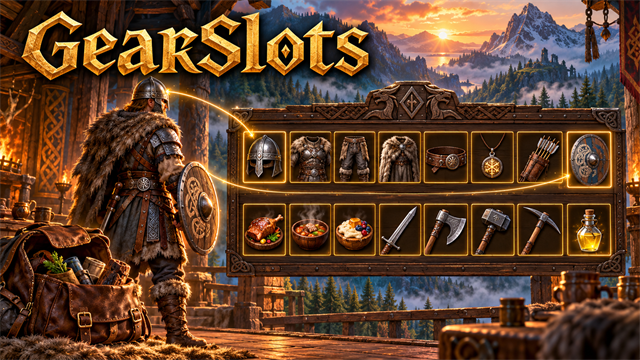
Extra inventory slots for what you wear, eat and use, in a Gear panel next to your inventory.



Source code · Report a bug · Discord
✨ Features
What is in it
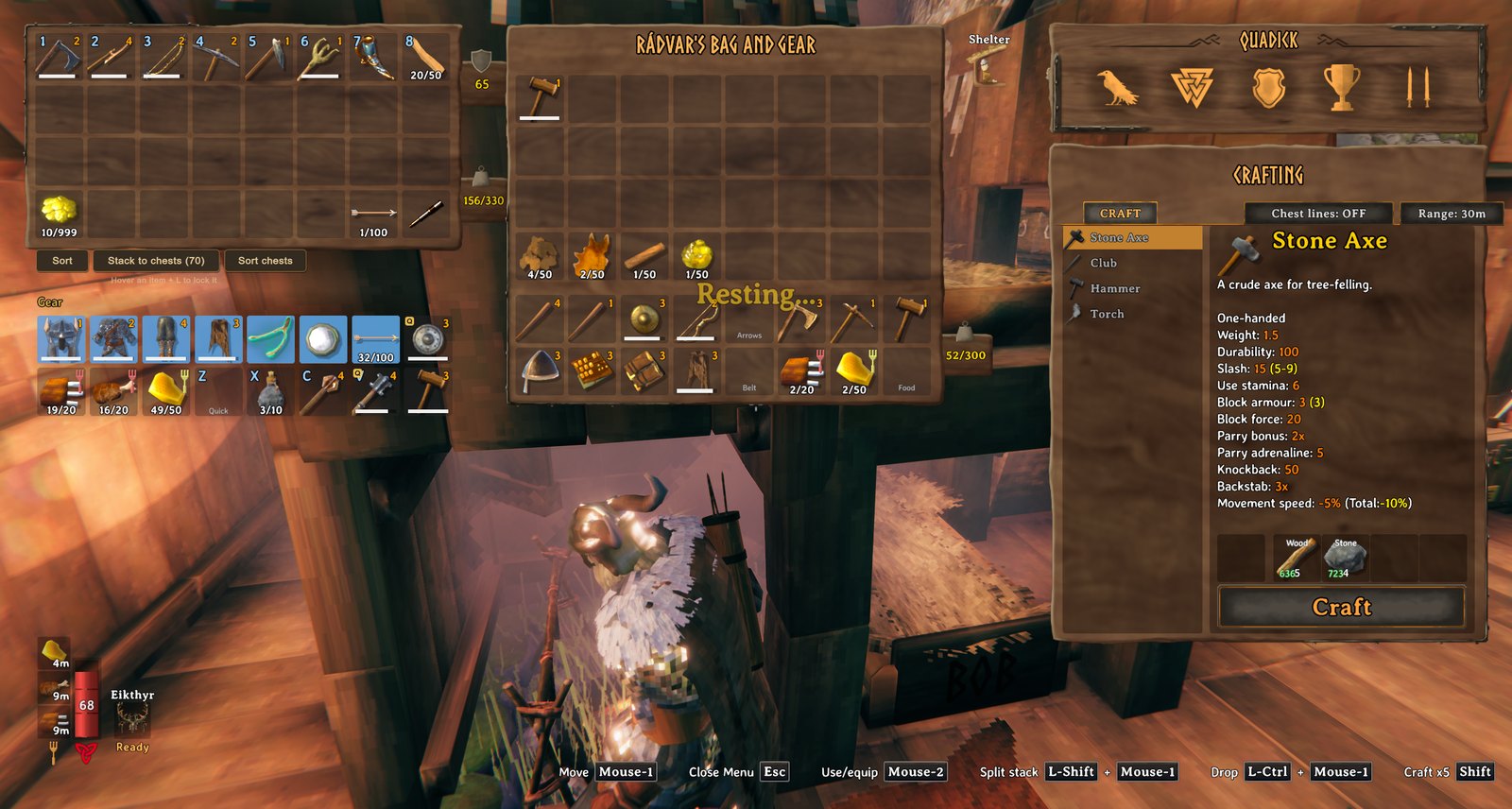
- Head, Chest, Legs, Cape, Belt, Trinket, Ammo and Shield slots: drop a matching piece in and you put it on. Armor and arrows no longer take room in your bag, and gear you are already wearing moves into its slot by itself.
- The shield follows your weapon: switch to a one-handed weapon and the shield from the Shield slot comes out with it (two-handed weapons and bows put it away).
- Three Food slots: keep your best meals in their own place (right-click to eat). Optional auto-eat is in the settings.
- Five Quick slots (Z, X, C, V by default; the fifth is unbound) for a weapon, tool, potion or anything else: press the key to equip or use it. With the inventory closed they show in a row under your hotbar, with their keys.
- Slots only accept the right kind of item, and Sort and Stack to Chests (QualityOfLife) leave them alone.
- Nothing is stored in a new place: the slots are extra rows of your real inventory, so saving, weight, crafting and dragging work as normal. Before removing the mod, move your gear-slot items into your bag: without it the game drops anything in those rows at your feet the next time you spawn.
Every key and option is in the settings (the manager's Mod settings tab).
📸 Screenshots
The Gear panel beside your inventory: armour, cape, belt, trinket, ammo and shield slots
🎮 How to use
| Key | What it does |
|---|---|
| Z / X / C / V | Use what is in Quick slot 1 to 4 (equip a weapon or tool, drink a potion); the fifth slot has no key until you set one |
🧩 Other mods
Known clashes
- ValheimPlus (extra inventory rows): works. You keep all of its rows and the gear rows sit below them.
- ExtraSlots, Equipment and Quick Slots, AzuExtendedPlayerInventory, Extended Player Inventory, ComfyQuickSlots: they keep their own slots in the same inventory cells, so the gear slots switch off while one is installed. What was in them moves into your bag, and you're told in chat.
- BetterArchery: the gear slots switch off while its quiver is on.
Works with our mods
- Quad's Quality of Life: Sort and Stack to chests leave the gear slots alone.
- Quad's Ledger Chest: items you take go into your ordinary rows.
- Quad's Companion: what's in your gear slots isn't offered to your companion.
Removing it: take everything out of the gear slots first, or the game drops it at your feet the next time you spawn.
Found a clash with another mod? Tell us which one and what happened.
👥 Multiplayer
Who needs it: Only the players who want it.
Nothing is shared: the slots are rows of your own inventory.
⚙️ Settings
In BepInEx/config/com.quad.gearslots.cfg, made the first time the game runs with the mod. r2modman and Thunderstore Mod Manager edit it under Config editor.
Food
| Setting | Default | What it does |
|---|---|---|
AutoEat |
false |
Eat from your Food slots by yourself: when a food you have in a slot is not active (and you have a free food slot), or its effect has dropped below half. Off by default. |
EatBelowPercent |
20 |
Auto-eat a food you are already under only once its time left drops below this percent (the game allows it from 50). Lower saves food: a meal then lasts 80% of its time instead of 50%, and its effect weakens a little towards the end. |
General
| Setting | Default | What it does |
|---|---|---|
ShowPanel |
true |
Show the Gear panel next to your inventory. (Turn off and your gear slots hide; the items stay where they are.) |
ShowMessages |
true |
Short messages when something happens (auto-eat, a quick slot is empty). |
ShieldFollowsWeapon |
true |
When you switch to a one-handed weapon, put on the shield from your Shield slot too. (Two-handed weapons and bows take the shield off, as in the game.) |
AutoFill |
true |
When you put on a piece of gear (or the game loads with it on), move it into its matching gear slot if that slot is empty. |
Layout
| Setting | Default | What it does |
|---|---|---|
Gap |
6 |
Space between the Gear panel and the inventory (UI pixels). |
OffsetX |
0 |
Move the Gear panel right (negative = left). |
OffsetY |
0 |
Move the Gear panel up (negative = down). |
Quick slots
| Setting | Default | What it does |
|---|---|---|
ShowUnderHotbar |
true |
Show what is in your Quick slots, with their keys, in a row under the hotbar (the 1-8 on screen) while the inventory is closed. |
Key1 |
Z |
Press to use what is in quick slot 1: equips or unequips a weapon, tool or shield, or drinks a potion. Set to None to turn it off. If the game uses the same key for something (V: auto-pickup, X: sit, C: walk), the game's key is unbound once, so only this one works; bind it again in the game's Settings, Controls. |
Key2 |
X |
Press to use what is in quick slot 2: equips or unequips a weapon, tool or shield, or drinks a potion. Set to None to turn it off. If the game uses the same key for something (V: auto-pickup, X: sit, C: walk), the game's key is unbound once, so only this one works; bind it again in the game's Settings, Controls. |
Key3 |
C |
Press to use what is in quick slot 3: equips or unequips a weapon, tool or shield, or drinks a potion. Set to None to turn it off. If the game uses the same key for something (V: auto-pickup, X: sit, C: walk), the game's key is unbound once, so only this one works; bind it again in the game's Settings, Controls. |
Key4 |
V |
Press to use what is in quick slot 4: equips or unequips a weapon, tool or shield, or drinks a potion. Set to None to turn it off. If the game uses the same key for something (V: auto-pickup, X: sit, C: walk), the game's key is unbound once, so only this one works; bind it again in the game's Settings, Controls. |
Key5 |
None |
Press to use what is in quick slot 5: equips or unequips a weapon, tool or shield, or drinks a potion. Set to None to turn it off. If the game uses the same key for something (V: auto-pickup, X: sit, C: walk), the game's key is unbound once, so only this one works; bind it again in the game's Settings, Controls. |
🤖 Made with AI
Made with the help of Claude (Anthropic), with Claude Code: designed, written and checked together, and tried in the game.
🧪 About Quads Lab
Quads Lab is where Quad H (HardHeadHackerHead) builds software with AI, of every kind: these Valheim mods are one of its projects. Each mod is designed by a player, written with Claude Code and tested in our own world, with bobisme as our tester.
- 🌐 quadslab.io
- 🧰 All Quads Lab mods on Thunderstore
- 💻 Source code on GitHub
- 💬 Discord
- 🐞 Found a bug? Open an issue on GitHub
📜 Recent changes
- 1.2.2 A clearer page: what it does, who needs it in multiplayer, how it gets on with other mods, and where to report a bug. The game itself is unchanged.
- 1.2.1 A new id, com.quad.gearslots (it was com.dhack.gearslots): your settings move over by themselves the first time it starts, and the old settings file is kept as a backup. Restart the game after this update. If an old copy is still installed beside it, this one stands down and says which file to delete, so the two never both run. The DLL now says it was made with AI, as Thunderstore asks.
- Fix: next to other mods that change the inventory size, items were dropped on the ground at every spawn: with ValheimPlus at 7 to 9 rows everything in its extra rows, and with BetterArchery's quiver your armour row. The game now sizes the inventory as it does without this mod (with every other mod's changes), and the gear rows move to just under whatever height that gives, so with ValheimPlus you keep all its rows and the gear slots sit below them. Where the gear rows are is saved with your character. With a mod that keeps its own slots in the same cells (ExtraSlots, Equipment and Quick Slots, AzuExtendedPlayerInventory, Extended Player Inventory, ComfyQuickSlots, or BetterArchery with its quiver on) the gear slots now switch off: what was in them moves into your bag, and you are told in chat. The Gear panel's title is now in the game's own title lettering, with the braided line under it.
Every change is on the Changelog tab.
CHANGELOG
1.3.1
- Its windows no longer fill the log with "The LiberationSans SDF Font Asset was not found": each text is given the game's font before it starts (it looked for TextMeshPro's default font, which the game doesn't have, every time a text was made). Nothing changes on screen.
1.3.0
- Now in your language: English, Russian, German, Chinese (Simplified), Portuguese (Brazil), Spanish, French, Polish and Turkish, following the game's own Language setting. The game's own names are used for its things (items, creatures, lands, stations). The translations were made with AI: to correct a line, or add a language, put a file in BepInEx/config/translations/com.quad.gearslots/ named after the game's name for the language (German.json...) with only the lines you change, copied from translations/English.json on GitHub. Its notes about the game's keys name them as the game's Controls settings do.
1.2.2
- A clearer page: what it does, who needs it in multiplayer, how it gets on with other mods, and where to report a bug. The game itself is unchanged.
1.2.1
- A new id, com.quad.gearslots (it was com.dhack.gearslots): your settings move over by themselves the first time it starts, and the old settings file is kept as a backup. Restart the game after this update. If an old copy is still installed beside it, this one stands down and says which file to delete, so the two never both run. The DLL now says it was made with AI, as Thunderstore asks.
Earlier
-
Fix: next to other mods that change the inventory size, items were dropped on the ground at every spawn: with ValheimPlus at 7 to 9 rows everything in its extra rows, and with BetterArchery's quiver your armour row. The game now sizes the inventory as it does without this mod (with every other mod's changes), and the gear rows move to just under whatever height that gives, so with ValheimPlus you keep all its rows and the gear slots sit below them. Where the gear rows are is saved with your character. With a mod that keeps its own slots in the same cells (ExtraSlots, Equipment and Quick Slots, AzuExtendedPlayerInventory, Extended Player Inventory, ComfyQuickSlots, or BetterArchery with its quiver on) the gear slots now switch off: what was in them moves into your bag, and you are told in chat. The Gear panel's title is now in the game's own title lettering, with the braided line under it.
-
Auto-eat now waits until a food you are already under is below 20% of its time left (setting Food / EatBelowPercent, 1 to 50; the game allows eating again from 50%). A meal lasts 80% of its time instead of half, so your food goes about 1.6 times as far; its effect weakens a little towards the end.
-
Fix: quick slots 2-4 (X, C, V) also did the game's sit, walk and auto-pickup toggle: pressing V for quick slot 4 turned auto-pickup off. The game's own key for those is now unbound (once, and you are told in chat), so only the quick slot happens; give them another key in the game's Settings, Controls if you want them. Auto-pickup is switched back on if it was left off.
-
Fix: everything in the gear slots was dropped on the ground each time you spawned after starting the game (the game resets the inventory size on spawn since inventory rows can be bought). The gear rows now stay, and if you buy a row they move down under it.
-
First release: a Gear panel with Head, Chest, Legs, Cape, Belt, Trinket, Ammo and Shield slots, three Food slots and five Quick slots (shown under the hotbar), a shield that follows your one-handed weapon, auto-fill of worn gear, and optional auto-eat.
