
Please disclose if any significant portion of your mod was created using AI tools by adding the 'AI Generated' category. Failing to do so may result in the mod being removed from Thunderstore.

AdvancedTerrainModifiers
Quality of life building mod that improves how terrain manipulation with the hoe and cultivator works and adds new terrain manipulation tools.
| Date uploaded | 2 years ago |
| Version | 1.1.0 |
| Download link | Searica-AdvancedTerrainModifiers-1.1.0.zip |
| Downloads | 1041 |
| Dependency string | Searica-AdvancedTerrainModifiers-1.1.0 |
This mod requires the following mods to function

ValheimModding-Jotunn
Jötunn (/ˈjɔːtʊn/, 'giant'), the Valheim Library was created with the goal of making the lives of mod developers easier. It enables you to create mods for Valheim using an abstracted API so you can focus on the actual content creation.
Preferred version: 2.30.2
denikson-BepInExPack_Valheim
BepInEx pack for Valheim. Preconfigured with the correct entry point for mods and preferred defaults for the community.
Preferred version: 5.4.2351README
AdvancedTerrainModifiers
Quality of life building mod that improves how terrain manipulation with the hoe and cultivator works and adds new terrain manipulation tools.
Server-Side Info: This mod does work as a client-side only mod and only needs to be installed on the server if you wish to enforce configuration settings.
Note: This is the same mod as TerrainTools by Searica. Turns out there is another mod named TerrainTools already on Thunderstore so I have changed the name for the sake of clarity and deprecated the upload that was named TerrainTools.
Features
Multiplayer Support
- All terrain operations, including resetting terrain modifications, work in multiplayer and are synced to other players.
Quality of Life
- Adds descriptions of how each terrain tool works for all Vanilla terrain tools.
- All new features can be enabled/disabled from the configuration file.
Modifiable Tool Radius
- Lets you change the radius of terrain tools using the scroll wheel.
- Configurable hotkey to enable changing radius.
- Configurable maximum tool radius.
- Camera zoom is blocked while modifying tool radius.
Modifiable Tool Hardness
- Lets you change the "hardness" of terrain tools using the scroll wheel. "Hardness" refers to how uniformly the effect is applied over the radius of the tool, so increasing the hardness will apply the effect more uniformly.
- Configurable hotkey to enable changing hardness.
- Camera zoom is blocked while modifying tool hardness.
New Terrain Tools
- Adds a version of each terrain tool that doesn't affect the terrain height when used.
- Adds square versions of all terrain tools that modify terrain according to the world grid (so you can enjoy clean edges).
- Adds a precision raise ground tool that lets you set the exact height you want to raise the terrain by using the scroll wheel on your mouse.
- Adds a remove terrain modifications tool that lets you reset terrain.
Hoe
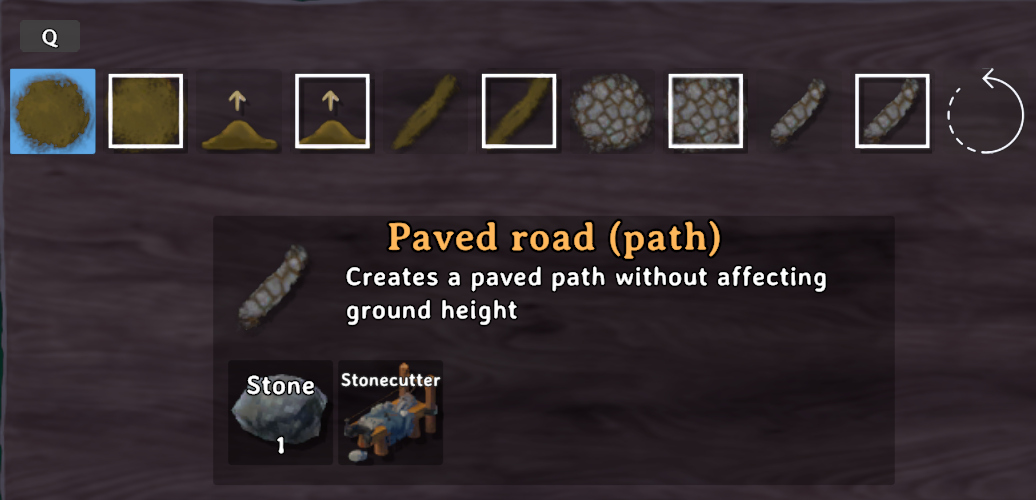
Cultivator
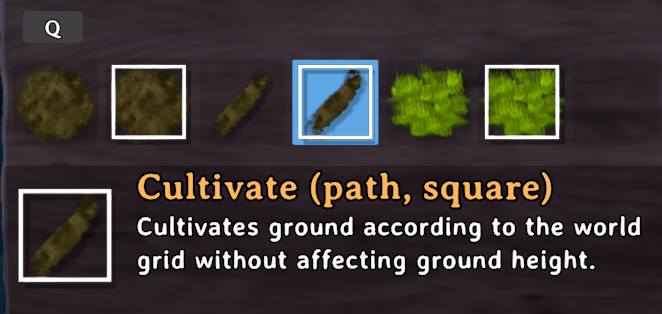
Instructions
If you are using a mod manager for Thunderstore simply install the mod from there. If you are not using a mod manager then, you need a modded instance of Valheim (BepInEx) and the Jotunn plugin installed.
Configuration
Changes made to the configuration settings will be reflected in-game immediately (no restart required) and they will also sync to clients if the mod is on the server. The mod also has a built in file watcher so you can edit settings via an in-game configuration manager (changes applied upon closing the in-game configuration manager) or by changing values in the file via a text editor or mod manager.
Global Section:
Verbosity
- Low will log basic information about the mod. Medium will log information that is useful for troubleshooting. High will log a lot of information, do not set it to this without good reason as it will slow down your game.
- Acceptable values: Low, Medium, High
- Default value: Low.
Radius Section:
RadiusModifier [Synced with Server]
- Set to true/enabled to allow modifying the radius of terrain tools using the scroll wheel. Note: Radius cannot be changed on square terraforming tools.
- Acceptable values: True, False
- Default value: true
RadiusModKeyModKey [Synced with Server]
- Modifier key that must be held down when using scroll wheel to change the radius of terrain tools.
- Acceptable values: KeyCodes
- Default value: LeftAlt
RadiusScrollScale [Synced with Server]
- Scroll wheel change scale.
- Acceptable values: (0.05, 2)
- Default value: 0.1
MaxRadius [Synced with Server]
- Maximum value that terrain tool radius can be increased to.
- Acceptable values: (4, 20)
- Default value: 10
Hardness Section:
HardnessModifier [Synced with Server]
- Set to true/enabled to allow modifying the hardness of terrain tools using the scroll wheel. Note: Hardness cannot be changed on square terraforming tools and tools that do not alter ground height do not have a hardness.
- Acceptable values: True, False
- Default value: true
HardnessModKey [Synced with Server]
- Modifier key that must be held down when using scroll wheel to change the hardness of terrain tools.
- Acceptable values: KeyCodes
- Default value: LeftControl
HardnessScrollScale [Synced with Server]
- Scroll wheel change scale.
- Acceptable values: (0.05, 2)
- Default value: 0.1
Tools Section:
HoverInfo [Synced with Server]
- Set to true/enabled to show terrain height when using square terrain tools.
- Acceptable values: True, False
- Default value: true
ToolName [Synced with Server]
- Set to true/enabled to add this terrain tool. Set to false/disabled to remove it.
- Acceptable values: True, False
- Default value: true
Known Issues
Reseting terrain modifications on the edge of a zone when there are significant differences in terrain height can result in the terrain appearing to tear. To fix this you can hit the tear in the fabric of reality with a pickaxe, or just walk to the other zone and reset the terrain while in that zone. This isn't something I plan to fix and it's largely a product of how terrain and zones work in Valheim.
Planned Improvements
- Add a shovel that lets you lower terrain.
Compatibility
Should be fully compatible with everything except other mods that let you change the radius of terrain manipulation tools as they will likely conflict.
Partial Incompatibility
ValheimPlus While TerrainTools does work with ValheimPlus there are some UI glitches. ValheimPlus freezes the animations for the terrain tools so you can't visualize the effect size properly and the hover info on square tools does not update correctly. It may be possible to fix this via changing something in ValheimPlus's configuration.
Donations/Tips
My mods will always be free to use but if you feel like saying thanks you can tip/donate.
| My Ko-fi: |  |
|---|
Source Code
Source code is available on Github.
| Github Repository: |  TerrainTools TerrainTools |
|---|
Contributions
If you would like to provide suggestions, make feature requests, or reports bugs and compatibility issues you can either open an issue on the Github repository or tag me (@searica) with a message on my discord Searica's Mods.
I'm a grad student and have a lot of personal responsibilities on top of that so I can't promise I will respond quickly, but I do intend to maintain and improve the mod in my free time.
Credits
This mod was inspired by and is based on OCDHeim by javadevils as well as HoeRadius by aedenthorn.
Shameless Self Plug (Other Mods By Me)
If you like this mod you might like some of my other ones.
Building Mods
Gameplay Mods
CHANGELOG
| Version | Notes |
|---|---|
| 1.6.0 |
|
| 1.5.7 |
|
| 1.5.6 |
|
| 1.5.5 |
|
| 1.5.4 |
|
| 1.5.3 |
|
| 1.5.2 |
|
| 1.5.1 |
|
| 1.5.0 |
|
| 1.4.1 |
|
| 1.4.0 |
|
| 1.3.3 |
|
| 1.3.2 |
|
| 1.3.1 |
|
| 1.3.0 |
|
| 1.2.6 |
|
| 1.2.5 |
|
| 1.2.4 |
|
| 1.2.3 |
|
| 1.2.2 |
|
| 1.2.1 |
|
| 1.2.0 |
Update Info
|
| 1.1.0 |
|
| 1.0.0-1.0.2 |
|
