
Please disclose if any significant portion of your mod was created using AI tools by adding the 'AI Generated' category. Failing to do so may result in the mod being removed from Thunderstore.

BagOHeim
Bag O' Heim: packs that always hold the same things (potions, food, arrows, two portals' worth of materials, or anything you like), and refill themselves from your base's chests with one key press.
| Date uploaded | 3 days ago |
| Version | 1.3.3 |
| Download link | Svaha-BagOHeim-1.3.3.zip |
| Downloads | 49 |
| Dependency string | Svaha-BagOHeim-1.3.3 |
This mod requires the following mods to function

denikson-BepInExPack_Valheim
BepInEx pack for Valheim. Preconfigured with the correct entry point for mods and preferred defaults for the community.
Preferred version: 5.4.2351
ValheimModding-Jotunn
Jötunn (/ˈjɔːtʊn/, 'giant'), the Valheim Library was created with the goal of making the lives of mod developers easier. It enables you to create mods for Valheim using an abstracted API so you can focus on the actual content creation.
Preferred version: 2.30.2README
Bag O' Heim
Packs that always hold the same things. Tell a pack what it should contain: potions, food, arrows, two portals' worth of materials (and the wood for a workbench), or anything you like. Click Refill and it tops itself up, from your inventory and from the chests in your base.
No more counting arrows into a quiver or hunting for the mead before you leave. Grab your Bag O' Potions, press K in your base, and it's full again.
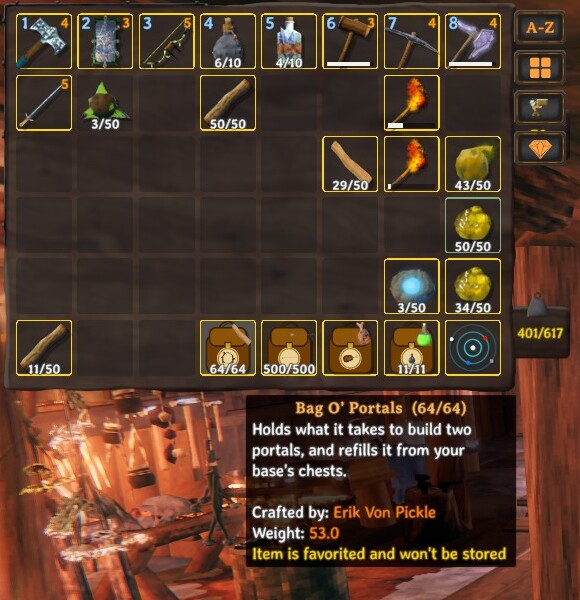
Contents
The packs
| Pack | Holds | Made at a workbench from |
|---|---|---|
| Bag O' Potions | potions and meads | 6 Leather scraps, 2 Deer hide, 2 Resin |
| Bag O' Lunch | food | 6 Wood, 2 Leather scraps |
| Bag O' Arrows | arrows and bolts | 4 Deer hide, 4 Leather scraps, 2 Wood |
| Bag O' Portals | portal materials, preset to two portals' worth plus 20 Wood for a workbench | 4 Deer hide, 4 Leather scraps, 2 Greydwarf eyes |
| Bag O' Stuff | anything | 6 Deer hide, 8 Leather scraps |
Each pack looks like a backpack with the game's own icon on it, like an iron-on patch (a mead, cooked meat, an arrow, a portal, a chest), large and outlined in white so it's easy to see. Prefer just the icon? Set Packs / IconStyle to IconOnly. A small icon of what's inside shows in the corner of its slot, along with how full it is (e.g. 18/20).
Using a pack
- Right-click a pack in your inventory (or press its hotbar key) to open it. It opens like a chest: drag items in and out.
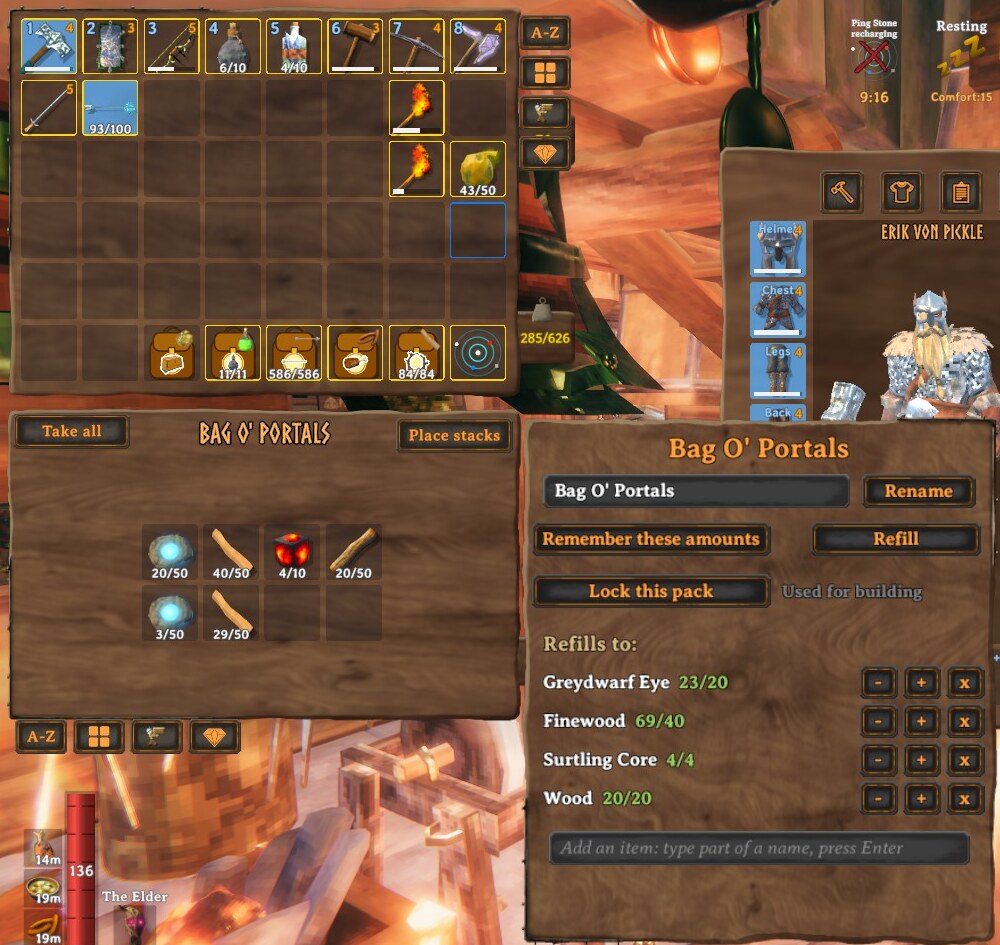
- Next to it, a panel lets you:
- Rename the pack. Leave the name empty to go back to the default.
- Remember these amounts: fill the pack the way you like it, click this, and that's what it refills to.
- Edit amounts with − / + (hold Shift for ×10) or remove items. Search for items to add, even ones you don't have yet.
- Refill: tops the pack up to what it's set to hold. A fresh Bag O' Portals refills to two portals' worth of materials.
Refilling
A pack refills from two places, in this order:
- Your own inventory (
Refill / TakeFromInventory, on by default): matching items you're carrying. It never takes what you're wearing or holding, or other packs. This works anywhere, so you can refill a Bag O' Portals in the middle of nowhere if you're carrying the materials. - Ordinary chests in your base for anything still missing: the area covered by the workbench you're near, with overlapping workbenches counting as one base.
- Click Refill in an open pack to refill that pack, or press K to refill every pack you're carrying.
- Or put a pack in a chest in your base and take it out again.
- Optional: turn on
AutoRefillOnEnteringBaseto refill whenever you walk into your base (off by default).
If something can't be filled, you're told what's missing. Packs only take from chests you could open yourself, and skip chests someone has open, gravestones, ships and carts.
Building and crafting from a pack
You don't need to take materials out of a pack to use them. When the game checks whether you can build or craft something, it counts what's in the packs you're carrying, and when you do build, whatever your inventory can't cover is taken out of the packs. So a Bag O' Portals really does let you place a portal: the Finewood, Greydwarf Eyes and Surtling Cores (and the wood for a workbench) are used straight from the bag. Your inventory is used first. Turn it off with Packs / UsePackContentsForBuilding.
Lock a pack to keep it out of this. Open the pack and click Lock this pack: a locked pack's contents are never counted or taken automatically, whether for building, crafting or shooting arrows (its tooltip shows [locked]). Click Unlock this pack to use it again. Locking doesn't stop you taking things out by hand, or refilling it.
Equipping from a pack
Open a pack and right-click any equipment in it: a weapon, armour, a shield, a tool, or arrows. It moves into your inventory and equips in one step, the same as right-clicking it in your inventory. This is handy for a Bag O' Stuff used as a spare-gear bag. You need a free slot in your inventory. (Food and potions already work straight from a pack.) Turn it off with Packs / EquipFromPacks.
Shooting from a pack
You don't have to take arrows out by hand. A bow or crossbow uses the arrows in any pack you're carrying: the game only looks for ammo in your inventory, so when you start to draw or shoot and have none there, a stack of matching arrows or bolts moves out of your pack into your inventory (a message says what was taken), and you shoot as normal. Arrows that are already in your inventory are used first.
The arrows you take out stay in your inventory until you put them back: press K or click Refill and any spare ammo goes back into the pack (refilling uses your inventory first). Turn the whole thing off with Packs / UseAmmoFromPacks.
Examples
A potion kit that's always ready. Fill a Bag O' Potions with 4 Health mead, 4 Stamina mead and 2 Frost resistance mead, click Remember these amounts, and from then on K at home brings it back to exactly that, whatever you used.
A quiver you never count. Bag O' Arrows: 60 Wood arrows, 20 Fire arrows, 20 Poison arrows. Just draw your bow: the arrows come out of the pack as you need them. After a boss fight, press K and it's full again from your inventory and your arrow chest.
Lunch for the expedition. Bag O' Lunch with 10 Cooked meat, 10 Queen's jam and a few Honey sticks. Set it once; refill it every trip.
Build a portal anywhere. Bag O' Portals is preset to two portals' worth of materials and 20 Wood, which is enough to knock up the workbench a portal has to be built near. Carry one, build a workbench and a portal at the far end of your trip, and you've got a way home. (With PortalHeim SG1 you can then dial it from any gate.)
Your own named pack. Use a Bag O' Stuff as a Bag O' Fishing or a Bag O' Cultivation: rename it, fill it, remember the amounts. It refills just like the others. Leave the name empty to go back to the default.
Plain names instead. Set Packs / NamingStyle to Plain and the packs become Potion Pack, Lunchbox, Quiver, Portal Bag and Backpack.
Good to know
- A pack's contents count toward your carry weight at half weight by default (configurable from full weight to weightless).
- Packs can't go inside other packs.
- A pack holding ore or anything else portals don't allow blocks portals, just as carrying the item would. (PortalHeim SG1 lifts that limit.)
- Install on the server as well as every client. Packs are new items, and a server without the mod removes items it doesn't recognise.
Configuration
BepInEx/config/mbaya.BagOHeim.cfg, or Gale's config editor:
| Section | Key | Default | Notes |
|---|---|---|---|
| General | RangeMode | Workbench | Workbench = your base; Distance = within Range meters |
| General | Range | 50 | Meters, used in Distance mode |
| Packs | NamingStyle | BagO | Plain = Potion Pack, Lunchbox, Quiver, Portal Bag, Backpack |
| Packs | Columns / Rows | 4 / 2 | Slots per pack |
| Packs | ContentsWeight | 0.5 | 1 = full weight, 0 = weightless |
| Packs | IconStyle | Backpack | Backpack = backpack with a big outlined icon; IconOnly = just the outlined icon filling the slot (restart the game) |
| Packs | PanelScale | 0 | Size of the settings panel beside an open pack. 0 = match the game's windows automatically; 1 = normal, 1.5 = half as big again |
| Packs | UsePackContentsForBuilding | true | Materials in packs you carry count when you build or craft |
| Packs | EquipFromPacks | true | Right-click equipment in an open pack to equip it |
| Packs | UseAmmoFromPacks | true | Bows and crossbows use ammo from packs you're carrying |
| Packs | PortalBagWood | 20 | Wood a Bag O' Portals holds for building a workbench (0 = none) |
| Refill | RefillKey | K | |
| Refill | TakeFromInventory | true | Refill also uses matching items from your own inventory (never what you're wearing) |
| Refill | AutoRefillOnEnteringBase | false |
Troubleshooting
- The packs aren't in the workbench menu. Check the mod is in the profile you launch from and you're at a workbench; the recipes are under the workbench's crafting list.
- K says something is missing. That item isn't in a chest in your base. Check that it's inside the base's workbench range, or set
RangeModetoDistancewith a largerRange. - It didn't take from a chest. It only uses chests you could open yourself, and skips ones someone has open, gravestones, ships and carts.
- The settings panel looks too small (or too big). It should scale with the game's windows. If it doesn't, set
Packs / PanelScale(for example 1.5), and tell me your screen resolution and the game's GUI scale. - A pack won't hold an item. Packs can't hold other packs. Anything else goes in a Bag O' Stuff.
- I can't go through a portal. A pack holding ore (or another item the game keeps out) blocks portals. Take it out, or install PortalHeim SG1.
- The server removes my packs. The server needs the mod too, with the same version.
- Something else. Open an issue at github.com/mattbaya/BagOHeim and attach
BepInEx/LogOutput.log.
Works with
- GearHeim: loadouts for your gear, packs for your supplies. Both use "your base" the same way and refill from the same chests.
- PortalHeim SG1: Bag O' Portals plus a ring gate that you can dial from anywhere.
CHANGELOG
Changelog
1.3.3
- The pack's settings panel no longer starts at the far right and jumps. It now moves next to the pack's contents window as soon as that window appears when you open a pack, and stays with it, instead of only after you click something.
1.3.2
- Equipping from an open pack now uses the game's own equip. Right-clicking gear in a pack moves it into your inventory and equips it the same way as from your inventory (including the equip delay most gear has). If it can't be equipped right then, it goes back into the pack instead of staying out. What happened is written to the log (
Equip from pack: ...).
1.3.1
- Packs can't go inside other packs, and that rule now also covers adding an item to a specific slot (it was already enforced when dragging).
1.3.0
- Bigger, clearer pack icons. The icon on each pack's backpack is about half again as large and has a white outline, so it's easy to see in a small slot.
Packs / IconStyle = IconOnlydrops the backpack and shows just the outlined icon, filling the slot (restart the game to apply). - Lock a pack. A new Lock this pack button in the pack's panel keeps a pack out of building, crafting and shooting: a locked pack's contents are never counted or taken automatically. Locked packs show
[locked]in their tooltip. Unlock it to use it again. - Build and craft straight from your packs. Materials inside packs you're carrying now count when the game checks whether you can build or craft (a Bag O' Portals supplies a portal's materials, and the wood for a workbench), and when you do build, whatever your inventory can't cover is taken out of the packs. You no longer have to drag things out first (
Packs / UsePackContentsForBuilding).
1.2.0
- Bows and crossbows use the arrows in your pack. The game only looks for ammo in your inventory, so when you start to draw or shoot with none there, a stack of matching arrows or bolts is taken out of a carried pack (such as a Bag O' Arrows) into your inventory, and you shoot as normal. A message tells you what was taken. Press K or click Refill to put spare ammo back. Switch it off with
Packs / UseAmmoFromPacks. - The pack's settings panel is bigger and closer. It now scales with the game's windows (on a large or high-resolution screen it used to look tiny next to the inventory), has larger text, and sits right beside the pack's contents window instead of at the edge of the screen.
Packs / PanelScalesets a size by hand. - Equip straight from a pack. Right-click a weapon, armour, a shield, arrows or any other equipment in an open pack and it is moved into your inventory and equipped in one step (
Packs / EquipFromPacks).
1.1.0
- The button in an open pack is now simply Refill (it was "Refill now"). It tops the pack up to what it's set to hold: for a Bag O' Portals, two portals' worth.
- Refill now takes from your own inventory first, then from chests in your base for anything still missing, so it works away from your base too. It never takes what you're wearing or holding, and never other packs. Switch it off with
Refill / TakeFromInventory. - The K key (refill all packs) works the same way.
- A Bag O' Portals now also holds 20 Wood, for the workbench a portal has to be built near (
Packs / PortalBagWood, 0 for none). Portal bags you've already set amounts for keep their own amounts.
1.0.0
- Initial release: Bag O' Potions, Bag O' Lunch, Bag O' Arrows, Bag O' Portals and Bag O' Stuff, with remembered amounts and refilling from your base's chests.
