
Please disclose if any significant portion of your mod was created using AI tools by adding the 'AI Generated' category. Failing to do so may result in the mod being removed from Thunderstore.

PingHeim
A craftable Ping Stone that puts creatures, traders, players, buildings and portals around you on your map, each with its own icon. Switch each kind on or off on the map. It recharges, and players you ping see it.
| Date uploaded | 4 days ago |
| Version | 0.2.3 |
| Download link | Svaha-PingHeim-0.2.3.zip |
| Downloads | 26 |
| Dependency string | Svaha-PingHeim-0.2.3 |
This mod requires the following mods to function

ValheimModding-Jotunn
Jötunn (/ˈjɔːtʊn/, 'giant'), the Valheim Library was created with the goal of making the lives of mod developers easier. It enables you to create mods for Valheim using an abstracted API so you can focus on the actual content creation.
Preferred version: 2.30.2
denikson-BepInExPack_Valheim
BepInEx pack for Valheim. Preconfigured with the correct entry point for mods and preferred defaults for the community.
Preferred version: 5.4.2351README
PingHeim
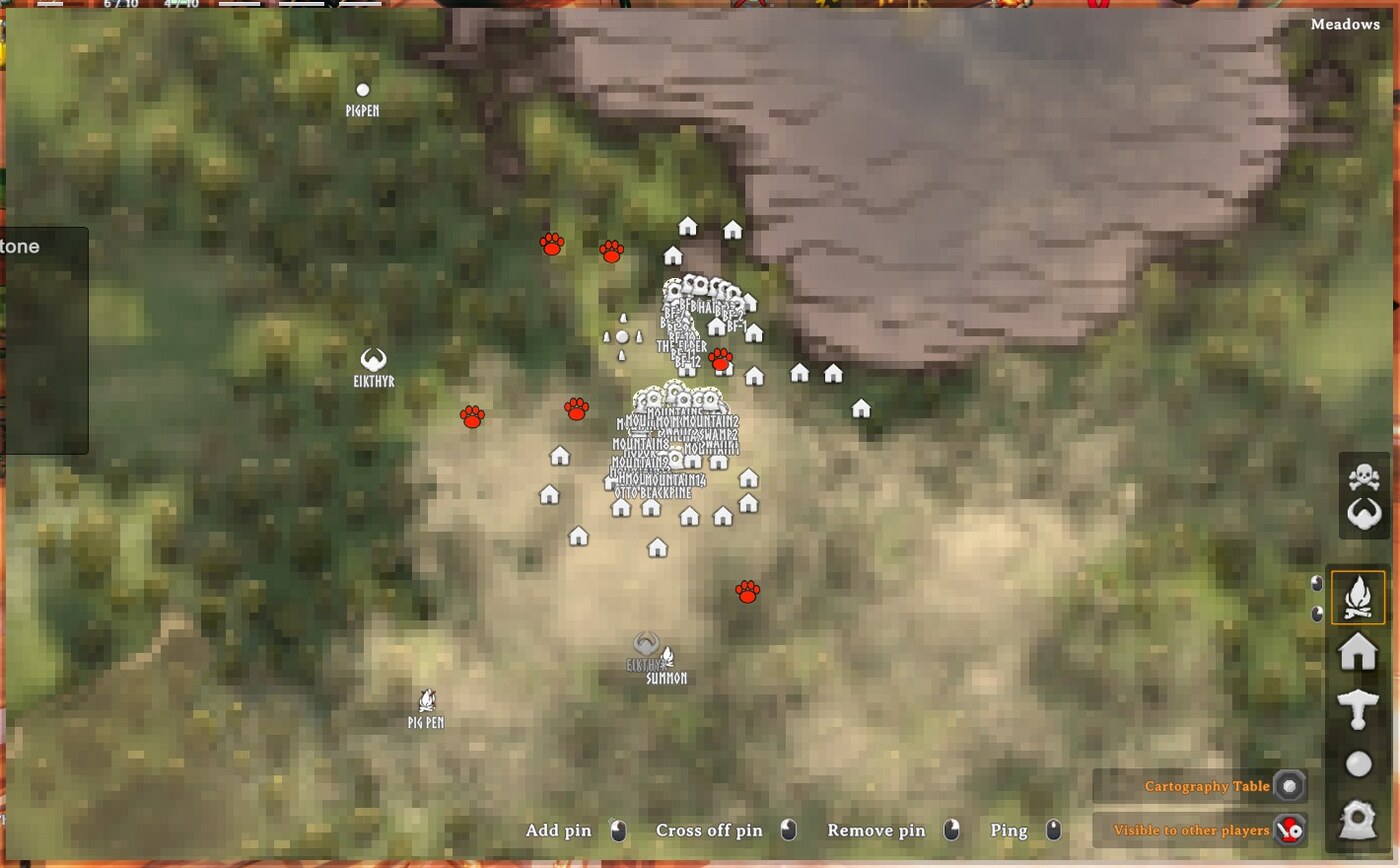
A craftable Ping Stone that lights up everything around you on the map: creatures, traders, other players and buildings.
Use the stone and a sonar-style ping rolls out across your area. Everything it finds appears as a coloured dot on your map:
| Map icon | What it is | How long it stays |
|---|---|---|
| Red paw print | Creatures: monsters and animals | 3 minutes |
| White person | Traders (Haldor, Hildir, the Bog Witch) | 3 minutes |
| Blue person | Other players | 3 minutes |
| House (the game's own icon) | Buildings that players have built | Permanently |
| Portal (the game's own icon, with the portal's name) | Portals that players have built | Permanently |
Then the stone needs to recharge (10 minutes by default). A status icon with a countdown shows when it's ready again.
Contents
- Getting started
- Choosing what to show
- Pinging other players
- Examples
- What a ping can see
- Multiplayer
- Configuration
- Troubleshooting
Getting started
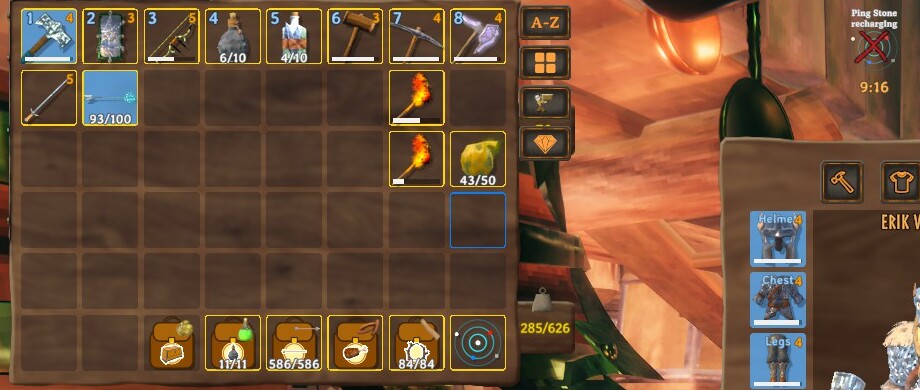
- Craft a Ping Stone at a forge: 3 Bronze, 5 Fine Wood, 1 Surtling Core.
- Carry it. Right-click it in your inventory (or put it on the hotbar and press its key) to use it.
- You hear the ping. Open your map: creatures, traders and players show as icons, and any player-built buildings and portals nearby are marked with the game's house and portal icons.
The stone is not used up. After a ping it shows a recharge timer in your status effects, and using it too early just tells you how many minutes are left.
Choosing what to show
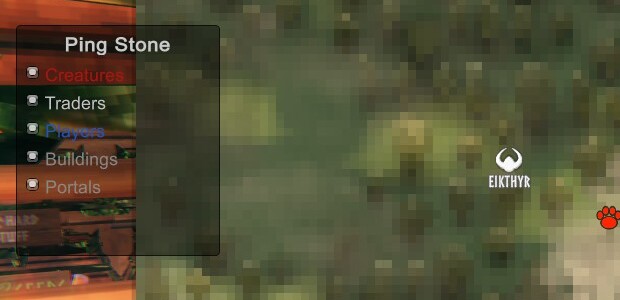
Don't want every kind of find? Open the map and you'll see a small Ping Stone box with a switch for each kind: Creatures, Traders, Players, Buildings, Portals. Click one to hide or show it straight away. You don't need to ping again: everything the last ping found is kept, and the switches only decide what's displayed.
You can also open the same box from the stone: hold Shift while you use it. It has a Ping now button too. Your choices are saved in the config file.
Pinging other players
A ping isn't silent. Any other player it detects gets a ping at your position, just like a middle-click on the map: the word PING appears in the world and on their map. They are told "Your name pinged you", and you show up on their map as a blue dot for 3 minutes, so a ping reveals you as well as them.
You can switch that off with Detect / NotifyPlayers, so the ping stays your secret (you will still see them).
Examples
Before you enter a swamp crypt: ping from the doorway to see what's wandering nearby, and which of your friends are close.
Scouting a base site: ping where you're thinking of building. The house icons show whether someone's already built close by.
Checking on the farm at night: a ping tells you whether anything is lurking around the pens.
Finding Haldor: he moves. A ping in a Black Forest clearing shows a white person if he's within range.
Group hunts: one player pings and everyone nearby sees them. Use it to meet up.
Quiet scouting: turn NotifyPlayers off and ping without alerting anyone you detect.
What a ping can see
- It reaches 120 metres around you by default (
Ping / Radius). Valheim only keeps track of the areas close to you, so in practice a ping finds things within roughly 64 to 128 metres, depending on where you stand in your area. You'll see more if you stand near the middle of an area than at its edge. - Creatures include animals and monsters. It skips creatures you have tamed unless you turn that on (
IncludeTamedCreatures), and you can limit it to hostile creatures (OnlyHostileMonsters) or add the creature's name beside each dot (LabelMonsters). - Buildings are grouped into one house icon per 16 metres (
StructureClusterMeters), so a whole base isn't covered in markers. They are remembered for good (in your character's save data), and repeated pings don't stack up duplicates. Only things that players built count, not ruins or dungeons. - Players show as blue people with their names. Portals show with their names, so you can find your way back to one.
Multiplayer
Install PingHeim on the server as well as every player: the Ping Stone is a new item, and a server without the mod removes items it doesn't recognise. Versions must match. Everything the ping does (the dots, the notice other players get) is between players' own games, so there is nothing for the server to do beyond having the mod installed.
Configuration
BepInEx/config/mbaya.PingHeim.cfg, or Gale's config editor:
| Section | Key | Default | Notes |
|---|---|---|---|
| Ping | Radius | 120 | Metres around you (limited by what the game knows, see above) |
| Ping | CooldownMinutes | 10 | Recharge time (restart the game to apply) |
| Ping | DotMinutes | 3 | How long creature, trader and player dots stay |
| Detect | Monsters | true | Show creatures (red paw prints) |
| Detect | OnlyHostileMonsters | false | Skip peaceful animals |
| Detect | IncludeTamedCreatures | false | |
| Detect | LabelMonsters | false | Show names beside red dots |
| Detect | Traders | true | Show traders (white people) |
| Detect | Players | true | Show players (blue people) |
| Detect | Structures | true | Show buildings (house icon) |
| Detect | Portals | true | Show portals (portal icon, with names) |
| Icons | BuildingIcon | Icon1 | Which of the game's map icons marks a building (the house) |
| Icons | PortalIcon | Icon4 | Which of the game's map icons marks a portal |
| Detect | StructureClusterMeters | 16 | One house icon per this many metres |
| Detect | NotifyPlayers | true | Detected players see your ping and you appear on their map |
| Sound | PingVolume | 0.8 |
Troubleshooting
- The stone isn't in the forge's crafting list. Check the mod is in the profile you launch from, and that you're at a forge with the Bronze, Fine Wood and Surtling Core.
- Nothing happens when I use it. Right-click it in your inventory. A message tells you if it's still recharging.
- I see no dots. Dots appear on the map: open it (M). Only things within the area the game keeps track of can be found, so try again from a more central spot.
- The icons disappeared. Creature, trader and player icons expire after
DotMinutes(3 by default). Buildings and portals stay. Also check the switches in the Ping Stone box on the map. - The house or portal icon looks wrong. The game's icons aren't named in its files, so
Icons / BuildingIconandIcons / PortalIconpick them by number. The game's icon names are written toBepInEx/LogOutput.logwhen you first open the map; send it to me if they're wrong. - A building icon is in the wrong place. Icons sit at the middle of each group of buildings (
StructureClusterMeters). - The server removes my Ping Stone. The server needs the mod too, with the same version.
- Something else. Open an issue at github.com/mattbaya/PingHeim and attach
BepInEx/LogOutput.log.
Works with
- PortalHeim SG1: ping your gates' surroundings before you step through.
- GearHeim and Bag O' Heim: keep your loadout and supplies ready for whatever the ping shows.
CHANGELOG
Changelog
0.6.7
- Only spawners you can destroy are shown (nests, bone piles, egg piles and the like). The invisible fixed spawn points are no longer marked, so there are far fewer green skulls.
- The aggro ping shares the Ping Stone's recharge (10 minutes by default): using either one starts it, and neither can be used until it's up. The separate aggro recharge setting is gone.
- Other players now hear your aggro ping. Everyone with the mod gets the ping sound, a message saying who sent it and how many creatures were called, and your spot as a normal ping with your name. (
Share / ShareWithPlayersandShare / ReceiveFromPlayersstill control it.) Everyone needs 0.6.7.
0.6.6
- Fixed: the P key and the host's big-object report did nothing in 0.6.3 to 0.6.5 (they were never called). They work now.
- The pointer no longer flickers in the options window. The game kept taking the mouse back every frame; the window now holds the cursor while it's open.
- Old buildings and portals no longer all say "(kept)". Marks saved by older versions (which kept everything for good) now come back as ordinary marks that fade after
DotMinutes, and the saved list is rewritten once. Only marks you click on the map are kept and labelled "(kept)". If you want an old one back, ping again and click it.
0.6.5
- A diagnostic for hosts: about 40 seconds after you spawn in a world you host, the log lists the biggest pieces of stored data in the world (
Big object: ...) and the total. It's to find what stops players from connecting. Turn off withDiagnostics / LogBigObjects.
0.6.4
- Fixed: clicking with the Ping Stone equipped punched instead of opening its options. The game doesn't count the stone as a weapon, so the check now looks at what's in your hand.
0.6.3
- A key opens the Ping Stone's options: press P (
Ping / OpenKey) while you carry a stone, with no menu open. It works whether or not the stone is equipped, so it's there if clicking with it equipped doesn't open the box.
0.6.2
- Each patch is now applied on its own, so one the game has changed can't stop the others (the log names the one that failed).
0.6.1
- The Ping Stone no longer looks exactly like a Surtling Core in your hand or on the ground: it, its glow and its light are now a cold blue.
0.6.0
- The Ping Stone is equippable. Right-click it to equip it in your hand; then click and a small box opens with what you can do: Ping now, Aggro ping, and what a ping shows on the map. (Shift+use still opens the box straight away.)
- Aggro ping. Every hostile creature within 60 m (
Aggro / Radius) is alerted and sent after you. Bosses aren't called unless you turnAggro / IncludeBosseson. It has its own 60-second recharge (Aggro / CooldownSeconds) and doesn't use up the normal ping's.
0.5.0
- Spawners. A ping now also finds creature spawners (nests, bone piles and the like) and marks them with a green skull, labelled with what they make. They fade like everything else unless you click one to keep it. There's a Spawners switch in the box on the map and in the options window (
Detect / Spawners). Fixed creature spawn points inside dungeons may not be found. Everyone needs this version for shared pings.
0.4.0
- Everything fades now, buildings and portals included, after
DotMinutes(3 by default). A ping near a building it already knows just renews it. Click a mark on the map to keep it for good (it's marked "(kept)" and saved with your character); click it again to let it fade. Buildings and portals you already had are kept. - Creatures show how big and strong they are: tiny (small yellow paw), small (orange), medium (red), large (big crimson), boss (big purple), by health.
Detect / SizeByStrengthturns it off. Shared pings carry it too, so everyone needs this version.
0.3.1
- A shared ping also shows as the caster's own ping: the word PING and their name appear where they stood, in the world and on the map, exactly as if they had middle-clicked the map.
0.3.0
- Pings are shared. When one player uses a Ping Stone, every other player with the mod hears the ping and gets the same results on their own map (creatures, traders, buildings, portals, and the player who pinged). They get a message saying who pinged and what was found. Their own map filters still decide what's shown. Switch it off with
Share / ShareWithPlayers(what you send) andShare / ReceiveFromPlayers(what you accept).
0.2.4
- The options window and the filter box on the map can be moved. Drag either by any empty part; they remember where you left them (
Window / PopupPosition,Window / MapBoxPosition).
0.2.3
- The filter box is easier to read. A solid dark background, white labels, and a square in each kind's colour, instead of red and blue text on a see-through box. Screenshots added to the description.
0.2.2
- Shorter package description (Thunderstore allows at most 256 characters). No changes to how the mod works.
0.2.1
- Clicking in the options window no longer swings your weapon. The game's player controller has its own input gate, which the window wasn't blocking.
0.2.0
- Filters on the map: a small "Ping Stone" box appears on the map with switches for Creatures, Traders, Players, Buildings and Portals. Switching one off hides it right away; switching it on brings it back. Hold Shift while using the stone to open the same box as a window.
- New icons: buildings use the game's house icon and portals its portal icon (with their names). Creatures are a red paw print, traders a white person and players a blue person.
- Portals are now found and marked too.
- Buildings and portals are now remembered in your character's save data instead of as map pins, so they can be switched off and on.
- A new ping replaces the previous ping's creatures, traders and players.
- The game's map icon names are written to the log the first time you open the map, so the icon choice (
Icons / BuildingIcon,Icons / PortalIcon) can be checked.
0.1.0
- First version: the Ping Stone, map dots for creatures, traders, players and structures, a recharge timer, and a ping that tells the players you detect.
