
Please disclose if any significant portion of your mod was created using AI tools by adding the 'AI Generated' category. Failing to do so may result in the mod being removed from Thunderstore.

PortalHeim SG1
Portals become stone ring gates with Norse runes, orange Chevrunes and rippling water. With the mod on your server too: dial any gate you know from a menu or the map, carry ore through, and pull your cart through with you.
| Date uploaded | 4 days ago |
| Version | 0.5.13 |
| Download link | Svaha-PortalHeim_SG1-0.5.13.zip |
| Downloads | 75 |
| Dependency string | Svaha-PortalHeim_SG1-0.5.13 |
This mod requires the following mods to function

denikson-BepInExPack_Valheim
BepInEx pack for Valheim. Preconfigured with the correct entry point for mods and preferred defaults for the community.
Preferred version: 5.4.2351README
PortalHeim SG1
Turn Valheim's wooden portals into ancient stone ring gates, then dial any gate you know from a menu or the map.
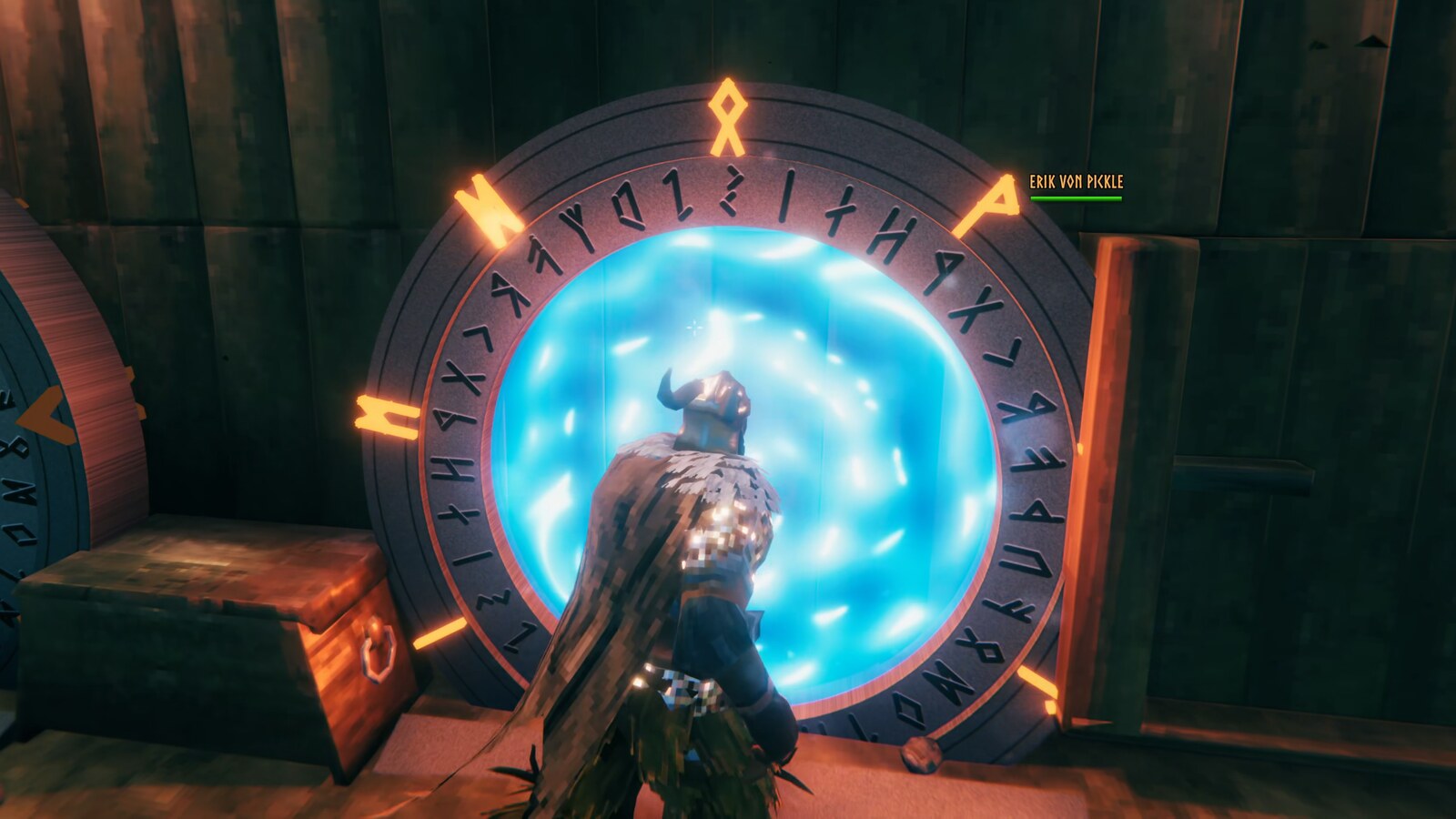
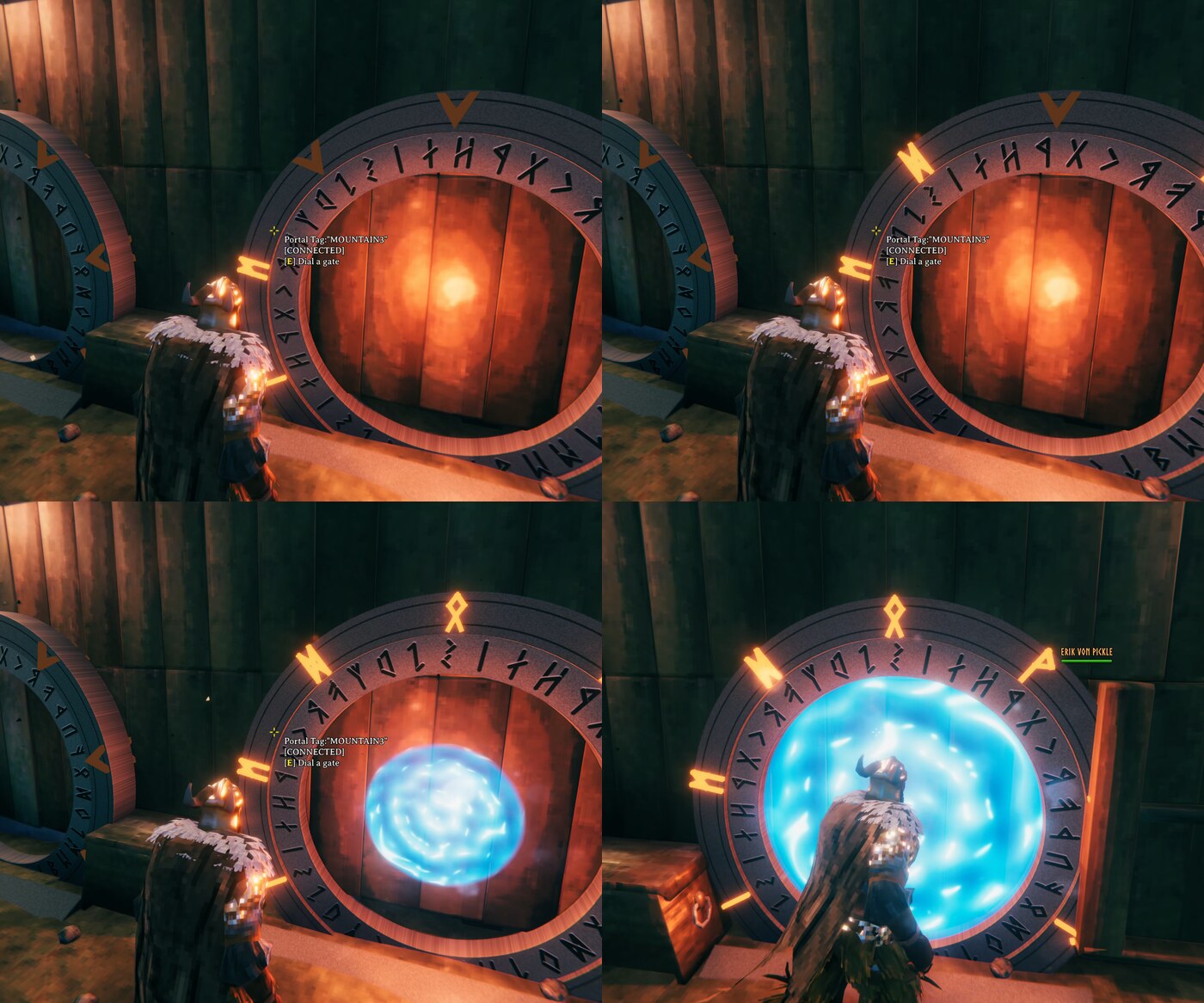
Every portal becomes a ring of carved stone with nine glowing Chevrunes and a turning inner ring of Elder Futhark runes. Walk up to a connected gate and it wakes up: the ring spins, the Chevrunes lock on one pair at a time, and the opening fills with a pool of rippling water. It's inspired by a certain famous gate, but built from Norse runes and a design of its own.
And it isn't only cosmetic. With the mod on your server too, you can dial any gate instead of pairing by name, see your gates on the map, carry ore and metal through, and pull your cart through with you.
Contents
- What you get
- Quick start
- Dialing any gate
- Carts and heavy loads
- Examples
- What needs the mod on the server
- Sounds
- Configuration
- Troubleshooting
- Works with
What you get
The gate
- A stone ring with an inner ring of rune carvings and nine Chevrunes around it.
- Start-up sequence: when someone walks up to a connected gate (at either end), the inner ring turns and the Chevrunes lock on in pairs, bottom to top, the top one last. They start as arrows and turn into glowing runes as they lock.
- A pool of water fills the opening once the gate is open, and drains away when everyone has gone. (Prefer the game's own swirl? Set
InteriortoVanilla.) - Dormant glow: a connected gate that nobody is near glows faintly, so you can tell it's live from across the base.
- Ramps and a sunk ring: the bottom of the ring sits at ground level and a gentle ramp on the front lets anyone walk in, even when overencumbered. (Want one on the back too? Set
Look / BackRampto true.)
The trip
- A long portal trip shows an endless swirling tunnel flying toward a bright light, with a deep bass loop, instead of the game's spinner.

The network
- Dial any gate you've visited from a menu at the gate, or by clicking its pin on the map.
- Set a home gate and dial it in one keypress.
- Carry anything through a portal, ore and metal included.
- Take your cart with you: it comes through and hooks back on.
Quick start
- Install with Gale (or any Thunderstore mod manager). It needs BepInExPack_Valheim, which installs automatically.
- Start the game. Every portal you see is now a ring gate. Existing portals change too, and nothing about them breaks: names, pairs and destinations are exactly as they were.
- Optional but recommended: install the mod on your server (or the game you host) as well, to turn on dialing, gate pins and carts. See what needs the mod on the server.
That's all for the new look: there's nothing to build or craft. Portals are built from the Hammer exactly as before.
Dialing any gate
With the mod on the server too, you aren't limited to portals that share a name.
- Walk up to a gate and press E (the normal use key). A window opens listing the gates you know, nearest first, with their distance.
- Pick a gate and press Dial (or highlight it and press Enter). Both gates run their start-up sequence and open. Walk in.
- The gate closes by itself about 15 seconds after the last player has left both gates. To close it sooner, use either gate (the one you dialed from, the one you dialed, or one that was set aside for the dial) and press Shift+E, or press E and click Hang up. Either end can hang up.
Home gate. Press Set home next to a gate. From then on it's highlighted first in the window, and Shift+E on any gate dials home straight away: the "I'm in a hurry" button.
On the map. Known gates appear on your map as a small gate icon (the powered-off gate, sunk in the ground with its ramp). In the dial window, click Pick on map: the map opens with a banner, and a click on any gate's icon dials it from the gate you're at (Esc cancels). You can also stand at a free gate, open the map yourself, and Shift+click a gate's icon. The map updates by itself whenever a gate is built, removed or renamed.
Which gates do I see? By default, only gates you've been near (within about 30 m) or built yourself, so exploring still matters. Each character remembers its own list. If you'd rather see every gate in the world, set Dialing / OnlyShowVisitedGates to false.
Paired gates work too. Portals that share a name still pair the way they always have, and walking through them works as usual. You can also dial from or to a paired gate: its old partner is set aside while the dial is open, and when the dial closes the original pair is put back exactly as it was. (Switch this off with Dialing / AllowDialingLinkedGates.)
Naming. Give each gate its own name so you can tell them apart in the list (use a gate, then Rename this gate). Gates sharing a name pair in twos at random, the way Valheim always has, which is confusing in a list. Unnamed gates pair with each other the same way, so name them all.
Carts and heavy loads
- No item limits. Valheim refuses to let you through a portal carrying ore, metal bars and a few other items. PortalHeim lifts that limit (
Portals / AllowAllItems, on by default), so hauling a pack full of copper to the forge takes one step. - Carts follow you. Pull a cart into a gate and it comes through with you and hooks back on, ready to keep pulling. You step out a few metres further from the gate than usual so the cart behind you isn't inside it (
Portals / CartExitDistance).
Examples
A home gate network. Build a gate at your main base, name it Home, and press Set home. Build one at each outpost: Mines, Swamp, Plains, Boss altar. From any of them, Shift+E sends you home. From home, E and pick where to go. No more guessing which two portals share a name.
Hauling ore. Load a cart at the mine gate, pull it into the gate, dial Home and walk out the other side with the cart behind you. Unload at the smelter.
A quick escape. In trouble at an outpost? Shift+E on its gate dials home. (The gate closes again by itself once everyone has left.)
Keeping old pairs. You already have two pairs of gates named SG1. They keep working as two pairs. Dialing from one of them sets its partner aside until the dial closes, then puts the pair back as it was.
Playing alone. It all works in single player, with no server involved: the game is its own server.
What needs the mod on the server
| Feature | Where it must be installed |
|---|---|
| Ring gate look, start-up sequence, water, sounds, ramps, travel tunnel | Your game only. Other players see normal portals (or their own look if they have the mod) |
| Carry any item through | Your game only |
| Dial any gate, gate list, gate map icons, carts follow you | Your game and the server (a dedicated server, or the host's game). Everyone who uses these needs it too |
On a server without the mod, everything still looks and sounds the same on your side, but gates behave as in vanilla: no dialing, no gate pins, carts stay behind. Nothing breaks. If you host from your own game, you and your friends all need the mod for dialing. A dedicated server needs BepInEx with this mod installed.
Sounds
Gate sounds are included: a heavy thud for each Chevrune, a stone scrape as the ring turns, a deep rumble and splash as the gate opens, a low hum while it's open, a whoosh when you step through, and a power-down when it shuts. They're mixes of free public-domain (CC0) recordings and sounds made for this mod (credits below).
Want your own? Put clips (.ogg, .wav or .mp3) in BepInEx/config/PortalHeim_SG1/sounds/, named for the moment they play. A file there replaces the included one. Restart the game after adding files.
| File | Plays when |
|---|---|
chevrune |
each Chevrune locks |
spin |
the inner ring turns |
activate |
the gate opens |
idle |
the open gate hums (loops; replaces the game's own hum) |
teleport |
someone steps through |
close |
the gate shuts down |
travel |
the music that loops while you're in the portal tunnel (the loading screen for a long trip) |
travelfx |
optional: a second sound layered under it (loops); none ships |
More free sounds
All CC0 (public domain), none from any show:
- 100 CC0 SFX #2 by rubberduck: stones, metal hits, doors, switches, air flowing, and loops including flowing water.
- Metal Impact Sounds by BMacZero: thuds and clinks.
- 6 Short Water Splashes by ezwa: splashes.
- Various Sound Effects by Luka Aleksic: includes
grind_stone,lockand door sounds. - Sci-Fi Sounds by Kenney: 70 sci-fi and engine sounds.
Credits for the included sounds
Built from CC0 recordings by rubberduck (100 CC0 SFX #2), BMacZero / Brian MacIntosh (Metal Impact Sounds) and ezwa (6 Short Water Splashes, cut by qubodup from public-domain recordings), plus sounds synthesized for this mod. The travel sound is "Deepbassloop80bpm" by deep into perspectives, CC0. Details in sounds/CREDITS.txt.
Configuration
BepInEx/config/mbaya.PortalHeimSG1.cfg, or Gale's config editor:
| Key | Default | Notes |
|---|---|---|
| Look / Reskin | true | Set to false to keep ordinary portals |
| Look / ChevruneColor | orange | Glow colour of a locked Chevrune |
| Look / Ramps | true | A gentle ramp up to the portal's base on the front |
| Look / RampDepth | 1.0 | How far below the base the ramp starts (m). Deeper also runs it further out, so it meets the ground even where the ground falls away |
| Look / BackRamp | false | Also add a ramp on the back |
| Look / SinkRing | true | The ring sits low so the opening is level with the ground |
| Look / DormantGlow | 0.3 | How brightly a connected but idle gate's Chevrunes glow (0 = dark) |
| Look / SecondsPerChevrune | 0.5 | Seconds between start-up steps (five steps: bottom pair, then up the sides, top last) |
| Look / TravelScreen | Tunnel | Tunnel = endless swirling tunnel, Gate = a miniature gate, Vanilla = the game's own spinner (reload a world to apply) |
| Look / Interior | Water | Water = rippling pool, Vanilla = the portal's own swirl |
| Look / Shading | PortalShader | If the ring looks wrong or is missing, try Standard (restart the game) |
| Portals / ActivationRange | 3 | How close you must be (metres) before a portal wakes up. The game's own is 5 |
| Portals / AllowAllItems | true | Carry ore, metal and other normally blocked items through portals |
| Portals / CartsFollow | true | A cart you are pulling comes through with you (needs the mod on the server) |
| Portals / CartExitDistance | 5.5 | Extra metres from the gate you come out when pulling a cart |
| Dialing / Enabled | true | Dialing on or off (set it on the server to switch it off for everyone) |
| Dialing / AllowDialingLinkedGates | true | Paired gates can be dialed from or to; the old partner is set aside until the dial closes |
| Dialing / OnlyShowVisitedGates | true | false lists and pins every gate in the world |
| Dialing / ShowGatePins | true | Gate pins on the map |
| Dialing / GateIconOnMap | true | Mark gates with the mod's own gate icon |
| Dialing / PinIcon | Icon4 | Built-in map icon used when GateIconOnMap is off |
| Dialing / CloseAfterIdleSeconds | 15 | Server: a dialed gate closes this long after the last player leaves |
| Dialing / MaxOpenSeconds | 300 | Server: a dialed gate always closes after this long |
| Dialing / DialRange | 15 | Server: how close you must be to a gate to dial from it |
| Dialing / KeepOpenRange | 15 | Server: a dialed gate stays open while a player is this close to either gate |
| Sound / TravelSounds | true | The bass loop on the portal-travel loading screen |
| Sound / TravelMusicVolume | 0.75 | Volume of the travel music (already played at half its earlier level) |
| Sound / TravelEffectVolume | 0.5 | Volume of an optional second travelfx layer (none ships) |
| Sound / ChevruneThuds | true | Play a thud as each chevrune locks (set false to switch it off on every gate) |
| Sound / OpeningSound | true | Play the gate-opening rumble and splash (set false to switch it off on every gate) |
| Sound / IncomingGate | Burst | What an incoming gate sounds like: Burst = one chevrune thud together with the opening sound as it opens, Silent = nothing, Normal = the whole sequence |
| Sound / UseBundledSounds | true | Turn off the included sounds (restart the game) |
| Sound / Volume | 1.0 | Also follows the game's sound-effects volume |
| Diagnostics / PreviewKey | F8 | Stand near a gate and press it to replay the opening sequence and sounds |
| Diagnostics / ShowStatusMessage | false | Show the one-line status on screen a few seconds after you spawn (it's always written to the log; it shows on screen anyway if something goes wrong) |
Troubleshooting
- Portals look the same as before. Check that the mod is in the profile you launch from. A few seconds after you spawn, a status line is written to
BepInEx/LogOutput.logsaying how many portals are gates and whether the water and sounds loaded (setDiagnostics / ShowStatusMessageto true to see it on screen). If the ring is missing or looks wrong, setLook / ShadingtoStandardand restart. - No water in the gate. The water only shows while a gate is live: someone standing at either end. Stand next to it, or press F8 to replay the opening sequence.
- Pressing E still opens the old naming box. The mod isn't on the server (or the server hasn't answered yet; give it a few seconds after spawning). Gates paired by name behave the old way when
Dialing / AllowDialingLinkedGatesis off. - The dial list is empty or missing a gate. By default you only see gates you've been near or built. Walk past it once, or set
Dialing / OnlyShowVisitedGatesto false. - Two gates share a name and won't dial. Gates sharing a name pair in twos at random. Rename each one so it's unique.
- Something else. Open an issue at github.com/mattbaya/PortalHeim-SG1 and attach
BepInEx/LogOutput.log. The mod logs each dial and the server handshake there.
Works with
- Bag O' Heim: its Bag O' Portals carries two portals' worth of materials, so you can drop a new gate anywhere. A pack holding ore no longer blocks portals when PortalHeim is installed.
- GearHeim: switch to your "Mining" loadout, step through a gate to the mine.
- Other mods that change how portals behave may conflict with dialing, and ones that only change their look may fight over the visuals. If something misbehaves, open an issue and say which mod.
CHANGELOG
Changelog
0.11.0
- Dialing a pair asks which end. A pair of gates shows once in the dial list; pressing Dial on it (or Enter) now asks which of the two ends you want, with how far each is.
- Storage follows the gate you dialed. While you're dialed from a gate to another, opening the gate you dialed from shows the destination's storage, and changes go to the destination. When the dial ends, the gate you dialed from gets its own contents back, exactly as they were, and anything put in or taken out through it stays with the destination. Needs the mod on the server.
0.10.7
- A shorter ramp by default. The slope is 1.0 (45 degrees) and it starts 1.5 m below the base, so it reaches the ground in about 1.6 m (it was 6.6 m in 0.10.4).
Look / RampSlopeandLook / RampDepthchange it; your existing settings are moved to these once. Includes the steeper-ramp setting (0.10.5) and the Portal and Workbench menu fix (0.10.6).
0.10.6
- Fixed: the Portal and Workbench piece didn't show in the build menu. It's now put in the hammer's list every time the game rebuilds it, and unlocked as soon as you know portals.
0.10.5
- Shorter ramps. The ramp is now steeper (
Look / RampSlope, default 0.7, about 35 degrees; it was 0.32, about 18). It still starts 2 m below the base, so it reaches the ground in about 3 m instead of nearly 7. If your character slips on it, lower the slope; if you want it even shorter, raise it (up to 1.2).
0.10.4
- The pointer stays steady in the dial and style windows (the game could take the mouse back every frame, making it flicker).
0.10.3
- The gate is back at its normal height; the ramp goes lower instead. The ring no longer sits sunk into the ground (
Look / SinkRingis off), and the ramp now starts 2 m below the base (Look / RampDepth, was 1.5) so it still meets the ground, even on a slope. Your existing settings are moved to these once; change them after that if you like.
0.10.2
- Fixed: the gates looked like the plain portals. The game's
PlacePiecemethod changed, and the patch for the new Portal and Workbench piece failed, which stopped the gate reskin and the other patches from being applied. The Portal and Workbench piece now finds the portal it just placed another way. - Each patch is now applied on its own, so one the game has changed can't stop the others (the log names the one that failed).
0.10.1
- The storage hatch and the gate styling can no longer stop a gate from being built or animated: if either fails it is logged and the gate carries on without it.
0.10.0
- Paired gates share one chest. Whatever you put in one gate's storage is in the other's, wherever they are: that's what a pair of gates is for. The server copies the newest contents across every couple of seconds. Only one end can be open at a time. While a pair is set aside for a dial, nothing is copied; it carries on when the pair is back. Needs the mod on the server. (Gates that aren't paired keep their own chest.)
0.9.1
- The storage hatch is two lids, left and right. By default they open like DeLorean gull-wings: hinged down the middle, the outer edges lifting.
Storage / HatchStyle = CellarDoorshinges them at the outer edges so the middle lifts instead.
0.9.0
- A chest in every gate. Shift+E on a gate (or Open storage in its dial window) opens its built-in storage, 6 by 4 slots by default, the same from either side. A stone hatch in front of the gate lifts like a boot while it's open.
Storage / Enabled,Columns,Rows. Needs the mod on the server. - Make each gate your own. In the dial window, More then Style... sets a gate's chevrune colour, a word spelled in runes on its chevrunes, and an icon from a searchable list. For everyone; both gates of a pair if you like. The icon also shows as the gate's pin on the map.
- A nicer gate list. Each gate is a card: its icon, its name in its colour, how far away it is and whether it's in use or paired. Dial and Fav are on the card, with Set home, Rename and Style... under More.
- Changed: Shift+E no longer dials home or hangs up (it opens the storage). Press E: your home gate is already highlighted, so Enter dials it, and Hang up is in the window.
0.8.1
- One entry per pair. Gates paired by name show once in the dial list (with the distance to the nearer of the two), and the gate you're standing at doesn't list its own partner.
- A to Z by default, with a button at the top of the list to sort nearest first instead (
Dialing / SortByDistance). Favorites and recently dialed gates still come first.
0.8.0
- Favorites and recent gates. Press Fav next to a gate in the dial window to keep it at the top, under Favorites. The last five gates you dialed are listed next, under Recently dialed, latest first, and everything else follows nearest first. Both are remembered per character.
0.7.0
- The Stone Portal looks different from the wooden one. Its gate has thicker, darker, cooler stone and chunkier runes, and its chevrunes lock from the top down (the wooden portal's lock from the bottom up). Switch off with
Look / StonePortalStyle.
0.6.0
- Rename any gate from the dial list. Each gate has a Rename button (or Rename pair if it's paired, which renames both so they stay paired). The new name is the same for everyone. Needs the mod on the server; a gate that is dialed has to be hung up first.
- New build piece: Portal and Workbench. In the hammer's list, next to the portal: it builds a portal and a normal workbench beside it, for the cost of both and without needing a workbench nearby. The workbench is a separate piece and can be removed on its own. Needs the mod on the server. (
Portals / PortalAndWorkbench,Portals / WorkbenchDistance.) - The ramp now starts 1.5 m below the base by default (it was 1.0), so it meets the ground even on slopes. If you've changed
Look / RampDepthbefore, your own value is kept.
0.5.15
- The chevrune thud now plays once, when the gate opens, on both ends. The thud for each chevrune as it locks is gone, on the gate you dial from as well as the one that receives you. (
Sound / IncomingGate = Silentstill silences the receiving gate.)
0.5.14
- The dial window can be moved. Drag it by any empty part; it remembers where you left it (
Dialing / DialWindowPosition, -1 = centred).
0.5.13
- Hang up from either end, faster. On a gate that's part of a dial (the one you dialed from, the one you dialed, or one that was set aside to make room for it), Shift+E now hangs up straight away, and the gate's prompt says so. (Pressing E and clicking Hang up still works too.)
0.5.12
- Pick the gate on the map. The dial window has a new Pick on map button. It opens the map with a banner ("Click a gate to dial it from ..."), and a plain click on a gate's icon dials it. Esc or closing the map cancels. (Shift+click on a gate icon while standing at a free gate still works too.)
0.5.11
- The ramp starts below the ground. It used to dip 0.4 m below the base and run 1.25 m, so where the ground fell away in front of a portal, its end stood above the ground and was a step too high to walk onto when overencumbered. It now starts 1 m down and runs out further at the same gentle angle, meeting the ground however it falls (
Look / RampDepthto change it).
0.5.10
- The incoming gate plays one burst as it opens. A gate that's opening but isn't the one you're standing at (someone dialed it, or it's where you arrive) no longer plays the five spaced chevrune thuds. Instead it plays one chevrune thud together with the opening sound, at the moment it opens. The gate you start from still plays everything.
Sound / IncomingGatechooses:Burst(default),Silent(nothing) orNormal(the full sequence). This replacesMuteIncomingChevrunesandMuteIncomingOpening.
0.5.9
- No more "PortalHeim loading" message a few seconds after you spawn. The status line now goes to the log only (
BepInEx/LogOutput.log); it shows on screen only if something goes wrong, or if you turn onDiagnostics / ShowStatusMessage. (The oldShowStatusOnSpawnsetting is replaced by it.) - The gate you arrive at is quiet too. It starts up as you step out of the trip, and its chevrune and opening sounds were still playing. For 15 seconds after you arrive, the gate you're standing at counts as the incoming one (
Sound / MuteIncomingChevrunesandMuteIncomingOpening).
0.5.8
- The transit sound is half as loud. The music on the portal-travel loading screen now plays at 50% of its old volume.
Sound / TravelMusicVolumestill scales it (its 1.0 is now the old 0.5).
0.5.7
- New icon and screenshots in the description. No changes to how the mod works.
0.5.6
- Clicking in the dial window no longer swings your weapon. The game's player controller has its own input gate, which the window wasn't blocking.
0.5.5
- Portals wake up from closer. You have to be within 3 metres of a portal now (it was 5) before the ring starts up and the portal can be used. Change it with
Portals / ActivationRange. - No door creak. The chevrune lock sound is now just the heavy thud: the lock-and-door recording that was mixed in behind it is gone, for every gate. The stone scrape is unchanged.
0.5.4
- No chevrune lock sounds and no opening sound on the incoming gate. A gate that's opening but isn't the one you're standing at (someone else dialed it, or it's the far end of your trip) no longer thuds as each chevrune locks, and no longer plays the opening rumble and splash. The gate you're at still does. Switch them back on with
Sound / MuteIncomingChevrunesandSound / MuteIncomingOpening.
0.5.3
- The ramp on the back of the gate is gone: only the front ramp (the side you step out of) is built.
Look / BackRampbrings it back.
0.5.2
- Dial from or to any gate, even ones paired by name. The gate it was paired with is set aside while the dial is open, and when the dial closes the original pair is put back exactly as it was. Switch off with
Dialing / AllowDialingLinkedGates.
0.5.1
- Carts now hook back on to you after going through a portal (before, they arrived but weren't attached, so you had to press use on them).
0.5.0
- Carry anything through a portal. The game's limit on ore, metal and similar items is switched off (
Portals / AllowAllItems, on by default). - Take your cart with you. Pull a cart into a gate and it comes through with you and hooks back on, ready to keep pulling (
Portals / CartsFollow). You step out a little further from the gate so the cart behind you clears it (Portals / CartExitDistance). Carts need the mod on the server too.
0.4.1
- The map and dial lists now update by themselves whenever a gate is built, removed, renamed, or starts or stops being connected (the server checks every second and tells everyone), instead of only when a gate was dialed.
0.4.0
- Dial any gate. With the mod on the server too, using a free gate opens a window listing the gates you know. Pick one and it dials, with the usual start-up sequence. Mark a home gate and Shift+use dials it straight away.
- Gates on the map with a small gate icon (the powered-off gate sunk in the ground with its ramp, flat like the game's own pins), and Shift+click a pin to dial it from the gate you're standing at.
- By default you only see gates you've been near or built (
Dialing / OnlyShowVisitedGates); each character remembers its own. - Dialed gates close by themselves once everyone has left. Gates that share a name still pair as in vanilla.
- Runs on dedicated servers: the server decides every connection, and puts gate names back if it stops mid-dial.
- Needs the mod installed on the server as well; without it, nothing changes.
0.3.0
- New travel sound. The loading screen for a long portal trip now loops a deep bass line, "Deepbassloop80bpm" by deep into perspectives (CC0, credited in
sounds/CREDITS.txt). The synthesized bass line from 0.2.x is gone. - Config:
Sound / TravelSounds(on/off),TravelMusicVolume(0.75) andTravelEffectVolume(0.5, for an optional secondtravelfxlayer; none ships). Your owntravelandtravelfxclips in the config sounds folder replace or add to them. (TravelBassLineandTravelBassVolumefrom 0.2.x no longer do anything.)
0.2.4
- The travel bass line is now a plain bass line: every note sits on the chord's root, with no octave jumps. The drone underneath is unchanged.
0.2.3
- The travel bass line now has a low drone underneath that follows the chord: a sustained A (for the IV chord) that glides down to a sustained E (for the I chord) and back again, in step with the notes above it.
0.2.2
- The travel bass line is slower (116 bpm instead of 138) and now plays eight notes on each chord (eight on the IV chord, A, then eight on the I chord, E) instead of four.
0.2.1
- Travel bass line. While you're on the loading screen for a long portal trip, a driving synth bass loops: four notes on the IV chord (A), then four on the I chord (E), alternating, in the spirit of the classic British sci-fi theme basslines. It's an original piece, synthesized for this mod. It fades in as you enter the tunnel and out as you arrive. Turn it off with
Sound / TravelBassLine, change the level withSound / TravelBassVolume, or replace it with your owntravelclip.
0.2.0
- The start-up sequence now plays whenever a gate goes live, not just when a portal first connects. Walk up to a connected portal (at either end) and the ring spins while the Chevrunes lock on in pairs, climbing the ring: the bottom two first, then the next pair up on the left and right, and so on, with the top one last. Then the gate opens, the water swells in and the hum starts. When everyone has gone it shuts down again (Chevrunes dim, water drains, power-down sound).
SecondsPerChevruneis now the time between steps. - Chevrunes are runes. Each one sits as an arrow while idle and turns into a glowing rune as it locks. Around the ring the runes spell V-A-L-H-E-I-M in Elder Futhark (ᚹ ᚨ ᛚ ᚺ ᛖ ᛁ ᛗ), with ᛟ (Othala, "home") at the top and ᛞ to finish.
- A connected gate with nobody near glows faintly (
Look / DormantGlow), so you can still tell which portals are connected; an unconnected one stays dark. - Ramps: a gentle ramp up to the portal's base on both sides, so anyone can walk in, even when overencumbered (
Look / Ramps). - The ring sits low so the bottom of the opening is level with the ground, with no stone lip to step over (
Look / SinkRing). - The hum now starts once the gate is fully open. F8 replays the whole sequence.
0.1.9
- The water now only shows while a gate is live: when someone is standing at either end (the game's own portal glow is on, or a player is near the far portal). Walk away and it drains out; walk up and it swells in. Before, it stayed on whenever the portal was connected.
0.1.8
- Endless tunnel. The loading screen for a long portal trip is now a swirling blue time-vortex tunnel that fills the screen, flying toward a bright light, in the spirit of the classic 1970s-80s British "time tunnel" title sequences. It's an original, procedurally painted effect (not taken from any show).
Look / TravelScreennow has three choices:Tunnel(default),Gate(the miniature gate from 0.1.7) andVanilla(the game's own spinner).
0.1.7
- New travel screen. The spinning graphic shown on the loading screen during a long portal trip is replaced with a miniature gate: the rune ring slowly turning inside a frame of lit Chevrunes, with rippling water in the middle. Set
Look / TravelScreentoVanillato keep the game's own spinner.
0.1.6
- Fixed: the stone ring, rune ring and Chevrunes were being hidden along with the wooden frame, so only the water showed.
- New preview key (F8): stand near a gate and press it to replay the opening sequence with all its sounds, without disconnecting the portal. Change it with
Diagnostics / PreviewKey. - The spawn status line now counts the gates that exist right now (it counted every gate ever loaded, giving "4 of 2"), and says which sounds, if any, are missing.
- Sound loading now reports its own errors instead of failing silently.
0.1.5
- A one-line status message now appears a few seconds after you spawn: how many portals are gates, whether the water and sounds loaded, and any error. It makes it obvious whether the mod is working. Turn it off with
Diagnostics / ShowStatusOnSpawn.
0.1.4
- Gate sounds are now included: a lock thud for each Chevrune, stone scrape, a deep rumble and splash as the gate opens, a low hum while it's open, a whoosh when you go through, and a power-down when it closes. They're mixes of free public-domain (CC0) recordings plus sounds made for the mod; none are from any show. Credits in
sounds/CREDITS.txt. - Your own clips in
BepInEx/config/PortalHeim_SG1/sounds/still replace any of them.UseBundledSoundsturns the included ones off.
0.1.3
- Water inside the gate. When a gate opens, a pool of rippling water swells in with a little splash, in place of the portal's own swirl. Set
InteriortoVanillato keep the old swirl. - Package page now lists free (CC0) places to find matching sounds.
0.1.2
- Chevrunes now light one at a time, half a second apart by default (
SecondsPerChevrune). The inner ring turns one step between each. - Hides every part of the wooden frame much more thoroughly (previously just its main model).
- If building the gate art fails, it now retries on the next portal and logs exactly which step failed, instead of leaving every portal vanilla for the whole session.
- New
Shadingoption (PortalShaderorStandard) in case the stone doesn't render right. - The log now records what happened for the first gates, to make problems easy to diagnose.
0.1.1
- The glowing runic chevrons are now called Chevrunes. Config and sound names follow:
ChevruneColor,SecondsPerChevrune, and the sound filechevrune(waschevron).
0.1.0
- First test build: every portal becomes a stone ring gate with a rotating Elder Futhark rune ring and nine chevrons that lock one by one when it connects.
- Sound slots filled from your own clips in
BepInEx/config/PortalHeim_SG1/sounds/. - Client-side only: no one else needs it, and portals behave exactly as before.
