
Please disclose if any significant portion of your mod was created using AI tools by adding the 'AI Generated' category. Failing to do so may result in the mod being removed from Thunderstore.
BrighterWisplight
Makes the Wisplight actually light your way. Brightness and range only.
| Date uploaded | 4 hours ago |
| Version | 1.2.1 |
| Download link | TaKeShI-BrighterWisplight-1.2.1.zip |
| Downloads | 18 |
| Dependency string | TaKeShI-BrighterWisplight-1.2.1 |
This mod requires the following mods to function

denikson-BepInExPack_Valheim
BepInEx pack for Valheim. Preconfigured with the correct entry point for mods and preferred defaults for the community.
Preferred version: 5.4.2333README
Brighter Wisplight
The Wisplight pushes back the Mistlands fog, but it barely lights anything — you still walk in the dark with one hand occupied. This mod makes its light strong enough to actually see by.
Light only. It does not touch the fog, add items, change recipes, or change colors.
- Configurable brightness and range, with a conservative ceiling
- Optional shadows
- Client-side: not required on the server or on other players
This is a comfort mod, not an advantage. The limits are deliberately tight: it helps you see where you step, without turning into a floodlight.
Before / after
Same spot, same night, same Wisplight. Only the light changed.
| Vanilla | With Brighter Wisplight |
|---|---|
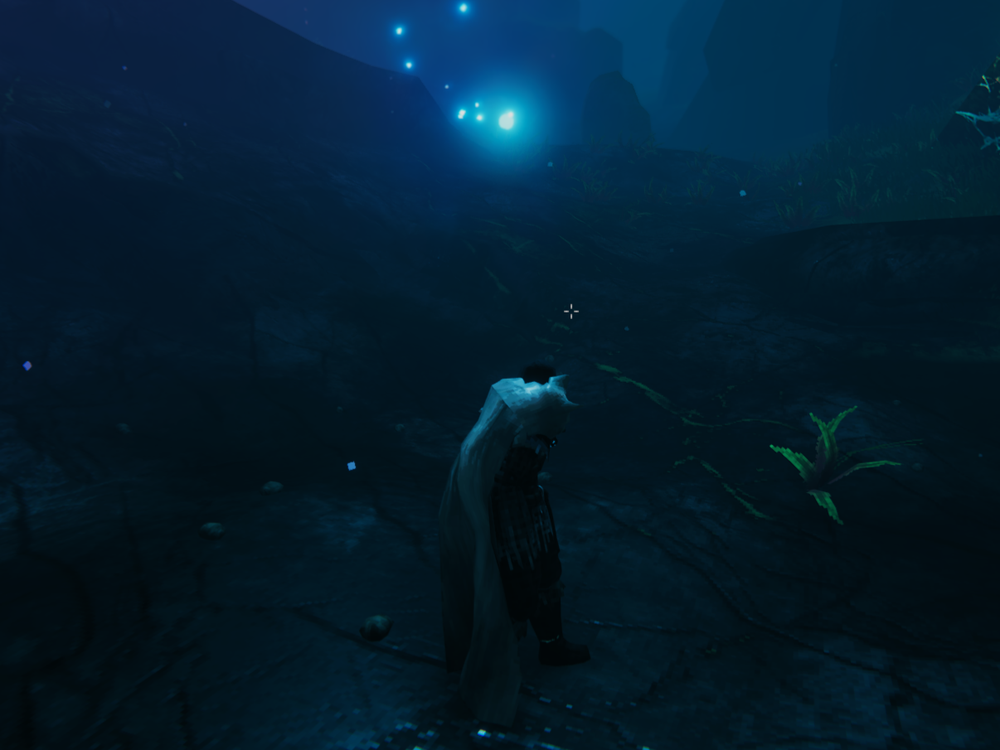 |
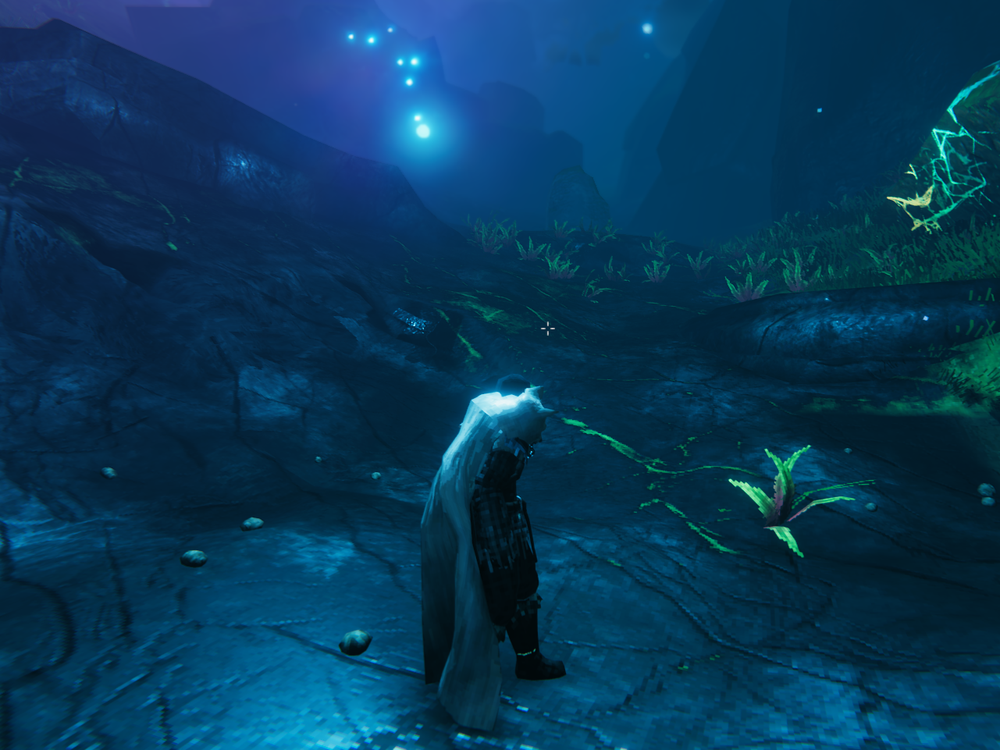 |
Note that the fog is untouched. The mist-clearing bubble around you is exactly the vanilla size — the mod never modifies it. What changes is how far you can see through the mist, because the light now reaches further.
Installation
Install through Thunderstore Mod Manager / r2modman, or copy
BrighterWisplight.dll into BepInEx/plugins.
Configuration
BepInEx/config/com.pass-os.brighterwisplight.cfg, generated on first launch.
You can edit it while the game is running (F1 with ConfigurationManager) — changes
apply immediately, no restart needed.
| Option | Default | What it does |
|---|---|---|
Enabled |
true |
Master switch. Turning it off restores the original values |
IntensityMultiplier |
1.13 |
Brightness. 1 = vanilla. Max 1.5 |
RangeMultiplier |
4.4 |
How far the light reaches. 1 = vanilla. Max 5 |
CastShadows |
false |
Cast shadows. Looks good, costs FPS |
SkipCreatures |
true |
Skips wisps attached to creatures (Hugin, Munin, Mistwalker) |
NameFilter |
empty | Empty = affects the carried wisp and wisp torches. Fill in to narrow it down |
VerboseLogging |
false |
Logs affected objects with before/after values |
Why range goes up more than brightness
The wisp's light is a point light. Raising the intensity blows out the image long before it solves anything — you get a glare in the middle of the screen and everything else stays dark. Raising the range is what actually lets you see where you are stepping. That is why the defaults barely touch intensity and are generous with range.
If you want a torch feel instead (strong light, close in, with a fast falloff),
go the other way: drop RangeMultiplier to around 1.5 and raise
IntensityMultiplier.
Why you cannot change the color
Earlier versions tried. It does not work, and the reason is worth explaining.
The wisp orb glows through HDR emission, and bloom turns any emission with
all three color channels above 1 into white. The original color escapes this by
accident: the wisp's emission is (0, 3.614, 5.340) — the red channel is
zero. It gets to be very bright and stay blue precisely because one channel
is dark.
Any normal color has all three channels alive. To keep the same brightness they all have to be high — and then you get a white blob around the wisp. No amount of tuning fixes it: the problem is the effect, not the value. So the mod does not try.
I only want my carried wisp affected, not my torches
Turn on VerboseLogging, load into the game, and check BepInEx/LogOutput.log.
It lists the name of every affected object. Copy the name into NameFilter — the
equipped wisp is Demister, wisp torches are _enabled.
Compatibility
The mod uses the Demister component only to locate wisps — it never
modifies it. It coexists cleanly with fog mods such as
MistBeGone, which
patches MistEmitter and ParticleMist, classes this mod never touches.
It does not touch networking, prefabs, or recipes.
CHANGELOG
Changelog
1.2.1
Documentation only — no code changes.
- Added before/after screenshots to the readme, side by side.
- Spelled out that the fog is untouched: the mist-clearing bubble is vanilla sized, only the light reach changed.
website_urlnow points at the mod's folder instead of the monorepo root.
1.2.0
The first version that actually works. Earlier ones never changed the light at all — see "Fixed" below.
Removed
- Color override (
OverrideColor,LightColor,ColorAffectsLight,ColorAffectsOrb). The orb glows through HDR emission, and bloom turns any emission with all three channels above 1 into white. The original color only escapes this because its red channel is zero. Recoloring without blowing out the effect is not possible, so the feature was removed rather than left broken.
Fixed
- The mod did nothing. The
Demistercomponent does not sit on the wisp object: it sits on a child named "Particle System Force Field", which only carries the fog force field. The search for lights started there and went downward, so it always came back empty. It now walks up until it finds the object that actually holds the light. - Freeze on world load. Capture read
renderer.materials, which CLONES every material on the renderer. That ran inside each wisp'sAwake, and a world loads hundreds of them at once. With color gone, the mod no longer touches materials at all. - Multiplier compounding on re-equip. The original state was keyed by the
Demister, which dies and respawns when you unequip and re-equip, while the lights survive. The new object re-captured already-modified values and treated them as factory defaults. State is now keyed by the visual root. NameFilternever filtered anything. It tested the name of theDemister's object, which is "Particle System Force Field" on every wisp in the game. It now tests the visual root's name.
Changed
- Defaults:
IntensityMultiplier1.127699,RangeMultiplier4.397653. - Tighter ceilings: intensity max
1.5, range max5(both were20). A comfort mod does not need a ceiling that turns into a gameplay advantage. - New
SkipCreatures(on by default): Hugin, Munin and the Mistwalker carry aDemisterand are left alone. - An exception on one wisp no longer propagates into world loading.
1.1.0
- Wisp color applied separately to the projected light and the visible orb.
1.0.0
- Configurable brightness and range for the Wisplight.
- Optional light color and shadows.
- Config reloads while the game is running.
