
Please disclose if any significant portion of your mod was created using AI tools by adding the 'AI Generated' category. Failing to do so may result in the mod being removed from Thunderstore.

WorldEditorBridge
Live editing for Valheim World Editor: sculpt terrain, plant, move and delete objects in a running world or dedicated server. Install where the world is hosted.
| Date uploaded | a day ago |
| Version | 1.0.1 |
| Download link | Tie-WorldEditorBridge-1.0.1.zip |
| Downloads | 21 |
| Dependency string | Tie-WorldEditorBridge-1.0.1 |
This mod requires the following mods to function

denikson-BepInExPack_Valheim
BepInEx pack for Valheim. Preconfigured with the correct entry point for mods and preferred defaults for the community.
Preferred version: 5.4.2351README
WorldEditorBridge
The live-editing plugin for Valheim World Editor, a world editor for Valheim in the spirit of Minecraft's MCEdit and WorldPainter. With this plugin in the game that hosts a world, the editor changes that world while it runs, and you (and the players on your server) see the changes as soon as they are applied.
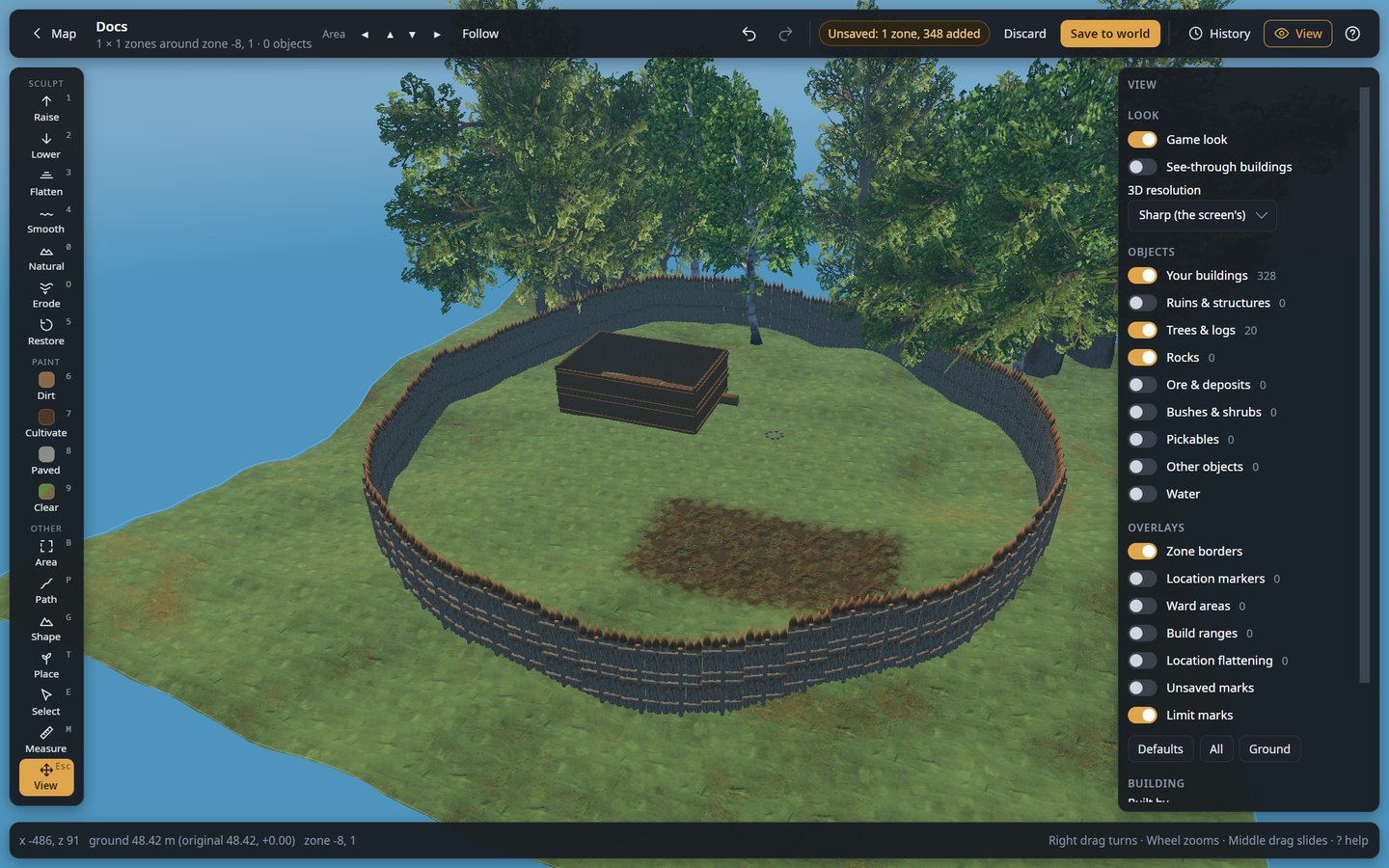
This plugin is only the bridge. The editor itself is a program for Windows and Linux, not a
mod: download it from the
GitHub releases page
(ValheimWorldEditor-<version>-win-x64.zip or -linux-x64.tar.gz), unpack it anywhere and start
it. Use the same version of the editor and of this plugin.
What the editor does
- Shape the ground: raise, lower, flatten, smooth, naturalize or restore it, and paint dirt, cultivated soil or paved stone.
- Build roads and ramps along a line you draw.
- Work on whole areas: level, paint, clear, copy and paste, or have the game generate zones again.
- Place anything the game has: trees, rocks, bushes, crops, building pieces, with brush, line, grid and zone patterns that respect the game's growing rules.
- Select, move, turn, copy and delete objects, including whole buildings.
- Undo anything, with a history panel.
Where to install it
Install it where the world is hosted:
- Your own game (single player, or when you host): install it with your mod manager, like any other mod.
- A dedicated server: install it on the server (with a mod manager's server profile, or by
copying
WorldEditorBridge.dllinto the server'sBepInEx/plugins).
Players who join a server need neither this plugin nor BepInEx. Editing a saved world with the game closed does not need it either.
Connecting the editor
Start the game or server once with the plugin: it writes
BepInEx/config/Tie.WorldEditorBridge.cfg with a random Token. Keep the token secret: anyone
with it and access to the port can change the world.
- Your own game: in the editor, choose My game on the start page. Load your world in Valheim: the editor finds the plugin and its token by itself (it also looks in r2modman and Thunderstore Mod Manager profiles) and shows Edit live.
- A dedicated server: choose A dedicated server, enter the server address, your SSH login, and the Token from the server's config file, then Connect. The editor makes its own encrypted tunnel to the server and saves it for one-click access next time.
Settings in Tie.WorldEditorBridge.cfg:
| Setting | Default | Meaning |
|---|---|---|
BindAddress |
127.0.0.1 |
Only this computer can connect (a server is reached through the editor's SSH tunnel). |
Port |
5182 |
Change it if something else uses 5182. |
Token |
random | Leave it empty to get a new one at the next start. |
The BepInEx log shows WorldEditorBridge <version> listening on http://127.0.0.1:5182/ once the
plugin runs.
More
- Full guide, with screenshots of every tool: github.com/Shuiei/valheim-world-editor
- Live mode in detail, and what each connection error means: docs/live-mode.md
- Problems and ideas: issues
CHANGELOG
Changelog
WorldEditorBridge is the live-editing plugin of Valheim World Editor: the two share one version. Download the editor that goes with this plugin from GitHub: Valheim World Editor v1.15.5 (every version: the releases page). This mod page only hosts the plugin.
Each version below says what changed in this plugin, then what changed in the editor.
1.15.5 — 2026-10-09
WorldEditorBridge (this plugin)
Unchanged: only the version number follows the editor's.
Valheim World Editor
Download: Valheim World Editor v1.15.5
Fixed
- Copying the game's look works with Valheim for Windows. It stopped with "ValueError: 15 is not in list": the Windows game has its terrain shader for Direct3D and Vulkan only, and the copy looked for the OpenGL one (which only the Linux and Mac games have). It now takes the Vulkan one there, and the editor turns it into the same shader: the ground looks as it does from a Linux game.
Added
- Open log, at the bottom of the start page and when copying the game's look fails: opens the editor's log, to attach to a bug report on GitHub.
- The log is now
ValheimWorldEditor.log(waslog.txt), started over at each run like the game'sLogOutput.log, and says more: each line has its time, and it holds the game-look copy's own output (the error that stopped it, too), which Valheim folder and game build it copied from, and errors in background tasks.
1.15.4 — 2026-10-09
WorldEditorBridge (this plugin)
- An object to remove whose id is gone is looked for by its kind and place (within 10 cm), once each, and removed if found. Another kind of object at that place, or an empty place, is left alone. Editors from before still work as they did.
Valheim World Editor
Download: Valheim World Editor v1.15.4
Fixed
- Undoing a placed object after Apply live removes it for the players too, on servers with mods that make objects again under a new id when they appear (ServersideQoL does, for build pieces, plants, fires, turrets and more). The undo found the object "already gone", and players kept seeing the new copy. Each removal now also says what the object is and where it stands, and the plugin removes that object at that place when its id is gone. Needs the plugin from this version on the server.
1.15.3 — 2026-10-09
WorldEditorBridge (this plugin)
Unchanged: only the version number follows the editor's.
Valheim World Editor
Fixed
- The editor no longer fills the graphics card's memory over a session. Each trip between the map and the 3D editor left the whole area's models, textures and ground on the card (about 165 MB a trip), and each move to another area left its ground and game look (about 40 MB). Both are now deleted, so the editor stays near the same size however long it runs, and leaves room for a game played beside it.
1.15.2 — 2026-10-09
WorldEditorBridge (this plugin)
- A new mod page: what people use live editing for, how it works, what to expect, and what each connection message means. The plugin itself is unchanged.
Valheim World Editor
Download: Valheim World Editor v1.15.2
Added
- The history is kept after the editor closes. After each Save to world or Apply live it is kept on disk with the world, and when the world is opened again (in a later run too) its steps are back in History, tagged earlier session, ready to undo: the ground as it was, a deleted object back with its contents, a placed one removed. When the world may have changed since (live, or saved by the game), the editor asks once before undoing or redoing those steps.
1.15.1 — 2026-10-09
WorldEditorBridge (this plugin)
Unchanged: only the version number follows the editor's.
Valheim World Editor
Changed
- Blueprints on the tool rail is a tool like the others: it lights up, and the blueprint list opens next to the rail in place of the last tool's options (it opened on the right, over the View panel). Blueprints… in the Area tool opens it the same way.
Fixed
- The saved-world page no longer says each save makes a full backup (it has not since 1.14.0): each save is read back and checked before the old one is removed.
- The server form says the plugin's token is written the first time the server starts with the plugin. The README, the plugin's README.txt and its mod page say so too, and the start page pictures show the Workshop.
1.15.0 — 2026-10-08
WorldEditorBridge (this plugin)
Unchanged: only the version number follows the editor's.
Valheim World Editor
Download: Valheim World Editor v1.15.0
Added
- The area's size (3 × 3, 5 × 5, 7 × 7 zones) changes on the fly next to the Area arrows, around the same middle zone, keeping the view, the changes and the history.
1.14.1 — 2026-10-08
WorldEditorBridge (this plugin)
Unchanged: only the version number follows the editor's.
Valheim World Editor
Fixed
- Zooming out no longer fogs the area over: the fog starts at the point the view turns around, so only what lies beyond it fades.
1.14.0 — 2026-10-08
WorldEditorBridge (this plugin)
Unchanged: only the version number follows the editor's.
Valheim World Editor
Changed
- Save to world (offline) works like Apply live: the area and its history stay after saving; undo a step and save again to take it back. No backup folder is made at each save any more: nothing of the old save is removed before the new one reads back right (on a failure the new files go and nothing changed), and the save the world was opened from stays until the world is left.
1.13.0 — 2026-10-08
WorldEditorBridge (this plugin)
Unchanged: only the version number follows the editor's.
Valheim World Editor
Added
- Mountain: a preview before clicking: the mountain under the pointer as a mesh on the ground, as high as it will rise. The circle turns red where it does not fit in the open area.
Fixed
- A wide brush or Mountain circle no longer drops a line straight down where it passes the edge of the open area, and follows hills instead of cutting through them.
- Zone borders (and the other overlays lying on the ground) follow the ground when it changes: after undoing or discarding a mountain they no longer outline it in the air.
1.12.1 — 2026-10-08
WorldEditorBridge (this plugin)
Unchanged: only the version number follows the editor's.
Valheim World Editor
Fixed
- Buildings copied with the Select tool keep their shape when pasted on a slope: each piece no longer follows the ground on its own (trees, rocks and the like still do).
1.12.0 — 2026-10-08
WorldEditorBridge (this plugin)
Unchanged: only the version number follows the editor's.
Valheim World Editor
Added
- Paste shows what it will place as see-through models (not only posts), at its height; Ctrl + wheel lowers or raises it (into a hill: Clear the site digs it out).
1.11.0 — 2026-10-08
WorldEditorBridge (this plugin)
Unchanged: only the version number follows the editor's.
Valheim World Editor
Added
- In a world: a Blueprints button on the tool rail opens the library, to paste a blueprint made in the Workshop.
- Clear the site (Paste, on by default): the ground in a pasted building's way is dug down to its lowest piece (a metre around too, never raised, past the ±8 m if need be), and the trees, rocks, bushes and pickables there are taken away, in the paste's undo step.
1.10.0 — 2026-10-08
WorldEditorBridge (this plugin)
Unchanged: only the version number follows the editor's.
Valheim World Editor
Changed
- A blueprint opened or added in the Workshop stands on its lowest buildable piece (rocks and other things the hoe places do not count), and the support check takes the ground it stood on in game to be under its lowest piece at each spot (the terrain reached each post), or at Homestead's terrain contact points. Rocks are left out of the support check.
1.9.1 — 2026-10-08
WorldEditorBridge (this plugin)
Unchanged: only the version number follows the editor's.
Valheim World Editor
Fixed
- Objects shown untextured (white) after opening another area while models were still loading.
1.9.0 — 2026-10-08
WorldEditorBridge (this plugin)
Unchanged: only the version number follows the editor's.
Valheim World Editor
Added
- Cut (the Workshop): the building shown only up to a height, a metre at a time, and the cursor goes through what is hidden, to build inside it.
Changed
- The support check tints the pieces in the game's build-mode colours (light blue on the ground, green to red) instead of outlining them; the pieces' own look still shows.
- The Workshop draws pieces solid (See-through buildings is for worlds).
1.8.0 — 2026-10-08
WorldEditorBridge (this plugin)
Unchanged: only the version number follows the editor's.
Valheim World Editor
Added
- The Workshop's Library tab: your blueprints with pictures, cost and search; Open (alone on the plot), Add, drag one onto the plot, or drop .blueprint and .vbuild files from your files (imported into the library). A blueprint keeps its form exactly; Homestead's keep their anchor's height when saved again.
Changed
- The start page's Workshop card opens the Workshop; the blueprints are in its Library.
- No unsaved marks in the Workshop (everything on the plot is new).
1.7.0 — 2026-10-08
WorldEditorBridge (this plugin)
Unchanged: only the version number follows the editor's.
Valheim World Editor
Added
- Select: Ctrl + click adds to the selection; Shift + click takes the row from the last object clicked (wall 1, Shift + click wall 3: walls 1 to 3).
1.6.0 — 2026-10-08
WorldEditorBridge (this plugin)
Unchanged: only the version number follows the editor's.
Valheim World Editor
Added
- The Workshop places pieces where the game's hammer would, from the game's own data for every piece (colliders, snap points, placement rules): the piece touches what you point at, then snap points within half a metre meet; pointed at a wall's top, the next stands on it.
- Ctrl + wheel lifts the piece (Shift: 0.1 m); , and . turn it by the game's 22.5° (or another step).
- The Build panel's Plants (cultivator) and Feasts (serving tray) tabs: everything players build.
Fixed
- Turning with the wheel: one step a notch (smooth wheels and touchpads too), and a snapped piece keeps the turn asked for.
1.5.0 — 2026-10-08
WorldEditorBridge (this plugin)
Unchanged: only the version number follows the editor's.
Valheim World Editor
Changed
- The Workshop keeps to building: Build (the hammer's pieces in its tabs, with pictures, by crafting station and name, searchable; snap, grid and turn step), Select and View; no world tools, Mask, View panel or zone borders there.
1.4.0 — 2026-10-08
WorldEditorBridge (this plugin)
Unchanged: only the version number follows the editor's.
Valheim World Editor
Added
- The blueprint library shows each blueprint's 3D picture (the game's models when its look has been copied), its cost in game (materials and crafting stations), a description and tags; the search looks through all of them; Details changes them.
1.3.0 — 2026-10-08
WorldEditorBridge (this plugin)
Unchanged: only the version number follows the editor's.
Valheim World Editor
Added
- The Workshop: a blank, flat plot (from the start page or the Blueprints panel) to build a building, then Save blueprint: only its building pieces are kept. Blueprints open in it to be changed.
- Support check (in the Workshop): each piece's structural support worked out by the game's own rules (per material), from full on the ground to what would fall. Saving asks first when some would.
1.2.0 — 2026-10-08
WorldEditorBridge (this plugin)
Unchanged: only the version number follows the editor's.
Valheim World Editor
Added
- Blueprints are Homestead's (the in-game building mod): saved into its folder, so they show in its hammer tab ready to build in game, and its own blueprints are listed here. The editor finds Homestead in the game's BepInEx and mod manager profiles, and warns when it is not installed.
Changed
- Save blueprint… writes Homestead blueprints (pieces only, no ground). Blueprints kept in the editor's own format before are still listed, and To Homestead moves them.
1.1.0 — 2026-10-08
WorldEditorBridge (this plugin)
Unchanged: only the version number follows the editor's.
Valheim World Editor
Download: Valheim World Editor v1.1.0
Added
- No limit (in the brush options; for every ground tool: brushes, Path, Area, pasting): move the ground past the game's ±8 m, for mountains, cliffs and canyons. Saving (or Apply live) turns that ground into invisible ground discs (the game's own DevGround1 location, placed as location proxies) that every player's game counts as generated ground: no mod needed, console players included. The hoe and pickaxe then get their ±8 m from the new ground. The disc heights are fitted by working out the ground exactly as the game does; what they leave is ordinary ground edits, and the discs' dirt is painted back to the biome's ground. Trees, rocks, ore, bushes and pickables where the ground moved more than 2 m are taken away; building pieces stay. Lifting again near earlier discs works them out again. Zones the game has not generated yet are left as they were. Very steep walls come out softer, more so near the world's middle (the game applies the discs in an order that depends on their height there).
- Mountain tool: a click raises a lone peak, a ridge, a mountain range, a mesa, a volcano or rolling hills, past the ±8 m (ground discs on saving). Each is made from a seed, with a natural profile (steeper up high, easing out at the foot), a ragged outline and broad ridges and gullies; slopes mostly stay under 35°, so they keep grass and trees. Randomize rolls a new one of the preset (size, roughness, direction, seed) that fits in the open area. It takes away the trees and rocks it buries and grows the biome's own on its slopes, by the game's rules.
- Cave tool (the Path tool's new Cave action): along a drawn line, a trench with an entrance slope at each end, roofed with the game's boulders (forest, coast, heath or mountain rocks, by biome or chosen), upside down so their flat side is a nearly level ceiling, turned, tilted and sized at random. Each is hung by its real underside (the game's model) to clear the headroom; more are added until the floor is covered, and the walls rise into the rock so no daylight comes in at the sides. A line drawn as a ring makes a ring-shaped cave with one entrance. Presets (tunnel, cave, cavern) and Randomize. The ground cannot overhang in Valheim, so the roof is rocks; players can mine them like any boulder.
- Script tool: C# scripts run on the open area, to generate anything the tools do and more. The editor compiles them itself (no .NET install needed) and gives them Area (its corners, its points, sea level, the world's seed), Ground (Height, Original, Set, Raise, Lower, Paint, Biome, Shape, Mountain; past the ±8 m by default), Objects (All, OfKind, Near, Place, Remove, CanPlace), Noise, a seeded Rnd and Print. A script runs in the background on a snapshot of the area; what it changes goes in as one undo step, nothing when it fails (its mistakes and errors give the line) or is stopped. Examples to start from (a mountain range, terraces, a canyon with a river, scattered boulders, a ring of trees, a flat paved base, a noise landscape); scripts are saved in the data folder's scripts folder. The program file is about 20 MB larger (the C# compiler).
Changed
- The editor's download no longer holds the WorldEditorBridge plugin: it is its own download,
WorldEditorBridge-<version>.zip, on the same releases page, and on Thunderstore and Hexium.
1.0.1 — 2026-10-08
WorldEditorBridge (this plugin)
Unchanged: only the version number follows the editor's.
Valheim World Editor
Download: Valheim World Editor v1.0.1
Fixed
- Linux: the 3D view and the map stayed blank without a GPU driver (Mesa's software OpenGL, llvmpipe) and in VMware virtual machines: Avalonia turned OpenGL off for those renderers.
- Leaving a live world closes its connection to the game.
Changed
- Every push is checked further: the code is analysed (no .NET analyzer warning allowed), and the Linux and Windows packages are started and must draw the test world.
1.0.0 — 2026-10-08 (the native app replaces the web editor)
WorldEditorBridge (this plugin)
Unchanged: only the version number follows the editor's.
Valheim World Editor
Download: Valheim World Editor v1.0.0
Added
- Native app: the game's look (terrain textures, map textures and models) is copied from your own Valheim on first start and again after a game update, as the web editor did. The start page shows the copy's progress, asks for the Valheim folder when it is not found, and offers Try again when it failed. Choosing another game folder in Settings checks it again.
- Native app: every control explains itself when you hover it, as in the web editor; a row's label tells the same.
- Native app: a log (log.txt in the data folder, as the web app kept), the window's icon, the version in the title, and a Documentation link on the start page.
- Native app: a world folder (
ValheimWorldEditor <folder>) or a live game (--live <url> --token <token>) given on the command line opens straight away, as with the web app. - Native app, editor: Discard in the top bar undoes the steps not saved (or applied) yet and keeps the rest of the history; changes without a step here are discarded by reading the world again.
- Native app, live: Reload in the editor's top bar, and the Auto switch that applies every change to the game at once (remembered).
- Native app, live: the players are shown in the 3D view with their names, and View has "Go to" a player.
- Native app, editor: move the area by one zone with ◀▲▼▶, or let it Follow the view near its edge (remembered); Follow waits while a selection, stroke, path or apply would be lost.
- Native app, editor: a note says how many locations are in or near the area.
- Native app, Select: saved selections. Keep the selection under a name, then select it again or add it later, also after saving the world (per world, found again by kind and place).
- Native app, Area and Select: "pick" next to Replace's list takes the kind from an object clicked in the world.
- Native app: the editor remembers its choices between runs, as the web editor did: the View switches, the map's place, the brush's shape and falloff, the Area action, the Shape preset and your own formula, Select's options, the open right-hand panel and the clipboard.
- Native app: the status bar shows where the mouse is (x/z), the ground's height against the original (and the ±8 m limit) and the zone.
- Native app, View: Game look on/off, See-through buildings, 3D resolution (Sharp, Balanced, Fast), and Defaults / All / Ground presets.
- Native app:
[]change the brush size; H picks the View tool; Space + left drag and Shift + right drag slide the view in any tool; Alt + wheel turns the selection, the paste or the Place preview; the help lists every key. - Native app, Naturalize: New pattern (another noise pattern for the next stroke or natural path).
- Native app, Area: cut and fill follows every change of the ground and of the action.
- Native app, Place: fit sets the spacing when a chosen kind is wider than it (the panel says so).
- Native app, Place chooser: Shift + click on Pick from world adds the kind, and on a favourite or recent places only it; Untick all; all / none per row; categories fold, and which are open is remembered.
- Native app: new objects not saved (or applied) yet carry a green dot in the view.
- Native app, View: Unsaved marks hides the green dots on new objects (remembered).
- Native app, View: Limit marks hides the red on ground at the game's ±8 m limit (remembered).
- Native app, Path: before a click, a circle under the cursor shows the path's width and soft edge, and the stretch the next point adds; the ground the path covers is tinted.
- Native app, Select: the object under the cursor is outlined faintly before a click picks it.
- Native app, Place: the brush's outline shows under the cursor (Brush mode).
- Native app, View: Tamed animals (boars, wolves, lox, hens, deer, necks… that players tamed, with their models) and Runestones, both shown at first. Runestones can be picked and deleted, offline and live; they cannot be moved or copied. The game's look is copied again once for their models.
- Native app: placing or pasting a kind switched off in View switches it on, and says so.
- The developer checks of the world generator and the save writer (
--verify,--verify-ingame,--selftest-save,--inspect,--summary) moved to a separate tool,tools/WorldCheck. It can also write a new world from a seed (create), its middle generated with the game's vegetation, and with--flatkeep its most even zone of dry Meadows bare (the documentation's pictures).
Fixed
-
Native app: after a visit to the map, the 3D editor drew its models without textures (trees as big white and blue leaf cards): the textures being read for the view's old OpenGL context were never read again for the new one.
-
Native app, Area: after choosing a backup folder with "Another folder…", the folder picker opened again and again; a folder chosen by hand was also dropped for live worlds.
-
My game: on Linux, mod manager profiles were listed and searched twice.
-
A character file that cannot be read no longer stops worlds from opening.
-
Native app: in a short window the View panel and the tool panels ran under the status bar and their last rows could not be reached; they now stop above it and scroll.
-
The data folder follows
XDG_DATA_HOMEon Linux even before that folder exists (it fell back to~/.local/share). -
Native app, start page: empty error lines and an empty server list left gaps; the data folder is shown as
~/…. -
Native app: Space no longer presses the focused button in the editor.
-
Native app, Place: Esc cancels Pick from world.
-
Native app, Area: "pick" for Replace now works before an area is drawn.
-
A character with a backup copy of its file (
ragnar_copy.fch) could be listed under the copy's name, depending on the disk: files are now read in name order, and the original is kept. -
Native app: folders under the home are shown as
~/…everywhere (saving, backups, blueprints, Settings), so no user name is on screen. -
Native app, Settings: the dialog is as tall as what it holds (it had a large empty part).
-
Native app: the tools' lines (brush circles, path, area, measure, selection boxes) broke into faint dashes when the 3D view ran below the screen's resolution; they are now drawn a few pixels wide.
Removed
- The web editor (the page in a WebView2/WebKitGTK window or the browser): the native app replaces it, with every feature it had. Its JavaScript Script console is not carried over (C# scripts may come later).
- Native app: the development command-line options (pictures, scripted tools);
--world,--zoneand--sizeremain.
0.41.1 — 2026-10-07
WorldEditorBridge (this plugin)
Unchanged: only the version number follows the editor's.
Valheim World Editor
Fixed
- Apply live: an error answered by the game (the plugin refusing a call) is reported as "Could not apply live" instead of failing; the changes stay waiting.
- Apply live: when the game refused the objects, deletions were already counted as sent and were never sent again. Now nothing counts as applied until the game accepts it.
- Apply live twice at once (a double click) could create the same new objects twice in the game.
- Native preview, Select: Drop (End) right after selecting an object above another one put it too low, by as much as it floated above the ground.
- Native preview, Place: a double-click on the last point of a line or zone did not place it (the click was taken for dragging that point).
- Native preview, map: the 1 m close-up never showed when zoomed in (its place was passed to the shader as whole numbers, which OpenGL refused); the coarse whole-world map was drawn instead.
- Native preview: after going between the map and the 3D editor, both kept OpenGL objects from the view's previous context and drew with them (errors, or the wrong buffers); they are rebuilt now.
- Native preview, Place: a circle of walls end to end came out one wall short (a gap), the last one falling a hair past the end of the ring through rounding.
- An object whose data is edited or moved keeps the game's short position form (the terrain compiler grew 8 bytes when written back).
0.41.0 — 2026-10-07 (plugin settings file renamed)
WorldEditorBridge (this plugin)
- The plugin's id is now
Tie.WorldEditorBridge, so its settings are inBepInEx/config/Tie.WorldEditorBridge.cfg(waslocal.worldeditorbridge.cfg). On its first start the plugin moves the old file to the new name: the port and token are kept, and saved servers in the editor keep connecting.
Valheim World Editor
Changed
- The editor finds the plugin's settings under either name (your game, and the server's Valheim folder over SSH), so it works with older plugins too. Every hint and guide names the new file.
0.40.1 — 2026-10-07
WorldEditorBridge (this plugin)
Unchanged: only the version number follows the editor's.
Valheim World Editor
Download: Valheim World Editor v0.40.1
Changed
- The frame rate log is written only on demand: Record frame rates in Help, off each time the editor opens.
0.40.0 — 2026-10-07 (3D resolution)
WorldEditorBridge (this plugin)
Unchanged: only the version number follows the editor's.
Valheim World Editor
Added
- 3D resolution (View, Look): Sharp (the screen's own pixels), Balanced (one per screen point: a quarter of the pixels on a screen scaled ×2) or Fast. Fewer pixels give more frames per second; the frame rate logs say which one was used.
0.39.0 — 2026-10-07 (frame rate log)
WorldEditorBridge (this plugin)
Unchanged: only the version number follows the editor's.
Valheim World Editor
Added
- Frame rate log: a line every 0.2 s while the 3D view is used (camera moving, or still while
something else happens), with frames per second, the editor's work per frame and the longest gap
between frames, in
perf-window.log(the app's window) orperf-browser.log(--browser) in the data folder, to compare the two. Header lines give the browser, the view's size and what is loaded.
0.38.3 — 2026-10-07
WorldEditorBridge (this plugin)
Unchanged: only the version number follows the editor's.
Valheim World Editor
Fixed
- The frame rate line in Help could not be selected to copy it: it was rewritten several times a second, which dropped the selection. It now stays as it is while selected.
0.38.2 — 2026-10-07 (frame rate in Help)
WorldEditorBridge (this plugin)
Unchanged: only the version number follows the editor's.
Valheim World Editor
Added
- Help (
?) shows the frame rate while the view moves, and how many milliseconds of work each frame takes, to tell a slow graphics path from a busy editor.
Fixed
- Help said "the graphics card" for the app's own window on Linux and Windows: WebKit answers "Apple GPU" whatever draws the view, so the window now says it does not tell.
0.38.1 — 2026-10-07 (fixes found by new tests)
WorldEditorBridge (this plugin)
Unchanged: only the version number follows the editor's.
Valheim World Editor
Fixed
- Area tool: after Undo or Redo, the counts of what is inside the selection and the Replace list still showed what was there before (the Replace list could be empty while trees were back).
0.38.0 — 2026-10-07 (lighter 3D view)
WorldEditorBridge (this plugin)
Unchanged: only the version number follows the editor's.
Valheim World Editor
Changed
- The 3D view is drawn only while something happens (the view moves, a stroke, the mouse or keys in use) and a few times a second otherwise (enough for the game look's water and sky): an idle editor leaves the processor alone instead of drawing 60 times a second.
Added
- Help (
?) says what draws the 3D view: the graphics card, or the processor (llvmpipe, SwiftShader), which is much slower; the editor says so once when it is the processor.
0.37.0 — 2026-10-07 (pieces that snap, elevation)
WorldEditorBridge (this plugin)
Unchanged: only the version number follows the editor's.
Valheim World Editor
Added
- Snap to pieces already there (Place tool, building pieces): a wall, fence or floor locks onto the pieces around it like the hammer, Beside (end to end, at their level) or On top of the piece under the cursor, facing like it (Rotation turns it in quarter turns). Pieces are placed one at a time under the cursor.
- Elevation for everything placed: on the ground, a height above the ground, or at one
height for all;
PgUp/PgDnchange it,Alt+ click takes the top of a piece or the ground. - Layers (Line, End to end): a line of walls or fences stacked several pieces high.
- A line started next to a piece already there continues it, at its level.
Fixed
- Walls and other pieces with their origin in the middle were half sunk into the ground when placed one by one: they now stand on their bottom.
0.36.0 — 2026-10-07 (tidier tool panels)
WorldEditorBridge (this plugin)
Unchanged: only the version number follows the editor's.
Valheim World Editor
Changed
- Tool panels show the settings you use most, and fold the rest under one line at the bottom that says what is inside (shape, falloff, stamp, curve, clumping, tilt, facing...), open or closed as you left it. The Mask moves into that fold, which says "mask on" while it is on.
- ? next to the tool name shows what the tool does and how to use it; the how-to text is hidden otherwise (in every tool, until you click ? again).
- Area: one Action list (Ground, Objects inside, Copy, Bring back) instead of six sections.
The panel shows only that action's settings, and one button at the bottom does it (
Entertoo). - Place: the panel lists the chosen kinds with their weights and a ✕ each; + Add kinds opens the list of every kind (search, favourites, recent, Pick from world) in a drawer beside the panel.
- Select: Delete, Whole building, Same kind, Invert and Exact place first; Replace with, saved selections, Inspect data and Make player built under More actions; the moving switches under Moving.
- Path: Soft edge, curve and natural look are folded; Apply and Clear stay at the bottom.
0.35.0 — 2026-10-07 (script console)
WorldEditorBridge (this plugin)
Unchanged: only the version number follows the editor's.
Valheim World Editor
Download: Valheim World Editor v0.35.0
Added
- Script console (Script in the top bar, like MCEdit's filters): a few lines of JavaScript with a small API (find, add and remove objects, read and set the ground, work inside the Area selection) for jobs the tools do not cover. Each run is one undo step. Comes with examples (count kinds, remove young beeches, rocks on steep slopes, terraces); your own scripts are kept in this browser. See docs/script.md.
0.34.0 — 2026-10-07 (cut and fill)
WorldEditorBridge (this plugin)
Unchanged: only the version number follows the editor's.
Valheim World Editor
Added
- Cut and fill in the Area tool: how much ground inside the selection has been raised and dug since it was generated, and what Flatten, Raise or Lower would dig and fill (m³) before you click, with what the ±8 m limit leaves out.
0.33.0 — 2026-10-07 (overlays)
WorldEditorBridge (this plugin)
Unchanged: only the version number follows the editor's.
Valheim World Editor
Added
- Ward areas, Build ranges and Location flattening in View, Overlays: rings on the ground where wards protect, where crafting stations let you build (by kind: 10 to 40 m), and where locations flatten the ground.
- Go to a player (View, live mode): right there, or the area moves to them.
Fixed
- After Undo or Redo in the Place tool, its spacing still counted the objects as they were before.
0.32.0 — 2026-10-07 (walk and fly)
WorldEditorBridge (this plugin)
Unchanged: only the version number follows the editor's.
Valheim World Editor
Added
- Walk and Fly views (
F): see the world from a player's eyes, 1.8 m above the ground (or the water), and walk it with WASD (Shift runs);Fagain flies (Space up, C down);Fagain goes back to the usual view. Tools keep working, and Follow and the Area arrows keep the view.
0.31.0 — 2026-10-07 (area that follows the view)
WorldEditorBridge (this plugin)
Unchanged: only the version number follows the editor's.
Valheim World Editor
Added
- Follow (next to the Area arrows): when the point you look at comes within 12 m of the edge of the area, the area moves there by itself. It waits, and says why, while a stroke, a path or Place shape, an Area selection or selected objects would be lost.
Changed
- Moving the area (arrows or Follow) keeps the view on the same spot and the tool in hand, instead of starting over above the middle with the Raise tool.
0.30.0 — 2026-10-07 (history survives reloads)
WorldEditorBridge (this plugin)
Unchanged: only the version number follows the editor's.
Valheim World Editor
Changed
- History survives a reload of the page and a move of the work area: the editor keeps it with the pending changes. A change that touched ground outside the new area is left out, with the ones before it. Saving, Discard and reloading from the game start a new history, as before.
Fixed
- A long message in the status bar wrapped onto several lines and covered the last buttons of the tool panel, which then could not be clicked. It now keeps to two lines (the whole text on hover).
- "Switched on … in View" replaced what the tool had just said (how many objects were placed or regrown); it is now added to it.
- Regrow nature offered kinds the page cannot place, and then reported them as regrown.
0.29.0 — 2026-10-07 (regrow nature)
WorldEditorBridge (this plugin)
Unchanged: only the version number follows the editor's.
Valheim World Editor
Added
- Regrow nature (Area tool): puts back the game's own vegetation inside the selection, for the kinds chosen with the chips: the trees, rocks, bushes and pickables its rules grow there (how many, on which slopes, heights and biome edges, in groves), worked out like the game does (its rules and random draws, per zone), on the ground as it is now. Spots where something already stands are skipped, and so is the ground near buildings. On a world the game generated, most of what it would place lands exactly where the game put it.
0.28.0 — 2026-10-07 (clumping)
WorldEditorBridge (this plugin)
Unchanged: only the version number follows the editor's.
Valheim World Editor
Added
- Clumping and Patch size in the Place tool (Brush, Zone): objects gather in groves with clearings between them, following a noise pattern fixed to the world, instead of an even spread. Presets keep them (Meadows woods, Black forest, Berry patch and Meadows rocks use some).
0.27.0 — 2026-10-07 (weighted mixes and presets)
WorldEditorBridge (this plugin)
Unchanged: only the version number follows the editor's.
Valheim World Editor
Added
- Weights in the Place tool: with several kinds ticked, a slider per kind sets how often it is used (Beech 3, Birch 1: three beeches for one birch), with its share in %.
- Presets: load a mix (kinds, weights, Density, Spacing, Size, Tilt, facing) from built-in looks (Meadows woods, Black forest, Swamp, Berry patch, Forest floor, Meadows rocks) or save your own.
0.26.3 — 2026-10-07 (spacing that fits)
WorldEditorBridge (this plugin)
Unchanged: only the version number follows the editor's.
Valheim World Editor
Added
- Place tool: when a ticked kind is wider than the spacing, the panel says so and fit sets the spacing to it. A blueberry bush is about 3 m wide: a 1 m grid of them was one big hedge instead of rows.
0.26.2 — 2026-10-07 (editable zone points)
WorldEditorBridge (this plugin)
Unchanged: only the version number follows the editor's.
Valheim World Editor
Added
- Place tool, Zone: drag a point to move it, drag the outline to add a point, Ctrl + click a point to remove it (as with lines). The hints above Place say how, for lines too.
- Remove last point button (Zone and Line), the same as Backspace.
Changed
- Leave saplings and crops room to grow also shows for grown crops (Pickable_Carrot...) and for trees that grow from saplings (Beech1, Oak1...): they keep the room their sapling needs (read from the game's saplings).
- Zone fills at random only: its Scatter / Grid choice is gone, Grid mode makes grids.
- Grid gets as many whole cells as fit best in the box you drag (at least one), centred: a box a little short of N cells used to lose a row, a small box got nothing. Its Cell slider is now called Spacing (space between objects).
0.26.1 — 2026-10-07 (placed objects follow View, chip toggles, Nobody builds)
WorldEditorBridge (this plugin)
Unchanged: only the version number follows the editor's.
Valheim World Editor
Changed
- Objects you placed follow the View switches like the others (before, they stayed shown until saved): switching off Trees & logs hides the trees you just planted too.
- A click on a Favourite or Recent kind ticks or unticks it (before, it placed only that kind, which Shift + click now does), and each row has all / none.
Added
- Untick all in the Place tool, next to Pick.
- Nobody (not player built) in Built by: places pieces without a builder.
0.26.0 — 2026-10-07 (Place tool)
WorldEditorBridge (this plugin)
Unchanged: only the version number follows the editor's.
Valheim World Editor
Changed
- The Plant tool is now called Place (still
T): it places any kind of object, walls and fences end to end along lines, circles and rectangles as well as trees and rocks with a brush. Its guide is now docs/place.md. - Leave saplings and crops room to grow only shows (and only applies) when a sapling or crop is ticked.
0.25.0 — 2026-10-07 (player-built pieces)
WorldEditorBridge (this plugin)
Unchanged: only the version number follows the editor's.
Valheim World Editor
Download: Valheim World Editor v0.25.0
Added
- Built by (View panel, Building): the player written as the builder of the pieces you place. It lists the world's builders (the one with the most pieces is chosen at the start), the players named on beds, wards and tombstones, and the characters on this computer; any other player id can be typed. Remembered per world.
- Make player built (Select tool): gives selected pieces that have no builder the chosen one.
Fixed
- Pieces placed by the editor were not always player built: kinds the world had none of, and copies of pieces from ruins, had no builder, so the game took them for ruins (a third of the materials back, no base for fires, ignored by raids, wards and private chests owned by nobody). Now every piece of a kind the hammer, hoe, cultivator or serving tray can place gets the chosen builder when it is placed, pasted or built. Moved and edited objects keep their builder.
0.24.0 — 2026-10-07 (eyedropper and favourite kinds)
WorldEditorBridge (this plugin)
Unchanged: only the version number follows the editor's.
Valheim World Editor
Added
- Eyedropper: the Plant tool's Pick button and the pick buttons next to the Replace lists (Select tool, Area tool) take the kind of the object you click in the world.
- Favourites and Recent kinds in the Plant tool: star kinds with ☆ in the list, and the last eight kinds you placed come back as buttons above the list. A click plants only that kind, Shift + click adds it to the ticked ones.
Changed
- The Select tool's Replace row reads "Replace with", and its button is now "Replace the selection".
0.23.0 — 2026-10-07 (sharp edges)
WorldEditorBridge (this plugin)
Unchanged: only the version number follows the editor's.
Valheim World Editor
Download: Valheim World Editor v0.23.0
Added
- Sharp edge brush falloff: full strength right to the brush's edge and nothing beyond, for steep walls like the game's pickaxe.
Changed
- With Soft edge 0, Path and Area actions give the ground points their edge crosses a share of the change, so a diagonal edge follows the line straight instead of stepping from point to point.
0.22.0 — 2026-10-07 (fine-tune drawn lines)
WorldEditorBridge (this plugin)
Unchanged: only the version number follows the editor's.
Valheim World Editor
Added
- Fine-tune drawn lines (Path tool, and Plant lines): drag a point to move it, drag the line to add a point there, Ctrl + click a point to remove it; the preview follows.
0.21.2 — 2026-10-07 (buildings keep their shape)
WorldEditorBridge (this plugin)
Unchanged: only the version number follows the editor's.
Valheim World Editor
Changed
- Moving a building "on the ground" keeps its shape: its pieces move as one block, and the block goes up or down until its bottom layer sits on the ground (sinking into a slope rather than floating). Trees, rocks and other objects in the selection still land on the ground one by one. Before, every piece was put on the ground by itself, pulling buildings apart.
0.21.1 — 2026-10-07 (ring brush outline)
WorldEditorBridge (this plugin)
Unchanged: only the version number follows the editor's.
Valheim World Editor
Changed
- The Ring brush shape draws its inner edge too, so the untouched middle shows on the ground.
0.21.0 — 2026-10-07 (exact moves and snapping)
WorldEditorBridge (this plugin)
Unchanged: only the version number follows the editor's.
Valheim World Editor
Added
- Snap to other pieces (Select tool, on by default): while moving, a piece's snap point locks onto the nearest snap point of a piece around it, so walls, floors and fences join like with the hammer.
- Turning ring around the selection: drag it to turn, Ctrl for 15° steps.
- Exact place: type the selection's position and turn, or how far to move and turn it.
Fixed
- "Put each object on the ground" put a piece's middle on the ground for pieces whose origin is in the middle (walls), sinking them; their bottom rests on the ground now.
0.20.5 — 2026-10-07 (pieces follow the line)
WorldEditorBridge (this plugin)
Unchanged: only the version number follows the editor's.
Valheim World Editor
Download: Valheim World Editor v0.20.5
Changed
- End to end switches itself on in the Plant tool's Line mode when every ticked kind is a piece the game snaps (fences, walls, stakes...), and off for other kinds, until it is changed by hand.
- Objects follow the line: circles and rectangles always turn their objects along the outline, and "Follow the line" (before: Face along the line) is on by default for drawn lines. A piece now lies along the line (its length, not its front, follows it).
0.20.4 — 2026-10-06 (dropdown boxes)
WorldEditorBridge (this plugin)
Unchanged: only the version number follows the editor's.
Valheim World Editor
Fixed
- The closed dropdown boxes were drawn by the system theme (a light box in the app window on Linux) under the editor's light text, so the chosen value could not be read: the editor draws them itself now, dark, with its own arrow.
- A dropdown followed by a button (Replace … go, Paint … apply, Saved … keep) pushed the button onto the next line.
0.20.3 — 2026-10-06 (readable dropdowns)
WorldEditorBridge (this plugin)
Unchanged: only the version number follows the editor's.
Valheim World Editor
Fixed
- Dropdown lists could be unreadable (pale text on a pale background), depending on the system theme: the pages now declare themselves dark, so the lists are drawn dark, with the chosen entry highlighted in the editor's amber.
0.20.2 — 2026-10-06 (dropdown labels)
WorldEditorBridge (this plugin)
Unchanged: only the version number follows the editor's.
Valheim World Editor
Fixed
- In the app window on Linux, the group headings of the Replace lists ("Trees & logs"...) could show blank, with GTK warnings in the terminal: they read "Trees and logs" and so on now.
0.20.1 — 2026-10-06 (fences on slopes)
WorldEditorBridge (this plugin)
Unchanged: only the version number follows the editor's.
Valheim World Editor
Changed
- End to end on slopes: every piece stays level and stands on the ground where it is, a little higher or lower than the last one and touching it, like a fence going up a hill (before, each one sat on the lower of its two ends, which could leave it floating at the middle of a bump).
Fixed
- End to end placed nothing at all when one of the ticked kinds had no known length yet; such kinds are now left out and the others are placed.
0.20.0 — 2026-10-06 (fences end to end)
WorldEditorBridge (this plugin)
Unchanged: only the version number follows the editor's.
Valheim World Editor
Added
- End to end (Plant tool, Line mode): pieces placed so that each one starts where the last one ends, turned along the line, like the game's hammer snaps them, from the pieces' own snap points (now in the build-piece catalogue) or the model's length for other kinds.
- Circle and Rectangle lines (Plant tool): press at the centre or a corner and drag to the size; Close the loop for drawn lines. With End to end the sizes snap to whole pieces, so a fenced ring or yard closes exactly.
0.19.2 — 2026-10-06 (moved objects on the ground)
WorldEditorBridge (this plugin)
Unchanged: only the version number follows the editor's.
Valheim World Editor
Changed
- Moved objects land on the ground (Select tool): each moved or turned object stands on the ground where it ends up. A new switch, "Put each object on the ground when moving" (on by default), turns it off to keep each object's height above the ground, as before (for buildings).
0.19.1 — 2026-10-06 (area selection)
WorldEditorBridge (this plugin)
Unchanged: only the version number follows the editor's.
Valheim World Editor
Added
- Clear in the Area tool, next to Box and Polygon, to start a new selection (as
Escdoes).
Fixed
- The Area tool's selection outline stayed on screen in every other tool; it is only drawn in the Area and Paste tools now (the selection is kept for when you come back).
0.19.0 — 2026-10-06 (selection helpers)
WorldEditorBridge (this plugin)
Unchanged: only the version number follows the editor's.
Valheim World Editor
Added
- Same kind, Invert and saved selections (Select tool): select every object of the selected kinds, the opposite of the selection, or a selection kept by name for the world.
0.18.0 — 2026-10-06 (select a whole building)
WorldEditorBridge (this plugin)
Unchanged: only the version number follows the editor's.
Valheim World Editor
Added
- Select a whole building (Select tool, like Axiom's magic select): double-click a piece, or press Whole building, to select every piece connected to it.
0.17.0 — 2026-10-06 (river and canal)
WorldEditorBridge (this plugin)
Unchanged: only the version number follows the editor's.
Valheim World Editor
Added
- River / canal (Path tool): digs a U-shaped bed below sea level with sloped banks, so the sea flows in.
0.16.0 — 2026-10-06 (shape tool)
WorldEditorBridge (this plugin)
Unchanged: only the version number follows the editor's.
Valheim World Editor
Added
- Shape (tool
G, like WorldEdit's//generate): one click puts a mound, cone, mesa, crater, moat, bowl or ridged hill into the ground, or any shape written as a formula.
0.15.0 — 2026-10-06 (erosion)
WorldEditorBridge (this plugin)
Unchanged: only the version number follows the editor's.
Valheim World Editor
Added
- Erode (sculpt tool
O, and an Area action): thermal erosion settles slopes to a rest angle, water erosion cuts gullies and fills hollows.
0.14.0 — 2026-10-06 (heightmaps)
WorldEditorBridge (this plugin)
Unchanged: only the version number follows the editor's.
Valheim World Editor
Added
- Heightmaps (Area tool, like WorldPainter): export the area's ground as a 16-bit grayscale PNG and import a picture back into the selection or the whole area, between chosen heights.
0.13.0 — 2026-10-06 (stamps)
WorldEditorBridge (this plugin)
Unchanged: only the version number follows the editor's.
Valheim World Editor
Added
- Stamps: pictures as brush shapes (built in: mountain, mesa, crater rim, dunes, rocky ground; or any picture loaded from a file), and "Stamp once" to put a whole stamp into the ground with one click, to a chosen height.
0.12.0 — 2026-10-06 (brush shapes)
WorldEditorBridge (this plugin)
Unchanged: only the version number follows the editor's.
Valheim World Editor
Added
- Brush shapes and falloff (sculpt and paint tools, like WorldPainter): circle, square, ring or ragged brushes, with a smooth, linear, dome, flat-top or peak falloff; square brushes turn.
0.11.0 — 2026-10-06 (restore from a backup)
WorldEditorBridge (this plugin)
Unchanged: only the version number follows the editor's.
Valheim World Editor
Added
- Restore from a backup (Area tool, like WorldEdit's
//restore): the ground and objects of a selection as they were in one of the world's backups (the editor's or the game's), objects with all their data.
0.10.0 — 2026-10-06 (reset zones across the world)
WorldEditorBridge (this plugin)
- New:
POST /zones/reset, so the editor can reset zones in the running game (they are generated again at once where players are). Players' tombstones are always kept.
Valheim World Editor
Added
- Reset zones across the world (map page, like MCA Selector): pick zones by biome, distance from buildings, ground edits and distance from the centre, and mark them all for the game to generate again.
- Zone resets in live mode (needs WorldEditorBridge 0.10.0 or newer): Apply live resets the marked zones in the running game, which generates them again at once where players are.
Fixed
- A zone reset also removed players' tombstones, with what they carried: they are always kept now.
- Saving twice within the same second failed, because both backups got the same folder name.
0.9.0 — 2026-10-06 (search the world)
WorldEditorBridge (this plugin)
Unchanged: only the version number follows the editor's.
Valheim World Editor
Added
- Search the world (map page): every object of a kind, every container holding an item, or every sign, portal or ward whose text matches, counted and pinned on the map; a result opens the 3D editor with that object selected.
0.8.0 — 2026-10-06 (object inspector)
WorldEditorBridge (this plugin)
Unchanged: only the version number follows the editor's.
Valheim World Editor
Added
- Object inspector (Select tool,
I): everything an object holds in the save, by name, and editing it: chest contents (items, stacks, quality, slots), sign texts, portal tags, ward permissions, timers... An edit is one undo step and is saved or applied live like any change.
Fixed
- Objects placed or moved in this session lost what they were copied from after the page was reloaded, so moving one again made a fresh copy (a moved chest lost its contents).
0.7.0 — 2026-10-06 (repeat a paste)
WorldEditorBridge (this plugin)
Unchanged: only the version number follows the editor's.
Valheim World Editor
Added
- Repeat a paste (like WorldEdit's
//stack): one click places several copies in a row, along the copy's width or depth or stacked upwards, with a gap; one undo step.
0.6.0 — 2026-10-06 (PlanBuild files)
WorldEditorBridge (this plugin)
Unchanged: only the version number follows the editor's.
Valheim World Editor
Added
- PlanBuild and .vbuild files: import a PlanBuild
.blueprint(its terrain marks become ground) or a.vbuildfile into the blueprint list, and write any blueprint back out in either format.
0.5.0 — 2026-10-06 (blueprints)
WorldEditorBridge (this plugin)
Unchanged: only the version number follows the editor's.
Valheim World Editor
Added
- Blueprints (Area tool → Copy & paste): save the clipboard as a named file, browse the saved
ones with a picture of each, and paste them into any world. They are kept in the
blueprintsfolder of the editor's data folder.
0.4.1 — 2026-10-05 (editor on GitHub only)
WorldEditorBridge (this plugin)
Unchanged: only the version number follows the editor's.
Valheim World Editor
Download: Valheim World Editor v0.4.1
Changed
- Thunderstore carries only the plugin (
Tie-WorldEditorBridge): Thunderstore does not host programs and rejected theValheimWorldEditor_Windowsand_Linuxpackages. The editor is downloaded from the GitHub releases page, which the plugin's mod page now points to.
0.4.0 — 2026-10-05 (clean-up)
WorldEditorBridge (this plugin)
Unchanged: only the version number follows the editor's.
Valheim World Editor
Download: Valheim World Editor v0.4.0
Fixed
- Leaving the world map with Worlds while it was still loading could raise an error on the page (a cut-off map reply was read as data).
Changed
- Unused code removed, and the origin notes of the files ported from the game corrected.
- Development: the old one-off test scripts are gone (the CI tests replace them), and the browser tests wait for the 3D view to be drawn instead of fixed pauses, so they no longer fail at random on a busy machine.
0.3.3 — 2026-10-05 (Thunderstore dependency)
WorldEditorBridge (this plugin)
Unchanged: only the version number follows the editor's.
Valheim World Editor
Download: Valheim World Editor v0.3.3
Changed
- Thunderstore: the editor packages no longer carry their own copy of the plugin: they depend
on
Tie-WorldEditorBridge, which mod managers install with them (one copy per profile; plugin fixes no longer need a new editor package). The GitHub downloads keep it inplugin/. - The start page's plugin steps point to WorldEditorBridge on Thunderstore for mod manager users.
0.3.2 — 2026-10-05 (smaller packages)
WorldEditorBridge (this plugin)
Unchanged: only the version number follows the editor's.
Valheim World Editor
Download: Valheim World Editor v0.3.2
Changed
- Only what the editor needs: the bundled Python keeps just the files a full game-look export
uses (traced on both systems; the export's output is byte-for-byte the same): 117 → 87 MB on
Linux, 74 → 48 MB on Windows. Gone with it:
requirements.txt, the Linux copy oficon.ico, and in the Thunderstore packages theREADME.txtfiles (the mod page replaces them).
Fixed
- Windows: the bundled Python carries
msvcp140.dll, which UnityPy needs; a Windows without the Visual C++ runtime could not copy the game's look.
0.3.1 — 2026-10-05 (Thunderstore packages)
WorldEditorBridge (this plugin)
Unchanged: only the version number follows the editor's.
Valheim World Editor
Download: Valheim World Editor v0.3.1
Added
- The editor on Thunderstore:
ValheimWorldEditor_WindowsandValheimWorldEditor_Linux, the editor with the plugin, for r2modman and Thunderstore Mod Manager;WorldEditorBridgestays as the plugin alone, for servers. - Installed by a mod manager, the editor finds its own profile for My game.
Fixed
- Linux: the game-look export runs even when the bundled Python lost its run bit (mod managers
unpack without permissions). The release no longer holds the
python/python3links.
0.3.0 — 2026-10-05 (Thunderstore)
WorldEditorBridge (this plugin)
First release on Thunderstore; from here on the plugin has the editor's version number: use the two together.
- Objects live: deleted, planted, pasted and moved objects are applied in the running world, and undoing after applying takes them back in the game too.
- Ground live: terrain edits (sculpt, paint, roads, areas) are sent to the game and shown to every player at once.
- World snapshot: the editor opens the running world as the game has it now, without a save.
- Listens on
127.0.0.1:5182only, with a random token inBepInEx/config/local.worldeditorbridge.cfg.
Valheim World Editor
Download: Valheim World Editor v0.3.0
Added
- WorldEditorBridge on Thunderstore: install the live-editing plugin with r2modman or Thunderstore Mod Manager; BepInEx comes with it.
Changed
- One version number for the editor and the plugin (0.3.0, the plugin's version until now),
kept in the
VERSIONfile. The plugin DLL's file version said 0.1.0; it now says 0.3.0 too.
0.2.0 — 2026-10-05 (desktop app)
WorldEditorBridge (this plugin)
Unchanged: only the version number follows the editor's.
Valheim World Editor
Download: Valheim World Editor v0.2.0
Added
- Its own window on Windows and Linux (the system's web engine; the browser as fallback, or
with
--browser), with an icon. - Start page with three ways to edit, each clearly separate:
- My game (live): finds Valheim running with the plugin (also in r2modman / Thunderstore Mod Manager profiles) and reads its token from your own game's settings; one click to edit live, or the steps that are missing (BepInEx, the plugin, starting the game).
- A dedicated server (live): the editor logs in over SSH (password or key, no
sshprogram needed) and makes its own tunnel to the plugin. The plugin token is always typed by you. Servers are saved inservers.cfgafter the first connection for one-click access, with the password only when "Save password" is ticked; the server's SSH identity is remembered and a change is refused. - A saved world (offline): the worlds found on the computer (Valheim's usual folders, Proton included), recently opened ones, and any other folder (with a folder dialog). Worlds on the map page goes back to the start page.
- Settings for folders that are not in the usual place: the Valheim game folder, extra BepInEx folders or mod manager profiles, and world folders that are always listed. For a server, an optional Server's Valheim folder: the plugin's port is read from it, and when the plugin does not answer the editor says exactly what is missing there.
- Automatic game look: the editor finds Valheim in the Steam libraries and copies the game's textures and models from it by itself, with progress on the page; it asks for the folder when Valheim is not found, and copies again after a Valheim update. The copy lives in the per-user data folder, next to the settings and a log.
- One download per system, each with the plugin in
plugin/and instructions for that system.
Changed
- The program is now called
ValheimWorldEditor. It picks the first free port from 5180, so a second copy or another program never blocks it. - The game-look exporter comes with its own small Python runtime; its texture fixes need only Pillow now (same visible result).
Fixed
- Connecting to a server that does not answer gave up only after 3 minutes; the editor now checks the bridge first (at most 10 seconds) and says what is wrong: no tunnel, wrong token, or a game that does not host the world.
- The app quits cleanly when the system asks it to (logout, shutdown), closing its window.
0.1.0 — 2026-10-05 (first release)
WorldEditorBridge (this plugin)
Unchanged: only the version number follows the editor's.
Valheim World Editor
Download: Valheim World Editor v0.1.0
Added
- Release packages (
tools/release.sh): program, web page and export tool, without source code or game files. export_all.py: one command that copies the game's terrain shader and textures, map textures and the models of every kind of object from your own Valheim install (a few minutes). Replaces the separate scripts that had paths of the development machine written in.
Changed
- Models are now exported for every placeable kind (about 800 world objects plus 689 building pieces), not only the kinds one world happened to contain, so the Plant tool shows real models for far more kinds.
Older history: the full changelog.
