
Please disclose if any significant portion of your mod was created using AI tools by adding the 'AI Generated' category. Failing to do so may result in the mod being removed from Thunderstore.

Build Hotbar
A standalone building hotbar with an F6 toggle, saved building pieces, multiple rows, custom hotkeys, draggable positioning and in-game settings. No Build Camera required.
| Date uploaded | a month ago |
| Version | 0.7.1 |
| Download link | ValheimEnthusiestKakimaki-Build_Hotbar-0.7.1.zip |
| Downloads | 3282 |
| Dependency string | ValheimEnthusiestKakimaki-Build_Hotbar-0.7.1 |
This mod requires the following mods to function

denikson-BepInExPack_Valheim
BepInEx pack for Valheim. Preconfigured with the correct entry point for mods and preferred defaults for the community.
Preferred version: 5.4.2350README
Build Hotbar
Keep your favourite building pieces one key press away. A standalone client-side mod for Valheim, with built-in settings and no Build Camera requirement.
Tested on Valheim 1.0.7 (network 39).
Getting started
Equip a hammer or another building tool, then press F6 to enable the hotbar. Press F6 again to restore your normal inventory shortcuts. Auto activation on equip is optional and off by default.
Open the building menu and hover over a piece, then press Shift + a slot key to save it. With no menu item hovered, this saves your currently selected piece instead.
| Default control | Action |
|---|---|
| F6 | Enable or disable the building hotbar |
| 1 to 8 | Select a saved piece in the current row |
| Shift + slot key | Save the hovered or selected piece |
| Alt + slot key | Clear that slot |
| Alt + mouse wheel | Switch hotbar rows |
Putting away or changing your building tool resets activation. Normal material requirements and building restrictions still apply.
Make it yours
- 8 slots and 3 rows by default. Choose 1 to 8 slots and 1 to 12 rows, with one row visible at a time.
- Move it: open the building menu and drag the title. The default position is top centre.
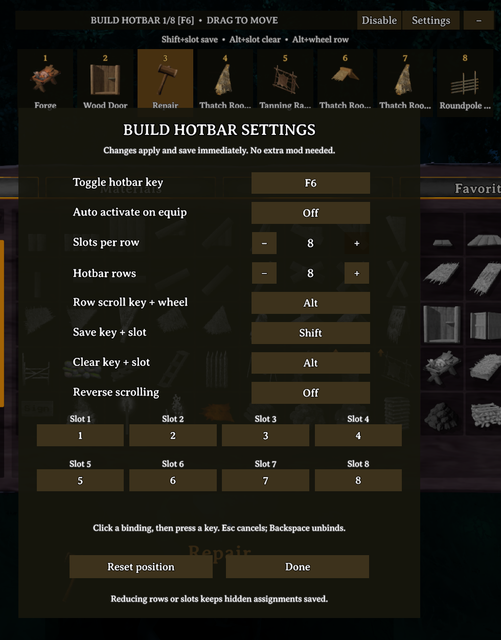
- Change keys: open the building menu, click Settings, click a binding, then press your preferred keyboard key. Escape cancels; Backspace unbinds.
- Hide the slots: click the minus button to collapse the bar. Collapse keeps shortcuts active; use F6 or Disable to turn them off.
- Settings save immediately. No ConfigurationManager needed. Adjust row scrolling, slot count, row count, activation and bindings in game.
- Saved pieces are kept separately for each building piece table and shared across characters/worlds within your mod profile. Reducing rows or slots preserves hidden assignments.
Custom bindings support keyboard keys. Save/clear use a held key plus a slot key; row switching uses a held key plus the wheel.
Screenshots
The screenshots show a user configuration with eight rows. The default is three.

Installation and existing users
Install with Thunderstore Mod Manager or r2modman and launch modded. Each player who wants the hotbar installs it locally; the server does not need it.
Build Camera is optional. Keep only one copy of BuildCameraHotbar.dll in your profile. Versions 1.1.0 and 1.1.1 of Build Camera Unofficial Valheim 1.0 Fix already bundle an older hotbar. Close the game and remove that older hotbar DLL before using this standalone package, while keeping the camera DLL if you want its camera features. Updating or reinstalling those older camera packages can restore their bundled DLL.
The DLL name and configuration identity are retained so existing assignments, bindings and position carry over. Configuration: BepInEx/config/ValheimEnthusiestKakimaki.BuildCameraHotbar.cfg.
For manual installation, install BepInEx and copy the package's plugins folder into BepInEx.
Credits and source
Build Hotbar is maintained by ValheimEnthusiestKakimaki / KakimakiDev. It began as a companion to the original Build Camera mod by Azumatt, CookieMilk and the original Build Camera contributors. This standalone hotbar does not include their camera plugin.
- Azumatt's Build Camera Custom Hammers Edition
- Build Camera Custom Hammers Edition source
- Original Build Camera source
Licensed under GNU GPL v3. The package includes LICENSE.txt and Source.zip with source code and build instructions.
CHANGELOG
Changelog
0.9.4
- Remove the nested source ZIP from downloads as requested by Thunderstore moderation. Source and tests remain available on GitHub.
- Keep screenshots hosted online and retain the GitHub source, issue-reporting and license links.
- Packaging and version metadata update only. No gameplay or configuration changes.
0.9.2
- Remove screenshots from downloads; display online-hosted images on the mod pages instead.
- Add the GitHub source URL, issue-reporting links, development link and license link.
- Packaging, documentation and version metadata update only. No gameplay or configuration changes.
0.9.1
- Fix outdated left-stick API calls that caused missing-method errors with the current Valheim version.
- Preserve existing settings, saved pieces and controller behaviour.
- Fully restart Valheim after updating so the corrected DLL replaces the version loaded in memory.
0.9.0
- Add a paged controller radial: hold Square/X, aim with the left stick and release the opening shortcut to select. The last highlight stays selected when the stick returns to centre.
- Save the current piece with R2/RT and clear a slot with L2/LT while the radial is open. Hold R2/RT in the build menu to assign its highlighted piece to a radial slot; click the left stick to deselect the target.
- Add controller-accessible settings, configurable opening/save combinations and an optional toggle-and-confirm mode.
- Prevent movement, camera rotation and build-menu navigation while selecting radial slots. Debounce D-pad paging.
- Add native button icons and contextual bottom control hints for controller and keyboard. Hide irrelevant placement hints while the build menu is open.
- Refresh the PC hotbar and add borderless translucent backgrounds to both menus. Hide the horizontal bar while a controller is active and remove radial slot numbers.
- Add independent horizontal hotbar and radial size settings from 50% to 200%, fitted to the screen.
- Enable auto activation on equip by default for new configurations. Existing activation preferences and saved slots are preserved.
- Keep an open controller radial and its hints visible when a keyboard screenshot key changes the active input device.
0.8.0
- Rename the DLL, project, namespace and plugin class to BuildHotbar.
- Use ValheimEnthusiestKakimaki.BuildHotbar for the plugin, patches and configuration.
- Start with fresh settings and saved slots; no legacy configuration migration.
- Remove the obsolete row-scroll modifier setting; use the configurable row-scroll key.
- Update standalone installation instructions and package naming.
