
Please disclose if any significant portion of your mod was created using AI tools by adding the 'AI Generated' category. Failing to do so may result in the mod being removed from Thunderstore.

StorageGroups
Put chests in groups and items move to the right chest by themselves. Works in multiplayer, respects wards, works with AzuAutoStore. Not compatible with other chest sorting mods like Smart Containers.
| Date uploaded | 6 hours ago |
| Version | 0.1.7 |
| Download link | ValheimQoL-StorageGroups-0.1.7.zip |
| Downloads | 68 |
| Dependency string | ValheimQoL-StorageGroups-0.1.7 |
This mod requires the following mods to function

denikson-BepInExPack_Valheim
BepInEx pack for Valheim. Preconfigured with the correct entry point for mods and preferred defaults for the community.
Preferred version: 5.4.2351README
Storage Groups
Work in progress. Use at your own risk. This mod is not fully tested yet, especially in multiplayer and with wards. Back up your world before using it.
A Valheim mod. Put your chests in groups, and items move to the right chest by themselves.
Licensed under Apache 2.0. See LICENSE and NOTICE for terms and project credit.
How it works
Open any chest. The Storage Groups controls sit next to the chest window, and they change with the chest.
A chest without a group
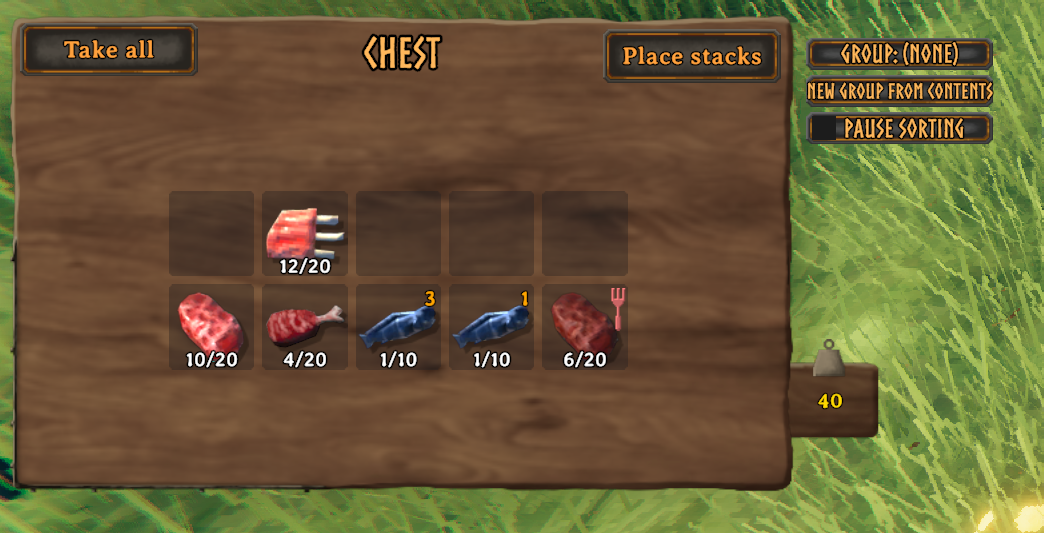
- Group: (none): click to open the group menu and pick a group for this chest. Hover to see the group chests nearby (closest first, marked if full or behind a ward edge) and which groups are Strict.
- New Group From Contents: makes a group from what's in the chest. The name is filled in for you from the item there is most of (for example "Wood"); press Enter, or type your own. The chest joins the new group and all its item types are added. If an item belonged to another group, it moves to this one and the game tells you.
- Pause sorting: while ticked, nothing moves in or out of this chest. Handy when you want to collect items first, for example ones that already belong to another group, before making a group from them. Turns off when you close the chest.
A chest with a group
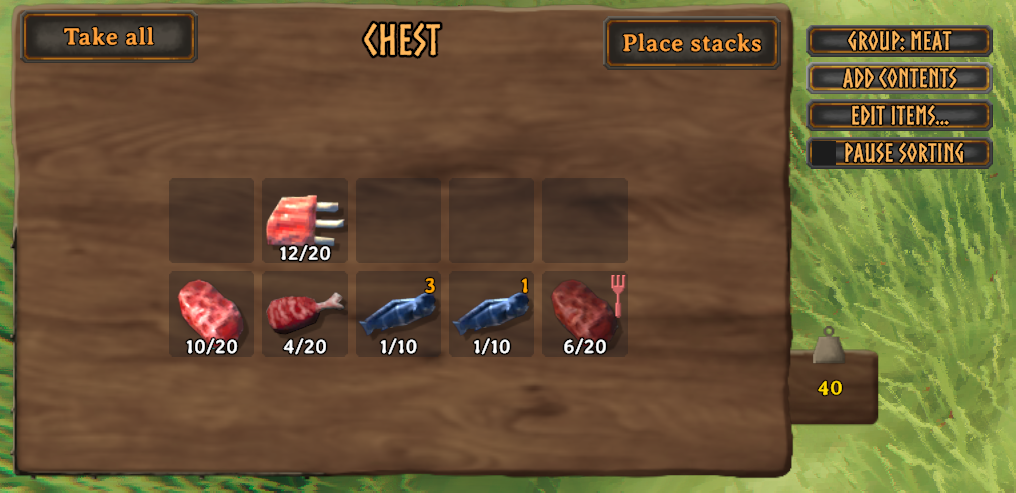
- Group: Meat: hover to see the group's items and the group chests nearby; click to open the group menu.
- Add Contents: adds this chest's item types to its group. The group keeps the items it already had. If an item belonged to another group, it moves to this one and the game tells you.
- Edit Items...: the group's item list. Remove single items, or use Clear all (click it twice) to start over.
- Pause sorting: same as above.
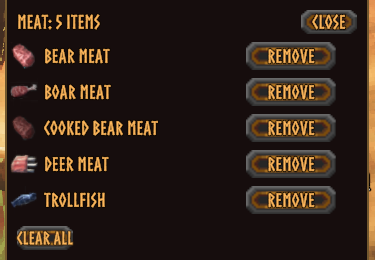
The group menu
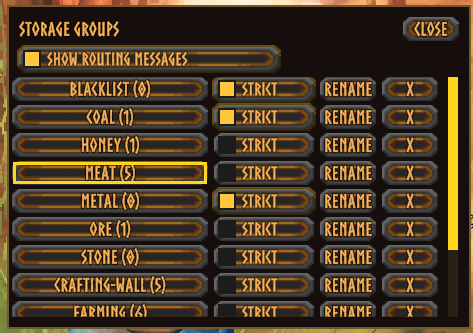
-
Every group, with how many item types it has. The one with the border is this chest's group; click it again to take the chest out of the group. + at the bottom of the list makes a new, empty group.
-
Strict (per group, optional): a strict group's chests only keep the group's own items. Anything else goes to a chest of its own group nearby, or, if none has room, to a nearby chest that isn't strict. Without Strict, other items stay where they are.
-
Rename, and X to delete a group. Deleting a group never deletes items; its chests just become ungrouped.
-
Show routing messages (just for you): shows a short message every time an item is routed near you, like "Evicted 3 Stone to an ungrouped chest (7 m)". Handy to see what the mod is doing. Off by default.

Where items go
When an item lands in any chest, and a chest of that item's group is within 10 meters with room, the item moves there. Closest chest first.
- If its group's chests are all full or too far away, the item stays put, unless the chest it landed in is Strict (see above). Nothing is lost.
- Items with no group stay where you put them, unless the chest is Strict.
- Changing a chest's group re-checks everything in it.
- Hover over a chest to see its group, whether it's Strict, and whether it is inside a ward.
Where does an item go?
                  An item lands in a chest
                            |
                            v
        +-------------------------------------+
        | Is this chest in the item's group?  |--- yes ---> STAYS (it is home)
        +-------------------------------------+
                            | no
                            v
        +-------------------------------------+
        | Is a chest of the item's group      |--- yes ---> MOVES there
        | within 10 m, with room, and in the  |             (closest first)
        | same ward (or both outside wards)?  |
        +-------------------------------------+
                            | no
                            v
        +-------------------------------------+
        | Is this chest's group Strict?       |--- no ----> STAYS
        |                                     |             (waits for room)
        +-------------------------------------+
                            | yes
                            v
        +-------------------------------------+
        | Is an ungrouped chest nearby        |--- yes ---> MOVES there
        | with room (same ward rule)?         |
        +-------------------------------------+
                            | no
                            v
        +-------------------------------------+
        | Is a grouped chest that is NOT      |--- yes ---> MOVES there
        | Strict nearby with room?            |
        +-------------------------------------+
                            | no
                            v
                  STAYS (nowhere to send it)
An item moves at most twice, and never back and forth. A group chest works like a sink: it keeps pulling in its group's items from nearby chests until it is full.
Everything is checked again when:
- an inventory changes (this chest and nearby chests are rechecked),
- a chest's group is set, changed or cleared,
- any group setting or item list changes, including Strict turning off,
- Pause sorting is turned off,
- a group is deleted.
Install
You need BepInExPack for Valheim installed first.
Install with a mod manager such as Gale or r2modman. That's all.
The mod is exactly two files: StorageGroups.dll and StorageGroups.Core.dll. Everything else it uses already comes with Valheim or BepInExPack.
With Gale (manual profile install):
- Open your profile folder. In Gale: the profile menu, then "Open profile folder".
- Go to
BepInEx/plugins. - Make a folder called
StorageGroupsand put both DLLs in it. - Start the game through the mod manager.
Manual install:
- Go to your Valheim folder (Steam: right-click Valheim, Manage, Browse local files).
- Go to
BepInEx/plugins. - Make a folder called
StorageGroupsand put both DLLs in it.
Uninstall: delete the StorageGroups folder. Your chests keep their items.
Multiplayer
- Install on the server and on every player.
- Groups are shared by everyone on the server. Anyone can create, rename or delete a group, and change its settings.
- All chests work together, no matter who built them or who has them open.
- Renaming a group keeps every chest in it, for everyone.
Wards
- Items never cross the edge of a ward. Chests inside a ward only send items to chests inside the same ward, and chests outside wards only to chests outside wards.
- A chest standing where two wards overlap only routes with chests covered by the same wards.
- Private chests are never touched.
Works with
- AzuAutoStore: AzuAutoStore puts the item in a chest first, then this mod moves it to the right group chest. Tip: turn on Strict for your groups, because AzuAutoStore stores into any chest that already has that item.
Does NOT work with
- Smart Containers / Smarter Containers, and other mods that move items between chests on their own. Two sorting mods fight over the same items. This mod will not load if Smart Containers is installed. Remove it first.
Settings
After the first launch, the config file BepInEx/config/com.jonasd.valheim.storagegroups.cfg appears. With a mod manager, open it from the manager's config editor.
Routing.RangeMeters(default 10): how far, in meters, an item can travel to reach another chest. Everyone on a server should use the same value.UI.ShowRoutingMessages(default off): same as the checkbox in the group menu.
Disclaimer
- This is a work in progress and not fully tested. Use at your own risk.
- Multiplayer and ward support are the least tested parts. Back up your world before using it on a server, and report anything odd.
- Items are only moved, never created or deleted on purpose. Still, if something goes wrong, the backup is your safety net.
CHANGELOG
Changelog
0.1.7: UI/UX overhaul
- The chest sidebar now changes with the chest. A chest without a group shows New Group From Contents; a chest with a group shows Add Contents and Edit Items.... Both have Pause sorting.
- New Group From Contents: one click (plus Enter) makes a group from the chest's items, named after the item there is most of, and puts the chest in it.
- Edit Items...: a list of the group's items with icons, a Remove button for each, and Clear all.
- The Group button's hover now also shows the group chests nearby, so the separate Routes (?) button is gone.
- Clearer names: Evict Mismatching is now Strict, Hold routing is now Pause sorting, Extend From Contents is now Add Contents, and Edit in the group menu is now Rename. Set From Contents is gone: use Clear all, then Add Contents.
- Popups have a solid dark background, so nothing shows through them.
- Hover boxes update while you hover, for example right after Add Contents.
- No gameplay or save changes. Groups, settings and multiplayer messages are the same as before, so older players and servers still work together with 0.1.7.
0.1.6
- New Extend From Contents button in the chest sidebar: adds this chest's items to its group without removing the group's other items. An item still belongs to one group only; if it was in another group, it moves over and the game tells you.
- New icon: three chests, each with its own group.
- The mod page now has screenshots.
0.1.5
- Group changes on a server now show up almost immediately (they could take up to about 5 seconds). This covers creating, renaming and deleting groups, Evict Mismatching, and Set From Contents.
- For the full effect, update both the server and all players. Players on 0.1.5 already see their own changes quickly, even on a server that's still on an older version.
- The group menu picks up changes faster and does less work while it's open.
- No gameplay changes. Saved groups and multiplayer messages use the same format as before, so 0.1.2 to 0.1.4 players and servers still work together with 0.1.5.
0.1.4
- The mod is now just two DLLs (
StorageGroups.dll,StorageGroups.Core.dll). It no longer bundles any .NET libraries, including copies of ones Valheim already ships. - Fixed a flood of "LiberationSans SDF Font Asset was not found" warnings in the log when opening a chest.
- No gameplay changes. Saved groups and multiplayer messages use exactly the same format as before, so existing worlds keep their groups and players on 0.1.2 or 0.1.3 can still play together with 0.1.4 players.
- If you installed an earlier version by hand, delete the old
StorageGroupsfolder first so the extra DLLs are gone. Mod managers do this for you.
0.1.3
- No longer bundles
System.MemoryandSystem.Runtime.CompilerServices.Unsafe. Valheim already ships both, and a second copy could conflict with the game's own.
0.1.2
- Pressing the Use key while typing a group name no longer closes the name editor.
0.1.1
- Works with the standard BepInExPack for Valheim, with no extra MonoMod libraries needed.
- Nearby chests are rechecked when a group's settings change (including turning Evict Mismatching off) and when a nearby chest's contents change.
0.1.0
- First release. Put chests in groups and items move to the right chest by themselves.
