
Please disclose if any significant portion of your mod was created using AI tools by adding the 'AI Generated' category. Failing to do so may result in the mod being removed from Thunderstore.

RiversAndLakes
Draw rivers, lakes and waterfalls in your world: flowing currents, shaped banks, fish, lava. Multiplayer.
| Date uploaded | 2 weeks ago |
| Version | 1.1.0 |
| Download link | Voxheim-RiversAndLakes-1.1.0.zip |
| Downloads | 997 |
| Dependency string | Voxheim-RiversAndLakes-1.1.0 |
This mod requires the following mods to function

denikson-BepInExPack_Valheim
BepInEx pack for Valheim. Preconfigured with the correct entry point for mods and preferred defaults for the community.
Preferred version: 5.4.2333
ValheimModding-Jotunn
Jötunn (/ˈjɔːtʊn/, 'giant'), the Valheim Library was created with the goal of making the lives of mod developers easier. It enables you to create mods for Valheim using an abstracted API so you can focus on the actual content creation.
Preferred version: 2.30.0README
Rivers and Lakes
Discord: Voxheim Discord | Patreon: patreon.com/Voxheim | Ko-Fi: ko-fi.com/voxheim
If you feel like supporting this project, thank you kindly in advance! The mod is free and always will be.
| Trailer | Tutorial |
|---|---|
 |
 |
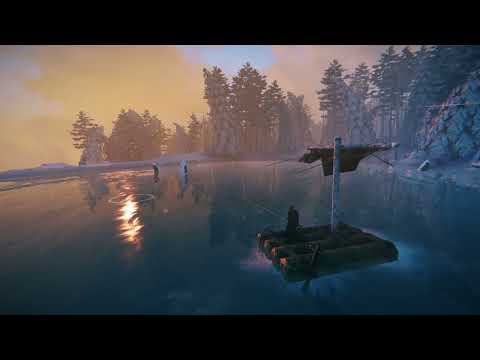
Draw rivers, lakes and waterfalls anywhere in your world. Lay out a river's course or a lake's shore from a bird's-eye planning view, apply it, and the water is there for everyone on the server. Your water flows, carries boats and items downstream, falls over cliffs, and holds fish. Or let the mod fill a new world with rivers and lakes for you.
Features
- World generation: a new world can come with rivers, lakes and waterfalls all over it: river systems with headwater lakes, creeks from springs, large lakes with islands. The generated water is yours to edit like any other.
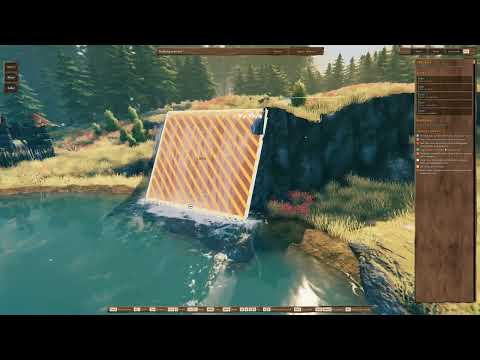
- Plan mode: a free-flying camera with a toolbar and an inspector. Draw a river knot by knot, or click a lake's shore point by point; drag, insert or delete knots; undo and redo; nothing changes in the world until you press Apply.
- Rivers that flow: the current follows your course: it carries boats, floating items and swimmers downstream, and rivers join other rivers and lakes. Build boats right on your water with the hammer.
- Waterfalls: a river that drops off a cliff becomes a waterfall on its own, with spray, mist and a plunge pool.
- Shaped banks: "Shoreline carve" digs the riverbed or lake basin into the ground and forms natural banks; "Paint ground" lays a band of dirt along them. Both are per body and can be turned off.
- Looks: presets (auto by biome, clear stream, glacial, forest pond, bog, mountain tarn, Mistlands, custom colours), foam, ripples, murk and spray per body; rapids and calm stretches per river segment.
- Lava: any body can be lava instead of water: it burns, glows, crusts over, and steams where it meets water.
- Living water: waves driven by the current, ripples around players, boats and rain, caustics on the bed, a view from under the water, reflections, and the sound of streams, rapids and waterfalls.
- Fish: lakes spawn the biome's fish (rivers too, if you turn it on).
- On the map: rivers and lakes show on the world map and the minimap.
- Tidy-up buttons: remove the stones, trees and ore that end up standing in the new water.
Getting started
- Equip the Hoe, open its build menu and pick Rivers & Lakes. (Or open the console and run
riversandlakes, or set a key in the config:[RiversAndLakes] PlanModeKey.) - Pick River (2) or Lake shore (3) and click on the ground to place knots; Enter finishes.
- Select water to change it in the inspector on the right; the keys you can use are shown on screen
(change them in the config's
[Keys]section). - Press Apply to make it real. Esc steps back (drawing, tool, selection); with nothing left to step back from, it leaves plan mode.
Camera: WASD to fly, Q / E to glide along the ground, middle mouse to orbit, Shift to go faster, Shift + mouse wheel to change the speed.
World generation
- New world: pick "Default Generator" in the Rivers and Lakes dropdown of the new-world dialog (it is preselected; "None" makes no water). The water is generated the first time the world loads.
- Existing world: run
riversandlakes_worldgen generate wholein the console (admins, withdevcommands), orgenerate newlandto keep to land nobody has visited yet.statusshows the progress,removetakes the generated water away again (water you have edited stays). Generated water goes round locations and builds, but it does reshape the ground along it: back up your world first. - Dedicated servers:
[WorldGen] NewWorlds = WholeWorldgenerates water for new worlds. - The
[WorldGen]config section sets how much water there is, which biomes stay dry, and the river systems and lakes. Generation runs on the host, so the host's config applies.
Multiplayer
All players and the server need the mod, in exactly the same version (checked when you connect). The server
decides: it accepts or refuses every change, and stores the water in the world save. Admins can set in the [Server]
section of the config (synced to everyone):
Access: who may change rivers and lakes: Everyone, AdminsOnly or Whitelist (AllowedPlayers).AllowLava,AllowGroundChanges(shoreline carve and ground paint),Fish.ProtectTerrain: players without access may not dig away the banks near water.
Settings
Water quality has its own rows in the game's Settings > Graphics (Auto / Low / Medium / High / Ultra). Everything
else is in BepInEx/config/com.bogey.riversandlakes.cfg, or in game with a config manager; developer tuning values
are marked advanced.
Compatibility
- Requires BepInEx and Jötunn.
- Works with Voxheim: rivers can run through caves you dig. Works perfectly fine without Voxheim too, of course.
- World generation follows modded world generators (it reads the world's own terrain) and Expand World Size's radius
(any other world-size mod: set
[WorldGen] WorldRadius). - Other mods can place rivers and lakes and add their own water generators through the public API
(
RiversAndLakes.Api). - This mod changes the ground around the water you make (unless you turn "Shoreline carve" and "Paint ground" off). Back up your world before trying it on a save you care about.
Installation
Ideally, use a mod manager. To install by hand, install the dependencies above, then extract the plugins folder of
the zip into <Valheim>\BepInEx\plugins\RiversAndLakes, so that it holds RiversAndLakes.dll and
RiversAndLakes.Core.dll.
FAQ
I see Voxheim in some links - do I need Voxheim to run Rivers and Lakes?
No, yours truly was foolish to believe Voxheim would be the only mod I'd ever make, hence many things are named after it. And yet, here we are ... Rivers and Lakes is entirely independent. It works with and without Voxheim.
Credits
Many thanks to Adam, Marius, Yuki and Matt, the first official supporters on Patreon. Your support is very much appreciated!
A big thank you to ATomWolf, Adrian, Kneesock, Kai-El, Kono dio da, rotsch, Saï Saïmon, and Wackah for their intense alpha testing of the mod.
The water and lava sounds are cut from the following Freesound recordings:
| Sound | Recording | Author |
|---|---|---|
| Lapping shores | Water_Lapping_River.wav | ceich93 |
| Streams | Stream, Close Perspective 02 | HECKFRICKER |
| Fast rivers | Loud River 001 | TheWoodlandNomad |
| Rapids | Rapid Mountain River Close.wav | DanGasior |
| Small waterfalls | Ambiance_Waterfall_Small_Close_Loop_Stereo.wav | Nox_Sound |
| Big waterfalls | Ambiance_Waterfall_Big_Skogafoss_Loop_Stereo.wav | Nox_Sound |
| Lava bubbling | Lava Loop 1 | Fission9 |
| Lava rumble | Lava Loop 4 | Fission9 |
| Lava falls | Bubbling lava flowing1.wav | Jim-Bretherick |
Bugs and ideas are welcome on the Discord. Join the server and come have a chat with everyone, we're friendly!
CHANGELOG
Changelog
1.1.0
World generation
- Rivers and lakes can now come with the world. A new world's dialog has a Rivers and Lakes dropdown: "Default Generator" (preselected) fills the whole world with rivers, lakes and waterfalls, "None" leaves it as before. Generated water is ordinary water: edit or delete it in plan mode like water you drew.
- Each island gets a few main river systems with a headwater lake, plus creeks rising from springs; rivers cut through
low ridges, fall over cliffs, split round islands, and run into and out of large lakes on flat ground. Every river
ends in the sea, a lake or another river (a small creek may end in a pond). The Mistlands' tall hills get waterfalls
from their tops down their sides (
[WorldGen] HillFalls, a few per Mistlands region). Small locations can stand in those lakes as islands or on their shores as headlands. - Generated lakes are deeper the bigger they are: ponds and small lakes 2 m, the largest lakes up to 8 m (their "Target depth" in plan mode).
[WorldGen] Waterfalls(Many / Few / None, Few by default): how many waterfalls generated rivers have. Few turns most steps of the ground into rapids cut into it and keeps falls for taller steps; None lets rivers flow gently (small gorges in hilly ground, falls only at tall cliffs); Many makes a fall at every steep step.- Rivers end in open sea, not in a narrow inlet of sea reaching inland.
[WorldGen] MinRiverWidth(off by default): the narrowest a generated river may be, in metres. Every river is made at least that wide, carrying as much more water; one that cannot be that wide everywhere is left out, with the rivers joining it.- Generated water flows round locations and builds and leaves them as they were. The stones, trees and plants standing in it are cleared away (ore stays).
- Generated water keeps clear of water already in the world (rivers and lakes you drew, or kept from an earlier run): no generated river or lake overlaps it. Generated rivers may flow into it, or one per body start from it, as they would a lake of their own.
[WorldGen] RiverPaintGround(on by default): off, generated rivers leave the ground's paint as it is (plan mode's "Paint ground"; their banks are still shaped). Lakes always paint.[WorldGen] CarveShore(on by default): off, generated rivers and lakes are placed with their shoreline carve off (plan mode's "Shoreline carve"): the ground is left as it is, so the water may stand above or below it.- Existing worlds and dedicated servers: the console command
riversandlakes_worldgen(admins, needsdevcommands):generate whole(the whole world) orgenerate newland(only land nobody has visited yet),status,cancel, andremove(takes away the generated water you have not edited). On a dedicated server,[WorldGen] NewWorldsgenerates water for new worlds. Back up your world before generating water in a save you care about: it reshapes the ground along the water. - The
[WorldGen]config section sets how much water, which biomes stay dry, the river systems, the lakes and more. Generation runs on the host, so the host's config applies. Worlds made bigger with Expand World Size are covered to their edge.
New
- Rivers and lakes are drawn on the world map and the minimap (
[Map] DrawWater, on by default; fog of war still applies). - Rivers can gather water on their way: a knot's "Water gathered to the next knot" adds springs and brooks too small to draw, and "Water here" shows how much water the river carries past the knot.
- Plan mode's keys can be changed in the config's new
[Keys]section (or a config manager); the on-screen hints show the keys you set. - For mod makers: other mods can place rivers and lakes, and add their own water generators to the new-world
dropdown, through a public API (
RiversAndLakes.Api).
Changes and fixes
- Rivers are drawn and carved at least 2 m wide; very narrow creeks no longer show ground through their water.
- A river linked to a lake can no longer run under the lake's surface. River knots that lie just under a lake's level are lifted onto it.
- Waterfalls are rebuilt: the sheet's edges follow the water, and each part of it lands in the water below, also where the river turns or runs steeply on below the fall. No more rock gaps between the river and the sheet, sheets inside the ground, sawtooth or dark crease along the lip, bare faces where a rock sits on the lip, strips of river hanging down beside the sheet, or walls and spikes of ground beside tall falls; the splash ends where a river drops on without a pool.
- A river joining other water less than 0.75 m below runs smoothly into it instead of making a tiny waterfall.
- Shaped banks follow the water: the ground along narrow creeks no longer dams them every few metres or shows a sawtooth waterline when they run diagonally.
- Worlds made bigger with Expand World Size: rivers and lakes outside the Ashlands are no longer tinted red.
- Rivers no longer stand still below a short steep drop or a dry band across them.
- Works with the Seasons mod (which used to throw errors on plan water), and with mods that change the vanilla water's material.
- Large worlds with many rivers and lakes: changes are sent as differences, the water near players is prepared first, and memory use is much lower. Far fewer stutters while flying or walking through a world full of water.
- Multiplayer: a client that misses part of an update asks the host for the whole state again instead of staying out of sync.
1.0.0
First public release: draw rivers, lakes and waterfalls in plan mode, with flowing currents, shaped banks, fish and lava, for single player and servers.
For alpha testers
- Worlds last saved by a plugin older than 0.0.36 no longer load their rivers and lakes (the stored data is kept and
backed up to
BepInEx/RiversAndLakes/failed-imports/). - Water quality now has its own rows in Settings > Graphics. The old
[Waves]tessellation and[LocalWaves]on/off switches are gone, so if you turned those off, set a lower water quality instead. - New server setting
[Server] AllowGroundChanges: off, players cannot turn on "Shoreline carve" or "Paint ground" (water that already has them keeps them). - Developer console commands (
riversandlakes_dump,_watershader,_waves,_carve, ...) now needdevcommands;riversandlakes_wipeis gone (useriversandlakes_clear confirm). - Quieter log; developer tuning values are marked advanced in config managers.
