
Please disclose if any significant portion of your mod was created using AI tools by adding the 'AI Generated' category. Failing to do so may result in the mod being removed from Thunderstore.

WiresStackify
Quick stack, restock and sort from one little pouch next to your armor and weight. Favorites stay put.
By Wire
| Date uploaded | 3 days ago |
| Version | 0.1.0 |
| Download link | Wire-WiresStackify-0.1.0.zip |
| Downloads | 32 |
| Dependency string | Wire-WiresStackify-0.1.0 |
README
Wire's Stackify
Quick stack, restock and sort, all from one little pouch that sits right next to your armor and weight.
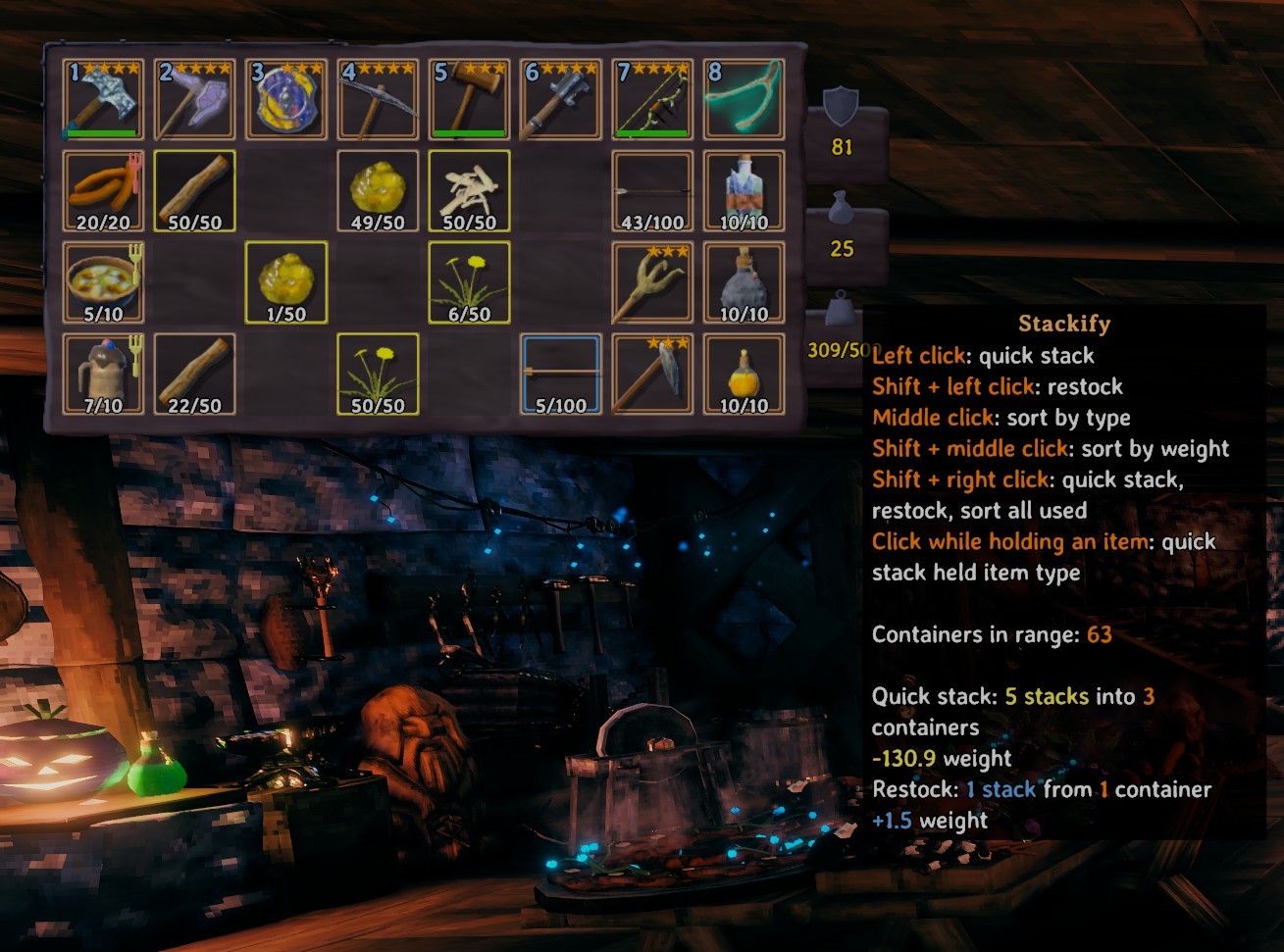
The pouch
- Left click: quick stack. Everything you carry goes into nearby chests that already hold the same item.
- Right click: restock. Tops your ammo and food back up from nearby chests.
- Shift + click: both in one trip, quick stack then restock.
- Middle click: sort by type. Shift + middle click: sort by weight.
- With a chest open, the chest gets its own pouch that works with just that chest.
- The number on the pouch is how many stacks you're carrying (or how many the chest holds).
- Hover it to see how many chests are in range.
Favorites
- Alt + left click an item to favorite every item of that kind, Alt + right click a slot to favorite the slot.
- Favorites are never quick stacked or sorted, and nothing gets sorted onto a favorited slot. Your hotbar is left alone too.
- Coming from Quick Stack Store? Me too! Your favorites come along the first time you load in.
Feels good
- Every chest you stack into or take from opens with its own sound, one after another, with a little burst of sparks.
- The pouch hops, bounces, wiggles or shrugs depending on what just happened, and your items pop into place when sorted.
- All of it is only on your side, nobody else hears or sees it.
Compatibility
- Works with Multi User Chest. Without it, nearby chests are only used in single player, so nobody loses items.
- Leaves Equipment and Quick Slots' slots alone.
- Doesn't need to be on the server. In multiplayer, sorting a chest someone else is holding needs them to have it too.
Quick stacking, restocking and sorting work the way Goldenrevolver's Quick Stack - Store - Sort - Trash - Restock does (MIT licensed), rebuilt with a new interface.
Disclaimer: the code is AI assisted since I barely know C#. Not fully AI nor human.
CHANGELOG
0.1.6
- Favorited items stay where they are when you sort a container too.
- The pouch's rings and tooltip update right away when anything changes while you hover it, including containers coming into or out of range as you walk. No need to hover off and back on.
0.1.5
- UI sounds use the game's GUI audio channel and bypass environmental reverb.
- Carts, ships and other containers without their own opening sounds now play the vanilla chest sounds when used by Stackify.
- Favorited items and items in favorited slots cannot be dropped, including with MouseTweaks' Ctrl + click. They can still be moved between inventories.
- Favorited items show their inner frame in containers. Favorited slots remain exclusive to your inventory.
- Favorite frames now refresh when inventories change or slots are created, without per-frame UI hooks.
0.1.4
- Middle click sorting now only reacts to the click itself, nothing runs every frame anymore.
0.1.3
- Picked up items skip favorited slots and go to the next free slot. They still stack onto what's already in a favorited slot, favorited items can still go there, and if nothing else is free a favorited slot is used.
0.1.2
- did a oopsie dw bout it
0.1.1
- New controls: left click quick stacks, shift + left click restocks, middle click sorts by type, shift + middle click by weight. Every click can be changed in the new Controls section of the config.
- Shift + right click does everything at once: quick stack, restock, then sort your inventory and every container it just used.
- Middle click almost anywhere sorts again: the top of the screen sorts your inventory, the bottom an open container.
- Click your pouch while holding an item to quick stack every stack of it, or a container's pouch to top up your stacks of it from that container. A pouch opens when it can do something with it.
- The pouch opens for a moment whenever it quick stacks or restocks something.
- The pouch no longer has a drop shadow, like the armor and weight icons next to it.
- Hovering the pouch shows what it would do: a yellow ring on stacks a quick stack would take, a blue inner ring on stacks a restock would top up.
- Blue sparks for a restock.
- The tooltip says how many containers a quick stack or restock would use, and how much weight it would take off or add.
- Restocking never takes you past what you can carry.
- The inventory pouch always works with the open container and the containers around you; the container's pouch is for that container. The "With a chest open" settings are gone.
- Every click gives the empty-bag rustle right away, with the action's own sound after it.
- The yellow messages are gone, the sounds say enough.
- Hand cursor over the pouch with Wire's Native Cursor Support 0.3.3.
- Everything says container instead of chest, since it works with every kind. The Nearby Chests settings are now Nearby Containers and keep your values.
- Tooltips say which pouch is which: "Stackify" for yours, "Stackify (Container)" for a container's, which only works with that container.
0.1.0
First release: quick stack, restock and sort from a pouch next to your armor and weight, with favorites.
