
Please disclose if any significant portion of your mod was created using AI tools by adding the 'AI Generated' category. Failing to do so may result in the mod being removed from Thunderstore.

Wolvys Cross Beams
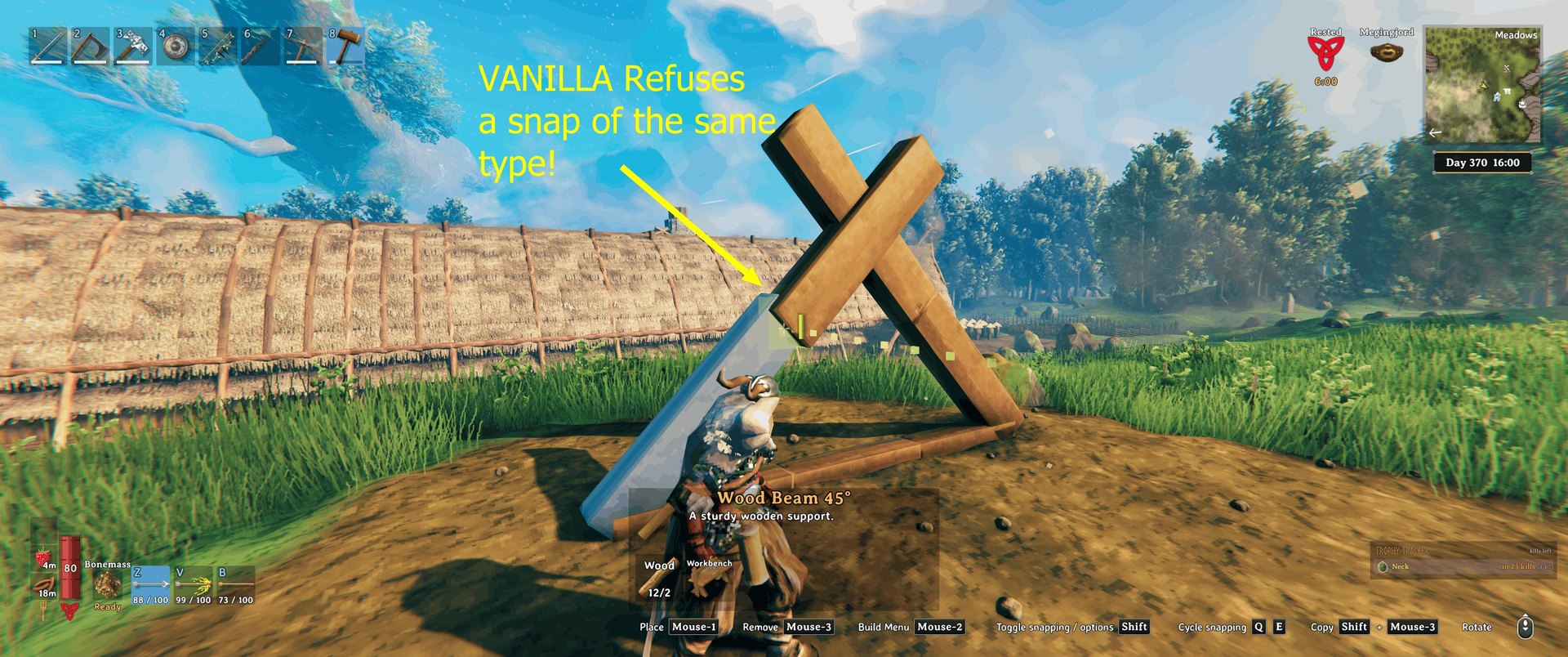
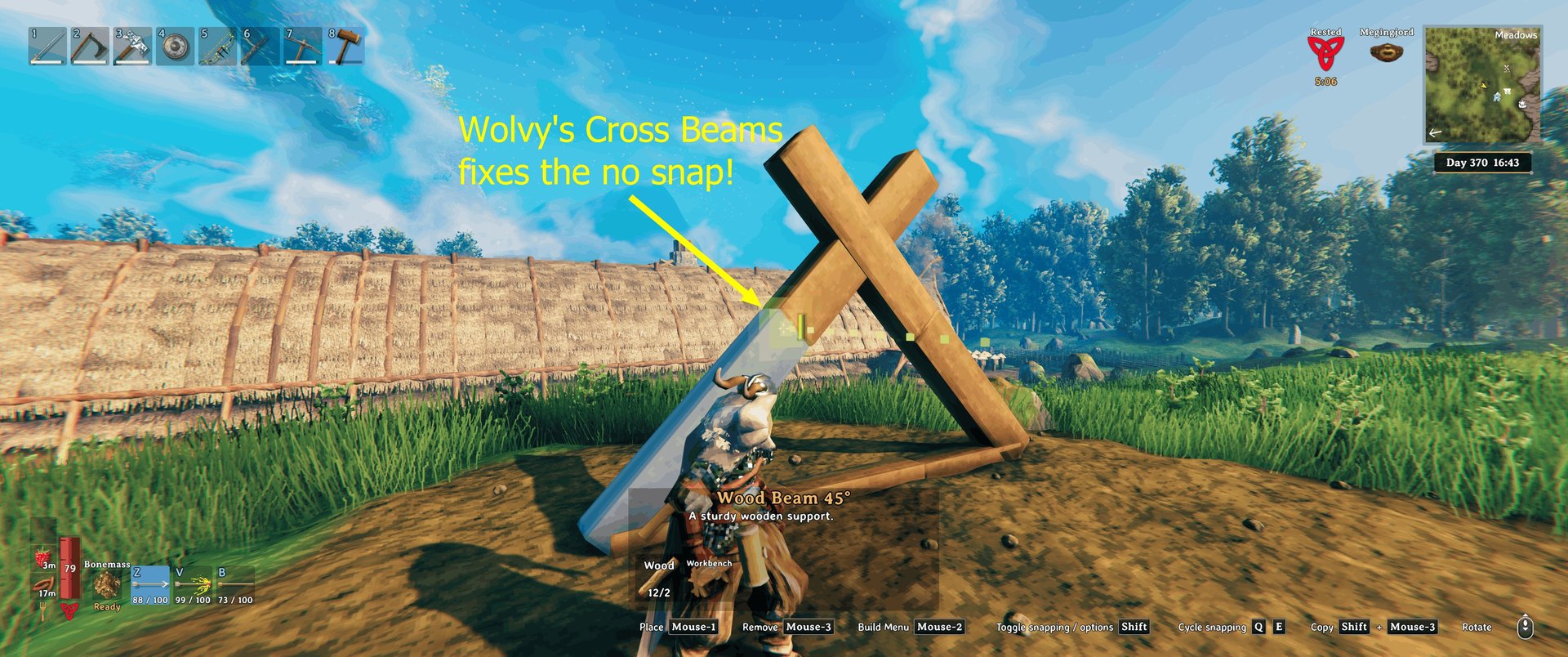
Lets you snap two angled beams of the same type into an X. Vanilla refuses the second beam; with this it clicks into place. Real duplicates are still blocked. Client-side only.
| Date uploaded | 2 weeks ago |
| Version | 1.0.0 |
| Download link | Wolvyreen-Wolvys_Cross_Beams-1.0.0.zip |
| Downloads | 52 |
| Dependency string | Wolvyreen-Wolvys_Cross_Beams-1.0.0 |
This mod requires the following mods to function

denikson-BepInExPack_Valheim
BepInEx pack for Valheim. Preconfigured with the correct entry point for mods and preferred defaults for the community.
Preferred version: 5.4.2360README
Wolvy's Cross Beams - Snapping Fix for X Beams
By Wolvyreen(With_ClaudeAI)
Ever tried to brace a wall with two angled beams in an X? The first one goes on fine. The second one just won't snap. It hangs in front of the first beam no matter how you aim it or which snap point you pick with Q/E.
This mod fixes that. Put up your first 26° or 45° beam, then snap a second one of the same type across it, and it clicks into place like it should.
Why the game won't let you
Valheim has a little safety check to stop you double-clicking and dropping a second piece hidden inside the first one. If a piece with the same name already sits within 5 cm of where the new one would go, the game cancels the snap.
The trouble is that it only looks at where the middle of the piece is, not which way it's facing. In a neat X, both beams have their middle in exactly the same spot, so the game thinks your second beam is a copy of the first and quietly refuses it.
What I changed
Instead of comparing the middle of the pieces, the mod compares their snap points (the ends and corners things attach to).
A beam crossing another one has its ends somewhere else, so it snaps. A real duplicate has its ends on top of the old one's, so it's still blocked. That includes the sneaky ones that look different on paper but sit exactly the same in the world, like a beam turned all the way round, a pole turned any amount, or a square floor turned a quarter turn.
The only extra thing it now allows is a square floor turned 45° in the same spot as another floor. You'd see that one straight away because the corners stick out, so it can't hide.
Nothing else is touched. Placement rules, support, costs, workbench range and wards all work exactly like vanilla, and what you build is just normal vanilla pieces.
A few things worth knowing
It's client-side only. Install it on your own game. Servers and friends don't need it, and they'll see your crosses just fine.
You can take it out any time. Everything you built stays where it is. You just lose the easier snapping.
If a Valheim update changes the bit of game code this mod hooks into, it writes a note to the BepInEx log and switches itself off, so you're back to normal vanilla snapping rather than anything breaking.
Settings
There's one setting, in BepInEx/config/wolvy.valheim.crossbeams.cfg (it appears after you start the game once with the mod), or in Configuration Manager if you use it:
[General] Enabled (default true) turns the fix off without uninstalling the mod.
Installing
r2modman or Thunderstore Mod Manager: hit Install and you're done. It sets up BepInEx for you if you don't have it.
Vortex or Mod Organizer 2: use "Mod Manager Download" on the Nexus page and enable the mod. You'll need BepInEx for Valheim set up in your mod manager first. Vortex's Valheim support does this for you. In Mod Organizer 2, use its Valheim support plugin and install BepInExPack Valheim as a mod.
By hand: install BepInExPack Valheim, then drop WolvysCrossBeams.dll into BepInEx/plugins/. The Nexus download already has the folders set up, so you can just extract it into your Valheim folder (the one with valheim.exe).
Other mods
It hooks one game method (Player.IsOverlappingOtherPiece) with a Harmony prefix.
Mods that add extra snap points, like Extra Snap Points Made Easy or Snapheim, should work fine alongside it. They decide where things can snap, and this one only decides whether a crossing snap is allowed. Mods that add their own rules to the same check after it runs (ItemDrawers Remake and Elite Building Pieces do this) keep working too.
If you find a mod it doesn't get along with, let me know and I'll have a look.
Source code
Everything's on GitHub, including the tests and build scripts: https://github.com/wolvyreen/Valheim/tree/main/WolvysCrossBeams (MIT licence). Bug reports are welcome there under Issues.
How this was made
I made this mod with Claude, Anthropic's AI. I ran into the problem while building, worked out what I wanted and tested it in game. Claude dug through the game code to find out why the snap was being refused, and wrote the code and most of the text.
Changelog
1.0.0: First release.
CHANGELOG
Changelog
1.0.5 (2026-11-12)
The wolf's head button in your inventory now just says "Wolvy's Mods" when you hover over it.
1.0.4 (2026-11-10)
The Wolvy's Mods window now has an About page: click the little "i" next to the X to see my other mods. Snapping works exactly the same as before.
1.0.3 (2026-11-10)
The Wolvy's Mods window got a few small fixes. This mod's lines in the BepInEx log now start with [WolvysCrossBeams], so they're easy to spot. Snapping works exactly the same as before.
1.0.2 (2026-11-08)
The Wolvy's Mods window got some love. You can now move it, resize it and close it with the X in the corner, and the settings line up neatly however big you make it. Snapping works exactly the same as before.
1.0.1 (2026-11-08)
The setting now lives in the "Wolvy's Mods" window too, behind the wolf's head button in your inventory. Snapping works exactly the same as before.
1.0.0 (2026-11-07)
First release.
