
Please disclose if any significant portion of your mod was created using AI tools by adding the 'AI Generated' category. Failing to do so may result in the mod being removed from Thunderstore.

ImmersiveCameraEnhanced
Bring Valheim closer with Bodycam, custom crosshairs, Alt bow aiming, optical zoom, Advanced Camera, explored cave minimap, Camera Cull and configurable collision. Client-side; no server installation required.
| Date uploaded | 3 weeks ago |
| Version | 1.6.0 |
| Download link | XineladaLendaria-ImmersiveCameraEnhanced-1.6.0.zip |
| Downloads | 93 |
| Dependency string | XineladaLendaria-ImmersiveCameraEnhanced-1.6.0 |
This mod requires the following mods to function

denikson-BepInExPack_Valheim
BepInEx pack for Valheim. Preconfigured with the correct entry point for mods and preferred defaults for the community.
Preferred version: 5.4.2333README
Immersive Camera Enhanced
Current release: 1.6.0
See Valheim from a whole new perspective. Step into an immersive, head-following first-person Bodycam, keep foliage from stealing the action, glide through tight interiors, and build a reticle that fits every weapon. Every feature is yours to tune, runs locally, and leaves your server and friends installation-free.
Features and demonstrations
Camera Cull — keep the action in sight
Keep the action in frame and let visual clutter fall away. Camera Cull clears leaves and selected foliage from your camera’s path while preserving gameplay colliders, so trees stay solid: cut them, gather from them, and fight around them. On Yggdrasil sprouts, it can hide identified leaves while keeping the trunk and branches visible. Leaves Only keeps trunks and branches in view; Movement Leaves Only waits until you move toward the camera before clearing the view.
Want a clearer view through a build? Cull Supports & Stone Arches starts off, so those pieces stay visible until you enable it. Shape the culling volume, check interval, restore delay and foliage shadows to decide how the world clears around your camera. Visual culling and collision pass-through are independent settings.
Demo: Camera Cull and selected-object pass-through.

Camera collision — move through your base comfortably
Explore tight spaces without losing your view behind solid geometry. Enable New Camera Collision gives the camera firm, responsive contact through a custom cylinder: it pulls in immediately when blocked, then glides back at the speed set by Camera Return Smooth Speed. Switch it off for Valheim’s native collision; both modes share the same object-ignore rules.
Choose what the camera can pass through: recognized vegetation, supports and arches, props and lights, entities, or boats. Boat mast colliders and the hammer placement preview are always ignored. The full boat is bypassed temporarily only while steering, holding its mast or sitting on a boat seat; simply standing aboard preserves hull collision. Ignore All Boat Collision keeps the full vessel ignored at all times. Structural walls, floors, roofs, terrain, rocks and ores stay solid; Ashlands rock formations remain solid even when vegetation collision pass-through is enabled.
Ignore Moving Door Collision, enabled by default, keeps opening and closing doors from jolting the camera. The camera passes through while the door moves, then treats it as a solid camera obstacle at either endpoint. It works with custom and native collision and never changes player or projectile collision.
Native hammer-built construction colliders are fitted to the visible shape across supported wear variants, bringing camera, player and projectile contact closer to what you see. Openings and compound parts stay intact; roofs, small props and modded pieces are excluded. Boats retain their original colliders to preserve ladder and helm interaction.
Demo: camera pass-through with the support/pillar option enabled.
Camera distance — choose your perspective
Shift in an instant from Viking-eye immersion to a sweeping third-person orbit. Set separate maximum distances on foot and in boats, then dial in how far each scroll moves the camera. Advanced Camera has its own 0.75 m default step, and inventory scrolling never knocks your view off course. Camera Base Position lets you sculpt the third-person angle, blending its vertical shift by distance.
Keep a reliable view when an obstruction lingers with Collision Distance Cut: after two seconds, it can lock in a shorter camera distance. Its minimum is calculated from your configured maximum distance and minimum reduction. The optional Camera Distance HUD puts your current distance and active cut at a glance.
Demo: changing camera distance from the character.

First person and Bodycam — step into Valheim
See Valheim from your Viking’s own eyes and make first person feel like a whole new way to play. With Enable First Person on, a scroll to 0.5 m drops you straight into the world. Two outward scrolls return to third person by default, preventing accidental exits; switch off Require Two Scrolls to Exit First Person for a quicker return.
Bring the camera to life with Bodycam: it follows the animated head so every lean and turn feels personal. Bodycam, Bodycam Footsteps, Show First Person Body, and Show First Person Held Items all start on, with independent controls. Footsteps carries the Viking’s step height and crouch into the view; turn it off for a steadier horizon. Add optional crouch lowering, camera sway and first-person FOV to make the perspective your own.
Look down to see your body and worn gear grounded in the scene, with the head, helmet, hair and beard cleanly hidden behind a sealed neck cut. Prefer pure hands-on action? Turn body visibility off and keep everything equipped in either hand on its own toggle: weapons, shields, tools and mod-added items. Frame-based locomotion blending, a visual rig aligned to the rendered view, direct mouse response, a stable near plane and deck-relative boat sway keep the view connected to the world.
Hide Held Items Above 5x Zoom starts on: optical zoom above 5x temporarily clears weapons, shields, tools and modded hand items from the first-person view. They return at 5x or below or when zoom ends. Body visibility and attacks keep their own behavior.
Demo: first-person view with animated held weapons and tools.

Optical zoom — bring distant details closer
Pull far-off details into focus without giving up your chosen camera distance. Hold Mouse4 and scroll to magnify in first or third person; release to glide smoothly back to normal view. Fine-tune magnification, scroll step, transition speed, key and mouse sensitivity, with independent FOV controls for each perspective.
Demo: hold-to-zoom and magnification changes.

Advanced Camera — make room indoors
Take command of the camera where ordinary views feel cramped. Advanced Camera activates with Valheim’s Shelter status when a player-placed building collider is overhead, and opens an indoor orbit up to 3 m. Natural caves, dungeons and other world-generated shelters do not activate it. After leaving the house, nearby player-built overhead geometry can keep your view free; overhead obstruction alone never activates the feature. The default exit check runs every 3 seconds.
Advanced Camera pauses automatically while sitting or lying down, including chairs, beds and compatible modded seats. Standing up restores the usual shelter checks.
With Advanced Height, raise or lower the camera with the mouse to find the angle your room allows. Movement stays within 50% of shared floor-to-ceiling free space, with corner clearance for height changes. Both collision modes remain available to keep the camera close when obstacles close in.
Double-tap the configurable Temporary Disable Key (Left Alt by default) within 2 seconds to suspend Advanced Camera. Double-tap it again inside a qualifying player-built shelter to reactivate it immediately. If left off, it automatically resumes after you have spent 1 minute outside that shelter.
Cave Map — chart the passages you explore
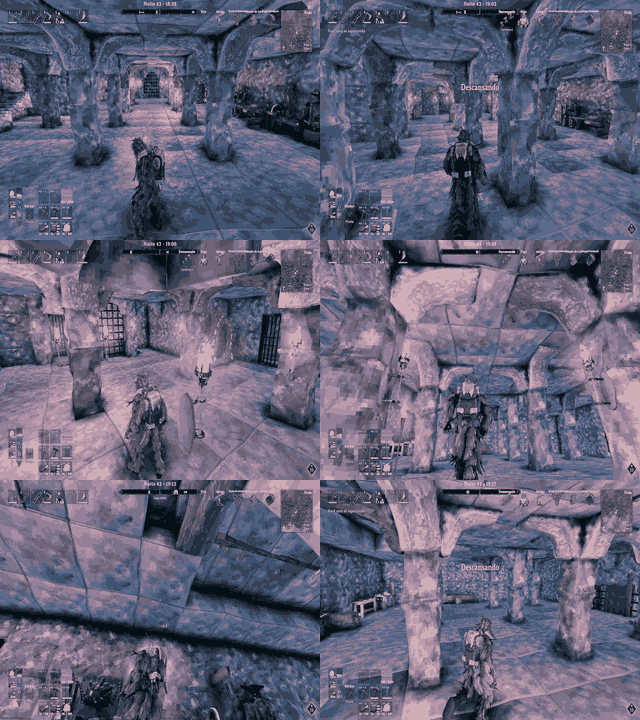
Turn every descent into a charted expedition. Inside a generated cave or dungeon, the minimap becomes a parchment map of the ground you explore, including Infested Mines and returning to a game saved underground. Discover visible walkable ground within 6 metres, following narrow corridors and stairs while walls, unvisited rooms and deep pits limit discovery. Exploration is saved locally per world.
Press M to open the cave map, drag to pan and scroll to zoom toward your player marker. Switch between cave and world views or browse floors with the on-screen controls; the minimap always follows your current floor. The entrance landing is floor 0, with positive levels above and negative levels below. Small steps stay on the same floor, and exits, doorways, graves and players use their own landing.
Keep your familiar player icons, including replacements from mods such as Path of Valheiman. Your arrow follows the camera; multiplayer markers respect the game's public-position sharing. Middle-click a death marker to ping its exact stored location, left-click to check it, or right-click to remove its map marker. Names follow the game language. Free pings and custom marker insertion are unavailable in cave view; removing a marker leaves the physical tombstone and its contents intact.
Enable Satellite Map Compatibility in 50 — Cave Map to switch from its terrain tiles to the cave plan and restore them on exit. Other map markers are preserved. A Vegvisir boss reveal opens the world map for that visit; close it and press M again to return to the cave view. The custom crosshair stays hidden on the open map. No extra dependency or server installation is required.
Alt free look — look around, keep your heading
Scan your surroundings without surrendering your heading. Hold Left Alt to move the view while your movement direction stays true; release to restore the captured view. When drawing a bow or crossbow, Alt becomes your dedicated mouse-aim control instead.
Demo: looking around with Alt while retaining movement heading.

Crosshair and bow aiming — put your aim where you want it
Make every shot and every swing feel like yours. Customize Default, Melee, Bow/Crossbow, Magic and Tools independently with screen-relative X/Y position, size, RGB color, thickness and center gap. Choose from 12 built-in styles, from crisp precision dots to vivid holographic marks, or add a transparent PNG up to 1024 × 1024 in the plugin’s Crosshairs folder or a supported BepInEx configuration folder.
Keep your aim under your control across every weapon category: shots follow the reticle’s viewing direction without normal aim snapping to scenery or mobs. Draw a bow or crossbow and hold Alt to guide the reticle while the camera stays still. Hold for 2 seconds by default to latch aim for that draw, then tap Alt to unlock. Releasing an unlatched Alt restores camera control immediately. Tune aim sensitivity, X/Y inversion and post-shot delay.
Choose how Alt aim gets on target: Aim Along Crosshair Direction follows the reticle’s direction, or converges on the target beneath it. The bow reticle tightens with the game’s draw and skill accuracy. Head Follows Camera Direction keeps your character looking with the camera instead of the offset reticle.
Never lose the interaction point while tailoring your aim. Show Vanilla Interaction Crosshair, on by default, keeps the original marker visible beside an offset custom reticle so you can still see exactly where a chest or object can be used; it hides when both markers overlap. The custom reticle hides on Esc and can remain visible over Configuration Manager. Automatic Crosshair Position compensates for the third-person pivot when the custom reticle is off.
Using BowTrajectory? Optional compatibility tunes its preview to live arrow speed and supported range modifiers, including Path of Valheiman’s range bonus. A toggle lets you switch back to BowTrajectory’s own preview at any time. With Better Archery installed, its original bow zoom is layered over Immersive Camera’s configured FOV and optical zoom, keeping the two magnifications continuous.
Demo: custom reticles and mouse-guided bow aiming.

Damage direction — find the source of a hit
Read incoming danger in a glance. A local 3D arrow reveals the attacker or incoming hit direction, with adjustable duration, update interval, color, size and separate first- and third-person positions. Fall and drowning damage do not produce an arrow.
Demo: the damage-direction indicator during combat.

Brightness — shape your local view
Set the mood of your world, your way. Optional day, night, fog and cave controls are off by default; brighten or darken the local scene, with values above 100 for an extra lift. These settings never change world simulation.
Demo: adjusting local brightness.

Water, building and diagnostics
Carry your view beneath the surface while swimming, then let Valheim’s normal water-level limit take over when you leave the water. Swim state follows the game and compatible changes from mods such as BetterDiving, with no artificial underwater overlay.
Keep building precise and uninterrupted. Building Hammer Behavior independently chooses which features pause with the hammer in hand. Disable Custom Crosshair starts on and restores the original reticle; custom collision yields to native collision, and camera-distance scrolling is blocked by default while piece rotation still works.
One General switch turns the mod off and restores temporary state. For precise tuning, show the culling volume in green, the active collision volume in pink, and every contacted collider for 30 seconds after its latest contact. Optional verbose logs help diagnose behavior.
Quick controls
- Scroll: change distance; enter first person at the minimum. Two outward steps exit by default.
- Hold Mouse4 + scroll: change optical magnification. Release Mouse4 to reset zoom.
- Hold Left Alt: free look. While drawing a bow/crossbow, steer the aim reticle instead.
- Hold Alt for the latch duration: keep bow mouse-aim active for that draw. Tap Alt again to unlock.
- F1: open the optional Configuration Manager. Without it, edit the generated config file.
Requirements
Requires Valheim and BepInExPack Valheim 5.4.2333 or newer. Install on the client that wants the camera changes; dedicated servers and other players do not need it. Configuration Manager and BowTrajectory are optional, not required dependencies.
Optional companion mods
- Valheim Configuration Manager by shudnal (Nexus Mods): edit settings in game. The config file remains available without it.
- BowTrajectory by ModdedWolf (Nexus Mods): display a predicted bow/crossbow flight path. Enable Bow Trajectory Compatibility defaults to on and takes effect only when BowTrajectory is installed. With Better Archery, the compatibility toggle selects the aim source both normally and while zooming: when enabled, the configured Immersive Camera reticle guides the shot and preview using the active zoom FOV; when disabled, Better Archery keeps its native aim. Alt mouse-aim remains available in either mode.
Installation
-
Thunderstore / r2modman / Gale: select your Valheim profile, install Immersive Camera Enhanced, and launch from that profile.
-
Manual / Nexus Mods: install BepInExPack, then extract this release into the Valheim game folder. The DLL should end up at
BepInEx/plugins/ImmersiveCameraEnhanced/ImmersiveCameraEnhanced.dll. -
Launch once to create
BepInEx/config/com.kimbauer.valheim.cameracull.cfg. Use F1 with Configuration Manager, or edit that file while the game is closed. Updating the DLL preserves saved choices; new defaults apply to new/reset settings.
Configuration
- 00 — General: master switch.
- 01 — Camera Cull: foliage/support culling, Leaves Only, movement activation, volume and timing.
- 10 — Camera Collision: custom/native collision, ignore rules, moving doors, distance cuts, recovery and debugging.
- 20 — Camera Improvements: Bodycam/first person, footsteps, body/equipment, crouch, FOV, camera distance/pivot, zoom, free look and Advanced Camera.
- 25 — Crosshair Position and Mouse Aim: enable switches, interaction marker, category positions/sizes, thickness/gap, Alt aiming, sensitivity, release delay and compatibility.
- 26 — Crosshair Appearance: category styles, PNG selection, draw-accuracy animation and colors.
- Damage / Visual / Performance and Debug / Building Hammer: hit indicators, lighting, diagnostic controls and hammer-specific behavior.
Compatibility and behavior
Custom and native camera-collision modes are alternatives; the mod does not run both solvers together. Their active queries share the ignore rules, including moving doors. Camera Cull preserves gameplay colliders; construction fitting is a separate local physics adjustment. Door animation filtering only changes camera-query acceptance. The mod does not edit saved worlds or server settings. Mods that replace the camera can conflict with camera features; features and optional BowTrajectory compatibility can be toggled separately.
Credits
Project by Xinelada Lendária.
CHANGELOG
Changelog
1.6.1 - 2026-10-27
- Prevent native near-camera vegetation cutouts in first and third person, including hollow-looking tree trunks and roots when the camera is close. Preserve intentional Camera Cull visibility, collision-ignore settings, original materials and renderer property blocks.
- Protect the final first-person camera position after Bodycam, footsteps and crouch placement. Solid world colliders remain active in first person regardless of third-person collision-ignore settings or the New Camera Collision toggle.
- Keep Camera Cull volumes disabled in first person. Use bounded collision queries, pooled buffers and cached nearby renderer lookups.
1.6.0 - 2026-10-25
- Add an explored-only cave and dungeon map to the minimap and M, including Infested Mines and logging back in underground. Reveal visible walkable ground within 6 metres, respecting walls, unexplored rooms and deep pits.
- Follow measured stair treads in narrow passages. Group floors by room landings and height, keeping small steps on the same level; use floor 0 at the entrance and signed levels above and below.
- Add floor selection, dragging and player-anchored zoom on M. The minimap follows the player's current floor, while cave/world views retain their own backgrounds and controls.
- Keep exits, doorways, graves and multiplayer markers on their correct landing. Reuse native and modded player icons; the local arrow follows the camera.
- Support checking, removing and middle-click pinging death markers at their exact stored location. Keep grave names localized; free pings and custom marker insertion remain unavailable in cave view.
- Add optional Satellite Map integration, local per-world exploration saves and one-opening world-map handling for Vegvisir boss reveals. Hide the custom crosshair on the open map.
- Add a configurable Advanced Camera double-tap shortcut (Left Alt by default, 2-second window). Double-tap again in a qualifying shelter to resume, or spend one minute outside it.
- Pause Advanced Camera while sitting or lying down, including beds and compatible modded seats; resume normal shelter checks when standing.
- Temporarily ignore whole-boat camera collision while steering, holding the mast or sitting on a boat seat. Standing aboard preserves hull collision unless Ignore All Boat Collision is enabled.
- Cache dungeon metadata, spread survey work across frames and reuse drawing buffers. Keep the per-frame probe cap and add optional cave CPU diagnostics under Verbose Logging.
1.5.11 - 2026-10-25
- Add a configurable double-tap shortcut (Left Alt by default, 2-second window) to suspend Advanced Camera; it resumes after one minute outside Shelter.
- Add a local, per-world explored-area map for procedural caves and dungeons. Floor levels are stored separately and only the current level is displayed, preventing stacked rooms from overlapping. Unvisited rooms stay hidden; shared world exploration is unchanged.
1.5.10 - 2026-10-25
- Camera Cull can hide identified leaves on Yggdrasil sprouts while keeping their trunks and branches visible; mixed meshes are culled only when leaf submeshes can be safely separated.
1.5.9 - 2026-10-25
- Keep Yggdrasil sprouts (
YggaShootprefabs) visible during Camera Cull. - Require a player-placed overhead building piece together with Valheim's Shelter status before Advanced Camera activates; natural caves and dungeons no longer qualify.
- Keep map navigation input out of camera orbit, zoom and distance controls so moving, scrolling or panning the open map does not displace the gameplay camera.
1.5.8 - 2026-10-23
- Keep Ashlands rocks and mineral formations solid in both camera-collision modes, even when vegetation pass-through is enabled. Explicitly named Ashlands vegetation continues to follow the existing ignore setting.
1.5.7 - 2026-10-23
- Keep horizontal and visually tilted native SwampTree2 instances visible during Camera Cull, even when the prefab root's up axis points vertically. Evaluate the complete tree bounds once per instance; upright trees and their native GuckSack visuals remain eligible.
1.5.6 - 2026-10-23
- Keep Immersive Camera's configured FOV and optical zoom as the base when Better Archery zoom is active; compose Better Archery's native zoom factor over it in FOV space so both transitions remain continuous. Projectile trajectory behavior is unchanged.
- Correct swamp-tree visual culling to recognize the native upright
SwampTree2prefab with or without GuckSack, plus the nativeGuckSackvisuals. Fallen or tilted trees, stumps, other tree types and unrelated loose guck remain protected.
1.5.5 - 2026-10-23
- Keep Better Archery zoomed shots and Bow Trajectory preview aligned to the selected aim source. When the Immersive Camera crosshair compatibility is enabled, its configured reticle is projected through the active zoom FOV; when disabled, Better Archery keeps native aim. Alt remains an override.
- Keep Bow Trajectory's native line renderer untouched during startup warm-up so preview visibility remains under the mod's own update loop.
- Preserve existing breakable swamp-tree culling.
1.5.4 - 2026-10-20
- Reduce camera and UI overhead with a persistent crosshair/distance Canvas, cached calculations and API access, and inactive-feature suspension. Preserve Configuration Manager display, collision checks, input responsiveness and live settings.
- Prepare camera probes, HUD resources and supported Bow Trajectory data ahead of their first use to reduce initialization work during scrolling and bow drawing.
- Add Hide Held Items Above 5x Zoom, enabled by default. Temporarily hide weapons, shields, tools and mod-added hand items in first person above 5x optical zoom; restore them at 5x or below without changing body visibility or attacks.
- Give all brightness sliders neutral defaults (0%) while preserving saved values. Use a darker amber for the camera-distance HUD.
- Preserve native boat colliders so enlarged hull geometry cannot block ladder or helm interaction. Retain construction fitting and both camera collision modes' boat-ignore settings.
1.5.3 - 2026-10-19
- Align the local first-person visual rig with native look yaw and the existing rendered player position while presenting body, weapons and shields. Restore its original pose after rendering; retain physics/network rotation, animation timing, Alt free look and attached/seated poses.
- Keep floating health bars, world tooltips and other world-to-screen anchors on the visible zoom projection, with constant UI size and native visibility. Cache the camera view per frame and refresh it after final camera movement; support native and mod callers of Unity's managed screen/viewport conversion wrappers.
- Publish zoom state once per frame before LateUpdate HUD positioning. Normalize AA projection scale to the visible FOV instead of multiplying an already zoomed matrix, preserving jitter and preventing double magnification. Add no scene scans, physics queries or duplicate animation evaluation.
1.5.2 - 2026-10-19
- Advance the local first-person forward/sideways animation blend on rendered frames, retaining native damping, animation speed, attack events, physics and network synchronization. Stop updating settled inputs; keep third-person and remote animations native.
- Show all equipped hand items in first person, including shields and mod-added visuals attached directly to either hand. Remove category filtering, retain renderer caching and keep body visibility independent. Rename the display option to Show First Person Held Items while preserving its saved configuration key.
1.5.1 - 2026-10-19
- Correct the hosted demo links so camera distance, zoom, brightness, crosshair aiming and Alt free look each show their matching GIF.
- Keep the camera-collision demo attached to its feature only; do not reuse it as an Advanced Camera preview.
- Documentation and release metadata only; gameplay behavior is unchanged.
1.5.0 - 2026-10-19
- Add Ignore Moving Door Collision, enabled by default. Both camera-collision modes ignore doors during opening/closing and restore collision at fully open or closed endpoints, including reverse and sliding animations. Player and projectile colliders remain unchanged.
- Cache encountered door/collider identities and share one animation sample per door per frame. Reuse endpoint clip metadata, resolve door reflection during startup, and add no extra world scans or physics queries.
- Default Cull Supports & Stone Arches to off, independently from support/arch camera pass-through. Preserve existing saved choices.
- Rewrite the feature guide and Nexus description around controls, defaults and practical behavior. Put each GIF directly after its own feature description and caption, retain the pillar demonstration, and preserve all nine hosted previews.
1.4.10 - 2026-10-18
- Use native view-facing movement and rotation in local first person, removing the late root-rotation correction that competed with side, diagonal and backward movement. Keep per-frame animation, body mesh and footstep presentation.
- Rename Enable Vanilla First Person to Enable First Person. Rename Camera Animations to Enable First Person Crouch, default off, and remove its synthetic walking bob. Bodycam, Footsteps, body visibility and held weapons/tools now default on; saved choices are preserved.
- Add Show Vanilla Interaction Crosshair, default on, to display the original interaction marker alongside an offset custom reticle. Keep interaction and attack queries unchanged, avoid duplicate coincident markers, and respect pause/Configuration Manager visibility.
- Reuse the native HUD graphic without new object scans or raycasts. Skip automatic repositioning of its hidden image while Custom Crosshair owns the reticle, keeping the interaction marker at the native center.
1.4.9 - 2026-10-18
- Update the local player's native animator per rendered frame in first person instead of sampling head and hand poses only on physics ticks. Preserve animation speed, root-motion ownership and other characters; restore the original update mode on exit.
- Add Enable First Person Bodycam Footsteps, off by default. Enable it for native vertical head movement; disabled keeps walking height stable with crouch lowering. Do not combine native steps with synthetic walking bob.
- Seal the neck opening exposed by the first-person head mask for male and female bodies. Keep native body surfaces, skin weights and materials, cache geometry per model, and restore the original mesh when disabled.
1.4.8 - 2026-10-18
- Replace the arm-only feature with optional First Person Bodycam and a separate Show First Person Body toggle, both off by default. Body visibility hides head, neck, hair, beard and helmet while keeping the original skeleton and equipment.
- Follow the rendered Head bone and its bind-pose eye offset every render frame. Existing camera animations replace native vertical bob/crouch, and existing sway replaces native head roll; lateral movement and direct mouse yaw/pitch are retained.
- Restore native renderer motion vectors and suppress the gameplay camera's motion-blur model only around visible first-person equipment/body rendering. Restore the exact effect state after rendering or feature shutdown; do not change AA or saved graphics preferences.
- Remove the retired ShowFirstPersonArms configuration entry and arm-only runtime mesh code. Cache supported and unsupported rig lookups and rebuild body geometry only when the body model changes.
1.4.7 - 2026-10-18
- Add a separate Show First Person Arms toggle, off by default. Render only native arm/hand triangles using a cached mesh and the existing skeleton, skin and animator; keep the head, torso and legs hidden.
- Exclude visible first-person weapons and arms from temporal motion blur, restoring original renderer settings on equipment changes and on leaving first person.
- Restore normal attack direction from the visible crosshair for every weapon category without selecting objects or mobs. Keep world-target convergence and shot-only ballistic correction exclusive to Alt mouse-aim; native projectile spread, launch behavior and Bow Trajectory's normal preview remain in control outside Alt.
1.4.6 - 2026-10-18
- Fix first-person held equipment failing with repeated Humanoid reflection errors when the camera supplied a player Transform. Resolve the actual local Player component and preserve the boat-view fix.
- Apply crosshair-directed projectile correction only during Alt mouse-aim and its shot release. Normal aiming keeps the original direction for every weapon category, including magic staves, with no entity-target exception or custom aim raycast.
- Restore Advanced Camera activation from vanilla Shelter. After Shelter ends, keep an existing session active while collision remains above the character within the selected indoor camera distance; use the configured deactivation interval for exit checks instead of continuous ceiling scans.
1.4.5 - 2026-10-18
- Add a default-enabled Show First Person Weapons and Tools toggle. Reuse the equipped hand models and their original animator while keeping the body, armor, shields and back items hidden.
- Preserve renderer states across equipment changes, toggle changes and camera-mode transitions; keep native character LOD hiding from suppressing visible hand equipment.
- Use a stable close first-person near plane instead of switching it with nearby geometry, and calculate movement bob/sway relative to the boat deck. Boat materials, transparency, LODs and graphics settings are unchanged.
1.4.4 - 2026-10-18
- Add a default-enabled hammer option to disable the custom crosshair and restore the vanilla reticle during building.
- Detect construction ceilings, including wooden floors overhead, without requiring vanilla shelter status; support one-sided ceiling meshes with a local reverse probe.
- Prevent inventory scrolling from changing camera distance or first-person mode.
- Add an optional two-step outward scroll to leave first person, enabled by default; entering first person is unchanged.
- Limit normal bow/crossbow target convergence to entities, while Alt mouse-aim can still target scenery. Physical arrow collision is unchanged.
- Reuse unchanged reticle positions and share bow/input reads within each frame, preserving draw-accuracy animation, zoom, and live Alt aiming.
1.4.3 - 2026-10-06
- Correct the zoomed aim ray's vertical orientation and remove extra trajectory easing during zoom, keeping Bow Trajectory aligned with the reticle.
1.4.2 - 2026-10-06
- Ease Bow Trajectory's preview direction through optical zoom changes while keeping crosshair motion and fired-arrow aim immediate.
1.4.1 - 2026-10-06
- Keep the zoomed Bow Trajectory aim ray tied to the camera's effective FOV, preventing AA and render callbacks from shifting or flickering the target.
1.4.0 - 2026-10-06
- Remove unused collision buffers and private helper methods; gameplay behavior is unchanged.
1.3.32 - 2026-10-06
- Stabilize the Bow Trajectory aim ray during optical zoom by deriving it from a consistent non-jittered camera projection across render callbacks.
1.3.31 - 2026-10-06
- Smooth Bow Trajectory preview changes caused by increasing bow draw while keeping reticle movement immediate; calculate the aim ray from the zoomed render projection so the projectile still passes through the visible crosshair with optical zoom and anti-aliasing.
1.3.30 - 2026-10-06
- Retarget Bow Trajectory with the exact final physics passed into its preview simulation, including the same unreachable-target fallback as the fired arrow; reuse near-identical solves to avoid extra per-frame work.
1.3.29 - 2026-10-06
- Match Bow Trajectory's live preview arc to the crosshair target and the same projectile physics used by the fired arrow; cache unchanged aim solutions to limit repeated work.
1.3.28 - 2026-10-06
- Run the ballistic reticle correction only when Valheim creates a projectile burst, keeping Bow Trajectory's live preview on its normal update path and removing the 15 Hz aiming refresh.
1.3.27 - 2026-10-06
- Cache projectile metadata and slow optional Path stat discovery to stop repeated assembly scans from stalling bow aiming.
- Preserve the reticle's world target through bow release and refresh the ballistic solve only when aim changes or a shot is released.
- Split Verbose Logging timings for projectile-physics reads and ballistic pitch solving.
1.3.26 - 2026-10-06
- Throttle repeated in-flight bow trajectory solves while preserving an exact refresh when the arrow is fired.
- Add rate-limited crosshair, mouse-aim, raycast, and shot-direction diagnostics under Verbose Logging.
1.3.25 - 2026-10-06
- Reduce repeated bow trajectory calculations and capture Alt mouse-aim input directly, so the reticle steers the actual shot without filtering camera movement outside aim mode.
1.3.24 - 2026-10-06
- Keep optical zoom working when anti-aliasing supplies a custom projection, restoring its jitter matrices after each frame.
- Compensate bow and crossbow aim for the live projectile speed, gravity, and drag so the arrow passes through the selected reticle point.
1.3.23 - 2026-10-06
- Set the bow/crossbow aim direction at the projectile spawn point toward the reticle target so the arrow and trajectory preview share the same direction.
- Let a second Alt press unlock mouse-aim after the configured hold latches it; fix legacy-position detection so saved crosshair percentages are not recalculated at each launch.
1.3.22 - 2026-10-06
- Set the default bow/crossbow reticle vertical position to 6.0% and add a configurable Alt hold duration (2 seconds by default) that latches mouse aim until the current draw ends.
- Aim bow shots from the actual projectile spawn point to the reticle's world target so the arrow follows the selected aim point.
- Remove direct zoom projection-matrix writes; zoom now updates the camera FOV without modifying anti-aliasing jitter or temporal image history.
1.3.21 - 2026-10-05
- Make bow/crossbow mouse aiming active only while holding the configured Alt key; releasing Alt immediately restores camera control and the configured reticle position.
- Apply the mouse delay only after firing, so releasing Alt does not delay camera input.
- Scale the full zoom projection axes, including anti-aliasing jitter offsets, to prevent visual artifacts while zooming.
1.3.20 - 2026-10-05
- Add independent crosshair sizes for each weapon category; use Valheim's draw and skill accuracy values to tighten the larger bow reticle, and remove the full-draw scale setting.
- Smooth brief arrow-aim transitions when the crosshair ray switches targets, keep camera and mouse response immediate, and fit each reticle style within the viewport.
- Keep circular reticle strokes inside their texture bounds so thick rings are not cut off by the square texture edge.
- Double the default bow-aim mouse sensitivity to 4.0.
1.3.19 - 2026-10-05
- Center the aiming boundary on camera heading, remove the experimental bow reticle boundary option, and preserve elevation when limiting horizontal aim.
1.3.18 - 2026-10-05
- Rewrite the feature guide around Camera Cull, add usage and compatibility notes, and list Configuration Manager and BowTrajectory as optional companions.
1.3.17 - 2026-10-05
- Add an optional crosshair limit while aiming bows and crossbows, keeping the reticle inside the character's forward firing range.
1.3.16 - 2026-10-05
- Make aim-along-reticle optional by default, cap aiming to the forward 90-degree range, and reset the reticle when Alt cancels bow mouse-aim.
1.3.15 - 2026-10-05
- Let Alt free look take over during bow aim; set mouse sensitivity to 2.0 and group crosshair colors by category.
1.3.14 - 2026-10-05
- Keep bow mouse-aim disabled for the current draw after Alt takes camera control.
1.3.13 - 2026-10-05
- Hide the reticle on the pause menu, restore its configured position after aim, and organize aim controls with an optional object-target mode.
1.3.12 - 2026-10-05
- Separate crosshair positioning from appearance; add BowTrajectory compatibility, a camera-resume delay, and configurable aim sensitivity.
1.3.11 - 2026-10-05
- Match BowTrajectory preview speed and supported arrow-range modifiers to the live shot.
1.3.10 - 2026-10-05
- Share the selected attack aim with trajectory overlays and remove the first-use camera-distance scroll hitch.
1.3.9 - 2026-10-05
- Keep the character's head facing the camera independently of attack aim and preserve bow aim through projectile launch.
1.3.8 - 2026-10-05
- Apply the reticle's aim point to the fired projectile and group crosshair settings into clear sections.
1.3.7 - 2026-10-05
- Add category-specific reticle positions, more styles, custom PNGs, and mouse-controlled bow aim.
1.3.6 - 2026-10-05
- Add a General master switch, category-specific colors, and screen-percentage reticle positioning.
1.3.5 - 2026-10-05
- Add the independent configurable reticle and attack alignment, with optional mouse-axis inversion.
1.3.4 - 2026-10-05
- Add optical hold-to-zoom and the first configurable screen-space crosshair with a bow draw animation.
1.3.3 - 2026-10-04
- Reduce Advanced Camera query work while keeping live collision checks responsive.
1.3.2 - 2026-10-02
- Handle a missing Configuration Manager quietly and support it loading after this mod.
1.3.1 - 2026-10-02
- Retain established cylinder contact through brief physics misses and release only after the path clears.
1.3.0 - 2026-10-02
- Keep contacted colliders highlighted for 30 seconds, stabilize custom cylinder contact, and fit supported vanilla construction colliders to visible geometry.
- Preserve native and custom collision modes, object-ignore rules, and the fixed 50% Advanced Height free-space limit.
