
Please disclose if any significant portion of your mod was created using AI tools by adding the 'AI Generated' category. Failing to do so may result in the mod being removed from Thunderstore.

BetterUI
QoL HUD overhaul: repositionable bars, item quality stars, durability colors, enhanced enemy HP bar, extra hover text, XP bar, combat stat tooltip. Inspired by matias-kovero/BetterUI, independent reimplementation.
| Date uploaded | a day ago |
| Version | 1.0.10 |
| Download link | Zenox-BetterUI-1.0.10.zip |
| Downloads | 402 |
| Dependency string | Zenox-BetterUI-1.0.10 |
This mod requires the following mods to function

denikson-BepInExPack_Valheim
BepInEx pack for Valheim. Preconfigured with the correct entry point for mods and preferred defaults for the community.
Preferred version: 5.4.2350README
BetterUI
Quality-of-life UI improvements for Valheim: repositionable/scalable HUD bars, item quality stars, colored durability bars, an enhanced enemy health bar, extra hover-text info, a combined character level/XP bar, character-select stats, and a combined weapon/armor stat tooltip.
Credits
Inspired by matias-kovero/BetterUI, which hasn't been updated in several years. This mod aims for the same goals (a more informative, more configurable HUD) but is an independent, original implementation written from scratch against the current Valheim 1.0 API, not a port or copy of that mod's code - the old codebase predates the 1.0 update and no longer builds against it. The icon is reused from the original project (public on GitHub, BSD 2-Clause licensed) so returning players recognize it. All credit for the original idea, feature set, and icon artwork goes to its author, Matias Kovero.
Features
-
HUD editor: press F7 to toggle edit mode. While active, drag a HUD bar (health, stamina, food, eitr, adrenaline) with the left mouse button to move it, or scroll while hovering it to resize it. Positions/sizes persist in the config.
-
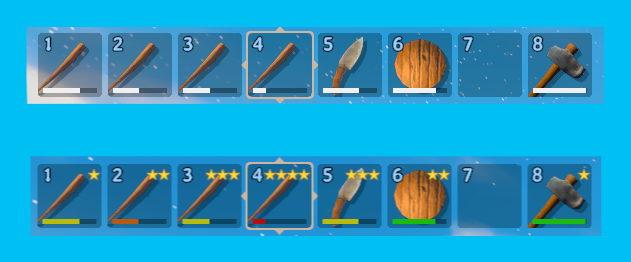
Item quality stars: item quality shown as gold star icons directly on the icon (inventory and hotbar), instead of vanilla's plain number.
HotbarEnabledlets you turn the hotbar ones off independently (leaving it exactly as vanilla, which never showed a quality indicator there) while keeping the inventory grid ones. -
Durability color: the durability bar is colored green/yellow/orange/red by remaining percentage.
-
Enemy HUD: configurable level display (vanilla stars, text prefix, or both), a live HP number on the health bar, name color by alert state, a bigger/thicker bar, and enemies can be set to always show their HUD within a configurable distance instead of only while aimed at.
-
Hover text extras: containers show free slot count, fermenters and cooking stations show remaining time - all with selectable display styles.
-
Character level bar: a combined level (summed across all skills) shown as an XP bar at the bottom of the HUD, with a level-up message.
-
Character-select stats: kills/deaths/crafts/builds shown under the character name on the character-select screen.
-
Combined stats tooltip: hovering the armor value in the character panel shows a combined weapon damage/block/armor/movement summary.
-
Party:
/invite <name>or look at a nearby player and press the interact key to invite them to a party (same key leaves it once you're grouped), accepted via a popup on their side. A movable/scalable HUD panel (F7 edit mode, like every other bar) then shows each online member's name, HP and stamina, kept live via a direct sync between clients.ShowHpBar/ShowStaminaBartoggle each bar independently.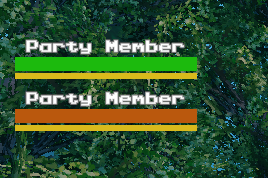
Notes
- Uses vanilla's own HUD bar objects directly (repositioned/rescaled), not custom-built bars.
- Report bugs/suggestions on Discord: https://discord.gg/YTpsF9YtdU
CHANGELOG
Changelog
1.0.12
- Fixed a packaging bug affecting every upload since 1.0.8:
upload_to_thunderstore.pyzipped the DLL frombin/Debug/instead ofbin/Release/, so every version from 1.0.9 through 1.0.11 actually shipped a stale binary despite the correct manifest/changelog - reported by a user seeing "wrong version" after updating. No functional code changes - this is the correct 1.0.11 build, finally packaged correctly, republished as 1.0.12 since Thunderstore doesn't allow overwriting an existing version.
1.0.11
- Made the Party system more visible in the description - it was easy to miss buried in the feature list. No code changes.
1.0.10
- Added a Party HUD panel screenshot to the README. No code changes.
1.0.9
- Added
ItemLevelStars.HotbarEnabled- lets you turn off the quality star icons on the hotbar (slots 1-8) specifically while keeping them in the inventory grid, or the other way around. Vanilla never showed a quality indicator on the hotbar at all, so turning it off just leaves the hotbar exactly as vanilla.
1.0.8
- Added a Party system:
/invite <name>or look at a nearby player and press the interact key (also offered as a hover prompt) to invite them, or to leave your current party. Accepted via a popup on the invited player's side. Once grouped, a movable/scalable HUD panel (F7 edit mode, like every other HUD bar) shows each online party member's name, HP and stamina, updated live via a direct sync between clients (not a passive read, which turned out unreliable for stats other players don't own). NewShowHpBar/ShowStaminaBarconfig toggles per bar.
1.0.7
- Added an upgrade preview to item tooltips: hovering an upgradeable item at a workbench/forge with a higher quality selected now shows an "old -> new" comparison for every stat that would actually increase (armor, durability, damage per type, block power, deflection), instead of just the raw target value like vanilla shows.
1.0.6
- HUD edit mode (F7) overhaul: fixed the Food bar not being movable (it was actually moving the wrong, invisible sub-elements), fixed the Health bar's heart icon and the fork icon next to the food slots not moving along with their bars, and fixed the Guardian Power icon becoming completely stuck when it happened to share a name with an auto-detected element.
- Added automatic detection of new HUD panels - any panel added by another installed mod is now found and made movable on its own, no configuration needed.
- Added a "Reset HUD" button (visible on the right side of the screen while in edit mode) that resets every moved/resized element back to its default position in one click.
- Added
DumpHudHierarchyOnEdit(off by default) for anyone who wants to find the exact name of a HUD element manually, andCustomTargetNamesto manually add elements the automatic detection can't reach.
1.0.5
- Fixed a NullReferenceException logged at the character-select screen when a third-party "achievement unlocker" style mod is also installed - the character stats line (Kills/Deaths/ Crafts/Builds) now reads lifetime totals directly instead of going through vanilla's achievement- difficulty lookup, which such mods can trigger outside of an active game session where it isn't safe to call. Purely cosmetic before this fix (the stats still displayed correctly), just noisy.
1.0.4
- Fixed EnemyLevelDisplay showing wrong star counts: "vanilla stars only" (Style 0) was forcing 2 stars onto every single enemy regardless of its actual level, and the default text-star style showed 1 star on plain, unstarred (level 1) enemies. Both now correctly show 0 stars on unstarred enemies, matching vanilla's own level convention.
1.0.3
- HUD edit mode (F7) overhaul: fixed the cursor being locked/hidden during edit mode, attacking/ moving/camera-look no longer trigger while repositioning, scrolling to resize a bar no longer also zooms the camera, and every element now drags via an invisible proxy hitbox instead of the real (sometimes hidden, zero-size, or auto-repositioning) HUD element directly - fixes Stamina/ Eitr/Adrenaline/Food/Hotbar/GuardianPower all being unmovable or unreliable to grab. Food now moves as one group (its 3 icon slots + fork symbol have no shared container in vanilla, handled without touching the scene hierarchy).
1.0.2
- Added a screenshot to the README.
1.0.1
- Added proper Thunderstore categories (Client-side, Utility, Tweaks) - no functional changes.
1.0.0
- Initial release: HUD bar editor (F7, drag+scroll to move/resize health/stamina/food/eitr/adrenaline bars), item quality stars (inventory + hotbar), colored durability bars, enhanced enemy HUD (configurable level display, live HP number, name color by alert state, bigger bar, always-show distance), hover text extras with selectable styles for containers/fermenters/cooking stations, combined character level/XP bar, character-select kills/deaths/crafts/builds stats, and a combined weapon/armor stat tooltip on the character panel.
