
Please disclose if any significant portion of your mod was created using AI tools by adding the 'AI Generated' category. Failing to do so may result in the mod being removed from Thunderstore.

Beastferry
Transport tamed Bjorn, Lox, Asksvin, Moose and companions by boat. Saved berths, optional cages, feeding troughs, boarding, landing and rescue. Optional Taming, VikingSeafarer and SimpleAccessControl. FR/EN.
| Date uploaded | 2 days ago |
| Version | 0.1.12 |
| Download link | Zephyrfit-Beastferry-0.1.12.zip |
| Downloads | 104 |
| Dependency string | Zephyrfit-Beastferry-0.1.12 |
This mod requires the following mods to function

denikson-BepInExPack_Valheim
BepInEx pack for Valheim. Preconfigured with the correct entry point for mods and preferred defaults for the community.
Preferred version: 5.4.2351
ValheimModding-Jotunn
Jötunn (/ˈjɔːtʊn/, 'giant'), the Valheim Library was created with the goal of making the lives of mod developers easier. It enables you to create mods for Valheim using an abstracted API so you can focus on the actual content creation.
Preferred version: 2.30.2README
Beastferry
Bring your companions aboard.
Take your tamed animals across Valheim's seas. Give them a place on deck, feed them during the crossing, and bring them ashore when you reach your next adventure. Each passenger keeps its name, health, appearance and equipment.
Solo & multiplayer · French & English · Optional Taming, VikingSeafarer and SimpleAccessControl integrations
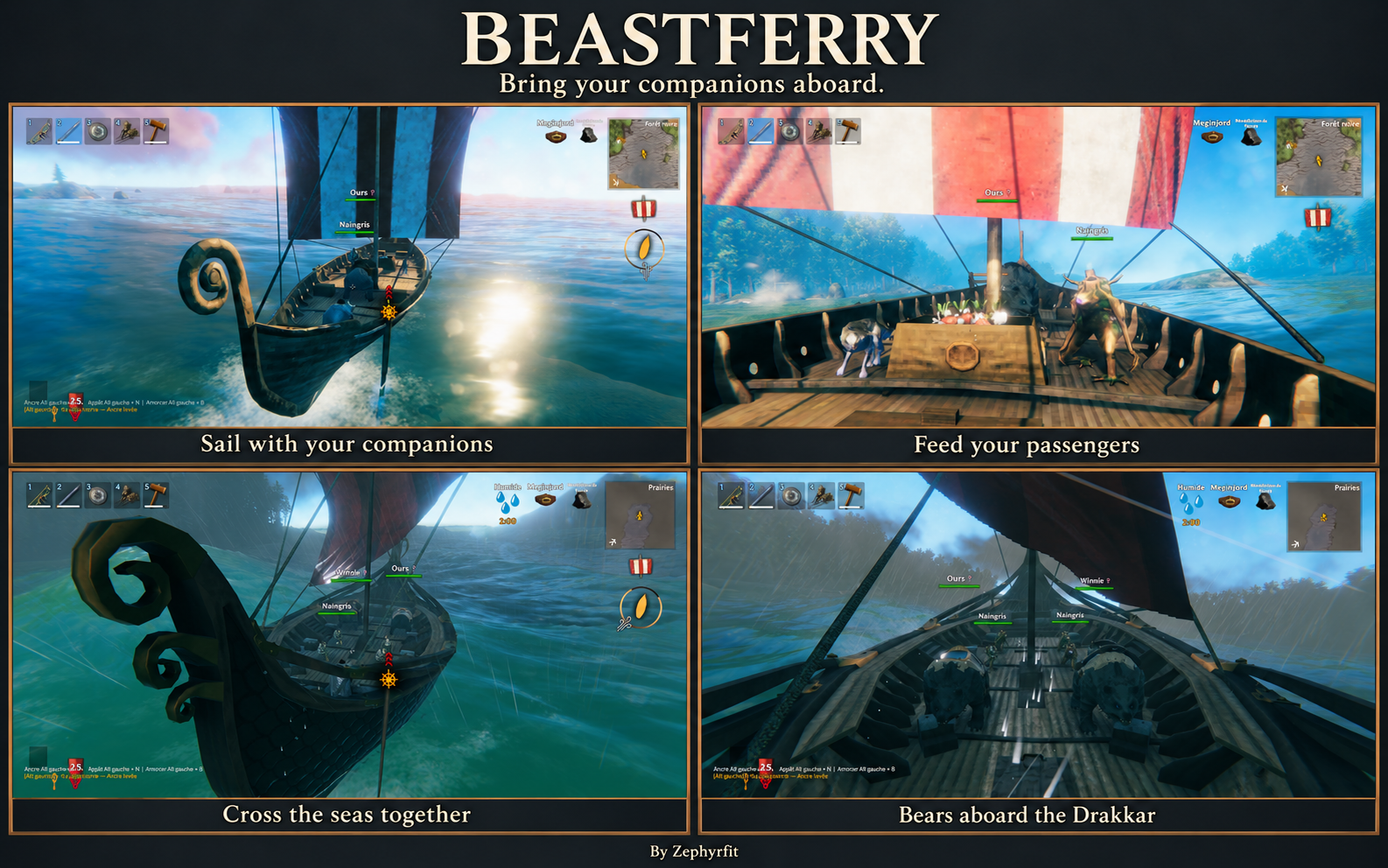
⚓ A place for your companions
| Boat | Mounts | Companions |
|---|---|---|
| Longship | 1 | 2 |
| Ashlands Drakkar | 2 total | 4 |
| Karve | 0 | 2 |
| Raft | 0 | 1 small companion |
The Drakkar's two mount places are shared by Bjorn, Lox, Asksvin and Moose, in any combination. Their young use mount places too. A reduced animal still uses a mount place. Raft and Karve capacities are configurable; custom boats and creatures require explicit transport profiles.
Profiles cover Bjorn, Lox, Asksvin, Moose, wolves, boars, hares, Greylings and Greydwarfs. Animals must already be tamed through the game or another mod. Asksvin hatchlings and Moose calves share their species' mount places and retain their native growth and feeding behavior. With Taming, passengers retain their individual sex, coat and native star traits. Their fitted display size stays fixed while the boat moves.
🐾 Board together, land together
Bring an animal within boarding range of both you and the boat's hull, then choose Board. The default range is 20 metres. Stop the boat and dismount before boarding a ridden animal. Board my followers lets you review your selection before confirming; animals staying behind are excluded.
Passengers stay visible on deck and keep their assigned berth between saved sessions. Land and Land all passengers search for dry ground or a clear dock; animals without a suitable destination remain aboard. Follow/stay orders resume after landing.
New mating is suspended aboard. Existing pregnancies continue, with births held until landing. After a shipwreck, passengers regain normal movement and seek a nearby living player to follow.
🥕 Feed your passengers
The open wooden trough displays a full pile of carrots, vegetables, meat and fish. This display is decorative: feeding uses the real food you place in its inventory. The trough keeps its stock and remains associated with its boat between saved sessions.
Feed an animal from your own inventory or from the shared trough. Optional automatic feeding is disabled by default. You can hide or show the trough for your own view while keeping its inventory and feeding access.
🪵 Choose your view
Cages are hidden by default. Show an optional wood-and-metal enclosure for any passenger when you want one; your explicit choice is remembered per animal. Visible cages block your movement, while hidden cages have no local collision. The passenger keeps its berth either way.
The passenger panel opens through the boat's storage or deck mooring ring. It separates mounts and companions, shows health and pending births, and can be dragged by its title. With Taming, click an animal's portrait to open its accessible saddlebags.
Panel position and size, cage choices, trough visibility and camera transparency are personal preferences saved separately for your character on your computer.
🎮 Controls
| Action | Control |
|---|---|
| Open the passenger panel | Open boat storage or use the deck mooring ring |
| Board an animal | Board in the passenger panel |
| Select your followers | Board my followers, review, then confirm |
| Bring passengers ashore | Land or Land all passengers |
| Display an enclosure | Show cage / Hide cage |
| Feed a passenger | Feed (inventory) or Feed (trough) |
| Manage shared food stock | Open feeding trough |
| Choose trough visibility | Show trough / Hide trough |
| Open accessible Taming saddlebags | Click the passenger portrait |
| Release a stuck passenger | Red Rescue control |
| Rescue the nearest stuck animal | Red Rescue nearest stuck animal control |
| Move / close the panel | Drag its title / Escape |
The rescue controls stay inside the boat inventory/mooring panel and do not require administrator status. Boat and animal permissions still apply. Rescue searches for safe ground near you; if no dry destination exists, normal swimming and gravity resume near you.
An additional panel shortcut is configurable and disabled by default.
🛠️ Console commands & administration
Enable the -console game launch option, then press F5 in game. Use the following commands for transport diagnostics, recovery and host configuration:
| Command | Purpose | Access |
|---|---|---|
bf_status |
Show loaded passenger count and nearby stuck animals, including their IDs and transport state. Read-only. | Players and administrators |
bf_rescue |
Release the nearest accessible stuck animal within rescue range. | Players and administrators, subject to normal permissions |
bf_rescue <UID> |
Release a specific nearby tamed animal using its exact reported ID. | Players and administrators, subject to normal permissions |
bf_reload |
Reload Beastferry configuration from disk. | Server/host process only |
bf_profiles |
Import BepInEx/config/Beastferry/profiles.json into Beastferry's configuration. |
Server/host process only |
For recovery, stand on dry land near the animal and run bf_status. Copy its exact ID, then run bf_rescue 1:12345, replacing the example ID with yours. Rescue also works when the original boat no longer exists. Dismount and close the animal's inventory before recovery. Boat/animal permissions and wards still apply; the default rescue range is 40 metres and is configurable. If no dry destination is found, normal swimming and gravity resume near you.
bf_reload and bf_profiles must run in the server or local host process. Administrator status on a remote game client does not make these commands run on the server. The profiles JSON file must be on the server/host when importing it. These configuration commands do not force-land passengers or repair them; use the rescue controls or bf_rescue for that.
🔗 Optional integrations
| Mod | What it adds |
|---|---|
| Taming | Animal management, sex labels, saddles, saddlebags and existing map tracking |
| VikingSeafarer | Boat anchor state |
| SimpleAccessControl | Boat permissions |
Native wards also apply. Install each optional integration and its dependencies on the server and clients when using it.
The anchor requirement applies only when VikingSeafarer is installed and its anchoring feature is enabled. Without it, stop the boat before boarding or landing passengers.
📦 Installation & settings
Install BepInExPack Valheim, Jötunn and Beastferry through your mod manager. Multiplayer requires the same Beastferry version on the server and every client.
With Gale, import the mod ZIP into your selected profile. For manual installation, extract its BepInEx directory into your game or server directory. Keep one copy of BepInEx/plugins/Zephyrfit-Beastferry/Beastferry.dll and preserve existing configuration and saves. Dedicated-server and DatHost instructions are included in SERVER_INSTALL.md.
Gameplay settings are generated at BepInEx/config/Zephyrfit.Beastferry.cfg. Personal settings are stored in %LOCALAPPDATA%/Zephyrfit/Beastferry/players/. Custom layouts and species are described in the configuration guide.
💬 Help, bug reports & suggestions
Discord: zephyrfit
User ID: 251341133085540352
I can help in English and French with installation, bug reports and suggestions. Contributions are welcome. For a bug report, include the game and mod versions, reproduction steps and BepInEx/LogOutput.log. Screenshots or a short video help with visual issues.
Created by Zephyrfit · Independent community mod for Valheim.
CHANGELOG
Changelog
0.1.12 — 2026-10-17
- Add native Asksvin and Moose transport profiles, including their hatchlings and calves. They share the existing mount capacity with Bjorn and Lox: one on the Longship, two total on the Drakkar.
- Fit their native idle and feeding poses once, including saddles and Moose antlers. Recognize hoof vertices for deck contact and retain fixed presentation and cage dimensions during waves.
- Read discarded native skin topology once from the installed mesh buffers and sample poses at their actual Animator root. Add absolute cage-bar clearance for the two new species, including their young.
- Accept their native tamed juveniles without adding a taming or feeding component. Keep feeding unavailable until their native adult has a food clock.
- Extend the previous unmodified shipped creature list in memory without rewriting saved configuration. Preserve custom creature profiles, exclusions, boat layouts and capacities.
- Refit the grown native animal after onboard growth instead of retaining a juvenile's presentation. Preserve existing passenger links and Taming 0.1.35 traits.
0.1.11 — 2026-10-15
- Authenticate remote passengers using the connected peer's player network record, including dedicated servers without an instantiated player near the boat.
- Authorize bounded client execution for boarding, landing, feeding, transport modes and rescue. Retain server operation locks and replay protection, and recheck access and geometry where the world is loaded.
- Report requests that cannot be sent while the connection is synchronizing.
- Detach saved feeding trough records after ship destruction even when the trough is not instantiated on the server, and let their simulation owner recover them.
0.1.10
- Document console diagnostics, recovery and server/host configuration commands with their access requirements.
- Refresh the English presentation with a gameplay screenshot montage, a controls table and Discord support information.
- Fit Greydwarfs against their sampled idle pose rather than an unevaluated arms-out bind pose, avoiding excessive reduction when boarding or reloading.
- Give Greydwarfs in the exact standard Drakkar companion layout enough presentation space for their native idle size. Keep other species, Longship slot dimensions and customized layouts unchanged.
- Refit existing Greydwarf passengers once while preserving their boat association and occupied berth. Keep size fixed during ship movement.
- Hide cages by default for new and legacy personal settings; preserve explicit per-animal show/hide choices, trough preferences and panel settings. Players can still show cages through the existing control.
0.1.9
- Preserve boat/passenger/trough associations with persistent identities across native world loading, which renumbers network-object IDs. Rebuild seat indices from canonical passenger records.
- Reuse the original stocked trough after loading; never create a replacement merely because its recorded object is temporarily unavailable.
- Recover unambiguous legacy berth/anchor associations. Preserve surplus trough inventories and settle detached containers onto support, retrying after terrain loads.
- Correct dock clearance so the landing capsule does not intersect its supporting surface. Search nearby landing positions more finely and retain real obstacle, water, slope and access checks.
- Remove foreign/stale seat entries before boarding and report exhausted capacity separately from dock obstruction.
- Allow the standard equipped Greydwarf pose to fit Longship companion berths with a 35% minimum presentation scale; upgrade only the exact previous default creature profile.
- Display both rescue controls in red. Retain non-admin rescue with normal access checks.
- Fit bear enclosures once against idle/feeding pose extents on an inactive model copy, and migrate previous berth fitting once. Keep presentation scale and cage dimensions fixed during boat movement.
- Verify real native disk save/reload, legacy association recovery and boarding with Taming installed and VikingSeafarer absent.
- Log the result of each manual server transport operation for targeted diagnosis.
- Remove only Beastferry's own routed handlers during session cleanup so scene recreation can register them once without disturbing other mods.
0.1.8
- Fill the trough across its measured opening with 64 decorative food models, including the sides and rim. Actual inventory stock remains separate.
- Align the trough's visible feet with the deck, excluding the raised mast socket on the Drakkar; preserve the cargo/mast center line.
- Add passenger and nearest-animal rescue buttons inside the boat inventory/mooring panel. Use the same server-authorized action as
bf_rescue, without requiring administrator status. - Re-register existing boat/passenger components after scene registry resets, allow delayed boat loading, and distinguish scene shutdown from confirmed ship destruction.
0.1.7
- Clear stale synchronized walking speeds throughout boarding and preserve idle locomotion during ship movement.
- Reserve additional head clearance when fitting fixed cage dimensions, and migrate existing passengers once.
- Center the Longship trough along the cargo hatch line; preserve the Drakkar mast anchor.
- Add per-player, per-boat trough visibility with retained inventory and feeding access.
- Add
bf_rescue [UID]for server-authorized recovery without a surviving boat or readable transport record; expandbf_statuswith nearby IDs and physics state. - Use static, opaque native-textured decoration materials with subdued highlights; trim cage joints to avoid overlapping outer faces.
0.1.6
- Cache paw vertices and bone topology instead of baking every animated mesh each frame.
- Combine cage geometry by native material and remove the duplicate visible floor above the ship deck.
- Keep cage visuals separate from their collision rigidbody so the visual follows the rendered boat through interpolation.
- Measure deck anchors against concave healthy hull geometry, including meshes without readable C# vertex data; preserve existing fixed animal/cage dimensions when migrating.
- Stop competing native position interpolation for attached feeding troughs and stabilize camera-fade transitions.
- Display the trough as an open wooden chest filled to the rim with decorative carrots, vegetables, meat and fish; retain its real inventory and feeding behavior.
0.1.5
- Keep the animal scale and cage dimensions fixed throughout boarding, waves, pitch and roll, and after reloading.
- Align the presentation using paw/toe vertices, excluding saddles and accessories from the ground reference; refine the deck anchor using visible native geometry when available.
- Restore native physics for reloaded passengers and recover previously released animals whose bodies remained frozen.
- Place detached feeding chests on nearby ground or a dock, preserving their inventory, including recovery of old missing-boat associations.
0.1.4
- Select the healthy native wood model for cage frames and flooring, excluding inactive snow meshes; retain the native iron material and its textures.
- Align presentation using posed mesh vertices instead of rotated bounding boxes, with a 5 mm deck clearance and per-frame correction.
- Follow the ship's rendered heave, pitch and roll after normal updates, remove passenger rigidbody interpolation while aboard, and restore the original settings on release.
- Reset the pre-boarding visual ground tilt to the model's native rest orientation while aboard.
- Treat the feeding chest as ship equipment: prevent unsupported/rain wear and retain ordinary damage, repair and removal behavior. Preserve its inventory after a wreck.
- Keep feeding chest anchors in boat-local coordinates to avoid repeated physics sampling during waves.
0.1.3
- Anchor passenger presentation to the biological foot pivot and clear swimming poses after boarding.
- Move the default Longship mount berth away from the cargo chest and prevent local cages from trapping the boarding player.
- Fit cages to the visible animal with at most 12% extra space per dimension; use native wood beam geometry and plain iron bars.
- Increase assisted boarding to 20 metres and landing search to 30 metres, measured from hull bounds; search near the requesting player and use the native landing capsule centre.
- Add a draggable title and persistent preferences outside shared Gale profiles, separately for each local character.
- Place visible native feeding chests above measured boat decks and preserve their inventories after a shipwreck.
- Enable native hammer removal eligibility on supported boat instances and release passengers on boat destruction or confirmed network-object disappearance.
- Defer passenger initialization until native character initialization has completed.
0.1.2
- Align passenger feet to the measured native boat deck, including passengers saved with the previous layout.
- Expand default Drakkar mount berths and fit presentation to each berth without the former species-wide size cap.
- Add solid cage walls, separated from ship physics, and a per-player Hide cage / Show cage control that also removes local cage collisions.
- Add an opaque passenger panel backing with native inventory texture and a canvas-compatible UI material.
- Rename feeding controls to identify the player's inventory and the feeding trough; use a body text font for passenger details.
0.1.1
- Replace the passenger window with Unity Canvas controls using native inventory textures, fonts and Valheim buttons.
- Use supported native game materials for rings, enclosures and tethers; prevent cosmetic failures from cancelling transport.
- Remove the gangway. Assisted boarding checks proximity to both the player and the boat.
- Handle immediate host replies during queued boarding and landing without waiting for a reply already received.
0.1.0
- Add a separate Beastferry transport plugin with explicit boat and creature profiles, aggregate capacities, assisted boarding, follower selection and automatic landing searches.
- Add persistent passenger references, moorings, enclosures, tethers, temporary visual scaling, a passenger panel, optional gangway and feeding trough.
- Add optional Taming, VikingSeafarer and SimpleAccessControl adapters.
- Add server-coordinated operations, reservations, bounded replay handling, birth deferral, growth association transfer and ship destruction recovery.
- Add French/English UI, synchronized settings, local visual preferences and configuration commands.
- Add Windows build/package/TEST scripts, invariant tests, an opt-in native self-test, configuration documentation and requirements traceability.
