
Please disclose if any significant portion of your mod was created using AI tools by adding the 'AI Generated' category. Failing to do so may result in the mod being removed from Thunderstore.

ContainerCustomizer
Personalize chests and barrels with names, colors and emoji. Search stored items with glowing highlights and optional through-wall markers. FR/EN/RU/ZH interface.
| Date uploaded | 3 weeks ago |
| Version | 1.0.9 |
| Download link | Zephyrfit-ContainerCustomizer-1.0.9.zip |
| Downloads | 27 |
| Dependency string | Zephyrfit-ContainerCustomizer-1.0.9 |
This mod requires the following mods to function

denikson-BepInExPack_Valheim
BepInEx pack for Valheim. Preconfigured with the correct entry point for mods and preferred defaults for the community.
Preferred version: 5.4.2350README
ContainerCustomizer
Name your storage. Give it a color and an emoji. Find your items.
Customize Valheim chests and barrels, then search nearby storage without opening every container. By Zephyrfit. Interface in French, English, Russian or Simplified Chinese, following the game language.
Install with Gale
- Open Gale, select Valheim and your profile.
- Search for ContainerCustomizer by Zephyrfit in the online mod list and install it. The required BepInEx dependency is installed automatically.
- Launch Valheim from Gale.
Install on each player's client to display and edit the markings. No installation is required on the dedicated server. Keep participating clients on the same mod version.
Upgrading from a local preview? Remove the old local ContainerCustomizer package from that Gale profile before installing the online version. Avoid loading two copies of the DLL. Saved container styles remain compatible.
Controls
| Shortcut | Action |
|---|---|
| Left Alt + L | Look at a chest or barrel to open its customization menu. Close its inventory first. |
| Left Alt + F | Open item search; press again to close the search window. From exploration mode, return to editing the query. |
| Escape | Close the editor or stop the search. |
Shortcuts use physical keys independently of the game language and IME; the yellow hover hint shows the configured editor chord and the active keyboard label. FR/US use Left Alt + L; a Russian layout labels that physical key Д. Movement and lock keys no longer suppress the shortcut. Native chat, console and text-entry screens still block opening the editor. On Windows, supported shortcuts read the foreground game keyboard directly using its current layout. Other bindings/platforms accept a complete chord from either Unity input backend. Both shortcuts are configurable. Shift+E is not used.
Colors and labels
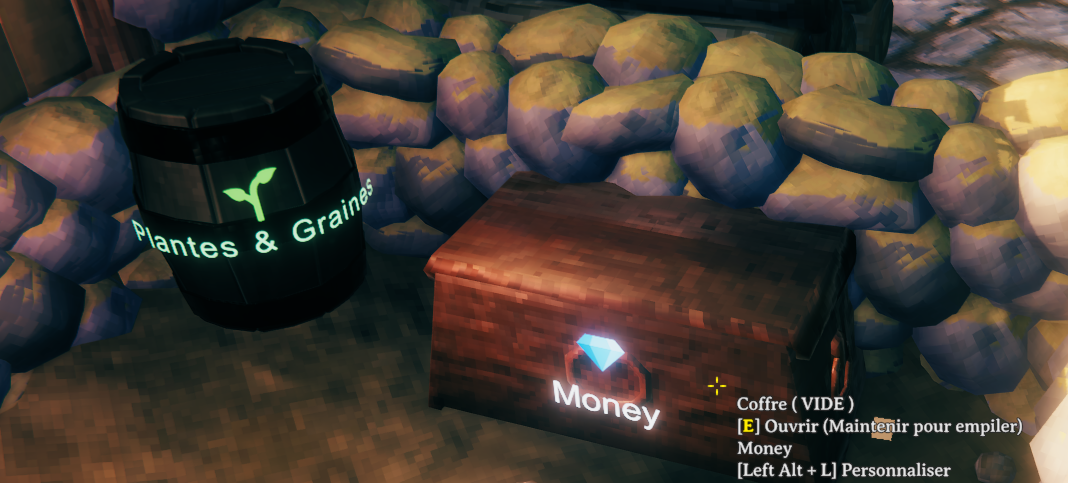
Set a name, choose the marked faces and top, and adjust wood tint, text color and background. Use color presets or RGB sliders, then copy and paste a style to other containers. Preview stays visible beneath the scrollable controls and immediately reflects the draft name, icon, text/icon colors, background and wood tint. This wood sample does not reproduce scene lighting. Changes are applied to the container when you save.
In Display, text size and icon size each range from 50% to 300%, independently. The icon-size slider appears only in Display. Icon size is saved per container and copied with its style; large markings are fitted to small faces. Chest markings use the model dimensions and sampled surfaces; small personal chests get proportionate labels, and side text/icon groups are centered together. Blackmetal chests retain their text layout with corrected icon clearance. Barrel labels follow the curved surface; long names on small chest faces shrink to fit. Label visibility defaults to 5 metres from your character, adjustable from 1 to 15 metres.
Emoji library
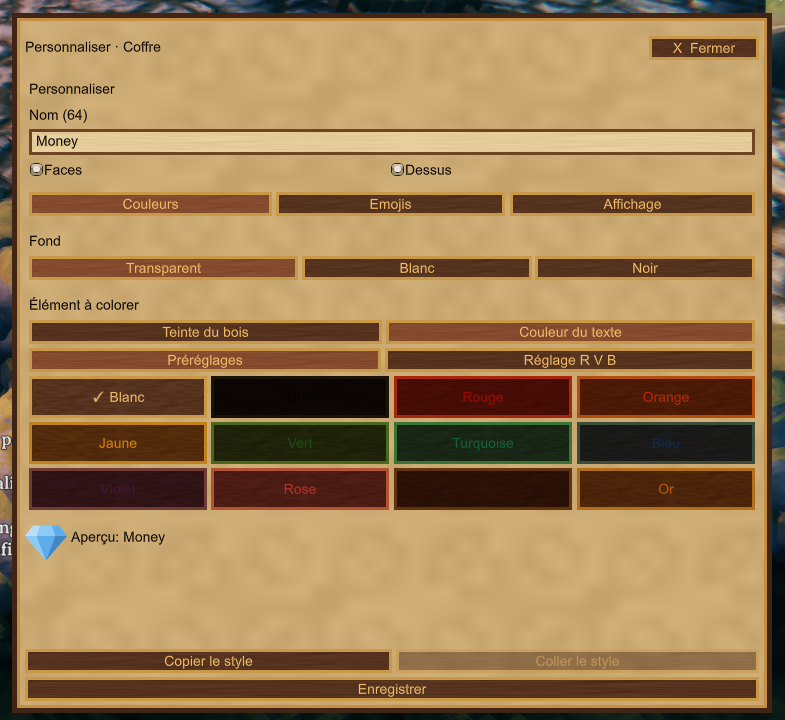
Choose from 120 emojis: the original 53 plus 67 illustrated resources, pelts, seeds and magical objects, including 12 arrow types and a mixed quiver. The default All view keeps the full collection together. Open Filters to select a family, or search in French, English, Russian or Simplified Chinese, with or without accents (for example: cuivre, copper, pelage, charbon).
Keep favorites with the star button, or open Recent for the last 12 selected icons. Show all clears the search and filters. Display original colors or use a recolorable monochrome icon. The normal editor width keeps six icons per row; the grid scrolls independently. Drag either gold arrow or the handle at the bottom of the customization window downward to increase its height, or upward to return to the compact size. The chosen height is saved locally on mouse release and restored after restarting the game. The icon grid grows with the window, and the window is kept within the current screen.
The new artwork includes seven individual metals, a six-ingot stack, coal chunks and a humorous Viking Coal sack, pelts, wood types, crafting materials, magical resources, a spellbook, a rune and a staff, plus a sparking forge/anvil, sword-and-axe weapons, pickaxe/axe/mallet tools, a pile of armor and a group of six metal Moai totems. Crop icons combine seeds with the matching vegetable or plant; mixed seeds and a seed sack are also available. Cooking includes stew, soup, skewers, cooked meat and raw meat. The Money icon combines a leather pouch, a few gold coins, a ring and a ruby. Find it by searching monnaie, piastres, bourse, money, Деньги or 钱币. The 16 existing pictograms are also retained.
Multiplayer: participating clients need 1.0.4 for the five new icons and resized icon styles (payload v4). Previously saved styles still load at 100% icon size. Older clients cannot decode a style saved with a non-default icon size. Existing names and icon choices remain compatible. Updating this client-side catalogue does not require a server change. Bear and flax-seed illustrations are optional storage labels, not additions to the game's items.
Find stored items
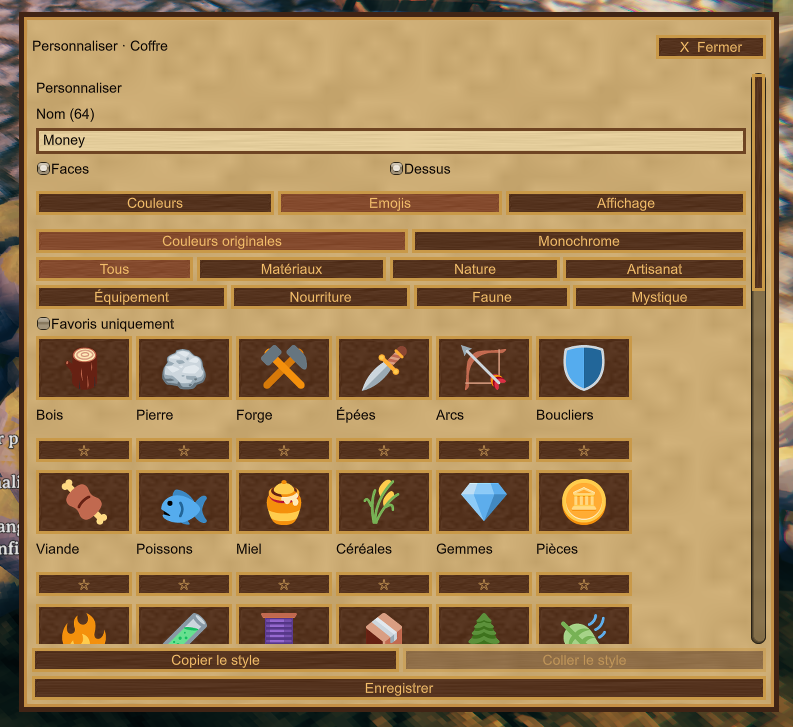
Use Alt+F and type an item name, or select one from the detected item list. Results show matching stored items and container distance. Search covers loaded containers within the chosen radius, up to 50 metres.
Click outside the search window or choose Explore with results displayed to move and interact while keeping a compact result list. Matching containers shine; optional gold stars reveal hidden chests and barrels.
The Locate containers through walls checkbox controls these stars independently of the visible highlights. Its setting and the search window position are saved locally. While an interactive menu is open, the wheel is reserved for scrolling. Camera compatibility includes FirstPersonMode.
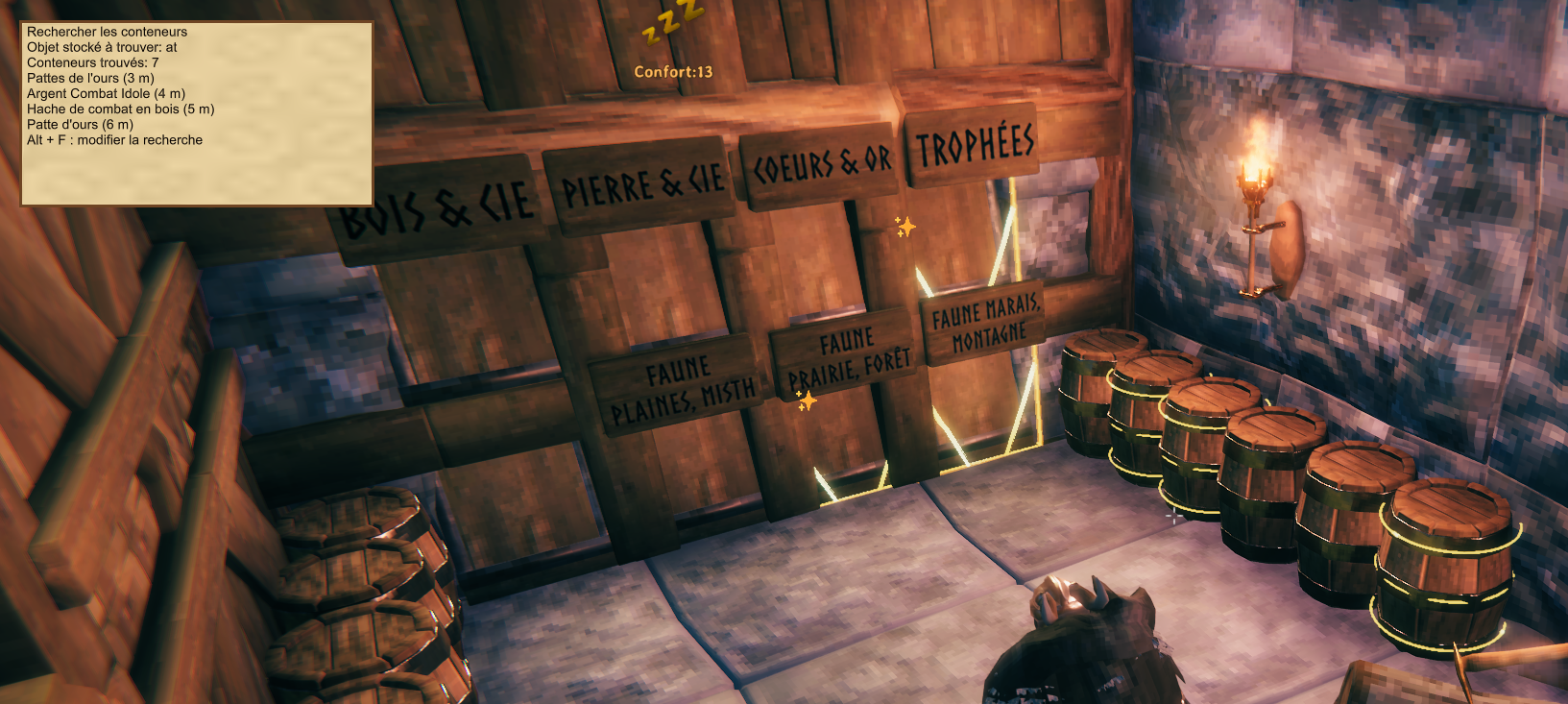
Screenshots show the development build. The released editor is smaller and includes the new through-wall marker checkbox.
Multiplayer and settings
- Container styles are saved in the world and shared with clients running the mod.
- The piece creator can edit it; if SimpleAccessControl assigns an owner, that owner is used. Unowned containers can be customized. Public access alone does not grant edit permission.
- This mod changes presentation and adds search. It does not change inventory capacity or access rules.
- SimpleAccessControl and FirstPersonMode are optional, not required downloads. Custom storage must expose Valheim's container and piece components; unusual models may need visual adjustments.
- Search is limited to the nearest 256 loaded containers. It is not a search of unloaded areas of the world.
Configuration: BepInEx/config/zephyrfit.containercustomizer.cfg in your active profile. The interface follows Valheim’s selected language; unavailable languages or missing keys fall back to English. Custom container names are never translated.
Language files
The mod follows the language selected in Valheim automatically. Files are in Translations/ContainerCustomizer beside ContainerCustomizer.dll: English.json, French.json, Russian.json and Chinese.json (Simplified Chinese). An unavailable language or a missing/empty translation falls back to English. No additional translation plugin or mod language setting is required.
To add a language, copy English.json, name the copy exactly for Valheim’s selected language (for example German.json), and translate its values while keeping every key unchanged. Save as UTF-8 JSON and restart the game after editing files. Invalid translation files also fall back to English. Built-in copies keep the interface working if the translation folder is absent. Back up personal edits before updating the mod.
Icon search recognizes all four supplied languages and the active custom translation. Player-written container names stay unchanged. Chinese UI text uses a loaded game font or an installed CJK font such as Microsoft YaHei or Noto Sans CJK SC. See docs/TRADUCTIONS_FR.md for contributor instructions.
Manual installation
The recommended route is Gale's online installation above. For a manual install, download and extract the Thunderstore ZIP, then copy the entire BepInEx/plugins/ContainerCustomizer folder (DLL and Translations) into your BepInEx plugins folder. BepInEx must already be installed. Use only one installation method per profile.
The optional Windows source installer is maintained separately and is not included in the Thunderstore package. Contact zephyrfit on Discord if you need it.
Help, bug reports and suggestions
Discord: zephyrfit · User ID: 251341133085540352.
Contact me for installation help, bugs or improvement ideas. For a bug report, include the mod and Valheim versions, steps to reproduce, a screenshot when relevant, and your profile's BepInEx/LogOutput.log.
FR : installation recommandée depuis Gale, en recherchant ContainerCustomizer — Zephyrfit. Alt+L personnalise le conteneur ciblé ; Alt+F recherche les objets stockés. L'interface suit la langue du jeu. Assistance, signalement de bugs et suggestions : zephyrfit sur Discord, en français ou en anglais.
Credits
The 67 custom illustrations were generated with AI for this mod and embedded locally; no images are downloaded during gameplay. The original 53 emoji artworks: Twemoji, CC BY 4.0. Resized artwork and monochrome variants are used; attribution and the full graphics license are included in the download. Original mod artwork and development: Zephyrfit.
CHANGELOG
1.0.10
- Shorten the Thunderstore description to focus on features, controls and installation.
- Group all build.copy entries before publish settings for compatibility with the Thunderstore CLI parser.
1.0.9
- Increase blackmetal chest side and lid icons by 35% at the default size, independently of text size.
- Attach blackmetal lid text and background to the outer lid surface using the same geometry guard as the icon.
- Add 12 arrow illustrations (wood, flint, bronze, iron, silver, fire, poison, frost, obsidian, needle, carapace, charred) and a mixed quiver.
- Catalogue: 120 emojis and 16 pictograms. Existing saved icon IDs are unchanged. New icons support original colour, recolourable monochrome and FR/EN/RU/Chinese search.
1.0.8
- Harden only the blackmetal lid icon clearance: include the chest's colliders even when readable interior triangles exist, check the full footprint for narrow metal reinforcements, and account for overlapping unreadable lid meshes.
- Preserve the approved text positioning and other chest/barrel faces.
- Add Money: leather pouch, four gold coins, a ring and a ruby. Total: 107 emojis plus 16 pictograms.
- Add French, English, Russian and Chinese labels and search aliases; retain original-color and tintable monochrome modes.
1.0.7
- Fit chest markings to the actual model dimensions instead of reusing fixed front/back/lid coordinates.
- Scale down markings for smaller personal chests and center the combined text/icon group on narrow sides.
- Project text, icons and backgrounds onto sampled original mesh surfaces, with a chest-only collider fallback for unreadable meshes.
- Keep the approved blackmetal text layout while correcting logo surface clearance.
- Account for background depth, both icon rendering paths, viewer-facing lid rotation and the chest's actual center.
- Draw both resize arrows inside the editor window on a contrasting bottom strip so the window layer cannot hide them.
1.0.6
- Read supported Windows shortcut keys directly from the foreground game keyboard with the active layout; track fresh presses and ignore held keys on focus return.
- Keep complete-chord fallback to either Unity backend instead of letting an inactive Input System suppress legacy input.
- Log detected editor/search shortcuts and UI focus blocks to help diagnose intermittent issues.
- Add gold downward arrows at both bottom corners of the resize handle.
- Keep Preview visible and update its name, icon, colors, background and wood tint live from the draft.
- Group emoji families under Filters and remove the Subsections menu.
- Translate Filters into all four supplied languages.
- Shorten the Help, bug reports and suggestions paragraph as requested.
1.0.5
- Keep the icon-size slider exclusively in Display.
- Color the configured editor shortcut yellow in container hover text.
- Add a bottom resize handle to the customization window, retaining the compact default.
- Save window height locally on release and restore it after restarting; clamp it to the screen.
- Let the icon grid use the increased height.
1.0.4
- Read shortcut chords without rejecting unrelated movement/lock keys; prefer Unity Input System physical key controls, retaining legacy Unity fallback.
- Replace the global IMGUI focus-only guard with native game input checks and visible UI focus; localize the configured shortcut hint.
- Rename JSON translation tokens to Jotunn-compatible ASCII keys; preserve legacy contributor-file loading and English fallback.
- Add independent 50–300% icon size, persisted per container (v4 only when size differs from 100%); keep v1–v3 styles readable.
- Resize curved and shader-fallback icon geometry and adjust text/icon spacing and small-face fitting.
- Add five illustrated icons: forge/anvil, sword and axe, pickaxe/axe/mallet, armor pile with helmet, six-metal Moai totems. Total: 106 emojis plus 16 pictograms.
1.0.3
- Add 48 illustrated icons, bringing the emoji collection to 101.
- Add multilingual, accent-insensitive icon search and resource subsections.
- Follow the game language using editable JSON files: English, French, Russian and Simplified Chinese, with English fallback.
- Add soup, skewers and raw meat; identify existing cooked meat and stew icons clearly.
- Keep All as the default view, retain favorites and add the last 12 selected icons.
- Add a scrollable icon grid and a clear-filters action.
- Preserve all existing icon IDs, saved styles and the 1.0.2 UI resource lifetime fixes.
- Keep the optional manual installer outside the Thunderstore package.
Changelog
1.0.2 — Menu resource lifetime
- Protect generated menu textures and emoji textures from unused-asset unloading.
- Rebuild the menu skin when its cached textures are missing; recreate destroyed emoji cache entries.
- Isolate and restore GUI tint and opacity while drawing the mod interface.
- Release owned menu resources when the plugin is destroyed.
- Keep the manual source installer separate from the Thunderstore package.
1.0.1 — Packaging correction
- Removed ManualInstaller.zip from the Thunderstore package as requested by moderation.
- Kept the optional source installer separate and clarified manual installation instructions.
- Added a pre-upload check that rejects packages containing ManualInstaller.zip.
- No gameplay or customization changes.
1.0.0 — First public release
- Customize chest and barrel names, wood tint, text color and backgrounds.
- Choose from 53 emojis with category filters, favorites, original colors and tintable monochrome artwork.
- Adjust text size from 50% to 300% and label range from your character; fit long names to narrow chest faces.
- Search nearby stored items with Alt+F, explore with results displayed and use optional through-wall star markers for hidden chests and barrels.
- Save search window placement and marker preferences locally. Alt+F opens and closes the search window.
- Compact Alt+L editor with six emoji columns and camera wheel filtering, including optional FirstPersonMode compatibility.
- French/English interface, world-persisted styles and owner-aware editing with optional SimpleAccessControl support.
- Repeated source builds exclude generated installer copies, preventing duplicate-definition compilation errors.
- Gale/Thunderstore installation, illustrated documentation and an optional Windows source installer.
See the main description for screenshots, controls and support details.
