
Please disclose if any significant portion of your mod was created using AI tools by adding the 'AI Generated' category. Failing to do so may result in the mod being removed from Thunderstore.

RuneStorage
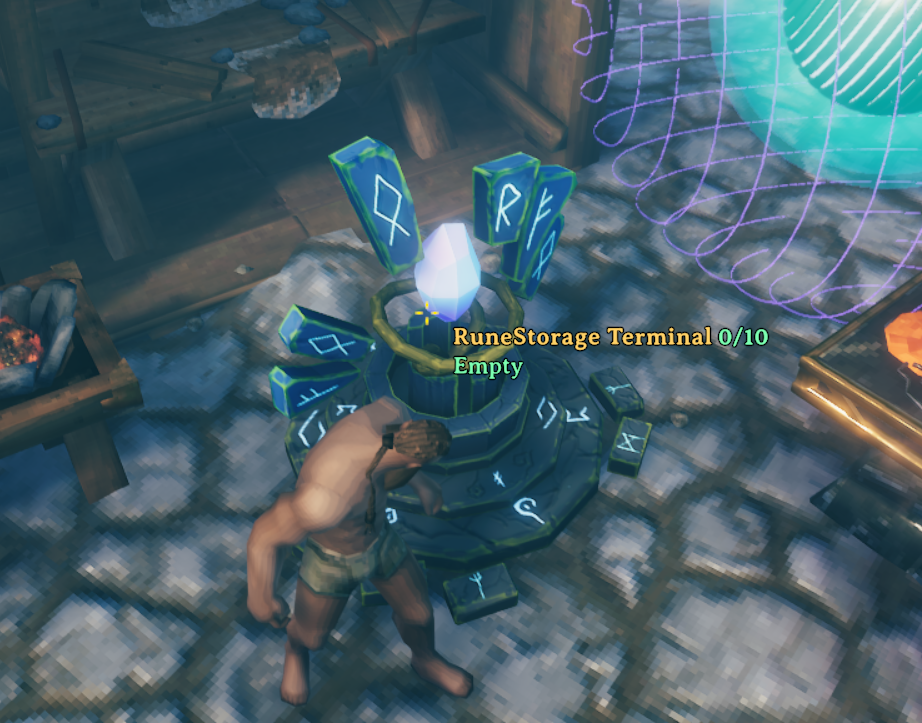
A buildable runestone terminal that gives a searchable view of a nearby storage core. Deposit, withdraw, craft from stored items, and upgrade the core.
| Date uploaded | a day ago |
| Version | 0.1.0 |
| Download link | catosaurluna-RuneStorage-0.1.0.zip |
| Downloads | 27 |
| Dependency string | catosaurluna-RuneStorage-0.1.0 |
This mod requires the following mods to function

denikson-BepInExPack_Valheim
BepInEx pack for Valheim. Preconfigured with the correct entry point for mods and preferred defaults for the community.
Preferred version: 5.4.2333
ValheimModding-Jotunn
Jötunn (/ˈjɔːtʊn/, 'giant'), the Valheim Library was created with the goal of making the lives of mod developers easier. It enables you to create mods for Valheim using an abstracted API so you can focus on the actual content creation.
Preferred version: 2.30.2README
RuneStorage
Place a terminal and a Core, and your storage becomes one searchable list. The Core keeps your items in a Valheim chest inventory. The terminal lets you deposit, withdraw, craft with what's stored, and upgrade the Core.
Costs
RuneStorage Terminal (Hammer): 10 Fine Wood, 10 Stone, 2 Surtling Cores.
RuneStorage Core, Tier I, 256 slots (Hammer, Forge nearby): 10 Bronze, 10 Fine Wood, 4 Surtling Cores.
Upgrade the Core from the terminal's Upgrade tab. Each upgrade is done in place, and nothing already stored moves or gets lost.
- Tier II, 512 slots: Forge nearby. 10 Iron, 10 Fine Wood, 4 Surtling Cores.
- Tier III, 1,024 slots: Blackforge nearby. 10 Black Metal, 10 Fine Wood, 6 Surtling Cores.
Pay from the Core's stored items, or switch the "Pay from" toggle to your own inventory. Equipped items are never used.
Using it
- Place a terminal and a Core within 12 meters of each other. A terminal needs one Core. If two Cores are in range, the terminal refuses to choose and says so.
- Interact with the terminal.
- Stored tab: take items out with Take 1, Take 5, or Take X. Sort by name or amount.
- Deposit tab: put items in with Deposit 1, Deposit 5, Deposit X, or Deposit all for one item group. Deposit Everything moves all your unequipped items.
- Craft tab: craft recipes from stored items. Each click crafts one recipe. The recipe's station must be nearby.
- Upgrade tab: upgrade the Core.
Deposit Everything and "Deposit all" store as much as fits. Whatever doesn't fit stays in your inventory, and a stack can be split. Deposit 1, 5, and X are all-or-nothing: if the whole amount doesn't fit, nothing moves. Withdrawals are all-or-nothing too.
Anyone can use the Core and terminal, the same as a chest, unless a ward or private area blocks them.
You can't remove a Core with the hammer while it holds items. Empty it first.
Known limits
- Disconnects: there is no recovery journal. If you disconnect during a transfer to a remote Core, items can be duplicated or lost. Vanilla chests carry the same kind of risk.
- Remote players: the Core owner trusts the item data that remote players send for deposits and player-paid upgrades.
- Destroyed Core: the Core's items are not lost. Where they land and how to recover them is still to be documented.
- Multiplayer: not yet tested.
Requirements
- BepInExPack_Valheim
- Jötunn 2.30.2
Source
Source code, build steps, and the development plan: https://github.com/ucwxcato/RuneStorage
