
Please disclose if any significant portion of your mod was created using AI tools by adding the 'AI Generated' category. Failing to do so may result in the mod being removed from Thunderstore.

MuninMap
A live web map your dedicated server hosts itself. 2D and 3D views, players and their stats, bases, portals, wards, bosses, runestones, lava and mist, explored fog. Server only: players install nothing.
| Date uploaded | a day ago |
| Version | 3.1.0 |
| Download link | cocopuff2u-MuninMap-3.1.0.zip |
| Downloads | 29 |
| Dependency string | cocopuff2u-MuninMap-3.1.0 |
This mod requires the following mods to function

denikson-BepInExPack_Valheim
BepInEx pack for Valheim. Preconfigured with the correct entry point for mods and preferred defaults for the community.
Preferred version: 5.4.2350README

Munin Map
A live map of your Valheim world that anyone can open in a web browser.
Install it on your dedicated server, then share a link like http://your-server:3000.
Your players don't install anything. It runs only on the server.
Named after Munin, one of Odin's two ravens, who flies over the world every day and brings back what it saw.
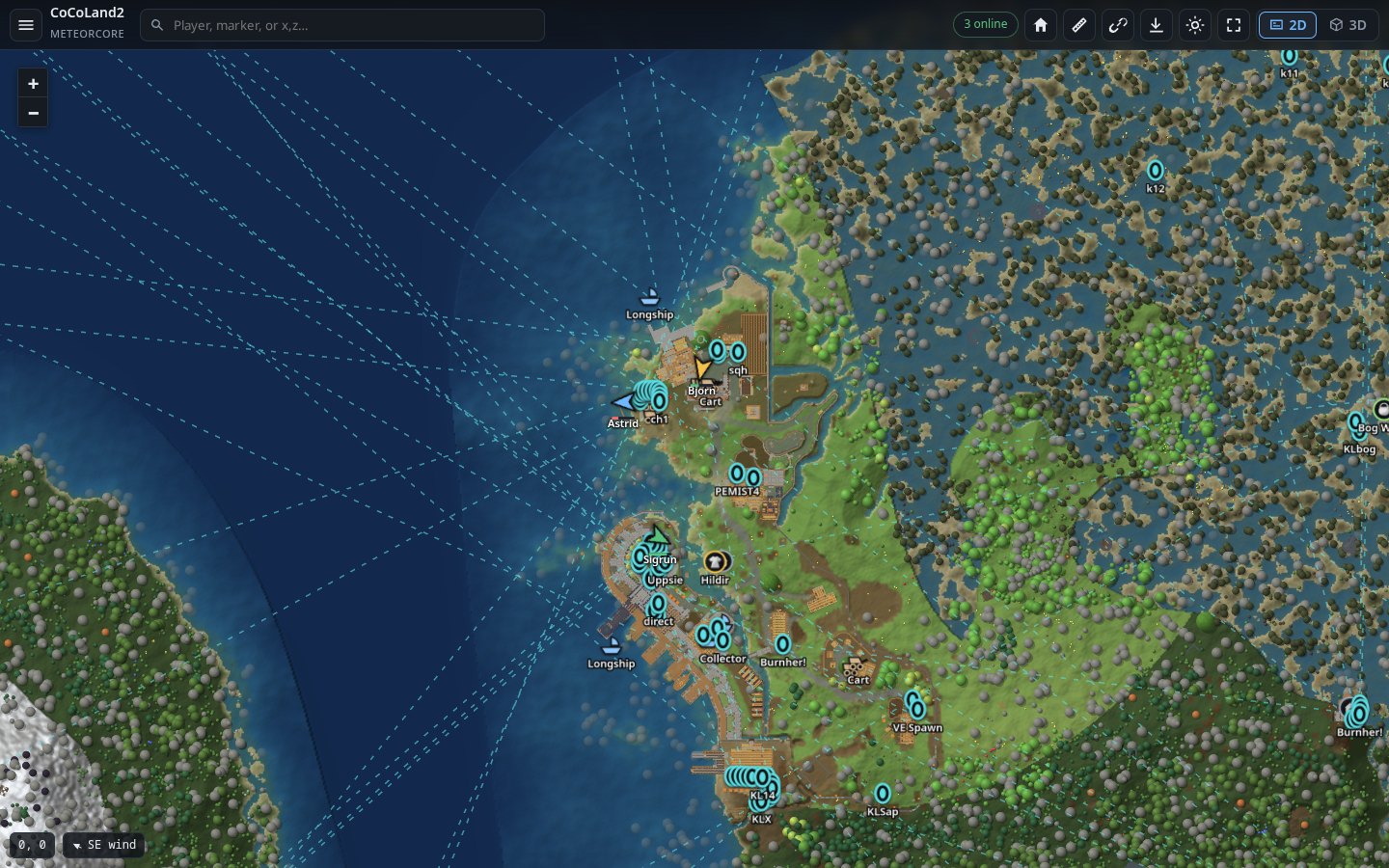
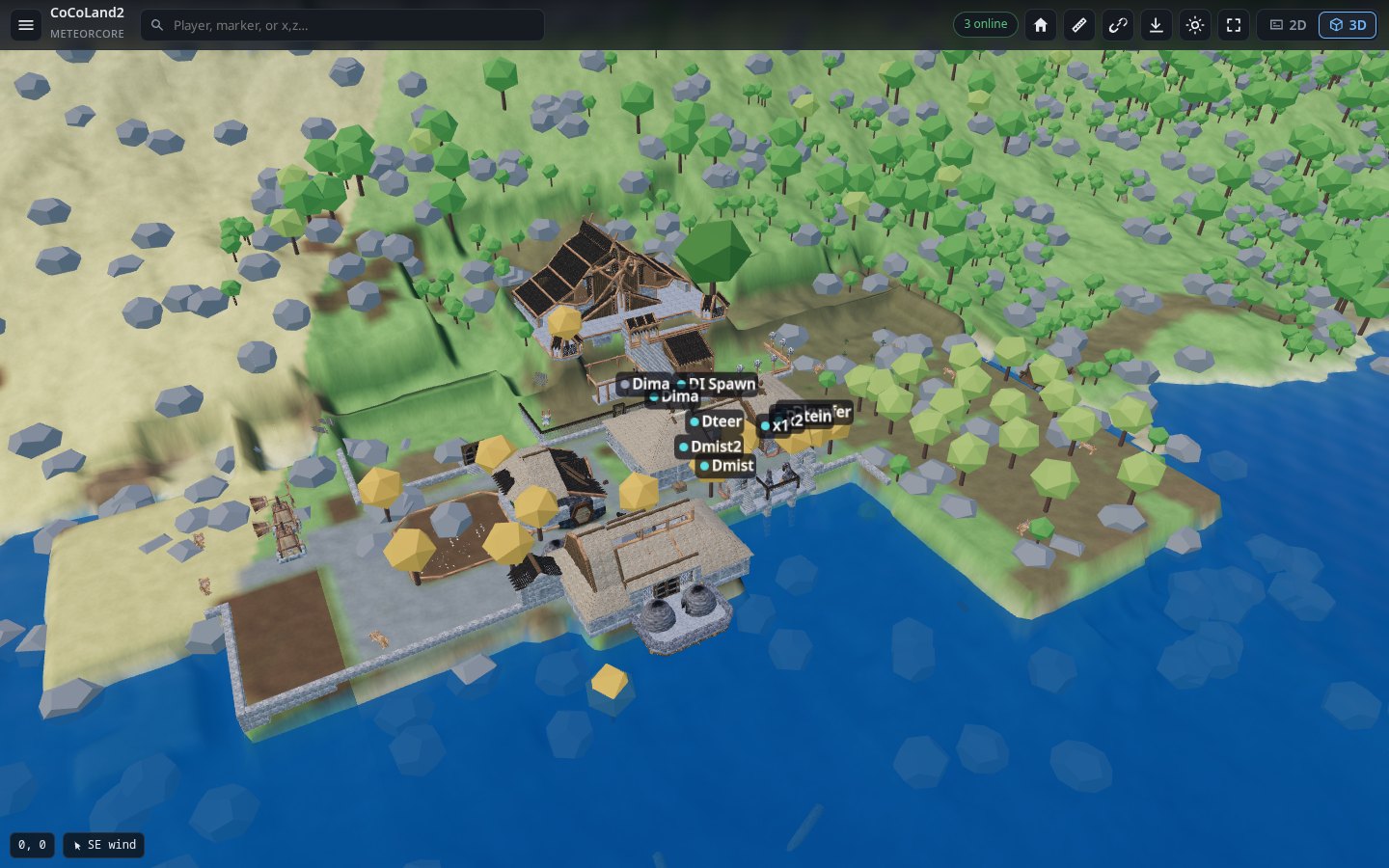
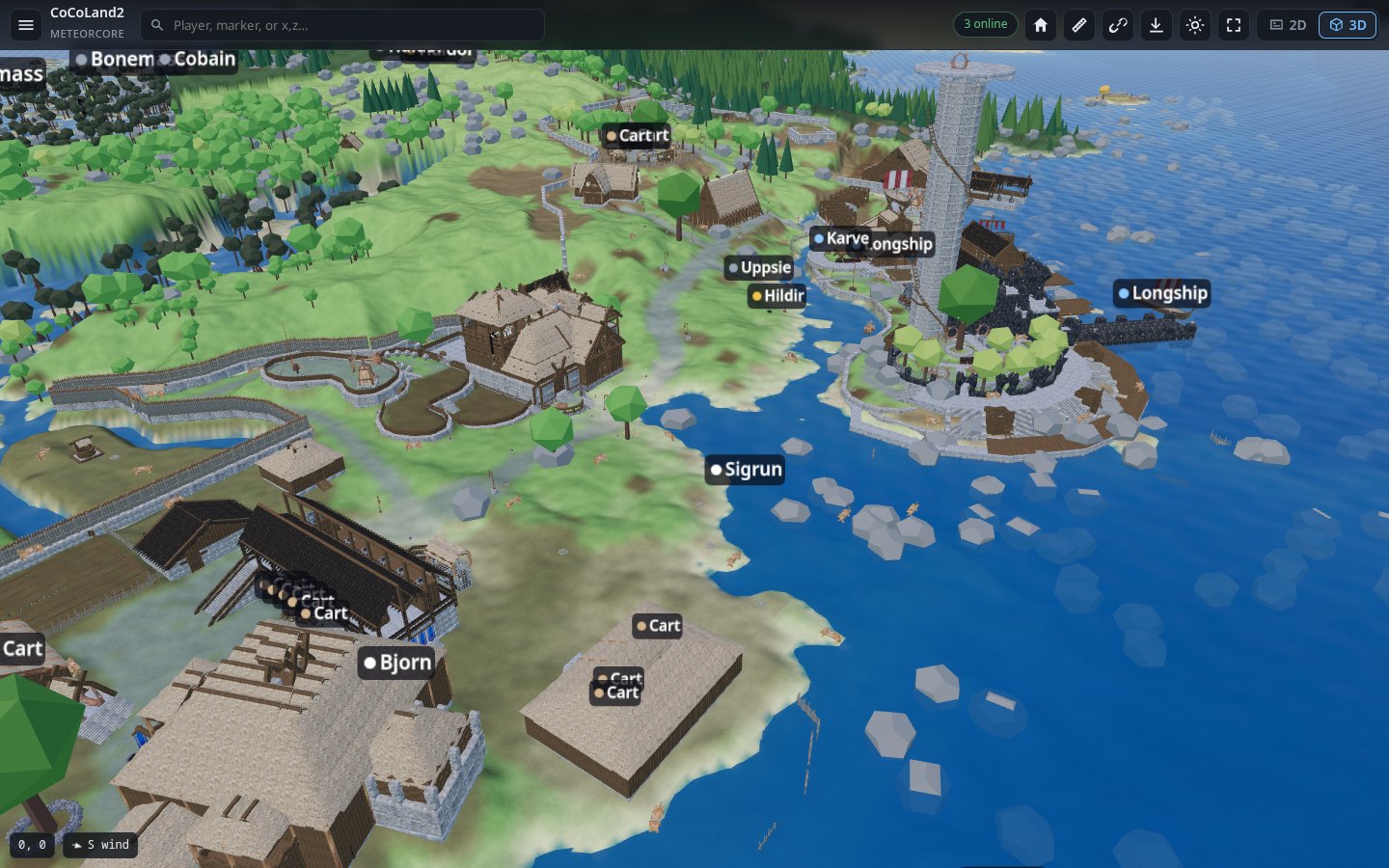
The 2D map, with players, buildings, boats and carts. One click switches to 3D:
What's on it
Munin Map shows the whole world as your players explore it, live, and keeps the server light while it does:
- Smoother and lighter: the map is drawn on the graphics card, so dragging and zooming stay smooth. Tiles are smaller (WebP), so the server uploads far less. World scans are spread out so players don't feel a hitch.
- More of the world: lava in the Ashlands, mist in the Mistlands, raids and invasions as they happen, a biome view, and the weather where each player stands.
- More markers: wards and the ground they protect, runestones you can read, Vegvisirs, beds, dungeon entrances (with what's still inside), map table pins, Hildir's mini-boss lairs, and every kind of tree, rock and ore.
- More stats and events: boss progress, world modifiers, Hildir's quests, a leaderboard, boss kills, raids, first visits to each biome, and Discord posts for raids and invasions.
- More control: switch each kind of marker, tree and ruin on or off, rename bases from the page, and read the server log from the page.
What you get
| The whole world, as you explored it | Ground nobody has seen stays black, like the in-game map. Zoom from the whole world down to single trees and walls. |
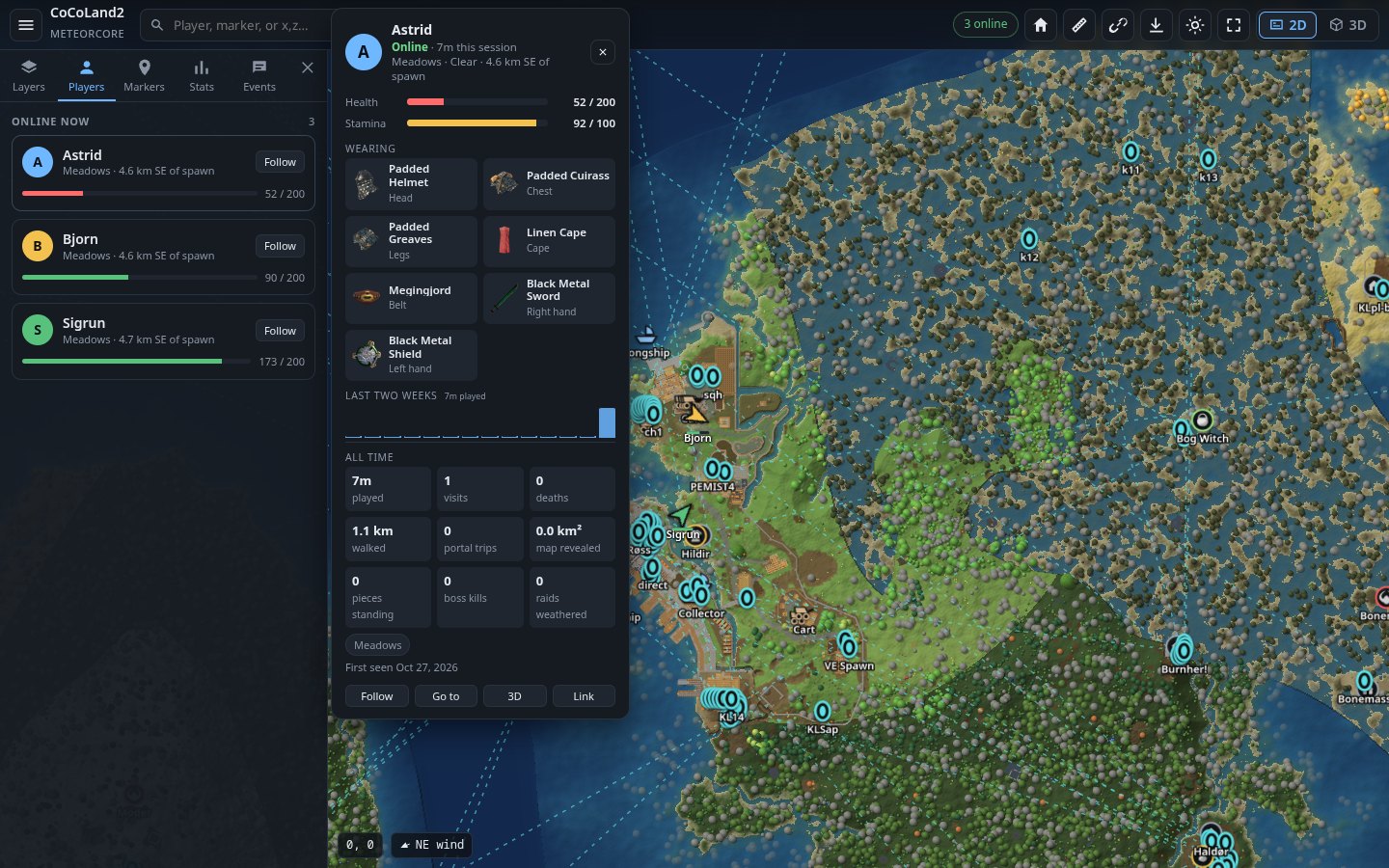
| Live players | Everyone online, where they're looking, their health, gear and weather. Click a player for their card, or follow them. |
| Everything you built | Every building piece, drawn in its material colour, updated as you build. Bases are found and named on their own. |
| 3D view | One click turns the map into 3D, using the game's own models, with sun, shadows and water. |
| Markers | Portals and where they lead, boss altars, traders, dungeons, tombstones, boats, carts and map table pins. You can also switch on wards, runestones (with their text), Vegvisirs and beds. |
| The world's events | Raids and invasions shown on the map as they happen. Lava in the Ashlands, mist in the Mistlands. |
| Stats | Time played, deaths, distance walked, bosses beaten, world modifiers, and who was online in the last day. |
| Events feed | Joins, deaths, chat, boss kills and raids, saved to a log. Can also post to Discord. |
| Works on phones | The same map, laid out for a small screen. |
| Light on your server | Drawing happens on a background thread, a little at a time, so players don't feel it. |
| No spoilers | Only what players have already explored is shown. The world seed is never sent out. |
Screenshots
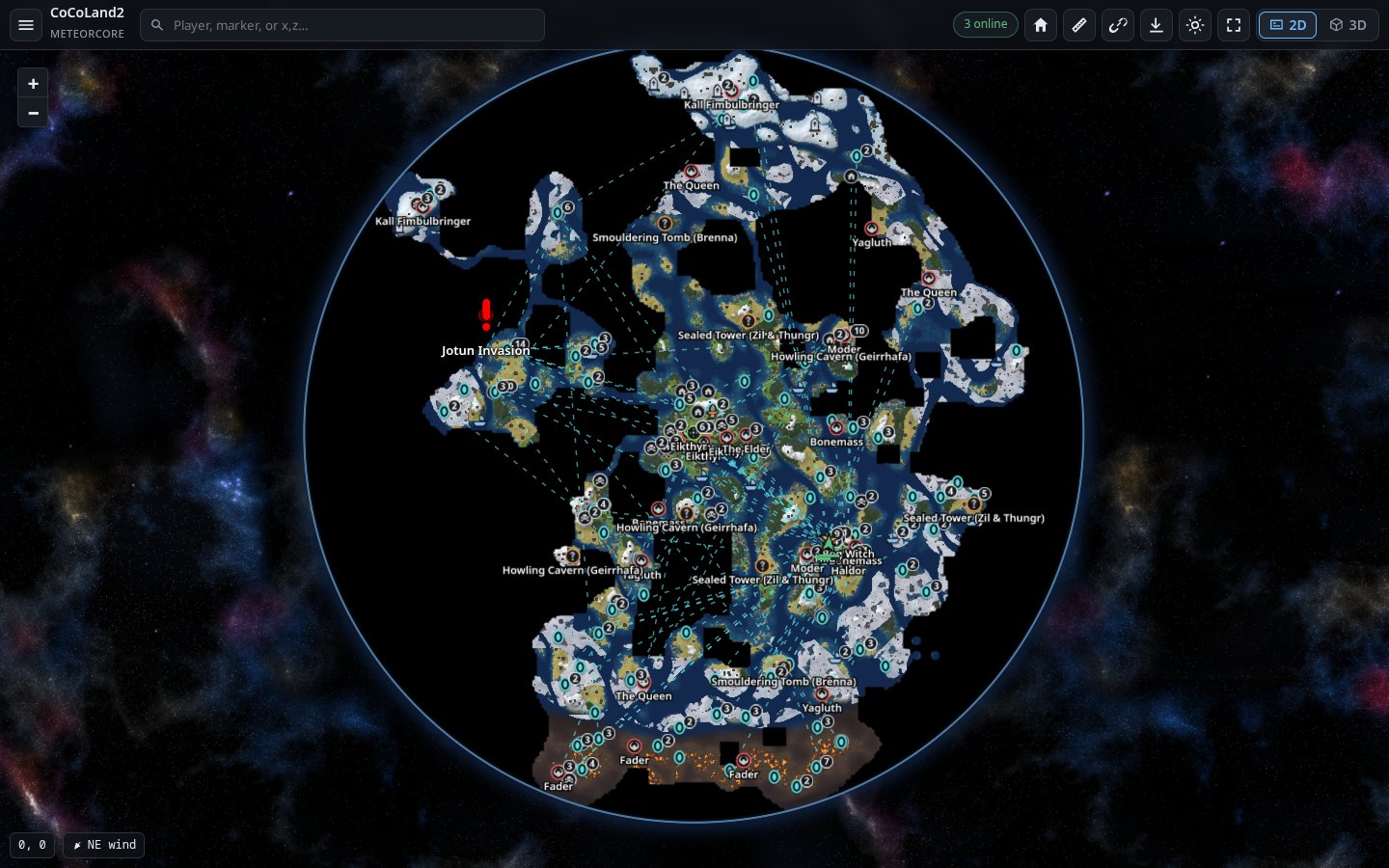 |
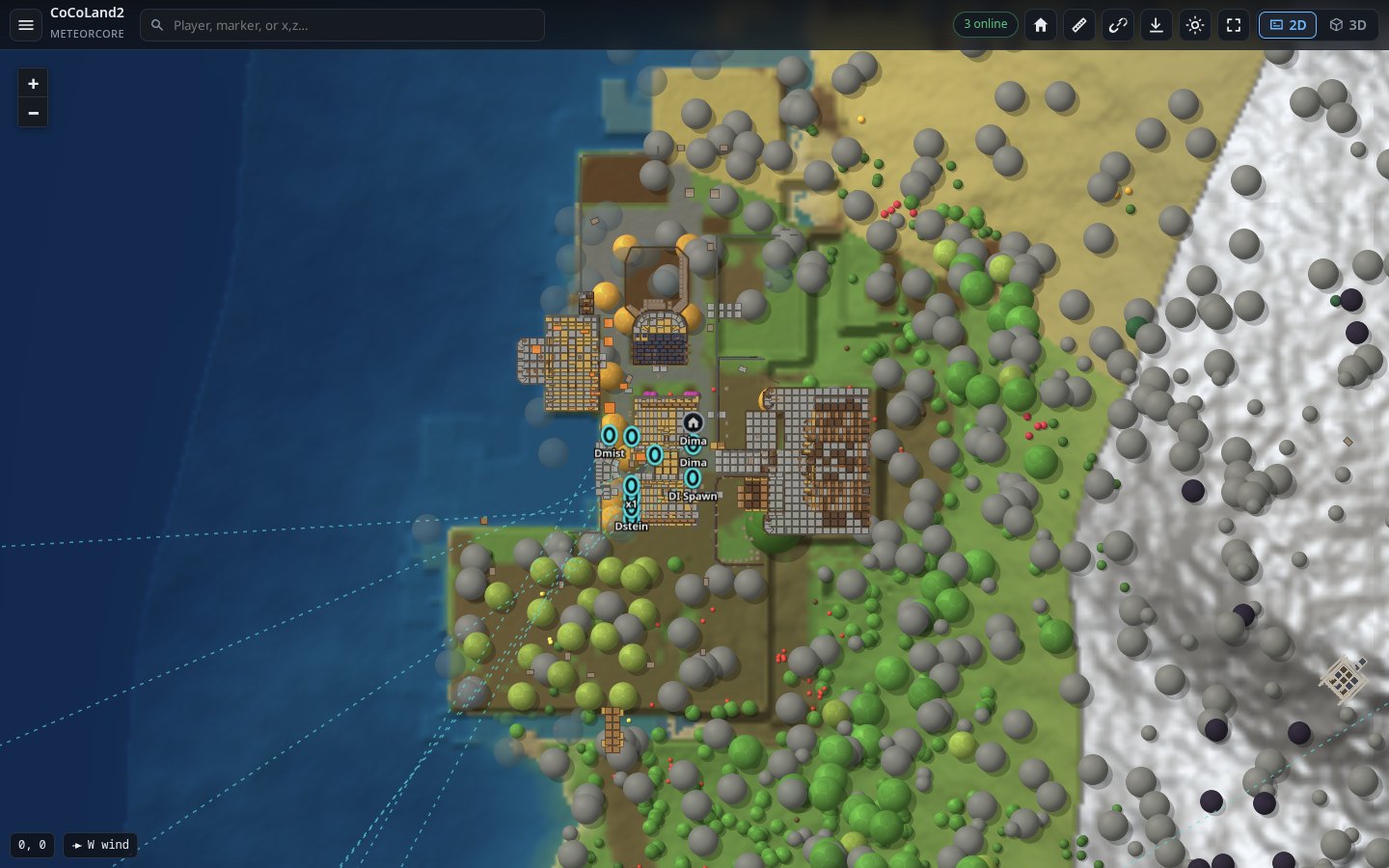 |
| The whole explored world | A base up close |
 |
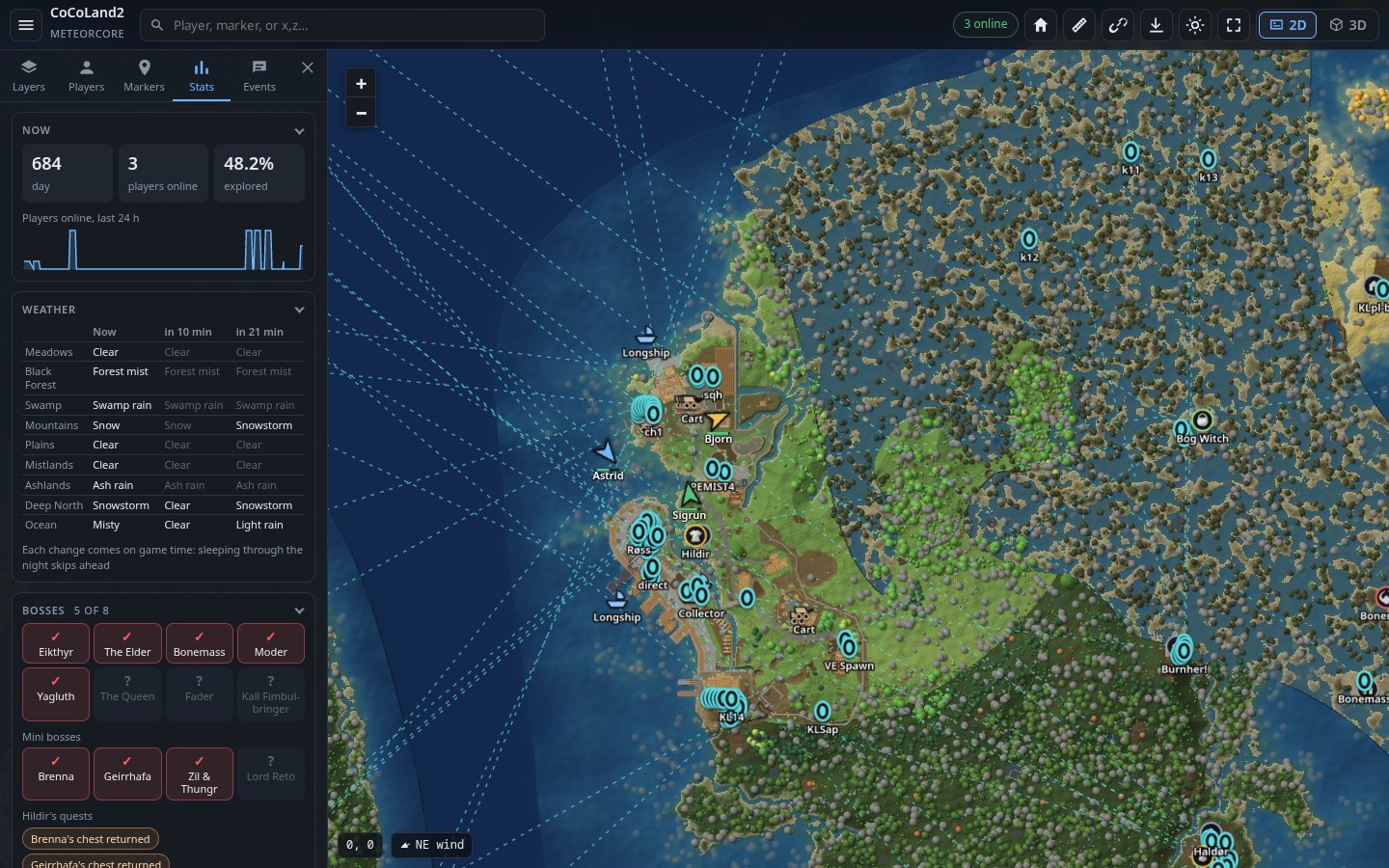 |
| Players and the player card | Stats |
 |
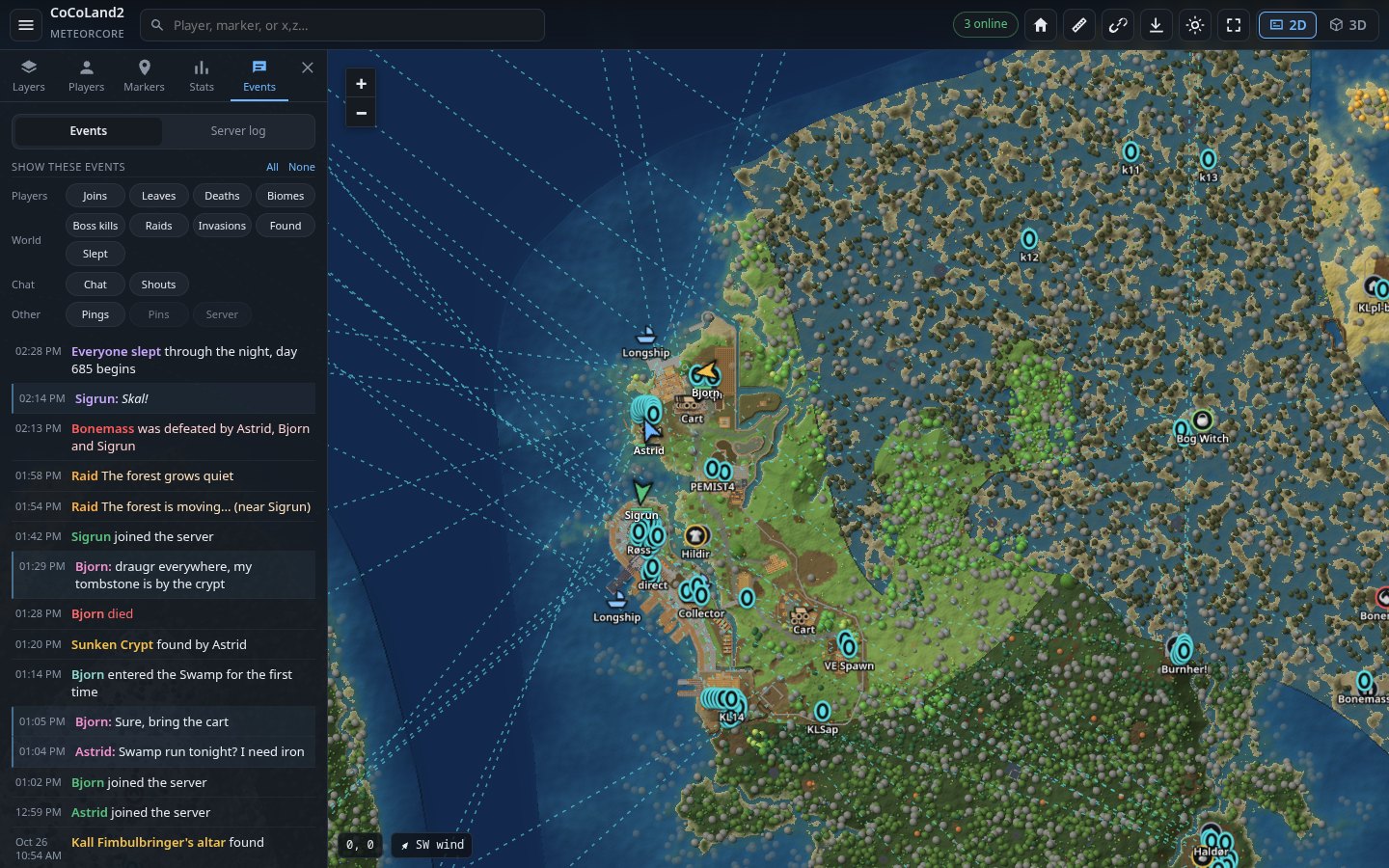 |
| 3D view | Events |
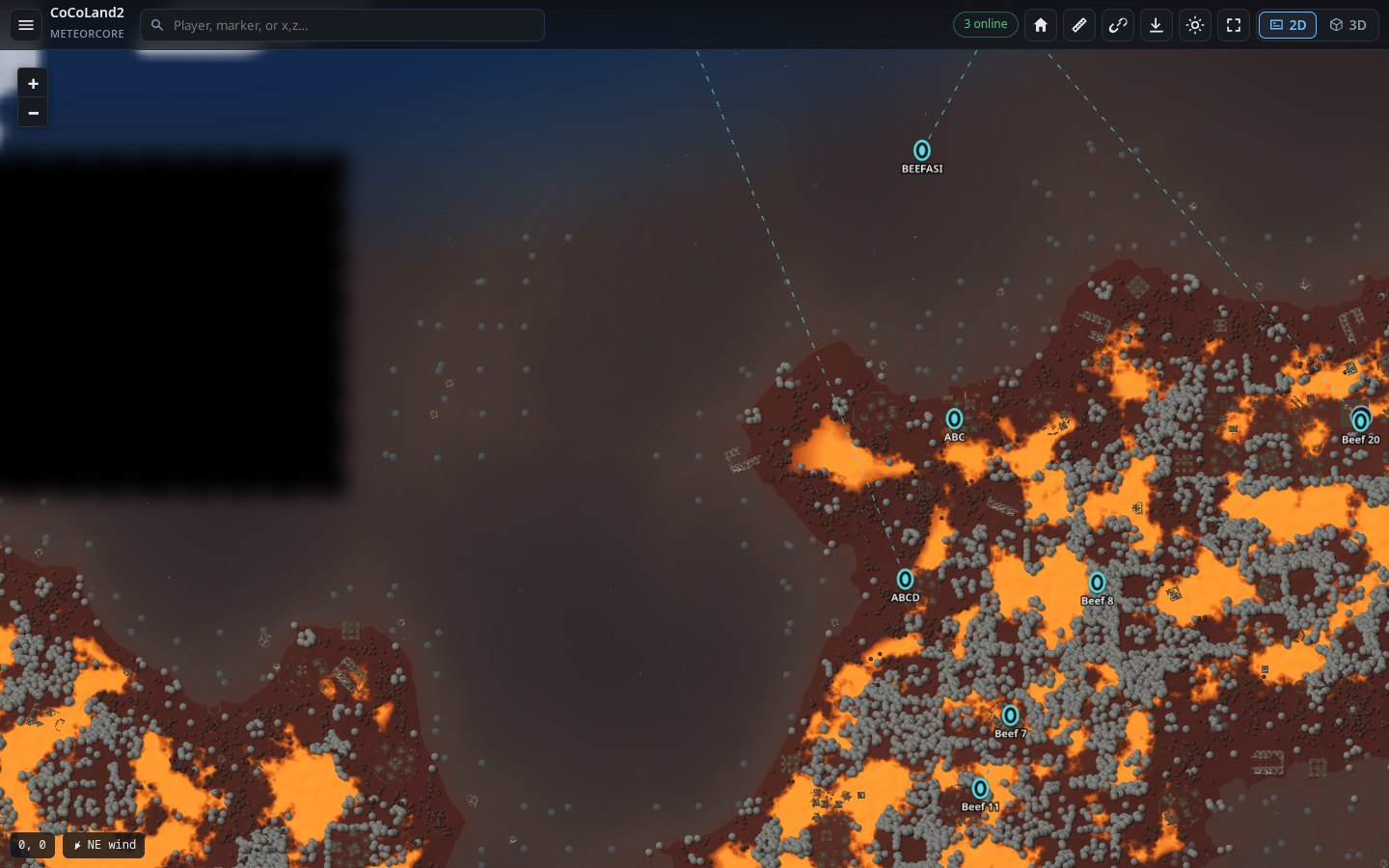 |
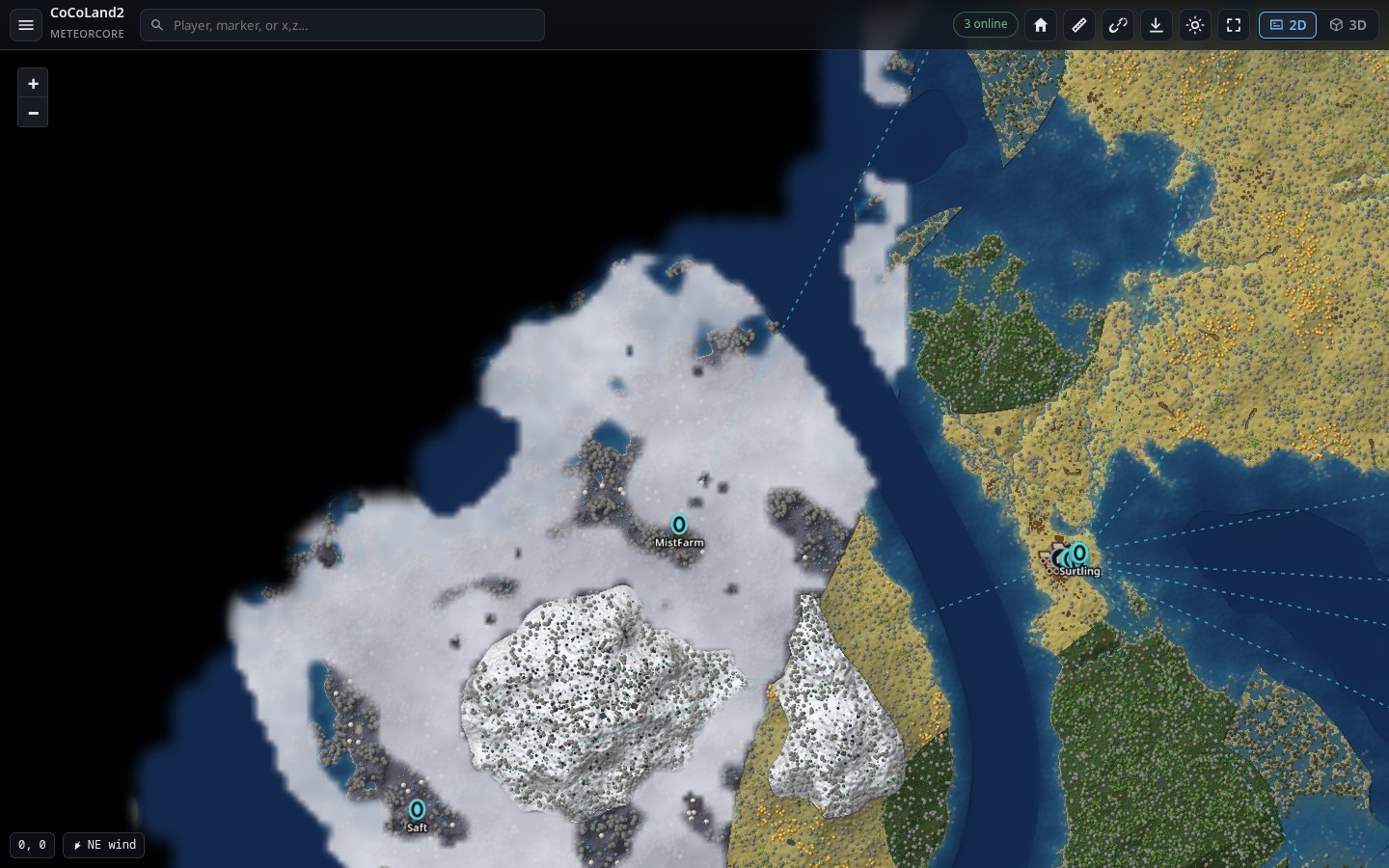 |
| The Ashlands | The Mistlands |
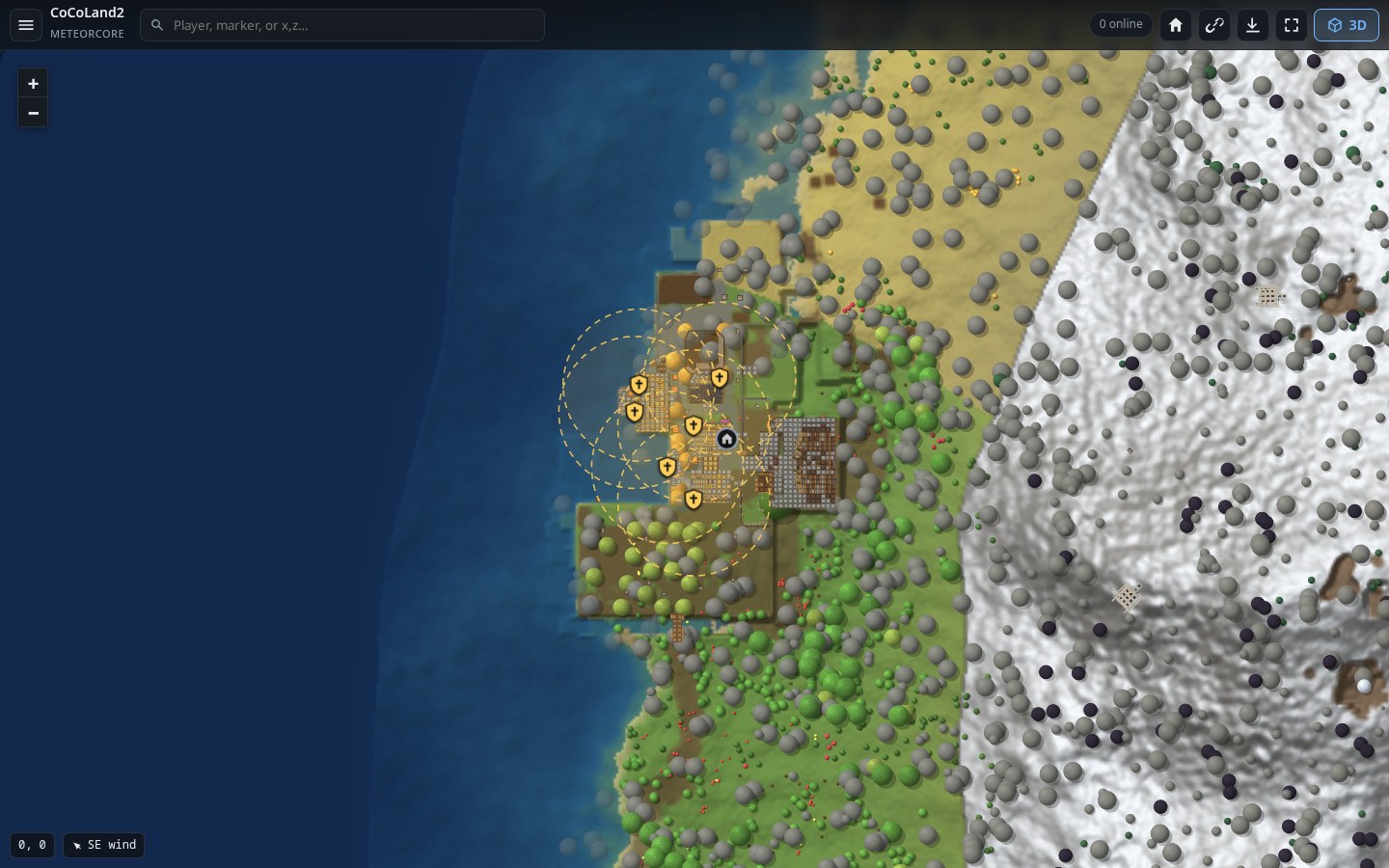 |
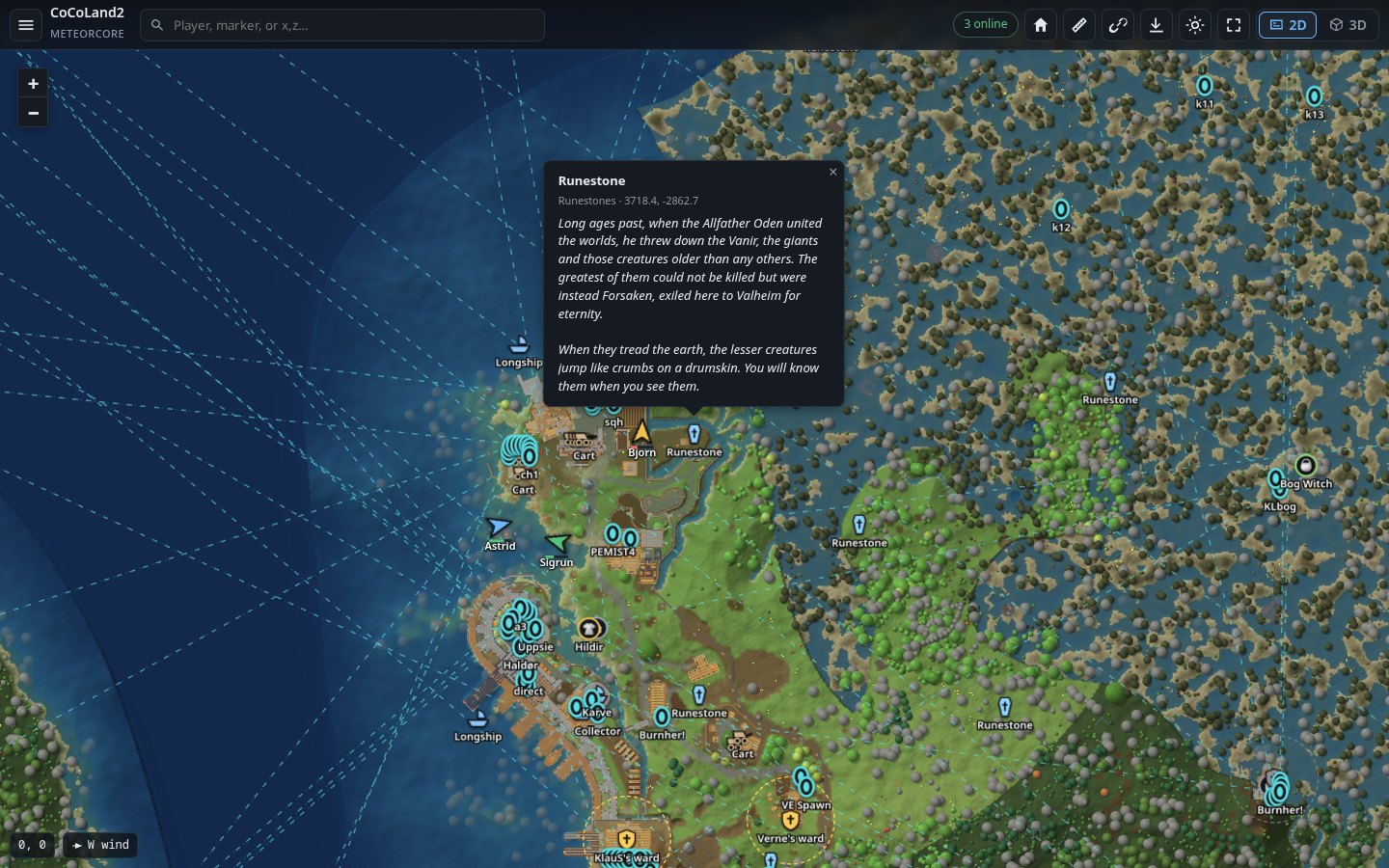 |
| Wards | Runestones |
 |
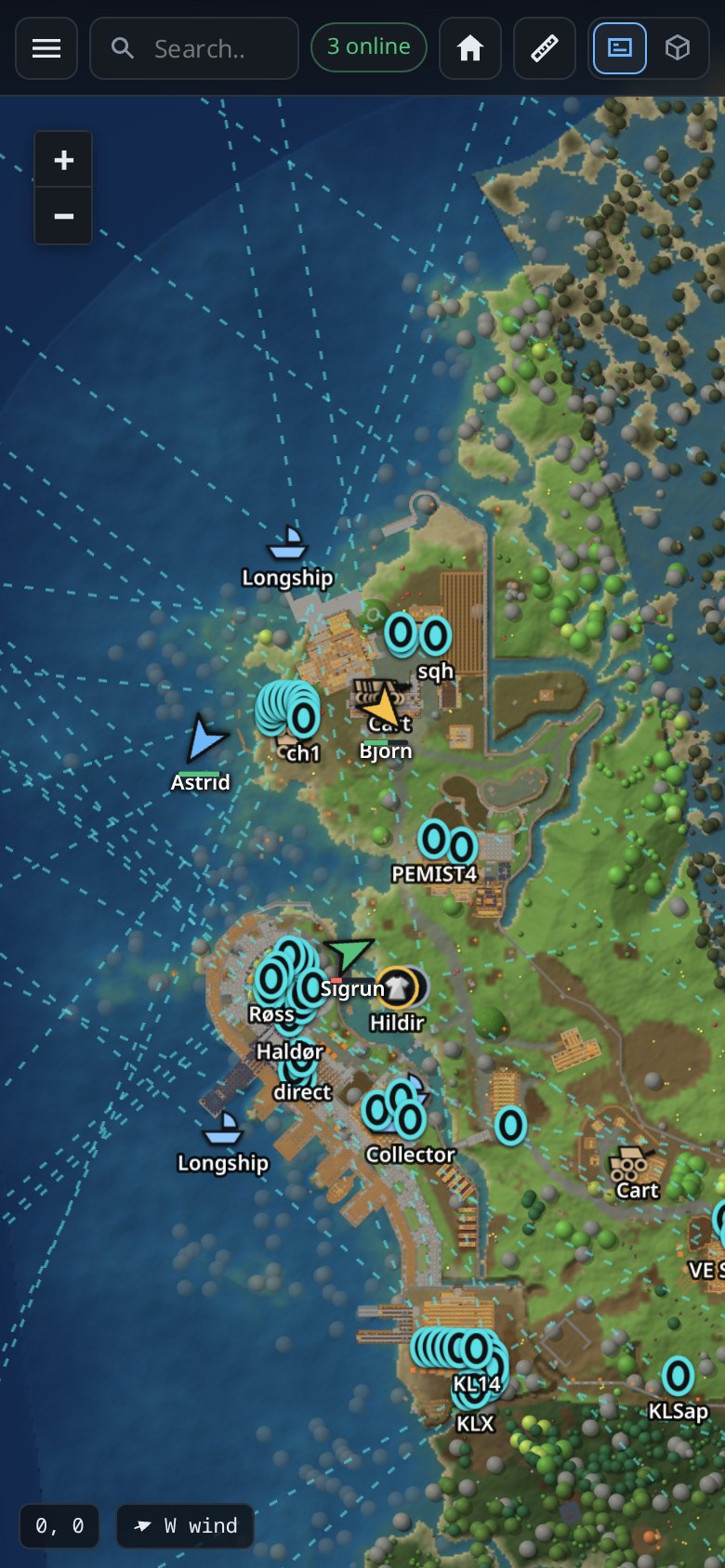 |
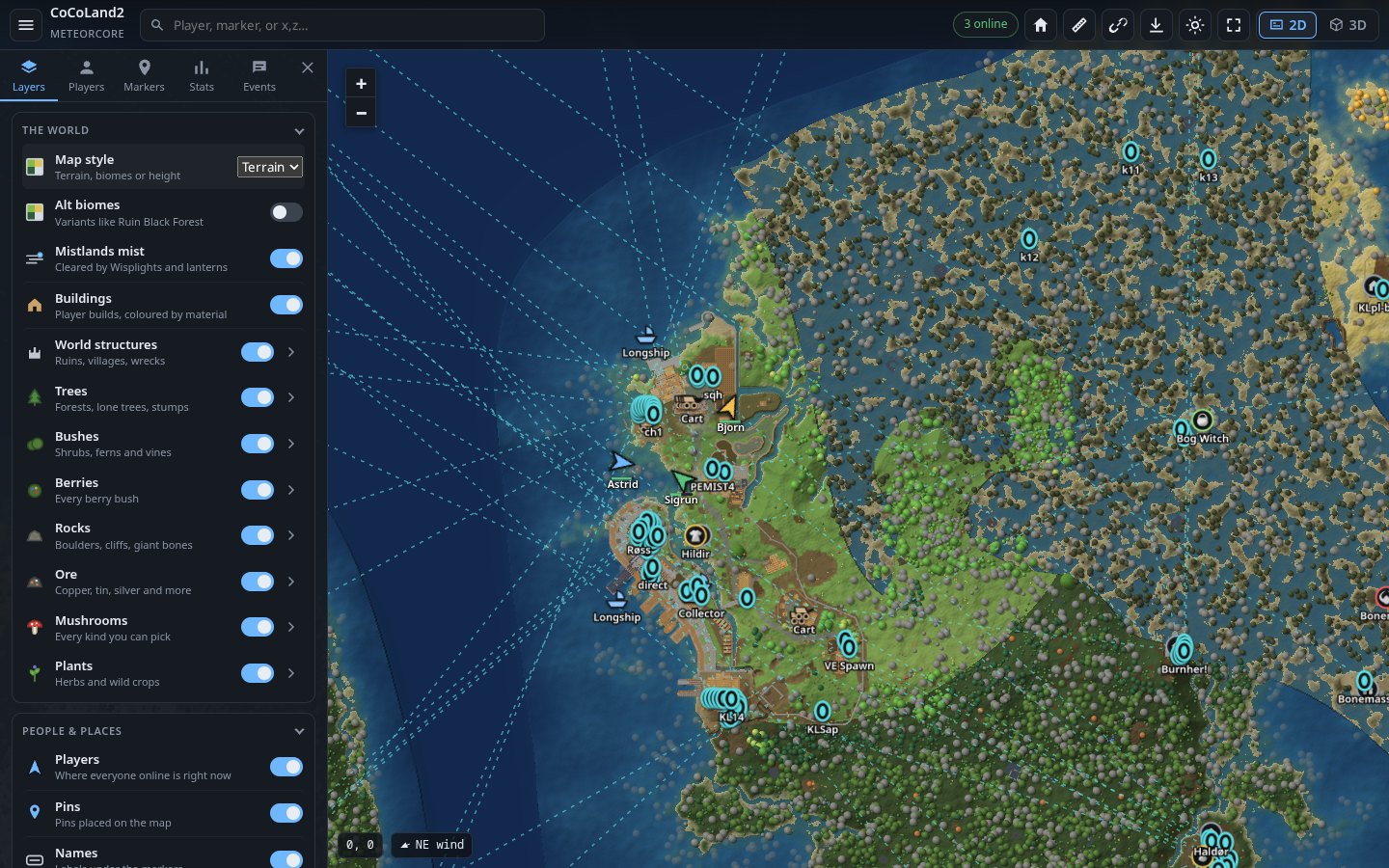
| Switch layers on and off | On a phone |
Install
You need a Valheim dedicated server with BepInEx on it (BepInExPack for Valheim). Most server hosts have a one-click option for BepInEx.
Step by step
-
Download
MuninMap-<version>.zipfrom Releases. -
Unzip it. Inside is a
plugins/MuninMapfolder. -
Copy the
MuninMapfolder into your server'sBepInEx/pluginsfolder, so you end up with:<server>/BepInEx/plugins/MuninMap/MuninMap.dll -
Start the server. In the server log you should see:
Munin Map 3.0.0 loaded -
Open port 3000 (TCP) in your firewall and, if you host at home, forward it on your router. (On a hosted server, look for "additional ports" in its panel.)
-
Open the map:
http://<your server's IP>:3000
That's it. Share the link with your players.
Using a mod manager (r2modman, Gale)? Use its "import local mod" option with the zip. It puts the files in the right place.
Using Docker (lloesche/valheim-server)?
Set BEPINEX=true, put the MuninMap folder in
/opt/valheim/bepinex/BepInEx/plugins/, and publish the port with
-p 3000:3000/tcp. There's a working example in
tools/docker-compose.test.yml.
The first start
The first time, the server needs a few minutes to get the map ready. You don't need to do anything, and the server stays playable.
- The map is drawn in the background: the zoomed-out view in a minute or two, then the close-up detail. Until a spot is ready, you'll see a blurrier version of it. A counter in the bottom-left corner shows what's left.
- The 3D models are read from the game files once. This takes a few minutes. Until then, some things show as simple boxes in 3D.
- Runestones and Vegvisirs are found once, in about 3 to 4 minutes.
After that, later starts are quick: everything is kept in
BepInEx/plugins/MuninMap/map_data.
Using the map
- Move around: drag, scroll to zoom. On a phone, use two fingers.
- 3D: the 3D button, top right. Right-drag (or two fingers) to turn the camera.
- Find something: type a player, a marker or
x,zcoordinates in the search box. - Switch things on and off: the menu (☰), then Layers. Wards, runestones, Vegvisirs, beds, dungeons and map table pins start switched off, because there can be hundreds of them.
- Share a view: the address bar always holds the spot you're looking at. Copy it (or press the link button) and the other person sees the same thing.
- Pin something: right-click the map (long press on a phone).
- Name a base: click its marker.
Keeping the map private
The map has no login. Anyone with the link can see it, including where everyone is right now. If that matters to you:
- Don't post the link publicly; give it to your players.
- Or put a password in front of it: Cloudflare Access, or basic auth on a reverse proxy (nginx, Caddy).
If you use Cloudflare or another cache in front of the map, purge it after each update, or set it not to cache the page itself.
Settings
Settings live in BepInEx/config/com.cocopuff2u.muninmap.cfg. The file
appears after the first start. Edit it while the server is stopped, or
restart the server afterwards. Each setting is explained in the file itself.
The ones people change most:
| Setting | Default | What it does |
|---|---|---|
server_port |
3000 |
The port the map is on. |
map_title |
(your server's name) | The title at the top of the page. |
enable_3d |
true |
Offer the 3D view. |
discord_webhook |
(empty) | A Discord webhook URL, to post joins, deaths, raids and more to a channel. |
discord_world_events |
true |
Also post raids and invasions to Discord. |
map_url |
(empty) | The map's address, for links in Discord posts. |
explore_radius |
110 |
How far around each player the fog clears, in metres. The game uses 100. |
reveal_visited |
true |
When first installed, clear the fog everywhere players have already been. |
always_visible |
false |
Show players even if they set themselves hidden on the in-game map. |
web_pins |
true |
Let people add pins from the web page. |
web_edit_bases |
true |
Let people rename or hide bases from the web page. |
max_render_zoom |
7 |
Closest zoom drawn. 6 uses a quarter of the disk space. |
Every setting is listed in docs/ADVANCED.md.
Admin extras
Make a file called announce.token next to MuninMap.dll with a secret word
in it. That secret lets you:
- See the server's log in the page: Events, then Server log, then enter the secret.
- Send a message to everyone in game:
curl -X POST -H "X-Announce-Token: <secret>" -d "Hello Vikings" http://localhost:3000/announce - Use the admin API calls: listed in docs/ADVANCED.md.
Troubleshooting
| Problem | Fix |
|---|---|
| The page doesn't open | Check that port 3000 (TCP) is open in the firewall, forwarded on the router, and allowed by your host. Check the log for HTTP server listening on port 3000. |
| Nothing in the log about Munin Map | BepInEx isn't running. Check that BepInEx/LogOutput.log exists and the server starts through BepInEx. |
Valheim WebMap is installed too in the log |
Switch one of the two off (see Coming from Valheim WebMap). |
| The map is blurry in places | It's still being drawn. Watch the counter in the bottom-left corner. |
| Boxes instead of models in 3D | The models are still being read from the game files. Give it a few minutes on the first start. |
| The page looks wrong after an update | Press Ctrl+Shift+R once. If you use Cloudflare, purge its cache. |
!pin in chat does nothing |
The game only sends chat through the server when two or more players are online. Right-click the map instead; that always works. |
Still stuck? Open an issue
and attach BepInEx/LogOutput.log.
Coming from Valheim WebMap
Munin Map can pick up where a Valheim WebMap install left off. It never touches the other mod's folder; you move things over yourself:
-
Stop the server.
-
Switch Valheim WebMap off (remove its DLL, or disable it in your mod manager). Both serve a map on the same port, so only one should run.
-
Move your map: move the
map_datafolder from Valheim WebMap's plugin folder intoBepInEx/plugins/MuninMap/. Copyannounce.tokentoo if you use one. -
Install Munin Map as above and start the server. Your settings are taken over by themselves (
com.valheimwebmap.server.cfgis copied tocom.cocopuff2u.muninmap.cfg), and the log says:MuninMap: settings taken over from .../com.valheimwebmap.server.cfg
Nothing is drawn again: explored area, tiles, 3D models, base names and
markers.json are all in map_data. Bookmarks and #x,z,zoom links to the
old map keep working. If you start Munin Map before moving the folder, the log
says where the old map is.
More
- docs/ADVANCED.md: every setting, your own markers, the HTTP API, server load and disk use, building from source.
- docs/EXPORT.md: exporting an area as a 3D scene for Blender, Unreal, Unity or Godot.
- docs/ARCHITECTURE.md: how it works inside.
- CHANGELOG.md: what changed in each version.
Credits
Munin Map is made by Cody Keats. It's based on Valheim WebMap, first made by Kyle Paulsen and carried on by Jeffrey Clark (h0tw1r3/valheim-webmap), and the version of it by f00d4tehg0dz and its contributors. Thank you all.
Licence
MIT. See LICENSE. The libraries it ships with keep their own licences: Leaflet (BSD-2), three.js (MIT), websocket-sharp (MIT), SixLabors.ImageSharp (Apache-2.0) and three Microsoft System libraries (MIT), given in full in THIRD-PARTY-NOTICES.md.
CHANGELOG
Changelog
3.1.0
New on the map
- Contour lines (Layers, Map guides): height lines like a hiking map, a thin one every 25 m and a bold one every 100 m with its height. Drawn by the browser's graphics card, sharp at every zoom, and only over explored ground.
- Height map style: the land coloured by its height, with relief shading.
- Peaks: the world's mountain tops with their heights, on explored ground only; the highest one found is named so.
- Ruler (top bar): measure a route (points snap to markers) and see how long it takes on foot, by lox, raft, karve, longship or drakkar. Reach shows everywhere you can get to within 2 to 30 minutes from a spot, over land or by water, in coloured bands with a key.
- Activity layers: each player's trail over the last 3 hours, where players spend their time (a heat map), where they die, and lag hotspots (areas heavy with building pieces, lights, creatures or dropped items: click one to see why). All off at first.
- New places: the Deep North boss (Kall Fimbulbringer) and Writhan, Bear caves, Winding tunnels, The Hole, Mörkhalla and half-buried crypts; Landmarks (the Forge of Potential, Ancestral Memorials, Fimbulvinter orbs, hot springs); Camps & resources (Fuling camps, tar pits, drake nests, guck trees); Signs, with what's written on them, searchable.
- Stats: a weather forecast for each biome, and how far each boss altar and trader found is from the spawn, with the walk there (or "by boat").
- Markers: chips to narrow the list to one biome, with counts.
- Embed links:
?embedshows the map alone (for an overlay),?follow=Namekeeps following a player. - Marker size slider and a plain dots style; every Layers section folds like the Map key.
Player cards
- What a player wears, with the game's own item icons and names, and what offline players last wore.
- When they play: the last two weeks, recent sessions and their usual hours.
- Bosses they fought, places they found first, the crafting stations they've built, and leaderboard badges.
- Their places: the bases they built, their portals, beds, tombstones, wards and where they last died, a click away.
- Cards for offline players too, and
?player=Namelinks that open one. - New setting
hidden_players: characters never shown on the map, in the stats or the event feed.
Smoother
- Players glide at an even pace instead of jumping each second, played back a couple of seconds behind on the server's own clock, and following one keeps them centred every frame.
- Player updates go out the moment they're taken (they could wait up to a second or two).
- The server no longer stalls once a minute. Revealing ground players had already visited redid a big calculation on the game's thread every minute: on a large world, a freeze of over a second. Now it's only redone when new ground is explored, off the game's thread.
- No hitches after each world sweep. The markers were rewritten every sweep (hundreds of KB at once, enough to set off the game's memory clean-up mid-frame); each set is now kept and reused while nothing in it changes.
- Lighter hooks into the game: one that recorded every name the game hashes now only exists with
debugon, and checking chat messages no longer hashes two names per message. - New setting
perf_report(Debug): every 5 minutes, log how much of the game's thread the map takes, job by job.
Fixes (GitHub issues)
- The fog now always covers the whole world, whatever
texture_sizeandpixel_sizeare; an existing fog is converted once, nothing lost (#11). - Enter in the search goes to the next match, Shift+Enter back (#12).
- Portal popups have a button to the other end (#14).
- Pins: a "pin key" lets you remove your pins from another browser, pin owners are no longer published (anyone could copy one and remove the pin), and the rate limit really is one pin per 2 seconds (#15).
- Names sort the way people expect ("Beef 3" before "Beef 14") (#16).
- Layers sections fold (#17); the new bosses, mini bosses and dungeons (#10, #13, #18).
- Zoomed out, small pieces such as torches no longer show as dots as big as walls; long boss names wrap.
Upgrading: replace MuninMap.dll and restart the server. On the first start the fog is converted if it used another grid, peaks are found once (a few seconds, in the background) and item icons are cut from the game's files (about 20 s, in the background). Height tiles no longer need the 3D view: height_max_zoom alone decides (6 is plenty for contour lines; -1 turns them off). pins.json no longer lists who placed each pin.
3.0.5
- Ping from the web map. Middle-click the map, or use the Ping button in the right-click pin form, to ping a spot. Players in game see it like a map ping, as "Name (web)", and so does everyone else on the web map. One ping every 10 seconds per visitor; turn it off with the new
web_pingssetting. - Portals, boats and carts stay current. They used to move only when the world sweep came round. Now they update every 15 seconds, and newly built boats and carts show up within that time too.
- Alt biomes. A new "Alt biomes" layer (off by default) stripes the biome variants, like Rockless Mistlands or Ruin Black Forest, coloured by their base biome. The cursor readout names the variant.
- Sortable player list. Click a column header in the Stats player table to sort by it, and again to reverse. The map remembers your choice.
- World modifiers that change a rate now read as a percent of normal.
- Trees and other objects no longer jump into place when you switch who you're following.
- The clearing a Wisplight makes in the mist stays the same size at every zoom.
Upgrading: replace MuninMap.dll and restart the server. The biome map is rebuilt once on the first start.
3.0.4
- Still one DLL, built the usual way. The libraries the map uses (websocket-sharp, ImageSharp and three System libraries ImageSharp needs) used to be packed inside
MuninMap.dlland unpacked into memory as the server started. Now they are merged into it when it's built (ILRepack), like most Valheim mods do: nothing is unpacked, and they can't clash with another mod's copy of the same library. - Munin Map leaves other mods alone. With Valheim WebMap installed too, it used to switch itself off, and on a first start it moved WebMap's map folder into its own. Now it only warns that both are installed, and says in the log where an old WebMap map is, for you to move by hand (see "Coming from Valheim WebMap" in the README). WebMap's settings are still taken over by themselves, from the config folder.
- The README no longer opens with WebMap: what Munin Map does comes first, and the credits are at the end. Its links work on mod sites too.
- The map itself, its settings and its data are the same as 3.0.2.
Upgrading: replace MuninMap.dll and restart the server.
3.0.2
Smoother servers. The map's world check (the sweep, every 2 minutes) no longer makes the game stall. Measured on a world of 2.9 million objects:
| 3.0.1 | 3.0.2 | |
|---|---|---|
| Slowest frame, first check after a restart | 360-470 ms | about 110 ms |
| Slowest frame, every check after that | 30-70 ms | about 23 ms |
| Garbage collection pauses caused by each check | 2 | 0 |
| Time a check takes | 107 s | 88 s |
- A big base no longer stalls the server: its map data is built a slice at a time instead of in one go (one chunk with 13 000 pieces took 360 ms), and built once instead of twice.
- Map tables are read in slices, and unpacked once (it was twice) on a background thread.
- Trees, rocks, buildings and 3D objects only redo the parts of the world that changed, and reuse their memory between checks instead of throwing a million entries away each time.
- Boss altars, mini-boss lairs, dungeons and traders are found in one pass over the world's locations instead of four.
- The log line after each check now says how many garbage collections it caused and the server's frame rate, and its "longest frame" is measured correctly (it used to count a whole server frame, 33 ms, that wasn't the map's).
- The map data, markers and fog come out exactly as before, so nothing needs redrawing and browsers keep what they cached.
Upgrading: replace MuninMap.dll and restart the server.
3.0.1
Fixes
- Stats are kept per character. They used to be tied to the Steam (or Xbox) account, so switching to another character on the same account carried over the first character's stats under the new name. Each character now has its own stats. Existing stats go to the character last seen on that account, and other characters start fresh.
- No more phantom altars, traders or dungeons. Valheim also keeps spots where it plans to put locations later, and
genlocor world upgrade tools (like Upgrade World) move those spots around. Any that landed on explored ground showed up as new finds, duplicate markers and "found" events. Now a location counts only once the game has actually built it in the world. Already-recorded phantom finds drop off the map and the Discoveries list, but their old "found" events stay in the feed.
New
-
Mist clears around Dvergr lanterns and Mistlands torches, like in the game, in both 2D and 3D:
Object Range Dvergr lantern 15 m Large Dvergr lantern 30 m Ruined Dvergr lantern 10 m Mistlands torch 24 m The ranges are read from the game files.
Clearer wording
- "Pieces built" is now "pieces standing". It counts everything a character ever built that still stands in the world, including from before the map was installed, while play time only counts from when the map first saw them. That's why a new player can show a minute played and hundreds of pieces.
Upgrading: replace MuninMap.dll, restart the server, and hard-refresh the page (Ctrl+Shift+R).
3.0.0
Valheim WebMap is now Munin Map, with its own home at https://github.com/cocopuff2u-gaming/munin-map. It's based on Valheim WebMap, with a lot more tweaks and information: a smoother GPU-drawn map, lower upload, lava, mist, raids and invasions, wards, runestones, Vegvisirs, beds, dungeon contents, and more stats and events.
Upgrading from Valheim WebMap
- Stop the server, delete
BepInEx/plugins/WebMap/WebMap.dll(leave the rest of that folder), and install Munin Map intoBepInEx/plugins/MuninMap. With a mod manager, disable Valheim WebMap instead of uninstalling it. - On its first start Munin Map moves everything over by itself: your settings (copied to
com.cocopuff2u.muninmap.cfg), your whole map (map_data: explored area, tiles, 3D models, base names,markers.json) and yourannounce.token. Nothing is drawn again. Then the oldWebMapfolder can go. - If
WebMap.dllis still there, Munin Map says so in the log and stays off, so the two never fight over the port. - Links and bookmarks are unchanged. The setting
webmap_urlis nowmap_url(renamed in your config by itself). For the admin API, send the token asX-Announce-Token(as before) orX-Munin-Token. - Browsers forget their saved admin key, pin name and 3D object filter once (they were stored under the old name).
What changed
- New name, new plugin ID (
com.cocopuff2u.muninmap), new icon. The zip isMuninMap-<version>.zip. - One DLL: everything is in
MuninMap.dll. websocket-sharp, ImageSharp and its helper libraries ride inside it and load from there, so there's nothing else to copy and no loose DLLs to clash with other mods. - Log lines start with
MuninMap:. - The licence credits the Valheim WebMap contributors, and
THIRD-PARTY-NOTICES.md(also in the zip) carries the full licences of the bundled libraries. - A new README, easier to follow, with fresh screenshots; the detailed reference moved to
docs/ADVANCED.md. - The project is laid out more simply:
src/(the mod),web/(the page),package/(manifest and icon),tools/,docs/.
The versions below were released as Valheim WebMap.
2.2.6
The Ashlands look like they do on the game's map, and dragging the map is smooth. Upgrading: replace the whole BepInEx/plugins/WebMap folder; your map_data and config are kept. Press Ctrl+Shift+R once in the browser.
Map
- Lava in the Ashlands: the lava fields and rivers glow orange, from the same mask the game's map paints them with, also in 3D. It comes with the Ashlands height the map already asked the game for, so tiles take no longer to make.
- The sea turns dark and ashen toward the Ashlands, over the game's own gradient, instead of the orange rim along every Ashlands shore.
- Wards: every ward a player built, with the ground it protects drawn as a dashed ring like the game's area marker (gold when on, grey when off). Click one for its owner, whether it's on, and who may build there. Their own group in Markers, off until switched on in Layers; explored ground only. The world's own camps and forts carry wards too: those are left out.
- Runestones on explored ground (the lore stones, the start temple's stones, the ones by the boss altars), with the text a player reads on each, the same text the game picks for that stone: click one to read it. Their own group in Markers, off until switched on in Layers.
- Vegvisirs on explored ground, named the way the game's hover names them ("Vegvisir: The Elder"), never where they point. Their own group, off until switched on.
- Which locations hold runestones and Vegvisirs is worked out once in the background (about 3.5 minutes after the first start, the server keeps running) and kept in
map_data/runestones.txt; later starts just read it. - Beds: every claimed bed, with its owner (a player keeps old beds too; the game keeps which one is their spawn on their own computer). Their own group, off until switched on.
- After the upgrade, only the map tiles that reach the Ashlands are made again, in the background at low priority at server start (close zooms too), so nobody waits for them.
Smoother dragging
- Dragging the map no longer catches every half screen or so. When the map canvas re-centres during a drag, the trees, ruins and buildings already drawn are shifted over and only the uncovered strip is drawn, instead of the whole canvas (~6 screens) in one frame. In the test browser the worst frame of a drag went from 0.6 s (7 s zoomed far out) to under 0.1 s.
- Markers no longer redraw the whole map on every frame of a drag (they are already drawn out past the screen), and map tiles that arrive off screen just appear instead of fading in unseen, which redrew the map every frame. A drag over loaded ground now draws nothing until it ends.
- Zoomed out, ruins and buildings are drawn from one dot per 3 m square instead of one per piece (the pieces of one ruin piled hundreds of dots on the same pixels): the same picture from about a sixth of the shapes.
2.2.5
Mistlands mist, invasions, shouts and weather on the map, raids and invasions on Discord, and a better phone view. Upgrading: replace the whole BepInEx/plugins/WebMap folder; your map_data and config are kept. Press Ctrl+Shift+R once in the browser.
Map
- Mistlands mist, like the game's map: the Mistlands are covered in mist (from the game's own map mask, explored ground only), and a player wearing a Wisplight clears it around them. In 3D it lies over the ground with tall things showing through. A switch in Layers turns it off. It loads after the map, at low priority, and is drawn only where there is mist.
- Invasions (the game's long-running events, e.g. a Jotun Invasion) drawn like the game's map draws them: the red area and the pulsing "!" with the invasion's name, over the fog. Click one (or a raid) for when it ends, its size and who is near it. They have their own group in Markers and a switch in Layers.
- Invasions starting and ending are in Events (with a filter chip) and pop up as notices.
- Shouts show on the map where they were shouted for 10 seconds, with the game's shout pin, for players who share their position.
- Weather: each online player's weather where they stand (worked out the way their game does) on their tooltip, card and in the Players list; the wind's direction beside the coordinates.
- The raid sprites are fetched ahead, so the first raid or invasion shows at once.
Discord
- Raids and invasions starting and ending are posted to the webhook, with who is near and a link to the spot on the map (
urlset). Off withdiscord_world_events = false.
Phone
- The zoom buttons no longer float over the full-screen menu.
- Search results use the screen's width, each place's group and position under its name.
Server
- Building the markers at the end of a sweep is spread over frames like the rest (on a test world, the worst sweep frame went from ~60 ms to ~34 ms).
2.2.4
Lighter on the game server, and the page keeps up with players without catching. Upgrading: replace the whole BepInEx/plugins/WebMap folder; your map_data and config are kept. Press Ctrl+Shift+R once in the browser.
Game server
- The world sweep (every 2 minutes) takes at most a few milliseconds of each game frame while players are on (new setting
frame_ms, default 4). Sorting a big world's trees, ruins and 3D objects used to stop the server for up to half a second at a time, which players felt as a hitch. - The sweep walks the world a map sector at a time instead of copying the whole object table in one frame (~150 ms on a 3-million-object world).
- Location names are matched with plain (ordinal) string comparison: building the markers went from ~50-90 ms to ~20 ms.
- Player bases are worked out again only when buildings change.
- Fixed: zones whose terrain data changed nothing were re-rendered on every sweep.
- The legacy forest and structure overlay images are made only when asked for, off the game's thread.
Page
- Moving players update their arrow and health bar in place instead of being remade every second (about 7x less work per update); the Players panel redraws only while it is open.
- The first fog reveal around a player no longer stalls the page (~300 ms).
- The fog mask is decoded and blurred in a background worker: no freeze at load or each time it refreshes while people explore.
- Marker list rows and Stats discoveries use the same icons as the map.
- The page starts fetching its startup data before its scripts load, and batches redraws as data arrives: far less stutter while the map fills in after a reload.
2.2.3
Smoother everywhere, the map gets ready before you need it, and more to see and switch. Upgrading: replace the whole BepInEx/plugins/WebMap folder; your map_data and config are kept. Press Ctrl+Shift+R once in the browser.
Smoother
- Mid-zoom, trees, ruins and buildings are drawn from a picture redrawn a few blocks a frame, instead of every one of them every frame (3-4x less work a frame from zoom 4 to 7).
- With the map still, they are kept as a picture too: a marker hovered, a label fading, a player moving or a drag no longer redraws every tree.
- Bushes and plants smaller than a pixel aren't drawn zoomed out; they ease in from zoom 5.5.
- The wheel zoom eases the way it did before 2.2.2 (2.2.2's spring lagged behind the wheel).
- While the map is idle the page gets ahead: every explored tree, ruin and building fetched and made ready for the GPU (nearest first, ~9 MB once, kept by the browser), the map tiles one zoom in around the mouse and one out, the marker icons and labels, the biome grid. The first zoom no longer catches.
- Faster page load: every script the page starts with is fetched at once (modulepreload), and the 1 MB world-edge backdrop waits until the map is up.
Map
- Dungeons: the popup tells what the save knows of the inside: rooms, chests emptied, locked gate open or shut, monsters inside, graves, and what is still in there to pick or mine (by the game's names), and whether anyone has been in.
- Cartography table pins drawn like the game's: its own pin sprites, crossed-out ones with the game's red cross.
- Trees, bushes, berries, rocks, ore, mushrooms and plants each have a switch, and under its arrow every kind can be hidden on its own. Ore and rocks are now told apart (copper, tin, silver, obsidian, muddy scrap; boulders, cliffs, giant bones).
- World structures can be hidden by kind of place: houses, stone ruins, fuling villages, Dvergr sites, Ashlands ruins, shipwrecks, camps, boss altars, Deep North, dungeons.
2.2.2
The whole world fits on the map, new things to see (biomes, dungeons, cartography table pins, raids), and zooming is much smoother. Upgrading: replace the whole BepInEx/plugins/WebMap folder; your map_data and config are kept. The map grid grew, so tiles are redrawn once on the first start. Press Ctrl+Shift+R once in the browser.
Map
- The map grid is 21504 m (was 20480), so land right out to the world's edge is never cut off on the north, south, east and west sides.
- World edge like the in-game map: a fine line, the ocean fading into it, a soft glow out into the space backdrop.
- Map style "Biomes": solid biome colours with region names. The biome under the cursor shows beside the coordinates, like in game.
- Dungeon entrances (burial chambers, sunken crypts, troll caves, frost caves, infested mines, charred fortresses), each with its own icon and colour, on explored ground. Off by default.
- Cartography table pins, read from the tables in the world, as their own group with the game's pin icons. Off by default (there can be hundreds).
- Raids: the area the game marks during a raid, with the game's own raid sprites and the raid's message.
- Mushrooms and plants (thistle, magecap, wild flax...) as their own vegetation group with their own colours.
- Fix: "Remove pin" on the page never worked (the server refused the empty request).
Smoother
- Wheel zoom eases like a spring: no surge and stall with every notch of a mouse wheel.
- Trees, buildings and ruins are drawn in 1 km blocks (about 6x fewer draw calls around zoom 4-5, where the zoom caught).
- New tiles, labels and blocks are handed to the GPU a few a frame instead of all at once when a zoom crosses a level.
- Building and ruin data is parsed and packed in a worker; the per-frame check of what to load only looks at chunks that have data.
- Markers group with a count when zoomed out, fewer labels far out, all icons in one draw.
- The sidebar's Markers and Stats tabs are only rebuilt while open (rebuilding the markers list after every world update stalled the map).
Players and stats
- No "View in 3D" when 3D is off; more stats on the player card. The page refetches markers and stats after a reconnect.
2.2.1
Fog closer to the in-game map
- Cartography tables are read: everything players recorded to a table (the game's own explored map) is uncovered exactly.
- Player traces count: the explore radius around every building, ship, cart, portal and tombstone is uncovered (someone stood there).
reveal_visitedwas tuned against recorded table maps: margin 4 (the new default) with a 64 m circle per zone uncovers about 99% of what players had explored, where the old default 3 also opened about twice as much ground they never saw.explore_radiusdefault 110 (the in-game map clears 100 m; a little more so trails don't look tighter than people remember), and the circle includes its edge cells like the game's.- Existing configs keep their values. To tighten a map that already opened wider: set
reveal_visited_margin = 4, stop the server, deletemap_data/<world>/fog.png, start again.
Map
- Past the world's edge: the in-game map's own space backdrop, taken from the game files at startup (clouds as before when it can't be).
- Spawn rings reach the world's edge (whole rings only), the outermost is labelled, and the dashes stay put while zooming.
- Mini-boss lairs (Hildir's sisters: Smouldering Tomb, Howling Cavern, Sealed Tower) on explored ground, with the game's Hildir icons and a "found" event.
- Tile URLs carry the world's name, so a server that switches worlds can't show the old world's cached tiles.
Stats
- Mini bosses (Brenna, Geirrhafa, Zil & Thungr), Hildir's quests, what first kills unlocked (troll, surtling, bat raids), other boss keys (from mods too), and the world modifiers in words (Combat: Hard, Resources: More... with the exact effects on hover).
3D
- Left out: the Valkyrie on the spawn pillars and creatures inside models, loose pickups, loot chests, cave insides, attack roots and floating crates. Model library format 7: models are exported again once.
2.2.0
Smoother on slow connections and slow machines, and a lot more to look at. Upgrading: replace the whole BepInEx/plugins/WebMap folder with the one in the zip (it has four new DLLs next to WebMap.dll); your map_data and config are kept. Press Ctrl+Shift+R once in the browser after updating.
2D map
- Everything on the map is drawn on the GPU (WebGL): ground, fog, trees, buildings, world structures, markers, labels, grid and spawn rings. Zooming is continuous and smooth like valheim.tools, without stutter; jumping to a marker glides instead of stretching.
- Round world with a zoom-out limit, clouds past the edge, black fog inside.
- Trees and berries in their own colours (oak, birch, autumn birch, pine, raspberry, blueberry, cloudberry...), seabed rocks hidden, shallow-water ones faded. Trees, bushes & berries and rocks & ore switch on and off on their own.
- The game's own map icons (with a badge), Spawn and boss altars always labelled, traders (Haldor, Hildir, the Bog Witch) once found, distance rings from spawn, grid with coordinates.
- Labels no longer flicker on slow scroll or drag.
Bandwidth and loading
- Map tiles as WebP (about 45% smaller), content-hashed URLs cached for good, 304s for everything else: a repeat visit loads ~8 KB.
- Trees, buildings and world structures fetched by region instead of per chunk (421 to 143 requests on first load), unpacked off the main thread.
- After a restart everything is served from disk caches straight away (
markers-cache.json,structures-cache.txt,ruins-cache.txt,vegetation-cache.bin).
Events
- New: raids (start and end, where), boss kills (and who was there), boss altars and traders found, everyone slept, a player's first time in a biome. Remembered in
world-events.txt. - Chat reads "Name: message", a leave shows once, the game's "I have arrived!" shout is dropped. Grouped filters with All / None, "Show older" pages back through
events.jsonl. - Server log view for admins (the key in
announce.token): the game's console lines with the time each was written, kept inserver-log.txt.
Stats
- Boss progress, totals (boss kills, raids, nights slept, deaths, peak online, bases, portals, ships and carts), pieces built per player, a leaderboard, discoveries with when and who.
Sidebar
- Layers, Markers and Players redesigned: switch cards with a map key, a marker search with folding sets and linked portal pairs, player cards plus who was on recently.
3D
- Drawn only when something changes, shadows only when needed, lighter trees, distant clutter left out, lower resolution while moving: much cooler and smoother on laptops. Loads while moving instead of after.
- Banners, rugs, cloth doors and crafting stations now have models (skinned meshes). Model library format 6: models are exported again once.
Server
GET /api/serverlog,GET /data/events/older.json,vegetation-kinds.txt(every object name a sweep met, for checking the tree classifier).tile_webpconfig (on by default).
2.1.6
- Rename or hide the auto-detected bases from the web page. Click a base marker: type a name and Rename, "Hide this base" to drop it, "Auto name" to go back to the portal tag. Saved in
map_data/<world>/bases.json, kept across re-scans.web_edit_basesturns it off (a token still works).POST /api/base,POST /api/bases/reset. (#14) - 3D view links. The URL now follows the 3D camera (
#x,z,zoom,3d,distance,heading,tilt), so a copied link opens the same spot, same angle. Before, only 2D updated the URL. (#13) - Sharp 2D close-ups. Past the tiles' native zoom (1 m per pixel) the map used to scale pixels up into blocks. Now trees and rocks are drawn as shapes from the vegetation data, buildings are drawn at the screen's own resolution (crisp on phones and Retina), and the ground is scaled smoothly instead of in blocks. (#12)
base_min_piecesandbase_min_per_cellconfig: how much built stuff it takes before a spot counts as a base. Raise them if a lone workbench shows up as one.
2.1.5
- GitHub Releases. A version tag builds the mod in GitHub Actions and attaches the zip plus
SHA256SUMSto a release, so the mod can be pinned by hash. (#15) - Script and stylesheet URLs carry a hash of the file (via the import map), so a CDN or browser cache can never mix old and new web files. Fixes "WASD works in 2D but not 3D" / "time of day does nothing" after an update behind Cloudflare.
- Fix: a few box-only prefabs were re-exported every minute ("N models to re-export with newly extracted textures" forever), which also kept the texture extractor from starting for anything new.
- Keyboard everywhere: WASD/arrows move, Q E turn, R F tilt, Z X zoom, Shift fast, P follow next player, M 2D/3D, L layers, Home spawn. Double click in 3D centres on that spot. README "Controls".
- Follow works in 3D: camera glides after the player; drag, WASD or Esc lets go. Following carries over when you switch 2D/3D.
- "Lighting (3D)" heading in Layers for time of day and shadows.
2.1.4
- Sky, sun, moon and shadows in 3D. Sky dome with sun disc, stars, dawn and dusk colours; fog to the horizon; the sun follows the server's time of day (Layers > "Time of day", or pick a fixed one); buildings, trees and hills cast shadows (toggle, off on phones by default); water ripples and mirrors the sky; filmic tone mapping.
2.1.3
- Every model, not one in eight. The engine locks most meshes, so the 3D view drew boxes (a cart with its boxes but no cart, a bare beehive). The mod now reads locked meshes out of the game files like it already did textures:
extract_meshesconfig,map_data/models/meshes/,tools/extract_meshes.pyby hand. Model library format 5: everything is exported again once. - Materials that keep their colour map under
_BaseMapand friends get their texture too.
2.1.1
- Addressed issue #2 with !pin command not working. Pins from the web page. Right click (long press on a phone), pick a type, label, done. Remove your own from the popup.
POST /api/pin,POST /api/unpin?id=.web_pinsturns it off. - Addressed issue #3 with title bar in Mobile not being supported.
- Addressed issue #1 with Web dir not being included in build, causing mod manager Gale to fail installation
- Addressed issue #5 with @Aughen PR #6. WebSocket compression off by default,
websocket_compressionturns it back on. - Addressed issue with fog coverage not being 100% on initial load with @clanofartisans PR #7
- Build script: one
-ValheimManagedpath works. (#6) POST /api/reload(token): Update the web app without restarting the game.- Layer list says "Pins", not "Chat pins".
2.1.0
- Old trips count. Fog lifts everywhere players have already been, even from
before the mod was installed. The world save lists every zone the game
built, and it only builds them near a player. Runs at start and once a
minute.
reveal_visited(on) andreveal_visited_margin(3 zones, about 150 m from where they walked). - Player card. Click a player on the map, in 3D or in the list: health, stamina, eitr, what they wear and hold, state, lifetime stats. Updates live. Server now sends stamina, eitr and gear.
- Export. Pick an area, get a 3D scene: glTF (instanced, or one node per object) or an Unreal pack with a 16-bit heightmap, CSVs in Unreal units and an editor script. Made in the browser. Fog applies.
- Demo site.
tools/Dockerfile.demoanddocker-compose.demo.ymlrun the mock server as a public demo. Mock draws the tree and rock overlay and loops forever. - Stats table fits the sidebar. README in plain words.
1.0.1
First public release. Same as 1.0.0 plus README and screenshot fixes.
1.0.0
First release.
- Tiled map, seven zoom levels, 1 m/px. Rendered from world generator plus player terraforming (levelled ground, moats, paved roads, farmland). Trees, bushes, rocks as a separate overlay layer. Close-zoom tiles render only over explored ground. Re-render when ground changes. Worker thread, own PNG encoder, sliced main-thread fallback.
- Buildings as vector data per 256 m chunk: footprint, height, material, prefab. Drawn as material-coloured footprints with hover info.
- 3D view (three.js). Terrain from height tiles with quadtree LOD, seamless
between tiles, clean ground tiles with tiled fine grain up close. Water.
Players. Markers. World objects as game's own meshes: mod exports each
prefab to glTF once (
map_data/models/), publishes each chunk's objects with prefab, position, rotation, scale. Browser instances models. - Textures pulled from the game's own asset files by the mod itself, in the
background, on every platform.
tools/extract_textures.pyas manual fallback.POST /api/reexportrebuilds models. - Fog of war always on. Black over unexplored ground. World locations (bosses, dungeons, traders) never published.
- Markers: portals with tags and links, tombstones,
player bases (clusters of built pieces), boats, carts, custom
markers.jsonsets. - Layer toggles drive 2D and 3D: buildings with opacity, players, chat pins, trees and rocks overlay (2D), labels, 256 m grid, marker sets, object categories.
- Stats per player: playtime, sessions, deaths, distance, portal trips, biomes. Per server: day, explored %, counts, online history.
- Event feed with
events.jsonlhistory. Deaths carry position. - Web app: dark UI, sidebar, search, permalinks, follow mode, mobile layout. No build step.
- Simple endpoints kept for scripts:
/map,/players,/pins,/messages,/structures,/forest,/vehicles. Websocket speaks JSON. - Discord webhook,
POST /announce, chat pin commands.
